1. 概述
LinkRest 是一個開源框架,用於構建基於數據的 REST Web 服務。它基於 JAX-RS 和 Apache Cayenne ORM,並使用 HTTP/JSON 消息協議。
基本上,這個框架旨在提供一種便捷的方式來將我們的數據存儲暴露到 Web 上。
在後面的章節中,我們將探討如何使用 LinkRest 構建一個 REST Web 服務,以訪問數據模型。
2. Maven 依賴項
為了開始使用該庫,首先我們需要添加 link-rest 依賴項:
<dependency>
    <groupId>com.nhl.link.rest</groupId>
    <artifactId>link-rest</artifactId>
    <version>2.9</version>
</dependency>
這也會引入 cayenne-server 構件。
此外,我們將使用 Jersey 作為 JAX-RS 實現,因此我們需要添加 jersey-container-servlet 依賴項,以及 jersey-media-moxy 用於序列化 JSON 響應:
<dependency>
    <groupId>org.glassfish.jersey.containers</groupId>
    <artifactId>jersey-container-servlet</artifactId>
    <version>2.25.1</version>
</dependency>
<dependency>
    <groupId>org.glassfish.jersey.media</groupId>
    <artifactId>jersey-media-moxy</artifactId>
    <version>2.25.1</version>
</dependency>
對於我們的示例,我們將使用內存中的 H2 數據庫,因為它更易於設置;因此,我們也會添加 h2 :
<dependency>
    <groupId>com.h2database</groupId>
    <artifactId>h2</artifactId>
    <version>1.4.196</version>
</dependency>
3. Cayenne 數據模型
我們將使用的數據模型包含一個 部門 和一個 員工 實體,它們代表一種一對多關係:
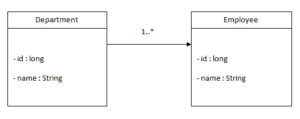
正如前面提到的,LinkRest 與使用 Apache Cayenne ORM 生成的數據對象一起工作。
與 Cayenne 的工作方式不是本文的主要內容,因此,獲取更多信息,請查看 Apache Cayenne 文檔。
我們將保存 Cayenne 項目到一個 cayenne-linkrest-project.xml 文件中。
運行 cayenne-maven-plugin 後,它將生成兩個 _Department 和 _Employee 抽象類 – 這些類將繼承 CayenneDataObject 類,以及由此產生的兩個具體的類,Department 和 Employee。
這些後來的類是我們可自定義和使用與 LinkRest 配合使用的類。
Jersey 作為 JAX-RS 實現,讓我們添加一個擴展 ResourceConfig 的類,並指定包含我們定義 REST 端點類的包:
@ApplicationPath("/linkrest")
public class LinkRestApplication extends ResourceConfig {

    public LinkRestApplication() {
        packages("com.baeldung.linkrest.apis");

        // load linkrest runtime
    }
}
在同一個構造函數中,我們需要構建並註冊 LinkRestRuntime 到 Jersey 容器。這個類基於首先加載 CayenneRuntime:
ServerRuntime cayenneRuntime = ServerRuntime.builder()
  .addConfig("cayenne-linkrest-project.xml")
  .build();
LinkRestRuntime lrRuntime = LinkRestBuilder.build(cayenneRuntime);
super.register(lrRuntime);
最後,我們需要將該類添加到 web.xml 中:
<servlet>
    <servlet-name>linkrest</servlet-name>
    <servlet-class>org.glassfish.jersey.servlet.ServletContainer</servlet-class>
        <init-param>
            <param-name>javax.ws.rs.Application</param-name>
            <param-value>com.baeldung.LinkRestApplication</param-value>
        </init-param>
    <load-on-startup>1</load-on-startup>
</servlet>
<servlet-mapping>
    <servlet-name>linkrest</servlet-name>
    <url-pattern>/*</url-pattern>
</servlet-mapping>
5. REST Resources
Now that we’ve got our model classes, we can start writing REST resources.
The REST endpoints are created using standard JAX-RS annotations, while the response is built using the LinkRest class.
Our example will consist of writing a series of CRUD endpoints that access the /department URL using different HTTP methods.
First, let’s create the DepartmentResource class, which is mapped to /department:
@Path("department")
@Produces(MediaType.APPLICATION_JSON)
public class DepartmentResource {

    @Context
    private Configuration config;

    // ...
}
The LinkRest class needs an instance of the JAX-RS Configuration class, which is injected using the Context annotation, also provided by JAX-RS.
Next, let’s continue writing each of the endpoints that access Department objects.
5.1. Creating Entities Using POST
To create an entity, the LinkRest class provides the create() method which returns an UpdateBuilder object:
@POST
public SimpleResponse create(String data) {
    return LinkRest.create(Department.class, config).sync(data);
}
The data parameter can be either a single JSON object representing a Department or an array of objects. This parameter is sent to the UpdateBuilder using the sync() method to create one or more objects and insert the records into the database, after which the method returns a SimpleResponse.
The library defines 3 additional formats for responses:
- DataResponse<T>– a response that represents a collection of T
- MetadataResponse<T>– contains metadata information about the type
- SimpleResponse – an object that contains two success and message attributes
Next, let’s use curl to add a Department record to the database:
curl -i -X POST -H "Content-Type:application/json"
  -d "{"name":"IT"}" http://localhost:8080/linkrest/department
As a result, the command returns the status 201 Created and a success attribute:
{"success":true}
We can also create multiple objects by sending a JSON array:
curl -i -X POST -H "Content-Type:application/json"
  -d "[{"name":"HR"},{"name":"Marketing"}]"
  http://localhost:8080/linkrest/department
5.2. Reading Entities Using GET
The main method for querying objects is the select() method from the LinkRest class. This returns a SelectBuilder object which we can use to chain additional querying or filtering methods.
Let’s create an endpoint in the DepartmentResource class that returns all the Department objects in the database:
@GET
public DataResponse<Department> getAll(@Context UriInfo uriInfo) {
    return LinkRest.select(Department.class, config).uri(uriInfo).get();
}
The uri() call sets the request information for the SelectBuilder, while get() returns a collection of Departments wrapped as a DataResponse<Department> object.
Let’s take a look at the departments we added before using this endpoint:
curl -i -X GET http://localhost:8080/linkrest/department
The response takes the form of a JSON object with a data array and a total property:
{"data":[
  {"id":200,"name":"IT"},
  {"id":201,"name":"Marketing"},
  {"id":202,"name":"HR"}
],
"total":3}
Alternatively, to retrieve a collection of objects, we can also get back a single object by using the getOne() instead of get().
Let’s add an endpoint mapped to /department/{departmentId} that returns an object with a given id. For this purpose, we’ll filter the records using the byId() method:
@GET
@Path("{id}")
public DataResponse<Department> getOne(@PathParam("id") int id,
  @Context UriInfo uriInfo) {
    return LinkRest.select(Department.class, config)
      .byId(id).uri(uriInfo).getOne();
}
Then, we can send a GET request to this URL:
curl -i -X GET http://localhost:8080/linkrest/department/200
The result is a data array with one element:
{"data":[{"id":200,"name":"IT"}],"total":1}
5.3. Updating Entities Using PUT
To update records, we can use the update() or createOrUpdate() method. The latter will update records if they exist, or create them if they do not:
@PUT
public SimpleResponse createOrUpdate(String data) {
    return LinkRest.createOrUpdate(Department.class, config).sync(data);
}
Similarly to the previous sections, the data argument can be a single object or an array of objects.
Let’s update one of the previously added departments:
curl -i -X PUT -H "Content-Type:application/json"
  -d "{"id":202,"name":"Human Resources"}"
  http://localhost:8080/linkrest/department
This returns a JSON object with a success or error message. Afterwards, we can verify if the name of the department with ID 202 was changed:
curl -i -X GET http://localhost:8080/linkrest/department/202
Sure enough, this command returns the object with the new name:
{"data":[{"id":202,"name":"Human Resources"}],"total":1}
5.4. Removing Entities Using DELETE
And, to remove an object, we can call the delete() method which creates a DeleteBuilder, then specify the primary key of the object we want to delete by using the id() method:
@DELETE
@Path("{id}")
public SimpleResponse delete(@PathParam("id") int id) {
    return LinkRest.delete(Department.class, config).id(id).delete();
}
Then we can send a DELETE request to this URL:
curl -i -X DELETE http://localhost:8080/linkrest/department/202
5.5. Working With Relationships Between Entities
LinkRest also contains methods that make working with relationships between objects easier.
Since Department has a one-to-many relationship to Employee, let’s add a /department/{departmentId}/employees endpoint that accesses an EmployeeSubResource class:
@Path("{id}/employees")
public EmployeeSubResource getEmployees(
  @PathParam("id") int id, @Context UriInfo uriInfo) {
    return new EmployeeSubResource(id);
}
The EmployeeSubResource class corresponds to a department so it’ll have a constructor that sets a department id, as well as the Configuration instance:
@Produces(MediaType.APPLICATION_JSON)
public class EmployeeSubResource {
    private Configuration config;

    private int departmentId;

    public EmployeeSubResource(int departmentId, Configuration configuration) {
        this.departmentId = departmentId;
        this.config = config;
    }

    public EmployeeSubResource() {
    }
}
Do note that a default constructor is necessary for the object to be serialized as a JSON object.
Next, let’s define an endpoint that retrieves all the employees from a department:
@GET
public DataResponse<Employee> getAll(@Context UriInfo uriInfo) {
    return LinkRest.select(Employee.class, config).toManyParent(Department.class, departmentId, Department.EMPLOYEES)
      .uri(uriInfo).get();
}
In this example, we’ve used the toManyParent() method of the SelectBuilder to query only the objects with a given parent.
The endpoints for the POST, PUT, DELETE methods can be created in a similar manner.
To add employees to a department, we can call the departments/{departmentId}/employees endpoint with POST method:
curl -i -X POST -H "Content-Type:application/json"
  -d "{"name":"John"}" http://localhost:8080/linkrest/department/200/employees
Then, let’s send a GET request to view the employees of the department:
curl -i -X GET "http://localhost:8080/linkrest/department/200/employees
This returns a JSON object with a data array::
{"data":[{"id":200,"name":"John"}],"total":1}
6. 自定義響應與請求參數
@ApplicationPath("/linkrest")
public class LinkRestApplication extends ResourceConfig {
public LinkRestApplication() {
packages("com.baeldung.linkrest.apis");
// load linkrest runtime
}
}ServerRuntime cayenneRuntime = ServerRuntime.builder()
.addConfig("cayenne-linkrest-project.xml")
.build();
LinkRestRuntime lrRuntime = LinkRestBuilder.build(cayenneRuntime);
super.register(lrRuntime);<servlet>
<servlet-name>linkrest</servlet-name>
<servlet-class>org.glassfish.jersey.servlet.ServletContainer</servlet-class>
<init-param>
<param-name>javax.ws.rs.Application</param-name>
<param-value>com.baeldung.LinkRestApplication</param-value>
</init-param>
<load-on-startup>1</load-on-startup>
</servlet>
<servlet-mapping>
<servlet-name>linkrest</servlet-name>
<url-pattern>/*</url-pattern>
</servlet-mapping>@Path("department")
@Produces(MediaType.APPLICATION_JSON)
public class DepartmentResource {
@Context
private Configuration config;
// ...
}@POST
public SimpleResponse create(String data) {
return LinkRest.create(Department.class, config).sync(data);
}curl -i -X POST -H "Content-Type:application/json"
-d "{"name":"IT"}" http://localhost:8080/linkrest/department{"success":true}curl -i -X POST -H "Content-Type:application/json"
-d "[{"name":"HR"},{"name":"Marketing"}]"
http://localhost:8080/linkrest/department@GET
public DataResponse<Department> getAll(@Context UriInfo uriInfo) {
return LinkRest.select(Department.class, config).uri(uriInfo).get();
}curl -i -X GET http://localhost:8080/linkrest/department{"data":[
{"id":200,"name":"IT"},
{"id":201,"name":"Marketing"},
{"id":202,"name":"HR"}
],
"total":3}@GET
@Path("{id}")
public DataResponse<Department> getOne(@PathParam("id") int id,
@Context UriInfo uriInfo) {
return LinkRest.select(Department.class, config)
.byId(id).uri(uriInfo).getOne();
}curl -i -X GET http://localhost:8080/linkrest/department/200{"data":[{"id":200,"name":"IT"}],"total":1}@PUT
public SimpleResponse createOrUpdate(String data) {
return LinkRest.createOrUpdate(Department.class, config).sync(data);
}curl -i -X PUT -H "Content-Type:application/json"
-d "{"id":202,"name":"Human Resources"}"
http://localhost:8080/linkrest/departmentcurl -i -X GET http://localhost:8080/linkrest/department/202{"data":[{"id":202,"name":"Human Resources"}],"total":1}@DELETE
@Path("{id}")
public SimpleResponse delete(@PathParam("id") int id) {
return LinkRest.delete(Department.class, config).id(id).delete();
}curl -i -X DELETE http://localhost:8080/linkrest/department/202@Path("{id}/employees")
public EmployeeSubResource getEmployees(
@PathParam("id") int id, @Context UriInfo uriInfo) {
return new EmployeeSubResource(id);
}@Produces(MediaType.APPLICATION_JSON)
public class EmployeeSubResource {
private Configuration config;
private int departmentId;
public EmployeeSubResource(int departmentId, Configuration configuration) {
this.departmentId = departmentId;
this.config = config;
}
public EmployeeSubResource() {
}
}@GET
public DataResponse<Employee> getAll(@Context UriInfo uriInfo) {
return LinkRest.select(Employee.class, config).toManyParent(Department.class, departmentId, Department.EMPLOYEES)
.uri(uriInfo).get();
}curl -i -X POST -H "Content-Type:application/json"
-d "{"name":"John"}" http://localhost:8080/linkrest/department/200/employeescurl -i -X GET "http://localhost:8080/linkrest/department/200/employees{"data":[{"id":200,"name":"John"}],"total":1}LinkRest 提供了一種通過向請求添加特定參數來定製響應的便捷方式。這些參數可用於過濾、排序、分頁或限制結果集的屬性集。
6.1. 過濾
我們可以通過使用 cayenneExp 參數根據屬性值過濾結果。正如名稱所暗示的,它遵循 Cayenne 表達式的格式。
讓我們發送一個只返回名稱為“IT”的部門的請求:
curl -i -X GET http://localhost:8080/linkrest/department?cayenneExp=name='IT'6.2. 排序
用於對結果集進行排序的參數是 sort 和 dir。 第一個參數指定要按什麼進行排序的屬性,第二個參數指定排序方向。
讓我們按名稱對所有部門進行排序:
curl -i -X GET "http://localhost:8080/linkrest/department?sort=name&dir=ASC"6.3. 分頁
該庫通過添加 start 和 limit 參數支持分頁:
curl -i -X GET "http://localhost:8080/linkrest/department?start=0&limit=26.4. 選擇屬性
通過使用 include 和 exclude 參數,我們可以控制在結果中返回的屬性或關係。
例如,讓我們發送一個只顯示部門名稱的請求:
curl -i -X GET "http://localhost:8080/linkrest/department?include=name要顯示部門及其員工的名稱,只需使用 include 屬性兩次:
curl -i -X GET "http://localhost:8080/linkrest/department?include=name&include=employees.name7. 結論
在本文中,我們展示瞭如何通過使用 LinkRest框架,快速地通過 REST 端點暴露數據模型。

