1. 概述
路由是一個在大多數 Web 開發框架中都出現的常見概念,包括 Spring MVC。
路由是一個映射到處理器的 URL 模式。處理器可以是 Web 應用程序中的可下載的資產,例如,或者在 MVC 應用程序中的控制器,例如處理請求的類。
在本教程中,我們將探討使用 Play Framework 開發 Web 應用程序時路由的方面。
2. 搭建環境
首先,我們需要創建一個 Java Play 應用。有關在機器上設置 Play Framework 的詳細信息,請參閲我們的入門文章。
在搭建完成後,我們應該能夠訪問一個可工作的 Play 應用,該應用可以通過瀏覽器訪問。
3. HTTP 路由
Play 如何知道在收到 HTTP 請求時應該諮詢哪個控制器?答案在於 app/conf/routes 配置文件的內容。
Play 的路由程序將 HTTP 請求轉換為動作調用。 HTTP 請求被認為是 MVC 架構中的事件,路由程序通過諮詢 routes 文件來確定執行哪個控制器和該控制器的哪個動作。
每個事件都向路由器提供兩個參數:帶有查詢字符串的請求路徑以及請求的 HTTP 方法。
4. 使用 Play 進行基本路由為了讓路由器發揮作用,conf/routes 文件必須定義 HTTP 方法和 URI 模式與適當的控制器動作之間的映射關係:
GET     /     controllers.HomeController.index
GET     /     assets/*file controllers.Assets.versioned(path="/public", file: Asset)
GET / controllers.HomeController.index
GET / assets/*file controllers.Assets.versioned(path="/public", file: Asset)所有路由文件也必須將 play-routing/public 文件夾中的靜態資源映射到客户端的 /assets 端點。
請注意定義 HTTP 路由的語法,以及 HTTP 方法 空格 URI 模式 空格 控制器動作。
5. URI 模式在本節中,我們將對 URI 模式進行一些詳細的闡述。
5.1. 靜態 URI 模式
上述前三個 URI 模式是靜態的。這意味着 URL 與資源之間的映射在控制器操作中不會進行任何進一步的處理。
只要調用控制器方法,它就會返回一個內容在請求之前就已經確定的靜態資源。
5.2. 動態 URI 模式
上述最後一個 URI 模式是動態的。這意味着為這些 URI 提供服務的控制器操作需要從請求中獲取一些信息以確定響應。在上述案例中,它期望文件名。
正常情況下,路由器接收事件,從 URL 中選擇路徑,解碼其片段並將它們傳遞給控制器。
然後,路徑和查詢參數作為參數注入到控制器操作中。我們將在下一部分中通過示例進行演示。
6. Advanced Routing With Play
In this section, we’ll discuss advanced options in routing using Dynamic URI Patterns in detail.
6.1. Simple Path Parameters
Simple path parameters are unnamed parameters in a request URL that appear after the host and port and are parsed in order of appearance.
Inside play-routing/app/HomeController.java, let’s create a new action:
public Result greet(String name) {
    return ok("Hello " + name);
}
We want to be able to pick a path parameter from the request URL and map it to the variable name.
The router will get those values from a route configuration.
So, let’s open play-routing/conf/routes and create a mapping for this new action:
GET /greet/:name controllers.HomeController.greet(name: String)Notice how we inform a router that name is a dynamic path segment with the colon syntax and then go ahead to pass it as a parameter to the greet action call.
Now, let’s load http://localhost:9000/greet/john in the browser, and we’ll be greeted by name:
Hello johnIt so happens that if our action parameter is of string type, we may pass it during the action call without specifying the parameter type, though this is not the same for other types.
Let’s spice up our /greet endpoint with age information.
Back to HomeController‘s greet action, we’ll change it to:
public Result greet(String name, int age) {
    return ok("Hello " + name + ", you are " + age + " years old");
}
And the route to:
GET /greet/:name/:age controllers.HomeController.greet(name: String, age: Integer)Notice also the Scala syntax for declaring a variable, age: Integer. In Java, we would use the Integer age syntax. The Play Framework is built in Scala. Consequently, there is a lot of scala syntax.
Let’s load http://localhost:9000/greet/john/26:
Hello john, you are 26 years old6.2. Wildcards in Path Parameters
In our routes configuration file, the last mapping is:
GET /assets/*file controllers.Assets.versioned(path="/public", file: Asset)We use a wildcard in the dynamic part of the path. What we are telling Play is that whatever value replaces *file in the actual request should be parsed as a whole and not decoded like in other cases of path parameters.
In this example, the controller is a built-in one, Assets, which allows the client to download files from the play-routing/public folder. When we load http://localhost:9000/assets/images/favicon.png, we should see the image of the Play favicon in the browser since it’s present in the /public/images folder.
Let’s create our own example action in HomeController.java:
public Result introduceMe(String data) {
    String[] clientData = data.split(",");
    return ok("Your name is " + clientData[0] + ", you are " + clientData[1] + " years old");
}
Notice that in this action, we receive one String parameter and apply our logic to decode it. In this case, the logic is to split a comma-delimited String into an array. Previously, we depended on a router to decode this data for us.
With wildcards, we are on our own. We’re hoping that the client gets our syntax correct while passing this data in. Ideally, we should validate the incoming String before using it.
Let’s create a route to this action:
GET /*data controllers.HomeController.introduceMe(data)Now load the URL http://localhost:9000/john,26. This will print:
Your name is john, you are 26 years old6.3. Regex in Path Parameters
Just like wildcards, we can use regular expressions for the dynamic part. Let’s add an action that receives a number and returns its square:
public Result squareMe(Long num) {
    return ok(num + " Squared is " + (num * num));
}
Now we’ll add its route:
GET /square/$num<[0-9]+> controllers.HomeController.squareMe(num:Long)Let’s place this route below the introduceMe route to introduce a new concept. We can only handle routes where the regex part is a positive integer with this routing configuration.
Now if we have placed the route as instructed in the previous paragraph, and we load http://localhost:9000/square/2, we should be greeted with an ArrayIndexOutOfBoundsException:
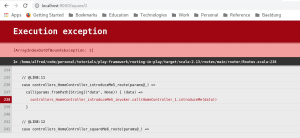
If we check the error logs in the server console, we will realize that the action call was actually performed on introduceMe action rather than squareMe action. As said earlier about wildcards, we are on our own and we did not validate incoming data.
Naturally, we would expect the call to be routed to the squareMe method. Why was it routed to introduceMe? The reason is a Play feature we’ll cover next called Routing Priority.
7. 路由優先級
如果存在路由衝突,例如 squareMe 和 introduceMe 之間,則 Play 會選擇在聲明順序中第一個路由
為什麼會有衝突?因為通配符上下文路徑 /*data 匹配除基本路徑 / 之外的所有請求 URL。因此,任何使用通配符的 URI 模式的路由都應該在順序中最後出現
現在,讓我們更改路由的聲明順序,使得 introduceMe 路由在 squareMe 路由之後,重新加載:
2 Squared is 4為了測試路由中正則表達式的力量,嘗試加載 http://locahost:9000/square/-1,路由器將無法匹配 squareMe 路由。相反,它將匹配 introduceMe, 並再次得到 ArrayIndexOutOfBoundsException。
這是因為 -1 不匹配提供的正則表達式,也沒有任何字母字符匹配。
8. 參數
在此之前,我們已經涵蓋了在路由文件中聲明參數類型的語法。
在這一部分,我們將研究在路由中處理參數時可用的更多選項。
8.1. 帶有固定值的參數
有時,我們希望為參數使用固定值。 這告訴 Play 使用提供的路徑參數,或者如果請求上下文是路徑時,使用某個固定值 /,然後使用某個固定值。
另一種看法是,有兩個端點或上下文路徑導致相同的控制器操作——其中一個端點需要從請求 URL 中獲取參數,並在缺少該參數時默認為另一個。
為了演示這一點,讓我們向 HomeController 添加一個 writer() 操作:
public Result writer() {
    return ok("Routing in Play by Baeldung");
}
假設我們不希望我們的 API 始終返回 String:
Routing in Play by Baeldung我們想通過將作者的名稱以及請求中發送來控制它,如果請求中沒有 author 參數,則默認為固定值 Baeldung。
因此,讓我們通過向 writer 操作添加參數來進一步更改它:
public Result writer(String author) {
    return ok("REST API with Play by " + author);
}
讓我們看看如何向路由中添加一個固定值參數:
GET     /writer           controllers.HomeController.writer(author = "Baeldung")
GET     /writer/:author   controllers.HomeController.writer(author: String)
請注意,我們現在有兩條不同的路由都指向 HomeController.index 操作,而不是一條。
現在加載 http://localhost:9000/writer 從瀏覽器,我們得到:
Routing in Play by Baeldung並且當我們加載 http://localhost:9000/writer/john,我們得到:
Routing in Play by john8.2. 帶有默認值的參數
除了具有固定值之外,參數也可以具有默認值。 它們都為控制器操作參數提供請求未提供所需值時的備用值。
兩者之間的區別在於,fixed values are used as a fallback for path parameters while default values are used as a fallback for query parameters。
路徑參數的格式是 http://localhost:9000/param1/param2,而查詢參數的格式是 http://localhost:9000/?param1=value1¶m2=value2。
第二種差異在於聲明兩者在路由中的語法。 固定值參數使用賦值運算符,如:
author = "Baeldung"而默認值使用不同的類型賦值:
author ?= "Baeldung"我們使用 ?= 運算符,在 author 未找到任何值的情況下,條件地將 Baeldung 賦值給 author。
為了進行完整演示,讓我們創建一個 HomeController.writer 操作。 假設,除了作者的名稱,作為路徑參數,我們還想通過請求中傳遞作者 id 作為查詢參數,如果未在請求中提供,則默認為 1。
我們將 writer 操作更改為:
public Result writer(String author, int id) {
    return ok("Routing in Play by: " + author + " ID: " + id);
}
以及 writer 路由:
GET     /writer           controllers.HomeController.writer(author="Baeldung", id: Int ?= 1)
GET     /writer/:author   controllers.HomeController.writer(author: String, id: Int ?= 1)
現在加載 http://localhost:9000/writer 我們看到:
Routing in Play by: Baeldung ID: 1點擊 http://localhost:9000/writer?id=10 給出我們:
Routing in Play by: john ID: 10關於 http://localhost:9000/writer/john?
Routing in Play by: john ID: 1最後,http://localhost:9000/writer/john?id=5 返回:
Routing in Play by: john ID: 59. 結論
在本文中,我們探討了 Play 應用程序中的路由概念。我們還有一篇關於使用 Play 框架構建 RESTful API 的文章,其中路由概念在實際示例中得到應用。

