1. 概述
Spring REST Docs 和 OpenAPI 3.0 都是為 REST API 創建 API 文檔的兩種方式。
在本教程中,我們將探討它們的相對優勢和劣勢。
2. 簡要起源概述
Spring REST Docs 是由 Spring 社區開發的框架,用於創建 RESTful API 的準確文檔。 它採用測試驅動的方法,其中文檔是通過 Spring MVC 測試、Spring Webflux 的 WebTestClient 或 REST-Assured 編寫的。
運行測試的輸出被創建為 AsciiDoc 文件,這些文件可以使用 Asciidoctor 組合起來生成描述我們 API 的 HTML 頁面。 由於它遵循 TDD 方法,Spring REST Docs 自動帶來所有優勢,例如更少錯誤的代碼、減少返工以及更快的反饋週期等。
另一方面,OpenAPI 是誕生於 Swagger 2.0 的規範。 截至編寫本文時,它的最新版本是 3.0,並且有許多已知的 實現。
就像任何規範一樣,OpenAPI 規定了其實現必須遵循的規則。 簡單來説,所有 OpenAPI 實現都應該以 JSON 對象的形式生成文檔,格式可以是 JSON 或 YAML。
還存在許多 工具,它們可以接受 JSON/YAML 並生成 UI 以可視化和導航 API。 這在驗收測試中非常有用,例如。 在我們這裏的代碼示例中,我們將使用 springdoc – Spring Boot 中 OpenAPI 3 的庫。
在詳細瞭解這兩種方法之前,讓我們快速設置一個需要文檔化的 API。
3. REST API
讓我們使用 Spring Boot 構建一個基本的 CRUD API。
3.1. The Repository
這裏,我們使用的 repository 是一個簡潔的 PagingAndSortingRepository 接口,以及模型 Foo。
@Repository
public interface FooRepository extends PagingAndSortingRepository<Foo, Long>{}

@Entity
public class Foo {
    @Id
    @GeneratedValue(strategy = GenerationType.IDENTITY)
    private long id;

    @Column(nullable = false)
    private String title;

    @Column()
    private String body;

    // constructor, getters and setters
}
我們還將使用 schema.sql 和 data.sql 加載 repository。
3.2. The Controller
接下來,我們看看它的 controller,為了簡潔,省略了其實現細節:
@RestController
@RequestMapping("/foo")
public class FooController {

    @Autowired
    FooRepository repository;

    @GetMapping
    public ResponseEntity<List<Foo>> getAllFoos() {
        // implementation
    }

    @GetMapping(value = "{id}")
    public ResponseEntity<Foo> getFooById(@PathVariable("id") Long id) {
        // implementation
    }

    @PostMapping
    public ResponseEntity<Foo> addFoo(@RequestBody @Valid Foo foo) {
        // implementation
    }

    @DeleteMapping("/{id}")
    public ResponseEntity<Void> deleteFoo(@PathVariable("id") long id) {
        // implementation
    }

    @PutMapping("/{id}")
    public ResponseEntity<Foo> updateFoo(@PathVariable("id") long id, @RequestBody Foo foo) {
        // implementation
    }
}
3.3. The Application
最後,Boot App:
@SpringBootApplication()
public class Application {
    public static void main(String[] args) {
        SpringApplication.run(Application.class, args);
    }
}
4. OpenAPI / Springdoc
Now let’s see how springdoc
can add documentation to our Foo REST API.Recall that it’ll generate a JSON object and a UI visualization of the API based on that object.
4.1. Basic UI
To begin with, we’ll just add a couple of Maven dependencies – springdoc-openapi-data-rest for generating the JSON, and springdoc-openapi-ui for rendering the UI.
The tool will introspect the code for our API, and read the controller methods’ annotations. On that basis, it’ll generate the API JSON which will be live at http://localhost:8080/api-docs/. It’ll also serve a basic UI at http://localhost:8080/swagger-ui-custom.html:
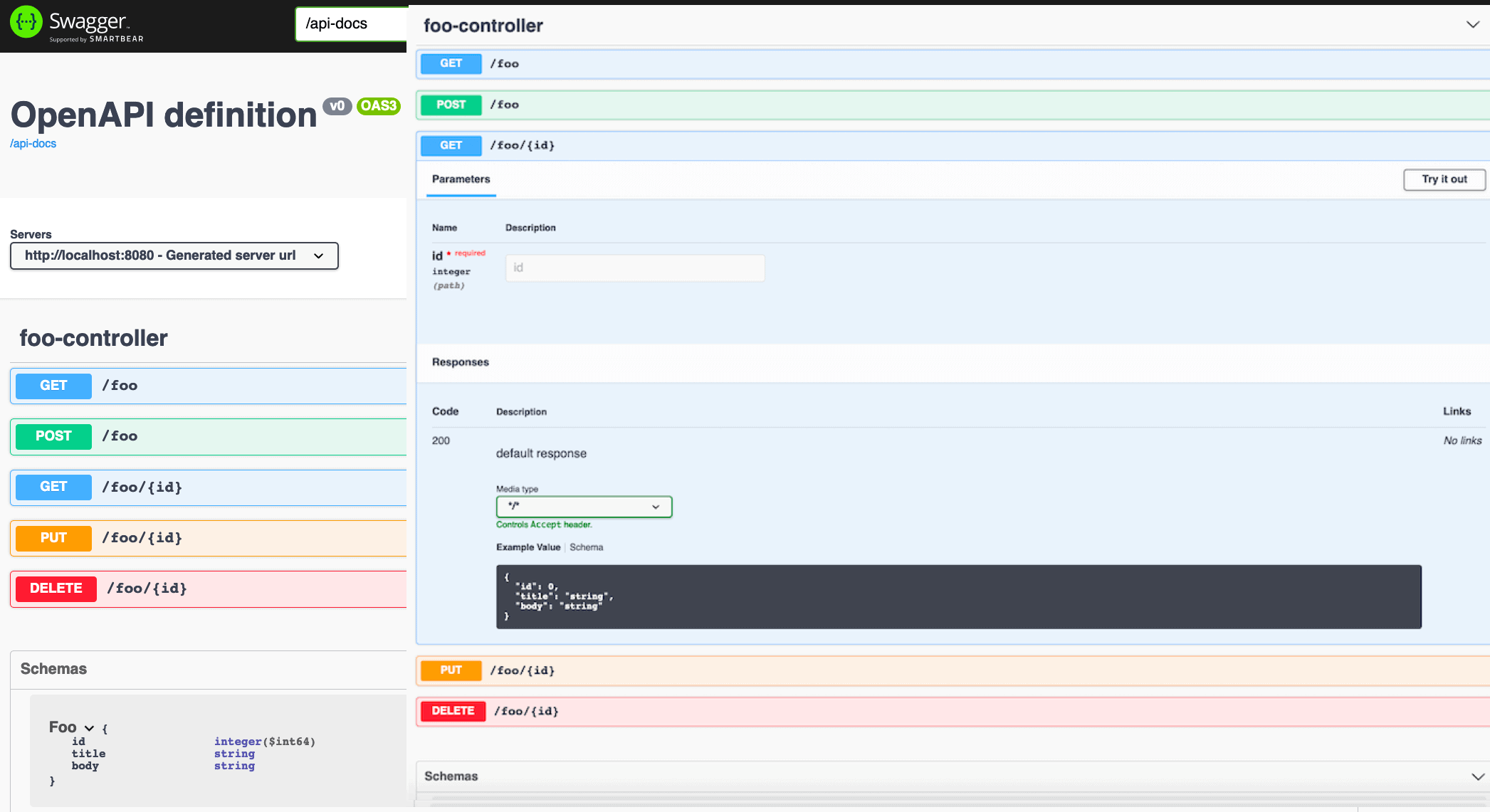
As we can see, without adding any code at all, we obtained a beautiful visualization of our API, right down to the Foo schema. Using the Try it out> button, we can even execute the operations and view the results.
Now,what if we wanted to add some real documentation to the API?
In terms of what the API is all about, what all its operations mean, what should be input, and what responses to expect?We’ll look at this in the next section.
4.2. Detailed UI
Let’s first see how to add a general description to the API.
For that, we’ll add an OpenAPI> bean to our Boot App:
@Bean
public OpenAPI customOpenAPI(@Value("${springdoc.version}") String appVersion) {
    return new OpenAPI().info(new Info()
      .title("Foobar API")
      .version(appVersion)
      .description("This is a sample Foobar server created using springdocs - " +
        "a library for OpenAPI 3 with spring boot.")
      .termsOfService("http://swagger.io/terms/")
      .license(new License().name("Apache 2.0")
      .url("http://springdoc.org")));
}
Next, to add some information to our API operations, we’ll decorate our mappings with a few OpenAPI-specific annotations.
Let’s see how we can describe getFooById. We’ll do this inside another controller, FooBarController, which is similar to our FooController:
@RestController
@RequestMapping("/foobar")
@Tag(name = "foobar", description = "the foobar API with documentation annotations")
public class FooBarController {
    @Autowired
    FooRepository repository;

    @Operation(summary = "Get a foo by foo id")
    @ApiResponses(value = {
      @ApiResponse(responseCode = "200", description = "found the foo", content = {
        @Content(mediaType = "application/json", schema = @Schema(implementation = Foo.class))}),
      @ApiResponse(responseCode = "400", description = "Invalid id supplied", content = @Content),
      @ApiResponse(responseCode = "404", description = "Foo not found", content = @Content) })
    @GetMapping(value = "{id}")
    public ResponseEntity getFooById(@Parameter(description = "id of foo to be searched")
      @PathVariable("id") String id) {
        // implementation omitted for brevity
    }
    // other mappings, similarly annotated with @Operation and @ApiResponses
}
Now let’s see the effect on the UI:
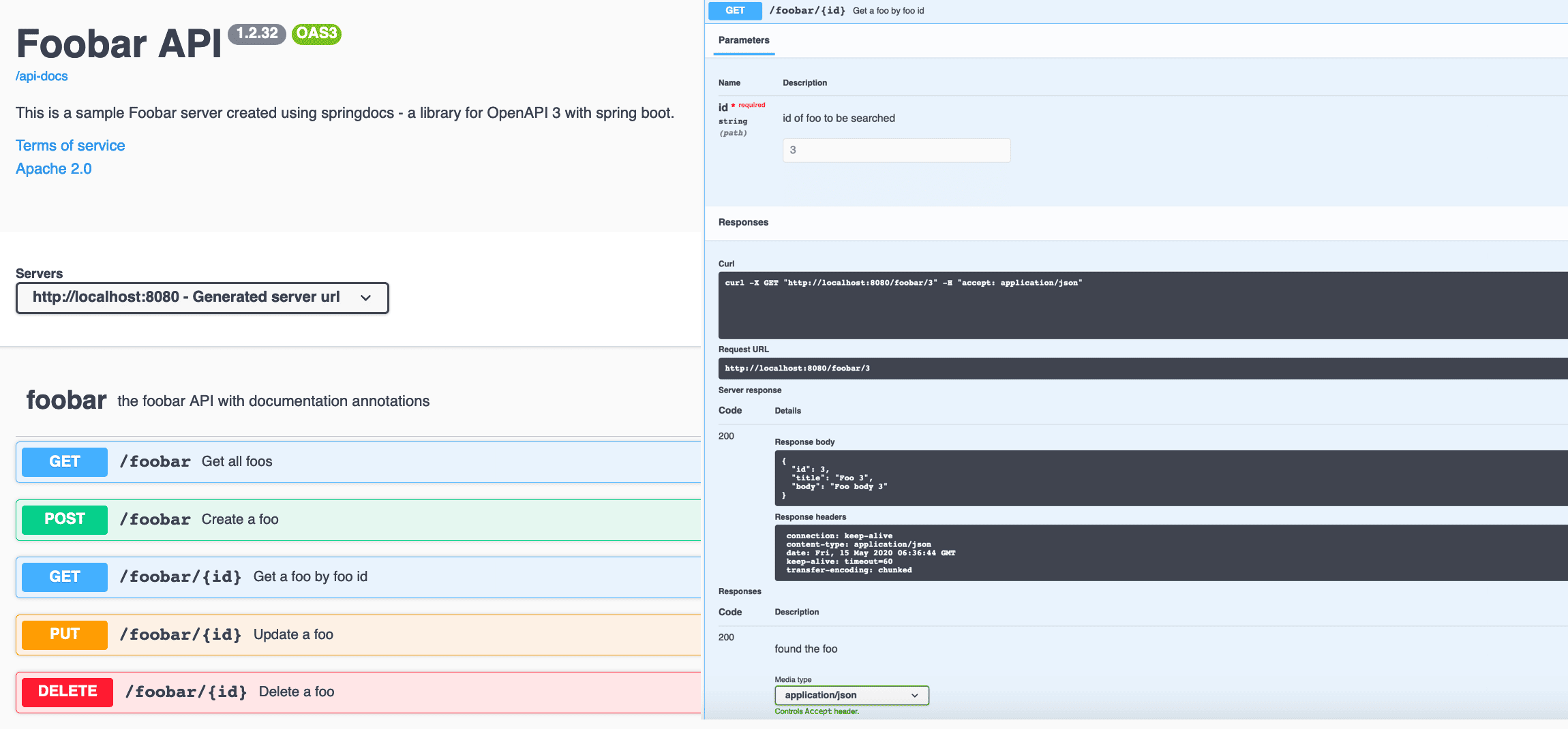
So with these minimal configurations, the user of our API can now see what it’s about, how to use it, and what results to expect. All we had to do was compile the code and run the Boot App.
5. Spring REST Docs
REST docs 是一個與 API 文檔完全不同的取樣。 如前所述,該過程是基於測試的,輸出是形式為靜態 HTML 頁面的。
在我們的示例中,我們將會使用 Spring MVC 測試來創建文檔片段。
首先,我們需要添加 spring-restdocs-mockmvc 依賴項和 asciidoc Maven 插件到我們的 pom。
5.1. The JUnit5 Test
現在讓我們來查看包含我們文檔的 JUnit5 測試:
@ExtendWith({ RestDocumentationExtension.class, SpringExtension.class })
@SpringBootTest(classes = Application.class)
public class SpringRestDocsIntegrationTest {
    private MockMvc mockMvc;

    @Autowired
    private ObjectMapper objectMapper;

    @BeforeEach
    public void setup(WebApplicationContext webApplicationContext,
      RestDocumentationContextProvider restDocumentation) {
        this.mockMvc = MockMvcBuilders.webAppContextSetup(webApplicationContext)
          .apply(documentationConfiguration(restDocumentation))
          .build();
    }

    @Test
    public void whenGetFooById_thenSuccessful() throws Exception {
        ConstraintDescriptions desc = new ConstraintDescriptions(Foo.class);
        this.mockMvc.perform(get("/foo/{id}", 1))
          .andExpect(status().isOk())
          .andDo(document("getAFoo", preprocessRequest(prettyPrint()),
            preprocessResponse(prettyPrint()),
            pathParameters(parameterWithName("id").description("id of foo to be searched")),
            responseFields(fieldWithPath("id")
              .description("The id of the foo" +
                collectionToDelimitedString(desc.descriptionsForProperty("id"), ". "),
              fieldWithPath("title").description("The title of the foo"),
              fieldWithPath("body").description("The body of the foo"))));
    }

    // more test methods to cover other mappings
}
在運行此測試後,我們會在 targets/generated-snippets 目錄中獲得有關給定 API 操作的幾個文件,其中 whenGetFooById_thenSuccessful 將為我們提供八個 adoc 文件,位於 getAFoo 文件夾中,該文件夾位於 directory 目錄中的。
這是一個樣本 http-response.adoc 文件,當然包含響應體:
[source,http,options="nowrap"]
----
HTTP/1.1 200 OK
Content-Type: application/json
Content-Length: 60

{
  "id" : 1,
  "title" : "Foo 1",
  "body" : "Foo body 1"
}
----
5.2. fooapi.adoc
現在我們需要一個主文件來編織所有這些片段以形成結構良好的 HTML。
我們將其命名為 fooapi.adoc 並查看其中的一部分:
=== Accessing the foo GET
A `GET` request is used to access the foo read.

==== Request structure
include::{snippets}/getAFoo/http-request.adoc[]

==== Path Parameters
include::{snippets}/getAFoo/path-parameters.adoc[]

==== Example response
include::{snippets}/getAFoo/http-response.adoc[]

==== CURL request
include::{snippets}/getAFoo/curl-request.adoc[]
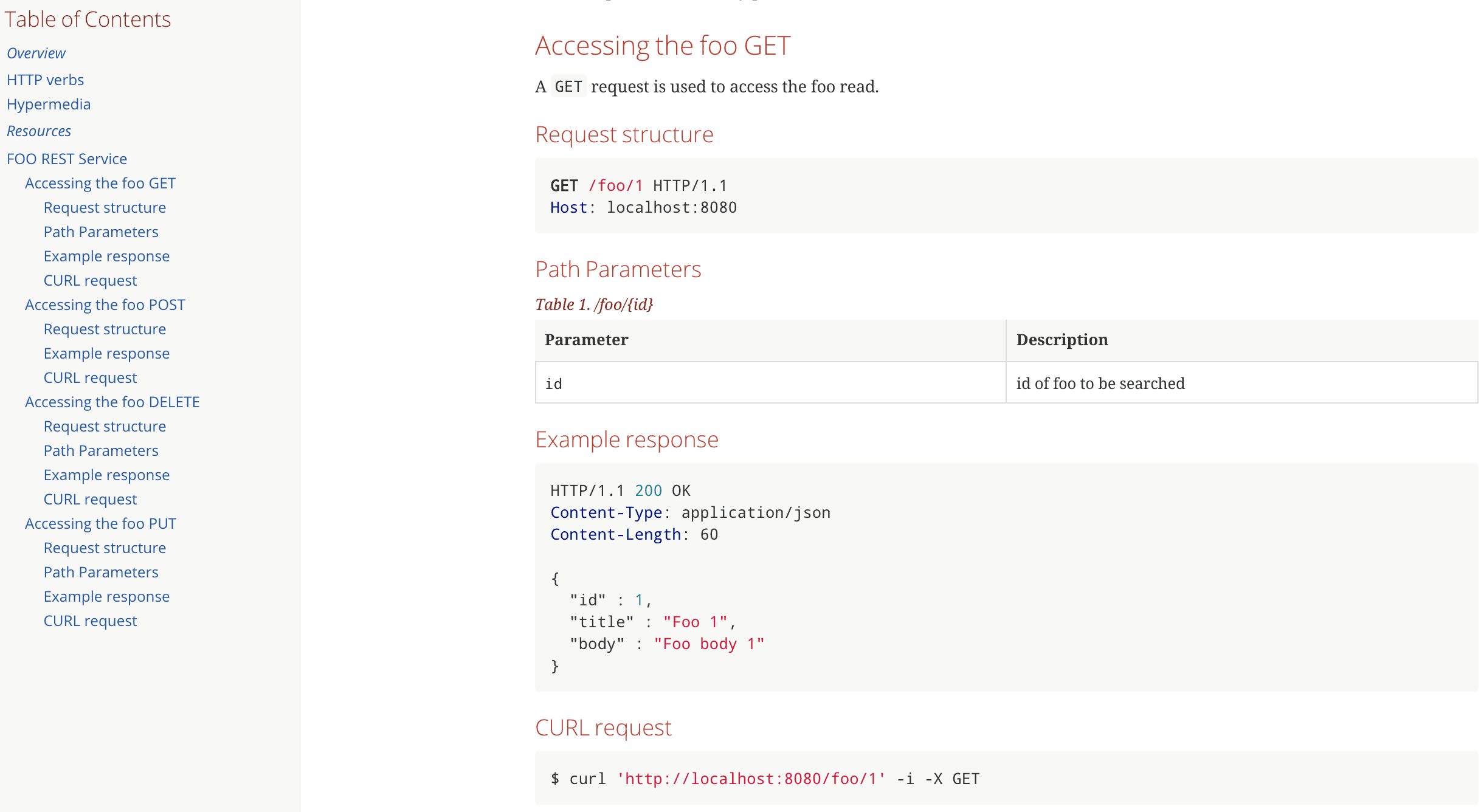
在執行 asciidoc-maven-plugin 後,我們會在 target/generated-docs 文件夾中獲得最終的 HTML 文件 fooapi.html。
並且當它在瀏覽器中打開時,它會這樣看起來:
6. 關鍵要點
現在我們已經研究了兩種實現方案,讓我們總結一下它們的優缺點。
使用 springdoc,我們不得不使用的註解使我們的 REST 控制器的代碼變得混亂,降低了可讀性。同時,文檔也與代碼緊密耦合,並且會進入生產環境。
Needless to say, 維護文檔也是一個挑戰——如果 API 發生變化,程序員是否總是記得更新相應的 OpenAPI 註解?
另一方面,REST Docs 既不像其他 UI 那樣引人注目,也不能用於驗收測試。但它也有它的優勢。
特別值得一提的是,Spring MVC 測試的成功完成不僅給我們提供了片段,還驗證了我們的 API,就像任何其他單元測試一樣。這迫使我們對 API 修改進行文檔更改,如果發生任何修改。
但是,再次來説,我們不得不編寫更多代碼來生成文檔。首先是測試本身,這可以説是像 OpenAPI 註解一樣冗長,其次是主 adoc。
它還需要更多步驟來生成最終的 HTML——首先運行測試,然後運行插件。Springdoc 只需要我們運行 Boot App。
7. 結論
在本教程中,我們探討了基於 OpenAPI 的 springdoc 與 Spring REST Docs 之間的差異。我們還看到了如何使用它們來為基本的 CRUD API 生成文檔。
總而言之,兩者各有優缺點,選擇使用哪一個取決於我們的具體需求。

