
1. 概述
本教程將教您如何使用 swagger-maven-plugin 文檔枚舉,並在 Swagger 編輯器中驗證生成的 JSON 文檔。
2. What Is Swagger?
Swagger 是一個開源工具,用於定義基於 REST 的 API。 在當今世界,大多數組織都在向微服務和 API 第一方法轉變。 Swagger 對於 API 的設計和文檔記錄都非常實用。 它還提供了 Swagger Editor、Swagger UI 和 Swagger CodeGen 等各種工具,以協助 API 開發。
此外,Swagger 是 OpenAPI 規範或 OAS 的實現,它定義了 REST API 開發的標準集,從而幫助全球各組織標準化 API 的編寫過程。
我們應用程序生成的 JSON 文件也將遵循 OpenAPI 規範。
讓我們來理解 Swagger 中枚舉 (Enum) 的重要性。 某些 API 需要用户使用一組預定義的特定值。 這些預定義的常量值稱為枚舉。 同樣,當 Swagger 暴露 API 時,我們希望確保用户從該預定義集中選擇一個值,而不是自由文本。 換句話説,我們需要在 swagger.json 文件中記錄枚舉,以便用户瞭解可能的取值。
3. 實現
讓我們以一個 REST API 為例,並直接進入實現。我們將實現一個 POST API,用於為組織招聘特定角色的員工。但是,一個角色只能是以下之一:工程師、文員、司機 或 清潔工。
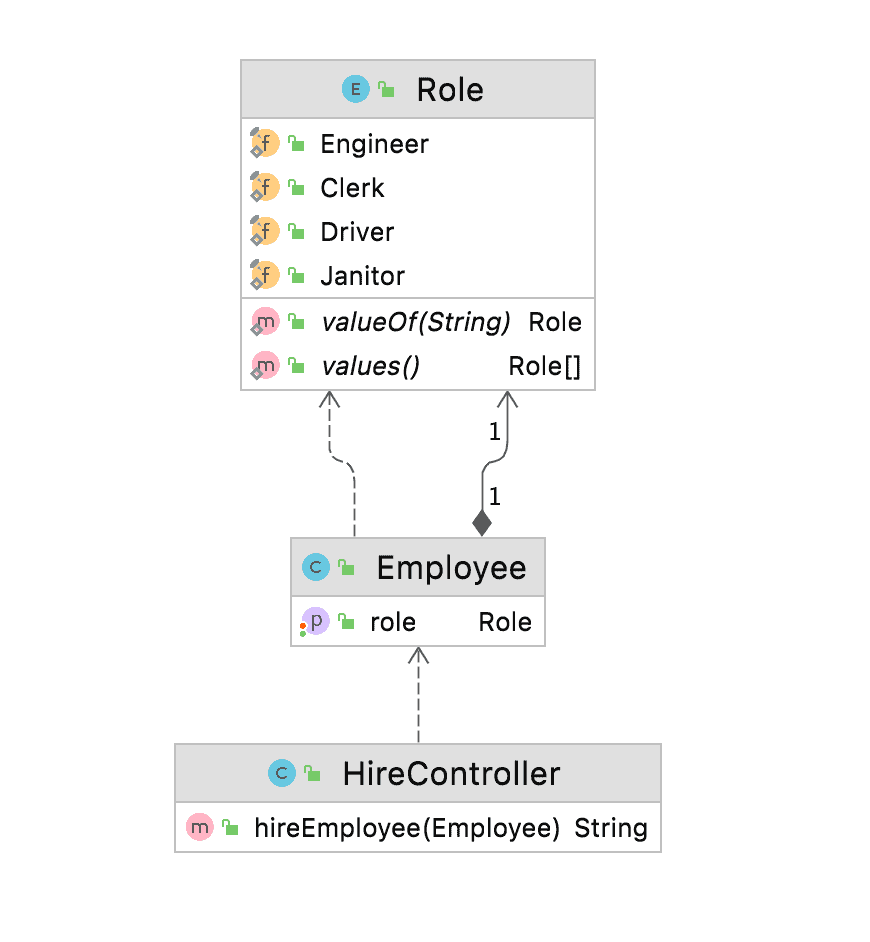
我們將創建一個名為 Role 的枚舉,其中包含所有可能的員工角色值,並創建一個名為 Employee 的類,其中角色作為其屬性之一。 讓我們通過 UML 圖來更好地理解類及其關係:
為了在 Swagger 中記錄這些內容,首先我們將導入並配置 swagger-maven-plugin 到我們的應用程序中。 其次,我們將向我們的代碼添加必需的註解,最後,我們將構建項目並驗證生成的 swagger 文檔或 swagger.json 在 swagger 編輯器中。
3.1. 導入和配置插件
我們將使用 swagger-maven-plugin,並且需要將其添加到我們應用程序的 pom.xml 中作為依賴項:
<dependency>
    <groupId>com.github.kongchen</groupId>
    <artifactId>swagger-maven-plugin</artifactId>
    <version>3.1.1</version>
</dependency>
此外,要配置並啓用此插件,我們將將其添加到 pom.xml 的“插件”部分:
- locations:此標籤指定包含 @Api 的包或類,用分號分隔
- info:此標籤提供 API 的元數據。Swagger-ui 使用這些數據來顯示信息
- swaggerDirectory:此標籤定義 swagger.json 文件的路徑
<plugin>
    <groupId>com.github.kongchen</groupId>
    <artifactId>swagger-maven-plugin</artifactId>
    <version>3.1.1</version>
    <configuration>
        <apiSources>
            <apiSource>
                <springmvc>false</springmvc>
                <locations>com.baeldung.swaggerenums.controller</locations>
                <schemes>http,https</schemes>
                <host>baeldung.com</host>
                <basePath>/api</basePath>
                <info>
                    <title>Baeldung - Document Enum</title>
                    <version>v1</version>
                    <description>This is a Baeldung Document Enum Sample Code</description>
                    <contact>
                        <email>[email protected]</email>
                        <name>Test</name>
                    </contact>
                    <license>
                        <url>https://www.apache.org/licenses/LICENSE-2.0.html</url>
                        <name>Apache 2.0</name>
                    </license>
                </info>
                <swaggerDirectory>generated/swagger-ui</swaggerDirectory>
            </apiSource>
        </apiSources>
    </configuration>
    <executions>
        <execution>
            <phase>compile</phase>
            <goals>
                <goal>generate</goal>
            </goals>
        </execution>
     </executions>
 </plugin>
3.2 文檔化枚舉
為了在 Swagger 中文檔化枚舉,我們需要使用註解 <em @ApiModel 聲明模型。
在示例中,我們創建了一個枚舉 Role,其中包含四個可能的取值 – Engineer, Clerk, Driver, and Janitor。由於我們需要文檔化此枚舉,我們將向枚舉 Role 添加 <em @ApiModel。換句話説,這將讓 Swagger 瞭解模型的存在。在 Employee 類中,我們將使用 <em @ApiModel 和 <em @ApiModelProperty 對 Employee 類進行標註。
我們的 Employee、Role 和 HireController 將如下所示:
@ApiModel
public class Employee {
    @ApiModelProperty
    public Role role;

   // standard setters and getters
}
@ApiModel
public enum Role {
Engineer, Clerk, Driver, Janitor;
}接下來,我們將創建一個帶有 <em @Path</em> 的 API,其中路徑設置為“/hire”,並使用 Employee 模型作為 hireEmployee 方法的輸入參數。我們需要為我們的 HireController 添加 <em @Api</em> 標記,以便 <a href="https://mvnrepository.com/artifact/io.swagger.core.v3/swagger-maven-plugin">swagger-maven-plugin</a> 能夠識別並將其用於文檔生成:
@Api
@Path(value="/hire")
@Produces({"application/json"})
public class HireController {

    @POST
    @ApiOperation(value = "This method is used to hire employee with a specific role")
    public String hireEmployee(@ApiParam(value = "role", required = true) Employee employee) {
        return String.format("Hired for role: %s", employee.role.name());
    }
}
3.3. 生成 Swagger 文檔
要構建我們的項目並生成 Swagger 文檔,請運行以下命令:
mvn clean install插件構建完成後,將在 generated/swagger-ui 目錄或插件中配置的路徑下生成 swagger.json 文件。在查看定義時,我們將會看到枚舉 Role 在員工屬性中進行文檔化,幷包含其所有可能的值。
"definitions" : {
  "Employee" : {
    "type" : "object",
    "properties" : {
      "role" : {
        "type" : "string",
        "enum" : [ "Engineer", "Clerk", "Driver", "Janitor" ]
      }
    }
  }
}
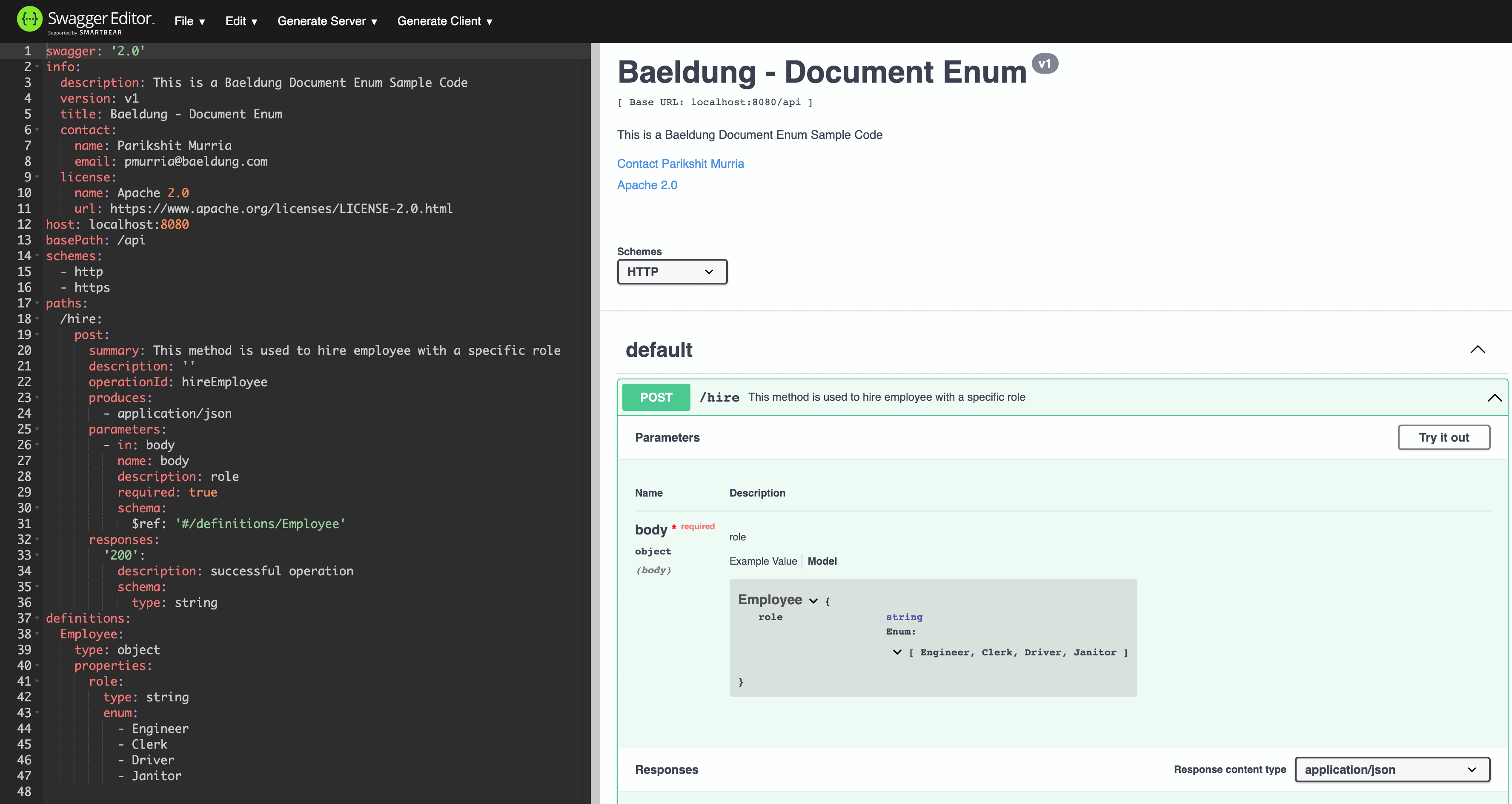
現在,我們將使用 在線 Swagger 編輯器可視化生成的 JSON,並查找枚舉 Role:
4. 結論
在本教程中,我們討論了 Swagger 的概念,並學習了 OpenAPI 規範及其在組織中 API 開發中的重要性。此外,我們創建並記錄了包含枚舉的示例 API,使用了 swagger-maven-plugin。最後,為了驗證輸出結果,我們使用 Swagger 編輯器可視化生成的 JSON 文檔。

