1. 概述
在本教程中,我們將理解 Kerberos 身份驗證協議的基礎知識。我們還將涵蓋 SPNEGO 在 Kerberos 中的必要性。
最後,我們將看到如何利用 Spring Security Kerberos 擴展來創建啓用了 Kerberos 和 SPNEGO 的應用程序。
在繼續之前,值得注意的是,對於不熟悉該領域的初學者來説,本教程將介紹許多新的術語。因此,我們將花費一些時間在前期進行鋪墊。
2. 瞭解 Kerberos
Kerberos 是 Massachusetts 理工學院 (MIT) 在八十年代初開發的網絡身份驗證協議
正如您可能意識到,這相當古老,但經受住了時間的考驗。Windows Server 廣泛支持 Kerberos 作為身份驗證機制,甚至將其設置為默認身份驗證選項。
從技術上講,Kerberos 是一種基於憑據的身份驗證協議,允許計算機網絡中的節點相互識別。
2.1. Kerberos 的簡單使用案例
讓我們設想一個情景來演示這一點。
假設一個用户,通過他的郵件客户端在機器上,需要從另一台機器上的郵件服務器拉取他的郵件。這裏顯然需要身份驗證。郵件客户端和郵件服務器必須能夠識別和信任彼此,才能安全地進行通信。
Kerberos 可以如何幫助我們這裏?Kerberos 引入了一個名為密鑰分發中心 (KDC) 的第三方,該 KDC 與網絡中的每個節點建立了相互信任。讓我們看看如何在我們的案例中工作:
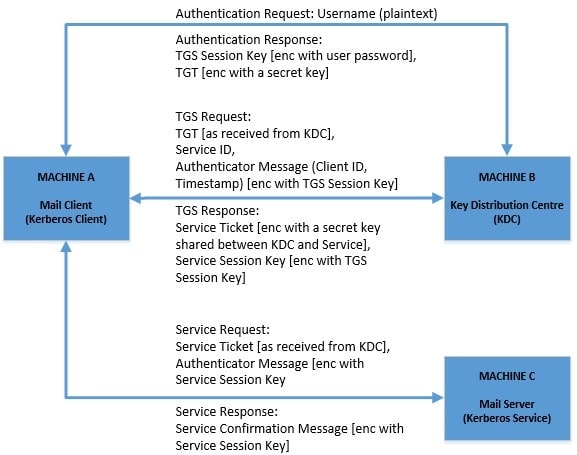
2.2. Kerberos 協議的關鍵方面
雖然這可能聽起來有些抽象,但實際上非常簡單和巧妙,可以安全地保護在不受保護的網絡上的通信。一些在這裏遇到的問題在 TLS 無處不在的時代被認為是理所當然的!
雖然 Kerberos 協議的詳細討論在這裏不可能,但讓我們回顧一下一些關鍵方面:
- 節點(客户端和服務器)與 KDC 之間的信任在這裏假定在同一領域內存在
- 密碼永遠不會通過網絡交換
- 客户端和服務器之間的信任基於他們能夠僅與 KDC 共享的密鑰來解密消息的事實而隱含
- 客户端和服務器之間的信任是相互的
- 客户端可以緩存憑據以供重複使用,直到過期,從而提供單點登錄體驗
- 身份驗證器消息基於時間戳,因此僅適用於一次使用
- 這裏的三方必須具有相對同步的時間
雖然這只是對這款美妙的身份驗證協議的初步瞭解,但足以讓我們開始學習教程。
3. 理解 SPNEGO
SPNEGO 代表 簡單且受保護的 GSS-API 協商機制。 名字相當複雜! 首先讓我們看看 GSS-API 代表什麼。 通用安全服務應用程序編程接口 (GSS-API) 只是 IETF 制定的一種標準,用於客户端和服務器以安全且與供應商無關的方式進行通信。
SPNEGO 是 GSS-API 的一部分,用於客户端和服務器協商使用的安全機制,例如 Kerberos 或 NTLM。
4. 為什麼我們需要 SPNEGO 與 Kerberos?
正如我們在上一節中看到的,Kerberos 是一種純粹的網絡身份驗證協議,主要在傳輸層(TCP/UDP)中運行。雖然這對於許多用例來説很好,但它無法滿足現代 Web 的要求。如果我們的應用程序運行在更高的抽象層,例如 HTTP,則無法直接使用 Kerberos。
這時,SPNEGO 派上用場了。對於 Web 應用程序來説,通信主要發生在 Web 瀏覽器(如 Chrome)和 Web 服務器(如 Tomcat)託管 Web 應用程序的 HTTP 上。如果啓用,它們可以 協商 Kerberos 作為安全機制通過 SPNEGO 並通過 HTTP 交換票據作為 SPNEGO 令牌。
這如何改變我們之前提到的場景?讓我們用 Web 瀏覽器和郵件服務器替換我們的簡單郵件客户端,用 Web 應用程序替換郵件服務器:
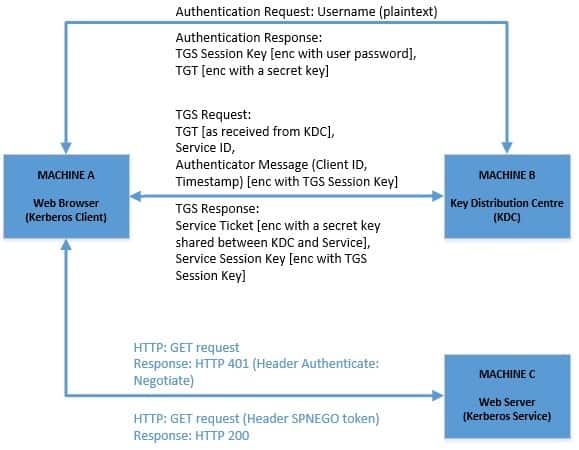
因此,與我們的先前圖表相比,這裏變化不大,只是客户端和服務器之間的通信現在明確地發生在 HTTP 上。讓我們更好地理解這一點:
- 客户端機向 KDC 進行身份驗證並緩存 TGT
- 客户端機上的 Web 瀏覽器配置為使用 SPNEGO 和 Kerberos
- Web 應用程序也配置為支持 SPNEGO 和 Kerberos
- Web 應用程序向嘗試訪問受保護資源的 Web 瀏覽器發出“Negotiate”挑戰
- 服務票據被包裝為 SPNEGO 令牌並作為 HTTP 標頭進行交換
5. Requirements
為了能夠繼續開發支持 Kerberos 認證模式的 Web 應用程序,我們必須先收集一些基本設置。 讓我們快速地完成這些任務。
5.1. 設置 KDC
設置用於生產環境的 Kerberos 環境超出了本教程的範圍。 這不幸地不是一個簡單的任務,而且非常脆弱。 有許多選項可用於獲取 Kerberos 的實現,包括開源和商業版本:
- MIT 提供 Kerberos v5 的 實現,供多個操作系統使用
- Apache Kerby 是 Apache Directory 的擴展,提供 Java Kerberos 綁定
- Microsoft 的 Windows Server 支持 Kerberos v5,並由 Active Directory 支持
- Heimdel 有 Kerberos v5 的實現
KDC 和相關基礎設施的實際設置取決於提供方,應按照其各自的文檔進行操作。 但是,Apache Kerby 可以運行在 Docker 容器中,這使得它具有平台無關性。
5.2. 設置 KDC 中的用户
我們需要在 KDC 中設置兩個用户——或者,正如他們所説的,這些是 principals。 我們可以使用“kadmin”命令行工具來完成此操作。 假設我們已在 KDC 數據庫中創建了一個名為“baeldung.com”的 realm,並且已使用具有管理員權限的用户登錄到“kadmin”。
我們將創建一個用户,我們希望從 Web 瀏覽器進行身份驗證,並使用:
$ kadmin: addprinc -randkey kchandrakant -pw password
Principal "[email protected]" created.
我們還需要將 Web 應用程序註冊到 KDC:
$ kadmin: addprinc -randkey HTTP/[email protected] -pw password
Principal "HTTP/[email protected]" created.
請注意,此處指定 principals 的約定,因為這必須與 Web 瀏覽器可訪問應用程序的域名匹配。 Web $ kadmin: ktadd -k baeldung.keytab HTTP/[email protected]
這將為我們提供名為“baeldung.keytab”的文件。 我們需要啓用我們用於訪問受保護資源的 Web 瀏覽器,以便在 Web 應用程序中使用“Negotiate”身份驗證方案。 幸運的是,像 Chrome 這樣的現代 Web 瀏覽器默認支持“Negotiate”身份驗證方案。 此外,我們可以配置瀏覽器以提供“集成身份驗證”。 在這種模式下,當遇到“Negotiate”挑戰時,瀏覽器會嘗試利用已登錄到 KDC principals 的主機機器緩存憑據。 但是,我們在這裏不會使用這種模式,以保持明確性。 我們可以理解,我們可能沒有實際的域來測試我們的 Web 應用程序。 但是,我們不能使用 localhost 或 127.0.0.1 或任何其他 IP 地址進行 Kerberos 身份驗證。 但是,有一種簡單的解決方案,即在“hosts”文件中設置條目,例如: Finally, as we’ve got the basics clear, it is time to test the theory. But, won’t it be cumbersome to create a web application supporting SPNEGO and Kerberos? Not if we use Spring. Spring has a Kerberos Extension as part of Spring Security that supports SPNEGO with Kerberos seamlessly. Almost all we have to do is just configurations in Spring Security to enable SPNEGO with Kerberos. We’ll use Java-style configurations here, but an XML configuration can be set up as easily. The first thing we have to set up are the dependencies: These dependencies are available for download from Maven Central. Firstly, SPNEGO is integrated into Spring Security as a Filter in HTTPSecurity: This only shows the part required to configure SPNEGO Filter and is not a complete HTTPSecurity configuration, which should be configured as per application security requirements. Next, we need to provide the SPNEGO Filter as Bean: In addition, We can configure Kerberos by adding AuthenticationProvider to AuthenticationManagerBuilder in Spring Security: The first thing we have to provide is a KerberosAuthenticationProvider as a Bean. This is an implementation of AuthenticationProvider, and this is where we set SunJaasKerberosClient as a KerberosClient: Next, we also have to provide a KerberosServiceAuthenticationProvider as a Bean. This is the class that validates Kerberos Service Tickets or SPNEGO Tokens: Lastly, we need to provide a SunJaasKerberosTicketValidator as a Bean. This is an implementation of KerberosTicketValidator and uses SUN JAAS Login Module: We’ve seen references to a UserDetailsService in our AuthenticationProvider earlier, so why do we need it? Well, as we’ve come to know Kerberos, it is purely an authentication mechanism that is ticket-based. So, while it’s able to identify the user, it doesn’t provide other details related to the user, like their authorizations. We need a valid UserDetailsService provided to our AuthenticationProvider to fill this gap. This is pretty much what we need to set up a web application with Spring Security enabled for SPNEGO with Kerberos. When we boot up the web application and access any page therein, the web browser should prompt for username and password, prepare a SPNEGO token with Service Ticket, and send it to the application. The application should be able to process it using the credentials in the keytab file and respond with successful authentication. However, as we saw earlier, setting up a working Kerberos environment is complicated and quite brittle. If things don’t work as expected, it’s worthwhile to check all the steps again. A simple mistake like mismatch in the domain name can lead to failure with error messages that aren’t particularly helpful. 現在我們已經瞭解了 Kerberos 認證的工作原理以及如何在 Web 應用程序中使用 SPNEGO 與 Kerberos,我們可能會質疑它的必要性。雖然這在企業網絡中作為 SSO 機制使用完全合理,但為什麼我們應該在 Web 應用程序中使用它? 原因在於,即使在多年來,Kerberos 仍然在企業應用程序中得到積極使用,尤其是在 Windows 應用程序中。如果一個組織擁有多個內部和外部 Web 應用程序,那麼將相同的 SSO 基礎設施擴展到這些應用程序中,無疑是有意義的。這使得組織中的管理員和用户能夠通過不同的應用程序獲得無縫體驗。 總而言之,在本教程中,我們理解了 Kerberos 身份驗證協議的基礎知識。我們還討論了 SPNEGO 作為 GSS-API 的一部分,以及如何利用它在 HTTP 上促進基於 Kerberos 的 Web 應用程序身份驗證。此外,我們嘗試構建一個利用 Spring Security 內置對 SPNEGO 的支持的 небольшой веб-приложение。 本教程只是對一種強大且經過驗證的身份驗證機制的快速預覽。我們還有很多可以學習和欣賞的信息!5.3. 瀏覽器配置
5.4. 域配置
demo.kerberos.baeldung.com 127.0.0.16. Spring to Our Rescue!
6.1. Maven Dependencies
<dependency>
    <groupId>org.springframework.security.kerberos</groupId>
    <artifactId>spring-security-kerberos-web</artifactId>
    <version>${kerberos.extension.version}</version>
</dependency>
<dependency>
    <groupId>org.springframework.security.kerberos</groupId>
    <artifactId>spring-security-kerberos-client</artifactId>
    <version>${kerberos.extension.version}</version>
</dependency>6.2. SPNEGO Configurations
 @Override
 public void configure(HttpSecurity http) throws Exception {
     AuthenticationManager authenticationManager = http.getSharedObject(AuthenticationManager.class);
     http.addFilterBefore(spnegoAuthenticationProcessingFilter(authenticationManager),
         BasicAuthenticationFilter.class);
}@Bean
public SpnegoAuthenticationProcessingFilter spnegoAuthenticationProcessingFilter(
AuthenticationManager authenticationManager) {
SpnegoAuthenticationProcessingFilter filter = new SpnegoAuthenticationProcessingFilter();
filter.setAuthenticationManager(authenticationManager);
return filter;
}6.3. Kerberos Configurations
 @Bean
 public AuthenticationManager authManager(HttpSecurity http) throws Exception {
     return http.getSharedObject(AuthenticationManagerBuilder.class)
         .authenticationProvider(kerberosAuthenticationProvider())
         .authenticationProvider(kerberosServiceAuthenticationProvider())
         .build();
}@Bean
public KerberosAuthenticationProvider kerberosAuthenticationProvider() {
KerberosAuthenticationProvider provider = new KerberosAuthenticationProvider();
SunJaasKerberosClient client = new SunJaasKerberosClient();
provider.setKerberosClient(client);
provider.setUserDetailsService(userDetailsService());
return provider;
}@Bean
public KerberosServiceAuthenticationProvider kerberosServiceAuthenticationProvider() {
KerberosServiceAuthenticationProvider provider = new KerberosServiceAuthenticationProvider();
provider.setTicketValidator(sunJaasKerberosTicketValidator());
provider.setUserDetailsService(userDetailsService());
return provider;
}@Bean
public SunJaasKerberosTicketValidator sunJaasKerberosTicketValidator() {
SunJaasKerberosTicketValidator ticketValidator = new SunJaasKerberosTicketValidator();
ticketValidator.setServicePrincipal("HTTP/[email protected]");
ticketValidator.setKeyTabLocation(new FileSystemResource("baeldung.keytab"));
return ticketValidator;
}6.4. User Details
6.5. Running the Application
7. SPNEGO 和 Kerberos 的實際應用
8. 結論

