1. 概述
在本教程中,我們將學習如何從 Swagger API 文檔生成 PDF 文件。為了熟悉 Swagger,請參考我們關於設置 Swagger 2 與 Spring REST API 的教程。
2. Generate PDF with Maven Plugins
The first solution for generating a PDF file from Swagger API documentation is based on a set of Maven plugins. With this approach, we’ll get the PDF file upon building a Java project.
The steps for producing the desired PDF file include applying several plugins in a specific order during a Maven build. The plugins should be configured to pick the resources and propagate the outputs from the previous phases as the inputs of the next phase. So, let’s see how each of them works.
2.1. The swagger-maven-plugin Plugin
The first plugin we’ll use is the swagger-maven-plugin. This plugin produces the swagger.json file for our REST API:
<plugin>
    <groupId>com.github.kongchen</groupId>
    <artifactId>swagger-maven-plugin</artifactId>
    <version>3.1.3</version>
    <configuration>
        <apiSources>
	    <apiSource>
        	<springmvc>false</springmvc>
		<locations>com.baeldung.swagger2pdf.controller.UserController</locations>
		<basePath>/api</basePath>
		<info>
	            <title>DEMO REST API</title>
		    <description>A simple DEMO project for REST API documentation</description>
		    <version>v1</version>
		</info>
		<swaggerDirectory>${project.build.directory}/api</swaggerDirectory>
	        <attachSwaggerArtifact>true</attachSwaggerArtifact>
            </apiSource>
        </apiSources>
    </configuration>
    <executions>
        <execution>
            <phase>package</phase>
            <goals>
		<goal>generate</goal>
            </goals>
        </execution>
    </executions>
</plugin>
We need to point to the locations of our API and define the phase in the build process during which the plugin produces the swagger.json file. Here, in the execution tag, we’ve specified that it should do this during the package tag.
2.2. The swagger2markup-maven-plugin Plugin
The second plugin we need is the swagger2markup-maven-plugin. It takes the swagger.json output of the previous plugin as its input to produce Asciidoc:
<plugin>
    <groupId>io.github.robwin</groupId>
    <artifactId>swagger2markup-maven-plugin</artifactId>
    <version>0.9.3</version>
    <configuration>
        <inputDirectory>${project.build.directory}/api</inputDirectory>
        <outputDirectory>${generated.asciidoc.directory}</outputDirectory>
        <markupLanguage>asciidoc</markupLanguage>
    </configuration>
    <executions>
        <execution>
	    <phase>package</phase>
            <goals>
                <goal>process-swagger</goal>
            </goals>
        </execution>
    </executions>
</plugin>
Here, we specify the inputDirectory and the outputDirectory tags. Again, we’ll define the package as the build phase for generating the Asciidoc for our REST API.
2.3. The asciidoctor-maven-plugin Plugin
The third and final plugin we’ll use is the asciidoctor-maven-plugin. As the last of the three plugins, this one produces a PDF file from Asciidoc:
<plugin>
    <groupId>org.asciidoctor</groupId>
    <artifactId>asciidoctor-maven-plugin</artifactId>
    <version>2.2.1</version>
    <dependencies>
        <dependency>
	    <groupId>org.asciidoctor</groupId>
            <artifactId>asciidoctorj-pdf</artifactId>
            <version>1.6.0</version>
        </dependency>
    </dependencies>
    <configuration>
        <sourceDirectory>${project.build.outputDirectory}/../asciidoc</sourceDirectory>
        <sourceDocumentName>overview.adoc</sourceDocumentName>
        <attributes>
            <doctype>book</doctype>
            <toc>left</toc>
            <toclevels>2</toclevels>
            <generated>${generated.asciidoc.directory}</generated>
        </attributes>
    </configuration>
    <executions>
        <execution>
            <id>asciidoc-to-pdf</id>
            <phase>package</phase>
            <goals>
                <goal>process-asciidoc</goal>
            </goals>
            <configuration>
                <backend>pdf</backend>
                <outputDirectory>${project.build.outputDirectory}/api/pdf</outputDirectory>
            </configuration>
        </execution>
    </executions>
</plugin>
We provide the location where the Asciidoc was generated during the previous phase. Then, we define a location to generate the PDF documentation and specify the phase during which it should generate the PDF. Once again, we’re using the package phase.
3. 使用 SwDoc 生成 PDF
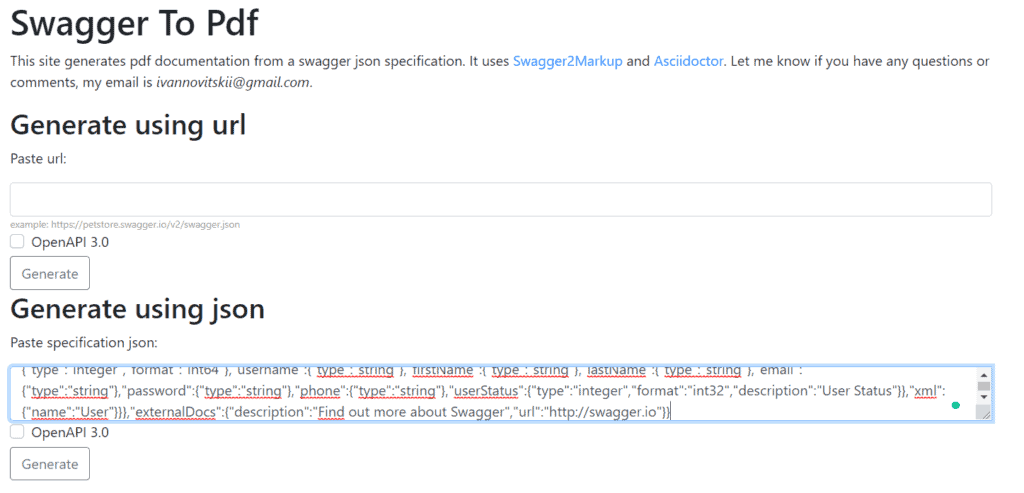
Swagger to PDF 是一個在線工具,位於 swdoc.org,它使用提供的 swagger.json 規範,通過該工具生成 API 文檔的 PDF 文件。它依賴於 Swagger2Markup 轉換器和 AsciiDoctor 。
其原理與之前解決方案類似。首先,Swagger2Markup 將 swagger.json 轉換為 AsciiDoc 文件。然後,Asciidoctor 解析這些文件並將其轉換為文檔模型,再將其轉換為 PDF 文件。
該解決方案易於使用,如果已經擁有 Swagger 2 API 文檔,則是一個不錯的選擇。
我們可以以兩種方式生成 PDF:
- 提供指向 swagger.json 文件的 URL
- 將我們 swagger.json 文件的內容粘貼到工具的文本框中
我們將使用 PetStore API 文檔,該文檔可在 Swagger 上公開。
為了我們的目的,我們將複製 JSON 文件並將其粘貼到文本框中:
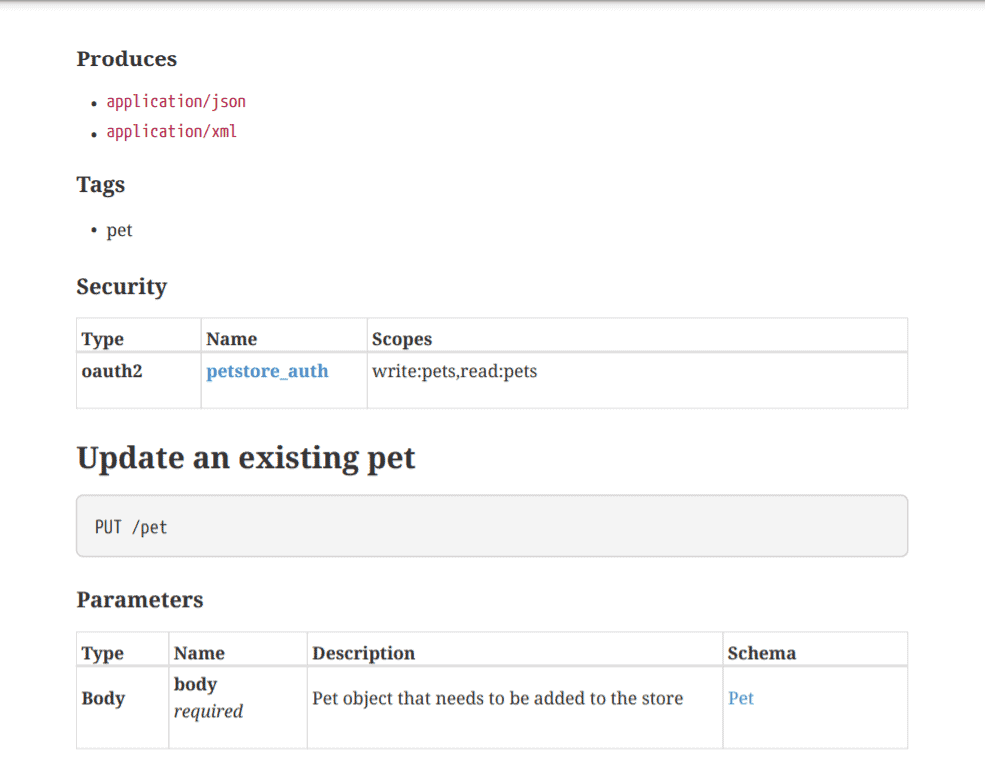
然後,當我們點擊“生成”按鈕後,我們將獲得文檔的 PDF 格式:
4. 結論
在本教程中,我們討論了兩種從 Swagger API 文檔生成 PDF 的方法。
第一種方法依賴於 Maven 插件。我們可以使用三個插件並在構建應用程序時生成 REST API 文檔。
第二種解決方案描述了使用 SwDoc 線上工具生成 PDF 文檔。我們可以從指向我們 swagger.json 的鏈接或將 JSON 文件內容粘貼到工具中生成文檔。

