
前言
移動端原生支持touchstart、touchmove、touchend等事件,但是在平常業務中我們經常需要使用swipe、tap、doubleTap、longTap等事件去實現想要的效果,對於這種自定義事件他們底層是如何實現的呢?讓我們從Zepto.js的touch模塊去分析其原理。您也可以直接查看touch.js源碼註釋
源碼倉庫
原文鏈接
事件簡述
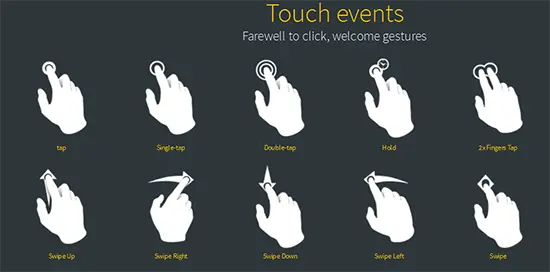
Zepto的touch模塊實現了很多與手勢相關的自定義事件,分別是swipe,swipeLeft,swipeRight,swipeUp,swipeDown,doubleTap,tap,singleTap,longTap
| 事件名稱 | 事件描述 |
|---|---|
| swipe | 滑動事件 |
| swipeLeft | ←左滑事件 |
| swipeRight | →右滑事件 |
| swipeUp | ↑上滑事件 |
| swipeDown | ↓下滑事件 |
| doubleTap | 雙擊事件 |
| tap | 點擊事件(非原生click事件) |
| singleTap | 單擊事件 |
| longTap | 長按事件 |
;['swipe', 'swipeLeft', 'swipeRight', 'swipeUp', 'swipeDown', 'doubleTap', 'tap', 'singleTap', 'longTap'].forEach(function(eventName){
  $.fn[eventName] = function(callback){ return this.on(eventName, callback) }
})
可以看到Zepto把這些方法都掛載到了原型上,這意味着,你可以直接用簡寫的方式例如$('body').tap(callback)
前置條件
在開始分析這些事件如何實現之前,我們先了解一些前置條件
- 部分內部變量
var touch = {},
    touchTimeout, tapTimeout, swipeTimeout, longTapTimeout,
    // 長按事件定時器時間
    longTapDelay = 750,
    gesture
touch: 用以存儲手指操作的相關信息,例如手指按下時的位置,離開時的座標等。
touchTimeout,tapTimeout, swipeTimeout,longTapTimeout分別存儲singleTap、tap、swipe、longTap事件的定時器。
longTapDelay:longTap事件定時器延時時間
gesture: 存儲ieGesture事件對象
- 滑動方向判斷(swipeDirection)
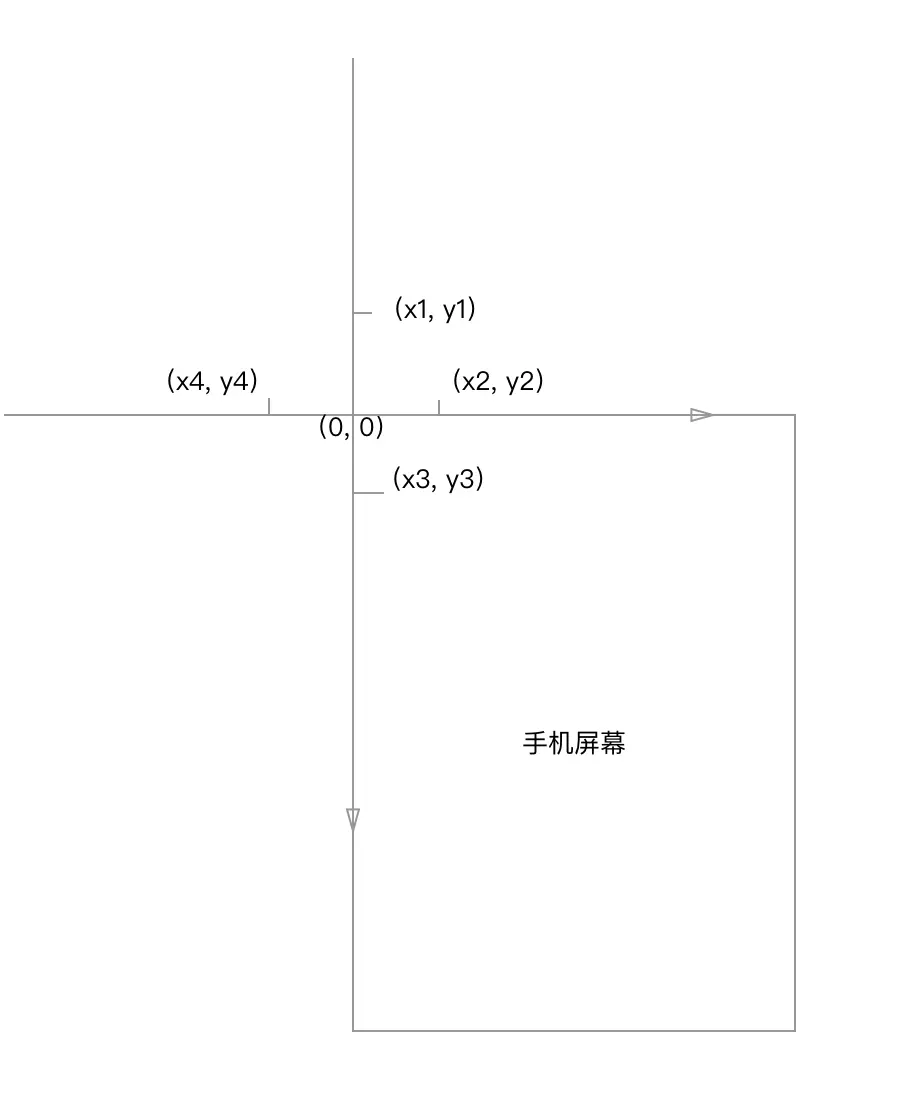
我們根據下圖以及對應的代碼來理解滑動的時候方向是如何判定的。需要注意的是瀏覽器中的“座標系”和數學中的座標系還是不太一樣,Y軸有點反過來的意思。
/**
  * 判斷移動的方向,結果是Left, Right, Up, Down中的一個
  * @param  {} x1 起點的橫座標
  * @param  {} x2 終點的橫座標
  * @param  {} y1 起點的縱座標
  * @param  {} y2 終點的縱座標
  */

function swipeDirection(x1, x2, y1, y2) {
  /**
    * 1. 第一個三元運算符得到如果x軸滑動的距離比y軸大,那麼是左右滑動,否則是上下滑動
    * 2. 如果是左右滑動,起點比終點大那麼往左滑動
    * 3. 如果是上下滑動,起點比終點大那麼往上滑動
    * 需要注意的是這裏的座標和數學中的有些不一定 縱座標有點反過來的意思
    * 起點p1(1, 0) 終點p2(1, 1)
    */
  return Math.abs(x1 - x2) >=
    Math.abs(y1 - y2) ? (x1 - x2 > 0 ? 'Left' : 'Right') : (y1 - y2 > 0 ? 'Up' : 'Down')
}
- 觸發長按事件
function longTap() {
  longTapTimeout = null
  if (touch.last) {
    // 觸發el元素的longTap事件
    touch.el.trigger('longTap')
    touch = {}
  }
}
在觸發長按事件之前先將longTapTimeout定時器取消,如果touch.last還存在則觸發之,為什麼要判斷touch.last呢,因為swip, doubleTap,singleTap會將touch對象置空,當這些事件發生的時候,自然不應該發生長按事件。
- 取消長按,以及取消所有事件
// 取消長按
function cancelLongTap() {
  if (longTapTimeout) clearTimeout(longTapTimeout)
  longTapTimeout = null
}

// 取消所有事件

function cancelAll() {
  if (touchTimeout) clearTimeout(touchTimeout)
  if (tapTimeout) clearTimeout(tapTimeout)
  if (swipeTimeout) clearTimeout(swipeTimeout)
  if (longTapTimeout) clearTimeout(longTapTimeout)
  touchTimeout = tapTimeout = swipeTimeout = longTapTimeout = null
  touch = {}
}
方式都是類似,先調用clearTimeout取消定時器,然後釋放對應的變量,等候垃圾回收。
整體結構分析
$(document).ready(function(){
  /**
    * now 當前觸摸時間
    * delta 兩次觸摸的時間差
    * deltaX x軸變化量
    * deltaY Y軸變化量
    * firstTouch 觸摸點相關信息
    * _isPointerType 是否是pointerType
    */
  var now, delta, deltaX = 0, deltaY = 0, firstTouch, _isPointerType

  $(document)
    .bind('MSGestureEnd', function(e){
      // xxx 先不看這裏
    })
    .on('touchstart MSPointerDown pointerdown', function(e){
      // xxx 關注這裏
    })
    .on('touchmove MSPointerMove pointermove', function(e){
      // xxx 關注這裏
    })
    .on('touchend MSPointerUp pointerup', function(e){
      // xxx 關注這裏
    })
    .on('touchcancel MSPointerCancel pointercancel', cancelAll)

    $(window).on('scroll', cancelAll)
  })
這裏將詳細代碼暫時省略了,留出整體框架,可以看出Zepto在dom,ready的時候在document上添加了MSGestureEnd,touchstart MSPointerDown pointerdown,touchmove MSPointerMove pointermove,touchcancel MSPointerCancel pointercancel等事件,最後還給在window上加了scroll事件。我們將目光聚焦在touchstart,touchmove,touchend對應的邏輯,其他相對少見的事件在暫不討論
touchstart
if((_isPointerType = isPointerEventType(e, 'down'))
&& !isPrimaryTouch(e)) return
要走到touchstart事件處理程序後續邏輯中,需要先滿足一些條件。到底是哪些條件呢?先來看看isPointerEventType, isPrimaryTouch兩個函數做了些什麼。
**isPointerEventType
function isPointerEventType(e, type){
  return (e.type == 'pointer'+type ||
    e.type.toLowerCase() == 'mspointer'+type)
}
Pointer Event相關知識點擊這裏
isPrimaryTouch
function isPrimaryTouch(event){
  return (event.pointerType == 'touch' ||
    event.pointerType == event.MSPOINTER_TYPE_TOUCH)
    && event.isPrimary
}
根據mdn pointerType,其類型可以是mouse,pen,touch,這裏只處理其值為touch並且isPrimary為true的情況。
接着回到
if((_isPointerType = isPointerEventType(e, 'down'))
&& !isPrimaryTouch(e)) return
其實就是過濾掉非觸摸事件。
觸摸點信息兼容處理
// 如果是pointerdown事件則firstTouch保存為e,否則是e.touches第一個
firstTouch = _isPointerType ? e : e.touches[0]
這裏只清楚e.touches[0]的處理邏輯,另一種不太明白,望有知曉的同學告知一下,感謝感謝。
復原終點座標
// 一般情況下,在touchend或者cancel的時候,會將其清除,如果用户調阻止了默認事件,則有可能清空不了,但是為什麼要將終點座標清除呢?
if (e.touches && e.touches.length === 1 && touch.x2) {
  // Clear out touch movement data if we have it sticking around
  // This can occur if touchcancel doesn't fire due to preventDefault, etc.
  touch.x2 = undefined
  touch.y2 = undefined
}
存儲觸摸點部分信息
// 保存當前時間
now = Date.now()
// 保存兩次點擊時候的時間間隔,主要用作雙擊事件
delta = now - (touch.last || now)
// touch.el 保存目標節點
// 不是標籤節點則使用該節點的父節點,注意有偽元素
touch.el = $('tagName' in firstTouch.target ?
  firstTouch.target : firstTouch.target.parentNode)
// touchTimeout 存在則清除之,可以避免重複觸發
touchTimeout && clearTimeout(touchTimeout)
// 記錄起始點座標(x1, y1)(x軸,y軸)
touch.x1 = firstTouch.pageX
touch.y1 = firstTouch.pageY
判斷雙擊事件
// 兩次點擊的時間間隔 > 0 且 < 250 毫秒,則當做doubleTap事件處理
if (delta > 0 && delta <= 250) touch.isDoubleTap = true
處理長按事件
// 將now設置為touch.last,方便上面可以計算兩次點擊的時間差
touch.last = now
// longTapDelay(750毫秒)後觸發長按事件
longTapTimeout = setTimeout(longTap, longTapDelay)
touchmove
.on('touchmove MSPointerMove pointermove', function(e){
  if((_isPointerType = isPointerEventType(e, 'move')) &&
    !isPrimaryTouch(e)) return
  firstTouch = _isPointerType ? e : e.touches[0]
  // 取消長按事件,都移動了,當然不是長按了
  cancelLongTap()
  // 終點座標 (x2, y2)
  touch.x2 = firstTouch.pageX
  touch.y2 = firstTouch.pageY
  // 分別記錄X軸和Y軸的變化量
  deltaX += Math.abs(touch.x1 - touch.x2)
  deltaY += Math.abs(touch.y1 - touch.y2)
})
手指移動的時候,做了三件事情。
- 取消長按事件
- 記錄終點座標
- 記錄x軸和y軸的移動變化量
touchend
.on('touchend MSPointerUp pointerup', function(e){
  if((_isPointerType = isPointerEventType(e, 'up')) &&
    !isPrimaryTouch(e)) return
  // 取消長按事件
  cancelLongTap()
  // 滑動事件,只要X軸或者Y軸的起始點和終點的距離超過30則認為是滑動,並觸發滑動(swip)事件,
  // 緊接着馬上觸發對應方向的swip事件(swipLeft, swipRight, swipUp, swipDown)
  // swipe
  if ((touch.x2 && Math.abs(touch.x1 - touch.x2) > 30) ||
      (touch.y2 && Math.abs(touch.y1 - touch.y2) > 30))

    swipeTimeout = setTimeout(function() {
      if (touch.el){
        touch.el.trigger('swipe')
        touch.el.trigger('swipe' + (swipeDirection(touch.x1, touch.x2, touch.y1, touch.y2)))
      }
      touch = {}
    }, 0)
  // touch對象的last屬性,在touchstart事件中添加,所以觸發了start事件便會存在
  // normal tap
  else if ('last' in touch)
    // don't fire tap when delta position changed by more than 30 pixels,
    // for instance when moving to a point and back to origin
    // 只有當X軸和Y軸的變化量都小於30的時候,才認為有可能觸發tap事件
    if (deltaX < 30 && deltaY < 30) {
      // delay by one tick so we can cancel the 'tap' event if 'scroll' fires
      // ('tap' fires before 'scroll')
      tapTimeout = setTimeout(function() {

        // trigger universal 'tap' with the option to cancelTouch()
        // (cancelTouch cancels processing of single vs double taps for faster 'tap' response)
        // 創建自定義事件
        var event = $.Event('tap')
        // 往自定義事件中添加cancelTouch回調函數,這樣使用者可以通過該方法取消所有的事件
        event.cancelTouch = cancelAll
        // [by paper] fix -> "TypeError: 'undefined' is not an object (evaluating 'touch.el.trigger'), when double tap
        // 當目標元素存在,觸發tap自定義事件
        if (touch.el) touch.el.trigger(event)

        // trigger double tap immediately
        // 如果是doubleTap事件,則觸發之,並清除touch
        if (touch.isDoubleTap) {
          if (touch.el) touch.el.trigger('doubleTap')
          touch = {}
        }

        // trigger single tap after 250ms of inactivity
        // 否則在250毫秒之後。觸發單擊事件
        else {
          touchTimeout = setTimeout(function(){
            touchTimeout = null
            if (touch.el) touch.el.trigger('singleTap')
            touch = {}
          }, 250)
        }
      }, 0)
    } else {
      // 不是tap相關的事件
      touch = {}
    }
    // 最後將變化量信息清空
    deltaX = deltaY = 0

})
touchend事件觸發時,相應的註釋都在上面了,但是我們來分解一下這段代碼。
swip事件相關
if ((touch.x2 && Math.abs(touch.x1 - touch.x2) > 30) ||
  (touch.y2 && Math.abs(touch.y1 - touch.y2) > 30))

swipeTimeout = setTimeout(function() {
  if (touch.el){
    touch.el.trigger('swipe')
    touch.el.trigger('swipe' + (swipeDirection(touch.x1, touch.x2, touch.y1, touch.y2)))
  }
  touch = {}
}, 0)
手指離開後,通過判斷x軸或者y軸的位移,只要其中一個跨度大於30便會觸發swip及其對應方向的事件。
tap,doubleTap,singleTap
這三個事件可能觸發的前提條件是touch對象中還存在last屬性,從touchstart事件處理程序中知道last在其中記錄,而在touchend之前被清除的時機是長按事件被觸發longTap,取消所有事件被調用cancelAll
if (deltaX < 30 && deltaY < 30) {
  // delay by one tick so we can cancel the 'tap' event if 'scroll' fires
  // ('tap' fires before 'scroll')
  tapTimeout = setTimeout(function() {

    // trigger universal 'tap' with the option to cancelTouch()
    // (cancelTouch cancels processing of single vs double taps for faster 'tap' response)
    var event = $.Event('tap')
    event.cancelTouch = cancelAll
    // [by paper] fix -> "TypeError: 'undefined' is not an object (evaluating 'touch.el.trigger'), when double tap
    if (touch.el) touch.el.trigger(event)
  }
}只有當x軸和y軸的變化量都小於30的時候才會觸發tap事件,注意在觸發tap事件之前,Zepto還將往事件對象上添加了cancelTouch屬性,對應的也就是cancelAll方法,即你可以通過他取消所有的touch相關事件。
// trigger double tap immediately

if (touch.isDoubleTap) {
  if (touch.el) touch.el.trigger('doubleTap')
  touch = {}
}

// trigger single tap after 250ms of inactivity

else {
  touchTimeout = setTimeout(function(){
    touchTimeout = null
    if (touch.el) touch.el.trigger('singleTap')
    touch = {}
  }, 250)
}
在發生觸發tap事件之後,如果是doubleTap,則會緊接着觸發doubleTap事件,否則250毫秒之後觸發singleTap事件,並且都會講touch對象置為空對象,以便下次使用
// 最後將變化量信息清空
deltaX = deltaY = 0
touchcancel
.on('touchcancel MSPointerCancel pointercancel', cancelAll)
當touchcancel被觸發的時候,取消所有的事件。
scroll
$(window).on('scroll', cancelAll)
當滾動事件被觸發的時候,取消所有的事件(這裏有些不解,滾動事件觸發,完全有可能是要觸發tap或者swip等事件啊)。
結尾
最後説一個面試中經常會問的問題,touch擊穿現象。如果對此有興趣可以查看移動端click延遲及zepto的穿透現象, [新年第一發--深入不淺出zepto的Tap擊穿問題
](https://zhuanlan.zhihu.com/p/...
參考
- 移動端click延遲及zepto的穿透現象
- [新年第一發--深入不淺出zepto的Tap擊穿問題
](https://zhuanlan.zhihu.com/p/...
- 讀Zepto源碼之Touch模塊
- pointerType
- [[翻譯]整合鼠標、觸摸 和觸控筆事件的Html5 Pointer Event Api](https://juejin.im/post/594e06...
文章目錄
-
touch.js
- 如何實現swipe、tap、longTap等自定義事件 (2017-12-22)
-
ie.js
- Zepto源碼分析之ie模塊(2017-11-03)
-
data.js
- Zepto中數據緩存原理與實現(2017-10-03)
-
form.js
- Zepto源碼分析之form模塊(2017-10-01)
-
zepto.js
- 這些Zepto中實用的方法集(2017-08-26)
- Zepto核心模塊之工具方法拾遺 (2017-08-30)
- 看Zepto如何實現增刪改查DOM (2017-10-2)
- Zepto這樣操作元素屬性(2017-11-13)
- 向Zepto學習關於"偏移"的那些事(2017-12-10)
-
event.js
- mouseenter與mouseover為何這般糾纏不清?(2017-06-05)
- 向Zepto.js學習如何手動觸發DOM事件(2017-06-07)
- 誰説你只是"會用"jQuery?(2017-06-08)
-
ajax.js
- 原來你是這樣的jsonp(原理與具體實現細節)(2017-06-11)