

創建移動應用,配置證書等步驟,在此不表
具體見wx.miniapp.shareMiniProgramMessage中説明
一、分享配置寫法
-
小程序寫法
Page({ onShareAppMessage() { const promise = new Promise(resolve => { setTimeout(() => { resolve({ title: '自定義轉發標題' }) }, 2000) }) return { title: '自定義轉發標題', path: '/page/user?id=123', promise } } }) -
donut寫法
Page({
 onShareAppMessage() {
     const promise = new Promise(resolve => {
         setTimeout(() => {
             resolve({
                 userName: '小程序原始id',
                 path: 'pages/index/index',
                 title: '標題',
                 imagePath: '/pages/thumb.png',
                 webpageUrl: 'www.qq.com',
                 withShareTicket: true,
                 miniprogramType: 0,
                 scene: 0,
             })
         }, 2000)
     })
     return {
         userName: '小程序原始id',
         path: 'pages/index/index',
         title: '標題',
         imagePath: '/pages/thumb.png',
         webpageUrl: 'www.qq.com',
         withShareTicket: true,
         miniprogramType: 0,
         scene: 0,
         promise
     }
 }
})
很明顯可以發現,
donut只有2點不一樣- 少了一些
userName和webpageUrl等配置 - 有一些配置項的轉換,如
imageUrl轉換為imagePath
- 少了一些
上述兩點只需要在某個全局的地方加上即可
統一兼容方式
注意在這需要使用donut的條件編譯(或者在require處使用條件編譯也可)
否則微信小程序中也會有這段不需要的代碼
-
重寫
Page和Component,使用handleAppShareInfo攔截onShareAppMessage方法const originalPage = Page; Page = function (e) { const app = getApp(); if (e.onShareAppMessage) { e.onShareAppMessage = handleAppShareInfo(e.onShareAppMessage); } return originalPage(e); }; const originalComponent = Component; Component = function (e) { if (e.methods && e.methods.onShareAppMessage) { e.methods.onShareAppMessage = handleAppShareInfo(e.methods.onShareAppMessage); } return originalComponent(e); }; -
添加小程序端缺失的配置
function appShareInfoAdapter(result) {
 return Object.assign({}, {
     userName: '小程序原始id',
     description: '',
     imagePath: res.imageUrl || '',
     webpageUrl: 'https://www.qq.com',
     withShareTicket: false,
     miniprogramType: 0,
     scene: 0,
 }, result, { imageUrl: void 0, })
}
function handleAppShareInfo(originalShare) {
 return function (...args) {
     const originResult = originalShare.apply(this, args)
     const result = appShareInfoAdapter(originResult)
     if (result.promise) {
         result.promise = result.promise.then(appShareInfoAdapter)
     }
     return result
 };
}
二、圖片大小限制
- 之後運行發現,有時候會報錯圖片超過128KB限制(具體見微信文檔安卓/IOS),得先將大於
128kb的圖片壓縮
- 但是對
png文件進行wx.compressImage無效
-
這是一個微信官方已確認的bug,無法壓縮png文件
此處提到的
把thumbData的轉換邏輯改下,對應到我們開發者,
是需要project.miniapp.json文件中的sdkVersion改成1.3.7-beta.2-656(或者大於此版本)
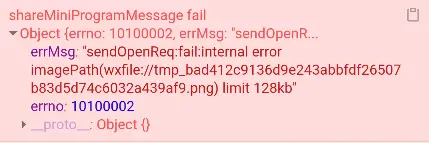
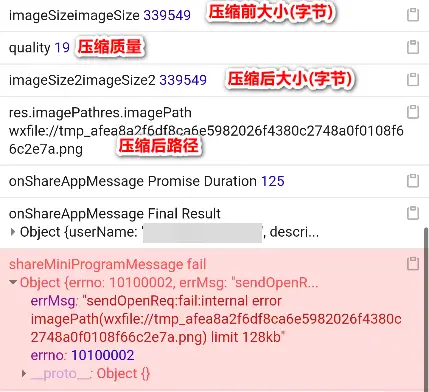

所以在圖片大於128kb的情況下,得把分享圖片轉換成jpg再進行壓縮,以下是具體代碼
-
代碼模塊內canvas變量&128kb限制常量
/** @type { WechatMiniprogram.FileSystemManager } */ let globalFileSystemManager const size128kb = 131072 function getFileSystemManager() { return globalFileSystemManager || (globalFileSystemManager = wx.getFileSystemManager()) } -
因為app分享只能使用本地路徑,所以需要實現轉換本地路徑邏輯
/** * 獲取分享圖本地路徑 * @param { string } imagePath 圖片路徑 * @returns { Promise<string> } */ function getShareImageLocalPath(imagePath) { return imagePath.startsWith('http') ? new Promise((resolve) => { wx.downloadFile({ url: imagePath, success(res) { resolve(res.tempFilePath) }, fail() { resolve('') } }) }) : imagePath } -
png轉換jpg邏輯
/** * 將圖片轉換為jpg格式 * @param { string } imagePath 非jpg圖片路徑 * @param { WechatMiniprogram.GetImageInfoSuccessCallbackResult } imageInfo * @returns { Promise<string> } */ async function function convert2JPG(imagePath, imageInfo) { const { width, height } = imageInfo const canvas = wx.createOffscreenCanvas({ type: '2d', width, height }) const context = canvas.getContext('2d') const image = canvas.createImage() await new Promise(resolve => { image.onload = resolve image.src = imagePath }) context.clearRect(0, 0, width, height) context.drawImage(image, 0, 0, width, height) /** @type { Promise<string> } */ return new Promise(resolve => { // #if ANDROID wx.canvasToTempFilePath({ width, height, destWidth: width, destHeight: height, canvas, fileType: 'jpg', quality: 1, success(res) { resolve(res.tempFilePath) }, fail() { resolve('') } }) // #elif IOS const imagePath = `${wx.env.USER_DATA_PATH}/temp-${Date.now()}.jpg` getFileSystemManager().writeFile({ filePath: imagePath, data: canvas.toDataURL('image/jpeg').replace(/^data:image\/\w+;base64,/, ''), encoding: 'base64', success() { resolve(imagePath) }, fail() { resolve('') }, }) // #endif }) } -
壓縮圖片
/** * 壓縮分享圖片 * @param { string } imageLocalPath 本地圖片路徑 * @param { boolean } skipPngCheck 跳過圖片格式檢查 * @returns { Promise<string> } */ async function compressImageShareImage(imageLocalPath, skipPngCheck = false) { /** @type { number } */ const imageSize = await new Promise(resolve => { getFileSystemManager().getFileInfo({ filePath: imageLocalPath, success(res) { resolve(res.size) }, fail() { resolve(0) } }) }) if (imageSize <= size128kb) { return imageLocalPath } if (!skipPngCheck) { /** @type { WechatMiniprogram.GetImageInfoSuccessCallbackResult } */ const imageInfo = await new Promise(resolve => wx.getImageInfo({ src: imageLocalPath, success: resolve, fail() { resolve({ width: 0, height: 0 }) } })) // wx.compressImage無法壓縮png圖片 // 官方開發人員已經確認的bug,並且暫時無法修改 // 所以,先轉換成jpg再進行壓縮 if (imageInfo.type === 'png') { const jpgImage = await convert2JPG(imageLocalPath, imageInfo) // 轉換之後,再走一次compressImageShareImage裏面的imageSize邏輯 // 如果jpgImage比128kb還小,就不需要再壓縮了 return compressImageShareImage(jpgImage, true) } } return new Promise(resolve => wx.compressImage({ src: imageLocalPath, quality: Math.max(1, Math.floor(100 * size128kb / imageSize)), success(res) { resolve(res.tempFilePath) }, fail() { resolve('') } })) } -
修改onShareAppMessage返回值
function handleAppShareInfo(originalShare) {
 return function (...args) {
     const originResult = originalShare.apply(this, args)
     const result = appShareInfoAdapter(originResult)
     result.promise = (
         result.promise
             ? result.promise.then(appShareInfoAdapter)
             : Promise.resolve(result)
     ).then(async res => {
         /** @type { { imagePath: string } } */
         const { imagePath } = res
         /** @type { string } */
         const imageLocalPath = await getShareImageLocalPath(imagePath)
         res.imagePath = await compressImageShareImage(imageLocalPath)
         return res
     })
     return result
 };
}
