

操作系統使用文件描述符來指代一個打開的文件,對文件的讀寫操作,都需要文件描述符指向存儲設備的不透明標識符。Java雖然在設計上使用了抽象程度更高的流來作為文件操作的模型,但是底層依然要使用文件描述符與操作系統交互,而Java世界裏文件描述符的對應類就是FileDescriptor。同時,Java規定了FileDescriptor只能由JDK的其它類來創建(比如FileInputStream、FileOutputStream、RandomAccessFile等),不能由應用程序自己創建。
操作系統中的文件描述符本質上是一個非負整數,其中0,1,2固定為標準輸入,標準輸出,標準錯誤輸出,如下所示(POSIX標準):
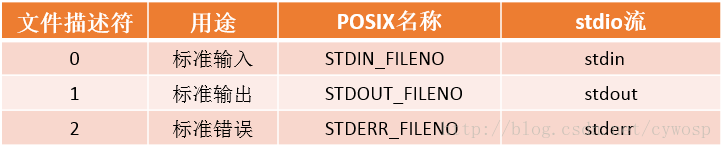
Java程序接打開的文件使用當前進程可用的文件描述符就被保存在了FileDescriptor中的int fd變量,因此FileDescriptor的核心功能都是圍繞着int fd變量來運行的
package java.io;
import java.util.ArrayList;
import java.util.List;
public final class FileDescriptor {

    private int fd;

    private long handle;

    private Closeable parent;
    private List<Closeable> otherParents;
    private boolean closed;

    //FileDescriptor只有無參的構造函數,保證了fd不能被應用程序設置
    public /**/ FileDescriptor() {
        fd = -1;
        handle = -1;
    }

    static {
        initIDs();
    }

    static {
        sun.misc.SharedSecrets.setJavaIOFileDescriptorAccess(
            new sun.misc.JavaIOFileDescriptorAccess() {
                public void set(FileDescriptor obj, int fd) {
                    obj.fd = fd;
                }

                public int get(FileDescriptor obj) {
                    return obj.fd;
                }

                public void setHandle(FileDescriptor obj, long handle) {
                    obj.handle = handle;
                }

                public long getHandle(FileDescriptor obj) {
                    return obj.handle;
                }
            }
        );
    }
    //POSIX標準中的標準輸入,和System.class有關
    public static final FileDescriptor in = standardStream(0);
    //POSIX標準中的標準輸出,和System.class有關
    public static final FileDescriptor out = standardStream(1);
    //POSIX標準中的標準錯誤輸出,和System.class有關
    public static final FileDescriptor err = standardStream(2);

    public boolean valid() {
        return ((handle != -1) || (fd != -1));
    }

    public native void sync() throws SyncFailedException;

    private static native void initIDs();

    private static native long set(int d);

    private static FileDescriptor standardStream(int fd) {
        FileDescriptor desc = new FileDescriptor();
        desc.handle = set(fd);
        return desc;
    }

    synchronized void attach(Closeable c) {
        if (parent == null) {
            // first caller gets to do this
            parent = c;
        } else if (otherParents == null) {
            otherParents = new ArrayList<>();
            otherParents.add(parent);
            otherParents.add(c);
        } else {
            otherParents.add(c);
        }
    }

    @SuppressWarnings("try")
    synchronized void closeAll(Closeable releaser) throws IOException {
        if (!closed) {
            closed = true;
            IOException ioe = null;
            try (Closeable c = releaser) {
                if (otherParents != null) {
                    for (Closeable referent : otherParents) {
                        try {
                            referent.close();
                        } catch(IOException x) {
                            if (ioe == null) {
                                ioe = x;
                            } else {
                                ioe.addSuppressed(x);
                            }
                        }
                    }
                }
            } catch(IOException ex) {
                /*
                 * If releaser close() throws IOException
                 * add other exceptions as suppressed.
                 */
                if (ioe != null)
                    ex.addSuppressed(ioe);
                ioe = ex;
            } finally {
                if (ioe != null)
                    throw ioe;
            }
        }
    }
}
一、設置int fd變量的值
FileDescriptor.class 的構造函數將int fd的值設置為了-1,但是操作系統中的文件描述符本質上是一個非負整數,因此FileDescriptor.class中表示文件描述符的int fd變量是在FileInputStream.class、FileOutputStream.class、RandomAccessFile.class等這些使用FileDescriptor.class的類中來設置的,比如FileInputStream.class
public
class FileInputStream extends InputStream
{
    /* File Descriptor - handle to the open file */
    private final FileDescriptor fd;

    //在FileInputStream實例化時,會新建FileDescriptor實例,並使用fd.attach(this)關聯FileInputStream實例與FileDescriptor實例,這是為了之後在程序中關閉文件描述符做準備。
    public FileInputStream(File file) throws FileNotFoundException {
        String name = (file != null ? file.getPath() : null);
        ...省略代碼...
        fd = new FileDescriptor();
        fd.attach(this);
        path = name;
        open(name);
    }

    private void open(String name) throws FileNotFoundException {
        open0(name);
    }
    //真正對FileDescriptor.class中int fd賦值的邏輯是JNI調用的FileInputStream#open0這個native函數中
    private native void open0(String name) throws FileNotFoundException;
}
// /jdk/src/share/native/java/io/FileInputStream.c
JNIEXPORT void JNICALL
Java_java_io_FileInputStream_open(JNIEnv *env, jobject this, jstring path) {
    fileOpen(env, this, path, fis_fd, O_RDONLY);
}

// /jdk/src/solaris/native/java/io/io_util_md.c
void
fileOpen(JNIEnv *env, jobject this, jstring path, jfieldID fid, int flags)
{
    WITH_PLATFORM_STRING(env, path, ps) {
        FD fd;

#if defined(__linux__) || defined(_ALLBSD_SOURCE)
        /* Remove trailing slashes, since the kernel won't */
        char *p = (char *)ps + strlen(ps) - 1;
        while ((p > ps) && (*p == '/'))
            *p-- = '\0';
#endif
        fd = JVM_Open(ps, flags, 0666); // 打開文件拿到文件描述符
        if (fd >= 0) {
            SET_FD(this, fd, fid); // 非負整數認為是正確的文件描述符,設置到fd變量
        } else {
            throwFileNotFoundException(env, path);  // 負數認為是不正確文件描述符,拋出FileNotFoundException異常
        }
    } END_PLATFORM_STRING(env, ps);
}
到了JDK的JNI代碼中,使用JVM_Open打開文件,得到文件描述符,而JVM_Open已經不是JDK的方法了,而是JVM提供的方法,所以需要繼續查看hotspot中的實現:
// /hotspot/src/share/vm/prims/jvm.cpp
JVM_LEAF(jint, JVM_Open(const char *fname, jint flags, jint mode))
  JVMWrapper2("JVM_Open (%s)", fname);

  //%note jvm_r6
  int result = os::open(fname, flags, mode);  // 調用os::open打開文件
  if (result >= 0) {
    return result;
  } else {
    switch(errno) {
      case EEXIST:
        return JVM_EEXIST;
      default:
        return -1;
    }
  }
JVM_END

// /hotspot/src/os/linux/vm/os_linux.cpp
int os::open(const char *path, int oflag, int mode) {

  if (strlen(path) > MAX_PATH - 1) {
    errno = ENAMETOOLONG;
    return -1;
  }
  int fd;
  int o_delete = (oflag & O_DELETE);
  oflag = oflag & ~O_DELETE;

  fd = ::open64(path, oflag, mode);  // 調用open64打開文件
  if (fd == -1) return -1;

  // 問打開成功也可能是目錄,這裏還需要判斷是否打開的是普通文件
  {
    struct stat64 buf64;
    int ret = ::fstat64(fd, &buf64);
    int st_mode = buf64.st_mode;

    if (ret != -1) {
      if ((st_mode & S_IFMT) == S_IFDIR) {
        errno = EISDIR;
        ::close(fd);
        return -1;
      }
    } else {
      ::close(fd);
      return -1;
    }
  }

#ifdef FD_CLOEXEC
    {
        int flags = ::fcntl(fd, F_GETFD);
        if (flags != -1)
            ::fcntl(fd, F_SETFD, flags | FD_CLOEXEC);
    }
#endif

  if (o_delete != 0) {
    ::unlink(path);
  }
  return fd;
}
可以看到JVM最後使用open64這個函數打開文件,網上對於open64這個資料還是很少的,我找到的是man page for open64 (all section 2) - Unix & Linux Commands,從中可以看出,open64是為了在32位環境打開大文件的系統調用,但是不是標準的一部分。(這一部分不是很確定,因為沒有明確的資料)
這裏的open()函數不是我們以前學C語言時打開文件用的fopen()函數,fopen是C標準庫裏的函數,而open()不是,open()是POSIX規範中的函數,是不帶緩衝的I/O,不帶緩衝的I/O相關的函數還有read(),write(),lseek(),close(),不帶緩衝指的是這些函數都調用內核中的一個系統調用,而C標準庫為了減少系統調用,使用了緩存來減少read,write的內存調用。(參考《UNIX環境高級編程》)
因此,我們知道了FileInputStream#open是使用open()系統調用來打開文件,得到文件句柄,現在我們的問題要回到這個文件句柄是如何最終設置到FileDescriptor#fd,我們來看/jdk/src/solaris/native/java/io/io_util_md.c:fileOpen的關鍵代碼:
fd = handleOpen(ps, flags, 0666);
if (fd != -1) {
    SET_FD(this, fd, fid);
} else {
    throwFileNotFoundException(env, path);
}
如果文件描述符fd正確,通過SET_FD這個紅設置到fid對應的成員變量上,如下宏所示:
#define SET_FD(this, fd, fid) \
    if ((*env)->GetObjectField(env, (this), (fid)) != NULL) \
        (*env)->SetIntField(env, (*env)->GetObjectField(env, (this), (fid)),IO_fd_fdID, (fd))
SET_FD宏比較簡單,獲取FileInputStream上的fid這個變量ID對應的變量,然後設置這個變量的IO_fd_fdID對應的變量(FileDescriptor#fd)為文件描述符。
這個fid和IO_fd_fdID的來歷可以參照/jdk/src/share/native/java/io/FileInputStream.c文件的開頭,可以看到這樣的代碼:
// jdk/src/share/native/java/io/FileInputStream.c
jfieldID fis_fd; /* id for jobject 'fd' in java.io.FileInputStream */

/**************************************************************
 * static methods to store field ID's in initializers
 */

JNIEXPORT void JNICALL
Java_java_io_FileInputStream_initIDs(JNIEnv *env, jclass fdClass) {
    fis_fd = (*env)->GetFieldID(env, fdClass, "fd", "Ljava/io/FileDescriptor;");
}
Java_java_io_FileInputStream_initIDs對應JAVA中FileInputStream.class源碼中的static塊調用的initIDs函數:
public
class FileInputStream extends InputStream
{
    /* File Descriptor - handle to the open file */
    private final FileDescriptor fd;
    static {
        initIDs();
    }
    private static native void initIDs();
}
還有jdk/src/solaris/native/java/io/FileDescriptor_md.c開頭:
// jdk/src/solaris/native/java/io/FileDescriptor_md.c
/* field id for jint 'fd' in java.io.FileDescriptor */
jfieldID IO_fd_fdID;

/**************************************************************
 * static methods to store field ID's in initializers
 */

JNIEXPORT void JNICALL
Java_java_io_FileDescriptor_initIDs(JNIEnv *env, jclass fdClass) {
    IO_fd_fdID = (*env)->GetFieldID(env, fdClass, "fd", "I");
}
Java_java_io_FileDescriptor_initIDs對應JAVA中FileDescriptor.class源碼中static塊調用的initIDs函數:
public final class FileDescriptor {
    private int fd;
    static {
        initIDs();
    }
    private static native void initIDs();
}
以上代碼的整個流程為:
①、JVM加載FileDescriptor類,執行static塊中的代碼
②、執行static塊中的代碼時,執行initIDs本地函數
③、initIDs本地函數只做了一件事情,就是獲取fd字段ID,並保存在IO_fd_fdID變量中
④、JVM加載FileInputStream類,執行static塊中的代碼
⑤、執行static塊中的代碼時,執行initIDs本地函數
⑥、initIDs本地函數只做了一件事情,就是獲取fd字段ID,並保存在fis_fd變量中
⑦、後續邏輯直接使用IO_fd_fdID和fis_fd
這樣做的理由是因為特定類的字段ID在一次Java程序的聲明週期中是不會變化的,而獲取字段ID本身是一個比較耗時的過程,因為如果字段是從父類繼承而來,JVM需要遍歷繼承樹來找到這個字段,所以JNI代碼的最佳實踐就是對使用到的字段ID做緩存。
二、設置FileDescriptor in、FileDescriptor out、FileDescriptor err變量
標準輸入,標準輸出,標準錯誤輸出是所有操作系統都支持的,對於一個進程來説,文件描述符0,1,2固定是標準輸入,標準輸出,標準錯誤輸出。Java對標準輸入,標準輸出,標準錯誤輸出的支持也是通過FileDescriptor實現的,FileDescriptor中定義了FileDescriptor in、FileDescriptor out、FileDescriptor err這三個靜態變量:
public final class FileDescriptor {
    //POSIX標準中的標準輸入,和System.class有關
    public static final FileDescriptor in = standardStream(0);
    //POSIX標準中的標準輸出,和System.class有關
    public static final FileDescriptor out = standardStream(1);
    //POSIX標準中的標準錯誤輸出,和System.class有關
    public static final FileDescriptor err = standardStream(2);
}
我們常用的System.out、System.err等,就是基於這三個封裝的:
public final class System {
    public final static PrintStream err = null;
    public final static InputStream in = null;
    public final static PrintStream out = null;
    private static void initializeSystemClass() {
        ...省略部分代碼...
        FileInputStream fdIn = new FileInputStream(FileDescriptor.in);
        FileOutputStream fdOut = new FileOutputStream(FileDescriptor.out);
        FileOutputStream fdErr = new FileOutputStream(FileDescriptor.err);
        setIn0(new BufferedInputStream(fdIn));
        setOut0(newPrintStream(fdOut, props.getProperty("sun.stdout.encoding")));
        setErr0(newPrintStream(fdErr, props.getProperty("sun.stderr.encoding")));
        ...省略部分代碼...
    }

    private static native void setIn0(InputStream in);
    private static native void setOut0(PrintStream out);
    private static native void setErr0(PrintStream err);
}
System.class作為一個特殊的類,該類構造時無法實例化PrintStream err變量、InputStream in變量、PrintStream out變量,構造發生在initializeSystemClass()函數被調用時,但是PrintStream err變量、InputStream in變量、PrintStream out變量是被聲明為final的,如果聲明時和類構造時沒有賦值,是會報錯的,所以System在實現時,先設置為null,然後通過native方法來在運行時修改(可以用在我的networkScan項目上),通過setIn0/setOut0/setErr0的註釋也可以説明這一點:
/*
 * The following three functions implement setter methods for
 * java.lang.System.{in, out, err}. They are natively implemented
 * because they violate the semantics of the language (i.e. set final
 * variable).
 */
JNIEXPORT void JNICALL
Java_java_lang_System_setIn0(JNIEnv *env, jclass cla, jobject stream)
{
    jfieldID fid =
        (*env)->GetStaticFieldID(env,cla,"in","Ljava/io/InputStream;");
    if (fid == 0)
        return;
    (*env)->SetStaticObjectField(env,cla,fid,stream);
}

JNIEXPORT void JNICALL
Java_java_lang_System_setOut0(JNIEnv *env, jclass cla, jobject stream)
{
    jfieldID fid =
        (*env)->GetStaticFieldID(env,cla,"out","Ljava/io/PrintStream;");
    if (fid == 0)
        return;
    (*env)->SetStaticObjectField(env,cla,fid,stream);
}

JNIEXPORT void JNICALL
Java_java_lang_System_setErr0(JNIEnv *env, jclass cla, jobject stream)
{
    jfieldID fid =
        (*env)->GetStaticFieldID(env,cla,"err","Ljava/io/PrintStream;");
    if (fid == 0)
        return;
    (*env)->SetStaticObjectField(env,cla,fid,stream);
}
三、attach()函數和closeAll()函數
attach()函數和closeAll()函數都和文件描述符的關閉有關。上文提到過,FileInputStream在構造函數中,會新建FileDescriptor並調用FileDescriptor#attach方法綁定文件流與文件描述符。
3.1、attach()函數
public
class FileInputStream extends InputStream
{
    /* File Descriptor - handle to the open file */
    private final FileDescriptor fd;
    private Closeable parent;
    private List<Closeable> otherParents;
    //在FileInputStream實例化時,會新建FileDescriptor實例,並使用fd.attach(this)關聯FileInputStream實例與FileDescriptor實例,這是為了之後在程序中關閉文件描述符做準備。
    public FileInputStream(File file) throws FileNotFoundException {
        String name = (file != null ? file.getPath() : null);
        ...省略代碼...
        fd = new FileDescriptor();
        fd.attach(this);
        path = name;
        open(name);
    }

    //如果FileDescriptor只和一個FileInputStream實例、FileOutputStream實例、RandomAccessFile等實例等有關聯,
    //則只是簡單的保存到parent成員中,如果有多個FileInputStream實例、FileOutputStream實例、RandomAccessFile等實例有關聯,
    //則所有關聯的Closeable都保存到List<Closeable> otherParents變量(實際是ArrayList<Closeable>實例)中。
    synchronized void attach(Closeable c) {
        if (parent == null) {
            // first caller gets to do this
            parent = c;
        } else if (otherParents == null) {
            otherParents = new ArrayList<>();
            otherParents.add(parent);
            otherParents.add(c);
        } else {
            otherParents.add(c);
        }
    }
}
這裏其實有個細節,就是Closeable parent變量其實只在這個函數有用到,所以上面的邏輯完全可以寫成無論FileDescriptor和幾個Closeable對象有關聯,都直接保存到List
3.2、closeAll()函數
public
class FileInputStream extends InputStream
{
    /* File Descriptor - handle to the open file */
    private final FileDescriptor fd;
    private final Object closeLock = new Object();
    private volatile boolean closed = false;
    private FileChannel channel = null;
    public void close() throws IOException {
        synchronized (closeLock) {
            if (closed) {
                return;
            }
            closed = true;
        }
        if (channel != null) {
           channel.close();
        }

        fd.closeAll(new Closeable() {
            public void close() throws IOException {
               close0();
           }
        });
    }
    private native void close0() throws IOException;
}
首先通過鎖保證關閉流程不會被併發調用,設置成員變量boolean closed為true,接着關閉關聯的Channel(NIO中的關鍵組件之一,另外2個NIO關鍵組件是Buffer、Selector)。接着就是關閉FileDescriptor了。
FileDescriptor沒有提供close()函數,而是提供了一個closeAll()函數:
synchronized void closeAll(Closeable releaser) throws IOException {
    if (!closed) {
        closed = true;
        IOException ioe = null;
        try (Closeable c = releaser) {
            if (otherParents != null) {
                for (Closeable referent : otherParents) {
                    try {
                        referent.close();
                    } catch(IOException x) {
                        if (ioe == null) {
                            ioe = x;
                        } else {
                            ioe.addSuppressed(x);
                        }
                    }
                }
            }
        } catch(IOException ex) {
            /*
             * If releaser close() throws IOException
             * add other exceptions as suppressed.
             */
            if (ioe != null)
                ex.addSuppressed(ioe);
            ioe = ex;
        } finally {
            if (ioe != null)
                throw ioe;
        }
    }
}
FileDescriptor的關閉流程有點繞,效果是會把關聯的Closeable對象(其實就是FileInputStream實例、FileOutputStream實例、RandomAccessFile等實例,而這些實例的close()函數實現是一模一樣的)通通都關閉掉(效果是這些對象的成員變量boolean closed設置為true,關聯的Channel關閉,這樣這個對象就無法使用了),最後這些關聯的對象中,只會有一個對象的close0本地函數被調用,這個函數中調用操作系統的close()函數來真正關閉文件描述符。
// /jdk/src/solaris/native/java/io/FileInputStream_md.c
JNIEXPORT void JNICALL
Java_java_io_FileInputStream_close0(JNIEnv *env, jobject this) {
    fileClose(env, this, fis_fd);
}

// /jdk/src/solaris/native/java/io/io_util_md.c
void fileClose(JNIEnv *env, jobject this, jfieldID fid)
{
    FD fd = GET_FD(this, fid);
    if (fd == -1) {
        return;
    }

    /* Set the fd to -1 before closing it so that the timing window
     * of other threads using the wrong fd (closed but recycled fd,
     * that gets re-opened with some other filename) is reduced.
     * Practically the chance of its occurance is low, however, we are
     * taking extra precaution over here.
     */
    SET_FD(this, -1, fid);

    // 嘗試關閉0,1,2文件描述符,需要特殊的操作。首先這三個是不能關閉的,
    // 如果關閉的,後續打開的文件就會佔用這三個描述符,
    // 所以合理的做法是把要關閉的描述符指向/dev/null,實現關閉的效果
    // 不過Java代碼中,正常是沒辦法關閉0,1,2文件描述符的
    if (fd >= STDIN_FILENO && fd <= STDERR_FILENO) {
        int devnull = open("/dev/null", O_WRONLY);
        if (devnull < 0) {
            SET_FD(this, fd, fid); // restore fd
            JNU_ThrowIOExceptionWithLastError(env, "open /dev/null failed");
        } else {
            dup2(devnull, fd);
            close(devnull);
        }
    } else if (close(fd) == -1) { // 關閉非0,1,2的文件描述符只是調用close系統調用
        JNU_ThrowIOExceptionWithLastError(env, "close failed");
    }
}
四、不能將一個FileDescriptor對象給多個流用
偽代碼如下所示:
    //new一個FileInputStream的流
    FileInputStream is = new FileInputStream("Some file");
    BufferedInputStream br = new BufferedInputStream(is);
    //獲取流 is 的文件描述符fd
    FileDescriptor fd = is.getFD();
    //文件描述符fd在流 is 和流 is1之間共享使用
    FileInputStream is1 = new FileInputStream(fd);
    BufferedInputStream br1 = new BufferedInputStream(is1);

    is.close();//關閉流 is的文件描述符fd的同時也會關閉流 is1的文件描述符
    System.out.println(is1.read());//此處會is1不能再使用文件描述符fd了
在上述示例中,文件描述符fd在流 is 和 is1 之間共享使用。如果對 is 進行關閉操作,那麼 is1 也會隨之關閉(即文件描述符fd會被關閉/釋放),這是因為FileDescriptor.class::closeAll()函數會把該文件描述符關聯的Closeable對象(其實就是FileInputStream實例、FileOutputStream實例、RandomAccessFile等實例)通通都關閉掉(詳細請看標題3.2、closeAll()函數)
參考資料:
https://www.cnblogs.com/yungyu16/p/13053912.html
