

前言
之前的小節,已經詳細介紹了envoy做反向代理、服務發現、流量劫持以及自動注入envoy的sidecar,可以發現envoy不光是一個普通的http代理工具,它還有很多非常強大的功能,本小節就來介紹一下envoy其他強大且實用的功能
Envoy 核心流量治理能力實踐:熔斷、限流、流量分發、透明代理
熔斷
在分佈式系統中,最危險的不是錯誤,而是慢。當某個下游服務變慢時:
- 上游請求不斷堆積
- 線程、連接被耗盡
- 最終引發級聯故障(雪崩)
Envoy 的熔斷機制,目的非常明確:在下游資源耗盡之前,主動拒絕請求,保護系統整體穩定
Envoy 的熔斷配置
Envoy 的熔斷是基於資源使用情況的硬限制,而不是基於錯誤率的統計判斷。
核心限制指標包括:
- 最大連接數
- 最大併發請求數
- 最大等待請求數
- 最大重試請求數
  clusters:
    - name: app_service
      ...
      circuit_breakers:
        thresholds:
        - priority: DEFAULT
          max_connections: 1000
          max_pending_requests: 100
          max_requests: 5
          max_retries: 50
當任意指標超過閾值,Envoy 直接返回 503,請求不會進入上游
驗證
為了驗證是否生效,先將max_requests改為5,只要併發超過5,就會立刻報錯。用ab來測試一下
ab -n 10 -c 10 10.22.12.178:30785/test
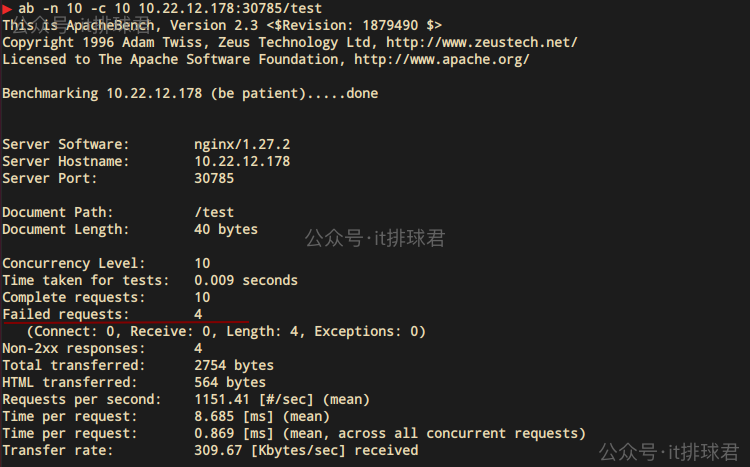
確實出現了4次報錯,在查看envoy的access_log,也能對上
[2025-12-30T08:03:41.267Z] "GET /test HTTP/1.0" 200 40 0 aecc99c3-4649-478e-8610-79e1b86c6338 "ApacheBench/2.3" "-" 10.244.0.203:10000 app_service -
[2025-12-30T08:03:41.270Z] "GET /test HTTP/1.0" 503 81 0 98609f61-60cf-4522-96c6-e0eb51743791 "ApacheBench/2.3" "-" 10.244.0.203:10000 app_service UO
[2025-12-30T08:03:41.270Z] "GET /test HTTP/1.0" 503 81 0 0b244330-25bd-48e9-b9fc-a0b7f5846e17 "ApacheBench/2.3" "-" 10.244.0.203:10000 app_service UO
[2025-12-30T08:03:41.270Z] "GET /test HTTP/1.0" 503 81 0 09906490-1916-4e26-bc9f-85d830e1f219 "ApacheBench/2.3" "-" 10.244.0.203:10000 app_service UO
[2025-12-30T08:03:41.271Z] "GET /test HTTP/1.0" 503 81 0 a77bc60a-5cdc-4340-8969-9ce2a1b6206d "ApacheBench/2.3" "-" 10.244.0.203:10000 app_service UO
[2025-12-30T08:03:41.270Z] "GET /test HTTP/1.0" 200 40 2 550dc619-6002-4bd6-9b36-3fe1a2b2b3e3 "ApacheBench/2.3" "-" 10.244.0.203:10000 app_service -
[2025-12-30T08:03:41.270Z] "GET /test HTTP/1.0" 200 40 3 da2a001c-3dc0-4afb-ae0a-a09b78642890 "ApacheBench/2.3" "-" 10.244.0.203:10000 app_service -
[2025-12-30T08:03:41.269Z] "GET /test HTTP/1.0" 200 40 3 3a7f7ec4-42c1-48d3-acf5-190a81439d84 "ApacheBench/2.3" "-" 10.244.0.203:10000 app_service -
[2025-12-30T08:03:41.270Z] "GET /test HTTP/1.0" 200 40 4 3bcd9947-e4c2-43c8-84de-12bd551af590 "ApacheBench/2.3" "-" 10.244.0.203:10000 app_service -
[2025-12-30T08:03:41.270Z] "GET /test HTTP/1.0" 200 40 4 f5f5f231-1079-4abf-8d72-56617d43cc03 "ApacheBench/2.3" "-" 10.244.0.203:10000 app_service -
熔斷關注的是 併發資源保護,而不是 QPS
限流
熔斷解決的是“服務被拖慢”,那麼限流解決的是“服務被打爆”,Envoy 的限流目標是:控制單位時間內的請求速率。常見觸發場景:
- 突發流量
- 單 IP / 單用户惡意請求
- 上游 Bug 導致請求風暴
限流配置
      listeners:
        - name: ingress_listener
          address:
            socket_address:
              address: 0.0.0.0
              port_value: 10000
          filter_chains:
            - filters:
                - name: envoy.filters.network.http_connection_manager
                  typed_config:
                    ...
                    http_filters:
                    - name: envoy.filters.http.local_ratelimit
                      typed_config:
                        "@type": type.googleapis.com/envoy.extensions.filters.http.local_ratelimit.v3.LocalRateLimit
                        stat_prefix: local_rate_limiter
                        token_bucket:
                          max_tokens: 100
                          tokens_per_fill: 100
                          fill_interval: 1s
                        filter_enabled:
                          default_value:
                            numerator: 100
                            denominator: HUNDRED
                        filter_enforced:
                          default_value:
                            numerator: 100
                            denominator: HUNDRED
                    - name: envoy.filters.http.router
                    ...
每秒最多 100 個請求,當超過閾值,Envoy 直接返回 429,請求不會進入上游,為了方便測試,將閾值改為5,再次進行ab測試
ab -n 10 -c 10 10.22.12.178:30785/test
查看日誌:
[2025-12-30T09:58:43.655Z] "GET /test HTTP/1.0" 200 40 1 f775154c-898e-46b2-99d5-b5629493834c "ApacheBench/2.3" "-" 10.244.0.203:10000 app_service -
[2025-12-30T09:58:43.658Z] "GET /test HTTP/1.0" 429 18 0 fde80049-a2df-473e-9f96-08a1526352ce "ApacheBench/2.3" "-" - app_service RL
[2025-12-30T09:58:43.658Z] "GET /test HTTP/1.0" 429 18 0 85d3f948-eb71-4304-88ae-ab1dc29e42b7 "ApacheBench/2.3" "-" - app_service RL
[2025-12-30T09:58:43.658Z] "GET /test HTTP/1.0" 429 18 0 11c01a56-46f1-4bc0-a611-4d32d32e3440 "ApacheBench/2.3" "-" - app_service RL
[2025-12-30T09:58:43.658Z] "GET /test HTTP/1.0" 429 18 0 53d14770-b89a-48ec-a430-a10d28849ccd "ApacheBench/2.3" "-" - app_service RL
[2025-12-30T09:58:43.658Z] "GET /test HTTP/1.0" 429 18 0 2bcfd5d9-bfba-4bda-b178-aaf85389a5c6 "ApacheBench/2.3" "-" - app_service RL
[2025-12-30T09:58:43.658Z] "GET /test HTTP/1.0" 200 40 2 1c56e4ec-b463-4a89-bdcb-978d81ec5826 "ApacheBench/2.3" "-" 10.244.0.203:10000 app_service -
[2025-12-30T09:58:43.658Z] "GET /test HTTP/1.0" 200 40 2 989c07b8-1af3-48f1-9398-fb28ad1ad0bd "ApacheBench/2.3" "-" 10.244.0.203:10000 app_service -
[2025-12-30T09:58:43.658Z] "GET /test HTTP/1.0" 200 40 2 ba224777-066d-4fae-b7e3-e5461c94b236 "ApacheBench/2.3" "-" 10.244.0.203:10000 app_service -
[2025-12-30T09:58:43.658Z] "GET /test HTTP/1.0" 200 40 2 7db78d9a-9a4e-4b41-8f13-6597e28946ce "ApacheBench/2.3" "-" 10.244.0.203:10000 app_service -
重要參數
filter_enabled與filter_enforced,簡而言之如果配置了前者,而沒有配置後者(其中數字代表百分比)
filter_enabled:
  default_value:
    numerator: 100
    denominator: HUNDRED
filter_enforced:
  default_value:
    numerator: 0
    denominator: HUNDRED
那就會啓動觀察者模式(相信玩過AWS WAF的老哥對觀察者模式應該非常熟悉了),envoy會記錄哪些記錄是應該被攔截的,但不會真正攔截,可以從envoy的統計接口觀察到
▶ curl "http://10.244.0.221:9901/stats?filter=local_rate_limit"
local_rate_limiter.http_local_rate_limit.enabled: 11
local_rate_limiter.http_local_rate_limit.enforced: 0
local_rate_limiter.http_local_rate_limit.ok: 6
local_rate_limiter.http_local_rate_limit.rate_limited: 5
ok為通過,rate_limited是被限制的請求,由於是觀察者模式,只會記錄,並不會真正限制
如果兩者都配置為numerator: 100,那就代表會嚴格執行了,一旦超過閾值,會立刻觸發429
這裏給一個配置表與接口統計信息的表
| 配置 | enabled 計數 | enforced 計數 | ok 計數 | rate_limited 計數 |
|---|---|---|---|---|
| enabled=100%, enforced=100% | 增加 | 增加 | 正常 | 超限時增加 |
| enabled=100%, enforced=0% | 增加 | 不增加 | 總是增加 | 不增加 |
| enabled=50%, enforced=100% | 50% 請求增加 | 50% 請求增加 | 變化 | 變化 |
| enabled=0%, enforced=任意 | 不增加 | 不增加 | 不增加 | 不增加 |
流量分發
流量分發主要用於:
- 金絲雀發佈
- 灰度發佈
- A/B 測試
- 多版本並行運行
按比例分發配置
這是最常用的,按照權重比例分發
                route_config:
                  name: local_route
                  virtual_hosts:
                    - name: app
                      domains: ["*"]
                      routes:
                        - match: { prefix: "/test" }
                          route:
                            weighted_clusters:
                              clusters:
                                - name: service-v1
                                  weight: 9
                                - name: service-v2
                                  weight: 1
這裏的name,是配置在cluster裏面的
  clusters:
    - name: service-v1
      ...
    - name: service-v2
      ...
按header分發
按前綴分發
常見於api結構變更,或者api版本升級(v1-->v2)
                route_config:
                  name: local_route
                  virtual_hosts:
                    - name: app
                      domains: ["*"]
                      routes:
                      - match:
                          prefix: "/test/v1"
                        route:
                          cluster: app_service_v1
                          prefix_rewrite: "/test"
                      - match:
                          prefix: "/test"
                        route:
                          cluster: app_service
這裏需要注意的是,envoy並沒有nginx的複雜優先級規則,什麼精確匹配、最大前綴匹配、正則匹配等,envoy就是簡單粗暴的按照順序來
envoy有一套自己的匹配規則
| 關鍵字 | 例子 | 解釋 |
|---|---|---|
| path | path: "/test/v1",只匹配 "/test/v1", 多一個字母都會報404 | 精確匹配(失去了nginx的最高優先級) |
| prefix | prefix: "/test/v1",匹配 "/test/v1/anything" | 最大前綴匹配 |
| safe_regex | regex: "^/test/v1(/.*)?$",匹配 /test/v1 和 /test/v1/* | 正則匹配 |
透明代理
這部分在之前的文章已經詳細描述,使用iptables做流量劫持,這裏就不贅述了
總結
Envoy 提供的這些能力,本質上都圍繞一件事,Envoy不光是做服務代理,而是做服務治理
- 熔斷:併發保護
- 限流:速率控制
- 流量分發:安全發佈
- 透明代理:零侵入接入
在微服務中,特別是服務網格化的今天,越來越強調服務的可觀測性,特別是當我們的微服務加上了一層envoy代理之後,對一些非常重要的指標需要更加的關注,比如:envoy層的延時、envoy層是否報錯、envoy層的資源消耗等等,這就是下一期的內容了
聯繫我
- 聯繫我,做深入的交流

至此,本文結束
在下才疏學淺,有撒湯漏水的,請各位不吝賜教...
