

學習真的是一件很累的事情,更何況有這麼多雜七雜八的事情
唉唉,莎了我吧
原文章地址:https://www.cnblogs.com/Reisentyan/p/19656869
Vue3 構建
Vue3 每一次構建新項目時,都會從 npm 上拉取模板。
在 VS Code 中按:
CTRL + ~
打開終端,然後輸入:
npm create vite@latest vue -- --template vue-ts
解釋一下這條命令:
create vite@latest:使用最新版本的 Vite 創建項目vue:項目文件夾名--template vue-ts:使用 Vue + TypeScript 模板
中途會問:
- 是否使用實驗性功能 → 選擇
NO - 是否下載並運行 → 選擇
YES
然後它會自動在當前文件夾生成一個完整的 Vue3 項目。
每次啓動項目,都在項目根目錄輸入命令:npm run dev 啓動本地開發服務器
項目入口結構
生成後,項目默認打開的是 index.html。
裏面有一行關鍵代碼:
<script type="module" src="/src/main.ts"></script>
這句話非常重要。
意思是:
瀏覽器加載 main.ts 作為整個應用的入口模塊。
也就是説:
真正的程序邏輯從 main.ts 開始。
關於一些基礎知識
在main.ts中我們會看到一些代碼,我將代碼及註釋放到這裏:
import { createApp } from 'vue'
// 從 vue 模塊中拿出 createApp 這個命名導出

import './style.css'
// 引入全局樣式

import App from './App.vue'
// 從 App.vue 中拿出默認導出的組件

createApp(App).mount('#app')
// 創建一個 Vue 應用實例
// 並把它掛載到 index.html 裏的 #app 上
也就是説,從 app.vue 中拿東西出來,插到 index.html 中的#app這個組件上面
從app.vue中我們會看到三段代碼:
<script setup lang="ts">
</script>

<template>
</template>

<style scoped>
</style>
<script setup>:邏輯<template>:結構(HTML)<style scoped>:樣式
在 Vue3 中使用 <script setup> 是推薦寫法,它是 Composition API 的語法糖。
<style>加上 scoped 後,這裏的樣式只對當前組件生效,不會跑到外面去亂竄(防止樣式污染)。
樣例:
<script setup lang="ts">
defineOptions({ name: 'App' });
</script>

<template>
	<div class="title">
		<h1>這是一個標題</h1>
	</div>
</template>

<style scoped>
.title {
	background-color: pink;
	box-shadow: 0 0 10px;
	padding: 20px;
	border-radius: 10px;
}
</style>
一個 .vue 文件在編譯後,本質上會變成一個 JS 模塊,模塊對外輸出一個值——通常就是“組件對象”。
也就是説,做網站就像拼積木一樣,每一個 Vue 文件都是一塊積木
最後拼好之後,Vue 會把整棵組件樹插入到 HTML 裏的那個 #app 容器裏。
以下是一段簡單的代碼,在網頁中顯示了一塊信息頁
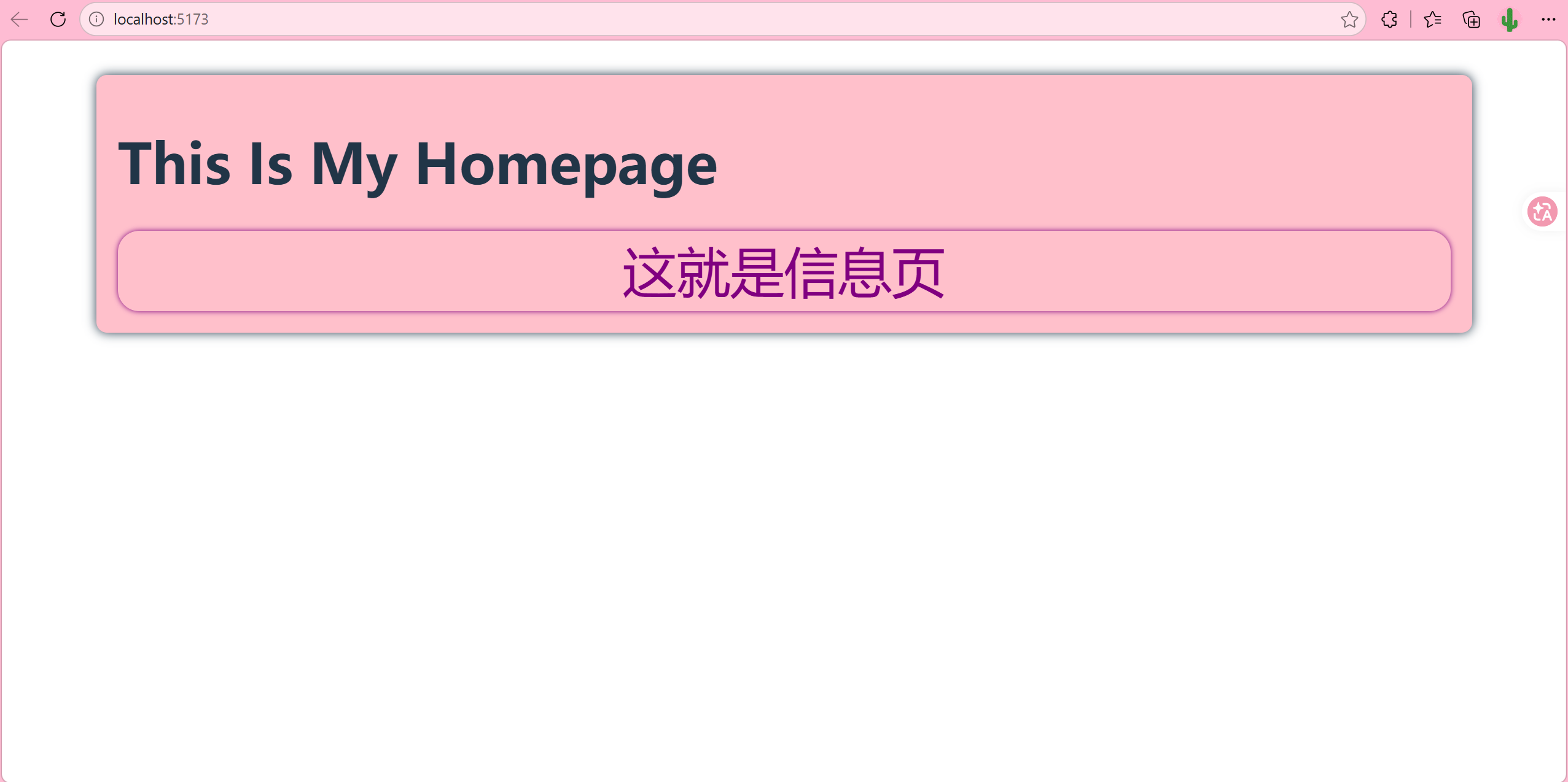
一份簡單的樣例
這是我的部分文件樹:
D:
index.html
src
│  App.vue
│  main.ts
│  style.css
│
├─assets
│      vue.svg
│
└─components
        IsMe.vue
我將 IsMe.vue 拼圖插入到 App.vue 中,
IsMe.vue:
<script setup lang="ts">
defineOptions({ name: 'personPage' });
</script>

<template>
	<div class="background">
		<h1>This Is My Homepage</h1>
		<div class="inf">這就是信息頁</div>
	</div>
</template>

<style scoped>
.background {
	background-color: pink;
	box-shadow: 0 0 10px;
	border-radius: 10px;
	padding: 20px;
}

.background h1 {
	text-align: left;
}

.inf {
	box-shadow: 0 0 5px;
	color: purple;
	font-size: 50px;
	border-radius: 20px;
}
</style>
App.vue
<script setup lang="ts">
import PersonPage from './components/IsMe.vue';
</script>

<template>
	<PersonPage /> <!--在這裏插入IsMe.vue組件-->
</template>

<style scoped></style>
import是把組件模塊引入<PersonPage />是使用組件- 在
<script setup>中 import 後可以直接使用,不需要額外註冊
index.html
<!doctype html>
<html lang="en">
	<head>
		<meta charset="UTF-8" />
		<link rel="icon" type="image/svg+xml" href="/vite.svg" />
		<meta name="viewport" content="width=device-width, initial-scale=1.0" />
		<title>vue</title>
	</head>
	<body>
		<div id="app"></div> <!--在這裏插入App.vue組件-->
		<script type="module" src="/src/main.ts"></script>
	</body>
</html>
這裏的 #app 只是一個掛載容器。
真正的頁面結構全部來自 Vue。
總結
Vue3 的工作流程就是:
- 寫小積木(Components)。
- 在大積木裏組裝小積木(App.vue)。
- 通過
main.ts把大積木掛到index.html。
像這樣拼積木,一份項目就拼出來了
