

1. DropdownMenu觸發AlertDialog後頁面無法點擊
是因為點擊AlertDialog的確定按鈕後後body標籤會被添加style="pointer-events: none;"導致頁面無法點擊
怎樣解決?
根據 I can't click anywhere after using alert dialog. #468 將DropdownMenu設置modal={false}即可避免這種情況
2. 用函數形式觸發dialog或者popover等
shadcn給的demo都是用類似於DialogTrigger的組件方式去觸發的。
<Dialog>
  <DialogTrigger>Open</DialogTrigger>
  <DialogContent>
    <DialogHeader>
      <DialogTitle>Are you absolutely sure?</DialogTitle>
      <DialogDescription>
        This action cannot be undone. This will permanently delete your account
        and remove your data from our servers.
      </DialogDescription>
    </DialogHeader>
  </DialogContent>
</Dialog>
有沒有函數觸發dialog等顯示隱藏的方法?
搜索,feat: function to trigger open/close dialog #386
const [open, setOpen] = useState(false);

return <Dialog open={open} onOpenChange={setOpen} />
其他popover等都可以用這種方式觸發
3. popover類似於antd的placement屬性控制其顯示位置
popover placement #2900
使用side和align屬性來控制其位置
小結:
上述兩個問題都將我們帶到了radix-ui Primitives 文檔 ,因為shadcn是基於radix的,所以props信息還是得查看radix文檔
4. 報錯:Warning: validateDOMNesting(...): <button> cannot appear as a descendant of <button>
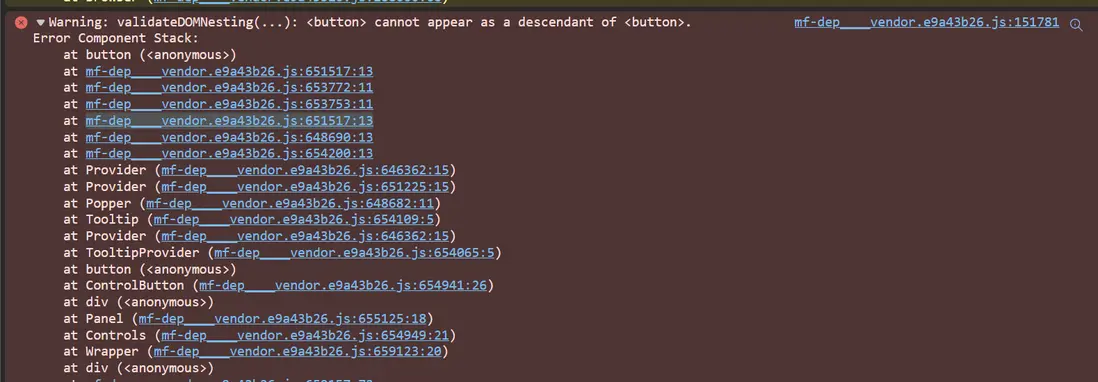
審查元素
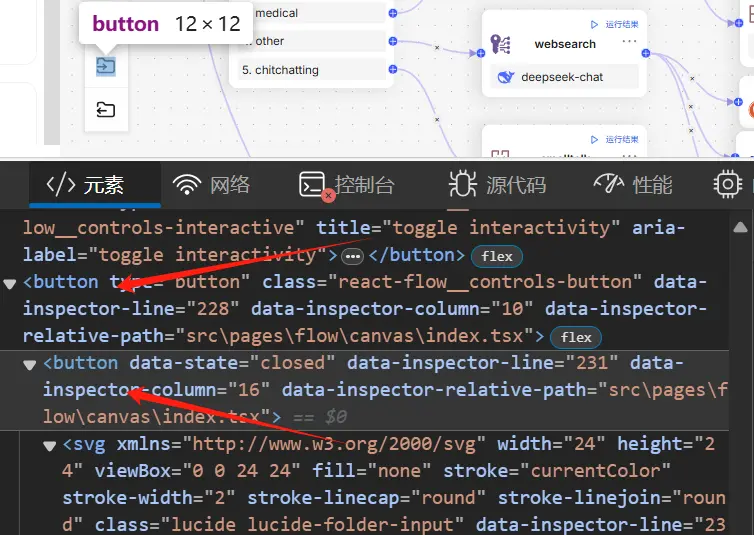
找到問題代碼:
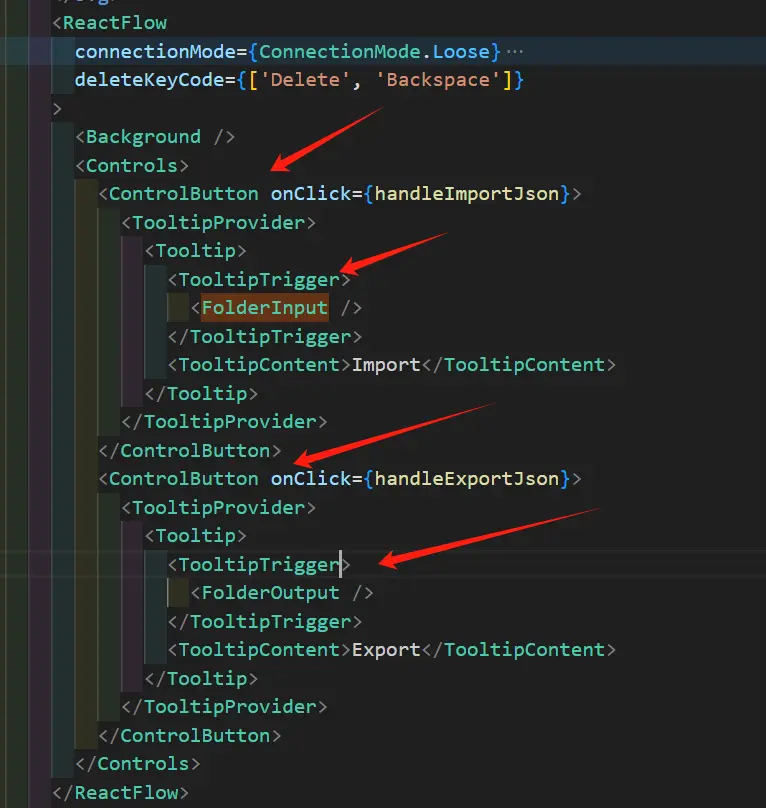
因為button內嵌了button導致的問題
解決辦法:
Dialog component - validateDOMNesting(...): <button> cannot appear as a descendant of <button> #1102
          <ControlButton onClick={handleImportJson}>
            <TooltipProvider>
              <Tooltip>
                <TooltipTrigger asChild> // 增加asChild讓TooltipTrigger不渲染為一個節點
                  <FolderInput />
                </TooltipTrigger>
                <TooltipContent>Import</TooltipContent>
              </Tooltip>
            </TooltipProvider>
          </ControlButton>
5. 怎樣將FormField拆分為一個獨立的組件?
為了複用,或者文件過大需要將FormField拆分為一個獨立的組件
export default function ChunkMethodCard() {
  const { t } = useTranslate('knowledgeConfiguration');
  const form = useFormContext(); // 這裏很關鍵

  return (
    <Card className="border-0 p-6 mb-8 bg-colors-background-inverse-weak flex">
      <div className="w-2/5">
        <FormField
          control={form.control}
          name="parser_id"
          render={({ field }) => (
            <FormItem>
              <FormLabel>{t('chunkMethod')}</FormLabel>
              <Select onValueChange={field.onChange} defaultValue={field.value}>
                <FormControl>
                  <SelectTrigger className="bg-colors-background-inverse-weak">
                    <SelectValue placeholder="Select a verified email to display" />
                  </SelectTrigger>
                </FormControl>
                <SelectContent>
                  <SelectItem value="m@example.com">m@example.com</SelectItem>
                  <SelectItem value="m@google.com">m@google.com</SelectItem>
                  <SelectItem value="m@support.com">m@support.com</SelectItem>
                </SelectContent>
              </Select>
              <FormMessage />
            </FormItem>
          )}
        />
      </div>
      <CategoryPanel chunkMethod=""></CategoryPanel>
    </Card>
  );
}
參考:
Properly divide Form components into reusable subcomponents #2781
6. 使用DialogFooter內的Btton提交表單
Button並沒有出現在form裏,怎樣提交表單?
Compose Dialog with Form #732
7. 限制Data Table的column寬度
設置列的最大寬度讓其超過最大寬度省略顯示
Data Table ignoring column size #2854
8. 動態表單
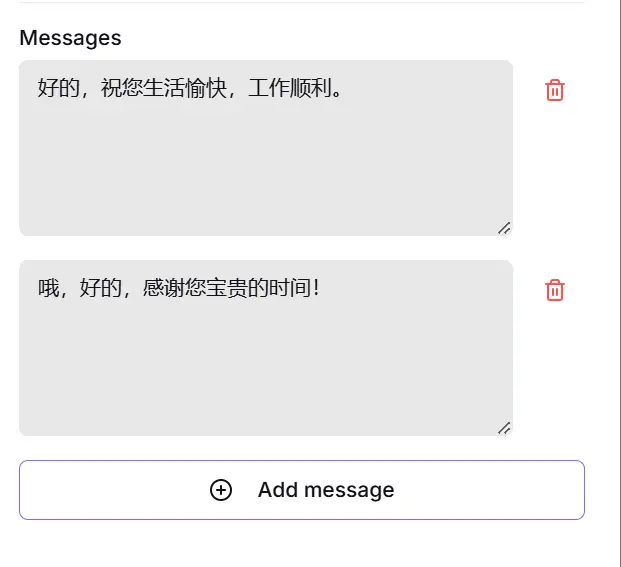
類似於上圖的動態表單,新增的時候必須append(" ")如果是""則無法新增
            <Button
              type="button"
              variant="outline"
              onClick={() => append(' ')} // "" will cause the inability to add, refer to: https://github.com/orgs/react-hook-form/discussions/8485#discussioncomment-2961861
              className="w-full mt-4"
            >
              <PlusCircle className="mr-2 h-4 w-4" />
              {t('flow.addMessage')}
            </Button>
詳細代碼:
Feat: Render MessageForm with shadcn-ui. #3221
參考:
append on useFieldArray #8485
9. react-hook-form 表單第一次change isDirty仍為false
"react-hook-form": "^7.53.1",
isDirty用來標識表單是手動觸發還是由form.reset()等方式觸發,但是在第一次手動change表單的時候isDirty為false,這個時候可以結合dirtyFields字段進行區別,對於watch函數也可以結合name區別
  useEffect(() => {
    const subscription = form?.watch((value, { name, type, values }) => {
      if (id && name) { // 只監聽手動觸發表單的變化,第一次手動觸發表單change的時候,form?.formState.isDirty仍為false,所以只好用name作區分
        let nextValues: any = value;
        updateNodeForm(id, nextValues);
      }
    });
    return () => subscription?.unsubscribe();
  }, [form, form?.watch, id, operatorName, updateNodeForm]);
參考:
issue: isDirty and dirtyFields are not marked as dirty on first submit of an array #10198
issue: isDirty is not set on first action #11225
10. data table裏的複選框無法點擊,刪除確認框也無法顯示
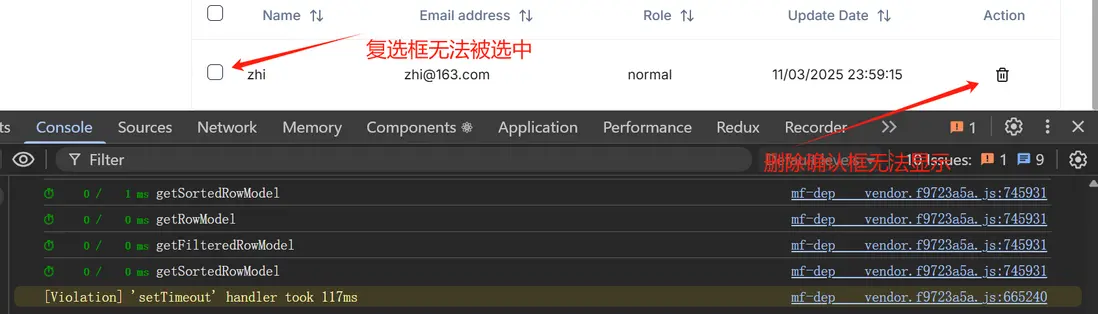
打開控制枱可以看到調試模式(debugTable: true)下的data table 一直在輸出,用react devtools 可以看到當前的table組件不斷地在刷新。
參考 How do I stop infinite rendering loops? 原來是columns做的怪,將columns包在useMemo中就好了。
11. dialog 打開後控制枱報錯,導致事件無法被觸發
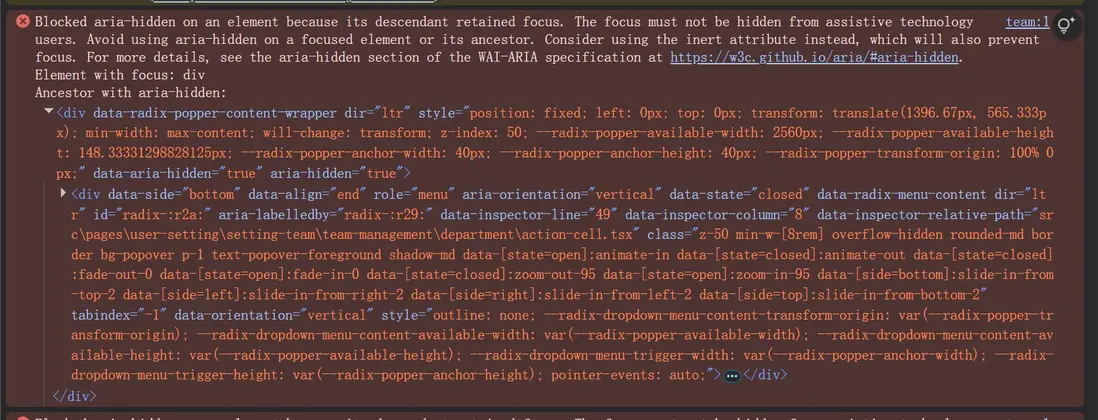
最終使用了Combobox in a form in a dialog isn't working. #1748老哥的辦法解決了問題。
12. DropdownMenuItem無法觸發dialog
Unable to use Dialog inside a DropdownMenu ( with DialogTrigger or without it ) #2497
13. <Input type="number"/> 輸出的數據仍然為string
const profileFormSchema = z.object({
  age: z.coerce.number().min(18), // Zod will coerce age to a number.
})

// ...

<FormField
  control={form.control}
  name="age"
  render={({ field }) => (
    <FormItem>
      <FormLabel>Age</FormLabel>
      <Input type="number" placeholder="21" {...field} /> // <---- type is number.
      <FormDescription>
        You must be at least 18 years old to use this service.
      </FormDescription>
      <FormMessage />
    </FormItem>
  )}
/>
react hook forms, number input #421
13. 表單不存在 但是定義了schema 會導致表單無法提交
  const FormSchema = z.object({
    parser_id: z
      .string()
      .min(1, {
        message: 'namePlaceholder',
      })
      .trim(),
    parser_config: z.object({
      pages: z.array( // 比如這裏定義了pages,但是表單沒有定義,會導整個表單無法觸發submit
        z.object({ form: z.coerce.number(), to: z.coerce.number() }),
      ),
    }),
  });
14. zod 自定義校驗規則
  const FormSchema = z.object({
    meta: z
      .string()
      .min(1, {
        message: t('knowledgeDetails.pleaseInputJson'),
      })
      .trim()
      .refine( // 自定義
        (value) => {
          try {
            JSON.parse(value);
            return true;
          } catch (error) {
            return false;
          }
        },
        { message: t('knowledgeDetails.pleaseInputJson') },
      ),
  });
Custom Schema Validation in TypeScript with Zod
15. 在popover內部關閉它
How to close Radix/Shadcn popover from inside of it
16. A component is changing an uncontrolled input to be controlled
React error "uncontrolled input" in forms (demo repo provided) #410
對於必填的字段需要給默認值,schema也需要給min
name: z.string().trim().min(1),17. useFieldArray 不支持字符串數組
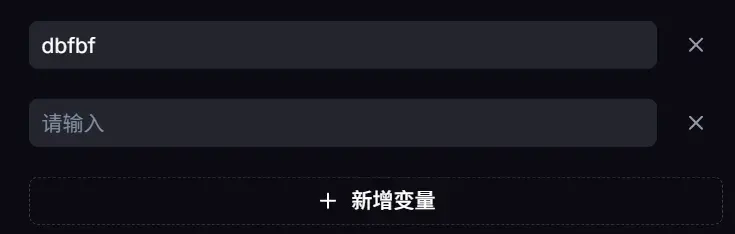
我想説實現上述效果,每行只有一個字段,我覺得不需要再給FormField name加上個字段value,但是事與願違。只好自己來回轉換。
schema
    options: z
      .array(z.object({ value: z.string().or(z.boolean()).or(z.number()) }))
      .optional(),
component
    <div className="space-y-5">
      {fields.map((field, index) => {
        const typeField = `${name}.${index}.value`; // 必須加上value
        return (
          <div key={field.id} className="flex items-center gap-2">
            <FormField
              control={form.control}
              name={typeField}
              render={({ field }) => (
                <FormItem className="flex-1">
                  <FormControl>
                    <Input
                      {...field}
                      placeholder={t('common.pleaseInput')}
                    ></Input>
                  </FormControl>
                  <FormMessage />
                </FormItem>
              )}
            />
            <Button variant={'ghost'} onClick={() => remove(index)}>
              <X className="text-text-sub-title-invert " />
            </Button>
          </div>
        );
      })}
      <BlockButton
        onClick={() => append({ value: '' })}
        variant={'outline'}
        type="button"
      >
        {t('flow.addVariable')}
      </BlockButton>
    </div>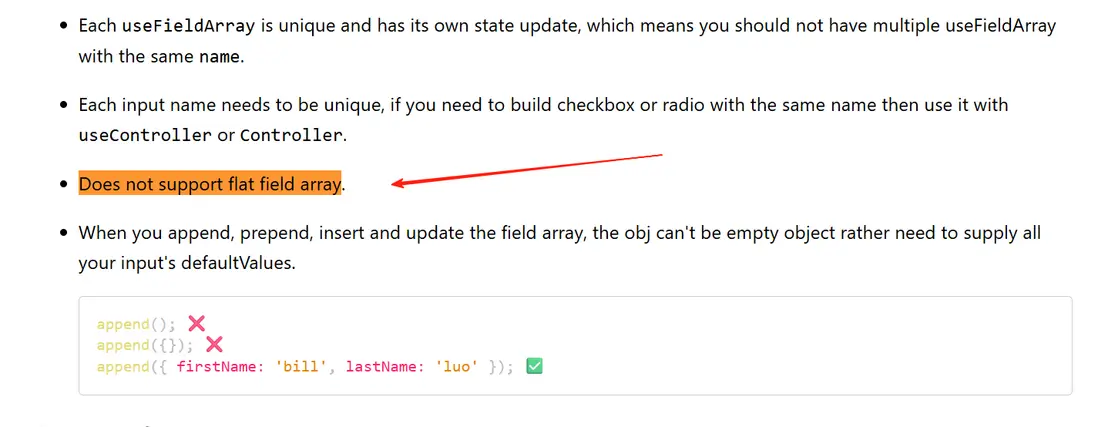
18. react-hook-form@7.53.1 useFieldArray append 不會觸發watch回調
只有在表單中改變數據才會觸發watch回調,issue: watch is not called when appending first item to Field Array #12370 指出了這個問題,升級到最新即可解決。
19. form 定義的字段沒有設置初始值導致表單卡死
  const FormSchema = z.object({
    enablePrologue: z.boolean().optional(),
    prologue: z.string().trim().optional(),
    mode: z.string(),
    query: z // 定義為可選數組
      .array(
        z.object({
          key: z.string(),
          type: z.string(),
          value: z.string(),
          optional: z.boolean(),
          name: z.string(),
          options: z.array(z.union([z.number(), z.string(), z.boolean()])),
        }),
      )
      .optional(),
  });
tsx
        {/* Create a hidden field to make Form instance record this */}
        <FormField
          control={form.control}
          name={'query'}
          render={() => <div></div>}
        />
當query初始值不定義的時候直接導致表單卡死,頁面也卡死。
解決:
  const form = useForm({
    defaultValues: {
      enablePrologue: true,
      prologue: t('chat.setAnOpenerInitial'),
      mode: AgentDialogueMode.Conversational,
      query: [], // 給定初始值
    },
    resolver: zodResolver(FormSchema),
  });
20. useFieldArray新增刪除一行並不會導致items數組引用的改變
  const { fields, remove, append } = useFieldArray({
    name: "items",
    control: form.control,
  });
這個時候依賴items數組的hooks需要注意進行一次淺拷貝。



