

前言
之前寫過使用springsecurity搭建認證服務SpringSecurity+Oauth2:密碼授權模式獲取Token(MongoDB+JWT),這篇則寫關於如何搭建資源服務,只有驗證通過的token才能訪問。
操作
1、配置Pom.xml引用spring-cloud-security和oauth2的jar包
2、配置主類@EnableResourceServer註解,開啓資源服務
3、創建JWTTokenStoreConfig類,配置和解析token
4、創建ResourceServerConfiguration類配置訪問權限以及自定義異常
5、自定義springsecurity異常信息(注意:認證和資源服務的自定義異常是統一的沒有區別,下面會説明)
1、配置Pom.xml引用spring-cloud-security和oauth2的jar包
<dependency>
    <groupId>org.springframework.cloud</groupId>
    <artifactId>spring-cloud-starter-oauth2</artifactId>
    <version>2.2.5.RELEASE</version>
</dependency>
<dependency>
    <groupId>org.springframework.cloud</groupId>
    <artifactId>spring-cloud-security</artifactId>
    <version>2.2.5.RELEASE</version>
</dependency>
2、配置主類@EnableResourceServer註解,開啓資源服務
@SpringBootApplication
// 資源保護服務
@EnableResourceServer
// 服務發現
@EnableDiscoveryClient
@EnableFeignClients
@RefreshScope
public class Xxxx {
    @Bean
    public BCryptPasswordEncoder passwordEncoder() {
        return new BCryptPasswordEncoder();
    }

    public static void main(String[] args) {
        SpringApplication.run(Xxxx.class, args);
    }
}
3、創建JWTTokenStoreConfig類,配置和解析token
@Configuration
public class JWTTokenStoreConfig {

    @Autowired
    private ServiceConfig serviceConfig;

    //JWT
    @Bean
    public TokenStore tokenStore() {
        return new JwtTokenStore(jwtAccessTokenConverter());
    }

    //JWT
    @Bean
    @Primary
    public DefaultTokenServices tokenServices() {
        DefaultTokenServices defaultTokenServices = new DefaultTokenServices();
        defaultTokenServices.setTokenStore(tokenStore());
        defaultTokenServices.setSupportRefreshToken(true);
        return defaultTokenServices;
    }


    //JWT
    // 從配置文件中獲取jwt key,然後自己解析token是否有效,
    @Bean
    public JwtAccessTokenConverter jwtAccessTokenConverter() {
        JwtAccessTokenConverter converter = new JwtAccessTokenConverter();
        converter.setSigningKey(serviceConfig.getJwtSigningKey());
        return converter;
    }

}
4、創建ResourceServerConfiguration類配置訪問權限以及自定義異常
@Configuration
public class ResourceServerConfiguration extends ResourceServerConfigurerAdapter{

    @Override
    public void configure(ResourceServerSecurityConfigurer resources) {

        OAuth2AuthenticationEntryPoint authenticationEntryPoint = new OAuth2AuthenticationEntryPoint();
        authenticationEntryPoint.setExceptionTranslator(new CustomOAuthWebResponseExceptionTranslator());
        resources.authenticationEntryPoint(authenticationEntryPoint);

        OAuth2AccessDeniedHandler oAuth2AccessDeniedHandler = new OAuth2AccessDeniedHandler();
        oAuth2AccessDeniedHandler.setExceptionTranslator(new CustomOAuthWebResponseExceptionTranslator());
        resources.accessDeniedHandler(oAuth2AccessDeniedHandler);
    }

    @Override
    public void configure(HttpSecurity http) throws Exception {
        http.authorizeRequests()
                // 放開/sendRegisterEmailMessage,不需要校驗token
                .antMatchers("/websocket/**").permitAll()
                .antMatchers("/info/**").permitAll()
                .anyRequest().authenticated();
    }
}5、自定義springsecurity異常信息
創建CustomOAuthException類
@JsonSerialize(using = CustomOAuthExceptionSerializer.class)
public class CustomOAuthException extends OAuth2Exception {
    private static Logger log = LoggerFactory.getLogger(CustomOAuthException.class);

    private String oAuth2ErrorCode;

    private int httpErrorCode;

    public CustomOAuthException(String msg, String oAuth2ErrorCode, int httpErrorCode) {
        super(msg);
        this.oAuth2ErrorCode = oAuth2ErrorCode;
        this.httpErrorCode = httpErrorCode;
    }

}創建CustomOAuthExceptionSerializer類
public class CustomOAuthExceptionSerializer extends StdSerializer<CustomOAuthException> {
    private static Logger log = LoggerFactory.getLogger(CustomOAuthExceptionSerializer.class);

    protected CustomOAuthExceptionSerializer() {
        super(CustomOAuthException.class);
    }

    @Override
    public void serialize(CustomOAuthException e, JsonGenerator generator, SerializerProvider serializerProvider) throws IOException {
        generator.writeStartObject();
        HttpServletRequest request = ((ServletRequestAttributes) RequestContextHolder.getRequestAttributes()).getRequest();
        generator.writeObjectField("error",e.getOAuth2ErrorCode());
        generator.writeObjectField("status", e.getHttpErrorCode());
        generator.writeObjectField("message", e.getMessage());
        generator.writeObjectField("path", request.getServletPath());
        generator.writeObjectField("timestamp", (new Date()).getTime());
        if (e.getAdditionalInformation() != null) {
            for (Map.Entry<String, String> entry : e.getAdditionalInformation().entrySet()) {
                String key = entry.getKey();
                String add = entry.getValue();
                generator.writeObjectField(key, add);
            }
        }
        generator.writeEndObject();
    }
}創建CustomOAuthWebResponseExceptionTranslator類
@Component
public class CustomOAuthWebResponseExceptionTranslator extends DefaultWebResponseExceptionTranslator {
    private ThrowableAnalyzer throwableAnalyzer = new DefaultThrowableAnalyzer();
    private static Logger log = LoggerFactory.getLogger(CustomOAuthWebResponseExceptionTranslator.class);

    @Override
    public ResponseEntity<OAuth2Exception> translate(Exception e) throws Exception {

        ResponseEntity<OAuth2Exception> translate = super.translate(e);
        OAuth2Exception body = translate.getBody();

        CustomOAuthException customOauthException = new CustomOAuthException(body.getMessage(),body.getOAuth2ErrorCode(),body.getHttpErrorCode());
        ResponseEntity<OAuth2Exception> response = new ResponseEntity<>(customOauthException, translate.getHeaders(), translate.getStatusCode());
        return response;
    }
}
最後如果用户名或密碼錯誤則返回下面的錯誤信息:
{
  timestamp: 1658149719489,
  path: '/oauth/token',
  error: 'invalid_request',
  message: '用户名或密碼錯誤'
  status: 400
}
如果token錯誤則返回下面的錯誤信息:
{
  timestamp: 1658149719489,
  path: '/oauth/token',
  error: 'invalid_request',
  message: 'token錯誤或過期'
  status: 400
}
如果refresh_token錯誤則返回下面的錯誤信息:
{
  timestamp: 1658149719489,
  path: '/oauth/token',
  error: 'invalid_request',
  message: 'refresh_token錯誤或過期'
  status: 400
}
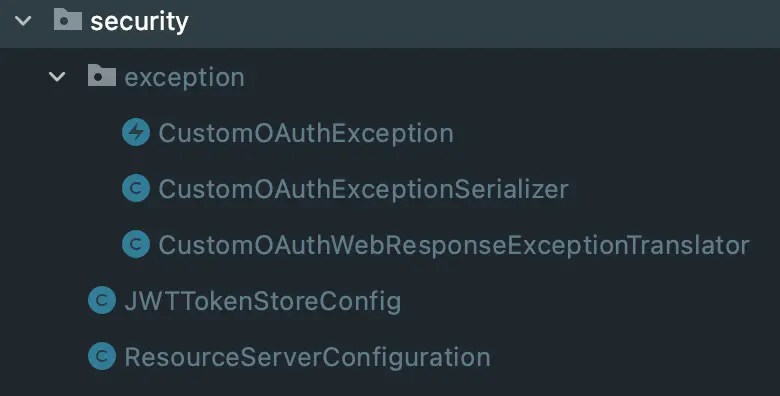
資源服務的目錄結構
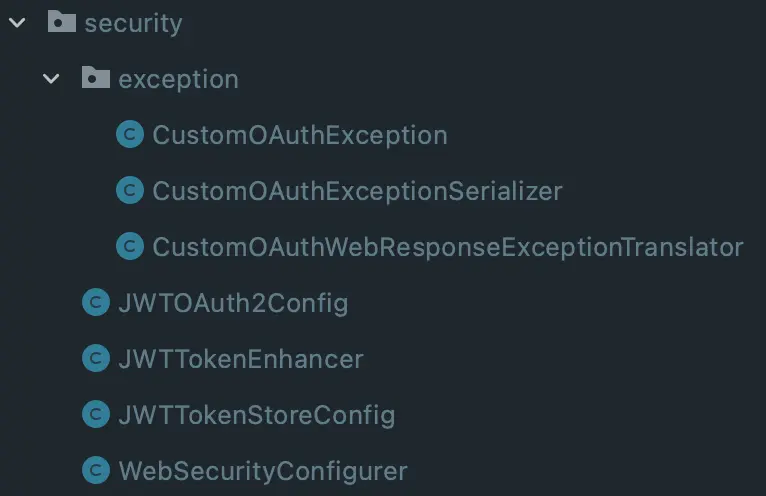
認證服務的目錄結構
總結
1、springsecurity 自帶的異常信息不符合自己的需求的時候就要自定義返回錯誤信息
2、錯誤信息返回的錯誤碼如果是401那麼照樣返回401,如果覺得401不太好可以自行設置
引用
SpringBoot Security的自定義異常