

大家好,我是半夏之沫 😁😁 一名金融科技領域的JAVA系統研發😊😊
我希望將自己工作和學習中的經驗以最樸實,最嚴謹的方式分享給大家,共同進步👉💓👈
👉👉👉👉👉👉👉👉💓寫作不易,期待大家的關注和點贊💓👈👈👈👈👈👈👈👈
👉👉👉👉👉👉👉👉💓關注微信公眾號【技術探界】 💓👈👈👈👈👈👈👈👈
前言
LocalDate,LocalTime和LocalDateTime是JDK1.8新增日期處理類,能夠以更快更優雅且線程安全的方式實現日期處理。DateTimeFormatter可以對基於LocalDate,LocalTime和LocalDateTime獲取到的日期的格式進行自定義,且線程安全。本篇文章將對其常見用法進行介紹。
正文
一. LocalDate,LocalTime和LocalDateTime的日期操作
獲取當前日期時間
LocalDate,LocalTime和LocalDateTime提供了靜態方法now()用於獲取當前日期時間。
LocalDate date = LocalDate.now();
LocalTime time = LocalTime.now();
LocalDateTime dateTime = LocalDateTime.now();
System.out.println("date: " + date.toString());
System.out.println("time: " + time.toString());
System.out.println("date time: " + dateTime.toString());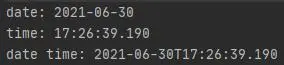
日期時間格式化
使用DateTimeFormatter可以對獲取到的日期時間按照預置的格式進行格式化。
格式化LocalDate。
DateTimeFormatter dateFormatter1 = DateTimeFormatter.ofPattern("yyyy-MM-dd");
DateTimeFormatter dateFormatter2 = DateTimeFormatter.ofPattern("yyyyMMdd");
DateTimeFormatter dateFormatter3 = DateTimeFormatter.ofPattern("yyyy.MM.dd");
DateTimeFormatter dateFormatter4 = DateTimeFormatter.ofPattern("yyyy年MM月dd日");
LocalDate date = LocalDate.now();
System.out.println("date -> " + date.toString());
String formatDate1 = dateFormatter1.format(date);
String formatDate2 = dateFormatter2.format(date);
String formatDate3 = dateFormatter3.format(date);
String formatDate4 = dateFormatter4.format(date);
System.out.println("yyyy-MM-dd -> " + formatDate1);
System.out.println("yyyyMMdd -> " + formatDate2);
System.out.println("yyyy.MM.dd -> " + formatDate3);
System.out.println("yyyy年MM月dd日 -> " + formatDate4);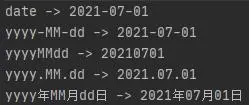
格式化LocalTime。
DateTimeFormatter timeFormatter1 = DateTimeFormatter.ofPattern("HH:mm:ss");
DateTimeFormatter timeFormatter2 = DateTimeFormatter.ofPattern("HHmmss");
DateTimeFormatter timeFormatter3 = DateTimeFormatter.ofPattern("HH mm ss");
DateTimeFormatter timeFormatter4 = DateTimeFormatter.ofPattern("HH時mm分ss秒");
LocalTime time = LocalTime.now();
System.out.println("time -> " + time.toString());
String formatTime1 = timeFormatter1.format(time);
String formatTime2 = timeFormatter2.format(time);
String formatTime3 = timeFormatter3.format(time);
String formatTime4 = timeFormatter4.format(time);
System.out.println("HH:mm:ss -> " + formatTime1);
System.out.println("HHmmss -> " + formatTime2);
System.out.println("HH mm ss -> " + formatTime3);
System.out.println("HH時mm分ss秒 -> " + formatTime4);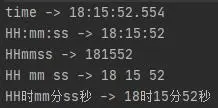
格式化LocalDateTime。
DateTimeFormatter dateTimeFormatter1 = DateTimeFormatter.ofPattern("yyyy-MM-dd HH:mm:ss");
DateTimeFormatter dateTimeFormatter2 = DateTimeFormatter.ofPattern("yyyyMMddHHmmss");
DateTimeFormatter dateTimeFormatter3 = DateTimeFormatter.ofPattern("yyyy.MM.dd HH:mm:ss");
DateTimeFormatter dateTimeFormatter4 = DateTimeFormatter.ofPattern("yyyy年MM月dd日HH時mm分ss秒");
LocalDateTime dateTime = LocalDateTime.now();
System.out.println("date time -> " + dateTime);
String formatDateTime1 = dateTimeFormatter1.format(dateTime);
String formatDateTime2 = dateTimeFormatter2.format(dateTime);
String formatDateTime3 = dateTimeFormatter3.format(dateTime);
String formatDateTime4 = dateTimeFormatter4.format(dateTime);
System.out.println("yyyy-MM-dd HH:mm:ss -> " + formatDateTime1);
System.out.println("yyyyMMddHHmmss -> " + formatDateTime2);
System.out.println("yyyy.MM.dd HH:mm:ss -> " + formatDateTime3);
System.out.println("yyyy年MM月dd日HH時mm分ss秒 -> " + formatDateTime4);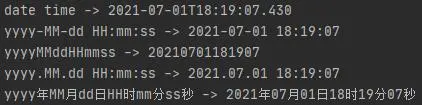
使用DateTimeFormatter也可以讀取預置格式的日期時間字符串。
DateTimeFormatter dateTimeFormatter = DateTimeFormatter.ofPattern("yyyy-MM-dd HH:mm:ss");
TemporalAccessor parsedDateTime = dateTimeFormatter.parse("2021-07-01 18:00:00");
LocalDateTime dateTime = LocalDateTime.from(parsedDateTime);
日期時間之間的轉換
LocalDate,LocalTime和LocalDateTime之間可以方便的進行轉換。
LocalDateTime dateTime = LocalDateTime.now();
LocalDate date = dateTime.toLocalDate();
LocalTime time = dateTime.toLocalTime();
LocalDateTime gettedDateTime = LocalDateTime.of(date, time);
System.out.println("date time: " + dateTime.toString());
System.out.println("date: " + date.toString());
System.out.println("time: " + time.toString());
System.out.println("getted date time: " + gettedDateTime.toString());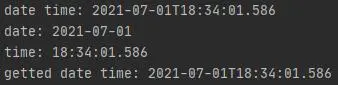
LocalDate,LocalTime和LocalDateTime提供了靜態方法of()來構造自身,以LocalDateTime為例,方法簽名如下。
public static LocalDateTime of(int year, Month month, int dayOfMonth, int hour, int minute)
public static LocalDateTime of(int year, Month month, int dayOfMonth, int hour, int minute, int second)
public static LocalDateTime of(int year, Month month, int dayOfMonth, int hour, int minute, int second, int nanoOfSecond)
public static LocalDateTime of(int year, int month, int dayOfMonth, int hour, int minute)
public static LocalDateTime of(int year, int month, int dayOfMonth, int hour, int minute, int second)
public static LocalDateTime of(int year, int month, int dayOfMonth, int hour, int minute, int second, int nanoOfSecond)
public static LocalDateTime of(LocalDate date, LocalTime time)
獲取某天在年(月,周)的第幾天
LocalDate和LocalDateTime可以方便的獲取某天在年(月,周)的第幾天。
LocalDate date = LocalDate.now();
LocalDateTime dateTime = LocalDateTime.now();

int dateDayOfYear = date.getDayOfYear();
int dateTimeDayOfYear = dateTime.getDayOfYear();
System.out.println("date day of year: " + dateDayOfYear);
System.out.println("date time day of year: " + dateTimeDayOfYear);

int dateDayOfMonth = date.getDayOfMonth();
int dateTimeDayOfMonth = dateTime.getDayOfMonth();
System.out.println("date day of month: " + dateDayOfMonth);
System.out.println("date time day of month: " + dateTimeDayOfMonth);

DayOfWeek dateDayOfWeek = date.getDayOfWeek();
DayOfWeek dateTimeDayOfWeek = dateTime.getDayOfWeek();
System.out.println("date day of week: " + dateDayOfWeek.getValue());
System.out.println("date time day of week: " + dateTimeDayOfWeek.getValue());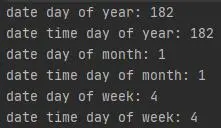
LocalDate和LocalDateTime可以獲取某月一共有多少天,獲取方式如下。
LocalDate date = LocalDate.now();
LocalDate lastDayOfMonth = date.with(TemporalAdjusters.lastDayOfMonth());
System.out.println("days of month: " + lastDayOfMonth.getDayOfMonth());

LocalDateTime dateTime = LocalDateTime.now();
LocalDateTime lastDateTimeOfMonth = dateTime.with(TemporalAdjusters.lastDayOfMonth());
System.out.println("days of month: " + lastDateTimeOfMonth.getDayOfMonth());
日期時間的加減
LocalDate,LocalTime和LocalDateTime可以實現對日期時間的加減,以LocalDate為例進行説明。
LocalDate date = LocalDate.of(2021, 1, 1);
LocalDate fiveDaysAgo = date.minus(5, ChronoUnit.DAYS);
LocalDate fiveDaysLater = date.plus(5, ChronoUnit.DAYS);
System.out.println("today: " + date.toString());
System.out.println("five days ago: " + fiveDaysAgo.toString());
System.out.println("five days later: " + fiveDaysLater.toString());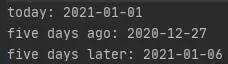
日期時間的比較
LocalDate,LocalTime和LocalDateTime可以實現日期時間之間的比較,以LocalDate為例進行説明。
LocalDate date = LocalDate.of(2021, 1, 1);
LocalDate fiveDaysAgo = date.minus(5, ChronoUnit.DAYS);
LocalDate fiveDaysLater = date.plus(5, ChronoUnit.DAYS);

System.out.println("compare result bwtween date and fiveDaysAgo: " + date.compareTo(fiveDaysAgo));
System.out.println("compare result bwtween date and fiveDaysLater: " + date.compareTo(fiveDaysLater));
System.out.println("compare result bwtween date and date: " + date.compareTo(date));
比較的結果為兩個日期時間的差值,通過判斷比較結果的正負,可以判斷日期時間的先後。
二. 為什麼線程安全
首先説明一下為什麼SimpleDateFormat線程不安全。已知SimpleDateFormat是用於格式化和分析Date的類,當SimpleDateFormat對象被聲明為靜態變量時,SimpleDateFormat對象的使用是線程不安全的。以SimpleDateFormat的format()方法為例,看一下其實現。
format()方法最終會調用到如下實現。
private StringBuffer format(Date date, StringBuffer toAppendTo,
                            FieldDelegate delegate) {
    // 調用了線程不安全的Calendar對象
    calendar.setTime(date);

    boolean useDateFormatSymbols = useDateFormatSymbols();

    for (int i = 0; i < compiledPattern.length; ) {
        int tag = compiledPattern[i] >>> 8;
        int count = compiledPattern[i++] & 0xff;
        if (count == 255) {
            count = compiledPattern[i++] << 16;
            count |= compiledPattern[i++];
        }

        switch (tag) {
        case TAG_QUOTE_ASCII_CHAR:
            toAppendTo.append((char)count);
            break;

        case TAG_QUOTE_CHARS:
            toAppendTo.append(compiledPattern, i, count);
            i += count;
            break;

        default:
            subFormat(tag, count, delegate, toAppendTo, useDateFormatSymbols);
            break;
        }
    }
    return toAppendTo;
}calendar是SimpleDateFormat從父類DateFormat繼承的Calendar對象,如果將SimpleDateFormat對象聲明為靜態變量,則會存在多個線程同時使用SimpleDateFormat對象,因此多個線程同時調用SimpleDateFormat的format()方法時,會導致多個線程同時調用Calendar的setTime()方法,線程之間會產生相互影響,線程不安全。下面以一個簡單例子演示一下。
編寫一個PrintDate類並提供printDate()方法用於打印日期,該類有一個SimpleDateFormat類變量。
public class PrintDate {

    private static SimpleDateFormat sdf = new SimpleDateFormat("yyyyMMdd");

    public void printDate(Date date) {
        System.out.println(Thread.currentThread().getName() + " -> " + sdf.format(date));
    }

}
測試方法。
class PrintDateTest {

    private PrintDate printDate;

    @BeforeEach
    public void setUp() {
        printDate = new PrintDate();
    }

    @Test
    void givenMultiThreads_whenPrintDateBySimpleDateFormat_thenThreadUnsafe() {
        ThreadPoolExecutor threadPool = new ThreadPoolExecutor(
                2, 10, 10, TimeUnit.SECONDS, new ArrayBlockingQueue<>(15));
        threadPool.execute(() -> {
            Date date = new Date(121, Calendar.JANUARY, 1);
            Thread.currentThread().setName(date.toString());
            for (int i = 0; i < 50; i++) {
                printDate.printDate(date);
            }
        });
        threadPool.execute(() -> {
            Date date = new Date(121, Calendar.JANUARY, 2);
            Thread.currentThread().setName(date.toString());
            for (int i = 0; i < 50; i++) {
                printDate.printDate(date);
            }
        });
    }

}啓用兩個線程循環50次調用PrintDate的printDate()方法,結果如下所示。
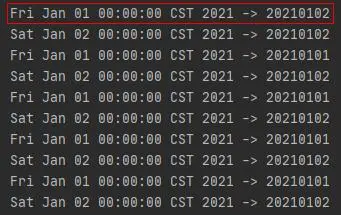
發現存在傳入日期和打印日期不一致的情況。表明了當SimpleDateFormat對象被聲明為靜態變量時,SimpleDateFormat對象的使用是線程不安全的
那麼LocalDate,LocalTime和LocalDateTime為什麼線程安全呢。下面看一下它們的字段簽名。
LocalDate字段簽名。
public final class LocalDate
        implements Temporal, TemporalAdjuster, ChronoLocalDate, Serializable {

    ...

    private final int year;

    private final short month;

    private final short day;

    ...

}LocalTime字段簽名。
public final class LocalTime
        implements Temporal, TemporalAdjuster, Comparable<LocalTime>, Serializable {

    ...

    private final byte hour;

    private final byte minute;

    private final byte second;

    private final int nano;

    ...

}LocalDateTime字段簽名。
public final class LocalDateTime
        implements Temporal, TemporalAdjuster, ChronoLocalDateTime<LocalDate>, Serializable {

    ...

    private final LocalDate date;

    private final LocalTime time;

    ...

}LocalDate,LocalTime和LocalDateTime的表示日期時間的字段簽名為private final,表示它們一經指定日期時間,便不能再被改變。其次,它們對日期時間的更改,都會返回一個新的對象。LocalDate,LocalTime和LocalDateTime的線程安全的實現和String的線程安全的實現是一樣的,String類中存儲字符的數組的簽名也是private final,以及對字符串的操作會返回一個新的字符串對象。
總結
LocalDate,LocalTime和LocalDateTime的使用比Date,SimpleDateFormat和Calendar的使用更方便和安全。善用LocalDate,LocalTime和LocalDateTime,可以使得對日期時間的處理更加優雅。
大家好,我是半夏之沫 😁😁 一名金融科技領域的JAVA系統研發😊😊
我希望將自己工作和學習中的經驗以最樸實,最嚴謹的方式分享給大家,共同進步👉💓👈
👉👉👉👉👉👉👉👉💓寫作不易,期待大家的關注和點贊💓👈👈👈👈👈👈👈👈
👉👉👉👉👉👉👉👉💓關注微信公眾號【技術探界】 💓👈👈👈👈👈👈👈👈


