
Vue源碼解析
推薦可以先去看下總結:vue解析總結
之前我們解析了mini-vue的響應式實現,和虛擬dom庫的實現,現在我們就來解析一下vue內部具體是如何做的,看看它在我們簡易實現上增加了什麼。
準備工作:
首先下載一份vue源代碼 地址:https://github.com/vuejs/vue
這個版本是2.6的,分析這個版本的原因:
- 到目前為止vue3.0正式版還沒有發佈
- 新版本發佈後,現有項目還不會立即升級到3.0,2.x還有很長一段過渡期
如果對3.0有興趣,也可以下下載看看:https://github.com/vuejs/vue-...
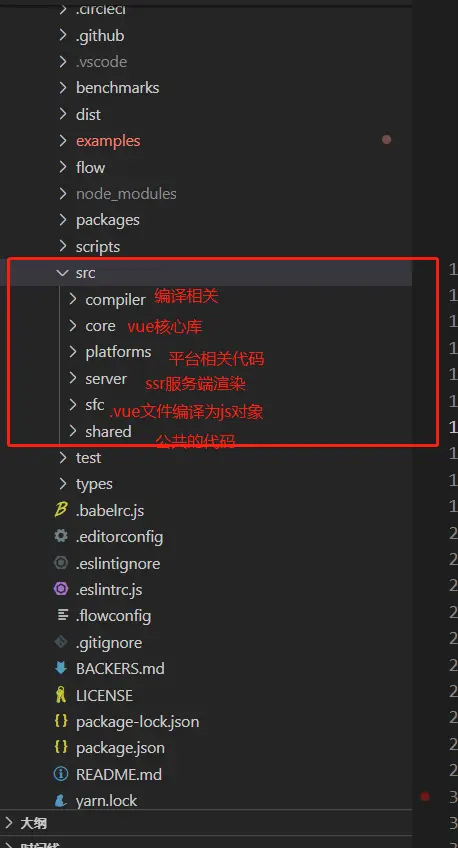
src/platform 文件夾下是 Vue 可以構建成不同平台下使用的庫,目前有 weex 和 web,還有服務器端渲染的庫
這是我們下載下來的一個vue源碼src下代碼目裏結構
代碼裏使用了flow做靜態類檢查
打包工具使用的Rollup,對比webpack更輕量,Webpack 把所有文件當做模塊,Rollup 只處理 js 文件更適合在 Vue.js 這樣的庫中使用,Rollup 打包也不會生成冗餘的代碼。
這裏在做一個調試的輔助工作:
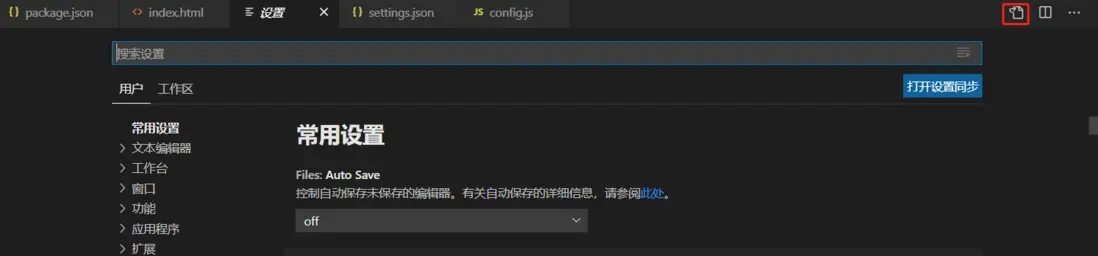
- vscode中打開設置把javascript.validate.enable暫時設置為false,不檢查javascript的語法問題,防止flow報錯。
- 這回源碼裏部分代碼是沒有高亮顯示的,vscode下載一個插件
- Babel javascript開其它就有高亮顯示了
npm i 下載依賴 這裏推薦用淘寶源cnpm 不然有的包下載不下來
然後修改一下 package.json文件scripts中dev命令:
"dev": "rollup -w -c scripts/config.js --sourcemap --environment TARGET:web-full-dev",-w是監聽文件變化,文件變化自動打包
-c設置配置文件
然後設置sourcemap方便調試
最後設置下環境變量web-full-dev,這個意思就是 使用 web平台下 帶編譯器的 dev開發版本
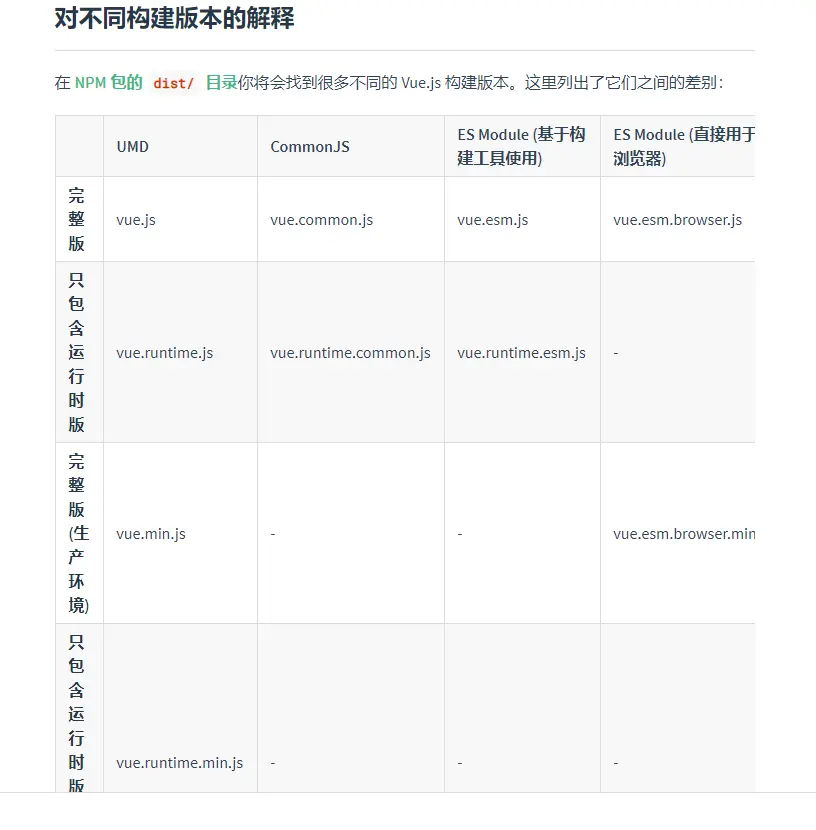
umd是通用版本,默認vue-cli生成項目使用的是vue.runtime.esm.js版本,esm格式被設計成可以靜態分析,所以打包工具可以利用這點來進行tree-shaking搖樹。
注意:*.vue文件中的模板是在構建時預編譯的,最終打包後的結果不需要編譯器,只需要運行時版本即可
我們調試的是 web下帶編譯器(編譯器:用來將模板字符串(new Vue時傳入template選項時需要編譯器把template轉換成render函數)編譯成為 JavaScript 渲染函數的代碼,體積大、效率低)的 dev開發版本也就是web-full-dev
找到config文件,可以看到
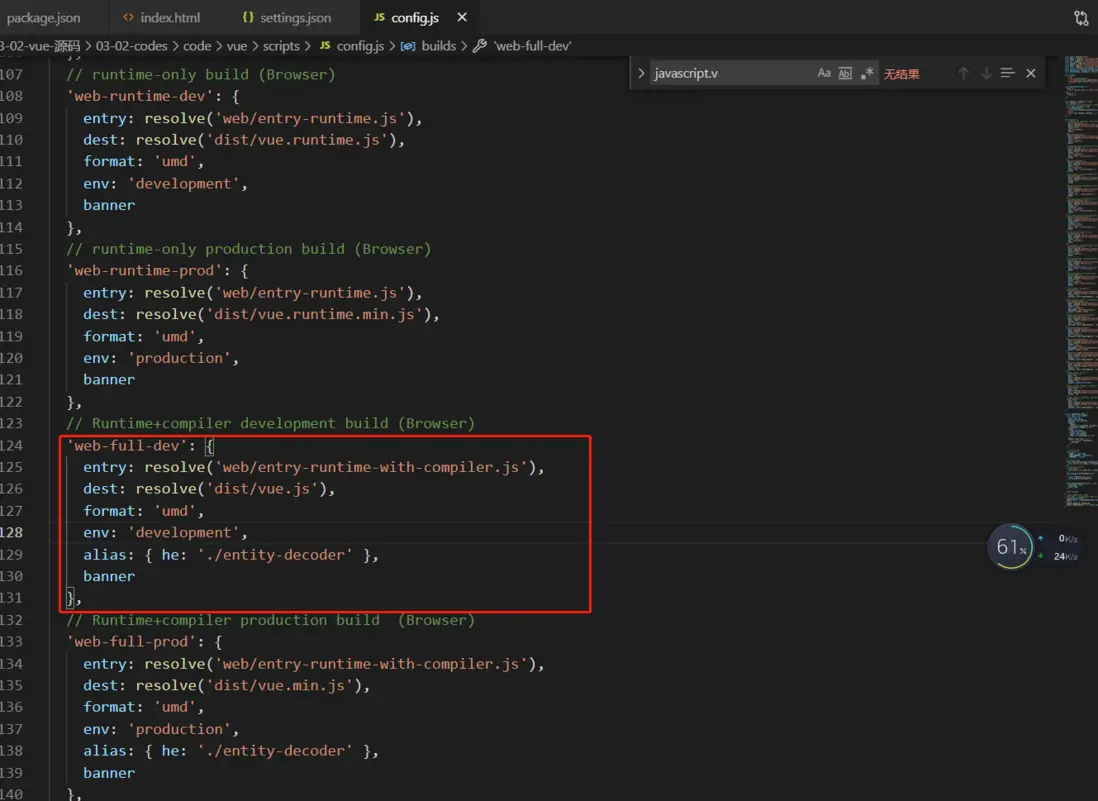
這裏可以看到我們當前版本的入口文件,以及輸出路徑文件。
然後準備工作做好,我們就可以啓動npm run dev,打開examples目錄下子集目錄裏的html進行調試了,或者在它下面新建自己的html.(我這裏是通過serve . 又啓動了一個服務,直接打開文件應該也可以),接下來就要正式進入我們的分析了。
首先根據config.js裏的:
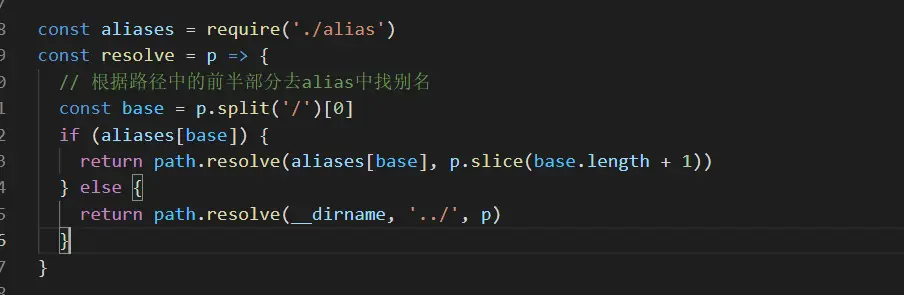
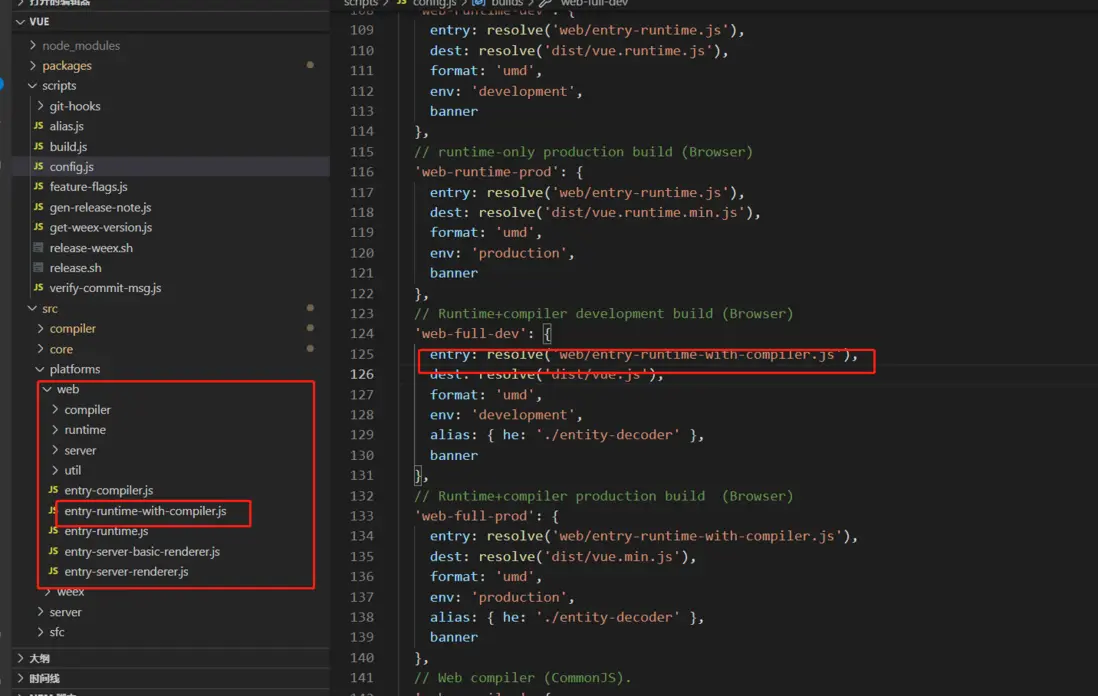
我們找到入口文件:
src/platform/web/entry-runtime-with-compiler.js
開始進行分析
我們分三個方向來進行解析
- 響應式原理
- 虛擬dom分析
- 模板編譯和組件化
響應式原理
這塊我們主要分析:
- vue.js的靜態成員和實例成員初始化的過程
- 首次渲染的過程
- 數據響應式的原理
我們帶個問題來看這塊的分析,通過這個分析來解決這個問題:
 // 如果同時設置template和render此時會渲染什麼?
    const vm = new Vue({
      el: '#app',
      template: '<h1>Hello Template</h1>',
      render(h) {
        return h('h1', 'Hello Render')
      }
    })
首先我們根據我們的入口文件,可以看到:
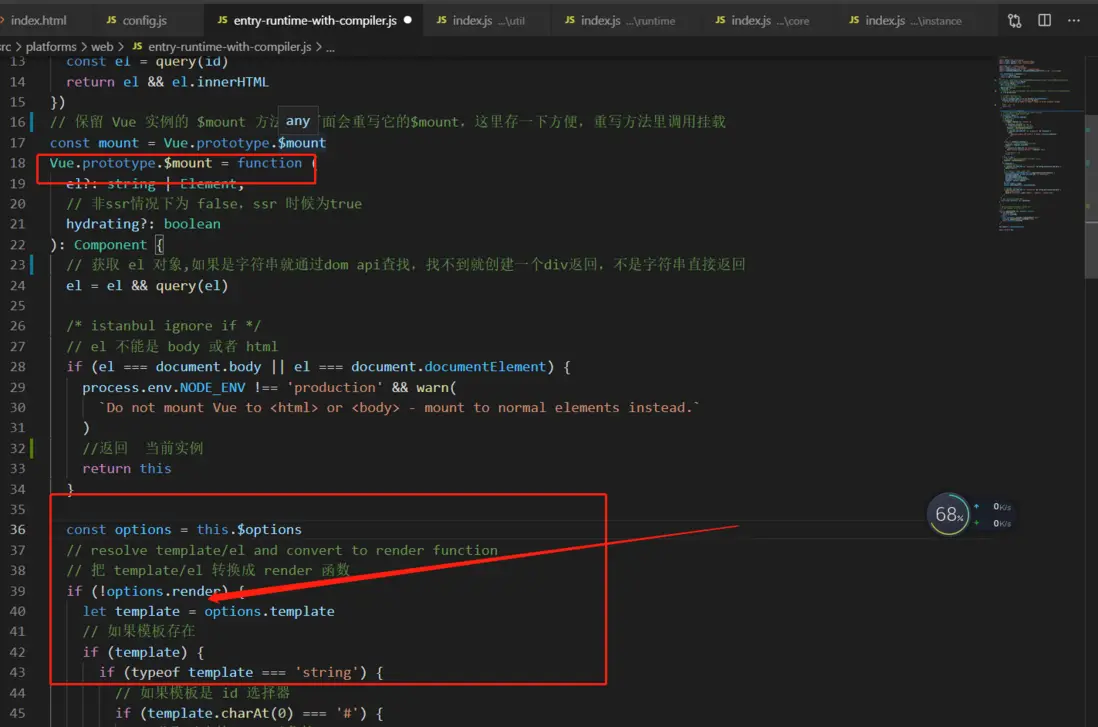
這裏重新定義vue原型上的$mount方法,並且保存了一下原來定義的,後面會用,如果我們初始傳遞了el,而不調用$mount方法的話,默認在vue裏最後也會調用$mount來進行渲染。
通過這裏我們就可以看出如果沒有render函數的話,才會把template轉換成render函數渲染,如果又render的話就不會取template了,所以上面結果就是會渲染render函數裏的結果.
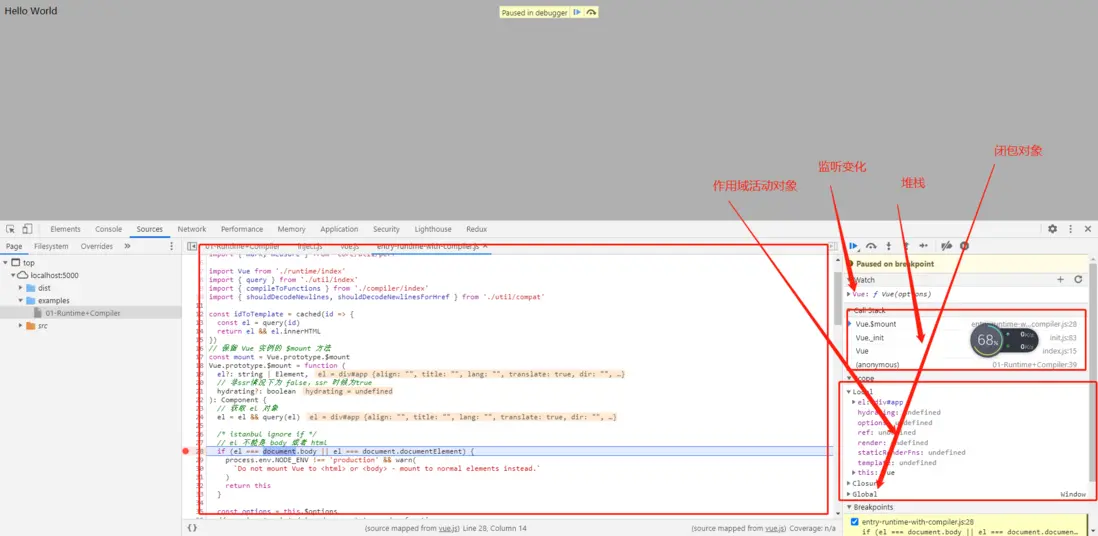
大家可以打斷點根據我的截圖,來調試
然後現在我們下一步要找vue的構造函數:
src/platform/web/entry-runtime-with-compiler.js 中引用了 './runtime/index'
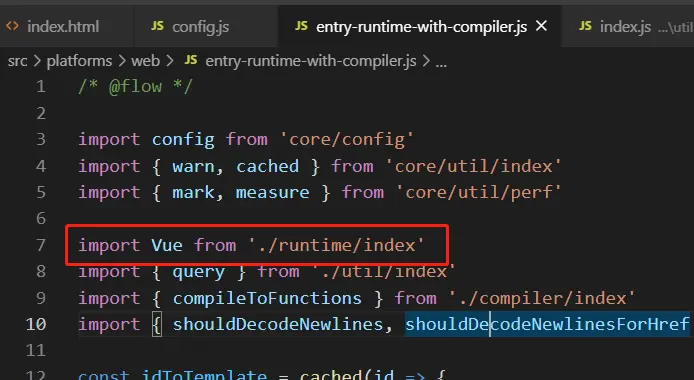
然後src/platform/web/runtime/index.js中實現的功能
- 設置vue.config的配置
-
設置平台相關的指令和組件
- 指令v-model,v-show
- 組件 transition、transition-group
- 設置平台相關的__patch__方法(打補丁方法,對比新舊的 VNode)
- 設置 $mount 方法,掛載 DOM
src/core/index.js 中引用了 './instance/index'
src/core/instance/index.js中:
- 定義了 Vue 的構造函數
import { initMixin } from './init'
import { stateMixin } from './state'
import { renderMixin } from './render'
import { eventsMixin } from './events'
import { lifecycleMixin } from './lifecycle'
import { warn } from '../util/index'
// 此處不用 class 的原因是因為方便後續給 Vue 實例混入實例成員
function Vue (options) {
  if (process.env.NODE_ENV !== 'production' &&
    !(this instanceof Vue)
  ) {
    //沒有new的話提示
    warn('Vue is a constructor and should be called with the `new` keyword')
  }
  // 調用 _init() 方法
  this._init(options)
}
// 註冊 vm 的 _init() 方法,初始化 vm
initMixin(Vue)
// 註冊 vm 的 $data/$props/$set/$delete/$watch
stateMixin(Vue)
// 初始化事件相關方法
// $on/$once/$off/$emit
eventsMixin(Vue)
// 初始化生命週期相關的混入方法
// _update/$forceUpdate/$destroy
lifecycleMixin(Vue)
// 混入 render
// $nextTick/_render
renderMixin(Vue)

export default Vue
四個導出vue的模塊
-
src/platforms/web/entry-runtime-with-compiler.js
- web 平台相關的入口
- 重寫了平台相關的$mount()方法
- 註冊了Vue.compile()方法,傳遞一個html字符串返回render函數
-
src/platforms/web/runtime/index.js
- web 平台相關
- 註冊和平台相關的全局指令:v-model、v-show
- 註冊和平台相關的全局組件: v-transition、v-transition-group
-
全局方法:
* __patch__:把虛擬 DOM 轉換成真實 DOM
* $mount:掛載方法
-
src/core/index.js
- 與平台無關
- 設置了 Vue 的靜態方法,initGlobalAPI(Vue)
-
src/core/instance/index.js
- 與平台無關
- 定義了構造函數,調用了 this._init(options) 方法
- 給 Vue 中混入了常用的實例成員
Vue的初始化
src/core/global-api/index.js
初始化vue的靜態方法
export function initGlobalAPI (Vue: GlobalAPI) {
  // config
  const configDef = {}
  configDef.get = () => config
  if (process.env.NODE_ENV !== 'production') {
    configDef.set = () => {
      warn(
        'Do not replace the Vue.config object, set individual fields instead.'
      )
    }
  }
  // 初始化 Vue.config 對象
  Object.defineProperty(Vue, 'config', configDef) // 開發環境不允許 修改config對象

  // exposed util methods.
  // NOTE: these are not considered part of the public API - avoid relying on
  // them unless you are aware of the risk.
  // 這些工具方法不視作全局API的一部分,除非你已經意識到某些風險,否則不要去依賴他們
  Vue.util = {
    warn,
    extend,
    mergeOptions,
    defineReactive
  }
  // 靜態方法 set/delete/nextTick
  Vue.set = set
  Vue.delete = del
  Vue.nextTick = nextTick

  // 2.6 explicit observable API
  // 讓一個對象可響應
  Vue.observable = <T>(obj: T): T => {
    observe(obj)
    return obj
  }
  // 初始化 Vue.options 對象,並給其擴展
  // components/directives/filters
  Vue.options = Object.create(null)
  ASSET_TYPES.forEach(type => {
    Vue.options[type + 's'] = Object.create(null)
  })

  // this is used to identify the "base" constructor to extend all plain-object
  // components with in Weex's multi-instance scenarios.
  Vue.options._base = Vue //設置私有屬性_base 是Vue構造函數

  // 設置 keep-alive 組件
  extend(Vue.options.components, builtInComponents)

  // 註冊 Vue.use() 用來註冊插件
  initUse(Vue)
  // 註冊 Vue.mixin() 實現混入
  initMixin(Vue)
  // 註冊 Vue.extend() 基於傳入的options返回一個組件的構造函數
  initExtend(Vue)
  // 註冊 Vue.directive()、 Vue.component()、Vue.filter()
  initAssetRegisters(Vue)
}
src/core/instance/index.js
- 定義vue的構造函數
- 初始化vue的實例成員
// 此處不用 class 的原因是因為方便後續給 Vue 實例混入實例成員
function Vue (options) {
  if (process.env.NODE_ENV !== 'production' &&
    !(this instanceof Vue)
  ) {
    //沒有new的話提示
    warn('Vue is a constructor and should be called with the `new` keyword')
  }
  // 調用 _init() 方法
  this._init(options)
}
// 註冊 vm 的 _init() 方法,初始化 vm
initMixin(Vue)
// 註冊 vm 的 $data/$props/$set/$delete/$watch
stateMixin(Vue)
// 初始化事件相關方法
// $on/$once/$off/$emit
eventsMixin(Vue)
// 初始化生命週期相關的混入方法
// _update/$forceUpdate/$destroy
lifecycleMixin(Vue)
// 混入 render
// $nextTick/_render
renderMixin(Vue)

export default Vue- initMixin(Vue)
- 初始化 _init() 方法
let uid = 0

//src\core\instance\init.js
export function initMixin (Vue: Class<Component>) {
  // 給 Vue 實例增加 _init() 方法
  // 合併 options / 初始化操作
  Vue.prototype._init = function (options?: Object) {
    const vm: Component = this
    // a uid
    vm._uid = uid++  //每個vue new之後 uid++

    let startTag, endTag
    /* istanbul ignore if */
    if (process.env.NODE_ENV !== 'production' && config.performance && mark) {
      startTag = `vue-perf-start:${vm._uid}`
      endTag = `vue-perf-end:${vm._uid}`
      mark(startTag)
    }

    // a flag to avoid this being observed
    // 如果是 Vue 實例不需要被 observe,本來就是響應式數據
    vm._isVue = true
    // merge options
    // 合併 options
    if (options && options._isComponent) {
      // optimize internal component instantiation
      //優化內部組件實例化
      // since dynamic options merging is pretty slow, and none of the
      //因為動態選項合併是非常緩慢的,而且沒有
      // internal component options needs special treatment.
      //內部組件選項需要特殊處理
      initInternalComponent(vm, options)
    } else {
      //合併配置,.vue單文件組件註冊到 options.components[options.name] = Ctor
      vm.$options = mergeOptions(
        resolveConstructorOptions(vm.constructor),
        options || {},
        vm
      )
    }
    /* istanbul ignore else */
    if (process.env.NODE_ENV !== 'production') {
      initProxy(vm)
    } else {
      vm._renderProxy = vm
    }
    // expose real self
    vm._self = vm
    // vm 的生命週期相關變量初始化
    // $children/$parent/$root/$refs
    initLifecycle(vm)
    // vm 的事件監聽初始化, 父組件綁定在當前組件上的事件
    initEvents(vm)
    // vm 的編譯render初始化
    // $slots/$scopedSlots/_c/$createElement/$attrs/$listeners
    initRender(vm)
    // beforeCreate 生命鈎子的回調
    callHook(vm, 'beforeCreate')
    // 把 inject 的成員注入到 vm 上
    initInjections(vm) // resolve injections before data/props
    // 初始化 vm 的 _props/methods/_data/computed/watch
    initState(vm)
    // 初始化 provide
    initProvide(vm) // resolve provide after data/props
    // created 生命鈎子的回調
    callHook(vm, 'created')

    /* istanbul ignore if */
    if (process.env.NODE_ENV !== 'production' && config.performance && mark) {
      vm._name = formatComponentName(vm, false)
      mark(endTag)
      measure(`vue ${vm._name} init`, startTag, endTag)
    }
    // 調用 $mount() 掛載
    if (vm.$options.el) {
      vm.$mount(vm.$options.el)
    }
  }
}
首次渲染:
- vue初始化完畢,開始真正執行
- 調用new vue之前,相關的靜態和原型屬性方法已經初始化完畢
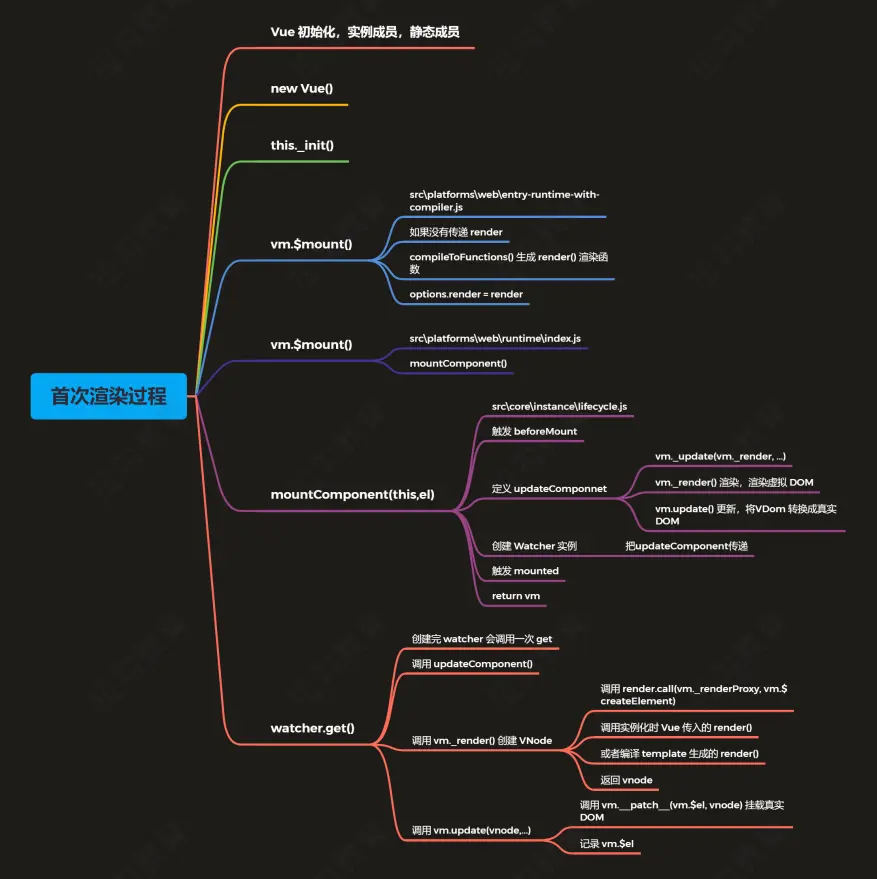
響應式處理的入口
整個響應式處理的過程是比較複雜的,下面我們先從
src\core\instance\init.js
- initState(vm) vm 狀態的初始化
- 初始化了_data、_props、methods 等
通過 initState(vm) 最後找到
function initData (vm: Component) {
  let data = vm.$options.data
  // 初始化 _data,組件中 data 是函數,調用函數返回結果
  // 否則直接返回 data
  data = vm._data = typeof data === 'function'
    ? getData(data, vm)
    : data || {}
  if (!isPlainObject(data)) {
    data = {}
    process.env.NODE_ENV !== 'production' && warn(
      'data functions should return an object:\n' +
      'https://vuejs.org/v2/guide/components.html#data-Must-Be-a-Function',
      vm
    )
  }
  // proxy data on instance
  // 獲取 data 中的所有屬性
  const keys = Object.keys(data)
  // 獲取 props / methods
  const props = vm.$options.props
  const methods = vm.$options.methods
  let i = keys.length
  // 判斷 data 上的成員是否和  props/methods 重名
    //。。。
  // observe data
  // 響應式處理
  observe(data, true /* asRootData */)
}
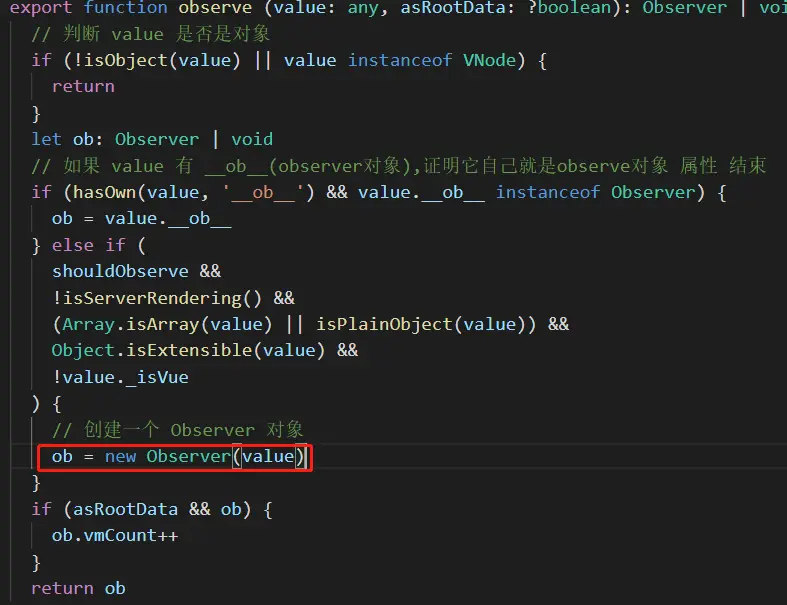
然後我們看到了observe這個方法
找到src\core\observer\index.js,看下它的實現
- observe(value, asRootData)
- 負責為每一個 Object 類型的 value 創建一個 observer 實例
Observer
src\core\observer\index.js
- 對對象做響應化處理
- 對數組做響應化處理
export class Observer {
  // 觀測對象
  value: any;
  // 依賴對象
  dep: Dep;
  // 實例計數器
  vmCount: number; // number of vms that have this object as root $data

  constructor (value: any) {
    debugger
    this.value = value
    this.dep = new Dep()
    // 初始化實例的 vmCount 為0
    this.vmCount = 0
    // 將實例掛載到觀察對象的 __ob__ 屬性
    def(value, '__ob__', this)
    // 數組的響應式處理
    if (Array.isArray(value)) {
      if (hasProto) {
        protoAugment(value, arrayMethods)
      } else {
        copyAugment(value, arrayMethods, arrayKeys)
      }
      // 為數組中的每一個對象創建一個 observer 實例
      this.observeArray(value)
    } else {
      // 遍歷對象中的每一個屬性,轉換成 setter/getter
      this.walk(value)
    }
  }

  /**
   * Walk through all properties and convert them into
   * getter/setters. This method should only be called when
   * value type is Object.
   */
  walk (obj: Object) {
    // 獲取觀察對象的每一個屬性
    const keys = Object.keys(obj)
    // 遍歷每一個屬性,設置為響應式數據
    for (let i = 0; i < keys.length; i++) {
      defineReactive(obj, keys[i])
    }
  }

  /**
   * Observe a list of Array items.
   */
  observeArray (items: Array<any>) {
    for (let i = 0, l = items.length; i < l; i++) {
      observe(items[i])
    }
  }
}
調用walk(obj):遍歷 obj 的所有屬性,為每一個屬性調用 defineReactive() 方法,設置 getter/setter
defineReactive為對象響應式處理
defineReactive(obj, key, val, customSetter, shallow)
- 為一個對象定義一個響應式的屬性,每一個屬性對應一個 dep 對象
- 如果該屬性的值是對象,繼續調用 observe
- 如果給屬性賦新值,繼續調用 observe
- 如果數據更新發送通知
// 為一個對象定義一個響應式的屬性
/**
 * Define a reactive property on an Object.
 */
export function defineReactive (
  obj: Object,
  key: string,
  val: any,
  customSetter?: ?Function,
  shallow?: boolean
) {
  // 創建依賴對象實例
  const dep = new Dep()
  // 獲取 obj 的屬性描述符對象
  const property = Object.getOwnPropertyDescriptor(obj, key)
  if (property && property.configurable === false) {
    return
  }
  // 提供預定義的存取器函數
  // cater for pre-defined getter/setters
  const getter = property && property.get
  const setter = property && property.set
  if ((!getter || setter) && arguments.length === 2) {
    val = obj[key]
  }
  // 判斷是否遞歸觀察子對象,並將子對象屬性都轉換成 getter/setter,返回子觀察對象
  let childOb = !shallow && observe(val)
  Object.defineProperty(obj, key, {
    enumerable: true,
    configurable: true,
    get: function reactiveGetter () {
      // 如果預定義的 getter 存在則 value 等於getter 調用的返回值
      // 否則直接賦予屬性值
      const value = getter ? getter.call(obj) : val
      // 如果存在當前依賴目標,即 watcher 對象,則建立依賴
      if (Dep.target) {
        //dep 和watcher添加相互的依賴
        //一個組件對應一個watcher對象 (渲染watcher)
        //1個watcher會對應多個dep(要觀察的屬性很多) 渲染和計算watcher偵聽器watcher 都有可能觀察很多屬性
        //我們可以手動創建多個watcher(渲染,計算)監聽1個屬性的變化,1個dep可以對應多個watcher (例如一個dep 對應有 一個計算watcher 一個渲染watcher)
        dep.depend()
        // 如果子觀察目標存在,建立子對象的依賴關係,將來Vue.set()會用到
        if (childOb) {
          childOb.dep.depend()
          // 如果屬性是數組,則特殊處理收集數組對象依賴
          if (Array.isArray(value)) {
            dependArray(value)
          }
        }
      }
      // 返回屬性值
      return value
    },
    set: function reactiveSetter (newVal) {
      // 如果預定義的 getter 存在則 value 等於getter 調用的返回值
      // 否則直接賦予屬性值
      const value = getter ? getter.call(obj) : val
      // 如果新值等於舊值或者新值舊值為NaN則不執行
      /* eslint-disable no-self-compare */
      if (newVal === value || (newVal !== newVal && value !== value)) {
        return
      }
      /* eslint-enable no-self-compare */
      if (process.env.NODE_ENV !== 'production' && customSetter) {
        customSetter()
      }
      // 如果沒有 setter 直接返回
      // #7981: for accessor properties without setter
      if (getter && !setter) return
      // 如果預定義setter存在則調用,否則直接更新新值
      if (setter) {
        setter.call(obj, newVal)
      } else {
        val = newVal
      }
      // 如果新值是對象,觀察子對象並返回 子的 observer 對象
      childOb = !shallow && observe(newVal)
      // 派發更新(發佈更改通知)
      dep.notify()
    }
  })
}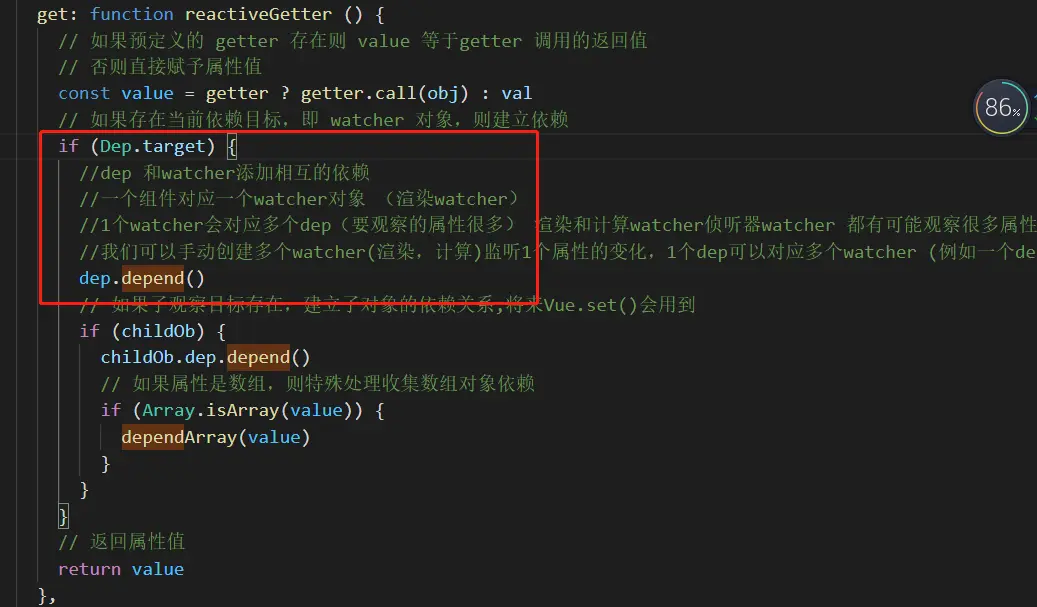
depend dev和watcher互相依賴,防止重複添加watcher
這裏 childOb.dep.depend() 這裏如果子觀察目標存在,建立子對象的依賴關係,將來Vue.set()會用到,這裏數組也會用到這裏,例如:
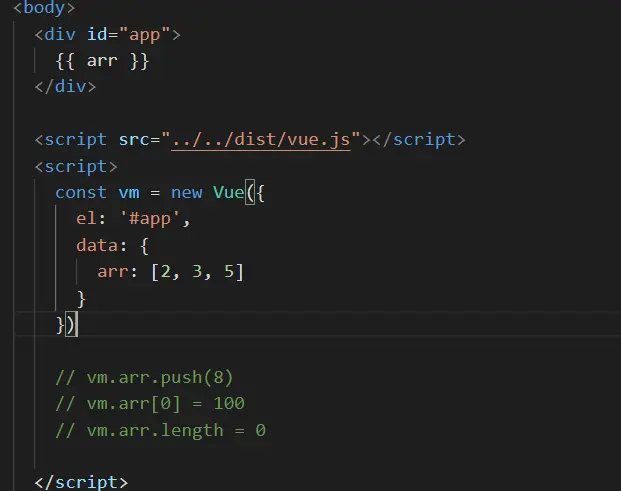
這裏,獲取 data中arr屬性時會給它的dep的subs中添加渲染watcher,並且給它的childOb 也就是那個數組 [] 的observe的dep的subs添加上渲染watcher,後續數組方法劫持的時候會通過this._ob_屬性獲取它的observe對象通過調用它dep的notify通知subs中的渲染watcher更新
還有這種對象特殊情況
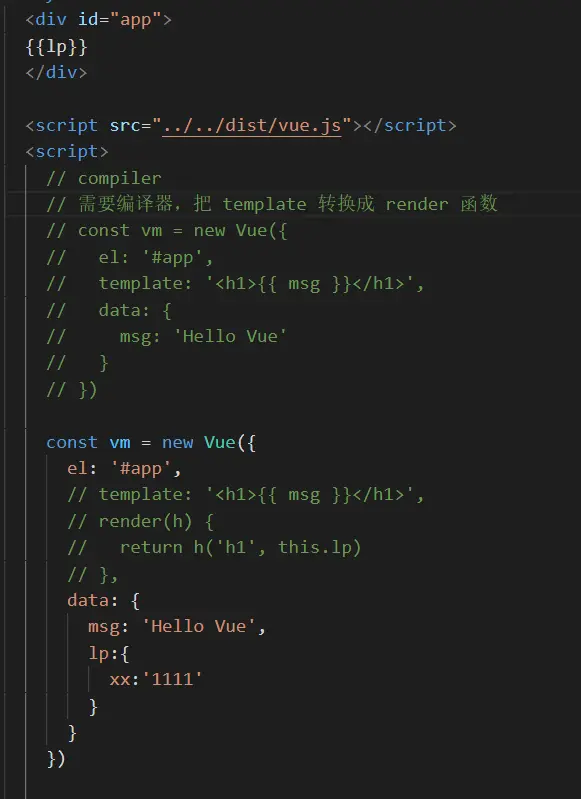
這種在_render種獲取lp時會觸發它對應的get添加渲染watcher,然後再解析這個lp獲取xx時又會觸發xx的get添加渲染watcher,所以更改xx時直接就可以調用xx的dep種渲染watcher更新了
數組的響應式處理
const arrayProto = Array.prototype
// 使用數組的原型創建一個新的對象
export const arrayMethods = Object.create(arrayProto)
// 修改數組元素的方法
const methodsToPatch = [
  'push',
  'pop',
  'shift',
  'unshift',
  'splice',
  'sort',
  'reverse'
]

/**
 * Intercept mutating methods and emit events
 */
methodsToPatch.forEach(function (method) {
  // cache original method
  // 保存數組原方法
  const original = arrayProto[method]
  // 調用 Object.defineProperty() 重新定義修改數組的方法
  def(arrayMethods, method, function mutator (...args) {
    // 執行數組的原始方法
    const result = original.apply(this, args)
    // 獲取數組對象的 ob 對象
    const ob = this.__ob__
    let inserted
    switch (method) {
      case 'push':
      case 'unshift':
        inserted = args
        break
      case 'splice':
        inserted = args.slice(2)
        break
    }
    // 對插入的新元素,重新遍歷數組元素設置為響應式數據
    if (inserted) ob.observeArray(inserted)
    // notify change
    // 調用了修改數組的方法,調用數組的ob對象發送通知
    ob.dep.notify()
    return result
  })
})
主要就是劫持了數組改變原數組的方法,push,unshift,splice。
對新插入的元素再進行observeArray 做數據響應式綁定。
我們開始的時候早observer類中代碼中給
 // 將實例掛載到觀察對象的 __ob__ 屬性
    def(value, '__ob__', this)
然後可以獲取到ob.dep.notify 通過_ob_獲取數組屬性的observer對象然後調用它的dep的notify發送通知 通知它的對應watcher更新
Dep 類
src\core\observer\dep.js
- 依賴對象
- 記錄 watcher 對象
- depend() -- watcher 記錄對應的 dep
- 發佈通知
- 在defineReactive()的getter中創建dep對象,並判斷Dep.target是否有值(一會再來看有什麼時候有值得),調用dep.depend()
- dep.depend()內部調用Dep.target.addDep(this),也就是watcher的addDep()方法,它內部最調用dep.addSub(this),把watcher對象,添加到dep.subs.push(watcher)中,也就是把訂閲者添加到dep的subs數組中,當數據變化的時候調用watcher對象的update()方法
- 什麼時候設置的Dep.target?通過簡單的案例調試觀察。調用mountComponent()方法的時候,創建了渲染watcher對象,執行watcher中的get()方法
- get()方法內部調用pushTarget(this),把當前Dep.target=watcher,同時把當前watcher入棧,因為有父子組件嵌套的時候先把父組件對應的watcher入棧,再去處理子組件的watcher,子組件的處理完畢後,再把父組件對應的watcher出棧,繼續操作
- Dep.target用來存放目前正在使用的watcher。全局唯一,並且一次也只能有一個watcher被使用
let uid = 0
// dep 是個可觀察對象,可以有多個指令訂閲它
/**
 * A dep is an observable that can have multiple
 * directives subscribing to it.
 */
export default class Dep {
  // 靜態屬性,watcher 對象
  static target: ?Watcher;
  // dep 實例 Id
  id: number;
  // dep 實例對應的 watcher 對象/訂閲者數組
  subs: Array<Watcher>;

  constructor () {
    this.id = uid++
    this.subs = []
  }

  // 添加新的訂閲者 watcher 對象
  addSub (sub: Watcher) {
    this.subs.push(sub)
  }

  // 移除訂閲者
  removeSub (sub: Watcher) {
    remove(this.subs, sub)
  }

  // 將觀察對象和 watcher 建立依賴
  depend () {
    if (Dep.target) {
      // 如果 target 存在,把 dep 對象添加到 watcher 的依賴中
      Dep.target.addDep(this)
    }
  }

  // 發佈通知
  notify () {
    // stabilize the subscriber list first
    const subs = this.subs.slice()
    if (process.env.NODE_ENV !== 'production' && !config.async) {
      // subs aren't sorted in scheduler if not running async
      // we need to sort them now to make sure they fire in correct
      // order
      subs.sort((a, b) => a.id - b.id)
    }
    // 調用每個訂閲者的update方法實現更新
    for (let i = 0, l = subs.length; i < l; i++) {
      subs[i].update()
    }
  }
}
// Dep.target 用來存放目前正在使用的watcher
// 全局唯一,並且一次也只能有一個watcher被使用
// The current target watcher being evaluated.
// This is globally unique because only one watcher
// can be evaluated at a time.
Dep.target = null
const targetStack = []
// 入棧並將當前 watcher 賦值給 Dep.target
// 父子組件嵌套的時候先把父組件對應的 watcher 入棧,
// 再去處理子組件的 watcher,子組件的處理完畢後,再把父組件對應的 watcher 出棧,繼續操作
export function pushTarget (target: ?Watcher) {
  targetStack.push(target)
  Dep.target = target
}

export function popTarget () {
  // 出棧操作
  targetStack.pop()
  Dep.target = targetStack[targetStack.length - 1]
}
Watcher 類
- Watcher 分為三種,計算Computed Watcher、用户 Watcher (偵聽器)、渲染 Watcher
渲染 Watcher 的創建時機/src/core/instance/lifecycle.js
export function mountComponent (
  vm: Component,
  el: ?Element,
  hydrating?: boolean
): Component {
  vm.$el = el
  if (!vm.$options.render) {
    vm.$options.render = createEmptyVNode
    if (process.env.NODE_ENV !== 'production') {
      /* istanbul ignore if */
      if ((vm.$options.template && vm.$options.template.charAt(0) !== '#') ||
        vm.$options.el || el) {
        warn(
          'You are using the runtime-only build of Vue where the template ' +
          'compiler is not available. Either pre-compile the templates into ' +
          'render functions, or use the compiler-included build.',
          vm
        )
      } else {
        warn(
          'Failed to mount component: template or render function not defined.',
          vm
        )
      }
    }
  }
  callHook(vm, 'beforeMount')

  let updateComponent
  /* istanbul ignore if */
  if (process.env.NODE_ENV !== 'production' && config.performance && mark) {
        //...
  } else {
    updateComponent = () => {
      vm._update(vm._render(), hydrating)
    }
  }
//創建渲染Watcher,expOrFn為updateComponent
  // we set this to vm._watcher inside the watcher's constructor
  // since the watcher's initial patch may call $forceUpdate (e.g. inside child
  // component's mounted hook), which relies on vm._watcher being already defined
  new Watcher(vm, updateComponent, noop, {
    before () {
      if (vm._isMounted && !vm._isDestroyed) {
        callHook(vm, 'beforeUpdate')
      }
    }
  }, true /* isRenderWatcher */)
  hydrating = false

  // manually mounted instance, call mounted on self
  // mounted is called for render-created child components in its inserted hook
  if (vm.$vnode == null) {
    vm._isMounted = true
    callHook(vm, 'mounted')
  }
  return vm
}- 渲染 wacher 創建的位置 lifecycle.js 的 mountComponent 函數中
- Wacher 的構造函數初始化,處理 expOrFn (渲染 watcher 和偵聽器處理不同)
- 調用 this.get() ,它裏面調用 pushTarget() 然後 this.getter.call(vm, vm) (對於渲染 wacher 調用 updateComponent),如果是用户 wacher 會獲取屬性的值(觸發get操作)
- 當數據更新的時候,dep 中調用 notify() 方法,notify() 中調用 wacher 的 update() 方法
- update() 中調用 queueWatcher()
- queueWatcher() 是一個核心方法,去除重複操作,調用 flushSchedulerQueue() 刷新隊列並執行watcher
- flushSchedulerQueue() 中對 wacher 排序,遍歷所有 wacher ,如果有 before,觸發生命週期的鈎子函數 beforeUpdate,執行 wacher.run(),它內部調用 this.get(),然後調用 this.cb() (渲染wacher 的 cb 是 noop)
- 整個流程結束
vm.$set
這個方法和observer在一塊,這個方法很簡單
export function set (target: Array<any> | Object, key: any, val: any): any {
  if (process.env.NODE_ENV !== 'production' &&
    (isUndef(target) || isPrimitive(target))
  ) {
    warn(`Cannot set reactive property on undefined, null, or primitive value: ${(target: any)}`)
  }
  // 判斷 target 是否是對象,key 是否是合法的索引
  if (Array.isArray(target) && isValidArrayIndex(key)) {
    target.length = Math.max(target.length, key)
    // 通過 splice 對key位置的元素進行替換
    // splice 在 array.js 進行了響應化的處理
    target.splice(key, 1, val)
    return val
  }
  // 如果 key 在對象中已經存在直接賦值
  if (key in target && !(key in Object.prototype)) {
    target[key] = val
    return val
  }
  // 獲取 target 中的 observer 對象
  const ob = (target: any).__ob__
  // 如果 target 是 vue 實例或者 $data 直接返回
  if (target._isVue || (ob && ob.vmCount)) {
    process.env.NODE_ENV !== 'production' && warn(
      'Avoid adding reactive properties to a Vue instance or its root $data ' +
      'at runtime - declare it upfront in the data option.'
    )
    return val
  }
  // 如果 ob 不存在,target 不是響應式對象直接賦值
  if (!ob) {
    target[key] = val
    return val
  }
  // 把 key 設置為響應式屬性
  defineReactive(ob.value, key, val)
  // 發送通知
  ob.dep.notify()
  return val
}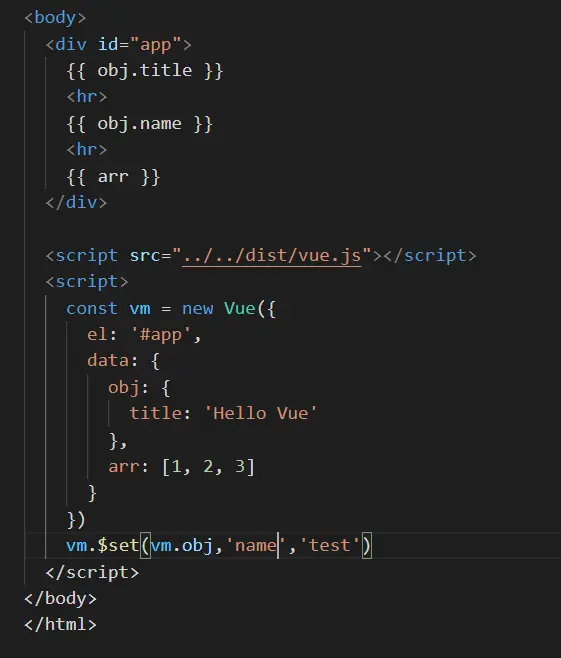
這個和我們 上面説的數組是一樣的,獲取obj屬性的時候給它對應的{}添加渲染watcher,也就是defineReactive 中的 childOb,給每一個響應式對象設置一個ob調用 $set 的時候,會獲取 ob 對象,並通過 ob.dep.notify() 發送通知
delete刪除
export function del (target: Array<any> | Object, key: any) {
  if (process.env.NODE_ENV !== 'production' &&
    (isUndef(target) || isPrimitive(target))
  ) {
    warn(`Cannot delete reactive property on undefined, null, or primitive value: ${(target: any)}`)
  }
  // 判斷是否是數組,以及 key 是否合法
  if (Array.isArray(target) && isValidArrayIndex(key)) {
    // 如果是數組通過 splice 刪除
    // splice 做過響應式處理
    target.splice(key, 1)
    return
  }
  // 獲取 target 的 ob 對象
  const ob = (target: any).__ob__
  // target 如果是 Vue 實例或者 $data 對象,直接返回
  if (target._isVue || (ob && ob.vmCount)) {
    process.env.NODE_ENV !== 'production' && warn(
      'Avoid deleting properties on a Vue instance or its root $data ' +
      '- just set it to null.'
    )
    return
  }
  // 如果 target 對象沒有 key 屬性直接返回
  if (!hasOwn(target, key)) {
    return
  }
  // 刪除屬性
  delete target[key]
  if (!ob) {
    return
  }
  // 通過 ob 發送通知
  ob.dep.notify()
}
vm.$watch
- 觀察 Vue 實例變化的一個表達式或計算屬性函數。回調函數得到的參數為新值和舊值。表達式只接受監督的鍵路徑。對於更復雜的表達式,用一個函數取代。
三種類型的 Watcher 對象
- 沒有靜態方法,因為 $watch 方法中要使用 Vue 的實例
- Watcher 分三種:計算屬性 Watcher、用户 Watcher (偵聽器)、渲染 Watcher
- 創建順序:計算屬性 Watcher、用户 Watcher (偵聽器)、渲染 Watcher
- 計算屬性watcher創建時不會馬上調用內部的get方法(也就是傳入的回調)而是暫時儲存在options配置裏,等待首次渲染watcher的創建,解析到這個計算屬性時,會從配置裏取出它執行get(傳入的回調),然後再觸發對應屬性的get, 這時會把自身計算屬性watcher和當前的渲染watcher都添加到對應訪問屬性dep的subs數組裏。
Vue.prototype._init裏的initState()可以看到:
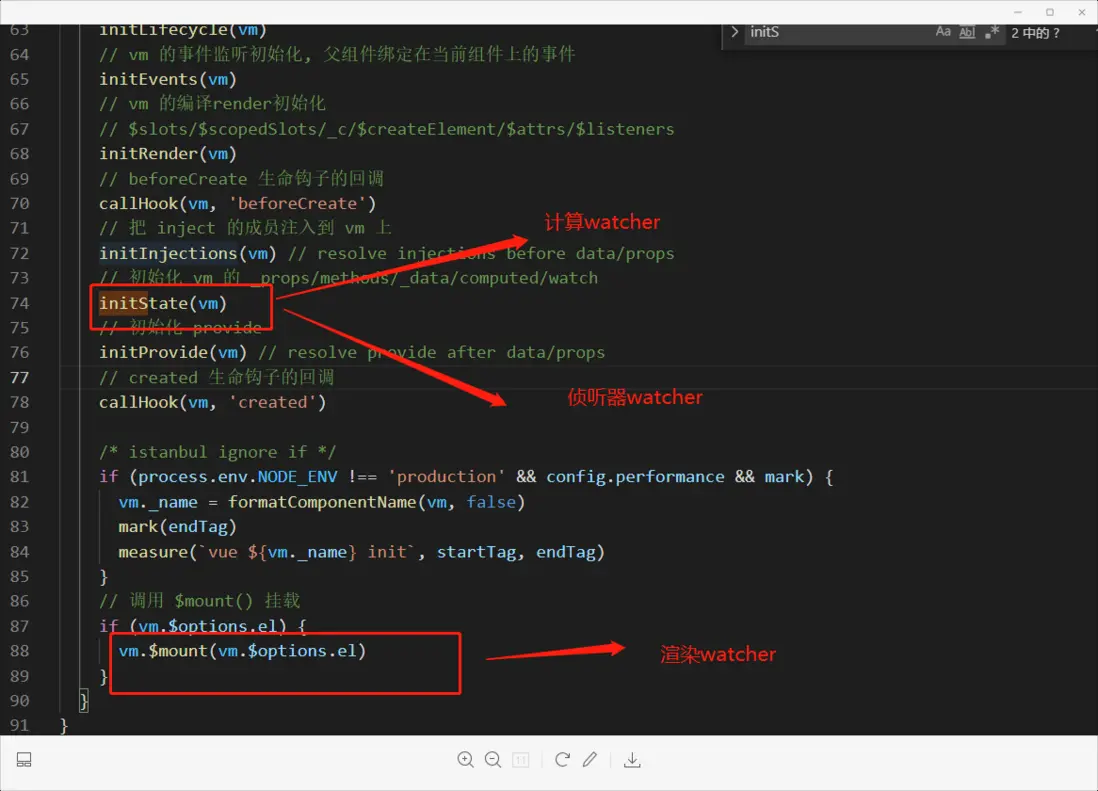
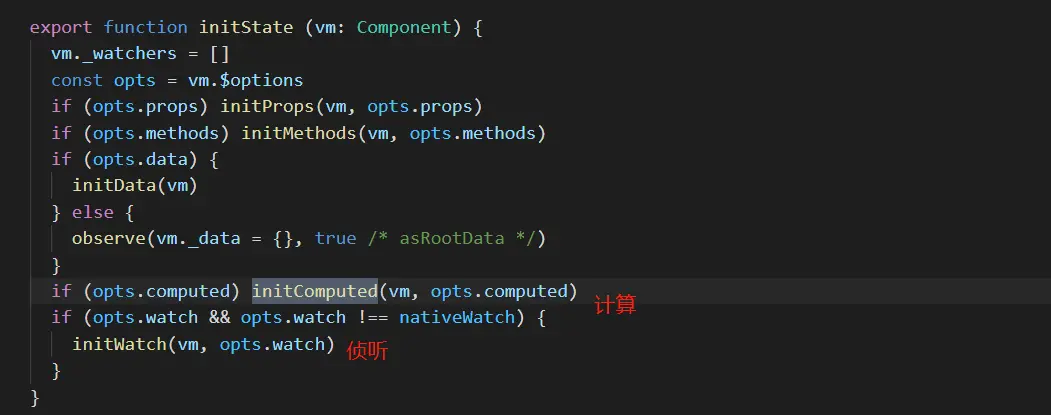
這裏也能看到順序
這裏還有一個首次渲染計算屬性的截圖

- src\core\instance\state.js
Vue.prototype.$watch = function (
    expOrFn: string | Function,
    cb: any,
    options?: Object
  ): Function {
    // 獲取 Vue 實例 this
    const vm: Component = this
    if (isPlainObject(cb)) {
      // 判斷如果 cb 是對象執行 createWatcher
      return createWatcher(vm, expOrFn, cb, options)
    }
    options = options || {}
    // 標記為用户 watcher
    options.user = true
    // 創建用户 watcher 對象
    const watcher = new Watcher(vm, expOrFn, cb, options)
    // 判斷 immediate 如果為 true
    if (options.immediate) {
      // 立即執行一次 cb 回調,並且把當前值傳入
      try {
        cb.call(vm, watcher.value)
      } catch (error) {
        handleError(error, vm, `callback for immediate watcher "${watcher.expression}"`)
      }
    }
    // 返回取消監聽的方法
    return function unwatchFn () {
      watcher.teardown()
    }
  }
渲染過程:
- 查看渲染 watcher 的執行過程
- 當數據更新,defineReactive 的 set 方法中調用 dep.notify()
- 調用 watcher 的 update(),計算屬性watcher不會調用queueWatcher存入隊列。
- 調用 queueWatcher(),把 wacher 存入隊列,如果已經存入,不重複添加 nextTick(flushSchedulerQueue)
-
循環調用 flushSchedulerQueue()
- 通過 nextTick(),在消息循環結束之前時候調用 flushSchedulerQueue()
-
調用 wacher.run()
- 調用 wacher.get() 獲取最新值
- 如果是渲染 wacher 結束
- 如果是用户 watcher,調用 this.cb()
最後是 nextTick
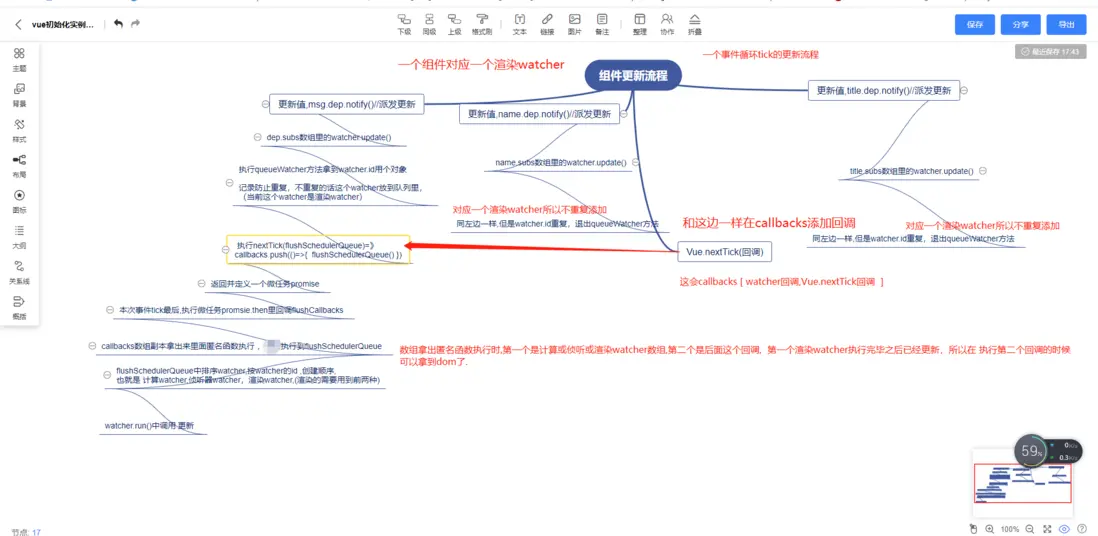
我們根據上面的數據更新可以看到 最終也是調用了nextTick這個方法。
queueWatcher這個方法會去除重複的watcher id防止同一事件循環種重複的watcher添加到queue隊列中,沒有添加過的通過nextTick(flushSchedulerQueue)添加到隊列裏。
nextTick把我們的處理方法添加到隊列裏,並返回執行一個promise或者settimeout定時器,標記為微任務,在本輪的tick的末尾來執行,例如我們通過這個方法獲取dom,我們先設置屬性調用nexttick會往隊列裏添加渲染watcher,然後才是我們自己的nextTick獲取取dom,然後先執行的渲染watcher,在執行獲取dom的任務時,就能獲取到了,同一次的事件循環同id的渲染watcher會防止重複添加,一個渲染watcher對應一個組件.
export function queueWatcher (watcher: Watcher) {
  const id = watcher.id
  if (has[id] == null) {
    has[id] = true
    if (!flushing) {
      queue.push(watcher)
    } else {
      // if already flushing, splice the watcher based on its id
      // if already past its id, it will be run next immediately.
      let i = queue.length - 1
      while (i > index && queue[i].id > watcher.id) {
        i--
      }
      queue.splice(i + 1, 0, watcher)
    }
    // queue the flush
    if (!waiting) {
      waiting = true

      if (process.env.NODE_ENV !== 'production' && !config.async) {
        flushSchedulerQueue()
        return
      }
      nextTick(flushSchedulerQueue)
    }
  }
}


export function nextTick (cb?: Function, ctx?: Object) {
  let _resolve
  // 把 cb 加上異常處理存入 callbacks 數組中
  callbacks.push(() => {
    if (cb) {
      try {
        // 調用 cb()
        cb.call(ctx)
      } catch (e) {
        handleError(e, ctx, 'nextTick')
      }
    } else if (_resolve) {
      _resolve(ctx)
    }
  })
  if (!pending) {
    pending = true
    // 調用
    timerFunc()
  }
  // $flow-disable-line
  if (!cb && typeof Promise !== 'undefined') {
    // 返回 promise 對象
    return new Promise(resolve => {
      _resolve = resolve
    })
  }
}


  const p = Promise.resolve()
  timerFunc = () => {
    p.then(flushCallbacks)
    // In problematic UIWebViews, Promise.then doesn't completely break, but
    // it can get stuck in a weird state where callbacks are pushed into the
    // microtask queue but the queue isn't being flushed, until the browser
    // needs to do some other work, e.g. handle a timer. Therefore we can
    // "force" the microtask queue to be flushed by adding an empty timer.
    if (isIOS) setTimeout(noop)
  }


  function flushCallbacks () {
    pending = false
     const copies = callbacks.slice(0)
     callbacks.length = 0
    for (let i = 0; i < copies.length; i++) {
        copies[i]()
    }
}
function flushSchedulerQueue () {
currentFlushTimestamp = getNow()
flushing = true
let watcher, id
// Sort queue before flush.
// This ensures that:
// 1. Components are updated from parent to child. (because parent is always
// created before the child)
// 組件從父組件更新到子組件。(因為父母總是
//在子節點之前創建
// 2. A component's user watchers are run before its render watcher (because
// user watchers are created before the render watcher)
// 組件的用户監視程序在渲染監視程序之前運行(因為
//用户觀察者在渲染觀察者之前創建
// 3. If a component is destroyed during a parent component's watcher run,
// its watchers can be skipped.
// 如果一個組件在父組件的監視程序運行期間被銷燬,
//它的觀察者可以被跳過。
queue.sort((a, b) => a.id - b.id)
// do not cache length because more watchers might be pushed
// as we run existing watchers
for (index = 0; index < queue.length; index++) {
watcher = queue[index]
if (watcher.before) {
watcher.before()
}
id = watcher.id
has[id] = null
watcher.run()
// in dev build, check and stop circular updates.
if (process.env.NODE_ENV !== 'production' && has[id] != null) {
circular[id] = (circular[id] || 0) + 1
if (circular[id] > MAX_UPDATE_COUNT) {
warn(
'You may have an infinite update loop ' + (
watcher.user
? `in watcher with expression "${watcher.expression}"`
: `in a component render function.`
),
watcher.vm
)
break
}
}
}
// keep copies of post queues before resetting state
const activatedQueue = activatedChildren.slice()
const updatedQueue = queue.slice()
resetSchedulerState()
// call component updated and activated hooks
callActivatedHooks(activatedQueue)
callUpdatedHooks(updatedQueue)
// devtool hook
/* istanbul ignore if */
if (devtools && config.devtools) {
devtools.emit('flush')
}
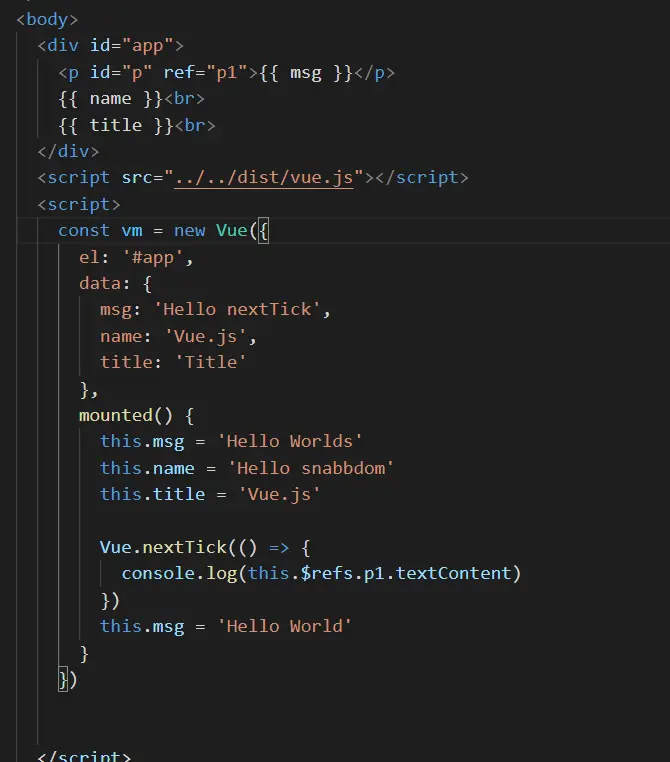
}我們可以看到它的更新説明
組件從父組件更新到子組件。(因為父母總是在子節點之前創建)
組件的用户監視程序在渲染監視程序之前運行(因為用户觀察者在渲染觀察者之前創建) watcher種類的渲染 用户偵聽器-渲染
如果一個組件在父組件的監視程序運行期間被銷燬,它的觀察者可以被跳過。
而我們 看到watcher 創建順序是 計算,偵聽器,渲染。
所以這個本次tick事件循環的中watcher也進行了排序,所以執行watcher的順序就是偵聽器,渲染。
這裏是一個下面這個圖的更新流程,我花了一個流程圖,有興趣可以看一下.