

前言-學以致用
之前一直忙於開發,總是零散的去看一些東西,想想學東西了麼?額... 好像學了,又好像沒有學,不知道你們有沒有這種感覺,所以新年初始,換一種學習方法,本着學以致用去完整的學一些東西,正好之前想接觸CI,CD 這裏的知識,所以就從最常見的github開始吧,畢竟免費又常用。
初始化項目
創建github代碼倉庫,clone 項目到本地,進入目錄初始化項目
npx create-react-app然後按照命令提示輸入完成初始化,推送項目到github。
配置github actions
目標是實現推送代碼到master分支, 自動開始構建項目,部署到Gthub Pages。
按照文檔先跑起來第一個流程,讓自己看到效果,在去學習語法內容,這樣更能激發興趣,免得直接看文檔看睡着了...
- 在目錄外層增加 .gihub/workflows文件夾,創建第一個first-demo.yml文件,拷貝示例內容.
name: GitHub Actions Demo
on: [push]
jobs:
  Explore-GitHub-Actions:
    runs-on: ubuntu-latest
    steps:
      - run: echo "🎉 The job was automatically triggered by a ${{ github.event_name }} event."
      - run: echo "🐧 This job is now running on a ${{ runner.os }} server hosted by GitHub!"
      - run: echo "🔎 The name of your branch is ${{ github.ref }} and your repository is ${{ github.repository }}."
      - name: Check out repository code
        uses: actions/checkout@v2
      - run: echo "💡 The ${{ github.repository }} repository has been cloned to the runner."
      - run: echo "🖥️ The workflow is now ready to test your code on the runner."
      - name: List files in the repository
        run: |
          ls ${{ github.workspace }}
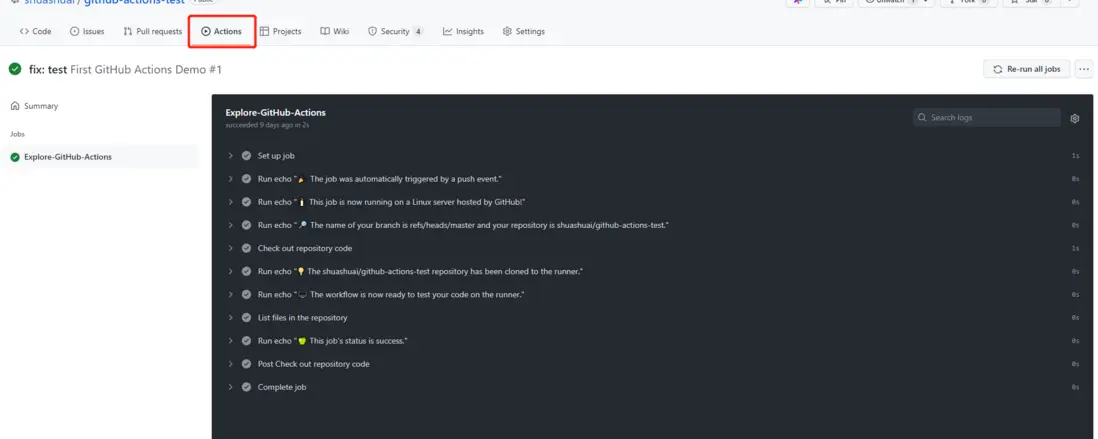
- run: echo "🍏 This job's status is ${{ job.status }}."- 提交代碼,點擊gihub倉庫上方的Actions按鈕,查看效果,第一個工作流程就完成了。
開始編寫自己的yml文件,實現自動構建
快速過一遍文檔,學習一下語法,實現自己想要的工作流程。從demo可以看到主要有流程有這麼幾步
- name 工作流程的名稱。 GitHub 在倉庫的操作頁面上顯示工作流程的名稱。
- on 觸發流程的事件,具體可以觸發的事件有這些,我們所要實現的是提交代碼,所以用 push.
- jobs 要按順序運行作業.
目標明確後,開始編寫yml
 # 顯示得workflow名稱
 name: First GitHub Actions Demo
 on:
   # 推送到master分支開始打包
   push:
     branches:
       - master

 jobs:
   # 開始打包
   Build:
     runs-on: ubuntu-latest
     steps:
     - name: checkout code
       # 遷出觸發的流程的版本 能讓下面的工作流程訪問
       uses: actions/checkout@v2
       # setup-node 可以提供node環境,指定node版本以及 npm /yarn緩存
     - name: actions/setup-node@v2
       uses: actions/setup-node@v2
       with:
         node: 16.14
     # 初始用的npm 打包時間太長了,就想着用yarn 結果沒仔細看文檔,yarn 不用安裝 ubuntu 上面有的
     # - name: install yarn
     #  uses: npm install yarn
     # - run: yarn install
     # - run: yarn build
     # 簡寫為
     - run: yarn install && yarn build
好了提交代碼看Actions(這是上面沒有優化時的流程)。
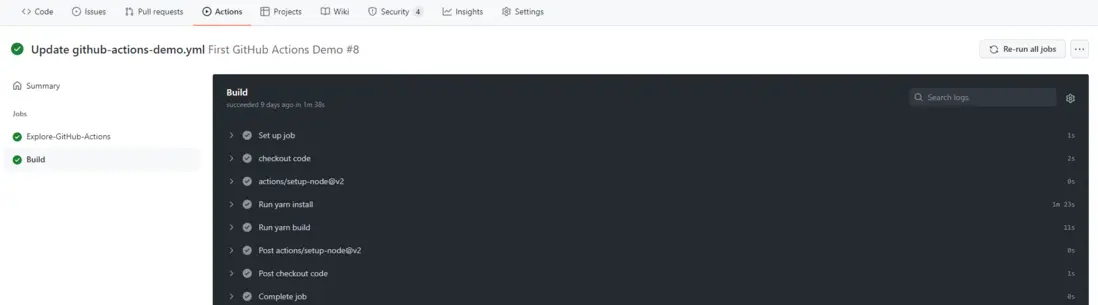
到此已經完成了提交代碼自動打包的過程了,但是一看打包時間好傢伙一分半,這要是實際開發大量依賴加入,那不得半個小時麼?打開流程一看大部分時間都是在下載依賴,所以是不是可以添加緩存呢?一搜索果然有cache,麻溜的按照文檔添加進入,
一看時間46s,哈哈果然有效。到此yml內容為
name: First GitHub Actions Demo
on:
  push:
    branches:
      - master

jobs:
  Build:
    runs-on: ubuntu-latest
    steps:
    - name: checkout code
      uses: actions/checkout@v2
    - name: actions/setup-node@v2
      uses: actions/setup-node@v2
      with:
        node: 16.14
    # 配置依賴緩存
    - name: yarn cache
      id: yarn-cahce-dir-path
      run: echo "::set-output name=dir::$(yarn cache dir)"
    - uses: actions/cache@v2
      id: yarn-cache
      with:
        path: ${{ steps.yarn-cahce-dir-path.outputs.dir }}
        key: ${{ runner.os }}-yarn-${{ hashFiles('**/yarn.lock') }}
        restore-keys: |
          ${{ runner.os }}-yarn-
    - run: yarn install && yarn build
部署頁面到Github Pages
- 首先需要設定一個分支,當做站點的根目錄,具體設置文檔,設置完成後會告訴你網站訪問地址(ps: 一定要把倉庫設置為Public,不然無法進行設置)。
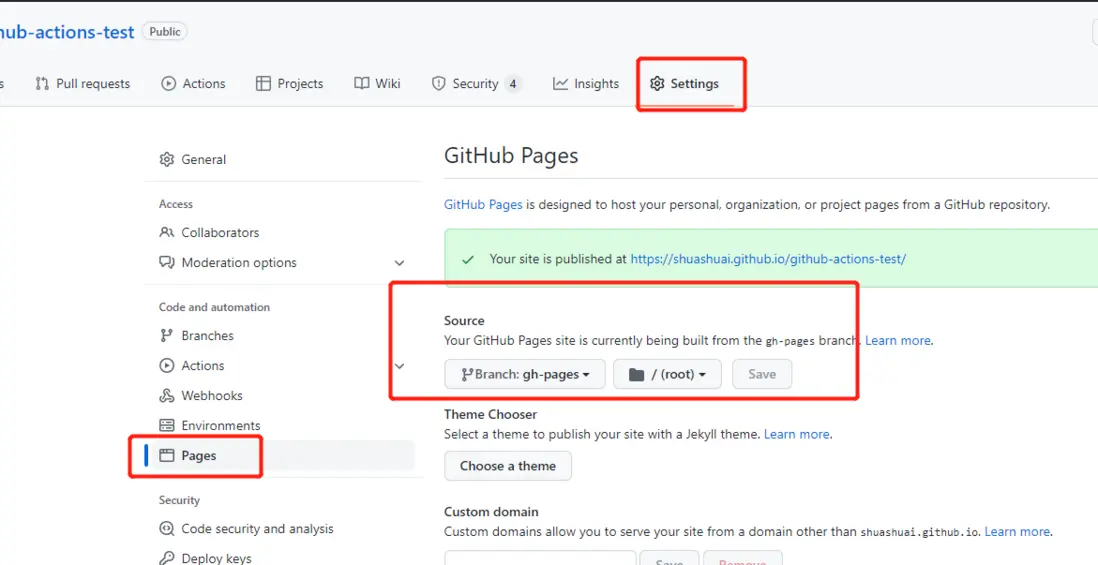
- 按照文檔編輯.yml,增加發布流程
 # 上面的步驟拿過來
 # 新增 deploy
  - name: deploy
    uses: JamesIves/github-pages-deploy-action@v4.2.3
    with:
      branch: gh-pages # 部署的分支名 有一定要獨立一個分支,第一次設置為master 好傢伙構建完成後,直接把我的項目文件清除了,只剩下打包的文件了。
      folder: build   # build後文件目錄
效果
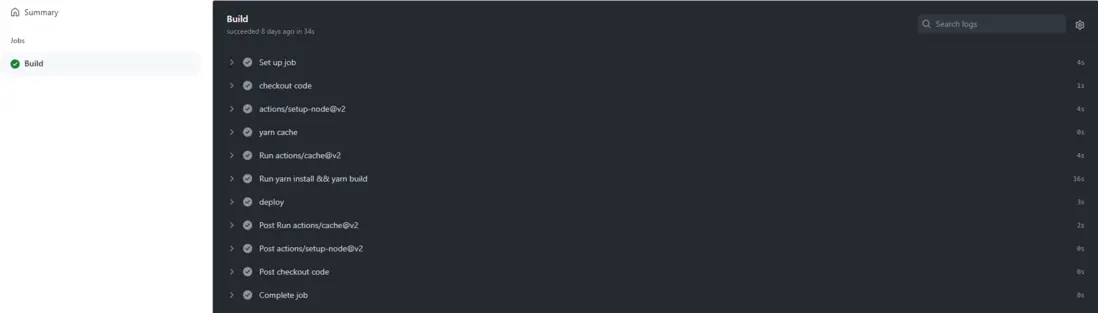
到這裏基本的目標已經實現了,但是當我看公司內部的流程時,install, build, deploy流程是分開的,這樣有利於增加一些校驗,lint規則等流程,所以我在思考怎麼拆分流程呢,第一次我簡單的拆分
name: First GitHub Actions Demo
on:
  push:
    branches:
      - master
      - dev

jobs:
  Build:
    runs-on: ubuntu-latest
    steps:
      uses: actions/checkout@v2
      uses: actions/setup-node@v2
      with:
        node: 16.14
    - name: yarn cache
      id: yarn-cahce-dir-path
      run: echo "::set-output name=dir::$(yarn cache dir)"
    - uses: actions/cache@v2
      id: yarn-cache
      with:
        path: ${{ steps.yarn-cahce-dir-path.outputs.dir }}
        key: ${{ runner.os }}-yarn-${{ hashFiles('**/yarn.lock') }}
        restore-keys: |
          ${{ runner.os }}-yarn-
    - run: yarn install
    - run: yarn build
  Deploy:
    - name: depploy
      uses: JamesIves/github-pages-deploy-action@v4.2.3
      width:
        branch: gh-pages
        folder: build
        clean: true
        clean-exclude: |
          special-file.txt
          some/*.txt
        ssh-key: ${{ secrets.PAGE_ACCESS_TOKEN }}
我想着這樣應該就可以了,一提交代碼直接GG,第一是沒有Deploy沒有等待build完成,第二是兩個job之間的文件不能夠直接用,又翻了下文檔才發現官方給了這兩個 actions/upload-artifact@v2 actions/download-artifact@v2 可以在不同job之間公用文件,所以又改了改,build階段上傳打包好的文件,deploy階段下載打包好的文件進行部署(注意deploy也要使用checkout@v2)。
最終結果
name: First GitHub Actions Demo
on:
  push:
    branches:
      - master
      - dev

jobs:
  Build:
    runs-on: ubuntu-latest
    steps:
    # 步驟名稱
    - name: checkout code
      uses: actions/checkout@v2
    - name: actions/setup-node@v2
      uses: actions/setup-node@v2
      with:
        node-version: '16.14'
        cache: 'yarn'
        cache-dependency-path: '**/yarn.lock'
    # 緩存 有需要可以開啓 同時 setu node 也可以進行緩存
    # - name: yarn cache
    #   id: yarn-cahce-dir-path
    #   run: echo "::set-output name=dir::$(yarn cache dir)"
    # - uses: actions/cache@v2
    #   id: yarn-cache
    #   with:
    #     path: ${{ steps.yarn-cahce-dir-path.outputs.dir }}
    #     key: ${{ runner.os }}-yarn-${{ hashFiles('**/yarn.lock') }}
    #     restore-keys: |
    #       ${{ runner.os }}-yarn-
    - run: yarn install && yarn build
    # 上傳打包好的文件,所以下一步可以使用
    - name: upload files
      uses: actions/upload-artifact@v2
      with:
        name: build-pages
        path: build
        retention-days: 1
  Deploy:
    needs: Build # 確保build 階段完成
    runs-on: ubuntu-latest
    steps:
      - name: checkout code
        uses: actions/checkout@v2
      - name: download build files
        uses: actions/download-artifact@v2
        with:
          name: build-pages
          path: build
      - name: deploy
        uses: JamesIves/github-pages-deploy-action@v4.2.3
        with:
          branch: gh-pages
          folder: build
          token: "${{ secrets.DEPLOY_TOKEN }}"
提交代碼,查看運行結果,完成拆分。
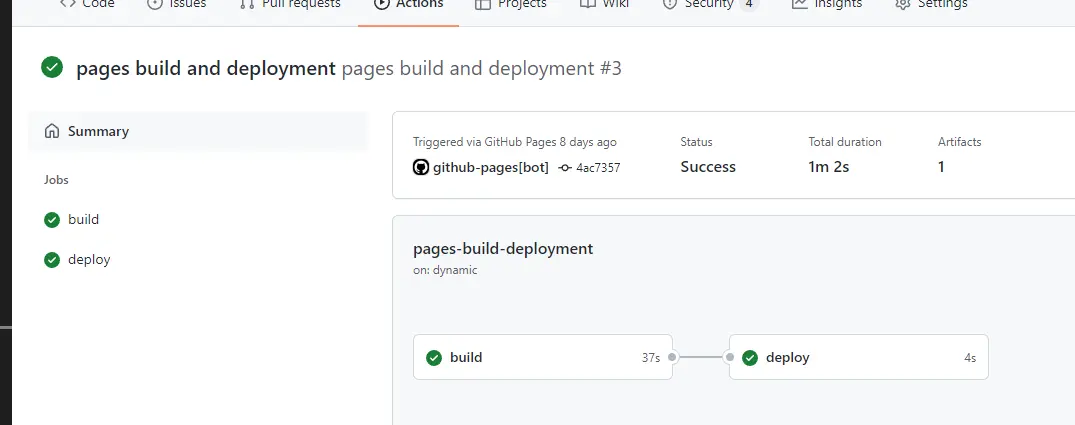
到這裏可以愉快的訪問你的網站了。
結尾
寫作思路是按照當時完成的思路一步一步的去完成這個流程來的,所以有些功能可能還沒想到,同時如果流程有什麼可以優化的地方,歡迎各位大佬指教。當然,完整的流程還欠缺很多,目前只是先完成簡單的打包構建流程,接下來還需要去學習gitlab 的CI、CD,完成後會在水一篇文章。在之後才會去看一些部署項目相關的內容。比如Docker,Nginx等,希望能在空閒之餘學會整個流程。加油!
