

大家好,我是“蔣點數分”,多年以來一直從事數據分析工作。從今天開始,與大家持續分享關於數據分析的學習內容。
本文是第 3 篇,也是【SQL 週週練】系列的第 3 篇。該系列是挑選或自創具有一些難度的 SQL 題目,一週至少更新一篇。後續創作的內容,初步規劃的方向包括:
後續內容規劃
1.利用 Streamlit 實現 Hive 元數據展示、SQL 編輯器、 結合Docker 沙箱實現數據分析 Agent
2.時間序列異常識別、異動歸因算法
3.留存率擬合、預測、建模
4.學習 AB 實驗、複雜實驗設計等
5.自動化機器學習、自動化特徵工程
6.因果推斷學習
7 ……
歡迎關注,一起學習。
第 3 期題目
題目來源:改進的題目,增加了電影院最優選座的邏輯
一、題目介紹
看到這個題目,有同學可能會吐槽:你小子拉了,第 3 期就出現常見題目。這裏我解釋一下,【SQL 週週練】系列的確是想輸出一系列我認為有挑戰性有意思的題(所謂挑戰性是對於大多數數分,SQL 資深者除外)我不想照搬 LeetCode 或牛客的題,更不想寫 “學生表” 那類題。
奈何我想象力有限(未來可能增加一個 SQL 破案系列,目前手裏有幾篇草稿,比如通過行車軌跡計算罪案策劃地點)對於市面上的題,如果增加一些創新點,我覺得也值得跟大家分享。比如這道題,我就增加了“最優選座”的邏輯。下面直接説題:
有一張表記錄了電影院某個廳某個場次的座位售出情況,假設有 5 個人來買票,請您用 SQL 輸出所有可以選擇的 5 個連續座位,還要按照一定規則根據座位的位置進行優劣排序。列名如下(這裏不顯示日期、放映廳名和場次等冗餘信息):
| 列名 | 數據類型 | 註釋 |
|---|---|---|
| seat_no | string | 座位號(格式:行號碼-列號碼) |
| is_saled | int | 是否售出(0-未銷售,1-已售出) |
説明:
- 為了簡化問題,假設不存在“過道”(以後有機會再水一篇文章)
- 為了簡化問題,“最優選座”的邏輯是——最優點在(總行數*0.65,總列數*0.5)所選座位相對於它的“歐式距離”(有權重,行號與列號的權重比是 3:2)之和最小者
二、題目思路
想要答題的同學,可以先思考答案🤔。
……
……
……
我來談談我的思路:這道題題目中的“連續”,可能會讓部分數據分析師想起“連續登錄”這個經典題型。我在第 1 期文章中提到,這類題型需要構造一個分組標識。但是今天的題目簡單的多,“連續登錄”類問題之所以要構造分組標識,是因為我們沒辦法確定窗口範圍。如果這道題是求最多有多少個連續空座,那套路是一樣的。
可是既然是求 5 個或者特定個連續空座,那麼問題大大簡化了。我們的窗口範圍是固定的 5 行就行了,你這 5 行從哪個位置開始都可以寫。我就從當前行開始算,也就是 order by seat_col asc rows between current row and 4 following。
下面,我在 Python 中生成模擬的數據集。相對於前兩期,這期模擬數據簡單得多:
三、生成模擬數據
只關心 SQL 代碼的同學,可以跳轉到第四節(我在工作中使用 Hive 較多,因此採用 Hive 的語法)
模擬代碼如下:
-
定義模擬邏輯需要的
常量,多少排多少列的座位。為了簡化問題,這裏就模擬一個長方形的普通廳,沒有過道,每排座位數一致:import numpy as np import pandas as pd # 感覺隨機數種子 2024 比 2025 最後展示的效果 np.random.seed(2024) n_rows = 9 # 多少排座位 n_cols = 25 # 多少列座位,為了簡化假設每排座位數相同 occupancy_rate = 0.3 # 電影院上座率 -
生成
pd.DataFrame。這裏強調一點,上座率不能當作0-1 分佈的概率,不能用0-1 分佈抽樣來模擬座位售出情況;而是應該用隨機抽指定數量的座位,即用頻率的方式來處理:df = pd.DataFrame( { "seat_no": [ f"{r}-{c}" for r in range(1, n_rows + 1) for c in range(1, n_cols + 1) ], "is_saled": np.zeros(n_rows * n_cols, dtype=int), } ) # 根據上座率隨機抽樣指定個數座位改為售出狀態 # 注意:我不是把上座率當成 0-1 分佈的概率 # 而是當成“頻率",抽取實際頻率對應的已售出座位數量 saled_index = np.random.choice( df.index, size=int(occupancy_rate * df.shape[0]), replace=False ) df.loc[saled_index, "is_saled"] = 1 # 0 表示座位未售出,1表示已售出 # 在 Jupyer 環境中展示數據框 # 如果在其他環境執行,可能報錯 display(df) - 這裏創建
Hive表,並將數據寫入。與前兩期不同,之前我都是將pd.DataFrame採用to_csv轉為csv文件;然後用pyHive在Hive中建好表,再使用load data local inpath的方法導入數據。而這一次,我採用CTAS的方式來建表並寫入數據,也就是create table ... as select...;但是這種方法有缺點,比如無法在建表時增加表和列的備註。因此我使用alter table語句來增加備註。
更正:我查了 Hive 的文檔:https://hive.apache.org/docs/latest/languagemanual-ddl_273620... 裏面提到了:The CREATE part of the CTAS takes the resulting schema from the SELECT part and creates the target table with other table properties such as the SerDe and storage format. 意思大概是,從 SELECT 的結果拿走 schema (大概就是列的定義)但是 other table properties 可以自己定義,包括SerDe和Storage format,表級別的備註也是可以在CTAS中直接定義的
關於 alter table 語句的使用格式和官方文檔,我已經在代碼註釋中説明:
from pyhive import hive

# 配置連接參數
host_ip = "127.0.0.1"
port = 10000
username = "蔣點數分"

hive_table_name = 'data_exercise.dwd_cinema_seat_sales_status'

# '1-1' 必須用引號括起來,否則在 sql 中被當成 1-1 的數學表達式
create_table_and_write_data_sql = f'''
create table {hive_table_name} as
select stack({df.shape[0]},
{','.join([f"'{row[0]}',{row[1]}" for row in df.values])}
) as (seat_no, is_saled)
'''

drop_table_sql = f'''
drop table if exists {hive_table_name}
'''

with hive.Connection(host=host_ip, port=port) as conn:
    cursor = conn.cursor()
    print(f'\n執行刪除表語句:\n{drop_table_sql}')
    # 如果該表已存在,則 drop
    cursor.execute(drop_table_sql)

    # 創建表並寫入數據
    print(f'\n採用 `CTAS` 建表並寫入數據:\n{create_table_and_write_data_sql}')
    cursor.execute(create_table_and_write_data_sql)

    # `CTAS` 不能在創建時添加備註,使用 `alter` 語句增加備註
    # 官方文檔
    # https://hive.apache.org/docs/latest/languagemanual-ddl_27362034/#alter-table-comment
    # ALTER TABLE table_name SET TBLPROPERTIES ('comment' = new_comment);
    cursor.execute(f'''
    alter table {hive_table_name} set tblproperties ('comment' =
        '電影院連續選座 | author:蔣點數分 | 文章編號:7b68c66c')
    ''')

    # 增加列備註,根據官方文檔
    # https://hive.apache.org/docs/latest/languagemanual-ddl_27362034/#alter-column
    # ALTER TABLE table_name [PARTITION partition_spec] CHANGE [COLUMN] col_old_name col_new_name column_type
      # [COMMENT col_comment] [FIRST|AFTER column_name] [CASCADE|RESTRICT];
    # 沒有打方括號的部分是必須寫的,也就是哪怕你不更改列名,不更改數據類型,也要寫上新舊列名和數據類型
    cursor.execute(f'''
    alter table {hive_table_name} change seat_no seat_no string comment '座位編號'
    ''')

    cursor.execute(f'''
    -- 如果嘗試將 `is_saled` 改為 `tinyint` 會報錯,只能往更大的整型修改
    alter table {hive_table_name} change is_saled is_saled int comment '是否已售出'
    ''')

    cursor.execute(f'''
    desc formatted {hive_table_name}
    ''')

    records = cursor.fetchall()

    for r in records:
        print(r)

    cursor.close()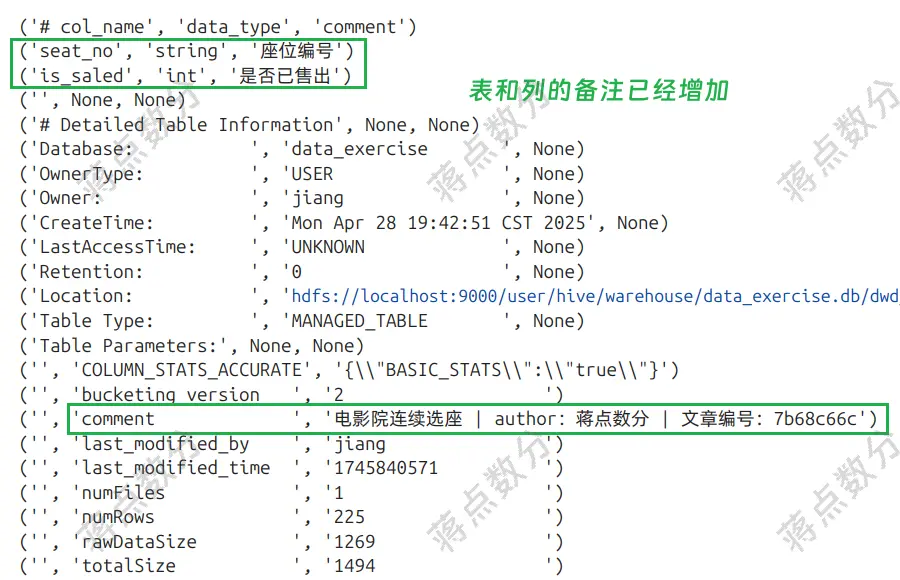
在寫入數據時,我在 select 語句中使用了 stack 函數,它是表生成函數。如果你之前沒有在 Hive 中使用過這個函數,你可以搜搜它的用法。數據比較簡單的時候,我就用它來配合 CTAS 寫入數據。
我通過使用PyHive包實現 Python 操作Hive。我個人電腦部署了Hadoop及Hive,但是沒有開啓認證,企業裏一般常用Kerberos來進行大數據集羣的認證。
- 既然上面數據都寫入
Hive了,那麼我這裏又貼一段代碼,是幹什麼呢?又不是查詢,這段代碼是用來做可視化的,將模擬生成的數據利用函數寫入網頁(以前在數分工作中簡單的使用過Vue)getCinemaHtml函數其實就是一個格式化字符串,根據參數返回完整的字符串。完整字符串就是一個簡單的網頁,裏面使用 CDN 方法引入了Vue3,作為初學者,我這裏沒有使用前端構建等方法來做:
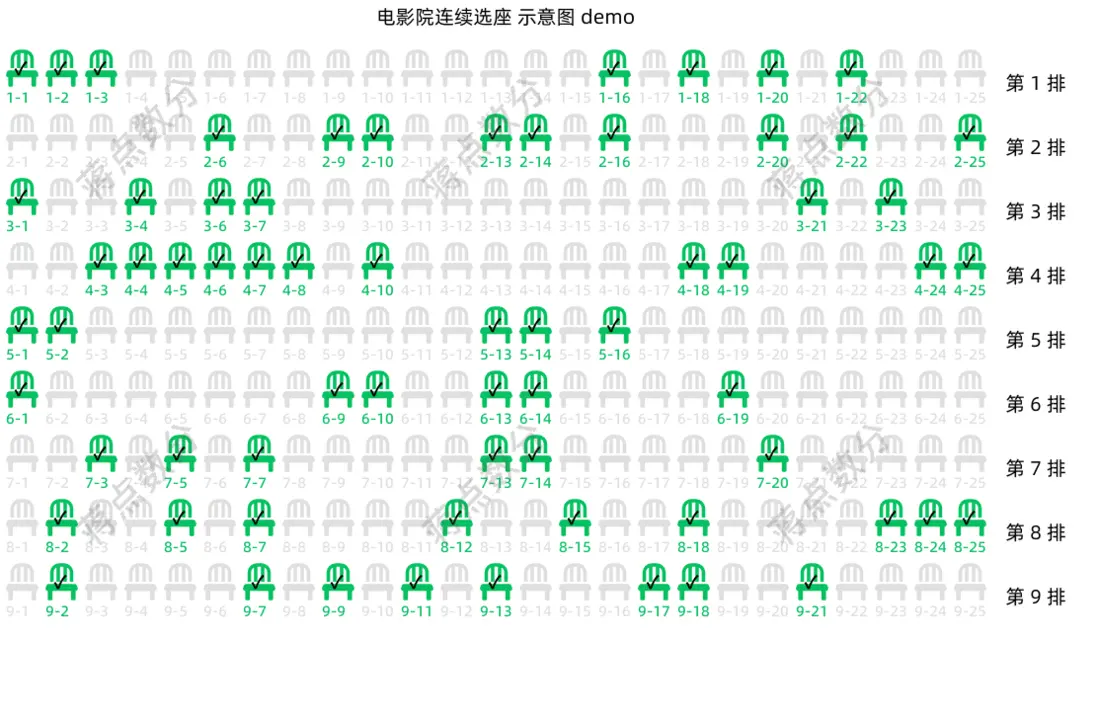
# 構造特定格式 dict 給網頁畫圖提供數據
seats_info_list = []

for i in df.groupby(by=df["seat_no"].apply(lambda s: s.split("-")[0])):
    d = {"seat_row_no": int(i[0])}
    d["seat_col_arr"] = i[1]["seat_no"].apply(lambda s: int(s.split("-")[1])).to_list()
    d["is_saled_arr"] = i[1]["is_saled"].to_list()
    seats_info_list.append(d)

print(seats_info_list)

# 外部的自定義函數
from cinema_seats_html import getCinamaHtml

with open('cinema_seats.html', 'w') as f:
    '''
    將 DataFrame 的數據處理為特定格式,在作為字符串寫入
    html 頁面的 script 標籤中;讓 Javascript 將其作為
    一個對象
    '''
    html_str = getCinemaHtml(seats_info_list)
    f.write(html_str)
四、SQL 解答
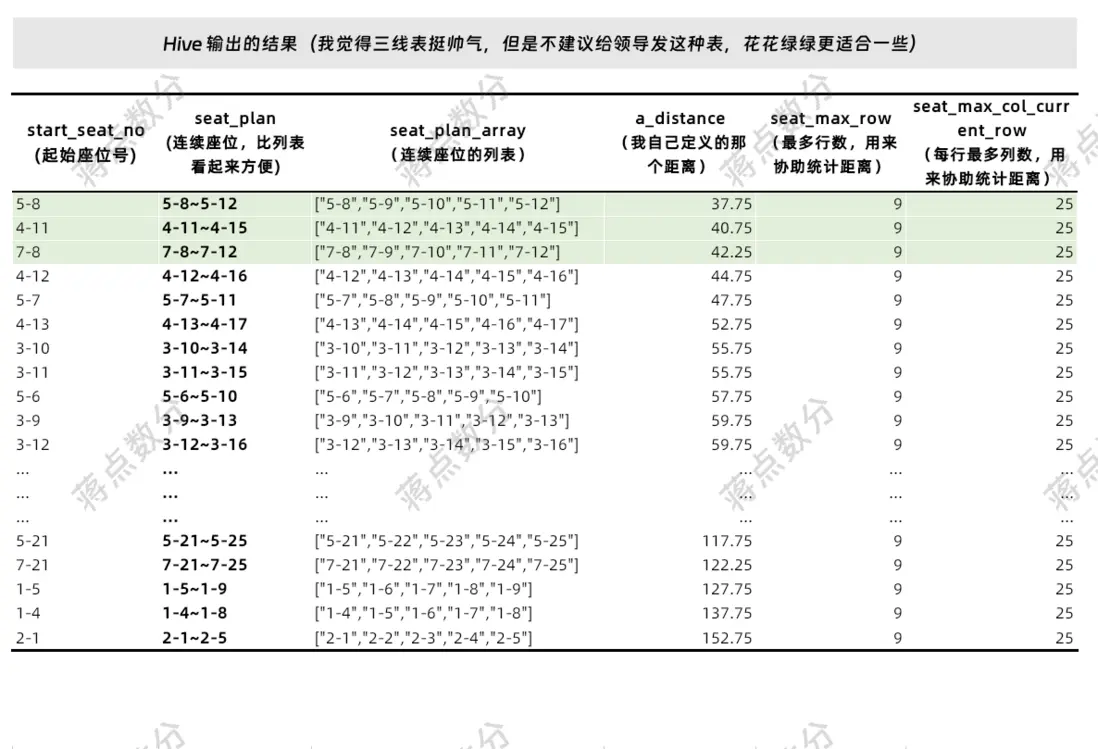
我先將 seat_no 切開,這樣行號碼和列號碼後面寫着方便。計算連續 5 個空座位,為什麼要 sum(if(is_saled=0, 1, 0)) = 5 而不是 sum(is_saled) = 0,因為 rows between ... 4 following,在掃到該分組最後 4 行時,此時窗口的實際長度已經不是 5 個了,因為後面沒有數據了。用 sum(is_saled) = 0 需要增加額外的邏輯。使用 3*abs(seat_row-0.65*seat_max_row)+2*abs(seat_col-0.5*seat_max_col_current_row 來處理我自定義的“歐式距離”,這裏行號和列號的權重是 3:2;最後篩選 5 個連續空座的標誌,將“歐式距離”升序排列,並且將連續座位的顯示格式調整一下即可。
-- 求連續 5 個的空座位

with simple_processing_table as (
    -- 表名根據“有道翻譯”取的,就是簡單處理一下
    -- 將行號和列號單獨拿出來,後面寫着方便一點點;不處理也可以
    select
      seat_no
    , int(split(seat_no, '-')[0]) as seat_row
    , int(split(seat_no, '-')[1]) as seat_col
    , is_saled
    from data_exercise.dwd_cinema_seat_sales_status
)

, calc_5_continuous_seats_table as (
   -- 計算連續 5 個空座位,為什麼要 sum(if(is_saled=0, 1, 0)) = 5 而不是
   -- sum(is_saled) = 0,因為 rows between ... 4 following,在掃到該分組最後 4 行時
   -- 此時窗口的實際長度已經不是 5 個了,因為後面沒有數據了。用 sum(is_saled) = 0
   -- 需要增加額外的邏輯
    select
      seat_no, seat_row, seat_col
    , sum(if(is_saled=0, 1, 0)) over (partition by seat_row order by seat_col asc
        rows between current row and 4 following) as tag
    , collect_set(seat_no) over (partition by seat_row order by seat_col asc
        rows between current row and 4 following) as seat_plan_array
    , max(seat_row) over () as seat_max_row
    -- 這裏隊列之所以用 partition by seat_row,不像求最多行 over 後面沒有內容,
    -- 其實還是兼容了每排座位數不同的情況,只是沒有過於細緻的處理
    , max(seat_col) over (partition by seat_row) as seat_max_col_current_row
    from simple_processing_table
)

, calc_euclidean_distance_table as (
    -- 計算歐式距離和將座位彙總,依舊是有道翻譯,取名太難了
    select
      seat_no as start_seat_no
      -- 注意加 4
    , concat(seat_row, '-', seat_col, '~', seat_row, '-',seat_col+4) as seat_plan
    , seat_max_row
    , seat_max_col_current_row
    , seat_plan_array
      -- 注意到每排最後 4 個的時候,實際可不是 5 個距離之和了;只不過後面會被條件 tag=5 篩掉
    , sum(
        3*abs(seat_row - 0.65 * seat_max_row) + 2*abs(seat_col - 0.5 * seat_max_col_current_row)
      ) over (partition by seat_row order by seat_col asc
      rows between current row and 4 following) as a_distance
    , tag
    from calc_5_continuous_seats_table
)

select
  start_seat_no
, seat_plan
, seat_plan_array
, a_distance
, seat_max_row
, seat_max_col_current_row
from calc_euclidean_distance_table
where tag = 5 -- 窗口函數卡了 5 行,不可能超過 5
order by a_distance asc
查詢結果如下:
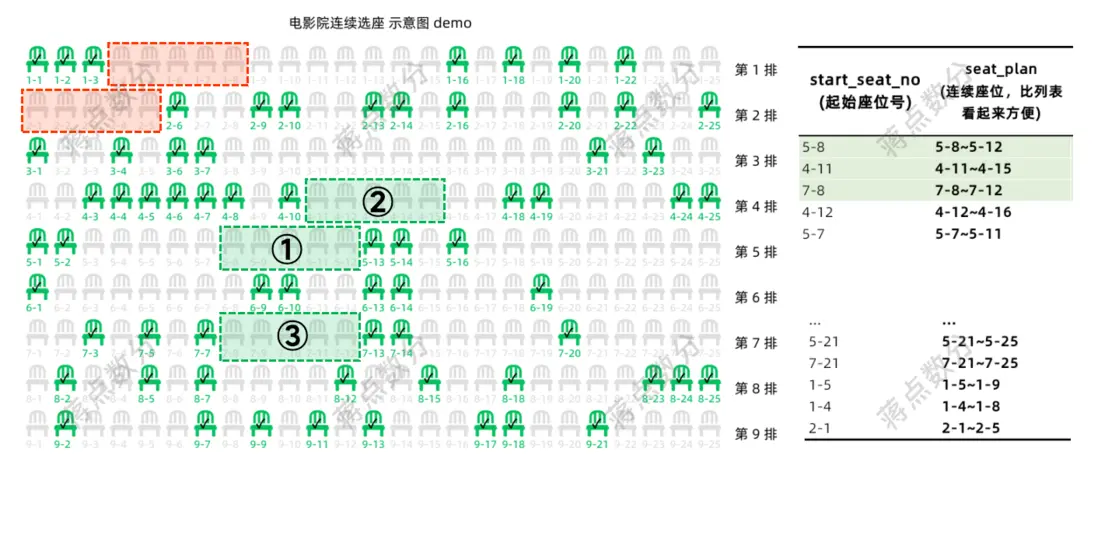
咱們跟網頁示意圖核對核對(在 WPS 演示中加工一下展示),綠色區域是最好的選擇,紅色區域就是最差的選擇:
以下是返回網頁的 Python 函數,初學者採用 CDN 方法引入的 Vue3,未使用前端構建工具,也沒使用 Flask 或 Fastapi 前後端分離。作為一名數學,接觸 Vue 不久,還請懂前端的大佬放過😃:
def getCinemaHtml(seat_info_str):
    return """
    <!DOCTYPE html>
    <html lang="zh-CN">
    <head>
        <meta charset='UTF-8'>
        <meta name="viewport" content="width=device-width, initial-scale=1.0" />
        <title>電影院選座 demo</title>
        <link rel="stylesheet" href="https://lf6-cdn-tos.bytecdntp.com/cdn/expire-10-y/font-awesome/5.15.4/css/all.min.css" />
        <style>
          #app{
           overflow: visible;
          }
          .row {
            display: flex;
            align-items: center;
          }
          .seat {
            margin: 0 2px 2px 0;
            color: #DFDFDF;
            width: 30px;
            height: 50px;
            justify-content: center;
          }
          .seat.isSaled {
            color: #07c160;
          }
          .seat.isSaled:after {
            content: '✓';
            font-size: 14px;
            color: #000000;
            position: relative;
            font-weight: 800;
            left: 7px;
            bottom: 42px;
          }
          .series {
            margin-left: 10px;
            white-space: nowrap;
          }
          .seat_no {
            font-size: 12px;
            font-weight: 600;
            white-space: nowrap;
          }
          .title {
            position: relative;
            left: calc(10 * 30px);
            margin-bottom: 16px;
            font-size: 16px;
          }
        </style>
    </head>
    <body>
        <div id='app'>
            <div class="title">電影院連續選座 示意圖 demo</div>
            <div class="row" v-for="(item, index) in seats_info" :key="item.seat_row_no">
                <div :class="{seat:true, isSaled:item.is_saled_arr[i]}"
                    v-for="(s, i) in item.seat_col_arr">
                    <i class="fas fa-chair" style="font-size:30px;"></i>
                    <div class="seat_no">{{ `${item.seat_row_no}-${s}` }}</div>
                </div>
                <div class="series">{{ `第 ${item.seat_row_no} 排`}}</div>
            </div>
        </div>
    <script type='module'>
    import { createApp, reactive } from 'https://unpkg.zhimg.com/vue@3.5.13/dist/vue.esm-browser.js';

    const app = createApp({
      setup(){
        // 定義一個 message
        const seats_info = reactive(
            %s
        );
        return {
          seats_info
        }
      }
    });

    app.mount('#app');
    </script>
    </body>
    </html>
    """ % (seat_info_str)
😃😃😃
我現在正在求職數據類工作(主要是數據分析或數據科學);如果您有合適的機會,懇請您與我聯繫,即時到崗,不限城市。您可以發送私信或通過公眾號聯繫我(全網同名:蔣點數分)。
