

發現
很多人都知道現代瀏覽器都支持 DNS 的預解析,學名:DNS Prefetching。用法也很簡單,就是在html代碼里加入這樣的 link 標籤
<link rel="dns-prefetch" href="//delai.me">我們之前的用法是在 Head 為2個 靜態資源服務器的域名 和 日誌圖片的域名 建了3條 dns-prefetch link。
<link rel="dns-prefetch" href="//tj.koudaitong.com/" />
<link rel="dns-prefetch" href="//imgqn.koudaitong.com/" />
<link rel="dns-prefetch" href="//kdt-static.qiniudn.com/" />
我最近給移動web 關鍵靜態資源做 File Prefetching,順手看了下Chromium 和 Firefox 關於 DNS Prefetching 的官方文檔 看到這麼一句:
Manual Prefetch
Chromium uses the "href" attribute of hyperlinks to find host names to prefetch. However, some of those hyperlinks may be redirects, for example if the site is trying to count how many times the link is clicked. In those situations, the "true" targeted domain is not necessarily discernible by examining the content of a web page, and so Chromium not able to prefetch the final targeted domain.
上面這段文字包含兩個信息:
-
chrome 會自動把當前頁面的所有帶href的link的dns都prefetch一遍
-
需要手動添加link標籤的場景是:你預計用户在後面的訪問中需要用到當前頁面的所有鏈接都不包含的域名
看來,我們原先的姿勢是不對的~
驗證
我寫了一個測試頁面,代碼是這樣的:
<html>
<head></head>
<body>
    <a href="http://a.youzan.com">a</a>
    <a href="http://b.youzan.com">b</a>
    <a href="http://c.youzan.com">c</a>
    <a href="http://d.youzan.com">d</a>
</body>
</html>
在chrome裏打開他,然後訪問 chrome://histograms/DNS.PrefetchQueue ,看到如下統計結果
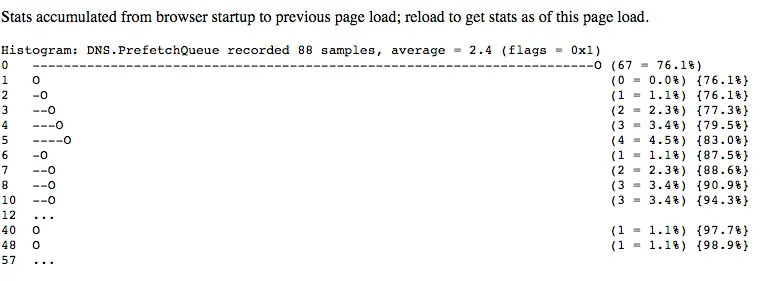
當然,上圖並不能説明什麼問題,只能看出:從啓動chrome到訪問剛剛這個測試頁面,一共有88次dns prefetching,其中67次直接命中耗時0ms,有4次耗時5ms。不過,如果把測試頁面改成下面這個樣子再跑一次就有點意思了:
<html>
<head></head>
<body>
    <a href="http://a.youzan.com">a</a>
    <a href="http://b.youzan.com">b</a>
    <a href="http://c.youzan.com">c</a>
    <a href="http://d.youzan.com">d</a>
    <a href="http://a1.youzan.com">a1</a>
    <a href="http://b1.youzan.com">b1</a>
    <a href="http://c1.youzan.com">c1</a>
    <a href="http://d1.youzan.com">d1</a>
    <a href="http://a2.youzan.com">a2</a>
    <a href="http://b2.youzan.com">b2</a>
    <a href="http://c2.youzan.com">c2</a>
    <a href="http://d2.youzan.com">d2</a>
    <a href="http://a3.youzan.com">a3</a>
    <a href="http://b3.youzan.com">b3</a>
    <a href="http://c3.youzan.com">c3</a>
    <a href="http://d3.youzan.com">d3</a>
    <a href="http://a4.youzan.com">a4</a>
    <a href="http://b4.youzan.com">b4</a>
    <a href="http://c4.youzan.com">c4</a>
    <a href="http://d4.youzan.com">d4</a>
</body>
</html>
統計結果變成了:
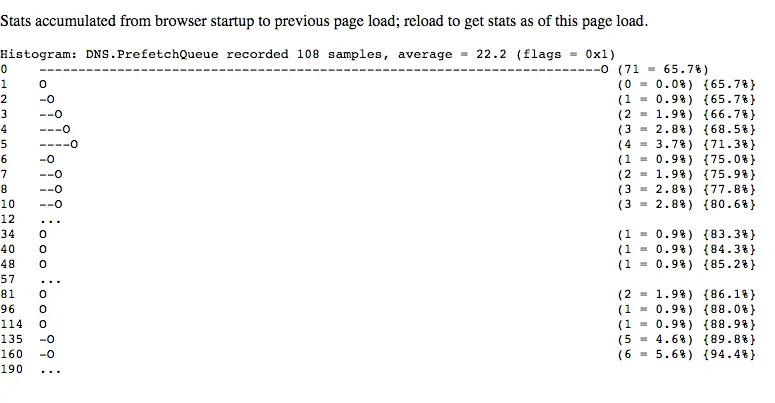
可以看出:因為頁面裏有20個a標籤帶href屬性,chrome做了20次dns prefetching,其中耗時為0的次數比之前加了4,那是因為頭4個域名在上一次跑測試頁面的時候已經被prefetch過了本地已經有記錄,直接命中。其餘的16個dns prefetching 耗時基本上離散分佈不甚相同。
結論
實際情況如文檔所説,我的理解也是對,我們之前的使用姿勢確實有點問題。
正確的使用姿勢是
1.對靜態資源域名做手動dns prefetching。
2.對js裏會發起的跳轉、請求做手動dns prefetching。
3.不用對超鏈接做手動dns prefetching,因為chrome會自動做dns prefetching。
4.對重定向跳轉的新域名做手動dns prefetching,比如:頁面上有個A域名的鏈接,但訪問A會重定向到B域名的鏈接,這麼在當前頁對B域名做手動dns prefetching是有意義的。
其他
1.假設頁面Head裏面有個css鏈接, 在當前頁的Head里加上對應的手動dns prefetching的link標籤,實際上並沒有好處。
2.普遍來説合理的dns prefetching能對頁面性能帶來50ms ~ 300ms的提升,有人做了這方面的統計。
3.如chromium的官方文檔所説,dns prefetching的網絡消耗是極低極低的:
Each request typically involves sending a single UDP packet that is under 100 bytes out, and getting back a response that is around 100 bytes. This minimal impact on network usage is compensated by a significant improvement in user experience.
4.如chromium的官方文檔所説,chrome使用8個線程專門做dns prefetching 而且chrome本身不做dns記錄的cache,是直接從操作系統讀dns —— 也就是説,直接修改系統的dns記錄或者host是可以直接影響chrome的。
5.手動 dns prefetching 的代碼實際上還是會增加html的代碼量的,特別是域名多的情況下。
所以,最優的方案應該是:通過js初始化一個iframe異步加載一個頁面,而這個頁面裏包含本站所有的需要手動dns prefetching的域名。事實上,我們已經這麼做了,具體可以看這篇文章:《預加載系列二:讓File Prefetching絲絲潤滑無痛無癢》。
本文首發於我的
SegmentFault專欄:http://segmentfault.com/a/1190000004336839
個人技術博客:http://delai.me/code/file-frefetching/
轉載請註明出處

