

前言: Algolia 是什麼?
Algolia 是一個搜索、推薦服務平台,可以通過簡單的配置來為站點添加全文檢索功能
基本原理:
通過爬蟲對目標網站的內容創建 Records (記錄), 在用户搜索時調用接口返回相關內容

一. 需求描述
為網站添加 實時搜索, 採用 Docusaurus2 官方支持的 Algolia DocSearch
Docsearch 每週一次爬取網站 (可在網頁界面上配置具體時間), 並將所有內容彙總到一個 Algolia 索引中
隨後,前端頁面會調用 Algolia API 來直接查詢這些內容
Docusaurus 搜索功能文檔
二. 準備工作
1. Docsearch 官網申請
前置條件:
-
準備項目域名地址 - 本案例: https://didilinkin.cn/
如沒有 服務器和域名 也可用 GitHub Pages
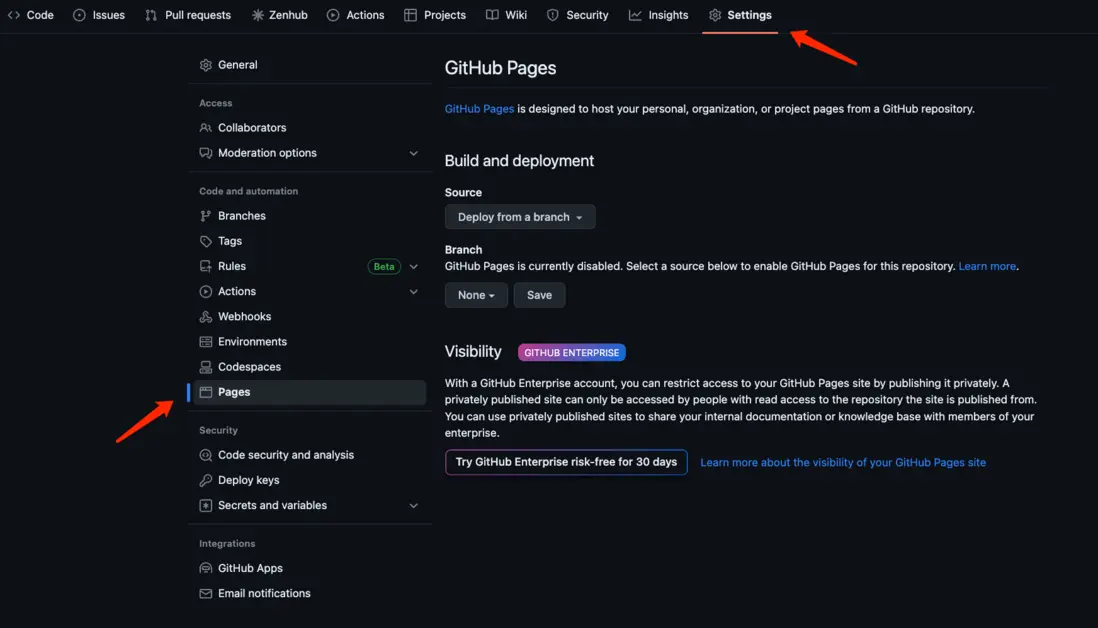
- 項目的開源地址 - 本案例: https://github.com/didilinkin/didilinkin-website
前置條件準備完成後, 就可到 Docsearch 註冊
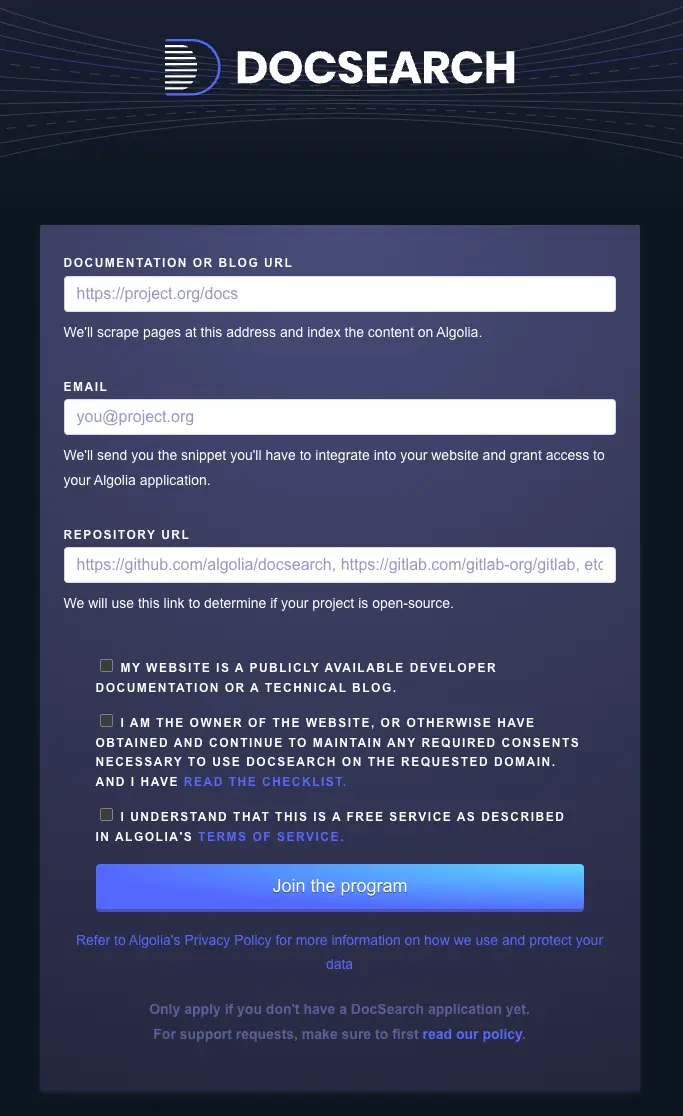
提交後大約 2天內會收到 反饋郵件, 通知註冊成功
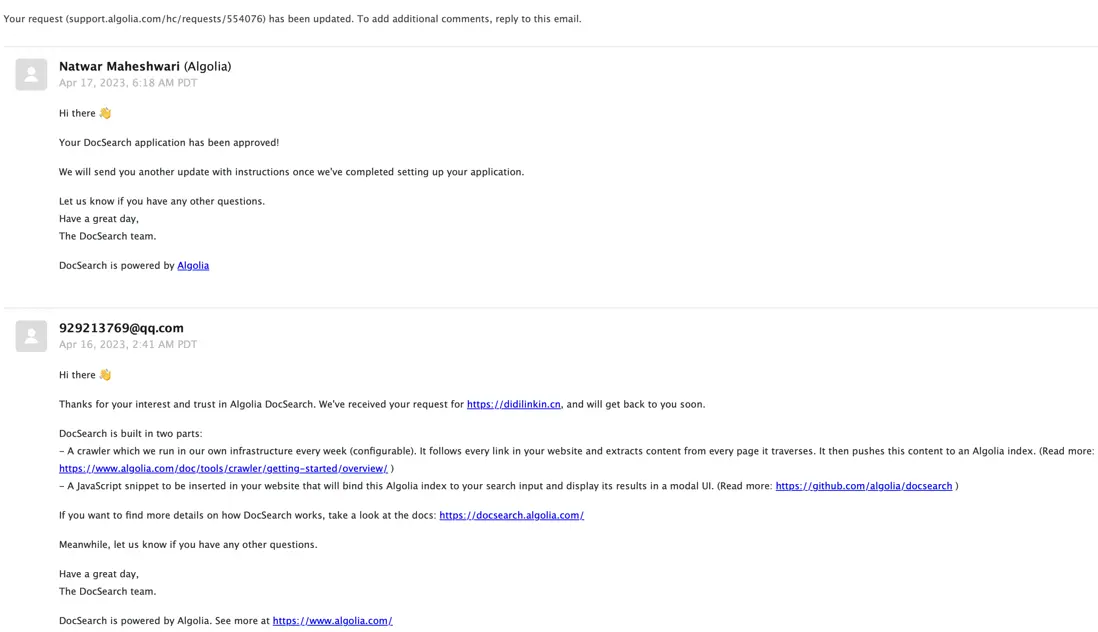
2. 獲取 Application ID & API Keys
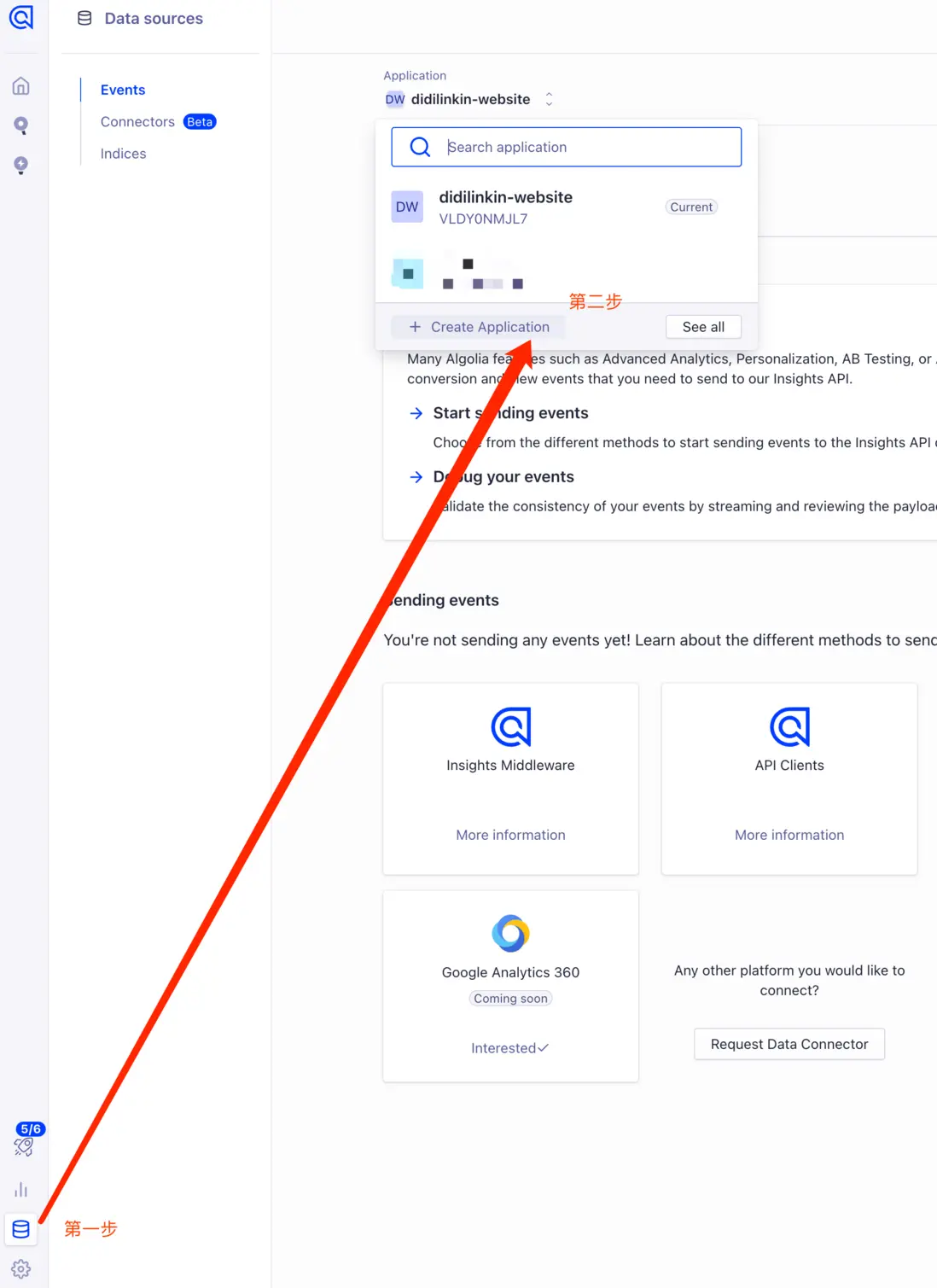
前往 Algolia 官網, 登錄賬户 創建 Application
設置 Application 名稱, 選擇免費計劃
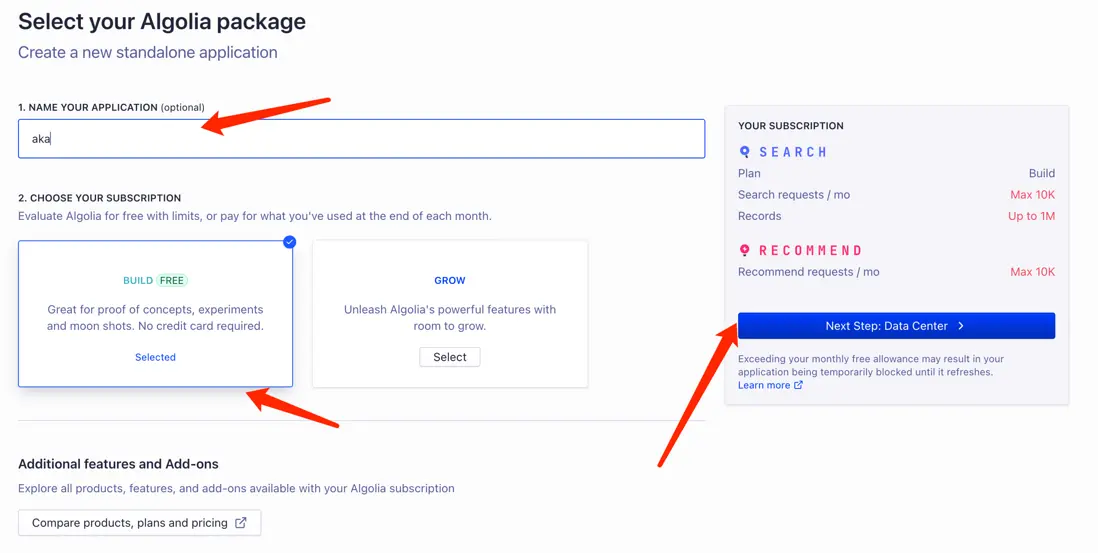
最後選擇響應速度快的服務後, 創建成功✅
控制枱打開 設置頁面,點擊 API keys
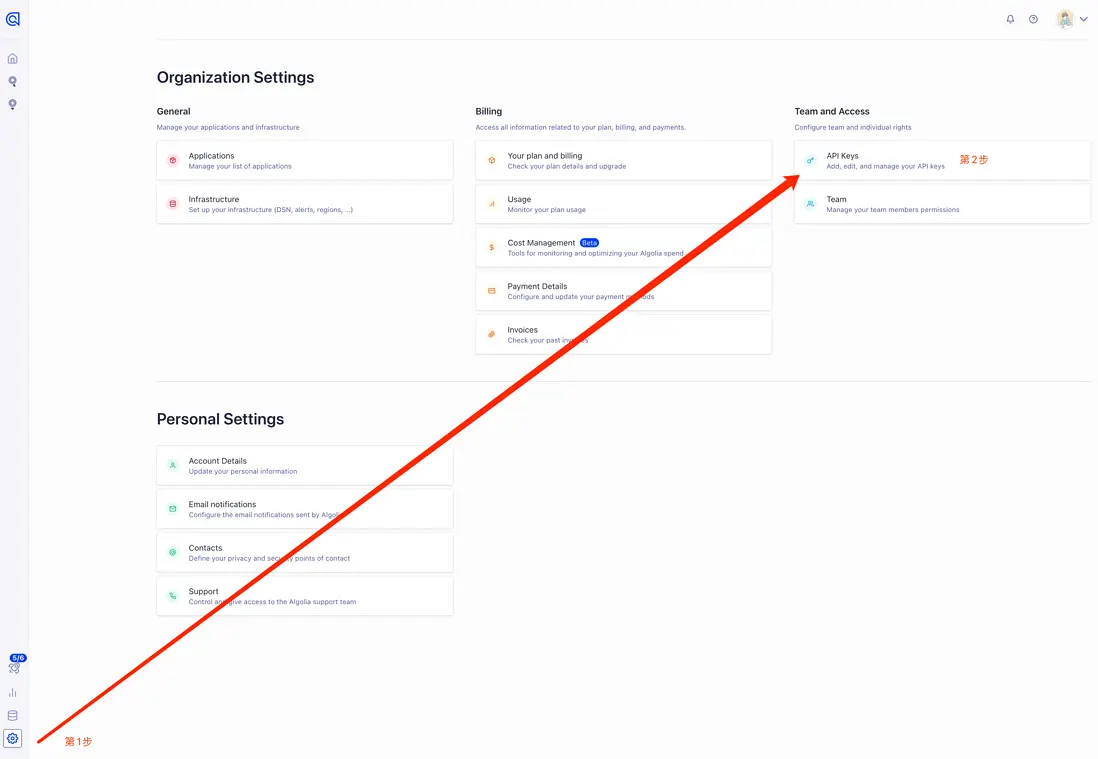
找到 接下來本地配置需要的數據

三. 本地 Algolia Docsearch配置
-
.env (鍵值不帶雙引號)
APPLICATION_ID=Application ID
API_KEY=Admin API Key # 務必確認, 這是坑點 不要用 'Write API Key' 或者 'Search API Key'
-
docusaurus.config.js
module.exports = { // ... presets: [[ // ... "classic", /** @type {import('@docusaurus/preset-classic').Options} */ ({ // 這個插件會為你的站點創建一個站點地圖 // 以便搜索引擎的爬蟲能夠更準確地爬取你的網站 sitemap: { changefreq: "weekly", priority: 0.5, ignorePatterns: ["/tags/**"], filename: "sitemap.xml", }, }) ]], // ... themeConfig: { // ... algolia: { appId: 'YOUR_APP_ID', // Application ID // 公開 API密鑰:提交它沒有危險 apiKey: 'YOUR_SEARCH_API_KEY', // Search-Only API Key indexName: 'YOUR_INDEX_NAME' }, } }- Algolia DocSearch 插件文檔
- sitemap 插件文檔
-
docsearch-config.json (爬蟲配置文件)
需修改3處:
- index_name
- start_urls
- sitemap_urls
{ "index_name": "didilinkin-website", "start_urls": [ "https://didilinkin.cn/" ], "sitemap_urls": [ "https://didilinkin.cn/sitemap.xml" ], "sitemap_alternate_links": true, "stop_urls": [ "/tests" ], "selectors": { "lvl0": { "selector": "(//ul[contains(@class,'menu__list')]//a[contains(@class, 'menu__link menu__link--sublist menu__link--active')]/text() | //nav[contains(@class, 'navbar')]//a[contains(@class, 'navbar__link--active')]/text())[last()]", "type": "xpath", "global": true, "default_value": "Documentation" }, "lvl1": "header h1", "lvl2": "article h2", "lvl3": "article h3", "lvl4": "article h4", "lvl5": "article h5, article td:first-child", "lvl6": "article h6", "text": "article p, article li, article td:last-child" }, "strip_chars": " .,;:#", "custom_settings": { "separatorsToIndex": "_", "attributesForFaceting": [ "language", "version", "type", "docusaurus_tag" ], "attributesToRetrieve": [ "hierarchy", "content", "anchor", "url", "url_without_anchor", "type" ] }, "js_render": true, "conversation_id": [ "833762294" ], "nb_hits": 46250 }- Algolia 官方用例
四. 執行爬蟲程序 - docsearch-scraper
以下兩種 爬蟲方式任選其一即可 (推薦使用 GitHub Actions)
1. 本地 執行爬蟲
前置條件:
- Docker
-
jq - 輕量級命令行 JSON 處理器
使用 brew 安裝最新版的 jq
jq安裝完成後, 在命令行執行 爬蟲腳本
docker run -it --env-file=.env -e "CONFIG=$(cat docsearch-config.json | jq -r tostring)" algolia/docsearch-scraper等待 容器運行完成, 如下即可
...
Getting https://didilinkin.cn/docs/react/hooks/custom-hooks from selenium
Getting https://didilinkin.cn/docs/react/hooks/useMemo from selenium
Getting https://didilinkin.cn/docs/react/hooks/useCallback from selenium
Getting https://didilinkin.cn/docs/javascript/versions/es-2016 from selenium
Getting https://didilinkin.cn/docs/javascript/versions/es-2015 from selenium
> DocSearch: https://didilinkin.cn/docs/plugins-and-libraries/big-screen/ 17 records)
> DocSearch: https://didilinkin.cn/docs/server/nginx/nginx-forward-proxy-vs-reverse-proxy/ 8 records)
> DocSearch: https://didilinkin.cn/docs/category/caddy/ 3 records)
> DocSearch: https://didilinkin.cn/docs/category/nginx/ 5 records)

Nb hits: 1369
2. GitHub Actions 執行爬蟲
在 .github/workflows/ 文件夾下 創建 docsearch-scraper.yml, 用來定義 GitHub Actions 工作流
name: 索引爬蟲 docsearch-scraper

on:
  push:
    branches: [master]
  pull_request:
    branches: [master]

jobs:
  scan:
    runs-on: ubuntu-latest

    steps:
      - name: Sleep for 10 seconds
        run: sleep 10s
        shell: bash

      - name: Checkout repo
        uses: actions/checkout@v3

      - name: Run scraper
        env:
          APPLICATION_ID: ${{ secrets.APPLICATION_ID }}
          API_KEY: ${{ secrets.API_KEY }}
        run: |
          CONFIG="$(cat docsearch-config.json)"
          docker run -i --rm \
                  -e APPLICATION_ID=$APPLICATION_ID \
                  -e API_KEY=$API_KEY \
                  -e CONFIG="${CONFIG}" \
                  algolia/docsearch-scraper
然後在 GitHub 的 Secrets 創建
- APPLICATION_ID
- API_KEY — Admin API Key
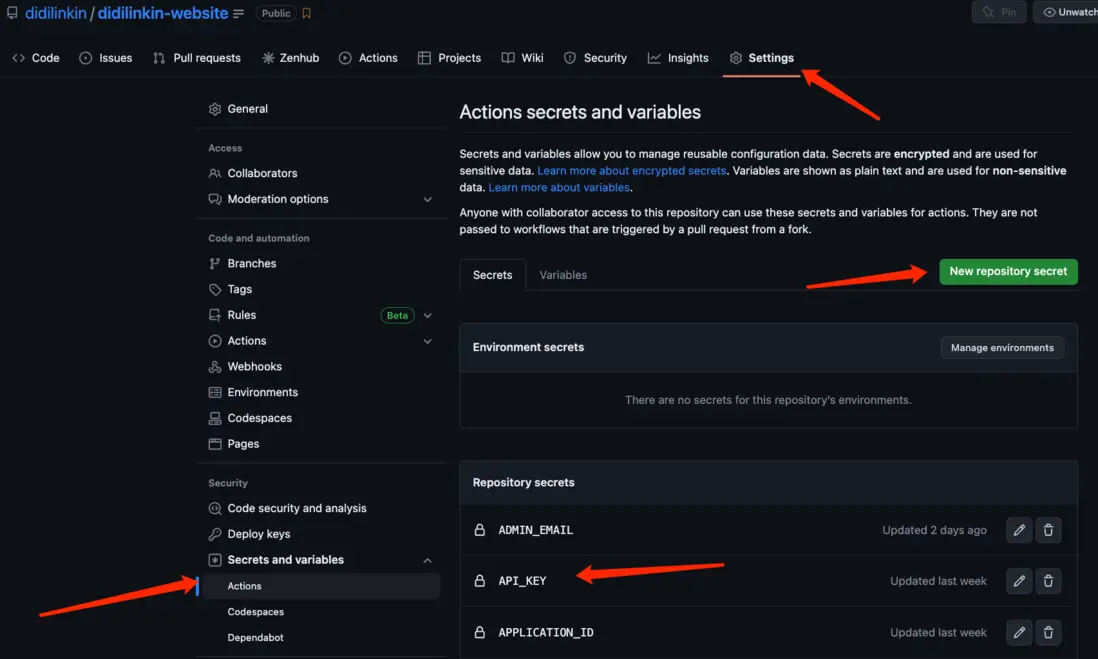
當使用 Git 推送項目到 GitHub時, Actions就會自動執行 爬蟲任務
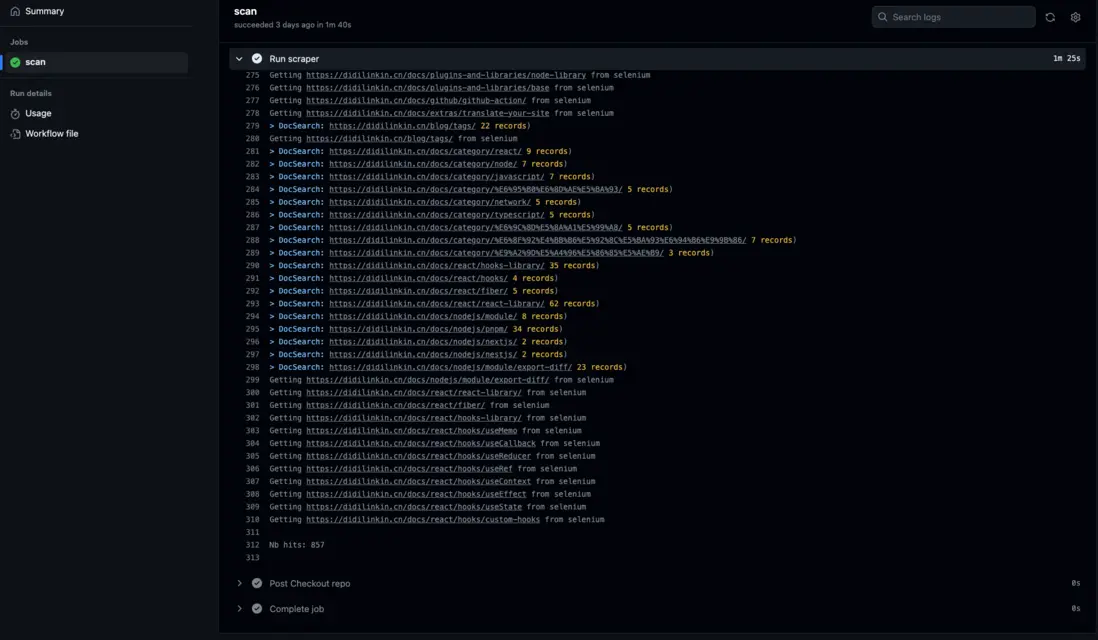
坑點
-
官網郵件通知 創建好的項目 是沒有 管理員權限的
需要在個人主頁, 重新創建項目, 注意起名字 不要衝突
-
index_name 需要三處對齊
- docsearch-config.json -
index_name - docusaurus.config.js -
indexName - Algolia 官網 的項目名稱 -
Application
如: didilinkin-website
- docsearch-config.json -
示例代碼
- GitHub Repository
- 實際效果 - 點擊右上角 "搜索"
常見問題
-
algoliasearch.exceptions.RequestException: Method not allowed with this API key
這個錯誤通常表示您在使用 Algolia Search API 時使用了無效的 API密鑰或 API密鑰權限不允許使用該請求方法
-
分析
使用的 key不對 - 當前使用的也許是
Search-Only API Key -
解決方法
改為使用
Admin API Key
-
-
Error: Process completed with exit code 3.
由於嘗試使用 Algolia Search API更新對象時所使用的 API密鑰缺少必要的權限
確認您正在使用具有正確權限的Algolia Search API密鑰來更新對象
-
分析
使用的 key權限不對 - 當前使用的也許是
Write API Key -
解決方法
改為使用
Admin API Key
-
-
本地執行 爬蟲腳本, 報錯: Error: Cannot find module 'winston'
使用 yarn 重新安裝 winston
yarn global remove winston

yarn global add winston
-
本地執行 爬蟲腳本, 報錯: Error: { cli } was removed in winston@3.0.0.
# 查看本地的 全局依賴是否存在 jq
yarn global list --depth=0

# 刪除 jq依賴
yarn global remove jq
-
本地執行 爬蟲腳本, 報錯: zsh: command not found: jq
確保本地 npm, yarn, pnpm 的全局依賴中沒有 jq, 使用 brew安裝
# 安裝最新版 jq
brew install --HEAD jq

# 鏈接 最新版 jq
brew link jq
參考鏈接
- 官網文檔 - Run your own
- 使用 Docusaurus 搭建優秀個人wiki
- Docusaurus搭建個人博客
- jq - Installation
