

qustion
1. 問題背景
在數據中心部署 Prometheus PushGateway 服務時,遇到了一個典型的容器網絡訪問問題。相同的部署配置在不同數據中心呈現出不同的網絡訪問結果,本文將詳細分析問題的排查過程和解決方案。
2. 問題現象
搭建典型的pushgateway服務,使用了nginx與pushgateway整合,為什麼整合呢?主要原因是安全掃描掃描出來很多pushgateway的安全漏洞,也木有經歷去修改,直接使用nginx做了deny,配置文件如下:
docker-compose.yaml
docker-compose.yaml
version: "3"
services:
  pushgateway:
    image: prom/pushgateway:v1.9.0
    networks:
      - internal-network
    privileged: true
    restart: always
    volumes:
      - ./pushgateway_data:/data
    command:
      - '--persistence.file=/data/pushgateway.data'
      - '--persistence.interval=5m'

  nginx:
    image: nginx:1.23.2
    networks:
      - internal-network
    ports:
      - "9091:80"  # 對外暴露9091端口,內部轉發至80
    depends_on:
      - pushgateway
    volumes:
      - ./nginx.conf:/etc/nginx/nginx.conf
    restart: always

networks:
  internal-network:  # 自定義網絡
nginx.conf
networks:
  internal-network:  # 自定義網絡
nginx.conf
events {}

http {
    server {
        server_tokens off;
        listen 80;

        location / {
            proxy_pass http://pushgateway:9091;  # 代理到 pushgateway 服務
            proxy_set_header Host $host;
        }

        # 禁用訪問 pprof 的路徑
        location ~ ^/(debug|pprof) {
            deny all;
            return 404;
        }
    }
}
服務的管理啓動使用了service:
cat /etc/systemd/system/pushgateway.service
[Unit]
Description=pushgateway Service
Requires=docker.service
After=docker.service

[Service]
Type=simple
User=apppub
Group=apppub
WorkingDirectory=/app/metabank/pushgateway
ExecStart=/bin/bash -c '/usr/bin/docker-compose up & sleep 5 && /usr/bin/docker-compose logs -f pushgateway >> /app/metabank/pushgateway/pushgateway_logs/pushgateway.log 2>&1'
ExecStop=/bin/bash -c '/usr/bin/docker-compose down'
Restart=always
RestartSec=10

[Install]
WantedBy=multi-user.target
數據中心服務器由合作方提供,但是部署過程中出現了下面的問題:
- 數據中心A:服務正常,容器間網絡互通,外部可訪問
- 數據中心B:本地訪問正常,跨主機訪問異常
問題排查過程
鏡像一致性驗證
首先驗證了 prom/pushgateway:v1.9.0 鏡像的一致性,通過對比 SHA256 確認鏡像完全一致,排除鏡像問題。
網絡模式測試
將網絡模式修改為 host 模式後,服務恢復正常,初步鎖定為容器網絡配置問題。
系統參數對比
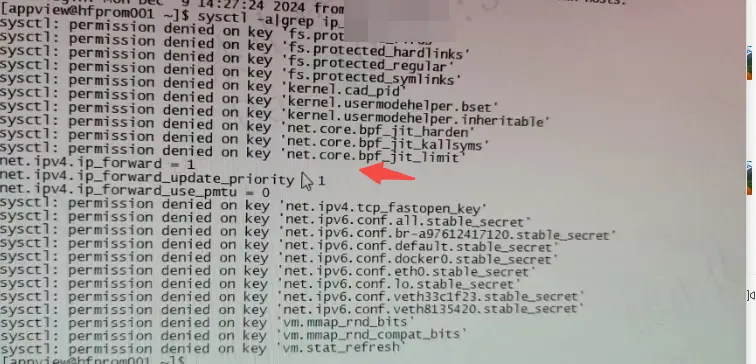
通過 sysctl -a 對比發現關鍵差異:
# 數據中心A
net.ipv4.ip_forward = 1

# 數據中心B
net.ipv4.ip_forward = 0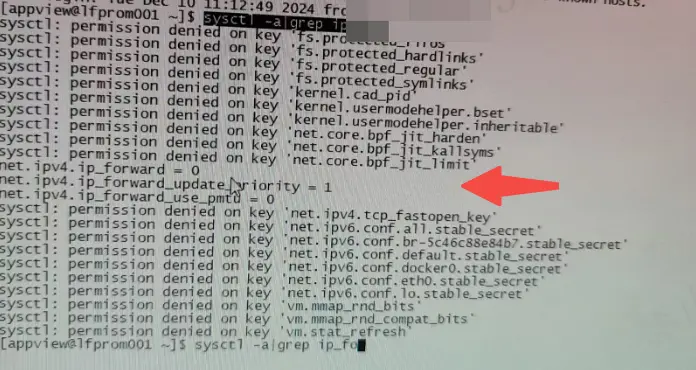
核心問題解析
net.ipv4.ip_forward 參數説明
該參數控制 Linux 系統的 IP 轉發功能:
- 1: 啓用 IP 轉發
- 0: 禁用 IP 轉發
在容器環境中,該參數對網絡模式的影響:
- bridge 模式需要啓用 IP 轉發
- host 模式不依賴 IP 轉發
Docker 網絡模式對比
下面是常用的集中網絡模式,更全面的可以參照:https://blog.csdn.net/qq_41917355/article/details/142833506
Bridge 模式(默認)
- 創建獨立的網絡命名空間
- 容器間通過虛擬網橋通信
- 需要 IP 轉發支持
- 優點:隔離性好
- 缺點:性能有一定損耗
Host 模式
- 共享主機網絡棧
- 直接使用主機端口
- 不需要 IP 轉發
- 優點:網絡性能好
- 缺點:端口容易衝突
<font style="color:rgb(79, 79, 79);">Container模式</font>
優點:
- -容器間共享網絡命名空間,通信效率高
- -適合不同容器需要共享網絡棧的場景
- -節省系統資源
缺點:
- 容器間網絡隔離性差
- 可能存在端口衝突
- 依賴於另一個容器的網絡配置
None 模式
- 完全隔離的網絡環境
- 適用於不需要網絡的場景
優化後的部署方案
由於中心的系統參數不能進行修改,不能保證兩個中心配置文件一致,只能保證兩個中心的pushgateway服務功能端口一致,故採用了host的網絡模式進行部署:
Host 模式部署配置
# docker-compose.yaml
version: "3"
services:
  pushgateway:
    image: prom/pushgateway:v1.9.0
    network_mode: "host"
    privileged: true
    restart: always
    volumes:
      - ./pushgateway_data:/data
    command:
      - '--persistence.file=/data/pushgateway.data'
      - '--persistence.interval=5m'
      - '--web.listen-address=127.0.0.1:9092'  # pushgateway只監聽本地9092端口

  nginx:
    image: nginx:1.23.2
    network_mode: "host"
    volumes:
      - ./nginx.conf:/etc/nginx/nginx.conf
    restart: always
    depends_on:
      - pushgateway
# nginx.conf
events {}
http {
server {
server_tokens off;
listen 9091; # nginx對外監聽9091端口
location / {
proxy_pass http://127.0.0.1:9092; # 轉發到本地9092端口
proxy_set_header Host $host;
}
location ~ ^/(debug|pprof) {
deny all;
return 404;
}
}
}服務啓動配置
# /etc/systemd/system/pushgateway.service
[Unit]
Description=pushgateway Service
Requires=docker.service
After=docker.service

[Service]
Type=simple
User=apppub
Group=apppub
WorkingDirectory=/app/metabank/pushgateway
ExecStart=/bin/bash -c '/usr/bin/docker-compose up & sleep 5 && /usr/bin/docker-compose logs -f pushgateway >> /app/metabank/pushgateway/pushgateway_logs/pushgateway.log 2>&1'
ExecStop=/bin/bash -c '/usr/bin/docker-compose down'
Restart=always
RestartSec=10

[Install]
WantedBy=multi-user.target
通過上述配置文件的修改,該中心pushgateway服務可以正常使用。
最佳實踐建議
- 在無法修改系統參數的環境中,優先考慮使用 host 網絡模式
- 使用 host 模式時注意端口衝突問題
- 通過 nginx 反向代理增加安全性控制
- 合理規劃端口映射,避免端口衝突
- 做好日誌收集和監控
總結
本文通過一個實際案例,詳細講解了容器網絡問題的排查思路和解決方案。在實際運維工作中,瞭解不同網絡模式的特點和系統參數的影響至關重要。通過合理選擇網絡模式,可以在不同環境約束下實現最優的部署方案。



