

服務端如何將一個大視頻文件做切分,分段響應給客户端,讓瀏覽器可以漸進式地播放。
Spring Boot實現HTTP分片下載斷點續傳,從而實現H5頁面的大視頻播放問題,實現漸進式播放,每次只播放需要播放的內容就可以了,不需要加載整個文件到內存中。
文件的斷點續傳、文件多線程併發下載(迅雷就是這麼玩的)等。
HTTP範圍請求
斷點續傳(分塊傳輸)
HTTP範圍請求,助力斷點續傳、多線程下載的核心原理
斷點續傳:指的是在上傳/下載時,將任務(一個文件或壓縮包)人為的劃分為幾個部分,每一個部分採用一個線程進行上傳/下載。如果碰到網絡故障,可以從已經上傳/下載的部分開始繼續上傳/下載未完成的部分,而沒有必要從頭開始上傳/下載。可以節省時間,提高速度。
斷點續傳的用途
有時,用户上傳/下載文件需要歷時數小時,萬一線路中斷,不具備斷點續傳的 HTTP/FTP 服務器或下載軟件就只能從頭重傳,所以如果服務器或下載軟件具有斷點續傳能力,允許用户從上傳/下載斷線的地方繼續傳送,這樣就大大減少了用户的煩惱。
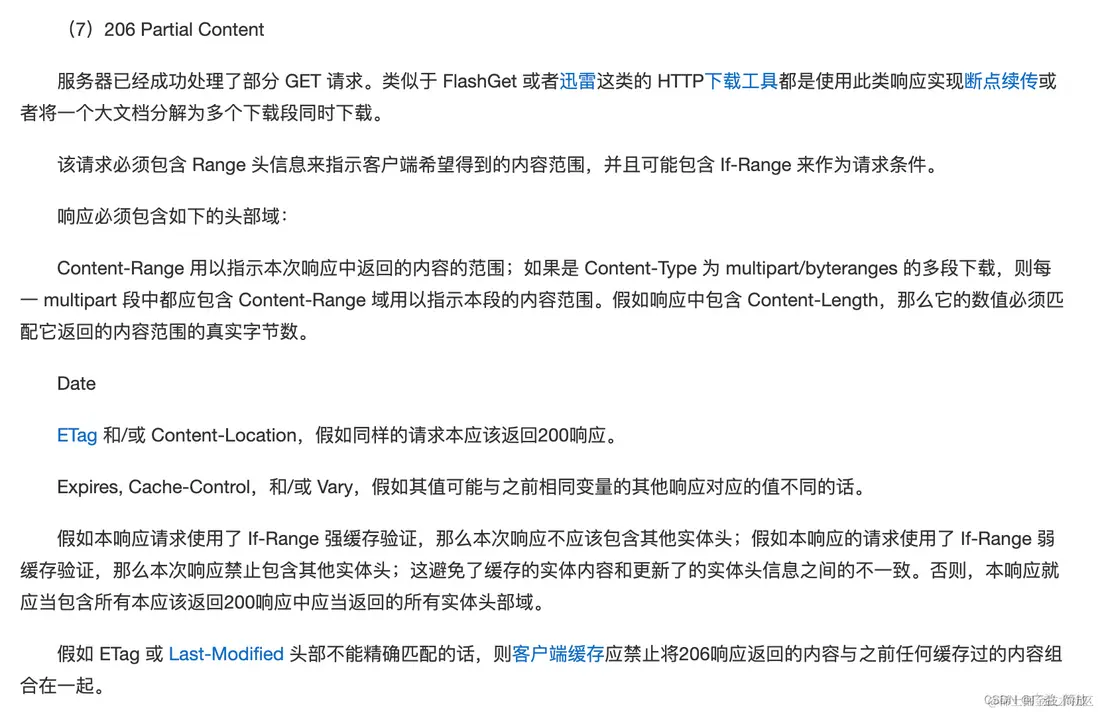
206 Partial Content
服務器已經成功處理了部分 GET 請求。類似於 FlashGet 或者迅雷這類的 HTTP下載工具都是使用此類響應實現斷點續傳或者將一個大文檔分解為多個下載段同時下載。
依賴
  <dependencyManagement>
    <dependencies>
      <dependency>
        <groupId>cn.hutool</groupId>
        <artifactId>hutool-bom</artifactId>
        <version>5.8.18</version>
        <type>pom</type>
        <scope>import</scope>
      </dependency>
    </dependencies>
  </dependencyManagement>

  <dependencies>
    <dependency>
      <groupId>cn.hutool</groupId>
      <artifactId>hutool-core</artifactId>
    </dependency>

    <dependency>
      <groupId>org.projectlombok</groupId>
      <artifactId>lombok</artifactId>
      <optional>true</optional>
    </dependency>
  </dependencies>
代碼實現
ResourceController
package com.example.insurance.controller;

import javax.servlet.http.HttpServletRequest;
import javax.servlet.http.HttpServletResponse;

import java.io.IOException;
import java.nio.file.Files;
import java.nio.file.Path;
import java.nio.file.Paths;
import java.util.List;

import com.example.insurance.common.ContentRange;
import com.example.insurance.common.MediaContentUtil;
import com.example.insurance.common.NioUtils;
import lombok.extern.slf4j.Slf4j;
import org.springframework.http.HttpHeaders;
import org.springframework.http.HttpRange;
import org.springframework.http.HttpStatus;
import org.springframework.util.CollectionUtils;
import org.springframework.util.StopWatch;
import org.springframework.web.bind.annotation.GetMapping;
import org.springframework.web.bind.annotation.PathVariable;
import org.springframework.web.bind.annotation.RequestHeader;
import org.springframework.web.bind.annotation.RequestMapping;
import org.springframework.web.bind.annotation.RestController;

/**
 * 內容資源控制器
 */
@SuppressWarnings("unused")
@Slf4j
@RestController("resourceController")
@RequestMapping(path = "/resource")
public class ResourceController {

    /**
     * 獲取文件內容
     *
     * @param fileName 內容文件名稱
     * @param response 響應對象
     */
    @GetMapping("/media/{fileName}")
    public void getMedia(@PathVariable String fileName, HttpServletRequest request, HttpServletResponse response,
                         @RequestHeader HttpHeaders headers) {
//        printRequestInfo(fileName, request, headers);

        String filePath = MediaContentUtil.filePath();
        try {
            this.download(fileName, filePath, request, response, headers);
        } catch (Exception e) {
            log.error("getMedia error, fileName={}", fileName, e);
        }
    }

    /**
     * 獲取封面內容
     *
     * @param fileName 內容封面名稱
     * @param response 響應對象
     */
    @GetMapping("/cover/{fileName}")
    public void getCover(@PathVariable String fileName, HttpServletRequest request, HttpServletResponse response,
                         @RequestHeader HttpHeaders headers) {
//        printRequestInfo(fileName, request, headers);

        String filePath = MediaContentUtil.filePath();
        try {
            this.download(fileName, filePath, request, response, headers);
        } catch (Exception e) {
            log.error("getCover error, fileName={}", fileName, e);
        }
    }


    // ======= internal =======

    private static void printRequestInfo(String fileName, HttpServletRequest request, HttpHeaders headers) {
        String requestUri = request.getRequestURI();
        String queryString = request.getQueryString();
        log.debug("file={}, url={}?{}", fileName, requestUri, queryString);
        log.info("headers={}", headers);
    }

    /**
     * 設置請求響應狀態、頭信息、內容類型與長度 等。
     * <pre>
     * <a href="https://www.rfc-editor.org/rfc/rfc7233">
     *     HTTP/1.1 Range Requests</a>
     * 2. Range Units
     * 4. Responses to a Range Request
     *
     * <a href="https://www.rfc-editor.org/rfc/rfc2616.html">
     *     HTTP/1.1</a>
     * 10.2.7 206 Partial Content
     * 14.5 Accept-Ranges
     * 14.13 Content-Length
     * 14.16 Content-Range
     * 14.17 Content-Type
     * 19.5.1 Content-Disposition
     * 15.5 Content-Disposition Issues
     *
     * <a href="https://www.rfc-editor.org/rfc/rfc2183">
     *     Content-Disposition</a>
     * 2. The Content-Disposition Header Field
     * 2.1 The Inline Disposition Type
     * 2.3 The Filename Parameter
     * </pre>
     *
     * @param response     請求響應對象
     * @param fileName     請求的文件名稱
     * @param contentType  內容類型
     * @param contentRange 內容範圍對象
     */
    private static void setResponse(
            HttpServletResponse response, String fileName, String contentType,
            ContentRange contentRange) {
        // http狀態碼要為206:表示獲取部分內容
        response.setStatus(HttpStatus.PARTIAL_CONTENT.value());
        // 支持斷點續傳,獲取部分字節內容
        // Accept-Ranges:bytes,表示支持Range請求
        response.setHeader(HttpHeaders.ACCEPT_RANGES, ContentRange.BYTES_STRING);
        // inline表示瀏覽器直接使用,attachment表示下載,fileName表示下載的文件名
        response.setHeader(HttpHeaders.CONTENT_DISPOSITION,
                "inline;filename=" + MediaContentUtil.encode(fileName));
        // Content-Range,格式為:[要下載的開始位置]-[結束位置]/[文件總大小]
        // Content-Range: bytes 0-10/3103,格式為bytes 開始-結束/全部
        response.setHeader(HttpHeaders.CONTENT_RANGE, contentRange.toContentRange());

        response.setContentType(contentType);
        // Content-Length: 11,本次內容的大小
        response.setContentLengthLong(contentRange.applyAsContentLength());
    }

    /**
     * <a href="https://www.jianshu.com/p/08db5ba3bc95">
     *     Spring Boot 處理 HTTP Headers</a>
     */
    private void download(
            String fileName, String path, HttpServletRequest request, HttpServletResponse response,
            HttpHeaders headers)
            throws IOException {
        Path filePath = Paths.get(path + fileName);
        if (!Files.exists(filePath)) {
            log.warn("file not exist, filePath={}", filePath);
            return;
        }
        long fileLength = Files.size(filePath);
//        long fileLength2 = filePath.toFile().length() - 1;
//        // fileLength=1184856, fileLength2=1184855
//        log.info("fileLength={}, fileLength2={}", fileLength, fileLength2);

        // 內容範圍
        ContentRange contentRange = applyAsContentRange(headers, fileLength, request);

        // 要下載的長度
        long contentLength = contentRange.applyAsContentLength();
        log.debug("contentRange={}, contentLength={}", contentRange, contentLength);

        // 文件類型
        String contentType = request.getServletContext().getMimeType(fileName);
        // mimeType=video/mp4, CONTENT_TYPE=null
        log.debug("mimeType={}, CONTENT_TYPE={}", contentType, request.getContentType());

        setResponse(response, fileName, contentType, contentRange);

        // 耗時指標統計
        StopWatch stopWatch = new StopWatch("downloadFile");
        stopWatch.start(fileName);
        try {
            // case-1.參考網上他人的實現
//            if (fileLength >= Integer.MAX_VALUE) {
//                NioUtils.copy(filePath, response, contentRange);
//            } else {
//                NioUtils.copyByChannelAndBuffer(filePath, response, contentRange);
//            }

            // case-2.使用現成API
            NioUtils.copyByBio(filePath, response, contentRange);
//            NioUtils.copyByNio(filePath, response, contentRange);

            // case-3.視頻分段漸進式播放
//            if (contentType.startsWith("video")) {
//                NioUtils.copyForBufferSize(filePath, response, contentRange);
//            } else {
//                // 圖片、PDF等文件
//                NioUtils.copyByBio(filePath, response, contentRange);
//            }
        } finally {
            stopWatch.stop();
            log.info("download file, fileName={}, time={} ms", fileName, stopWatch.getTotalTimeMillis());
        }
    }

    private static ContentRange applyAsContentRange(
            HttpHeaders headers, long fileLength, HttpServletRequest request) {
        /*
         * 3.1. Range - HTTP/1.1 Range Requests
         * https://www.rfc-editor.org/rfc/rfc7233#section-3.1
         * Range: "bytes" "=" first-byte-pos "-" [ last-byte-pos ]
         *
         * For example:
         * bytes=0-
         * bytes=0-499
         */
        // Range:告知服務端,客户端下載該文件想要從指定的位置開始下載
        List<HttpRange> httpRanges = headers.getRange();

        String range = request.getHeader(HttpHeaders.RANGE);
        // httpRanges=[], range=null
        // httpRanges=[448135688-], range=bytes=448135688-
        log.debug("httpRanges={}, range={}", httpRanges, range);

        // 開始下載位置
        long firstBytePos;
        // 結束下載位置
        long lastBytePos;
        if (CollectionUtils.isEmpty(httpRanges)) {
            firstBytePos = 0;
            lastBytePos = fileLength - 1;
        } else {
            HttpRange httpRange = httpRanges.get(0);
            firstBytePos = httpRange.getRangeStart(fileLength);
            lastBytePos = httpRange.getRangeEnd(fileLength);
        }
        return new ContentRange(firstBytePos, lastBytePos, fileLength);
    }
}
NioUtils
package com.example.insurance.common;

import javax.servlet.http.HttpServletResponse;
import java.io.BufferedOutputStream;
import java.io.InputStream;
import java.io.OutputStream;
import java.io.RandomAccessFile;
import java.nio.MappedByteBuffer;
import java.nio.channels.Channels;
import java.nio.channels.FileChannel;
import java.nio.file.Path;
import java.nio.file.StandardOpenOption;

import cn.hutool.core.io.IORuntimeException;
import cn.hutool.core.io.IoUtil;
import cn.hutool.core.io.NioUtil;
import cn.hutool.core.io.StreamProgress;
import cn.hutool.core.io.unit.DataSize;
import lombok.extern.slf4j.Slf4j;
import org.apache.catalina.connector.ClientAbortException;

/**
 * NIO相關工具封裝,主要針對Channel讀寫、拷貝等封裝
 */
@Slf4j
public final class NioUtils {

    /**
     * 緩衝區大小 16KB
     *
     * @see NioUtil#DEFAULT_BUFFER_SIZE
     * @see NioUtil#DEFAULT_LARGE_BUFFER_SIZE
     */
//    private static final int BUFFER_SIZE = NioUtil.DEFAULT_MIDDLE_BUFFER_SIZE;
    private static final int BUFFER_SIZE = (int) DataSize.ofKilobytes(16L).toBytes();

    /**
     * <pre>
     * <a href="https://blog.csdn.net/qq_32099833/article/details/109703883">
     *     Java後端實現視頻分段漸進式播放</a>
     * 服務端如何將一個大的視頻文件做切分,分段響應給客户端,讓瀏覽器可以漸進式地播放。
     * 文件的斷點續傳、文件多線程併發下載(迅雷就是這麼玩的)等。
     *
     * <a href="https://blog.csdn.net/qq_32099833/article/details/109630499">
     *     大文件分片上傳前後端實現</a>
     * </pre>
     */
    public static void copyForBufferSize(
            Path filePath, HttpServletResponse response, ContentRange contentRange) {
        String fileName = filePath.getFileName().toString();

        RandomAccessFile randomAccessFile = null;
        OutputStream outputStream = null;
        try {
            // 隨機讀文件
            randomAccessFile = new RandomAccessFile(filePath.toFile(), "r");
            // 移動訪問指針到指定位置
            randomAccessFile.seek(contentRange.getStart());

            // 注意:緩衝區大小 2MB,視頻加載正常;1MB時有部分視頻加載失敗
            int bufferSize = BUFFER_SIZE;

            //獲取響應的輸出流
            outputStream = new BufferedOutputStream(response.getOutputStream(), bufferSize);

            // 每次請求只返回1MB的視頻流
            byte[] buffer = new byte[bufferSize];
            int len = randomAccessFile.read(buffer);
            //設置此次相應返回的數據長度
            response.setContentLength(len);
            // 將這1MB的視頻流響應給客户端
            outputStream.write(buffer, 0, len);

            log.info("file download complete, fileName={}, contentRange={}",
                    fileName, contentRange.toContentRange());
        } catch (ClientAbortException | IORuntimeException e) {
            // 捕獲此異常表示用户停止下載
            log.warn("client stop file download, fileName={}", fileName);
        } catch (Exception e) {
            log.error("file download error, fileName={}", fileName, e);
        } finally {
            IoUtil.close(outputStream);
            IoUtil.close(randomAccessFile);
        }
    }

    /**
     * 拷貝流,拷貝後關閉流。
     *
     * @param filePath     源文件路徑
     * @param response     請求響應
     * @param contentRange 內容範圍
     */
    public static void copyByBio(
            Path filePath, HttpServletResponse response, ContentRange contentRange) {
        String fileName = filePath.getFileName().toString();

        InputStream inputStream = null;
        OutputStream outputStream = null;
        try {
            RandomAccessFile randomAccessFile = new RandomAccessFile(filePath.toFile(), "r");
            randomAccessFile.seek(contentRange.getStart());

            inputStream = Channels.newInputStream(randomAccessFile.getChannel());
            outputStream = new BufferedOutputStream(response.getOutputStream(), BUFFER_SIZE);

            StreamProgress streamProgress = new StreamProgressImpl(fileName);

            long transmitted = IoUtil.copy(inputStream, outputStream, BUFFER_SIZE, streamProgress);
            log.info("file download complete, fileName={}, transmitted={}", fileName, transmitted);
        } catch (ClientAbortException | IORuntimeException e) {
            // 捕獲此異常表示用户停止下載
            log.warn("client stop file download, fileName={}", fileName);
        } catch (Exception e) {
            log.error("file download error, fileName={}", fileName, e);
        } finally {
            IoUtil.close(outputStream);
            IoUtil.close(inputStream);
        }
    }

    /**
     * 拷貝流,拷貝後關閉流。
     * <pre>
     * <a href="https://www.cnblogs.com/czwbig/p/10035631.html">
     *     Java NIO 學習筆記(一)----概述,Channel/Buffer</a>
     * </pre>
     *
     * @param filePath     源文件路徑
     * @param response     請求響應
     * @param contentRange 內容範圍
     */
    public static void copyByNio(
            Path filePath, HttpServletResponse response, ContentRange contentRange) {
        String fileName = filePath.getFileName().toString();

        InputStream inputStream = null;
        OutputStream outputStream = null;
        try {
            RandomAccessFile randomAccessFile = new RandomAccessFile(filePath.toFile(), "r");
            randomAccessFile.seek(contentRange.getStart());

            inputStream = Channels.newInputStream(randomAccessFile.getChannel());
            outputStream = new BufferedOutputStream(response.getOutputStream(), BUFFER_SIZE);

            StreamProgress streamProgress = new StreamProgressImpl(fileName);

            long transmitted = NioUtil.copyByNIO(inputStream, outputStream,
                    BUFFER_SIZE, streamProgress);
            log.info("file download complete, fileName={}, transmitted={}", fileName, transmitted);
        } catch (ClientAbortException | IORuntimeException e) {
            // 捕獲此異常表示用户停止下載
            log.warn("client stop file download, fileName={}", fileName);
        } catch (Exception e) {
            log.error("file download error, fileName={}", fileName, e);
        } finally {
            IoUtil.close(outputStream);
            IoUtil.close(inputStream);
        }
    }

    /**
     * <pre>
     * <a href="https://blog.csdn.net/lovequanquqn/article/details/104562945">
     *     SpringBoot Java實現Http方式分片下載斷點續傳+實現H5大視頻漸進式播放</a>
     * SpringBoot 實現Http分片下載斷點續傳,從而實現H5頁面的大視頻播放問題,實現漸進式播放,每次只播放需要播放的內容就可以了,不需要加載整個文件到內存中。
     * 二、Http分片下載斷點續傳實現
     * 四、緩存文件定時刪除任務
     * </pre>
     */
    public static void copy(Path filePath, HttpServletResponse response, ContentRange contentRange) {
        String fileName = filePath.getFileName().toString();
        // 要下載的長度
        long contentLength = contentRange.applyAsContentLength();

        BufferedOutputStream outputStream = null;
        RandomAccessFile randomAccessFile = null;
        // 已傳送數據大小
        long transmitted = 0;
        try {
            randomAccessFile = new RandomAccessFile(filePath.toFile(), "r");
            randomAccessFile.seek(contentRange.getStart());
            outputStream = new BufferedOutputStream(response.getOutputStream(), BUFFER_SIZE);
            // 把數據讀取到緩衝區中
            byte[] buffer = new byte[BUFFER_SIZE];

            int len = BUFFER_SIZE;
            //warning:判斷是否到了最後不足4096(buffer的length)個byte這個邏輯((transmitted + len) <= contentLength)要放前面
            //不然會會先讀取randomAccessFile,造成後面讀取位置出錯;
            while ((transmitted + len) <= contentLength && (len = randomAccessFile.read(buffer)) != -1) {
                outputStream.write(buffer, 0, len);
                transmitted += len;

                log.info("fileName={}, transmitted={}", fileName, transmitted);
            }
            //處理不足buffer.length部分
            if (transmitted < contentLength) {
                len = randomAccessFile.read(buffer, 0, (int) (contentLength - transmitted));
                outputStream.write(buffer, 0, len);
                transmitted += len;

                log.info("fileName={}, transmitted={}", fileName, transmitted);
            }

            log.info("file download complete, fileName={}, transmitted={}", fileName, transmitted);
        } catch (ClientAbortException e) {
            // 捕獲此異常表示用户停止下載
            log.warn("client stop file download, fileName={}, transmitted={}", fileName, transmitted);
        } catch (Exception e) {
            log.error("file download error, fileName={}, transmitted={}", fileName, transmitted, e);
        } finally {
            IoUtil.close(outputStream);
            IoUtil.close(randomAccessFile);
        }
    }

    /**
     * 通過數據傳輸通道和緩衝區讀取文件數據。
     * <pre>
     * 當文件長度超過{@link Integer#MAX_VALUE}時,
     * 使用{@link FileChannel#map(FileChannel.MapMode, long, long)}報如下異常。
     * java.lang.IllegalArgumentException: Size exceeds Integer.MAX_VALUE
     *   at sun.nio.ch.FileChannelImpl.map(FileChannelImpl.java:863)
     *   at com.example.insurance.controller.ResourceController.download(ResourceController.java:200)
     * </pre>
     *
     * @param filePath     源文件路徑
     * @param response     請求響應
     * @param contentRange 內容範圍
     */
    public static void copyByChannelAndBuffer(
            Path filePath, HttpServletResponse response, ContentRange contentRange) {
        String fileName = filePath.getFileName().toString();
        // 要下載的長度
        long contentLength = contentRange.applyAsContentLength();

        BufferedOutputStream outputStream = null;
        FileChannel inChannel = null;
        // 已傳送數據大小
        long transmitted = 0;
        long firstBytePos = contentRange.getStart();
        long fileLength = contentRange.getLength();
        try {
            inChannel = FileChannel.open(filePath, StandardOpenOption.READ, StandardOpenOption.WRITE);
            // 建立直接緩衝區
            MappedByteBuffer inMap = inChannel.map(FileChannel.MapMode.READ_ONLY, firstBytePos, fileLength);
            outputStream = new BufferedOutputStream(response.getOutputStream(), BUFFER_SIZE);
            // 把數據讀取到緩衝區中
            byte[] buffer = new byte[BUFFER_SIZE];

            int len = BUFFER_SIZE;
            // warning:判斷是否到了最後不足4096(buffer的length)個byte這個邏輯((transmitted + len) <= contentLength)要放前面
            // 不然會會先讀取file,造成後面讀取位置出錯
            while ((transmitted + len) <= contentLength) {
                inMap.get(buffer);
                outputStream.write(buffer, 0, len);
                transmitted += len;

                log.info("fileName={}, transmitted={}", fileName, transmitted);
            }
            // 處理不足buffer.length部分
            if (transmitted < contentLength) {
                len = (int) (contentLength - transmitted);
                buffer = new byte[len];
                inMap.get(buffer);
                outputStream.write(buffer, 0, len);
                transmitted += len;

                log.info("fileName={}, transmitted={}", fileName, transmitted);
            }

            log.info("file download complete, fileName={}, transmitted={}", fileName, transmitted);
        } catch (ClientAbortException e) {
            // 捕獲此異常表示用户停止下載
            log.warn("client stop file download, fileName={}, transmitted={}", fileName, transmitted);
        } catch (Exception e) {
            log.error("file download error, fileName={}, transmitted={}", fileName, transmitted, e);
        } finally {
            IoUtil.close(outputStream);
            IoUtil.close(inChannel);
        }
    }

}
ContentRange
package com.example.insurance.common;

import lombok.AllArgsConstructor;
import lombok.Getter;

/**
 * 內容範圍對象
 * <pre>
 * <a href="https://www.rfc-editor.org/rfc/rfc7233#section-4.2">
 *     4.2. Content-Range - HTTP/1.1 Range Requests</a>
 * Content-Range: "bytes" first-byte-pos "-" last-byte-pos  "/" complete-length
 *
 * For example:
 * Content-Range: bytes 0-499/1234
 * </pre>
 *
 * @see org.apache.catalina.servlets.DefaultServlet.Range
 */
@Getter
@AllArgsConstructor
public class ContentRange {

    /**
     * 第一個字節的位置
     */
    private final long start;
    /**
     * 最後一個字節的位置
     */
    private long end;
    /**
     * 內容完整的長度/總長度
     */
    private final long length;

    public static final String BYTES_STRING = "bytes";

    /**
     * 組裝內容範圍的響應頭。
     * <pre>
     * <a href="https://www.rfc-editor.org/rfc/rfc7233#section-4.2">
     *     4.2. Content-Range - HTTP/1.1 Range Requests</a>
     * Content-Range: "bytes" first-byte-pos "-" last-byte-pos  "/" complete-length
     *
     * For example:
     * Content-Range: bytes 0-499/1234
     * </pre>
     *
     * @return 內容範圍的響應頭
     */
    public String toContentRange() {
        return BYTES_STRING + ' ' + start + '-' + end + '/' + length;
//        return "bytes " + start + "-" + end + "/" + length;
    }

    /**
     * 計算內容完整的長度/總長度。
     *
     * @return 內容完整的長度/總長度
     */
    public long applyAsContentLength() {
        return end - start + 1;
    }

    /**
     * Validate range.
     *
     * @return true if the range is valid, otherwise false
     */
    public boolean validate() {
        if (end >= length) {
            end = length - 1;
        }
        return (start >= 0) && (end >= 0) && (start <= end) && (length > 0);
    }

    @Override
    public String toString() {
        return "firstBytePos=" + start +
                ", lastBytePos=" + end +
                ", fileLength=" + length;
    }
}
StreamProgressImpl
package com.example.insurance.common;

import cn.hutool.core.io.StreamProgress;
import lombok.AllArgsConstructor;
import lombok.extern.slf4j.Slf4j;

/**
 * 數據流進度條
 */
@Slf4j
@AllArgsConstructor
public class StreamProgressImpl implements StreamProgress {

    private final String fileName;

    @Override
    public void start() {
        log.info("start progress {}", fileName);
    }

    @Override
    public void progress(long total, long progressSize) {
        log.debug("progress {}, total={}, progressSize={}", fileName, total, progressSize);
    }

    @Override
    public void finish() {
        log.info("finish progress {}", fileName);
    }
}
MediaContentUtil
package com.example.insurance.common;

import java.net.URLDecoder;
import java.net.URLEncoder;
import java.nio.charset.StandardCharsets;

/**
 * 文件內容輔助方法集
 */
public final class MediaContentUtil {

    public static String filePath() {
        String osName = System.getProperty("os.name");
        String filePath = "/data/files/";
        if (osName.startsWith("Windows")) {
            filePath = "D:\" + filePath;
        }
//        else if (osName.startsWith("Linux")) {
//            filePath = MediaContentConstant.FILE_PATH;
//        }
        else if (osName.startsWith("Mac") || osName.startsWith("Linux")) {
            filePath = "/home/admin" + filePath;
        }
        return filePath;
    }

    public static String encode(String fileName) {
        return URLEncoder.encode(fileName, StandardCharsets.UTF_8);
    }

    public static String decode(String fileName) {
        return URLDecoder.decode(fileName, StandardCharsets.UTF_8);
    }
}
