

在上期Notebook詳解系列中,我們介紹了《基於Isaac仿真的操作動作數據擴增與模仿學習》,本期我們將介紹一套類似的方案,同樣可以完成人工演示、數據擴增、模仿學習、模型測評這幾個環節,但完全使用Cosmos世界模型作為內核。
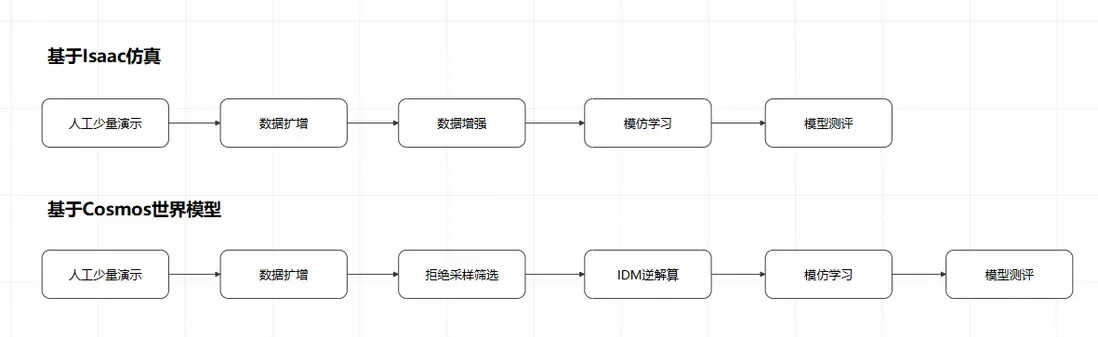
相比基於Isaac仿真的方案,使用Cosmos世界模型的方案具有以下特點:
- 人工演示、數據擴增環節無需仿真算力(RT Core),全流程使用AI算力(CUDA Core/Tensor Core)
- 無需對人工演示數據進行動作打標處理,直接使用視頻數據即可實現擴增
- 無需單獨的數據增強環節,可在數據擴增環節通過調整提示詞實現數據增強
- 需要額外的拒絕採樣步驟以過濾不合理的生成內容,以及額外的IDM逆解算步驟以補齊視頻中缺少的action序列
在PAI的Notebook Gallery中,我們已經預置了一個最佳實踐,就是這個過程的一個具體示例:
https://gallery.pai-ml.com/#/preview/deepLearning/cv/isaac\_gr00t\_wf2
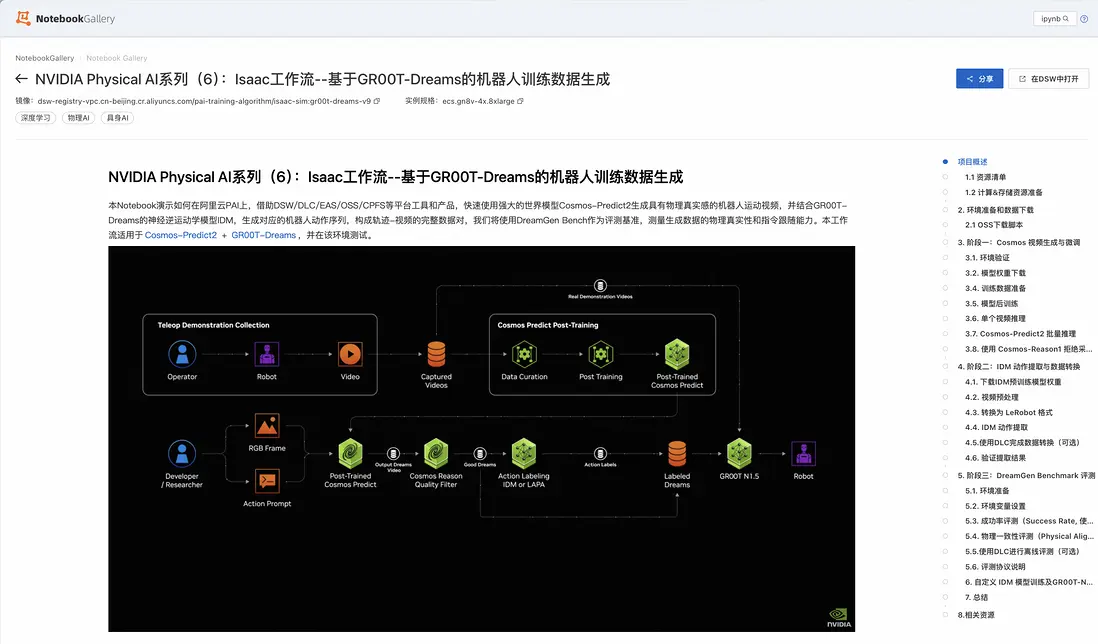
下面我們來詳細解讀這個示例。
人工少量演示
與基於仿真的數據擴增相同,人工演示可以在真實空間或仿真空間中進行,但無需進行動作打標,僅需錄製視頻即可,
查看演示 >>
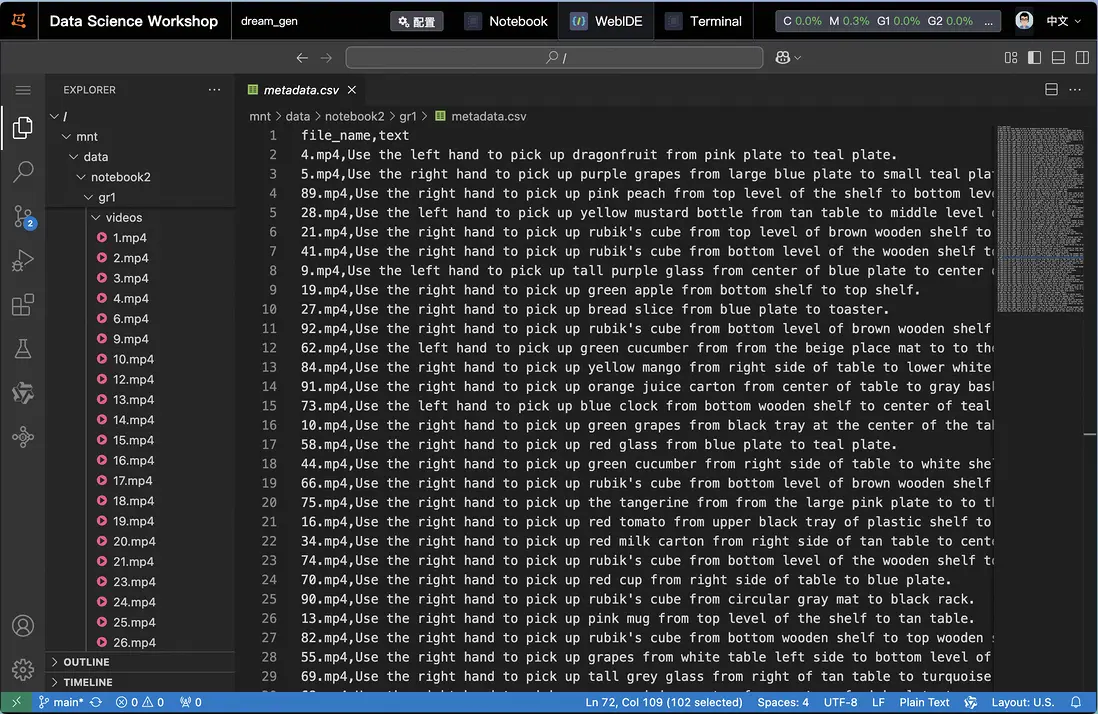
在視頻中,左上角的操控者遠程控制機器人本體,對蔬菜進行了“Pick and Place”的動作。同時,由操控者對視頻內容進行文字描述,例如:
Use the right hand to pick up green bok choy from tan table right side to bottom level of wire basket.
採集類似的視頻數據,直至滿足Cosmos-Predict模型微調的要求(本樣例中為100條)。
數據擴增
利用Cosmos世界模型進行數據擴增,首先要使用人工演示數據對Cosmos-Predict模型進行微調。本例中使用Cosmos-Predict2-2B-Video2World模型,在4*GU8T機型中進行微調:
!torchrun --nproc_per_node=4 --master_port=12341 -m scripts.train --config=cosmos_predict2/configs/base/config.py -- experiment=predict2_video2world_training_2b_groot_gr1_480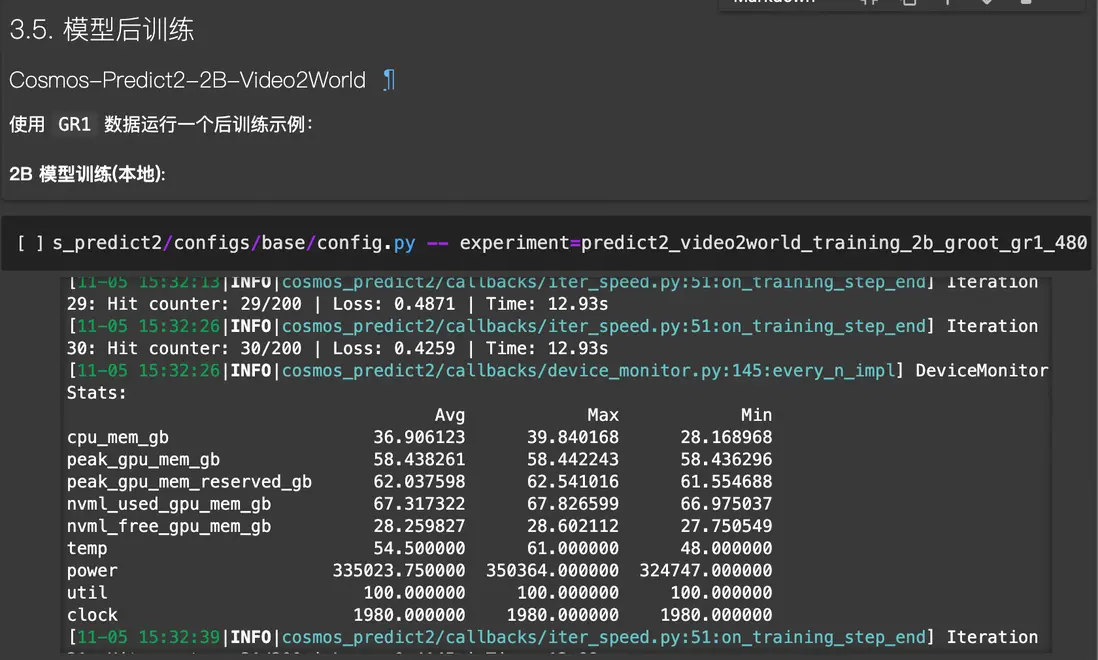
對於更大的世界模型,例如Cosmos-Predict2-14B-Video2World,可以在DLC中,使用4節點 × 8*GU8T的機型中進行微調:
import os
import json
import time

from alibabacloud_tea_openapi.models import Config
from alibabacloud_credentials.client import Client as CredClient
from alibabacloud_credentials.models import Config as CredConfig
from alibabacloud_pai_dlc20201203.client import Client as DLCClient
from alibabacloud_pai_dlc20201203.models import (
    CreateJobRequest,
    GetJobRequest,
)

def wait_for_job_to_terminate(client, job_id):
    while True:
        job = client.get_job(job_id, GetJobRequest()).body
        print('job({}) is {}'.format(job_id, job.status))
        if job.status in ('Succeeded', 'Failed', 'Stopped'):
            return job.status
        time.sleep(5)
    return None


def main():
    current_time_tuple = time.localtime()
    year = current_time_tuple.tm_year
    month = current_time_tuple.tm_mon
    day = current_time_tuple.tm_mday
    hour = current_time_tuple.tm_hour
    minute = current_time_tuple.tm_min
    # 請確認您的主賬號已授權DLC,且擁有足夠的權限。
    display_name = f"train_cosmos-predict2_14b_{day}_{hour}-{minute}"  #設置任務名稱
    region_id = os.environ.get("dsw_region") #設置regionid
    workspace_id = os.environ.get('PAI_WORKSPACE_ID') #設置成用户自己的工作空間id
    image_uri = f"dsw-registry.{region_id}.cr.aliyuncs.com/pai-training-algorithm/isaac-sim:gr00t-dreams-v9" #使用官方鏡像
    ecs_spec = "ecs.gn8v-8x.16xlarge"
    num_gpus = 8 # 與資源規格保持一致
    num_nodes = 4
    #########訓練任務相關配置#############
    config = "cosmos_predict2/configs/base/config.py"
    exp = "predict2_video2world_training_14b_groot_gr1_480"
    #########訓練任務相關配置#############

    # 本示例通過Credentials SDK默認從環境變量中讀取AccessKey,來實現身份驗證。
    credentialsConfig = CredConfig(
        type='credentials_uri'   # 選填。若您未配置其他“默認憑據鏈”訪問方式,您無需再顯式指定,Credentials SDK會通過uri方式獲取臨時憑證
    )
    cred = CredClient(credentialsConfig)

    # 1. create client;
    dlc_client = DLCClient(
         config=Config(
            credential=cred,
            region_id=region_id,
            endpoint='pai-dlc.{}.aliyuncs.com'.format(region_id),
         )
    )

    print('-------- Create Job ----------')
    # 創建DLC作業。
    create_job_resp = dlc_client.create_job(CreateJobRequest().from_map({
        'WorkspaceId': workspace_id,
        'DisplayName': display_name,
        'JobType': 'PyTorchJob',
        # 'ResourceId': resource_quota_id,
        'JobSpecs': [
            {
                "Type": "Worker",
                "Image": image_uri,
                "PodCount": num_nodes,
                "EcsSpec": ecs_spec,
            },
        ],
        'DataSources': [
            {
                "DataSourceId": dataset_id,
            },
        ],
       'UserVpc': {
            "VpcId": vpc_id,  # 替換為實際 VPC ID
            "SwitchId": switch_id,  # 替換為實際交換機 ID
            "SecurityGroupId": security_groupid  # 替換為實際安全組 ID
        },
        "UserCommand": f" export NVTE_FUSED_ATTN=0 && \
            rm -rf /workspace/cosmos-predict2/checkpoints && \
            rm -rf /workspace/cosmos-predict2/datasets/benchmark_train/gr1 && \
            ln -s /mnt/data/notebook2/checkpoints /workspace/cosmos-predict2/checkpoints && \
            ln -s /mnt/data/notebook2/gr1 /workspace/cosmos-predict2/datasets/benchmark_train/gr1 && \
            cd /workspace/cosmos-predict2 && \
            torchrun --nproc_per_node={num_gpus} --nnodes={num_nodes} --rdzv_id 123 --rdzv_backend c10d --rdzv_endpoint $MASTER_ADDR:1234 -m \
            scripts.train --config={config} \
            -- experiment={exp} \
            model.config.fsdp_shard_size=0"
    }))
    job_id = create_job_resp.body.job_id

    wait_for_job_to_terminate(dlc_client, job_id)

    pass


if __name__ == '__main__':
    main()
完成微調後,即可使用微調後的模型進行推理:
!torchrun --nproc_per_node=4 --master_port=12341 -m examples.video2world_gr00t \
--num_gpus 4   --model_size 14B   --gr00t_variant gr1   \
--batch_input_json dream_gen_benchmark/gr1_object/batch_input.json   --disable_guardrail
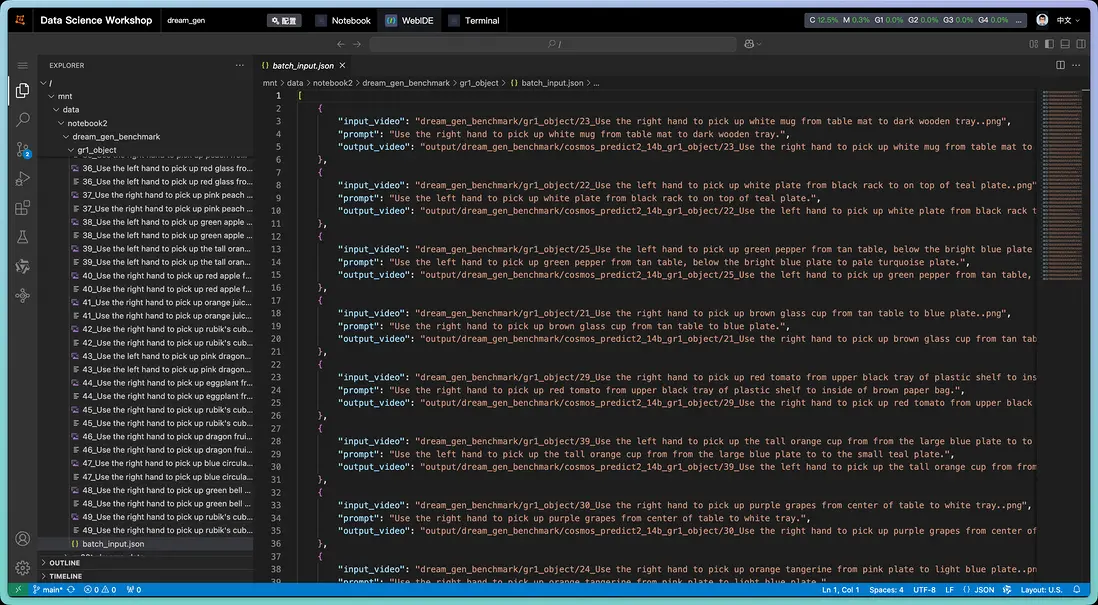
在上述代碼中,使用batch\_input.json來記錄推理所需的prompts與起始幀:
執行上述推理過程:
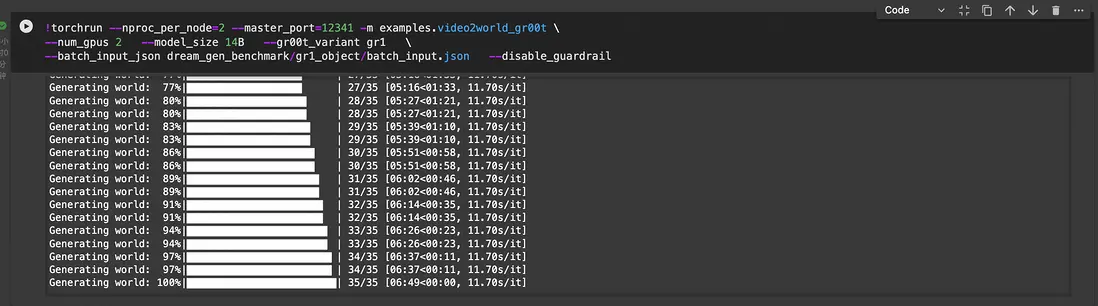
按照batch\_input.json,腳本會輸出一系列推理結果,實現數據擴增。擴增的數量取決於batch\_input.json的prompt數量。以下是輸出結果示例:
查看演示 >>
從上述結果中可以看出,右上角的水壺出現了明顯的變形,不符合真實物理規律。在實際生產中,我們需要剔除這類視頻,因此需要使用Cosmos-Reason1模型進行拒絕採樣。
拒絕採樣
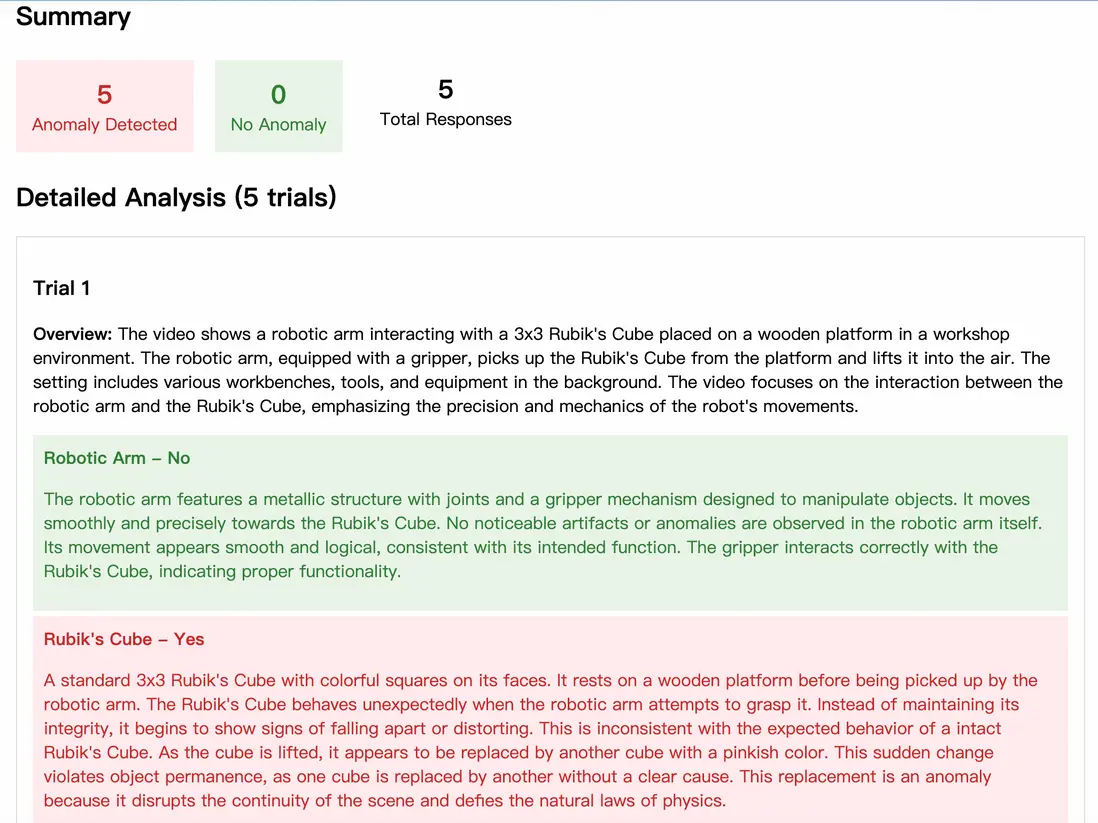
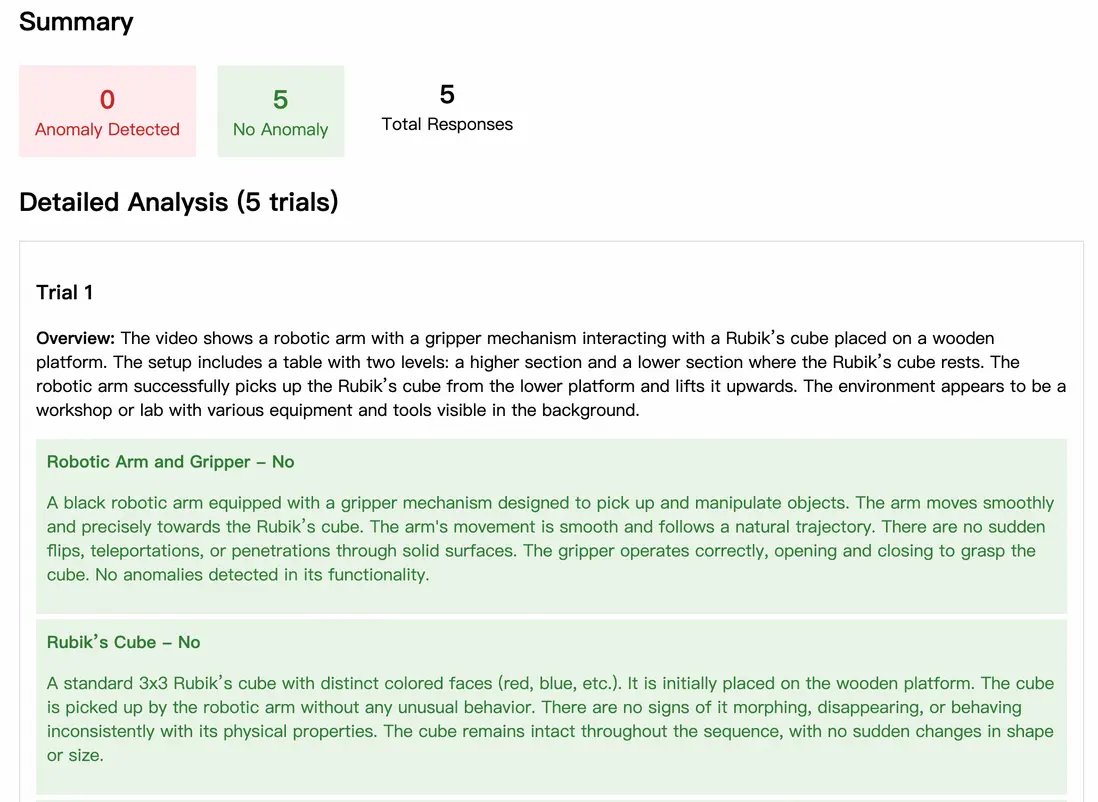
拒絕採樣的原理是:生成多個候選視頻,然後使用Cosmos-Reason1對這些視頻進行評分,選擇評分最高的視頻作為最終輸出。評分將從以下幾個方面進行考量:
- 運動連貫性: 物體移動是否自然流暢
- 時間一致性: 幀與幀之間是否存在突兀變化
- 物理合理性: 重力、光影、材質是否符合物理規律
- 視覺質量: 是否存在偽影、模糊、扭曲等問題
- 內容邏輯: 場景元素之間的關係是否合理
可以使用以下腳本進行拒絕採樣:
!torchrun --nproc_per_node=4 --master_port=12341   -m examples.video2world_bestofn   \
--model_size 14B   --gr00t_variant gr1   \
--prompt "Use the right hand to pick up rubik's cube from from the bottom of the three-tiered wooden shelf to to the top of the three-tiered wooden shelf."   \
--input_path assets/sample_gr00t_dreams_gr1/8_Use_the_right_hand_to_pick_up_rubik\'s_cube_from_from_the_bottom_of_the_three-tiered_wooden_shelf_to_to_the_top_of_the_three-tiered_wooden_shelf..png   \
--num_gpus 2   --num_generations 4   --prompt_prefix ""   \
--disable_guardrail   --save_path output/best-of-n-gr00t-gr1
該腳本會使用相同的prompt生成4條視頻,然後通過Cosmos-Reason1進行打分,以下分別是0分和100分的視頻,以示對比:
| 0分 | 100分 |
|---|---|
| 0分演示 >> | 100分演示 >> |
 |
 |
IDM逆解算
上述數據擴增和拒絕採樣的結果,為一系列的“prompt-視頻”數據對。一般來説,如果用於VLA模型的模仿學習,僅有這樣的數據對是不夠的,還需給出視頻內容中的action序列。但由於Cosmos-Predict2模型直接輸出了視頻,沒有action序列,我們需要通過IDM(Inverse Dynamics Model,逆向動力學模型)對視頻進行處理,逆向解析出其中的action序列。
可以使用以下腳本進行IDM逆解算:
!PYTHONPATH=. CUDA_VISIBLE_DEVICES=0,1,2,3 python IDM_dump/dump_idm_actions.py \
    --checkpoint "seonghyeonye/IDM_gr1" \
    --dataset "IDM_dump/data/gr1_unified.data" \
    --output_dir "IDM_dump/data/gr1_unified.data_idm" \
    --num_gpus 4 \
    --video_indices "0 8"
由於需要使用huggingface獲取IDM模型,在國內的網絡環境中,執行上述命令可能出現網絡問題,可以使用以下環境變量進行代理加速:
HF_ENDPOINT=https://hf-mirror.com 逆解算結果以parquet格式保存,可以通過以下命令查看:
!uv pip install parquet-tools
!parquet-tools csv IDM_dump/data/gr1_unified.data_idm/data/chunk-000/episode_000000.parquet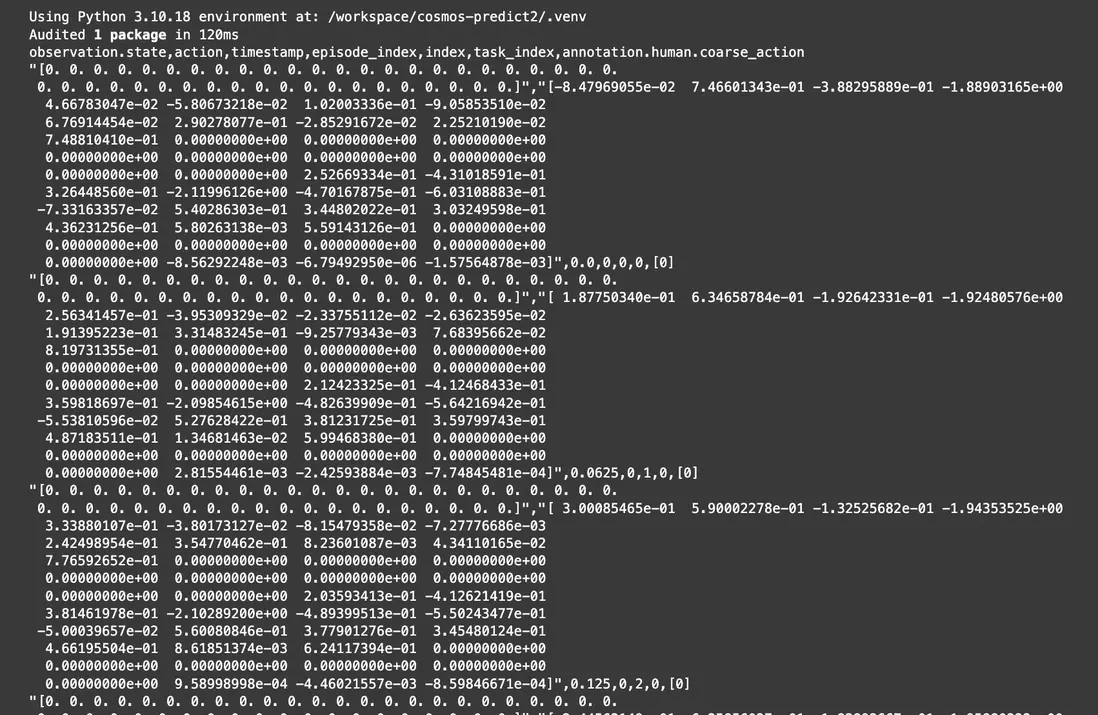
如果需要使用自定義機器人本體構型,也可以自定義微調IDM模型:
cd /workspace/GR00T-Dreams/
export HF_HOME=/mnt/data/notebook2
PYTHONPATH=. WANDB_MODE=disabled CUDA_VISIBLE_DEVICES=0 torchrun scripts/idm_training.py \
    --dataset-path demo_data/robot_sim.PickNPlace/ \
    --embodiment_tag gr1
模仿學習
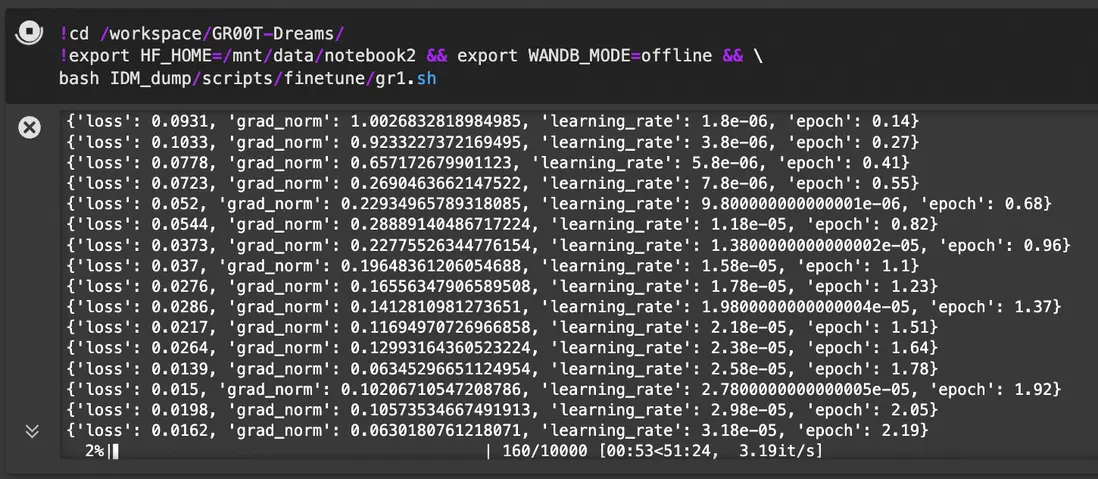
使用上述過程得到的擴增數據,可以用與GR00T-N1模型的模仿學習:
!cd /workspace/GR00T-Dreams/
!export HF_HOME=/mnt/data/notebook2 && export WANDB_MODE=offline && \
bash IDM_dump/scripts/finetune/gr1.sh
詳細訓練腳本gr1.sh如下:
import os
import subprocess
import sys
from dataclasses import dataclass
from pathlib import Path

import torch
import tyro
from transformers import TrainingArguments

from gr00t.data.dataset import LeRobotSingleDataset
from gr00t.data.schema import EmbodimentTag
from gr00t.experiment.data_config import DATA_CONFIG_MAP
from gr00t.experiment.runner import TrainRunner
from gr00t.model.gr00t_n1 import GR00T_N1
from gr00t.utils.peft import get_lora_model


@dataclass
class Config:
    """Configuration for GR00T model fine-tuning."""

    # Dataset parameters
    dataset_path: str
    """Path to the dataset directory."""

    output_dir: str = "/tmp/gr00t"
    """Directory to save model checkpoints."""

    data_config: str = "gr1_arms_only"
    """Data configuration name from DATA_CONFIG_MAP."""

    # Training parameters
    batch_size: int = 16
    """Batch size per GPU for training."""

    max_steps: int = 10000
    """Maximum number of training steps."""

    num_gpus: int = 1
    """Number of GPUs to use for training."""

    save_steps: int = 500
    """Number of steps between saving checkpoints."""

    # Model parameters
    base_model_path: str = "nvidia/GR00T-N1-2B"
    """Path or HuggingFace model ID for the base model."""

    tune_llm: bool = False
    """Whether to fine-tune the language model backbone."""

    tune_visual: bool = True
    """Whether to fine-tune the vision tower."""

    tune_projector: bool = True
    """Whether to fine-tune the projector."""

    tune_diffusion_model: bool = True
    """Whether to fine-tune the diffusion model."""

    resume: bool = False
    """Whether to resume from a checkpoint."""

    # Advanced training parameters
    learning_rate: float = 1e-4
    """Learning rate for training."""

    weight_decay: float = 1e-5
    """Weight decay for AdamW optimizer."""

    warmup_ratio: float = 0.05
    """Ratio of total training steps used for warmup."""

    lora_rank: int = 0
    """Rank for the LORA model."""

    lora_alpha: int = 16
    """Alpha value for the LORA model."""

    lora_dropout: float = 0.1
    """Dropout rate for the LORA model."""

    dataloader_num_workers: int = 8
    """Number of workers for data loading."""

    report_to: str = "wandb"
    """Where to report training metrics (e.g., 'wandb', 'tensorboard')."""

    # Data loading parameters
    embodiment_tag: str = "new_embodiment"
    """Embodiment tag to use for training. e.g. 'new_embodiment', 'gr1'"""

    video_backend: str = "decord"
    """Video backend to use for training. [decord, torchvision_av]"""


#####################################################################################
# main training function
#####################################################################################


def main(config: Config):
    """Main training function."""
    # ------------ step 1: load dataset ------------
    embodiment_tag = EmbodimentTag(config.embodiment_tag)

    # 1.1 modality configs and transforms
    data_config_cls = DATA_CONFIG_MAP[config.data_config]
    modality_configs = data_config_cls.modality_config()
    transforms = data_config_cls.transform()

    # 1.2 data loader
    train_dataset = LeRobotSingleDataset(
        dataset_path=config.dataset_path,
        modality_configs=modality_configs,
        transforms=transforms,
        embodiment_tag=embodiment_tag,  # This will override the dataset's embodiment tag to "new_embodiment"
        video_backend=config.video_backend,
    )

    # ------------ step 2: load model ------------
    model = GR00T_N1.from_pretrained(
        pretrained_model_name_or_path=config.base_model_path,
        tune_llm=config.tune_llm,  # backbone's LLM
        tune_visual=config.tune_visual,  # backbone's vision tower
        tune_projector=config.tune_projector,  # action head's projector
        tune_diffusion_model=config.tune_diffusion_model,  # action head's DiT
    )

    # Set the model's compute_dtype to bfloat16
    model.compute_dtype = "bfloat16"
    model.config.compute_dtype = "bfloat16"

    if config.lora_rank > 0:
        model = get_lora_model(
            model,
            rank=config.lora_rank,
            lora_alpha=config.lora_alpha,
            lora_dropout=config.lora_dropout,
        )

    # 2.1 modify training args
    training_args = TrainingArguments(
        output_dir=config.output_dir,
        run_name=None,
        remove_unused_columns=False,
        deepspeed="",
        gradient_checkpointing=False,
        bf16=True,
        tf32=True,
        per_device_train_batch_size=config.batch_size,
        gradient_accumulation_steps=1,
        dataloader_num_workers=config.dataloader_num_workers,
        dataloader_pin_memory=False,
        dataloader_persistent_workers=True,
        optim="adamw_torch",
        adam_beta1=0.95,
        adam_beta2=0.999,
        adam_epsilon=1e-8,
        learning_rate=config.learning_rate,
        weight_decay=config.weight_decay,
        warmup_ratio=config.warmup_ratio,
        lr_scheduler_type="cosine",
        logging_steps=10.0,
        num_train_epochs=300,
        max_steps=config.max_steps,
        save_strategy="steps",
        save_steps=config.save_steps,
        save_total_limit=8,
        report_to=config.report_to,
        seed=42,
        do_eval=False,
        ddp_find_unused_parameters=False,
        ddp_bucket_cap_mb=100,
        torch_compile_mode=None,
    )

    # 2.2 run experiment
    experiment = TrainRunner(
        train_dataset=train_dataset,
        model=model,
        training_args=training_args,
        resume_from_checkpoint=config.resume,
    )

    # 2.3 run experiment
    experiment.train()


if __name__ == "__main__":
    # Parse arguments using tyro
    config = tyro.cli(Config)

    # Print the tyro config
    print("\n" + "=" * 50)
    print("GR00T FINE-TUNING CONFIGURATION:")
    print("=" * 50)
    for key, value in vars(config).items():
        print(f"{key}: {value}")
    print("=" * 50 + "\n")

    available_gpus = torch.cuda.device_count() if torch.cuda.is_available() else 1

    # Validate GPU configuration
    assert (
        config.num_gpus <= available_gpus
    ), f"Number of GPUs requested ({config.num_gpus}) is greater than the available GPUs ({available_gpus})"
    assert config.num_gpus > 0, "Number of GPUs must be greater than 0"
    print(f"Using {config.num_gpus} GPUs")

    if config.num_gpus == 1:
        # Single GPU mode - set CUDA_VISIBLE_DEVICES=0
        os.environ["CUDA_VISIBLE_DEVICES"] = "0"
        # Run the script normally
        main(config)
    else:
        if os.environ.get("IS_TORCHRUN", "0") == "1":
            main(config)
        else:
            # Multi-GPU mode - use torchrun
            script_path = Path(__file__).absolute()
            # Remove any existing CUDA_VISIBLE_DEVICES from environment
            if "CUDA_VISIBLE_DEVICES" in os.environ:
                del os.environ["CUDA_VISIBLE_DEVICES"]

            # Use subprocess.run instead of os.system
            cmd = [
                "torchrun",
                "--standalone",
                f"--nproc_per_node={config.num_gpus}",
                "--nnodes=1",  # default to 1 node for now
                str(script_path),
            ]

            # Convert config to command line arguments
            for key, value in vars(config).items():
                if isinstance(value, bool):
                    # For boolean values, use --flag or --no-flag format
                    if value:
                        cmd.append(f"--{key.replace('_', '-')}")
                    else:
                        cmd.append(f"--no-{key.replace('_', '-')}")
                else:
                    # For non-boolean values, use --key value format
                    cmd.append(f"--{key.replace('_', '-')}")
                    cmd.append(str(value))
            print("Running torchrun command: ", cmd)
            env = os.environ.copy()
            env["IS_TORCHRUN"] = "1"
            sys.exit(subprocess.run(cmd, env=env).returncode)
建議在實際訓練中,將 batch size 儘可能調大,並訓練 20k steps。請在 DreamGen 環境中運行相應命令。
模型測評
在本例中,使用真實的GR1機器人進行模型效果驗證,得到結果如下:
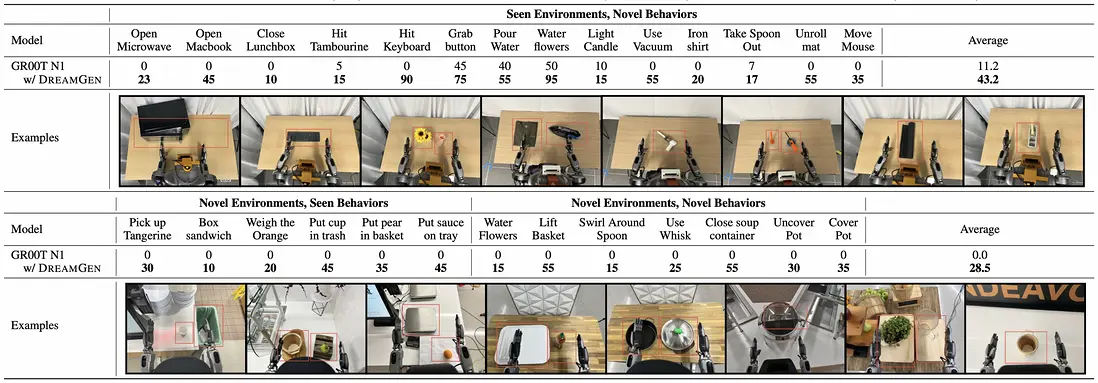
從結果中可以看到:
- 在已知場景中執行全新的動作,未使用擴增數據微調的GR00T N1模型僅有11.2%的成功率,使用擴增數據微調後可以達到43.2%的成功率
- 在未知場景中執行已知或未知動作,未使用擴增數據微調的GR00T N1模型全部失敗,但是使用擴增數據微調後可以達到28.5%的成功率
總結
在本最佳實踐中,基於阿里雲 PAI 平台的特性,我們實現了基於Cosmos世界模型的操作動作數據擴增與模仿學習,包含從人工少量演示、數據擴增、拒絕採樣、IDM逆解算、模仿學習再到模型測評的端到端實現
與基於Isaac仿真的數據擴增技術一樣,Cosmos 數據擴增後訓練的模型在各個場景下的成功率均有較高提升。相比於Isaac仿真,Cosmos數據擴增有以下特點:
- 人工演示、數據擴增環節無需仿真算力(RT Core),全流程使用同構算力(CUDA Core/Tensor Core)
- 無需對人工演示數據進行動作打標處理,直接使用視頻數據即可實現擴增
- 無需單獨的數據增強環節,可在數據擴增環節通過調整提示詞實現數據增強
- 需要額外的拒絕採樣步驟以過濾不合理的生成內容,以及額外的IDM逆解算步驟以補齊視頻中缺少的action序列
!torchrun --nproc_per_node=4 --master_port=12341 -m examples.video2world_gr00t \
--num_gpus 4   --model_size 14B   --gr00t_variant gr1   \
--batch_input_json dream_gen_benchmark/gr1_object/batch_input.json
--disable_guardrail
