

上一篇介紹了Spring Security框架中身份認證的架構設計,本篇就OAuth2客户端登錄認證的實現源碼做一些分析。
一、OAuth2協議簡介
OAuth2協議,英文全稱Open Authorization 2.0,即開放授權協議,它本身解決的問題,就是互聯網中的安全信任問題,當第三方需要訪問本系統內受保護資源的時候,如何對其授權以實現合法安全的訪問。
舉個例子,可能在物理世界裏面並不存在,只是為方便説明OAuth2的工作原理。假設有某個大型商場提供了一種無卡消費的服務,用户只要在商場的賬户中充值,就可以在商場中任何一家店鋪進行無卡消費,此時商家作為第三方,需要訪問你的無卡賬户,對於用户來説,無卡賬户就是一種受保護資源,它並不能隨意進行訪問,那麼怎麼解決信任問題。
首先,能夠想到的是,任何一家的店鋪想要支持無卡消費,就必須在商場內進行登記註冊,只有在冊的店鋪才被允許訪問儲值卡的賬户;
其次,用户不應該在每家店鋪消費時都提供用户名和密碼,這樣密碼就存在泄露的風險,商場應該提供一種用户授權的交互方式,在店鋪發起訪問無卡賬户時,用户只需要授權即可,姑且想象一下,在店鋪中支付時,會從空氣中彈出一個商場提供的確認授權頁面,當然商場已經核對了商户的註冊信息;
最後,一旦用户對該店鋪進行了合法的授權,商場就給店鋪發放一個交易憑證,店鋪帶着這個憑證就可以訪問我的無卡賬户;
當然,商場應當要保證這個交易憑證的發放是安全的,不能輕易泄露,否則就有盜刷的風險。
以上,OAuth2的工作原理大致如此,用户不用擔心自己的密碼暴露給了第三方,而又實現了受保護資源的授權訪問,其中店鋪被授權後得到憑證就是所謂的訪問令牌,即access_token。OAuth2協議中最主要的一個部分就是如何獲取accessToken,在OAuth2協議規範文檔https://datatracker.ietf.org/doc/html/rfc6749中介紹了幾種常用的授權模式:
- 授權碼模式(Authorization Code Grant):服務端通過重定向機制,將一次性的授權碼code參數下發給客户端,客户端通過code獲取accessToken和refreshToken,這種模式比較完整地體現了OAuth2協議的原則,流程較為複雜,但安全性最好,因此也是最常用的模式,廣泛運用於各類互聯網應用的登錄認證場景,交互流程見下圖
- 隱式模式(Implicit Grant):也叫簡化模式,沒有重定向過程,一次授權請求就可以獲得accessToken,通常用於瀏覽器腳本,例如在JavaScript腳本內發起授權請求,有令牌泄露的風險,安全性一般,另外也不支持refreshToken,
- 資源屬主密碼模式(Resource Owner Password Credentials Grant):用户需要在第三方應用中輸入用户名和密碼,上面提到過,這種模式有暴露密碼的風險,安全性較差,在OAuth2官方推薦的最佳實踐中,已經明確禁止使用這種模式,並且在Spring Security 高版本中也已經棄用
- 客户端憑證模式(Client Credentials Grant):常用於設備或者可信任的應用本身,通過客户端憑證與OAuth2直接通信進行認證,對用户無感
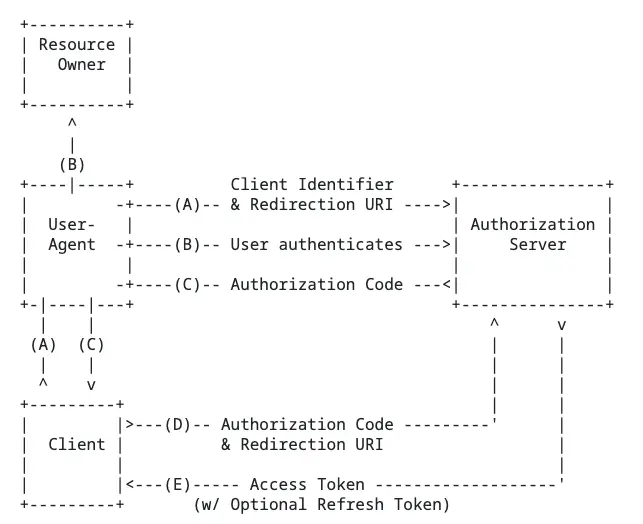
OAuth2本身是一種協議,它不直接規定實現細節,下面主要就Spring Security框架內OAuth2客户端的源碼作一定的分析,通過研究它默認的實現,為將來擴展對接其他OAuth2服務端做一定參考。
二、OAuth2登錄認證
Spring Security集成了國外幾個OAuth2認證服務商的默認實現,包括Google, GitHub, Facebook, 以及Okta,下面以Github為例,説明OAuth2登錄認證(授權碼模式)的整個交互過程。
2.1 OAuth2.0客户端配置
默認配置下,僅添加SecurityFilterChain的oauth2Login配置項即可,它主要的作用是向過濾器鏈中添加兩個過濾器:即OAuth2AuthorizationRequestRedirectFilter和OAuth2LoginAuthenticationFilter(第2小節和第3小節會分別介紹這兩個類的實現細節),他們分別負責處理兩個端點:
- /oauth2/authorization/{client},即OAuth2授權端點,用於向OAuth2服務端發起授權請求
- /login/oauth2/code/{client},即OAuth2服務端重定向端點,用於在OAuth2服務端重定向回到本應用時接收code,從而利用code換取accessToken
@EnableWebSecurity
@Configuration
public class SpringSecurityConfiguration {

    @Bean
    public SecurityFilterChain securityFilterChain(HttpSecurity http) throws Exception {
        http.oauth2Login(Customizer.withDefaults());
        return http.build();
    }
}
另外在application.yaml配置文件中註冊Github客户端,主要是指定client-id和client-secret這兩個參數
通常,client-id和client-secret等參數都需要在Github官網註冊自己的應用後,才能拿到。註冊的操作流程放在文末的附錄中
spring:
  security:
    oauth2:
      client:
        registration:
          github:
            client-id: *********
            client-secret: **********************
至於其他參數,例如authorization-uri,token-uri等,對於任何一個OAuth2的客户端來説都是通用的,所以都已經提前定義好了,具體可以看CommonOAuth2Provider的源碼
public enum CommonOAuth2Provider {
 ...
    GITHUB {

       @Override
       public Builder getBuilder(String registrationId) {
          ClientRegistration.Builder builder = getBuilder(registrationId,
                ClientAuthenticationMethod.CLIENT_SECRET_BASIC, DEFAULT_REDIRECT_URL);
          builder.scope("read:user");
          builder.authorizationUri("https://github.com/login/oauth/authorize");
          builder.tokenUri("https://github.com/login/oauth/access_token");
          builder.userInfoUri("https://api.github.com/user");
          builder.userNameAttributeName("id");
          builder.clientName("GitHub");
          return builder;
       }
...
}
在Spring Boot中,當我們在配置文件中添加了spring.security.oauth2.client.registration相關內容時,例如上面的github配置,就會觸發自動配置以完成客户端信息的註冊,配置類為OAuth2ClientRegistrationRepositoryConfiguration,其中構建過程主要由OAuth2ClientPropertiesMapper這個類完成,源碼如下
@Configuration(proxyBeanMethods = false)
@EnableConfigurationProperties(OAuth2ClientProperties.class)
@Conditional(ClientsConfiguredCondition.class)
class OAuth2ClientRegistrationRepositoryConfiguration {

    @Bean
    @ConditionalOnMissingBean(ClientRegistrationRepository.class)
    InMemoryClientRegistrationRepository clientRegistrationRepository(OAuth2ClientProperties properties) {
       List<ClientRegistration> registrations = new ArrayList<>(
             new OAuth2ClientPropertiesMapper(properties).asClientRegistrations().values());
       return new InMemoryClientRegistrationRepository(registrations);
    }

}

public final class OAuth2ClientPropertiesMapper {
...
    private static ClientRegistration getClientRegistration(String registrationId,
          OAuth2ClientProperties.Registration properties, Map<String, Provider> providers) {
       Builder builder = getBuilderFromIssuerIfPossible(registrationId, properties.getProvider(), providers);
       if (builder == null) {
          builder = getBuilder(registrationId, properties.getProvider(), providers);
       }
       PropertyMapper map = PropertyMapper.get().alwaysApplyingWhenNonNull();
       map.from(properties::getClientId).to(builder::clientId);
       map.from(properties::getClientSecret).to(builder::clientSecret);
       map.from(properties::getClientAuthenticationMethod)
          .as(ClientAuthenticationMethod::new)
          .to(builder::clientAuthenticationMethod);
       map.from(properties::getAuthorizationGrantType)
          .as(AuthorizationGrantType::new)
          .to(builder::authorizationGrantType);
       map.from(properties::getRedirectUri).to(builder::redirectUri);
       map.from(properties::getScope).as(StringUtils::toStringArray).to(builder::scope);
       map.from(properties::getClientName).to(builder::clientName);
       return builder.build();
    }
...
}
OAuth2ClientPropertiesMapper#getBuilder方法會根據application.yml配置文件中配置的客户端名稱,從CommonOAuth2Provider枚舉類中得到對應枚舉值, 即“GITHUB”,並調用其getBuilder方法返回builder對象,然後使用配置文件中的參數值進行填充,最終得到完整的客户端註冊信息。
2.2 OAuth2AuthorizationRequestRedirectFilter:提交授權請求
該Filter繼承自OncePerRequestFilter,用於向OAuth2協議服務端發起認證請求,核心邏輯也比較簡單,其中doFilterInternal核心源碼如下
@Override
protected void doFilterInternal(HttpServletRequest request, HttpServletResponse response, FilterChain filterChain)
       throws ServletException, IOException {
    try {
       OAuth2AuthorizationRequest authorizationRequest = this.authorizationRequestResolver.resolve(request);
       if (authorizationRequest != null) {
          this.sendRedirectForAuthorization(request, response, authorizationRequest);
          return;
       }
    }
    catch (Exception ex) {
       this.unsuccessfulRedirectForAuthorization(request, response, ex);
       return;
    }
    ...
}
當請求“/oauth2/authorization/{registrationId}”端點時,authorizationRequestResolver就會解析出{registrationId}對應的值,如github,然後通過registrationId查詢到對應客户端的註冊信息,並通過構造器OAuth2AuthorizationRequest.Builder,創建出一個OAuth2AuthorizationRequest實例,它主要作用就是生成重定向到OAuth2.0服務端獲取code的地址,對於github來説,該地址為https://github.com/login/oauth/authorize?response_type=code&client_id={client_id}&scope=read:user&state={state}&redirect_uri={redirect_uri},其中state是由客户端生成的一個隨機字符串,在Spring Security框架中,使用了32位長度的Base64編碼生成算法,而redirect_uri則表示期望OAuth2服務端在通過驗證後重定向到本系統的地址,以便從響應中獲取code之後發起認證,當然這個redirectUri需要事先註冊在OAuth2服務端中,否則視為非授權的訪問而拒絕。
private OAuth2AuthorizationRequest resolve(HttpServletRequest request, String registrationId, String redirectUriAction) {
    if (registrationId == null) {
       return null;
    }
    ClientRegistration clientRegistration = this.clientRegistrationRepository.findByRegistrationId(registrationId);
    if (clientRegistration == null) {
       throw new InvalidClientRegistrationIdException("Invalid Client Registration with Id: " + registrationId);
    }
    OAuth2AuthorizationRequest.Builder builder = getBuilder(clientRegistration);

    String redirectUriStr = expandRedirectUri(request, clientRegistration, redirectUriAction);

    // @formatter:off
    builder.clientId(clientRegistration.getClientId())
          .authorizationUri(clientRegistration.getProviderDetails().getAuthorizationUri())
          .redirectUri(redirectUriStr)
          .scopes(clientRegistration.getScopes())
          .state(DEFAULT_STATE_GENERATOR.generateKey());
    // @formatter:on

    this.authorizationRequestCustomizer.accept(builder);

    return builder.build();
}
而在重定向之前,為了在認證通過之後能夠跳轉回認證前的訪問路徑,需要保存當前請求的地址,在authorizationRequestRepository#saveAuthorizationRequest方法中,會將當前請求存儲到session中,這樣就可以在OAuth2服務端回調之後,再從session取出。
private void sendRedirectForAuthorization(HttpServletRequest request, HttpServletResponse response,
       OAuth2AuthorizationRequest authorizationRequest) throws IOException {
    if (AuthorizationGrantType.AUTHORIZATION_CODE.equals(authorizationRequest.getGrantType())) {
       this.authorizationRequestRepository.saveAuthorizationRequest(authorizationRequest, request, response);
    }
    this.authorizationRedirectStrategy.sendRedirect(request, response,
          authorizationRequest.getAuthorizationRequestUri());
}

public void saveAuthorizationRequest(OAuth2AuthorizationRequest authorizationRequest, HttpServletRequest request,
       HttpServletResponse response) {
    Assert.notNull(request, "request cannot be null");
    Assert.notNull(response, "response cannot be null");
    if (authorizationRequest == null) {
       removeAuthorizationRequest(request, response);
       return;
    }
    String state = authorizationRequest.getState();
    Assert.hasText(state, "authorizationRequest.state cannot be empty");
    request.getSession().setAttribute(this.sessionAttributeName, authorizationRequest);
}
OAuth2服務端在接受到該請求之後,如果一切正常,則會生成一個臨時的code,然後連同請求參數中state一起拼接到redirect_uri的參數中,例如https://{domain}/login/oauth2/code/github?code={code}&state={state in request},最後發起重定向,此時請求就會進入過濾器OAuth2LoginAuthenticationFilter。
2.3 OAuth2LoginAuthenticationFilter:發起認證
該過濾器繼承自AbstractAuthenticationProcessingFilter,顯然,它的作用主要是用於完成OAuth2的認證過程,最終生成認證對象。
具體看一下attemptAuthentication方法,這裏創建出來的對象稍微有點複雜,先梳理一下引用關係:
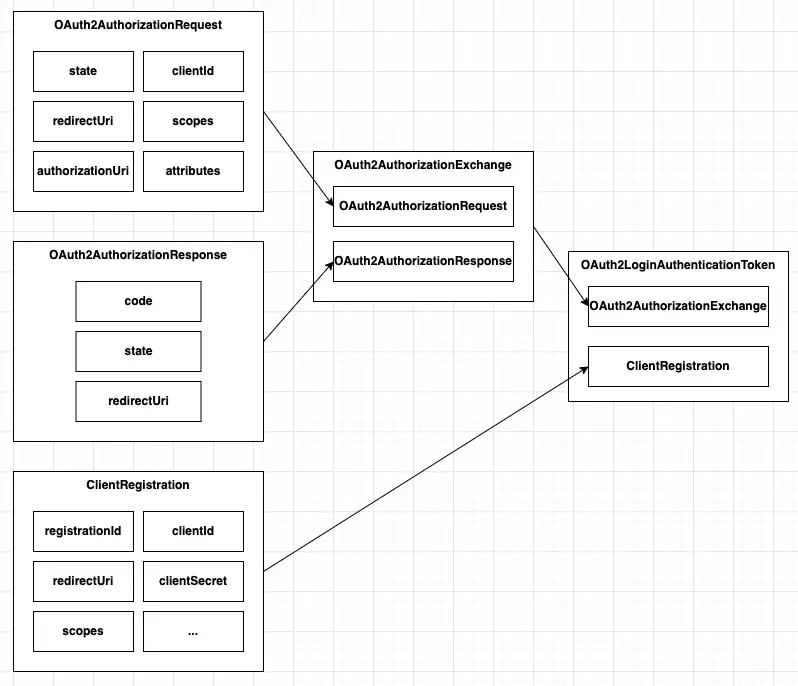
這裏,OAuth2AuthorizationRequest代表了此前提交授權的請求,上文有提到,即保存在session中的請求對象,而OAuth2AuthorizationResponse代表了OAuth2服務端重定向回來的響應,其中也封裝了請求時攜帶過去的state參數,他們構造了一個OAuth2AuthorizationExchange對象,並連同ClientRegistration一併被封裝到了OAuth2LoginAuthenticationToken對象中,該對象用於在OAuth2LoginAuthenticationProvider發起認證請求時提取各種參數。
以下是源碼的實現細節:
public Authentication attemptAuthentication(HttpServletRequest request, HttpServletResponse response)
       throws AuthenticationException {
    MultiValueMap<String, String> params = OAuth2AuthorizationResponseUtils.toMultiMap(request.getParameterMap());
    // ①
    if (!OAuth2AuthorizationResponseUtils.isAuthorizationResponse(params)) {
       OAuth2Error oauth2Error = new OAuth2Error(OAuth2ErrorCodes.INVALID_REQUEST);
       throw new OAuth2AuthenticationException(oauth2Error, oauth2Error.toString());
    }
    OAuth2AuthorizationRequest authorizationRequest = this.authorizationRequestRepository
       .removeAuthorizationRequest(request, response); // ②
    if (authorizationRequest == null) {
       OAuth2Error oauth2Error = new OAuth2Error(AUTHORIZATION_REQUEST_NOT_FOUND_ERROR_CODE);
       throw new OAuth2AuthenticationException(oauth2Error, oauth2Error.toString());
    }
    String registrationId = authorizationRequest.getAttribute(OAuth2ParameterNames.REGISTRATION_ID);
    ClientRegistration clientRegistration = this.clientRegistrationRepository.findByRegistrationId(registrationId);
    // ③
    if (clientRegistration == null) {
       OAuth2Error oauth2Error = new OAuth2Error(CLIENT_REGISTRATION_NOT_FOUND_ERROR_CODE,
             "Client Registration not found with Id: " + registrationId, null);
       throw new OAuth2AuthenticationException(oauth2Error, oauth2Error.toString());
    }
    // @formatter:off
    String redirectUri = UriComponentsBuilder.fromHttpUrl(UrlUtils.buildFullRequestUrl(request))
          .replaceQuery(null)
          .build()
          .toUriString();
    // @formatter:on
    OAuth2AuthorizationResponse authorizationResponse = OAuth2AuthorizationResponseUtils.convert(params,
          redirectUri);
    // ④
    Object authenticationDetails = this.authenticationDetailsSource.buildDetails(request);
    OAuth2LoginAuthenticationToken authenticationRequest = new OAuth2LoginAuthenticationToken(clientRegistration,
          new OAuth2AuthorizationExchange(authorizationRequest, authorizationResponse));
    authenticationRequest.setDetails(authenticationDetails);
    // ⑤
    OAuth2LoginAuthenticationToken authenticationResult = (OAuth2LoginAuthenticationToken) this
       .getAuthenticationManager()
       .authenticate(authenticationRequest); // ⑥
    OAuth2AuthenticationToken oauth2Authentication = this.authenticationResultConverter
       .convert(authenticationResult); // ⑦
    Assert.notNull(oauth2Authentication, "authentication result cannot be null");
    oauth2Authentication.setDetails(authenticationDetails);
    OAuth2AuthorizedClient authorizedClient = new OAuth2AuthorizedClient(
          authenticationResult.getClientRegistration(), oauth2Authentication.getName(),
          authenticationResult.getAccessToken(), authenticationResult.getRefreshToken());
    // ⑧
    this.authorizedClientRepository.saveAuthorizedClient(authorizedClient, oauth2Authentication, request, response);
    return oauth2Authentication;
}- 檢查URL參數是否有效,即是否包含了code和state
- 通過authorizationRequestRepository查詢認證之前存儲在session中的request對象,即authorizationRequest,同時還要將其刪除,以保證一個對應的code,只能被處理一次,同時如果沒有查詢到對應的request對象,也不會繼續執行,從而也杜絕了其他偽造的重定向請求進入系統,這一步還是比較重要的,它嚴格約束了一個發起授權請求和接受服務端響應必須成對匹配,否則整個OAuth2授權碼流程就無法執行
- 這個request對象中保存了客户端的registrationId,因此可以通過clientRegistrationRepository查詢到對應的客户端信息,即clientRegistration
- 同時再根據code和state參數,以及當前request請求的url作為redirectUri,構造出一個OAuth2AuthorizationResponse對象,即authorizationResponse
- 在得到clientRegistration,authorizationRequest,authorizationResponse三個實例之後,再構造出一個OAuth2LoginAuthenticationToken實例,它便是用來發起OAuth2認證的實際對象
- OAuth2認證過程交由OAuth2LoginAuthenticationProvider執行(具體細節在下一節中介紹)
- 認證通過後,結果返回了一個OAuth2LoginAuthenticationToken對象,這個對象主要是用於封裝授權碼模式的認證結果,經過轉換,將其principal,authorities,和clientRegistration的RegistrationId取出,最終構造出一個標準的OAuth2認證對象,即OAuth2AuthenticationToken
2.4 OAuth2LoginAuthenticationProvider:獲取AccessToken
這個Provider的作用主要包括兩個部分,一是請求OAuth2服務端獲取AccessToken,二是獲取服務端用户信息,前者委託給了OAuth2AuthorizationCodeAuthenticationProvider來執行具體請求的邏輯,而後者則通過UserService實例請求OAuth2服務端的UserInfo相關端點,獲取用户信息,最後上述AccessToken相關信息,以及用户信息被封裝成OAuth2LoginAuthenticationToken認證對象返回。
public Authentication authenticate(Authentication authentication) throws AuthenticationException {
    OAuth2LoginAuthenticationToken loginAuthenticationToken = (OAuth2LoginAuthenticationToken) authentication;
    ...
    OAuth2AuthorizationCodeAuthenticationToken authorizationCodeAuthenticationToken;
    try {
       authorizationCodeAuthenticationToken = (OAuth2AuthorizationCodeAuthenticationToken) this.authorizationCodeAuthenticationProvider
          .authenticate(
                new OAuth2AuthorizationCodeAuthenticationToken(loginAuthenticationToken.getClientRegistration(),
                      loginAuthenticationToken.getAuthorizationExchange()));
    }
    catch (OAuth2AuthorizationException ex) {
       OAuth2Error oauth2Error = ex.getError();
       throw new OAuth2AuthenticationException(oauth2Error, oauth2Error.toString(), ex);
    }
    OAuth2AccessToken accessToken = authorizationCodeAuthenticationToken.getAccessToken();
    Map<String, Object> additionalParameters = authorizationCodeAuthenticationToken.getAdditionalParameters();
    OAuth2User oauth2User = this.userService.loadUser(new OAuth2UserRequest(
          loginAuthenticationToken.getClientRegistration(), accessToken, additionalParameters));
    Collection<? extends GrantedAuthority> mappedAuthorities = this.authoritiesMapper
       .mapAuthorities(oauth2User.getAuthorities());
    OAuth2LoginAuthenticationToken authenticationResult = new OAuth2LoginAuthenticationToken(
          loginAuthenticationToken.getClientRegistration(), loginAuthenticationToken.getAuthorizationExchange(),
          oauth2User, mappedAuthorities, accessToken, authorizationCodeAuthenticationToken.getRefreshToken());
    authenticationResult.setDetails(loginAuthenticationToken.getDetails());
    return authenticationResult;
}
下面再看一下OAuth2LoginAuthenticationProvider#authenticate方法的源碼:
public Authentication authenticate(Authentication authentication) throws AuthenticationException {
    OAuth2AuthorizationCodeAuthenticationToken authorizationCodeAuthentication = (OAuth2AuthorizationCodeAuthenticationToken) authentication;
    OAuth2AuthorizationResponse authorizationResponse = authorizationCodeAuthentication.getAuthorizationExchange()
       .getAuthorizationResponse();
    if (authorizationResponse.statusError()) {
       throw new OAuth2AuthorizationException(authorizationResponse.getError());
    }
    OAuth2AuthorizationRequest authorizationRequest = authorizationCodeAuthentication.getAuthorizationExchange()
       .getAuthorizationRequest();
    if (!authorizationResponse.getState().equals(authorizationRequest.getState())) { // ①
       OAuth2Error oauth2Error = new OAuth2Error(INVALID_STATE_PARAMETER_ERROR_CODE);
       throw new OAuth2AuthorizationException(oauth2Error);
    }
    OAuth2AccessTokenResponse accessTokenResponse = this.accessTokenResponseClient.getTokenResponse(
          new OAuth2AuthorizationCodeGrantRequest(authorizationCodeAuthentication.getClientRegistration(),
                authorizationCodeAuthentication.getAuthorizationExchange())); // ②
    OAuth2AuthorizationCodeAuthenticationToken authenticationResult = new OAuth2AuthorizationCodeAuthenticationToken(
          authorizationCodeAuthentication.getClientRegistration(),
          authorizationCodeAuthentication.getAuthorizationExchange(), accessTokenResponse.getAccessToken(),
          accessTokenResponse.getRefreshToken(), accessTokenResponse.getAdditionalParameters());  // ③
    authenticationResult.setDetails(authorizationCodeAuthentication.getDetails());
    return authenticationResult;
}- authorizationRequest中包含了請求時攜帶的state,而authorizationResponse中包含了OAuth2服務端重定向URL中攜帶的state,通過兩個state參數的比較,校驗是否為非法的重定向地址,如果不校驗state是否一致,主要用於防範CSRF攻擊(跨站請求偽造攻擊),當其他賬號正常授權時重定向的地址被另一個人點擊了,就可以能發生用户在毫無察覺的情況下登錄其他人賬號的情況,從而導致信息泄露
- accessTokenResponseClient向OAuth2服務端發起認證請求,請求地址存儲在ClientRegistration中的tokenUri,即https://github.com/login/oauth/access_token,請求體參數則包括code,redirect_uri,grant_type,另外還加入了Authorization的請求頭,其屬性值是用client_id和client_serect拼接後編碼出來的一個字符串,用於向OAuth2服務端證明客户端的真實性
- OAuth2服務端通過認證後就會返回AccessToken,以及創建時間,過期時間等信息,最後封裝成OAuth2AuthorizationCodeAuthenticationToken認證對象返回
2.5 OAuth2UserService:訪問受保護資源
上文提到,需要請求OAuth2服務端獲取用户信息,用户信息是服務端保護的資源,包含了在Github中個人賬號的各類屬性,例如id,用户名,頭像,主頁地址等等,因此這裏需要攜帶AccessToken才能訪問,下面看一下具體的執行過程
public OAuth2User loadUser(OAuth2UserRequest userRequest) throws OAuth2AuthenticationException {
 ...
    String userNameAttributeName = userRequest.getClientRegistration()
       .getProviderDetails()
       .getUserInfoEndpoint()
       .getUserNameAttributeName();
    if (!StringUtils.hasText(userNameAttributeName)) {
       OAuth2Error oauth2Error = new OAuth2Error(MISSING_USER_NAME_ATTRIBUTE_ERROR_CODE,
             "Missing required \"user name\" attribute name in UserInfoEndpoint for Client Registration: "
                   + userRequest.getClientRegistration().getRegistrationId(),
             null);
       throw new OAuth2AuthenticationException(oauth2Error, oauth2Error.toString());
    }
    RequestEntity<?> request = this.requestEntityConverter.convert(userRequest); // 關鍵代碼
    ResponseEntity<Map<String, Object>> response = getResponse(userRequest, request);
    Map<String, Object> userAttributes = response.getBody();
    Set<GrantedAuthority> authorities = new LinkedHashSet<>();
    authorities.add(new OAuth2UserAuthority(userAttributes));
    OAuth2AccessToken token = userRequest.getAccessToken();
    for (String authority : token.getScopes()) {
       authorities.add(new SimpleGrantedAuthority("SCOPE_" + authority));
    }
    return new DefaultOAuth2User(authorities, userAttributes, userNameAttributeName);
}

public RequestEntity<?> convert(OAuth2UserRequest userRequest) {
    ClientRegistration clientRegistration = userRequest.getClientRegistration();
    HttpMethod httpMethod = getHttpMethod(clientRegistration);
    HttpHeaders headers = new HttpHeaders();
    headers.setAccept(Collections.singletonList(MediaType.APPLICATION_JSON));
    URI uri = UriComponentsBuilder
       .fromUriString(clientRegistration.getProviderDetails().getUserInfoEndpoint().getUri())
       .build()
       .toUri();

    RequestEntity<?> request;
    if (HttpMethod.POST.equals(httpMethod)) {
       headers.setContentType(DEFAULT_CONTENT_TYPE);
       MultiValueMap<String, String> formParameters = new LinkedMultiValueMap<>();
       formParameters.add(OAuth2ParameterNames.ACCESS_TOKEN, userRequest.getAccessToken().getTokenValue());
       request = new RequestEntity<>(formParameters, headers, httpMethod, uri);
    }
    else {
       headers.setBearerAuth(userRequest.getAccessToken().getTokenValue());
       request = new RequestEntity<>(headers, httpMethod, uri);
    }

    return request;
}
其中生成請求對象的關鍵代碼在OAuth2UserRequestEntityConverter#convert方法中:
- 用户信息的端點同樣也是由clientRegistration提供,即https://api.github.com/user
- accessToken作為參數,如果是GET方法,則被置於Header中的"Authorization"屬性中,並按照規範添加"Bearer "的前綴,如果是POST,則被放在請求表單參數"access_token"中,此處為GET方法
有關更多訪問受保護資源的方法,將在下一篇文章中介紹。
三、附錄
3.1 在Github中註冊一個新的OAuth2客户端
註冊地址為https://github.com/settings/developers,點擊右上方“new OAuth App”,就會跳轉到註冊頁面
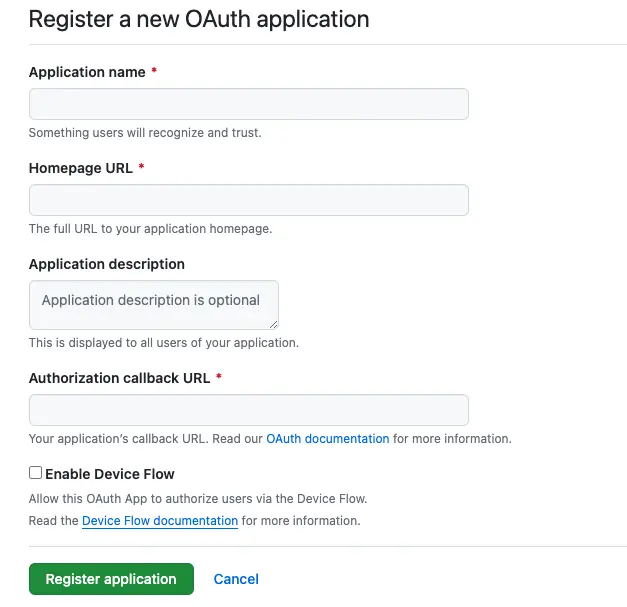
3.2 填寫表單
其中,必填項包括“應用名稱”,“主頁地址”,“授權回調地址”即上文提到的redirect_uri參數,最後點擊“Register Application”即可完成客户端註冊
3.3 查看客户端信息
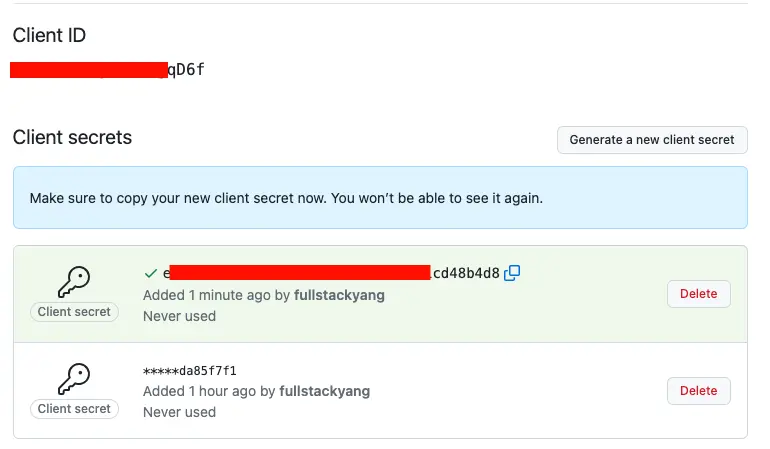
註冊完成之後就可以進入客户端信息頁面,此時client-id已經生成好了,還需要生成一串client-secret,點擊“Generate a new client secret”即可生成,此時務必複製並保存該字符串,後面就無法再次查看了,只能再生成一個新的。
3.4 官方文檔
如有其他問題,也可以參考其官方文檔
https://docs.github.com/zh/apps/oauth-apps/building-oauth-apps/authorizing-oauth-apps
