

防抖定義
某些頻繁操作的事件會影響性能,"防抖"可以用來減少事件的響應頻次,當事件觸發的時候,相對應的函數並不會立即觸發,而是會進行等待,只有等待了一段時間之後,事件停止觸發,此時才會執行響應函數。
防抖案例
比如屏幕設定了1分鐘的熄屏時間,如果用户在這1分鐘之內,沒有對電腦進行任何的操作,那麼電腦就會在一分鐘時準時熄屏,但如果用户在第50秒的時候,移動了一下鼠標,熄屏的時間會從這一刻開始重新計時,往後計算滿1分鐘沒有進行任何操作時才會繼續熄屏。
防抖使用場景
在程序設計的過程中,很多場景都能夠用到"防抖"。
- 輸入框頻繁輸入、搜索
- 按鈕頻繁點擊、提交信息,觸發事件
- 監聽瀏覽器的滾動事件
- 監聽瀏覽器的縮放事件
沒有使用防抖時
這裏模擬一個商品搜索框,我們需要對用户輸入的內容調用接口進行關聯查詢,來給用户進行搜索提示。
當沒有使用防抖時,我們會直接將函數綁定到對應的事件上。
// html代碼
<input>

// js代碼
const inputEl = document.querySelector('input')

let count = 0
const inputChange = function(){
    console.log(`第${++count}次調用inputChange方法`)
}
inputEl.oninput = inputChange
input框內輸入"javascript",一共10個字符,所以方法調用了10次
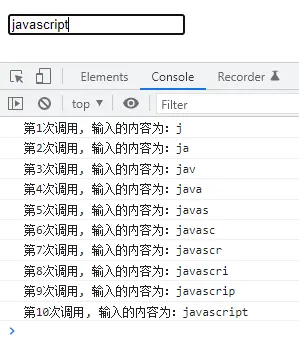
這樣的方式性能很低,其一是因為每輸入一個字符就調用接口,對服務器造成的壓力很大,其二是因為直到第10個字符,用户才停止輸入,此時才獲取了用户輸入的完整信息,前9個字符的調用就不是那麼必要,那麼,"防抖"的作用就是等到用户停止輸入的時候,才去執行函數,避免了多次執行造成的資源浪費。
自定防抖函數
防抖函數實現的原理是,傳入要執行的函數,以及需要等待推遲的時間,在經過一系列的處理之後,再去執行傳入的函數。
第一步:基本版防抖實現
定義setTimeout推遲函數的執行時間,clearTimeout用於在輸入下一個字符還沒有超過1秒鐘時清除計時器,創建新的計時器,如果沒有清除的話,那麼相當於每個字符都會隔1s調用方法。
const debounce = function (fn, delay) {
  let timer = null;
  const _debounce = function () {
    if (timer) clearTimeout(timer);
    timer = setTimeout(()=>{
      fn()
    }, delay);
  };
  return _debounce;
};
inputEl.oninput = debounce(inputChange, 1000);
我們是希望達到當用户輸入完成時,再執行函數,也就是輸入完10個字符,才調用一次
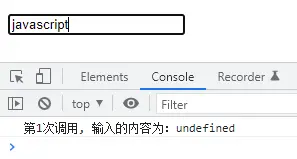
但此時發現,event.target.value 用於獲取用户輸入的值變成了undefined
第二步:拓展this和參數
在上一步定義函數時,this對象和event參數都被丟失了,在這裏要把他們找回來,只需要在執行fn函數時,通過call/apply/bind來改變this的執行,以及傳入參數即可。
const debounce = function (fn, delay) {
  let timer = null;
  const _debounce = function (...args) {
    if (timer) clearTimeout(timer);
    timer = setTimeout(()=>{
      fn.apply(this,args)
    }, delay);
  };
  return _debounce;
};
inputEl.oninput = debounce(inputChange, 1000);
這樣之後,我們就能拿到用户的輸入內容啦~
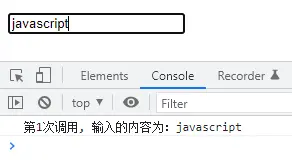
到這裏為止,已經實現了防抖的大部分使用場景,下面來看看更復雜的需求吧~
第三步:函數立即執行
在我們上面定義的防抖函數中,是沒有立即執行的,也就是在輸入第一個字符"j"的時候,是不會調用函數,可能存在一些場景,等到用户輸入完成再調用顯得響應比較緩慢,需要在第一個字符輸入時就進行一次調用。
這裏可以對於傳入的函數增加一個參數,表示是否需要立即執行,默認不需要,為false,函數裏在使用一個變量來保存是否需要首次執行,當首次執行完成後,再將這個變量置為false
 const debounce = function (fn, delay, isImmediate = false) {
  let timer = null;
  let isExcute = isImmediate;
  const _debounce = function (...args) {
    if (isExcute) {
      fn.apply(this, args);
      isExcute = false;
    }
    if (timer) {
      clearTimeout(timer);
    }
    timer = setTimeout(() => {
      fn.apply(this, args);
      isExcute = isImmediate;
    }, delay);
  };
  return _debounce;
};

inputEl.oninput = debounce(inputChange, 1000, true);
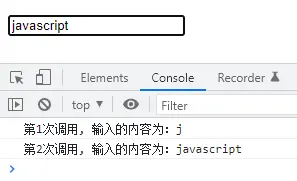
輸入字符"j"時立即調用以及當用户輸入完成時進行一次調用,所以這裏會有兩次調用。
第四步:取消功能
仔細一看,我們的防抖函數不能夠取消呀,只要到了時間就一定會執行,萬一當用户輸完內容之後,還沒有到1秒鐘,但是他已經關掉窗口了呢,考慮到這種情況,我們得把取消功能安排上!
函數也是一個對象,我們可以給函數對象上再綁定一個函數,在return的_debounce上綁定一個cancel方法,當需要取消的時候執行cancel方法
// html
<button>取消</button>

// javascript
const cancelBtn = document.querySelector("button");
const debounce = function (fn, delay, isImmediate = false) {
  let timer = null;
  let isExcute = isImmediate;
  const _debounce = function (...args) {
    if (isExcute) {
      fn.apply(this, args);
      isExcute = false;
    }
    if (timer) {
      clearTimeout(timer);
    }
    timer = setTimeout(() => {
      fn.apply(this, args);
      isExcute = isImmediate;
    }, delay);
  };
  _debounce.cancel = function () {
    if (timer) {
      clearTimeout(timer);
    }
  };
  return _debounce;
};
const debounceFn = debounce(inputChange, 2000, true);
inputEl.oninput = debounceFn;
cancelBtn.onclick = debounceFn.cancel;
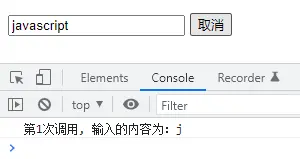
當輸入了內容之後,在停止輸入到點擊按鈕中沒有超過定義的時間(上面定義的是2秒鐘),這樣就只會執行首次輸入的函數,在用户輸入完成的那一次就不會執行了。
第五步:函數返回值
上面定義的"防抖"函數是沒有返回值的,如果説在執行完成之後,希望得到執行的結果,那麼也有兩種方式可以獲取到
回調函數
在防抖函數的入參中增加第四個參數,是一個函數,用來獲取防抖函數執行完成的結果
let count = 0;
const inputChange = function (event) {
  console.log(`第${++count}次調用, 輸入的內容為:${event?.target?.value}`);
  return 'hello world'
};
const debounce = function (fn, delay, isImmediate = false, callbackFn) {
  let timer = null;
  let isExcute = isImmediate;
  const _debounce = function (...args) {
    if (isExcute) {
      const result = fn.apply(this, args);
      callbackFn(result)
      isExcute = false;
    }
    if (timer) {
      clearTimeout(timer);
    }
    timer = setTimeout(() => {
      const result = fn.apply(this, args);
      callbackFn(result)
      isExcute = isImmediate;
    }, delay);
  };
  return _debounce;
};
const debounceFn = debounce(inputChange, 2000, true, function(result){
  console.log('獲取執行的結果',result)
});
inputEl.oninput = debounceFn;
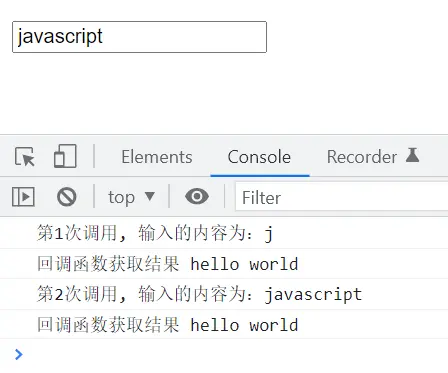
每執行一次防抖函數,都會執行回調函數裏的內容。
promise
防抖函數的返回函數中,通過promise來返回成功或失敗的結果,以下代碼只判斷了成功的執行條件,還可以加上失敗的處理。
通過promise包裹的異步函數要經過調用才能獲取響應結果,所以將防抖函數放在新函數中,將新函數作為oninput事件響應的函數。
const inputEl = document.querySelector("input");
  let count = 0;
  const inputChange = function (event) {
    console.log(
      `第${++count}次調用, 輸入的內容為:${event?.target?.value}`
    );
    return "hello world";
  };
  const debounce = function (fn, delay, isImmediate = false) {
    let timer = null;
    let isExcute = isImmediate;
    const _debounce = function (...args) {
      return new Promise((resolve, reject) => {
        if (isExcute) {
          const result = fn.apply(this, args);
          resolve(result);
          isExcute = false;
        }
        if (timer) {
          clearTimeout(timer);
        }
        timer = setTimeout(() => {
          const result = fn.apply(this, args);
          resolve(result);
          isExcute = isImmediate;
        }, delay);
      });
    };
    // 封裝取消功能
    _debounce.cancel = function () {
      if (timer) clearTimeout(timer);
      timer = null;
      isInvoke = false;
    };
    return _debounce;
  };
  const debounceFn = debounce(inputChange, 2000, true);
  const promiseCallback = function (...args) {
    debounceFn.apply(inputEl, args).then((res) => {
      console.log("promise的執行結果", res);
    });
  };
  inputEl.oninput = promiseCallback;
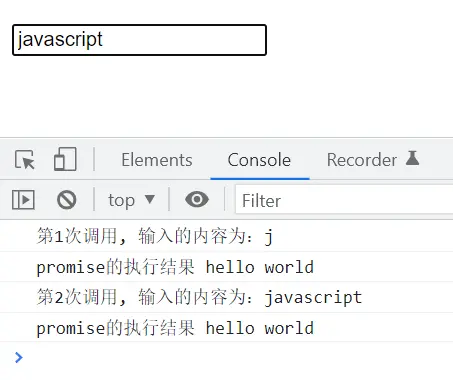
和傳入回調函數的形式一致,都是通過每執行一次防抖函數,就會返回一次結果。
在開發中使用防抖函數優化項目的性能,可以按如上方式自定義,也可以使用第三方庫。
以上就是防抖函數相關內容,關於js高級,還有很多需要開發者掌握的地方,可以看看我寫的其他博文,持續更新中~



