

GitHub Action 持續集成服務推出有一段時間了,目前已經免費開放使用,由於個人項目都是放在Github上有點多,使用它來發布、測試、部署,是極大的提高了生產力。
下面通過一些實例來説明,我們可以在那些地方可以提高生產力。
入門
我們只需要在項目的 .github/workflows/ 目錄下配置 yml 文件,配置觸發事件既可以,例如 .github/workflows/ci.yml 中,我們在 master 分支進行 push,就可以出發這個工作流。
name: CI
on:
  push:
    branches:
      - master
為這個工作流添加一些任務,通過使用 actions/checkout 拉代碼,使用 actions/setup-node 安裝制定的 nodejs 版本
name: CI
on:
  push:
    branches:
      - master

jobs:
  build-deploy:
    runs-on: ubuntu-18.04
    steps:
      - uses: actions/checkout@v2
      - uses: actions/setup-node@v2
        with:
          node-version: 14
你可以添加更多的步驟完成簡單的測試,例如安裝依賴,編譯代碼,運行測試用例等:
jobs:
  build-deploy:
    runs-on: ubuntu-18.04
    steps:
      - uses: actions/checkout@v2
      - uses: actions/setup-node@v2
        with:
          node-version: 14
      - run: npm install
      - run: npm run build
      - run: npm run coverage
      - run: npm run bundle
      - run: npm run bundle:min
      - run: npm run doc
自動打 tag
配置一個步驟,通過判斷 package.json 中的變化自動創建一個 tag。
- name: Create Tag
  id: create_tag
  uses: jaywcjlove/create-tag-action@v1.3.6
  with:
    package-path: ./package.json
自動生成 released
通過判斷 tag 創建成功是否成功(if: steps.create_tag.outputs.successful),來自動創建一個 released
- name: Create Release
  uses: ncipollo/release-action@v1
  if: steps.create_tag.outputs.successful
  with:
    token: ${{ secrets.GITHUB_TOKEN }}
    name: ${{ steps.create_tag.outputs.version }}
    tag: ${{ steps.create_tag.outputs.version }}
自動生成 released 的詳情描述
使用 jaywcjlove/changelog-generator 獲取commit的日誌,在創建 released 的時候使用
- name: Generate Changelog
  id: changelog
  uses: jaywcjlove/changelog-generator@v1.5.0
  with:
    head-ref: ${{steps.create_tag.outputs.version}}
    filter-author: (renovate-bot|Renovate Bot)
    filter: '[R|r]elease[d]\s+[v|V]\d(\.\d+){0,2}'
- name: Create Release
uses: ncipollo/release-action@v1
if: steps.create_tag.outputs.successful
with:
token: ${{ secrets.GITHUB_TOKEN }}
name: ${{ steps.create_tag.outputs.version }}
tag: ${{ steps.create_tag.outputs.version }}
body: |
Comparing Changes: ${{ steps.changelog.outputs.compareurl }}
${{ steps.changelog.outputs.changelog }}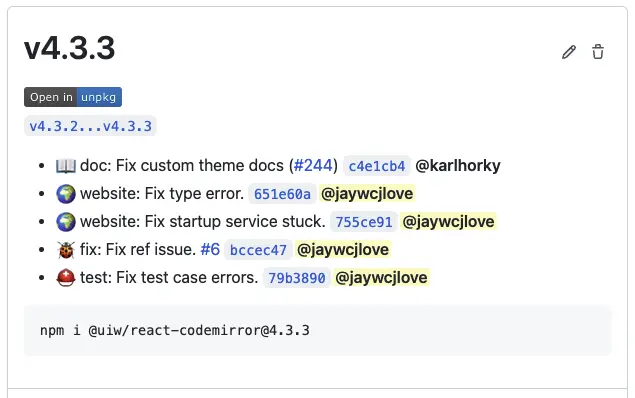
自動生成一個簡單的文檔網站
你可以通過腳本生成它(index.html):
- name: Compress uiw Example.
  run: |
    cat > index.html << EOF
    <!DOCTYPE html><html lang="en">
    <head>
    </head>
    <body>
    <div class="footer">
      Licensed under MIT. (Yes it's free and open-sourced)
    </div>
    </body></html>
    EOF
如果你只想通過 README.md 生成一個簡單的文檔網站,你可以使用 jaywcjlove/markdown-to-html-cli 進行配置自動生成簡單的 index.html 靜態文件進行發佈即可
- name: Converts Markdown to HTML
  uses: jaywcjlove/markdown-to-html-cli@main
  with:
    source: README-zh.md
    output: website/index.html
    github-corners: https://github.com/jaywcjlove/markdown-to-html-cli
    favicon: data:image/svg+xml,<svg xmlns=%22http://www.w3.org/2000/svg%22 viewBox=%220 0 100 100%22><text y=%22.9em%22 font-size=%2290%22>🌐</text></svg>
自動發佈靜態資源
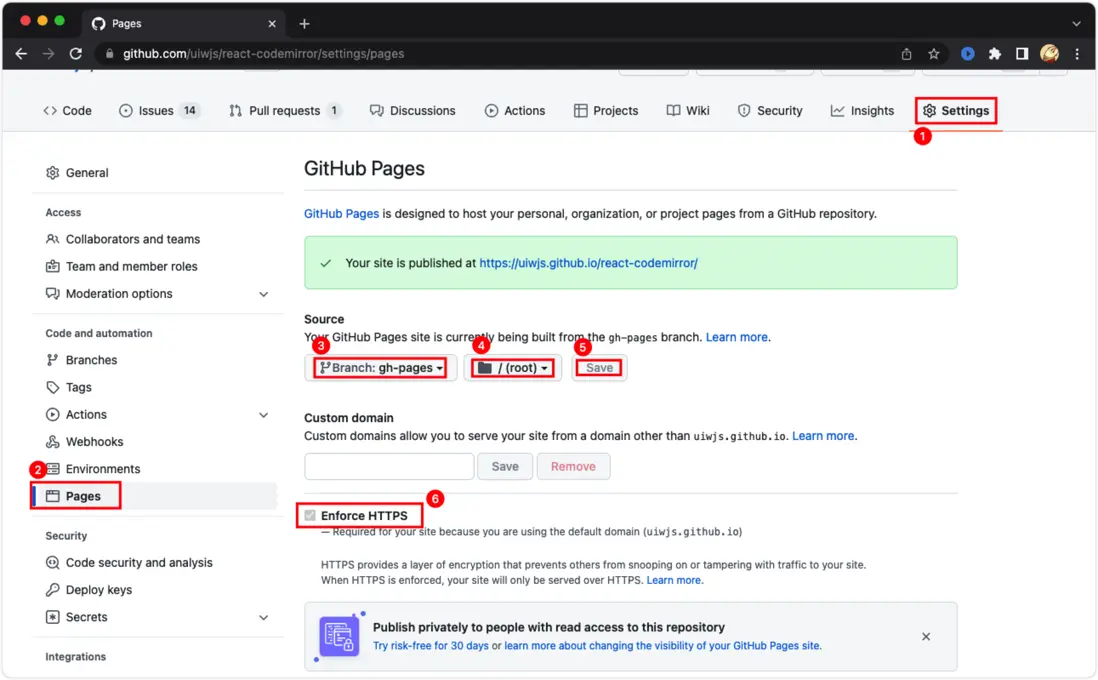
GitHub 提供一個免費的靜態資源託管功能,我們只需要將靜態資源提交到某個分支,進行配置即可。這裏我們使用 peaceiris/actions-gh-pages 將 build 目錄中編譯好的靜態資源,提交到 gh-pages 分支中,通過配置即可以直接預覽它。
- name: Deploy
  uses: peaceiris/actions-gh-pages@v3
  with:
    github_token: ${{ secrets.GITHUB_TOKEN }}
    publish_dir: ./build
根據下圖進行配置靜態資源所在的位置
文檔歷史記錄預覽
在每次生成的 releases 中展現當前的文檔預覽,這很好的獲取到不通版本的文檔,這個非常有用。我們不需要幹什麼就可以根據 git 歷史記錄,預覽歷史的文檔源碼,但是希望他擁有預覽工具,這個時候需要用到 https://raw.githack.com/ 這個 CDN 工具了,只需通過 jaywcjlove/changelog-generator 輸出的 hash 拼接一下,就可以了。
https://raw.githack.com/uiwjs/react-codemirror/${{ steps.changelog.outputs.gh-pages-short-hash }}/index.html# 如果你需要獲取最新的 gh-pages 分支 hash
# 這需要你在提交靜態資源之後
- name: Generate Changelog
id: changelog
uses: jaywcjlove/changelog-generator@v1.5.0
with:
head-ref: ${{steps.create_tag.outputs.version}}
filter-author: (renovate-bot|Renovate Bot)
filter: '[R|r]elease[d]\s+[v|V]\d(\.\d+){0,2}'
- name: Create Release
uses: ncipollo/release-action@v1
if: steps.create_tag.outputs.successful
with:
token: ${{ secrets.GITHUB_TOKEN }}
name: ${{ steps.create_tag.outputs.version }}
tag: ${{ steps.create_tag.outputs.version }}
body: |
Documentation ${{ steps.changelog.outputs.tag }}: https://raw.githack.com/uiwjs/react-codemirror/${{ steps.changelog.outputs.gh-pages-short-hash }}/index.html 自動上傳 npm 包
使用 JS-DevTools/npm-publish 判斷 package.json 中的版本是否發生變化,自動在 npm 上發佈版本。
- uses: JS-DevTools/npm-publish@v1
  with:
    token: ${{ secrets.NPM_TOKEN }}
    package: ./package.json
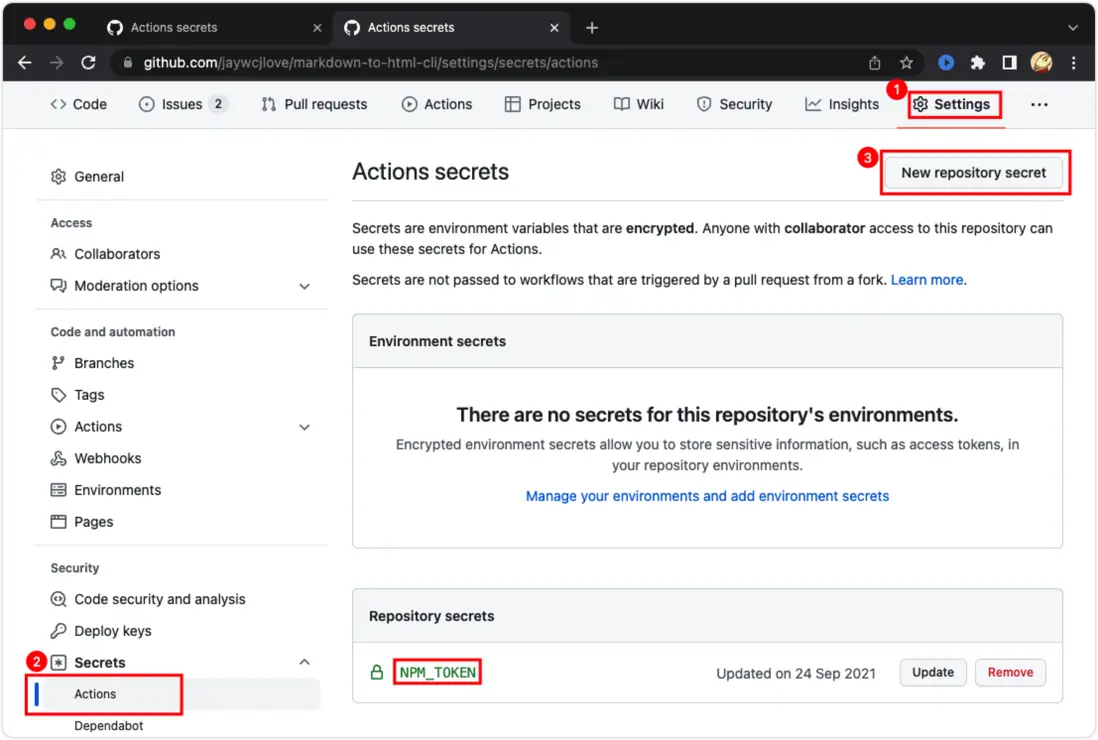
配置 NPM_TOKEN ,如果你的倉庫在 GitHub 組織中,只需要組織裏面設置一次就好了,個人的配置如下:
自動生成貢獻者圖標
有個更簡單的工具 contrib.rocks 配置URL,直接在你的自述文件中引用就可以,但是這個不夠酷,因為有機器人貢獻者需要過濾,不想依賴一個第三方服務,我們只需要這個貢獻者頭像集合圖片就可以了,這個時候我們使用 jaywcjlove/github-action-contributors 去生成它,將它提交到 gh-pages 靜態資源分支中,在頁面使用預覽即可
- name: Generate Contributors Images
  uses: jaywcjlove/github-action-contributors@main
  with:
    filter-author: (renovate\[bot\]|renovate-bot|dependabot\[bot\])
    output: build/CONTRIBUTORS.svg
    avatarSize: 42
## Contributors
As always, thanks to our amazing contributors!
<a href="https://github.com/jaywcjlove/github-action-contributors/graphs/contributors">
<img src="https://jaywcjlove.github.io/github-action-contributors/CONTRIBUTORS.svg" />
</a>
Made with [github-action-contributors](https://github.com/jaywcjlove/github-action-contributors).
完整示例參考
- @kktjs/kkt/.github/workflows/ci.yml
- @uiwjs/react-codemirror/.github/workflows/ci.yml
