

對Tapir的深度剖析
利用Tapir,一個基於 OpenAPI規範 (也可稱作Swagger規範)的開源API設計工具,開發者可以通過一種高層級的抽象方式更輕鬆地構建和記錄RESTful API。
此工具以圖形化形式展示API端點及參數,並且配備了豐富的編輯選項及自動文檔生成能力,方便開發者生成清晰易懂的説明文件,並支持多種輸出格式如OpenAPI和Markdown等,從而適應各種不同的需求。
Tapir不僅限於API的設計與記錄,它同樣提供API測試和模擬服務,允許開發者模擬API響應進行測試,並且它還能自動生成客户端代碼,幫助快速實現API的應用。
選擇Tapir的四大理由
類型安全性: Tapir的核心優勢之一在於其強調類型安全的API設計。通過Scala的強類型系統來驗證API結構的合法性,這有助於避免運行時錯誤。
import sttp.tapir._
import sttp.tapir.generic.auto._
import sttp.tapir.json.circe._
import io.circe.generic.auto._
import java.util.UUID

case class User(name: String)

val paging: EndpointInput[(UUID, Option[Int])] =
    query[UUID]("start").and(query[Option[Int]]("limit"))

val listUsersEndpoint: PublicEndpoint[(UUID, Option[Int]), Unit, List[User], Any] =
    endpoint.in("user" / "list").in(paging).out(jsonBody[List[User]])
易於測試: 由於Tapir的類型安全設計,可以藉助Scala的測試框架輕鬆創建測試用例,確保API在不同情形下都能正常工作,這有助於提升開發流程的效率,降低錯誤率。
維護簡單: Tapir通過將API定義拆分為獨立的、可組合的元素,使得維護API定義變得簡單。這便於對API的特定部分進行更新,而不會影響到整體結構。
自動化生成代碼和文檔: Tapir能夠將API定義轉化成各類客户端和服務器端代碼,並且還可以自動化生成API文檔。這意味着降低了手工編寫代碼和維護文檔的工作量和出錯風險。
快速上手Tapir
開始之前先添加相關的庫
"com.softwaremill.sttp.tapir" %% "tapir-core" % "1.2.9"定義一個端點(Endpoint)
case class Status(uptime: Long)

val statusEndpoint: PublicEndpoint[Unit, ErrorInfo, Status, Any] =
   baseEndpoint.in("status").out(jsonBody[Status])
以下是一個例子,演示如何設置分頁
import sttp.tapir._
import java.util.UUID

case class Paging(from: UUID, limit: Option[Int])

val paging: EndpointInput[Paging] =
   query[UUID]("start").and(query[Option[Int]]("limit"))
   .map(input => Paging(input._1, input._2))(paging => (paging.from, paging.limit))
對接Web框架
import sttp.tapir._
import sttp.tapir.server.akkahttp.AkkaHttpServerInterpreter
import scala.concurrent.Future
import akka.http.scaladsl.server.Route
import scala.concurrent.ExecutionContext.Implicits.global

def countCharacters(s: String): Future[Either[Unit, Int]] =
  Future.successful(Right[Unit, Int](s.length))

val countCharactersRoute: Route =
  AkkaHttpServerInterpreter().toRoute(countCharactersEndpoint.serverLogic(countCharacters))

val countCharactersEndpoint: PublicEndpoint[String, Unit, Int, Any] =
  endpoint.in(stringBody).out(plainBody[Int])

val countCharactersRoute: Route =
  AkkaHttpServerInterpreter().toRoute(countCharactersEndpoint.serverLogic(countCharacters))
自動生成Swagger UI
生成的描述信息可以通過 Swagger UI 或Redoc界面共享給用户。
"com.softwaremill.sttp.tapir" %% "tapir-swagger-ui-bundle" % "1.2.9"import sttp.tapir._
import sttp.tapir.swagger.bundle.SwaggerInterpreter
import sttp.tapir.server.akkahttp.AkkaHttpServerInterpreter
import scala.concurrent.Future
import scala.concurrent.ExecutionContext.Implicits.global
val myEndpoints: List[AnyEndpoint] = ???
val swaggerEndpoints =
SwaggerInterpreter().fromEndpoints[Future](myEndpoints, "My App", "1.0")
val swaggerRoute =
AkkaHttpServerInterpreter().toRoute(swaggerEndpoints)使用yaml生成端點
addSbtPlugin("com.softwaremill.sttp.tapir" % "sbt-openapi-codegen" % "1.2.9")
Enable the plugin for your project in the build.sbt:
enablePlugins(OpenapiCodegenPlugin)
Add your OpenApi file to the project, and override the openapiSwaggerFile setting in the build.sbt:
openapiSwaggerFile := baseDirectory.value / "swagger.yaml"
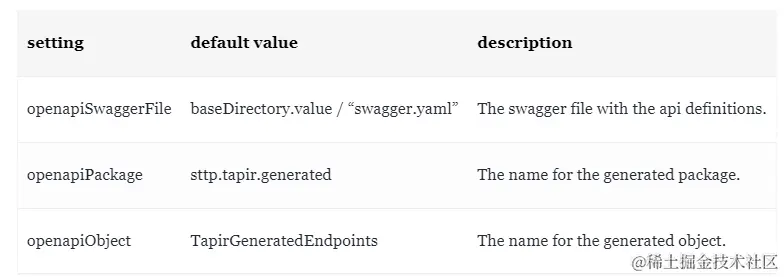
下面是一些配置説明:
其他自動生成文檔的方法:
- 如何使用 Apifox 自動生成 API 接口文檔 - 一份詳細指南
- 如何使用YApi自動生成文檔