

你好,我是 Kagol,個人公眾號:前端開源星球。
Fluent Editor 是一個基於 Quill 2.0 的富文本編輯器,在 Quill 基礎上擴展了豐富的模塊和格式,框架無關、功能強大、開箱即用。
- 源碼:https://github.com/opentiny/fluent-editor/(歡迎 Star ⭐)
- 官網:https://opentiny.github.io/fluent-editor/
Quill 內置公式
Quill 內置了公式的功能,基於 KaTeX,使用時需要安裝 katex 依賴,並導入對應的樣式,具體使用示例如下:
安裝 katex 依賴:
npm i katex使用 Quill 內置 formula 公式:
<script setup lang="ts">
import { onMounted } from 'vue'

// 導入 katex 和對應的樣式
import katex from 'katex'
import 'katex/dist/katex.min.css'

// 掛載 katex 到 window 變量上
window.katex = katex

let editor

const TOOLBAR_CONFIG = [
  [{ header: [] }],
  ['bold', 'italic', 'underline', 'link'],
  [{ list: 'ordered' }, { list: 'bullet' }],
  ['clean'],
  ['formula'], // 配置公式工具欄按鈕
]

onMounted(() => {
  editor = new FluentEditor('#editor', {
    theme: 'snow',
    modules: {
      toolbar: TOOLBAR_CONFIG,
    },
  })
})
</script>

<template>
  <div id="editor" />
</template>
效果圖:
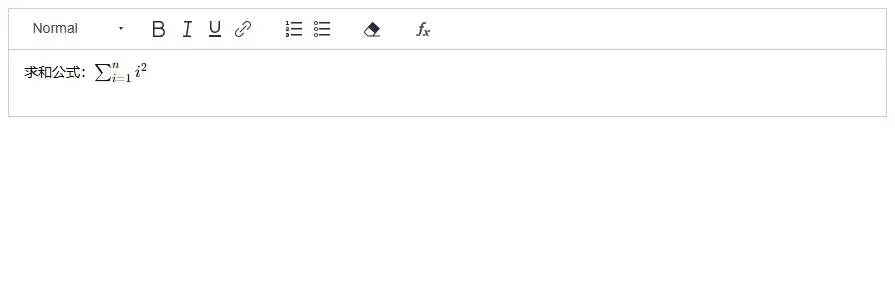
要插入上圖中的求和公式,需要知道該公式對應的 KaTeX 語法。
\sum_{i=1}^{n} i^2
然後點擊工具欄的公式按鈕,並將上面的公式粘貼到公式輸入框中,按回車鍵就可以插入公式啦。
以下是效果演示(Gif 動圖):

從上面的演示動圖不難看出,Quill 內置公式主要有以下問題:
- 對於用户來説
有一定的使用成本,用户需要記住 KaTeX 公式的語法。 - 只支持新增和刪除公式,
不支持編輯公式。
LaTeX 可編輯公式
2024年9月27日,kiss-keray 提交了一個 PR,為 Fluent Editor 增加 mathlive 可編輯公式能力。
過了兩天 kiss-keray 關閉了這個 PR,我覺得挺可惜的,就問了一句為什麼關閉了呢?

過了兩天 kiss-keray 又重新提交了一個 PR #95,經過20天左右的檢視和交流,今天該 PR 已合入主幹分支,併發布正式版本:v3.22.0🎉🎉。
感謝 kiss-keray 為 Fluent Editor 做出的貢獻,讓 Fluent Editor 富文本擁有這麼棒的公式編輯體驗!
歡迎朋友們體驗和使用👏
使用可編輯公式之前,需要先安裝 mathlive 依賴。
npm i @opentiny/fluent-editor@3.22.0 mathlive<script setup lang="ts">
import { onMounted } from 'vue'
// 導入 mathlive,並引入對應的樣式
import 'mathlive'
import 'mathlive/static.css'
import 'mathlive/fonts.css'
let mathliveEditor
const TOOLBAR_CONFIG = [
[{ header: [] }],
['bold', 'italic', 'underline', 'link'],
[{ list: 'ordered' }, { list: 'bullet' }],
['clean'],
['formula'], // 配置工具欄公式按鈕
]
onMounted(() => {
mathliveEditor = new FluentEditor('#mathliveEditor', {
theme: 'snow',
modules: {
toolbar: {
container: TOOLBAR_CONFIG,
handlers: {
formula() {
// 綁定點擊工具欄公式按鈕的事件
const mathlive = this.quill.getModule('mathlive')
mathlive.createDialog('e=mc^2')
},
},
},
mathlive: true, // 開啓可編輯公式功能
},
})
})
</script>
<template>
<div id="mathliveEditor" />
</template>可編輯公式也支持 KaTex/LaTeX 語法,可以直接複製下面的公式,粘貼到公式輸入框中。
\sum_{i=1}^{n} i^2
效果如下:
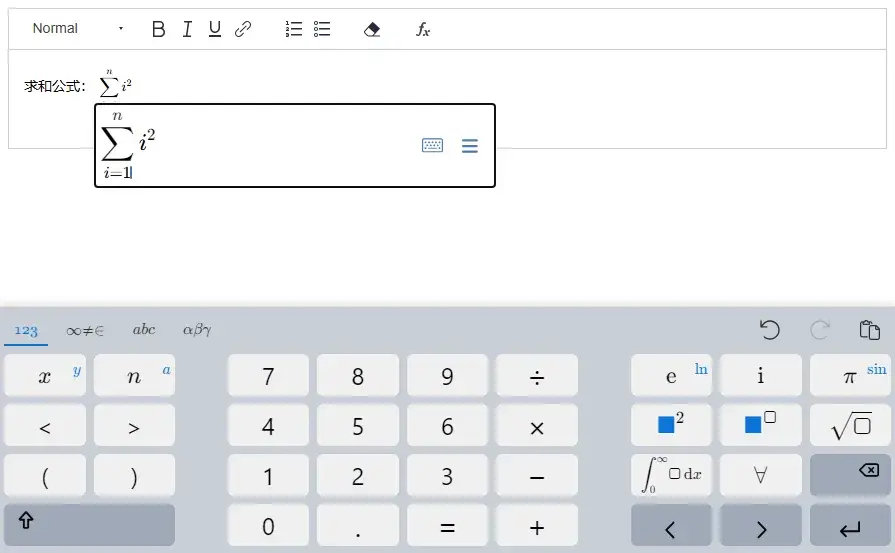
同時也支持對公式進行編輯,點擊公式輸入框右邊的小鍵盤圖標即可呼起公式編輯鍵盤,裏面包含非常豐富的公式,使用起來非常方便,也不需要記憶複雜的 KaTeX/LaTeX 公式語法。
以下是效果演示(Gif 動圖):

歡迎通過以下鏈接體驗更多可編輯公式的功能👏
可編輯公式體驗地址:https://opentiny.github.io/fluent-editor/docs/formula
往期推薦文章
- 🎉Fluent Editor:一個基於 Quill 2.0 的富文本編輯器,功能強大、開箱即用!
- 👏喜報!Fluent Editor 開源富文本迎來了第一位貢獻者
- 🎈Fluent Editor 富文本開源2個月的總結:增加格式刷、截屏、TypeScript 類型聲明等新特性
聯繫我們
GitHub:https://github.com/opentiny/tiny-vue(歡迎 Star ⭐)
官網:https://opentiny.design/tiny-vue
B站:https://space.bilibili.com/15284299
個人博客:https://kagol.github.io/blogs
小助手微信:opentiny-official
公眾號:OpenTiny