

概述
IO 延遲問題幾乎是每個生產系統都會或多或少遇到的問題。雖然現在 NVMe + SSDs 已經可以到達 10Gbytes/s 的呑吐量,價格也非常親民。但 IO 延遲問題不會消失。因為:
- 一些基於網絡的的存儲方案,如 Ceph,天然地有不穩定性
- SSD / RAIN Controller 本身的不穩定性
在 Linux 下,傳統地,我們有 iostat / sar 等等工具可以看系統級、存儲設備級的問題。但均不能告訴你以下幾點:
- 發生 IO 延遲時,進程/線程實際上的掛起時長
- 進程/線程因 IO 延遲掛起過幾次
這些問題,在 Linux 下由於寫操作的異步落盤 pdflush 線程,問題變得更加難回答。當然,你可以用新技術 BPF,但不一定需要這個牛刀。
有同學會問,知道 IO 延遲對線程的實際影響有什麼用?答案可見我另外的兩篇文章:
- eBPF 求證坊間傳聞:Java GC 日誌可導致整個 JVM 服務卡頓?
- eBPF 求證坊間傳聞:mmap + Java Safepoint 可導致整個 JVM 服務卡頓?
基本原理
Linux 有很多隱藏特性,其中 Per-task statistics interface 與其上層的 Delay accounting 可以為每個線程增加一些 delay 的統計指標。 內核源碼中,也有讀取相關指標的 demo 應用源碼。以下是一個操作示例:
sudo sysctl kernel.task_delayacct=1

# run your app

sudo ./getdelays -t 608452 -d -i

print delayacct stats ON
printing IO accounting
TGID    608452


CPU             count     real total  virtual total    delay total  delay average
                60043     4332000000     4670325102       49110971          0.001ms
IO              count    delay total  delay average
                  199   200090856599           1005ms
SWAP            count    delay total  delay average
                    0              0              0ms
RECLAIM         count    delay total  delay average
                    0              0              0ms
THRASHING       count    delay total  delay average
                    0              0              0ms
COMPACT         count    delay total  delay average
                    0              0              0ms
WPCOPY          count    delay total  delay average
                  201         313245              0ms
: read=0, write=0, cancelled_write=0
Ubuntu 好像沒有這個 getdelays 工具的 apt 包,需要自己編譯。我是個懶人,所以我選擇了另一個查看這些指標的方法。
我們知道 linux 的 /proc/pid/stat 其實已經有這個 IO Delay 的指標了:
https://man7.org/linux/man-pages/man5/proc.5.html
       /proc/pid/stat
              Status information about the process.  This is used by
              ps(1).  It is defined in the kernel source file
              fs/proc/array.c.
      ...
              (42) delayacct_blkio_ticks  %llu  (since Linux 2.6.18)
                     Aggregated block I/O delays, measured in clock
                     ticks (centiseconds).
所以只需要找個其它現成的程序,會使用到這個指標就行。正好,htop 與 pidstat 都會。我們看看常用點的 pidstat。
https://manpages.ubuntu.com/manpages/focal/en/man1/pidstat.1....
       -d     Report I/O statistics (kernels 2.6.20 and later only).  The following values may be
              displayed:
...
              iodelay
                     Block  I/O  delay of the task being monitored, measured in clock ticks. This
                     metric includes the delays spent waiting for sync block I/O  completion  and
                     for swapin block I/O completion.
如果你好奇,可以查看它的源碼: https://github.dev/sysstat/sysstat/blob/master/pidstat.c
這是我執行的一個結果:
sudo sysctl kernel.task_delayacct=1

# run your app

sudo pidstat -d -r -p 202484  -u 205:08:35 PM   UID       PID    %usr %system  %guest   %wait    %CPU   CPU  Command
05:08:37 PM     0    202484    9.50   66.00    0.00    0.00   75.50     1  dd

05:08:35 PM   UID       PID   kB_rd/s   kB_wr/s kB_ccwr/s iodelay  Command
05:08:37 PM     0    202484 1347648.00      0.00      0.00      49  dd

05:08:37 PM   UID       PID    %usr %system  %guest   %wait    %CPU   CPU  Command
05:08:39 PM     0    202484   10.00   82.00    0.00    0.00   92.00     1  dd

05:08:37 PM   UID       PID   kB_rd/s   kB_wr/s kB_ccwr/s iodelay  Command
05:08:39 PM     0    202484 1598144.00      0.00      0.00      15  dd
如果你好奇 Per-task statistics interface 與其上層的 Delay accounting 與 /proc/pid/stat 之間在內核設計與源碼之間的關係,可以見我整理的圖:
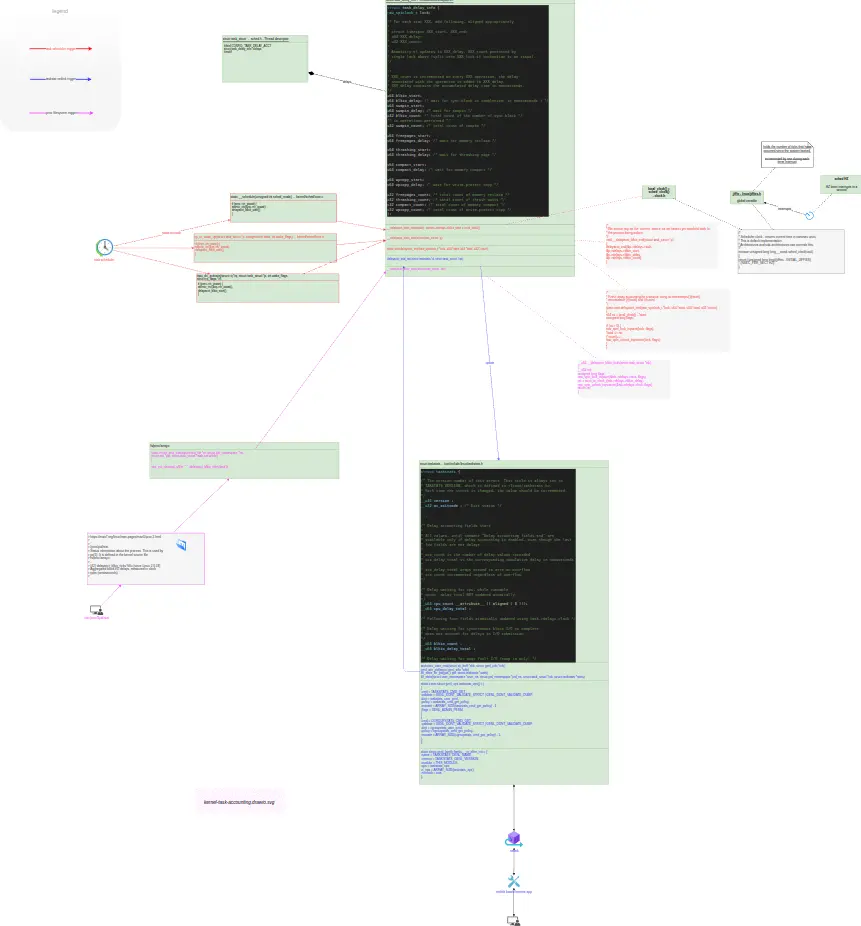
如上圖排版有問題,請點這裏用 Draw.io 打開。部分帶互動鏈接和 hover tips
sysctl kernel.task_delayacct
- [kernel commit: [tip: sched/core] delayacct: Add sysctl to enable at runtime. CommitterDate: Wed, 12 May 2021](https://www.spinics.net/lists/linux-tip-commits/msg57566.html)
iotop documentation:
https://kaisenlinux.org/manpages/iotop.html
iotop watches I/O usage information output by the Linux kernel (requires 2.6.20 or later) and displays a table of current I/O usage by processes or threads on the system. At least the CONFIG_TASK_DELAY_ACCT, CONFIG_TASK_IO_ACCOUNTING, CONFIG_TASKSTATS and CONFIG_VM_EVENT_COUNTERS options need to be enabled in your Linux kernel build configuration and since Linux kernel 5.14, the
kernel.task_delayacctsysctl enabled.從 Linux 內核 5.14.x 開始,
kernel.task_delayacct可在運行時配置並默認設置為關閉。
Ubuntu 下編譯 getdelays 的方法
https://www.kimullaa.com/posts/202112072130/
cd kernel_src/tools/accounting/

gcc -I/usr/src/linux-headers-5.19.0-50-generic/include/uapi -I/usr/src/linux-headers-5.19.0-50-generic/include/generated/uapi  -I/usr/src/linux-headers-5.19.0-50-generic/include   getdelays.c -o getdelays
結語
後面,我會寫另外兩編相關文章:《eBPF 求證坊間傳聞:Java GC 日誌可導致整個 JVM 服務卡頓?》、eBPF 求證坊間傳聞:mmap + Java Safepoint 可導致整個 JVM 服務卡頓?
參考
- The struct taskstats
- Control Groupstats
- Linux Delay Accounting
- getdelays – get delay accounting information from the kernel
- 嘗試使用 delay accounting - delay accounting を使ってみる
- delayacct: Default disabled
