

ubuntu中快速安裝on-my-zsh
1.安裝oh-my-zsh
使用命令安裝zsh
sudo apt install zsh然後安裝on-my-zsh,優先推薦使用碼雲地址
# 碼雲地址
sh -c "$(wget -O- https://gitee.com/mirrors/oh-my-zsh/raw/master/tools/install.sh)"

# github地址
sh -c "$(wget https://raw.github.com/robbyrussell/oh-my-zsh/master/tools/install.sh -O -)"
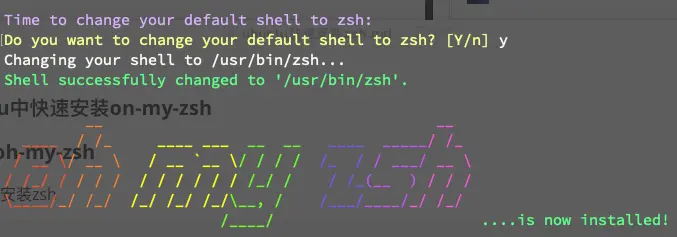
安裝過程出現是否切換zsh,選擇y,出現下圖即安裝成功
2.安裝插件
安裝結束後,在用户目錄下會有一個.zshrc文件,可以在這裏修改主題
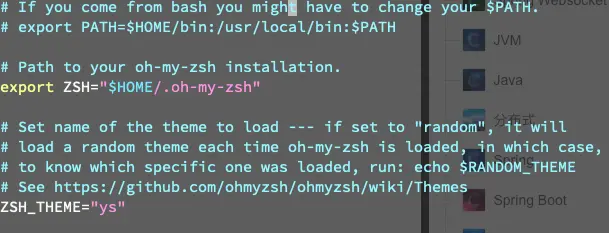
推薦主題ys,將ZSH_THEME修改為你想要的主題,source ~/.zshrc更新配置文件
zsh-autosuggestions
歷史命令智能提示插件。能幫助我們快速執行歷史命令
# 下載插件
git clone https://github.com/zsh-users/zsh-autosuggestions ${ZSH_CUSTOM:-~/.oh-my-zsh/custom}/plugins/zsh-autosuggestions

# 在配置文件.zshrc中增加zsh-autosuggestions,以空格隔開,再次增加插件同理
plugins=(git zsh-autosuggestions)

# 修改配置文件後都要執行改命令令其生效
source ~/.zshrc
如果出現提示部分也是白色的情況,可以執行以下操作
# 往.zshrch中增加下面一行內容
export TERM=xterm-256color

# 更新
source ~/.zshrc
zsh-syntax-highlighting
高亮插件,合法的命令是綠色,不合法會顯示紅色
# 下載插件
git clone https://github.com/zsh-users/zsh-syntax-highlighting.git ${ZSH_CUSTOM:-~/.oh-my-zsh/custom}/plugins/zsh-syntax-highlighting

# 在配置文件.zshrc中增加
plugins=(git zsh-autosuggestions zsh-syntax-highlighting)

# 修改配置文件後都要執行改命令令其生效
source ~/.zshrc
extract
使用 x 命令即可解壓文件,再也不用記憶tar的參數
# 下載插件
git clone https://github.com/xvoland/Extract.git ${ZSH_CUSTOM:-~/.oh-my-zsh/custom}/plugins/Extract

# 在配置文件.zshrc中增加
plugins=(git zsh-autosuggestions zsh-syntax-highlighting extract)

# 修改配置文件後都要執行改命令令其生效
source ~/.zshrc