

使用記錄
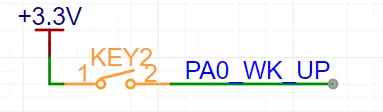
使用PA0引腳,電路圖如下,使用GPIO內部下拉。
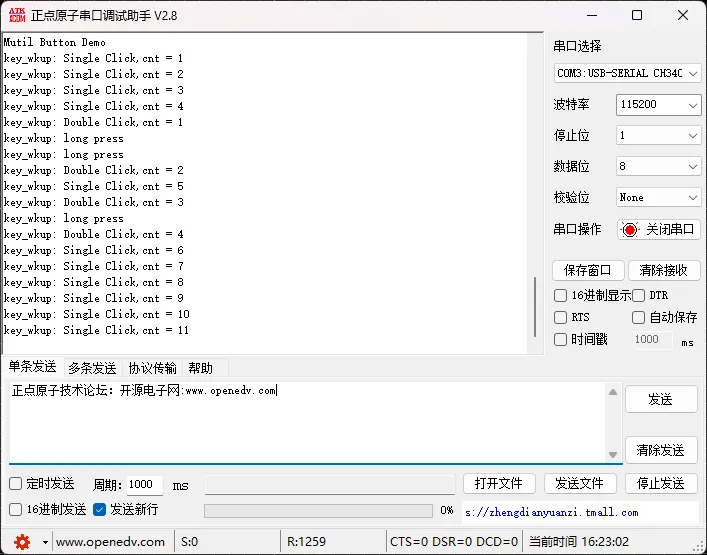
實際測試,很穩定,沒有誤觸發,單擊、雙擊、長按很穩定。
移植記錄
- 複製multi_button.c和multi_button.h到工程中,實現GPIO的初始化、讀取。
void key_init(void)
{
    GPIO_InitTypeDef GPIO_InitStruct = {0};
    /* GPIO Ports Clock Enable */
    __HAL_RCC_GPIOA_CLK_ENABLE();
    /*Configure GPIO pin : KEY_WK_UP_Pin */
    GPIO_InitStruct.Pin = KEY_WK_UP_Pin;
    GPIO_InitStruct.Mode = GPIO_MODE_INPUT;
    GPIO_InitStruct.Pull = GPIO_PULLDOWN;
    HAL_GPIO_Init(KEY_WK_UP_GPIO_Port, &GPIO_InitStruct);
}
/// multi_button 移植接口
uint8_t read_button_gpio(uint8_t button_id)
{
    switch (button_id)
    {
        case 1:
            return HAL_GPIO_ReadPin(KEY_WK_UP_GPIO_Port, KEY_WK_UP_Pin);
            break;
        default:
            return 0;
    }
}
- 實現定時器回調,button_ticks()函數需要5ms調用一次,自己實現定時器中斷,5ms中斷一次。或者使用軟件定時器。
void HAL_TIM_PeriodElapsedCallback(TIM_HandleTypeDef *htim)
{
	if(htim->Instance == TIM6)
	{
		button_ticks();
	}
}
調整下面參數,可以調整短按、長按的時間間隔
// Configuration constants - can be modified according to your needs
#define TICKS_INTERVAL          5    // ms - timer interrupt interval
#define DEBOUNCE_TICKS          3    // MAX 7 (0 ~ 7) - debounce filter depth
#define SHORT_TICKS             (300 / TICKS_INTERVAL)   // short press threshold
#define LONG_TICKS              (1000 / TICKS_INTERVAL)  // long press threshold
#define PRESS_REPEAT_MAX_NUM    15   // maximum repeat counter value
- 使用MultiButton
void key_wkup_single_click_handle(Button *btn)
{
	static uint32_t cnt = 1;
	printf("key_wkup: Single Click,cnt = %d\n",cnt);
	cnt++;
}
void key_wkup_double_click_handle(Button *btn)
{
	static uint32_t cnt = 1;
	printf("key_wkup: Double Click,cnt = %d\n",cnt);
	cnt++;
}
void key_wkup_long_press_handle(Button *btn)
{
	printf("key_wkup: long press\n");
}

int main(void)
{
    //初始化按鍵,active_level:0:低電平有效,1:高電平有效
	button_init(&key_wkup,read_button_gpio,1,1);
	//註冊單擊事件回調
	button_attach(&key_wkup,BTN_SINGLE_CLICK,key_wkup_single_click_handle);
	//註冊雙擊事件回調
	button_attach(&key_wkup,BTN_DOUBLE_CLICK,key_wkup_double_click_handle);
	//註冊長按事件回調
	button_attach(&key_wkup,BTN_LONG_PRESS_START,key_wkup_long_press_handle);
	//啓動按鍵處理
	button_start(&key_wkup);
    while(1)
    {
        ///process other things
    }


}
輪詢方式
裸機下的思路:
假如有四個按鍵,先註冊好4個按鍵的各個回調函數,比如每個按鍵的單擊、雙擊、長按等,然後在回調函數中,入隊,也就是每個按鍵的狀態入隊,最後在輪詢中查詢隊列是否為非空,如果非空,就表示有按鍵的事件,否則就表示沒有按鍵事件。
需要寫一個環形隊列(FIFO)
RTOS下的思路:
和裸機思路一樣,不過使用RTOS自帶的隊列,更方便的使用了。
參考資料:
開源鏈接: GitHub倉庫
