

本文由體驗技術團隊Kagol原創。
2024年8月20日,剛開源一週的富文本 Fluent Editor 迎來了第一位貢獻者:zzxming

1、Bug 描述
zzxming 同學修復了 Fluent Editor 富文本表格模塊的一個隱藏 Bug:
fix: table module can't save background color #10
缺陷描述:通過表格右鍵菜單設置單元格背景色之後,生成的 delta 中缺失單元格背景色信息,導致通過 setContents 方法設置的富文本表格單元格丟失了背景色。
這樣描述可能比較繞口,zzxming 同學非常貼心地做了一個 Demo 用於復現該問題:
最小可復現 Demo:https://stackblitz.com/edit/vitejs-vite-quwkzn?file=src%2FApp...
2、Bug 復現步驟
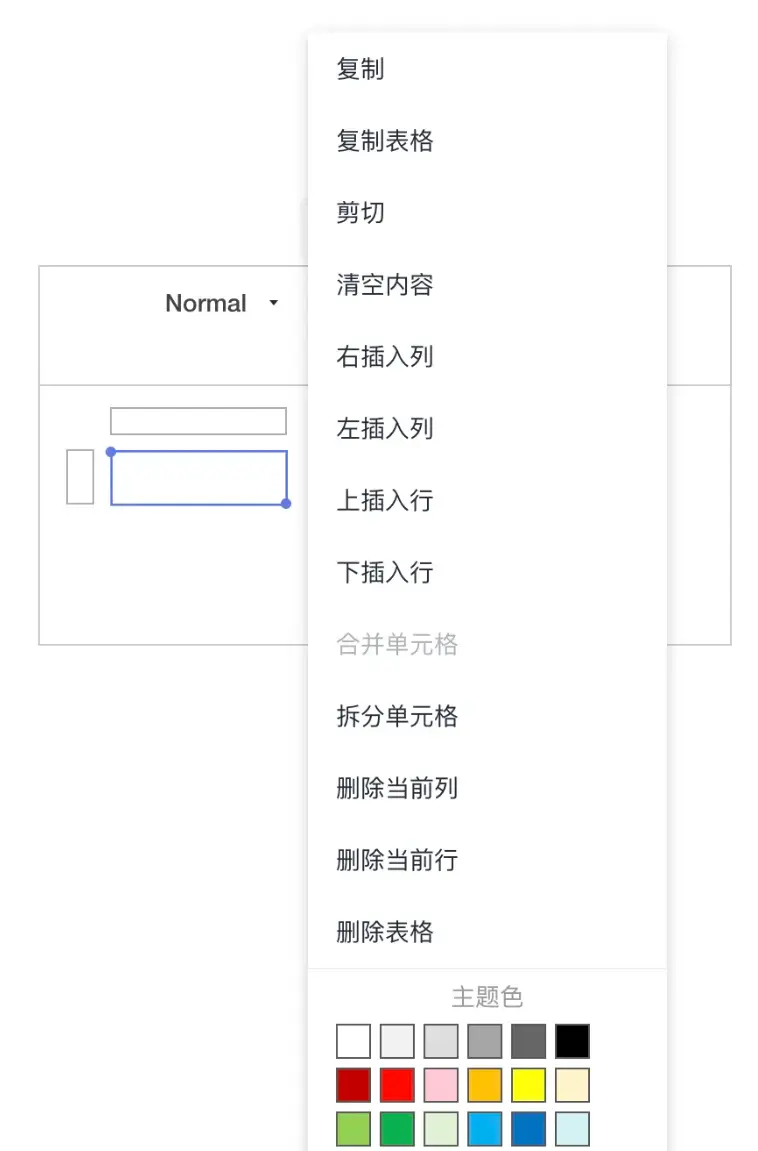
第一步:在表格單元格中右鍵,給單元格設置一個背景色。
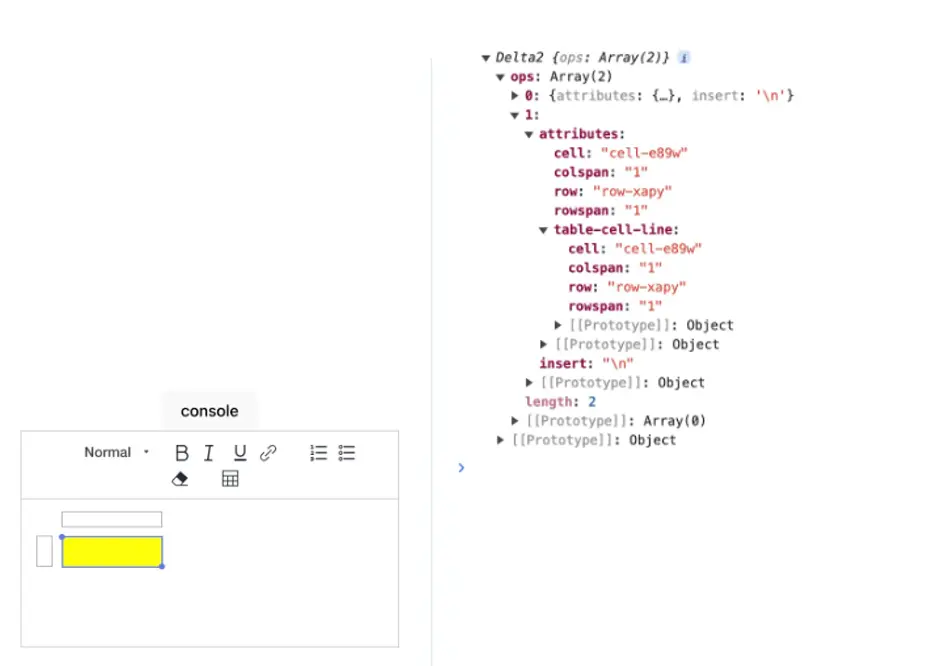
第二步:通過 editor.getContents() 獲取到的對應的 delta。
const delta = {
    "ops": [
        {
            "attributes": {
                "table-col": {
                    "width": "100"
                }
            },
            "insert": "\n"
        },
        {
            "attributes": {
                "table-cell-line": {
                    "rowspan": "1",
                    "colspan": "1",
                    "row": "row-xapy",
                    "cell": "cell-e89w"
                },
                "row": "row-xapy",
                "cell": "cell-e89w",
                "rowspan": "1",
                "colspan": "1"
            },
            "insert": "\n"
        }
    ]
}
可以看到 delta 沒有攜帶單元格背景色信息。
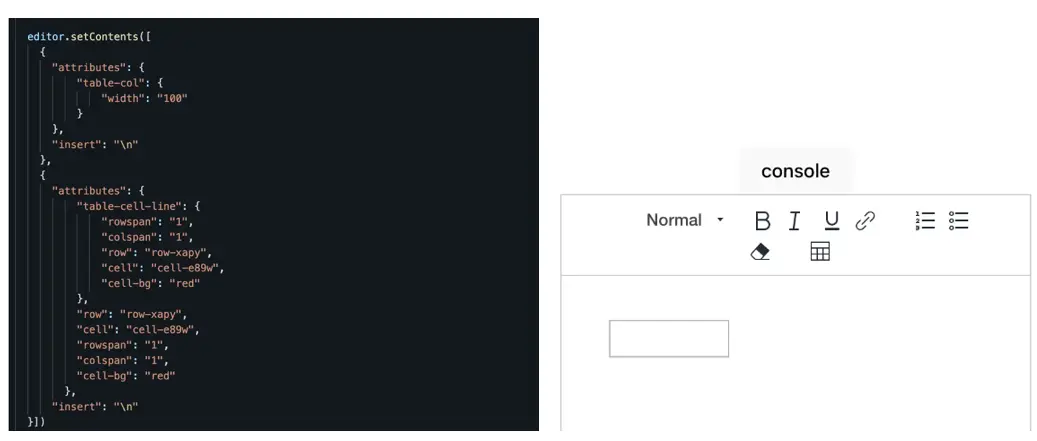
第三步:將 delta 通過 setContents 方法回填到富文本中,單元格沒有背景色。
editor.setContents(delta)
3、解決方案
修改文件:packages/fluent-editor/src/table/formats/table.ts
修復該問題主要分成以下步驟:
- 把 delta 中的 cell-bg 設置到 qlbt-cell-line 節點的
data-cell-bg屬性中 - 從 qlbt-cell-line 節點中拿到
data-cell-bg的值,回填到單元格背景色 - 將 DOM 節點中的
data-cell-bg值,保存到 delta 中
3.1 將 delta 中 cell-bg 信息設置到 DOM 節點中
將 delta 信息設置到 DOM 節點中,一般是在 blot 的 static create 方法中進行。
static create(value) {
  const node = super.create(value);

  ...

-  CELL_ATTRIBUTES.forEach((attrName) => {
-  node.setAttribute(`data-${attrName}`, value[attrName] || CELL_DEFAULT[attrName]);
+  [...CELL_ATTRIBUTES, 'cell-bg'].forEach((attrName) => {
+    const keyValue = value[attrName] || CELL_DEFAULT[attrName];
+    keyValue && node.setAttribute(`data-${attrName}`, keyValue);
  });

  ...

  return node;
}
先從 delta(value) 中拿到 cell-bg 信息,然後設置到 DOM 節點的 data-cell-bg 屬性中。
value 的結構:
{
  rowspan: '1',
  colspan: '1',
  row: 'row-xapy',
  cell: 'cell-e89w',
  cell-bg: '#ffff00'
}
3.2 回填 cell-bg 到單元格背景色
zzxming 同學不僅修復了這個 Bug,還做了一個小重構,將設置單元格背景色這個功能抽成了一個函數 setCellBg,並且加了詳細的註釋,點贊👍
/** this method is for TableCellLine to change cell background color
 *  if use `format('cell-bg', value)` will loop trigger
 *  TableCellLine.optimize -> TableCell.format -> TableCellLine.optimize ...
 */
setCellBg(value?: string) {
  if (value) {
    this.domNode.style.backgroundColor = value
  } else {
    this.domNode.style.backgroundColor = 'initial'
  }
}
在 TableCellLine 類的 optimize 方法中調用該函數,以便把 delta 中的 cell-bg 顏色設置到表格單元格。
3.3 將 cell-bg 信息保存到 delta 中
將 DOM 的信息保存到 delta 中,一般是在 blot 的 static format 方法中進行。
在 TableCellLine 類的 static format 方法中調用了 reduceFormats 函數,給該函數傳入 cell-bg 信息。
static formats(domNode) {
  const formats = {};
  if (formats['list']) {
    formats['list'] = domNode.classList.item(0);
  }
-  return reduceFormats(domNode, formats);
+  return reduceFormats(domNode, formats, ['cell-bg']);
}
在 reduceFormats 中獲取到 DOM 中的 data-cell-bg,並設置到 delta 數據中。
- function reduceFormats(domNode, formats) {
-   return CELL_ATTRIBUTES.concat(CELL_IDENTITY_KEYS).reduce((tableFormats, attribute) => {
+ function reduceFormats(domNode:HTMLElement, formats:Record<string, any>, extraFormat: string[] = []) {
+   return [...CELL_ATTRIBUTES, ...CELL_IDENTITY_KEYS, ...extraFormat].reduce((tableFormats, attribute) => {
    if (domNode.hasAttribute(`data-${attribute}`)) {
      tableFormats[attribute] = domNode.getAttribute(`data-${attribute}`) || undefined;
    }
    return tableFormats;
  }, formats);
}
該問題已解決,可以通過以下鏈接進行驗證:
- https://stackblitz.com/edit/vitejs-vite-cakzv5?file=src%2FApp...
詳見 zzxming 同學提交的 PR:
fix: table module can't save background color #10
3.4 優化點
這裏其實有個優化點(歡迎 PR 👏):
目前 zzxming 同學在 static create 和 reduceFormats 方法中傳入 cell-bg 都是直接增加的,其實可以放到 CELL\_ATTRIBUTES 常量數組中,合理利用現有的代碼😋。
- export const CELL_ATTRIBUTES = ['rowspan', 'colspan'];
+ export const CELL_ATTRIBUTES = ['rowspan', 'colspan', 'cell-bg'];
感謝 zzxming 同學對 Fluent Editor 的貢獻,目前已發佈 v3.18.3 版本,歡迎朋友們使用 Fluent Editor,感興趣也歡迎一起參與共建。
往期文章推薦:
- Fluent Editor:一個基於 Quill 2.0 的富文本編輯器,功能強大、開箱即用!
- 重回鐵王座!時隔5年!Quill 2.0 終於發佈啦
- 深入淺出 Quill 系列之使用篇1:Quill 基本使用和配置
- 深入淺出 Quill 系列之使用篇2:通過 Quill API 實現對編輯器內容的完全控制
- 深入淺出 Quill 系列之原理篇1:現代富文本編輯器 Quill 的模塊化機制
- 深入淺出 Quill 系列之原理篇2:現代富文本編輯器 Quill 的內容渲染機制
- 深入淺出 Quill 系列之實踐篇1:如何將龍插入到編輯器中?
- 深入淺出 Quill 系列之實踐篇2:整個貪吃蛇遊戲到編輯器裏玩兒吧
- 深入淺出 Quill 系列之選型篇:Quill 富文本編輯器的實踐
- Kagol 個人博客:https://kagol.github.io/blogs
關於OpenTiny
官網:https://opentiny.design
TinyVue 源碼:https://github.com/opentiny/tiny-vue (歡迎 Star ⭐)
TinyEngine 源碼:https://github.com/opentiny/tiny-engine (歡迎 Star ⭐)
B站:https://space.bilibili.com/15284299
歡迎加入 OpenTiny 開源社區。添加微信小助手 opentiny-official 一起參與交流前端技術~
(温馨提示:OpenTiny CCF開源創新大賽也在持續報名中,歡迎大家一起報名參賽,贏取10W獎金:https://www.gitlink.org.cn/competitions/track1_openTiny )


