

什麼是BeautifulSoup
Beautiful Soup 是一個可以從HTML或XML文件中提取數據的Python庫.它能夠通過你喜歡的轉換器實現慣用的文檔導航,查找,修改文檔的方式.
多看官方文檔https://beautifulsoup.readthedocs.io/zh_CN/latest/
通過例子來講解bs庫的用法
from bs4 import BeautifulSoup
html = '''
<html><head><title>The Dormouse's story</title></head>
<body>
<p class="title"><b>The Dormouse's story</b></p>
<p class="story">Once upon a time there were three little sisters; and their names were
<a href="http://example.com/elsie" class="sister" id="link1">Elsie</a>,
<a href="http://example.com/lacie" class="sister" id="link2">Lacie</a> and
<a href="http://example.com/tillie" class="sister" id="link3">Tillie</a>;
and they lived at the bottom of a well.</p>
<p class="story">...</p>
'''- soup = BeautifulSoup(html,'lxml') //將代碼進行格式化
output:
 <html\>
 <head\>
 <title\>
 The Dormouse's story
 </title\>
 </head\>
 <body\>
 <p class\="title"\>
 <b\>
 The Dormouse's story
 </b\>
 </p\>
 <p class\="story"\>
 Once upon a time there were three little sisters; and their names were
 <a class\="sister" href\="http://example.com/elsie" id\="link1"\>
 Elsie
 </a\>,
 <a class\="sister" href\="http://example.com/lacie" id\="link2"\>
 Lacie
 </a\>and
 <a class\="sister" href\="http://example.com/tillie" id\="link3"\>
 Tillie
 </a\>
 ;
and they lived at the bottom of a well.
 </p\>
 <p class\="story"\>
 ...
 </p\>
 </body\>
</html\>
詳解bs4對html的解析
Tag
bs的使用和字典的使用極為相似,用.來進行運算
- print(soup.title) 獲取title標籤(靈活變話:soup.a soup.li等
<title>The Dormouse's story</title>
- print(soup.title.string) 獲取title中的內容(可以靈活變化,獲得其他標籤中的內容)
The Dormouse's story
- print(soup.p["class"]) 獲取class的值 (也可以靈活變換獲取id或者data-id的值)
\['title'\]
- print(soup.find(id = 'link3')) 利用find函數找到相應的標籤
bs可以多次調用得到需要的標籤內容
<p class\="title"\>
 <b\>
 The Dormouse's story
 </b\>
 </p\>

 input:print(soup.p.b.string)
 output: The Dormouse's story
find_all
find_all( name , attrs , recursive , string , **kwargs )
-
name: 根據標籤名來進行查詢(常用)
- soup.find_all('a') find_all返回的是一個列表,相應的可以soup.find_all('li')
常用方法是將列表中的元素提取出來進行處理
alist = soup.find\_all('a')
for a in alist:
function(a)- 根據attrs來進行查詢,用傳入字典的方式來精準查詢
html\='''
<div class="panel">
<div class="panel-heading">
<h4>Hello</h4>
</div>
<div class="panel-body">
<ul class="list" id="list-1" name="elements">
<li class="element">Foo</li>
<li class="element">Bar</li>
<li class="element">Jay</li>
</ul>
<ul class="list list-small" id="list-2">
<li class="element">Foo</li>
<li class="element">Bar</li>
</ul>
</div>
</div>
'''
from bs4 import BeautifulSoup
soup = BeautifulSoup(html, 'lxml')
print(soup.find\_all(attrs\={'id': 'list-1'}))
print(soup.find\_all(attrs\={'name': 'elements'}))
上面兩句的output:
\[<ul class\="list" id\="list-1" name\="elements"\>
<li class\="element"\>Foo</li\>
<li class\="element"\>Bar</li\>
<li class\="element"\>Jay</li\>
</ul\>\]- keyword參數
用tag的屬性來進行搜索,搜索每個tag的id屬性
soup.find_all(id = 'list-2')
class是特殊字,用下面方法進行處理
soup.find_all('',{"class":"element"})
- 按照CSS搜索
可以用class_ = ...... 來對class屬性進行搜索新屬性
soup.find_all("div",class_ = "panel-body")
谷歌瀏覽器快速獲得標籤CSS選擇器方法
用選擇器對組件選擇---->找到相應的語句----->右鍵------>
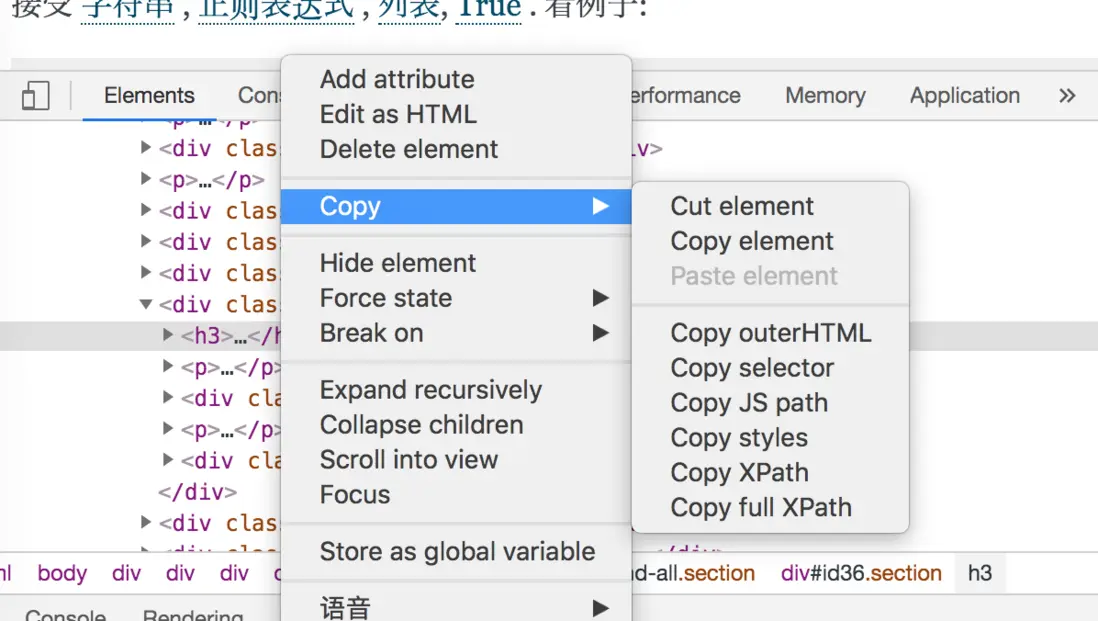
可以根據需要進行copy,selector即為CSS的路徑
find_all()若沒有找到相應的數據返回一個空的列表
find()則返回一個None
