

-
通道
- 認識Channel
- 容量與迭代
- produce與actor
- Channel的關閉
- BroadcastChannel
-
多路複用
- 什麼是多路複用
- 複用多個await
- 複用多個Channel
- SelectClause
- Flow實現多路複用
-
併發安全
- 協程的併發工具
- Mutex
- Semaphore
認識Channel
Channel實際上是一個併發安全的隊列,它可以用來連接協程,實現不同協程的通信。
看個生產者消費者的例子:@Test fun testChannel() = runBlocking { val channel = Channel<Int>() // 生產者 val producer = GlobalScope.launch { var i = 1 while (true) { delay(1000) println("sending $i") channel.send(i++) } } // 消費者 val consumer = GlobalScope.launch { while (true) { val element = channel.receive() println("receive: $element") } } joinAll(producer, consumer) }生產者每隔一秒生產一個元素,然後立刻被消費者消費掉。
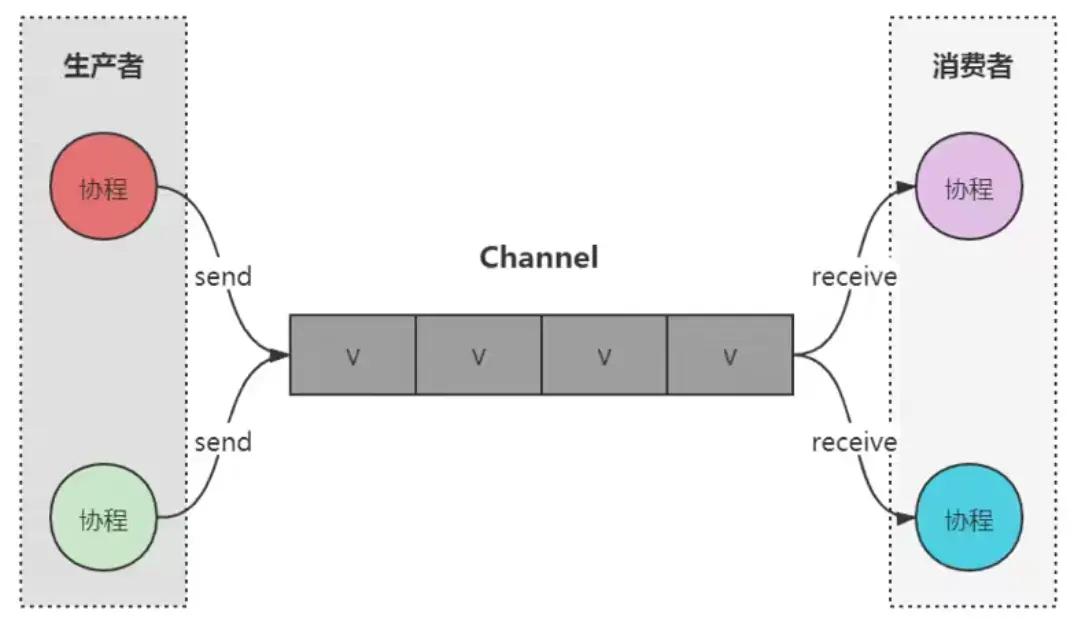
Channel的容量
Channel實際上就是一個隊列,隊列中一定存在緩衝區,那麼一旦這個緩衝區滿了,並且也一直沒有人調用receive並取走元素,send就需要掛起。若故意讓接收端的節奏放慢,發現send總是會掛起,知道receive之後才會繼續往下執行。
public fun <E> Channel(
    capacity: Int = RENDEZVOUS,
    onBufferOverflow: BufferOverflow = BufferOverflow.SUSPEND,
    onUndeliveredElement: ((E) -> Unit)? = null
): Channel<E>
Channel 默認有一個容量大小RENDEZVOUS,值為0。上面的例子如果調慢消費者的節奏,那麼就會依照消費者的節奏,每當消費者消費一個元素,生產者才會生產一個,send總是會掛起,等待消費者消費。
    @Test
    fun testChannel() = runBlocking {
        val channel = Channel<Int>()
        val start = System.currentTimeMillis()
        // 生產者
        val producer = GlobalScope.launch {
            var i = 1
            while (true) {
                delay(1000)
                println("sending $i, ${System.currentTimeMillis() - start}")
                channel.send(i++)
            }
        }
        // 消費者
        val consumer = GlobalScope.launch {
            while (true) {
                delay(5000)
                val element = channel.receive()
                println("receive: $element, ${System.currentTimeMillis() - start}")
            }
        }
        joinAll(producer, consumer)
    }
sending 1, 1018
receive: 1, 5017
sending 2, 6022
receive: 2, 10021
sending 3, 11024
receive: 3, 15026
...由於緩衝區默認為0,所以生產者每次不得不等待消費者消費掉元素後再生產。
迭代Channel
Channel本身像序列,在讀取的時候,可以直接獲取一個Channel的iterator。
    @Test
    fun testChannelIterator() = runBlocking {
//        val channel = Channel<Int>()
        val channel = Channel<Int>(Channel.UNLIMITED)
        val start = System.currentTimeMillis()
        // 生產者
        val producer = GlobalScope.launch {
            for (i in 1..5) {
                println("sending $i, ${System.currentTimeMillis() - start}")
                channel.send(i)
            }
        }
        // 消費者
        val consumer = GlobalScope.launch {
            val it = channel.iterator()
            while (it.hasNext()) {
                val element = it.next()
                println("receive: $element, ${System.currentTimeMillis() - start}")
                delay(2000)
            }
        }
        joinAll(producer, consumer)
    }
sending 1, 8
sending 2, 12
sending 3, 12
sending 4, 12
sending 5, 12
receive: 1, 15
receive: 2, 2023
receive: 3, 4026
receive: 4, 6031
receive: 5, 8037上面就是迭代的方法,把緩衝區設置成UNLIMITED,看到生產者一下子把5個元素生產完發送出來,消費者一個一個按照自己的節奏消費。如果緩衝區還是默認,那麼和上一個例子一樣,還是消費一個後再生產一個。
produce與actor
- 構造生產者與消費者的便捷方法
-
可以通過produce方法啓動一個生產者協程,並返回一個ReceiveChannel,其他協程就可以用這個Channel來接收數據了。反過來,可以用actor啓動一個消費者協程。
看個例子,使用produce創建一個receiveChannel,然後啓動一個協程消費receiveChannel中的元素。@Test fun testProducer() = runBlocking { val receiveChannel = GlobalScope.produce(capacity = 50) { repeat(5) { delay(1000) println("produce $it") send(it) } } val consumer = GlobalScope.launch { for (i in receiveChannel) { delay(3000) println("consume: $i") } } consumer.join() }produce 0 produce 1 produce 2 consume: 0 produce 3 produce 4 consume: 1 consume: 2 consume: 3 consume: 4 Process finished with exit code 0produce的源碼如下,容量默認為0。所以在上面例子中創建receiveChannel的時候不設置容量,那麼就會變成:生產一個元素,消費一個元素,交替進行。設置了50個容量後,可以一下子產生多個元素。當然,該例子的消費者消費元素的時間是delay 3秒鐘,所以每次delay3秒的期間,生產者(模擬每秒鐘生產1個元素)生產了3個元素。
public fun <E> CoroutineScope.produce(
  context: CoroutineContext = EmptyCoroutineContext,
  capacity: Int = 0,
  @BuilderInference block: suspend ProducerScope<E>.() -> Unit
): ReceiveChannel<E>
再來看看actor:
public fun <E> CoroutineScope.actor(
  context: CoroutineContext = EmptyCoroutineContext,
  capacity: Int = 0, // todo: Maybe Channel.DEFAULT here?
  start: CoroutineStart = CoroutineStart.DEFAULT,
  onCompletion: CompletionHandler? = null,
  block: suspend ActorScope<E>.() -> Unit
): SendChannel<E>
用actor可以創建一個sendChannel,然後啓動協程使用sendChannel發送元素。例子:
  @Test
  fun testActor() = runBlocking<Unit> {
      val sendChannel = GlobalScope.actor<Int> {
          while (true) {
              val element = receive()
              println("receive: $element")
          }
      }

      val producer = GlobalScope.launch {
          for (i in 1..3) {
              println("send: $i")
              sendChannel.send(i)
          }
      }

      producer.join()
  }
Channel的關閉
- produce和actor返回的channel都會隨着對應的協程執行完畢而關閉,也正是如此,Channel才被稱為熱數據流。
- 對於一個Channel,如果調用了它的close方法,會立即停止接收新元素,也就是説,這時它的
isClosedForSend會立即返回true。而由於Channel緩衝區的存在,這時候可能還有一些元素沒有被處理完,因此要等緩衝區中所有的元素被讀取之後isClosedForReceive才會返回true。 -
Channel的生命週期最好由主導方來維護,建議由主導的一方實現關閉。
  @Test
  fun testClose() = runBlocking<Unit> {
      val channel = Channel<Int>(3)
      val producer = GlobalScope.launch {
          List(3) {
              channel.send(it)
              println("send $it")
          }
          channel.close()
          println("close channel. closeForSend: ${channel.isClosedForSend}, closeFoReceive: ${channel.isClosedForReceive}")
      }
      val consumer = GlobalScope.launch {
          for (e in channel) {
              println("receive: $e")
              delay(1000)
          }
          println("after consuming. closeForSend: ${channel.isClosedForSend}, closeFoReceive: ${channel.isClosedForReceive}")
      }
      joinAll(producer, consumer)
  }
send 0 send 1 send 2 receive: 0 close channel. closeForSend: true, closeFoReceive: false receive: 1 receive: 2 after consuming. closeForSend: true, closeFoReceive: true Process finished with exit code 0從上面的例子看到,消費者每秒鐘消費一個元素,有1秒的處理時間,這期間生產者把3個元素都send出來然後關閉Channel,這時候剛剛消費了一個元素,所以closeForSend是true,closeForReceive是false,等到消費完畢所有元素後,值都為true。
廣播BroadcastChannel
前面提到,發送端和接收端在Channel中存在一對多的情形,從數據處理本身來講,雖然有多個接收端,但是同一個元素只會被一個接收端讀到。廣播則不然,多個接收端不存在互斥行為。
    @Test
    fun testBroadcast() = runBlocking {
        val broadcastChannel = BroadcastChannel<Int>(Channel.BUFFERED)
        val producer = GlobalScope.launch {
            List(3) {
                delay(100)
                broadcastChannel.send(it)
            }
            broadcastChannel.close()
        }
        List(3) { index ->
            GlobalScope.launch {
                val receiveChannel = broadcastChannel.openSubscription()
                for (i in receiveChannel) {
                    println("#$index received $i")
                }
            }
        }.joinAll()
    }
#2 received 0
#0 received 0
#1 received 0
#1 received 1
#0 received 1
#2 received 1
#1 received 2
#0 received 2
#2 received 2
Process finished with exit code 0創建一個BroadcastChannel,廣播數據,開啓多個協程訂閲廣播,每個協程都能接收到廣播數據。
Channel可以轉換成BroadcastChannel,如下效果一樣:
    @Test
    fun testBroadcast2() = runBlocking {
        //val broadcastChannel = BroadcastChannel<Int>(Channel.BUFFERED)
        val channel = Channel<Int>()
        val broadcastChannel = channel.broadcast(Channel.BUFFERED)
        val producer = GlobalScope.launch {
            List(3) {
                delay(100)
                broadcastChannel.send(it)
            }
            broadcastChannel.close()
        }
        List(3) { index ->
            GlobalScope.launch {
                val receiveChannel = broadcastChannel.openSubscription()
                for (i in receiveChannel) {
                    println("#$index received $i")
                }
            }
        }.joinAll()
    }
什麼事多路複用
數據通信系統或者計算機網絡系統中,傳輸媒體的帶寬或容量往往大於傳輸單一信號的需求,為了有效地利用通信線路,希望一個信道同時傳輸多路信號,這就是多路複用技術(Multiplexing)。
複用多個await
兩個API分別從網絡和本地緩存獲取數據,期望哪個先返回就先用哪個做展示。
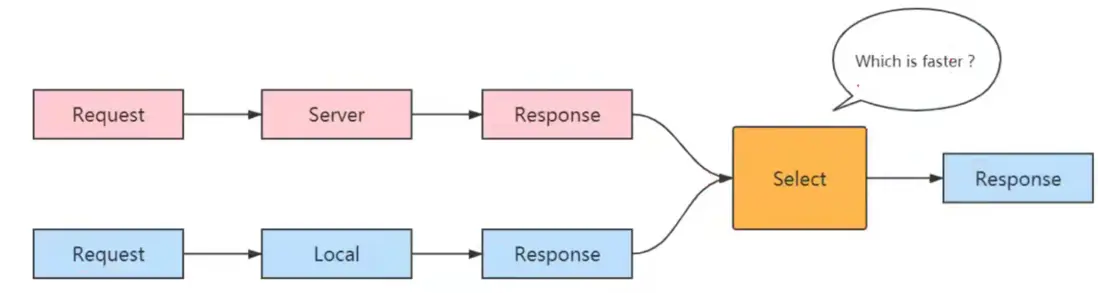
看例子:
    private suspend fun CoroutineScope.getUserFromLocal(name: String) = async {
        delay(1000)
        "local $name"
    }

    private suspend fun CoroutineScope.getUserFromRemote(name: String) = async {
        delay(2000)
        "remote $name"
    }

    data class Response<T>(val value: T, val isLocal: Boolean = false)

    @Test
    fun testSelectAwait() = runBlocking<Unit> {
        GlobalScope.launch {
            val localUser = getUserFromLocal("Jack")
            val remoteUser = getUserFromRemote("Mike")
            val userResponse = select<Response<String>> {
                localUser.onAwait { Response(it, true) }
                remoteUser.onAwait { Response(it, false) }
            }
            println("render on UI: ${userResponse.value}")
        }.join()
    }
render on UI: local Jack
Process finished with exit code 0local方法延遲時間短,先返回了,所以select選取的是local數據。若把remote時間縮短,那麼select就會選擇remote返回的數據。
複用多個Channel
跟await類似,會接收到最快的那個Channel消息。看下面的例子:
    @Test
    fun testSelectChannel() = runBlocking<Unit> {
        val channels = listOf(Channel<Int>(), Channel<Int>())
        GlobalScope.launch {
            delay(100)
            channels[0].send(100)
        }
        GlobalScope.launch {
            delay(50)
            channels[1].send(50)
        }
        val result = select<Int?> {
            channels.forEach { channel -> channel.onReceive { it } }
        }
        println("result $result")
        delay(1000)
    }
result 50
Process finished with exit code 0兩個Channel發送數據元素,第一個延遲100毫秒發送,第二個延遲50毫秒發送,用select接收的時候,收到延遲50毫秒發送的那個。
SelectClause
-
怎麼知道哪些事件可以被select呢?其實所有能被select的事件都是SelectClauseN類型,包括:
- SelectClause0: 對應事件沒有返回值,例如join沒有返回值,那麼onJoin就是SelectClauseN類型,使用時,onJoin的參數是一個無參函數。
- SelectClause1: 對應事件有返回值,前面的onAwait和onReceive都是類似情況。
- SelectClause2: 對應事件有返回值,此外還需要一個額外的參數,例如Channel.onSend有兩個參數,第一個是Channel數據類型的值,表示即將發送的值,第二個是發送成功的回調參數。
-
如果想要確認掛起函數時否支持select,只需要查看其是否存在對應的SelectClauseN類型可回調即可。
看一個無參函數的例子:@Test fun testSelectClause0() = runBlocking<Unit> { val job1 = GlobalScope.launch { delay(100) println("job 1") } val job2 = GlobalScope.launch { delay(10) println("job 2") } select<Unit> { job1.onJoin { println("job 1 onJoin") } job2.onJoin { println("job 2 onJoin") } } delay(1000) }job 2 job 2 onJoin job 1 Process finished with exit code 0啓動兩個協程job1和job2,job2延遲少,先打印,所以select中選擇了job2 (打印了job 2 onJoin),因為兩個協程沒有返回值,或者説返回值是Unit,所以在select後面聲明。
下面看一個兩個參數的例子,第一個是值,第二個是回調參數。
    @Test
    fun testSelectClause2() = runBlocking<Unit> {
        val channels = listOf(Channel<Int>(), Channel<Int>())
        println(channels)
        launch(Dispatchers.IO) {
            select<Unit> {
                launch {
                    delay(10)
                    channels[1].onSend(10) { sendChannel ->
                        println("sent on $sendChannel")
                    }
                }
                launch {
                    delay(100)
                    channels[0].onSend(100) { sendChannel ->
                        println("sent on $sendChannel")
                    }
                }
            }
        }
        GlobalScope.launch {
            println(channels[0].receive())
        }
        GlobalScope.launch {
            println(channels[1].receive())
        }
        delay(1000)
    }
[RendezvousChannel@78aab498{EmptyQueue}, RendezvousChannel@7ee955a8{EmptyQueue}]
10
sent on RendezvousChannel@7ee955a8{EmptyQueue}
Process finished with exit code 0兩個Channel對象78aab498和7ee955a8,啓動兩個協程,分別延遲10毫秒和100毫秒,分別使用onSend發送數據10和100,第二個參數是回調;
然後啓動兩個協程分別接收兩個Channel對象發送的數據,可以看到結果選擇了較少延遲的那個協程。
再來看上面"是否存在對應的SelectClauseN類型"的意思:
public val onSend: SelectClause2<E, SendChannel<E>>public val onJoin: SelectClause0可以看到源碼中,onSend和onJoin都有SelectClauseN接口,所以都支持select。
使用Flow實現多路複用
多數情況下,可以通過構造合適的Flow來實現多路複用的效果。
fun CoroutineScope.getUserFromLocal(name: String) = async {
    delay(1000)
    "local $name"
}

fun CoroutineScope.getUserFromRemote(name: String) = async {
    delay(2000)
    "remote $name"
}

data class Response<T>(val value: T, val isLocal: Boolean = false)

class ChannelTest2 {

    @Test
    fun testSelectFlow() = runBlocking<Unit> {
        // 函數 -> 協程 -> Flow -> Flow合併
        val name = "guest"
        coroutineScope {
            coroutineScope {
                listOf(::getUserFromLocal, ::getUserFromRemote) // 函數
                    .map { function -> function.call(name) }    // 協程
                    .map { deferred ->
                        flow { emit(deferred.await()) }         // Flow
                    }
                    .merge()                                    // Flow 合併
                    .collect { user -> println("collect $user") }
            }
        }
    }
}
collect local guest
collect remote guest
Process finished with exit code 0如上例,這個和select是有區別的,例子中把兩個操作合併到末端操作符collect上。
併發安全
不安全的併發訪問
使用線程在解決併發問題的時候總是會遇到線程安全的問題,而Java平台上的Kotlin協程實現免不了存在併發調度的情況,因此線程安全同樣值得留意。
    @Test
    fun testUnsafeConcurrent() = runBlocking<Unit> {
        var count = 0
        List(1000) {
            GlobalScope.launch { count++ }
        }.joinAll()
        println(count)
    }
984
Process finished with exit code 0啓動1000個協程對count進行加一操作,運行多次,可能每次結果都不一樣,有的協程拿到count後加操作還沒完成,就被別的協程進行加操作了。所以同樣需要注意線程安全,把count修改為AtomicInteger,修改如下:
    @Test
    fun testSafeConcurrent() = runBlocking<Unit> {
        var count = AtomicInteger(0)
        List(1000) {
            GlobalScope.launch { count.incrementAndGet() }
        }.joinAll()
        println(count.get())
    }
1000
Process finished with exit code 0協程的併發工具
除了在線程中常用的解決併發問題的手段外,協程框架也提供了一些併發安全地工具,包括:
- Channel:併發安全地消息通道。這個已經熟悉。
- Mutex: 輕量級鎖,它的lock和unlock從語義上與線程鎖比較類似,之所以輕量級是因為它在獲取不到鎖時不會阻塞線程,而是掛起等待鎖的釋放。
-
Semaphore: 輕量級信號量,信號量可以有多個,協程在獲取到信號量後即可執行併發操作。當Semaphore的參數為1時,效果等價於Mutex。
看下Mutex輕量級鎖的例子:@Test fun testMutex() = runBlocking<Unit> { var count = 0 val mutex = Mutex() List(1000) { GlobalScope.launch { mutex.withLock { count++ } } }.joinAll() println(count) }輸出1000,使用mutex,為加操作加上鎖,能保證線程安全。
再看下Semaphore輕量級信號量的例子:@Test fun testSemaphore() = runBlocking<Unit> { var count = 0 val semaphore = Semaphore(1) List(1000) { GlobalScope.launch { semaphore.withPermit { count++ } } }.joinAll() println(count) }加上信號量機制,也能保證線程安全。
避免訪問外部可變狀態
編寫函數的時候,要求它不得訪問外部狀態,只能基於參數做運算,通過返回值提供運算結果。
    @Test
    fun testAvoidAccessOuter() = runBlocking<Unit> {
        val count = 0
        val result = count + List(1000) {
            GlobalScope.async { 1 }
        }.map { it.await() }.sum()
        println(result)
    }
這個是一個比較極端的例子,把count作為外部變量,和協程隔開,也就不存在併發的安全性問題了。
