

由於上半年經常跑出去玩,突然想做一個旅行地圖的博客,想起之前接觸過 openlayers 的項目,也懶得去調查別的庫了,直接用 openlayers 開幹。之前用github actions偶爾會構建失敗,然後vercel上部署的又需要科學訪問。最近域名備案完成,部署到服務器上了,可以正常訪問了。
-
鏈接
- 項目代碼github鏈接
- 博客原文鏈接
- 旅行地圖預覽鏈接
- 效果預覽

安裝
vue 的項目搭建就不説了,直接安裝 ol 就可以開寫了
npm i ol創建地圖
const { center, zoom, minZoom, maxZoom, extent } = MAP_DEFAULT_OPTIONS;
const map = new Map({
  target: "map",
  layers: [],
  controls: [],
});
map.setView(
  new View({
    center: fromLonLat(center),
    zoom,
    minZoom,
    maxZoom,
    constrainResolution: true,
    extent: transformExtent(extent, EPSG4326, map.getView().getProjection()),
  })
);
添加圖層
創建圖層,我這裏用的是 geojson 的數據創建的,可以在網上找到你想要創建地圖的 geojson 數據。
const layer = new Vector({
  source: new SourceVector({
    url,
    format: new GeoJSON(),
  }),
});

layer.setStyle(CreateLayerStyle);
創建多個圖層添加到組內,比如亞洲圖層,中國圖層
const layerGroup = new Group({
  layers: [asiaLayer, chinaLayer],
});
map.addLayer(layerGroup);
實現放大現在省份圖層
由於中國圖層的 geojson 就只包含省份的邊界線,我想要在放大的時候加載出城市的邊界線,就得添加省份的 geojson 數據。
監聽地圖的 change 事件,判斷縮放發生大於某個數的時候,添加對應的省份圖層
- LayerCacheMap 省份圖層
- currentExtent 當前視圖範圍
- isCityInView 判斷省份是否在當前視圖中
- layer.setVisible 設置圖層顯示隱藏
map.getView().on("change", function (event) {
  const mapView = event.target;
  // 獲取新的縮放級別
  const zoom = event.target.getZoom();
  // 當前視圖範圍
  const currentExtent = mapView.calculateExtent(map.getSize());

  const transformedExtent = transformExtent(
    currentExtent,
    mapView.getProjection(),
    EPSG4326
  );

  if (zoom > index) {
    // 顯示2級塗層
    for (const key in ALL_EXTENT) {
      const extent = ALL_EXTENT[key];

      // 判斷省份是否在當前視圖中
      const isCityInView = intersects(extent, transformedExtent);
      const layer = LayerCacheMap[key];
      if (!layer) continue;

      if (isCityInView) {
        layer.setVisible(true);
      } else {
        layer.setVisible(false);
      }
    }
  } else {
    // 移除2級塗層
    for (const key in ALL_EXTENT) {
      const layer = LayerCacheMap[key];
      if (layer) layer.setVisible(false);
    }
  }
});- 效果

實現主題切換
監聽 isDark 的變化,遍歷所有圖層,使用 layer.setStyle 改變圖層的 style
const isDark = useDark();

watch(isDark, () => {
  for (const key in LayerCacheMap) {
    if (Object.prototype.hasOwnProperty.call(LayerCacheMap, key)) {
      const map = LayerCacheMap[(key as any) as LayerIndex];
      for (const key in map) {
        if (Object.prototype.hasOwnProperty.call(map, key)) {
          const layerMap = map[key];
          if (layerMap.layer) {
            // 設置主題
            layerMap.layer.setStyle(CreateLayerStyle);
          }
        }
      }
    }
  }
});- 效果

添加標點
- 創建一個 marker layer 圖層來收集所有的點
- 通過數據批量創建點要素,設置樣式
const container = new Vector({
  source: new SourceVector(),
});

// 獲取標點的數據
const markerList = CreateMapMarkerData();

markerList.forEach((item) => {
  // 創建點要素,添加到container layer中
  const pointFeature = CreatePointFeature(item);
  if (pointFeature) container.getSource()?.addFeature(pointFeature);
});- 根據位置信息創建點要素
const pointFeature = new Feature({
  geometry: new Point(fromLonLat(item.coords)), // 設置點的座標
  info: item,
});

// 創建一個圖標樣式
const iconStyle = new Style({
  image: new Icon({
    src: "/images/icons/marker.svg",
    color: "red",
    scale: 1,
    anchor: [0.15, 0.9], // 圖標的錨點位置
  }),
});
pointFeature.setStyle(iconStyle);- 效果
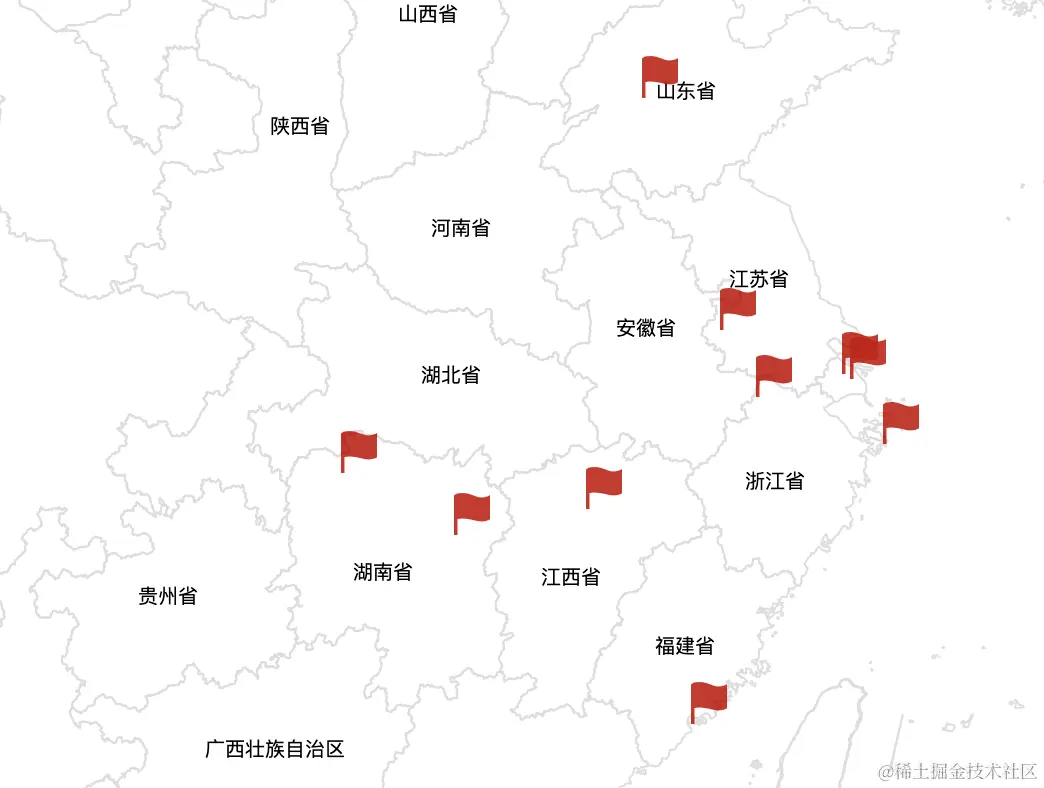
為標點添加事件
- 移動到標點出顯示標點信息
- 使用創建交互事件
- layer 交互圖層為 marker container
- condition 交互條件為鼠標懸停 pointerMove
import { pointerMove } from "ol/events/condition";

const interaction = new Select({
  layers: [layer], // 指定可以觸發交互的圖層
  condition: pointerMove, // 鼠標觸發條件
  style: null, // 禁用默認樣式
});- 綁定交互事件觸發的回調函數
- 獲取標點 event.selected[0]
- 獲取標點信息 selectedFeature.get("info")
- 在鼠標移入標點時觸發相應的事件,比如修改指針
- 鼠標移出時觸發相應的事件
let markerInfo: MarkInfo = {
  info: {},
  coords: [],
};

interaction.on("select", (event) => {
  // 懸停事件觸發
  if (event.selected.length > 0) {
    const selectedFeature = event.selected[0];
    // 保存標點信息
    markerInfo.info = selectedFeature.get("info");

    const geometry = selectedFeature.getGeometry();
    if (geometry instanceof Point) {
      // 保存標點位置
      markerInfo.coords = geometry.getCoordinates();
    }

    // 設置 preview 的顯示內存
    const element = document.getElementById("map_marker_preview");

    element.textContent = markerInfo.info.title;
    // ...

    // 設置鼠標指針為 pointer
    map.getTargetElement().style.cursor = "pointer";
  } else {
    // 鼠標移出觸發
    // ...

    map.getTargetElement().style.cursor = "default";
  }
});- 添加點擊事件
觸發點擊事件跳轉到對應的鏈接
import { click } from "ol/events/condition";

const interaction = new Select({
  layers: [layer],
  condition: click,
  style: null,
});

interaction.on("select", (event) => {
  if (event.selected.length > 0) {
    const selectedFeature = event.selected[0];
    const info = selectedFeature.get("info");
    if (info?.route) router.push(info?.route);
  }
});- 效果

航行路線
其實標點做完已經完成了我的目標和想要的效果了,不過最近比較清閒,就想加點花哨的東西,添加一個飛機飛過的航行絡線。
- 創建飛機、路線圖層
const source = new SourceVector();
const layer = new Vector({ source });
map.addLayer(layer);- 創建一架飛機
- extent 目的地的座標
- degrees 飛機初始的旋轉角度
- countDegrees 通過起始座標和終點座標來計算 degrees
const extent = transform(event?.coords, EPSG3857, EPSG4326);
const degrees = countDegrees(START_POINT, extent);

const feature = new Feature({ geometry: new Point([]) });
const style = new Style({
  image: new Icon({
    src: "/images/icons/plane.svg",
    scale: 1,
    rotation: toRadians(45 + 360 - degrees),
  }),
});
feature.setStyle(style);
source.addFeature(feature);- 飛行路線
- 根據標點創建不同的路線
- 使用 LineString 創建線段要素
- interpolatePoints 根據起始點和終點插值(我的效果是使用貝塞爾曲線創建的)
const features: Record<string, Feature> = {};
const markers = CreateMapMarkerData();

markers
  .filter((m) => !!m.coords)
  .forEach((marker) => {
    // 插值
    const coords = interpolatePoints(START_POINT, marker.coords, 100);

    const feature = new Feature({
      geometry: new LineString(coords),
    });
    // 設置樣式
    feature.setStyle(CreateLineStyle());
    features[marker.route] = feature;
});- 飛行動畫
根據線路的座標在設置的時間內 Duration 不停的改變飛機的座標位置
const line = lineFeature?.getGeometry();
const coordsList = line.getCoordinates();
let startTime = new Date().getTime();

function animate() {
  const currentTime = new Date().getTime();
  const elapsedTime = currentTime - startTime;
  const fraction = elapsedTime / Duration;
  const index = Math.round(coordsList.length * fraction);

  if (index < coordsList.length) {
    const geometry = feature.getGeometry();
    if (geometry instanceof Point) {
      geometry?.setCoordinates(coordsList[index]);
    }
    // TODO 飛機轉向

    requestAnimationFrame(animate);
  } else {
    callback();
  }
}

animate();- 效果

左上角是信息預覽和路線預覽的開關。
可以看到飛機的初始方向是對的,但飛行起來就不對了,因為我還沒有做哈哈哈哈,需要在動畫裏每一幀根據座標去計算飛機的角度,之後再更新吧。
飛機轉向(更新)
其實也很簡單,就是記錄一下上一次的位置信息,計算一下偏移角度調用 setRotation 在動畫的每一幀設置一下就可以了
if (lastCoords) {
  const degrees = toRadians(
    45 + 360 - countDegrees(lastCoords, coordsList[index])
  );
  (feature.getStyle() as Style)?.getImage()?.setRotation(degrees);
}
lastCoords = coordsList[index];- 效果

總結
如果感興趣的話可以關注我的github。
對我的博客項目感興趣可以關注my blog github,我會不定期地持續地更新,歡迎大佬添加友鏈。
這裏是旅行地圖預覽地址,由於github actions經常會因為錯誤提交而構建失敗,之前vercel構建出來頁面刷新會404。最近域名弄好了,訪問正常了。
現在已經解決了vercel刷新404的問題,於是重新部署到vercel上m,my blog
所有的展示圖片來自錄屏再通過my tools轉換為 gif。



