

1. Shape 組件概述
Shape 組件是 ArkUI 提供的 繪製容器,它用於管理和繪製所有形狀組件,如 矩形、橢圓、路徑、折線等。在 Shape 組件內,其他圖形(如 Rect、Ellipse、Path)會根據定義的座標、樣式、顏色等信息被渲染出來。
Shape 的作用:
- 作為父容器,包含其他圖形組件;
- 支持自定義視口,可以限制繪製區域;
- 支持各種通用屬性,如填充顏色、邊框、透明度等;
- 可動態調整各種屬性,例如:填充顏色、透明度、邊框樣式、抗鋸齒等。
支持的圖形包括:Rect、Ellipse、Circle、Polyline、Polygon、Path 等。
組件支持版本
- 從 API version 7 開始支持;
- 從 API version 9 開始支持在 ArkTS 卡片中使用;
- 從 API version 11 開始支持元服務 API。
2. Shape 組件的基本用法
2.1 創建一個簡單的 Shape 組件
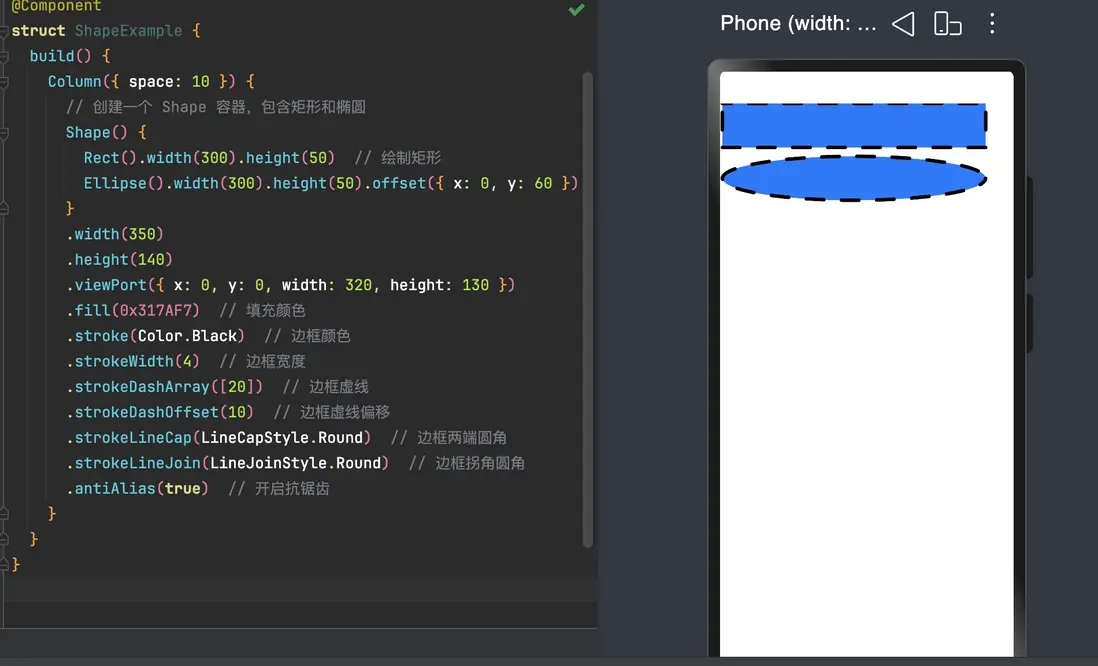
Shape 本身並不直接繪製圖形,它需要包含其他圖形組件。以下示例創建一個包含矩形和橢圓的 Shape。
// xxx.ets
@Entry
@Component
struct ShapeExample {
  build() {
    Column({ space: 10 }) {
      // 創建一個 Shape 容器,包含矩形和橢圓
      Shape() {
        Rect().width(300).height(50)  // 繪製矩形
        Ellipse().width(300).height(50).offset({ x: 0, y: 60 })  // 繪製橢圓
      }
      .width(350)
      .height(140)
      .viewPort({ x: 0, y: 0, width: 320, height: 130 })
      .fill(0x317AF7)  // 填充顏色
      .stroke(Color.Black)  // 邊框顏色
      .strokeWidth(4)  // 邊框寬度
      .strokeDashArray([20])  // 邊框虛線
      .strokeDashOffset(10)  // 邊框虛線偏移
      .strokeLineCap(LineCapStyle.Round)  // 邊框兩端圓角
      .strokeLineJoin(LineJoinStyle.Round)  // 邊框拐角圓角
      .antiAlias(true)  // 開啓抗鋸齒
    }
  }
}
2.2 Shape 的常用屬性
2.2.1 viewPort
viewPort 用來定義圖形的顯示區域。它可以用來控制整個繪圖區域的座標、寬度和高度。
viewPort({ x: 0, y: 0, width: 320, height: 130 })x:視口的水平偏移量;y:視口的垂直偏移量;width:視口的寬度;height:視口的高度。
2.2.2 fill & fillOpacity
用於設置形狀的填充顏色和透明度。
fill(0x317AF7)  // 填充顏色
fillOpacity(0.5) // 填充透明度,範圍 [0.0, 1.0]fill:填充顏色;fillOpacity:填充透明度,默認值為 1.0。
2.2.3 stroke & strokeWidth
用於設置形狀的邊框顏色和寬度。
stroke(Color.Black)  // 邊框顏色
strokeWidth(4) // 邊框寬度stroke:邊框顏色;strokeWidth:邊框寬度,默認值為 1。
2.2.4 strokeDashArray & strokeDashOffset
用於設置虛線的樣式。
strokeDashArray([20])  // 邊框虛線樣式
strokeDashOffset(10) // 虛線的偏移量strokeDashArray:定義虛線的線段長度和間隙長度;strokeDashOffset:設置虛線的起點偏移量。
2.2.5 strokeLineCap & strokeLineJoin
用於設置邊框端點和連接處的樣式。
strokeLineCap(LineCapStyle.Round)  // 邊框兩端樣式
strokeLineJoin(LineJoinStyle.Round) // 邊框連接處樣式strokeLineCap:設置線條端點樣式(例如Round圓形端點);strokeLineJoin:設置線條連接處的樣式(例如Round圓角連接)。
3. 使用 Shape 繪製複雜圖形
3.1 繪製矩形、橢圓和路徑
通過將 Shape 作為容器,可以繪製矩形、橢圓、路徑等不同圖形:
@Entry
@Component
struct ShapeComplexExample {
  build() {
    Column({ space: 10 }) {
      // 繪製矩形、橢圓和路徑
      Shape() {
        Rect().width(300).height(50)  // 矩形
        Ellipse().width(300).height(50).offset({ x: 0, y: 60 })  // 橢圓
        Path().width(300).height(10).commands('M0 0 L900 0').offset({ x: 0, y: 120 })  // 路徑
      }
      .width(350)
      .height(140)
      .viewPort({ x: -2, y: -2, width: 304, height: 130 })
      .fill(0x317AF7)  // 填充顏色
      .stroke(Color.Black)  // 邊框顏色
      .strokeWidth(4)  // 邊框寬度
      .strokeDashArray([20])  // 虛線
      .strokeDashOffset(10)  // 虛線偏移
      .strokeLineCap(LineCapStyle.Round)  // 圓頭
      .strokeLineJoin(LineJoinStyle.Round)  // 圓角
      .antiAlias(true)  // 開啓抗鋸齒
    }
  }
}
3.2 使用不同參數類型繪製圖形
你可以使用不同的數據類型(如數字、字符串、資源)來定義圖形的屬性。
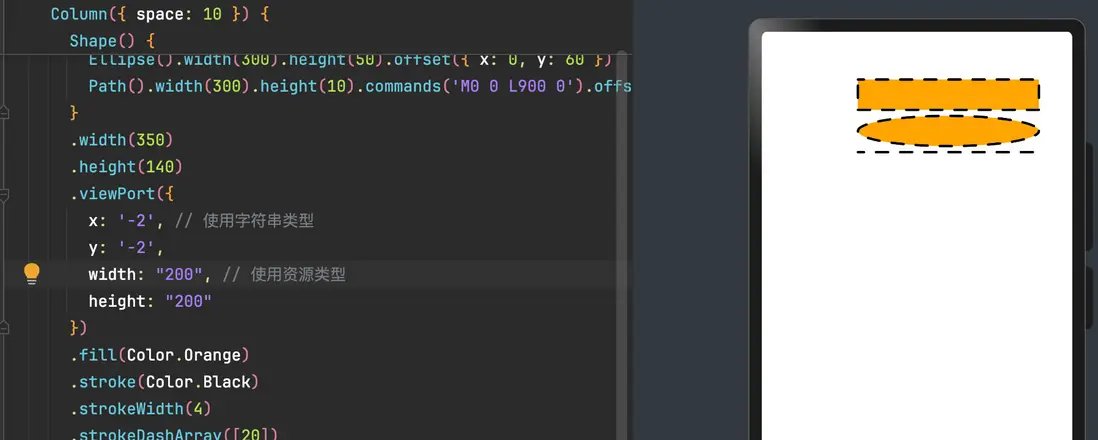
@Entry
@Component
struct ShapeTypeExample {
  build() {
    Column({ space: 10 }) {
      Shape() {
        Rect().width('300').height('50')  // 使用字符串類型
        Ellipse().width(300).height(50).offset({ x: 0, y: 60 })  // 使用數字類型
        Path().width(300).height(10).commands('M0 0 L900 0').offset({ x: 0, y: 120 })  // 使用數字類型
      }
      .width(350)
      .height(140)
      .viewPort({
        x: '-2', // 使用字符串類型
        y: '-2',
        width: "200",
        height: "200"
      })
      .fill(Color.Orange)
      .stroke(Color.Black)
      .strokeWidth(4)
      .strokeDashArray([20])
      .strokeDashOffset(10) // 使用數字類型
      .strokeLineCap(LineCapStyle.Round)
      .strokeLineJoin(LineJoinStyle.Round)
      .strokeMiterLimit(5)
      .antiAlias(true)
    }.width('100%').margin({ top: 15 })
  }
}
3.3 使用 attributeModifier 動態設置屬性
attributeModifier 允許你動態更新圖形的屬性,使其更加靈活。
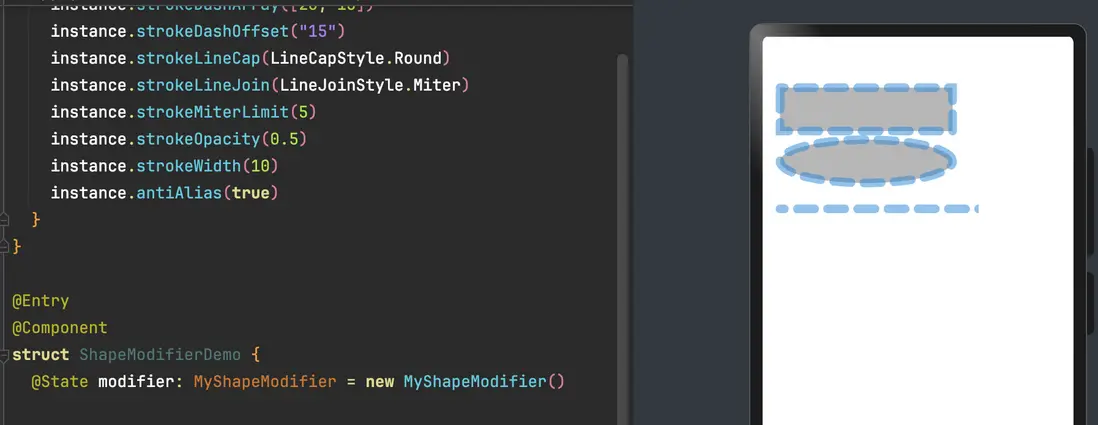
class MyShapeModifier implements AttributeModifier<ShapeAttribute> {
  applyNormalAttribute(instance: ShapeAttribute): void {
    instance.fill("#707070")
    instance.fillOpacity(0.5)
    instance.stroke("#2787D9")
    instance.strokeDashArray([20, 15])
    instance.strokeDashOffset("15")
    instance.strokeLineCap(LineCapStyle.Round)
    instance.strokeLineJoin(LineJoinStyle.Miter)
    instance.strokeMiterLimit(5)
    instance.strokeOpacity(0.5)
    instance.strokeWidth(10)
    instance.antiAlias(true)
  }
}

@Entry
@Component
struct ShapeModifierDemo {
  @State modifier: MyShapeModifier = new MyShapeModifier()

  build() {
    Column() {
      Shape() {
        Rect().width(200).height(50).offset({ x: 20, y: 20 })
        Ellipse().width(200).height(50).offset({ x: 20, y: 80 })
        Path().width(200).height(10).commands('M0 0 L900 0').offset({ x: 20, y: 160 })
      }
      .width(250).height(200)
      .attributeModifier(this.modifier)
    }
  }
}
4. 高級特性:圖形扭曲
Shape 組件還支持 mesh 屬性,它可以對圖像進行 局部扭曲,實現類似於 CSS 的“網格扭曲”效果。
@Entry
@Component
struct MeshExample {
  private meshArray: Array<number> = [0, 0, 50, 0, 410, 0, 0, 180, 50, 180, 410, 180, 0, 360, 50, 360, 410, 360]

  build() {
    Column() {
      Shape()
        .mesh(this.meshArray, 2, 2)
        .width(250)
        .height(250)
        .backgroundColor(Color.Gray)
    }
  }
}