
博客 / 詳情

返回

Handy Tweaks To Make GIMP Replace Photoshop

GIMP was never designed to replace Photoshop, yet with every release, it comes a little closer to being able to do so. It can be used to author graphics, create logos and edit photos, as well as make short animations (using GAP).

Despite these features, the open-source app is a foreign world for many users switching from Photoshop. Familiar tools are missing, menus are laid out differently and tasks must be accomplished in unknown ways.

In this article, we list eight tweaks to make GIMP a more serious Photoshop replacement option. Version 2.6 was used to test the following tweaks, but past versions of the app should work as well.

Installing Plug-Ins, Brushes and Filters

Before continuing, you need to know how to install add-ons. It’s very simple to do, and takes little time. You’ll find three different folders in the application’s program folder. The location of the application folder depends on the operating system you use. Go to Edit > Preferences > Folders to see all folders.
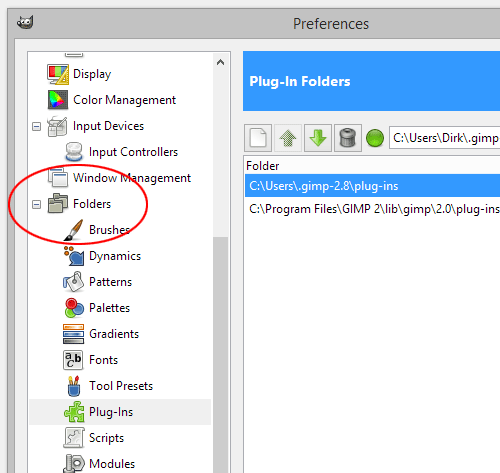
gimp2

To install a brush or plug-in, copy and paste it into the appropriate folder and restart GIMP.

1. Add the PSPI Plug-In

The PSPI plug-in allows GIMP to use Photoshop plug-ins. This increases the number of filters available to GIMP and allows Photoshop users to not have to sacrifice their library. If an equivalent GIMP plug-in can’t be found, assembling a kit of Photoshop filters is a potential option.
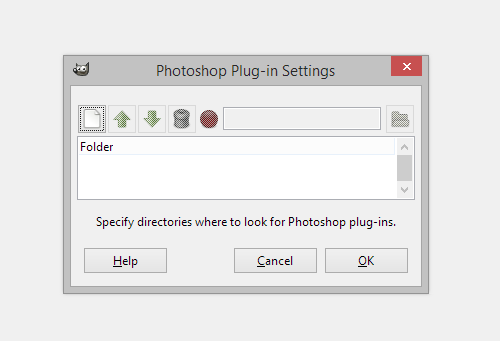
gimp3

To start, download the PSPI plug-in from Gimp.org

In the program folder, copy and paste the entire contents of the PSPI plug-in download into the Plug-ins folder. If you’re running Linux, make sure you copy both the PSPI plug-in and the PSPI.exe, or it will not work.

Restart GIMP and open the Filters menu. At the bottom, you will see a new entry: “Photoshop Filters Plug-In Settings.” Select that to open the Photoshop dialog box, and point it to the folder where your Photoshop plug-ins are located. Add all future Photoshop plug-ins to that folder.

2. Install Layer Styles

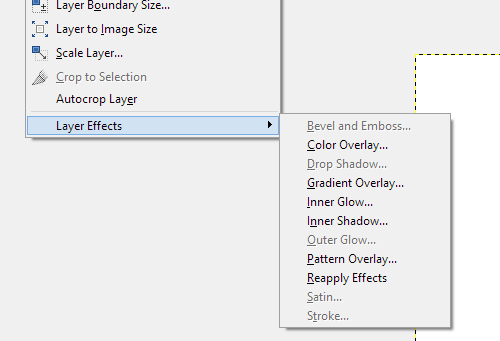
Layer Styles are a beloved feature of many Photoshop users, and living without them can be a difficult adjustment. Layer Styles are called Layer Effects in GIMP and include: Drop Shadow, Inner Glow, Outer Glow, Gradient Overlay, Stroke, Bevel and Emboss, etc. These can be used to quickly apply effects to your layer(s) without having to jump through hoops.
gimp4

Download the Layer Effects GIMP plug-in from Gimp.org. There are two versions: Script-Fu and Python. The Python version allows for live previews of the effects; the Script-Fu version does not. No matter which version you choose, save the plug-in in GIMP’s Plug-in folder and restart the program.

If you download the Python version, Layer Effects will be added under Layer > Layer Effects. The Script-Fu version will be listed under Script-Fu > Layer Effects.

3. Add CMYK Color Separation

CMYK stands for cyan, magenta, yellow, key (black). In the context of photo editors and graphics programs, it is a subtractive color model that is different from the commonly used, additive RGB color model. In simplified terms, RGB colors work by becoming lighter with the addition of white, while CMYK colors subtract the white by overlaying colors, eventually resulting in black; that black isn’t as deep as it should be for printing, so black is added to the CMYK mix.

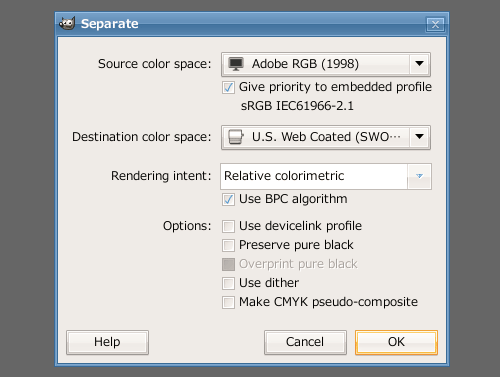
Many users complain about GIMP’s lack of CMYK support. For many designers and photographers, images have to be converted to CMYK colors for high-quality prints. If you require CMYK separation, download the plug-in Separate+ from Yellowmagic. Save the ZIP file, extract the plug-in to the GIMP plug-in folder, then restart the program.
gimp5

The new feature will be located in the Image menu.

4. Install Liquid Rescale

Liquid Rescale is a favorite of many users and created quite a buzz when first introduced into Photoshop. Liquid Rescale makes it possible to alter an image’s dimensions from, for example, 16:9 to 4:3 without distortion by eliminating unnecessary pixels in certain areas. This process, known most commonly as seam carving, allows you to resize a narrow photo to widescreen format without stretching the content into a morphed, twisted mess.

To add the Liquid Rescale feature to GIMP, download the plug-in from Wikidot and copy it into the GIMP Plug-In folder. Restart the program.

5. Add Essential Brushes

GIMP comes with far too few brushes; and the ones that are there are small, basic and not all useful. If you’re planning to author graphics, you’ll need a new library of brushes to accomplish anything. Installing brushes in GIMP is as simple as copying the brush file into the Brush folder and restarting GIMP.

Brushes can be downloaded from numerous locations, depending on what you’re looking for. That said, an excellent repository of free brushes of all types – including grunge, fire, splatter, stone and more – is at DeviantArt.

gimp6

If you add the largest brushes available, you can scale the features in GIMP to reduce their size, allowing for high-resolution graphics.

6. Anchor Windows

If you were to ask Photoshop users their biggest dislike about GIMP, they would almost unanimously express a disdain for the loose docks and toolbars. The canvas, toolbar and layers, paths and brushes dock are all free-floating and scattered about the desktop. If you have a decent window manager, this is a benefit; for most users, it’s a hindrance.

If the loose docks in GIMP bother you, go to Windows > Single-Window Mode.
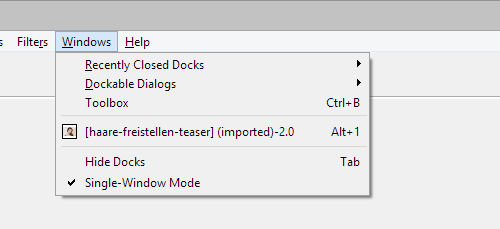
gimp7

If you still aren’t satisfied with the window system, two different versions of GIMP are available that have interfaces similar to Photoshop’s: GIMPshop and GimPhoto. GimPhoto has a slightly more appealing interface, but GIMPshop is based on a newer version of GIMP.

7. Install Animation Package

The GIMP Animation Package, known as GAP, allows users to create animations. The most common use of GAP is for animated GIFs and avatars; but it is sophisticated enough to make full-episode animations, surrealistic landscapes and realistic water motion.

GAP is not automatically included in GIMP. It can be downloaded from an ever-changing number of locations. Mac users can find a download and instructions at GAP-Systems. Windows users have dozens of mirrors to choose from, and a fresh Internet search will yield the best results. Finally, Linux users can download GAP by running a gimp-gap install in the terminal or, if you’re on Ubuntu, searching gimp-gap in the Synaptic packages.

8. Enable GEGL

GEGL is a new feature found only in GIMP 2.6+. According to Gimp.org:

“Many highly requested features of the GIMP will be easier to do using GEGL. Layer effects, layer groups, and adjustment layers are quite easily represented (and efficiently calculated) using the DAG organization of GEGL. CMYK and high bit depth support will be easier because GEGL does not make the same assumptions about color spaces and data types that the GIMP does.”

You can use the presets available at Tools > GEGL Operations. Approximately a dozen different presets can be applied to layers and images.
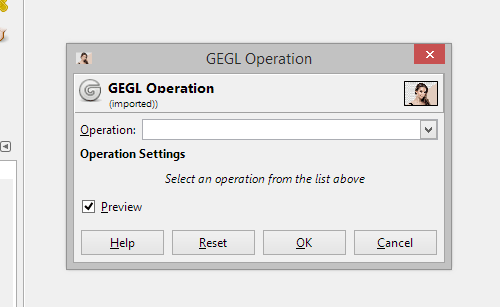
gimp8

Conclusion

These tweaks, plug-ins and add-ons push GIMP closer to its full potential. While it still wouldn’t replace Photoshop as the top graphics program, it will stand a step higher and provide features that would otherwise be missing.

In addition to the add-ons above, a great deal more can be added to customize GIMP to your own personal needs, including HDR plug-ins, photo cleaners, scrapbook borders and animation effects for GAP. New features are added to the GIMP registry everyday. In addition, if you can’t find a plug-in to meet your needs, you can write your own plug-in script.

For further resources, check out these links:

user avatar
0 位用戶收藏了這個故事!

評論

anonymousUser 頭像 @anonymousUser

04:08 AM · Jan 07 ,2026
Equilibrado de piezas El equilibrado representa una fase clave en el mantenimiento de maquinaria agricola, asi como en la produccion de ejes, volantes, rotores y armaduras de motores electricos. Un desequilibrio provoca vibraciones que incrementan el desgaste de los rodamientos, generan sobrecalentamiento e incluso llegan a causar la rotura de componentes. Para evitar fallos mecanicos, resulta esencial identificar y corregir el desequilibrio de forma temprana utilizando metodos modernos de diagnostico. Principales metodos de equilibrado Hay diferentes tecnicas para corregir el desequilibrio, dependiendo del tipo de componente y la magnitud de las vibraciones: El equilibrado dinamico – Se utiliza en componentes rotativos (rotores, ejes) y se realiza en maquinas equilibradoras especializadas. El equilibrado estatico – Se emplea en volantes, ruedas y piezas similares donde es suficiente compensar el peso en un unico plano. La correccion del desequilibrio – Se realiza mediante: Perforado (retirada de material en la zona de mayor peso), Colocacion de contrapesos (en ruedas y aros de volantes), Ajuste de masas de balanceo (como en el caso de los ciguenales). Diagnostico del desequilibrio: ?que equipos se utilizan? Para identificar con precision las vibraciones y el desequilibrio, se emplean: Maquinas equilibradoras – Miden el nivel de vibracion y determinan con exactitud los puntos de correccion. Equipos analizadores de vibraciones – Registran el espectro de oscilaciones, detectando no solo el desequilibrio, sino tambien otros defectos (como el desgaste de rodamientos). Sistemas laser – Se usan para mediciones de alta precision en mecanismos criticos. Especial atencion merecen las velocidades criticas de rotacion – regimenes en los que la vibracion aumenta drasticamente debido a la resonancia. Un equilibrado adecuado evita danos en el equipo en estas condiciones de funcionamiento.

anonymousUser 頭像 @anonymousUser

01:32 PM · Jan 13 ,2026
XEvil 6.0 automatically solve most kind of captchas, Including such type of captchas: ReCaptcha v.2, ReCaptcha v.3, Google, Solve Media, BitcoinFaucet, Steam, +12000 + hCaptcha, FC, ReCaptcha Enterprize now supported in new XEvil 6.0! 1.) Fast, easy, precisionly XEvil is the fastest captcha killer in the world. Its has no solving limits, no threads number limits 2.) Several APIs support XEvil supports more than 6 different, worldwide known API: 2captcha.com, anti-captcha (antigate), rucaptcha.com, DeathByCaptcha, etc. just send your captcha via HTTP request, as you can send into any of that service - and XEvil will solve your captcha! So, XEvil is compatible with hundreds of applications for SEO/SMM/password recovery/parsing/posting/clicking/cryptocurrency/etc. 3.) Useful support and manuals After purchase, you got access to a private tech.support forum, Wiki, Skype/Telegram online support Developers will train XEvil to your type of captcha for FREE and very fast - just send them examples 4.) How to get free trial use of XEvil full version? - Try to search in Google "Home of XEvil" - you will find IPs with opened port 80 of XEvil users (click on any IP to ensure) - try to send your captcha via 2captcha API ino one of that IPs - if you got BAD KEY error, just tru another IP - enjoy! :) - (its not work for hCaptcha!) WARNING: Free XEvil DEMO does NOT support ReCaptcha, hCaptcha and most other types of captcha! http://xrumersale.site/

anonymousUser 頭像 @anonymousUser

09:48 PM · Jan 13 ,2026
XEvil 6.0 automatically solve most kind of captchas, Including such type of captchas: ReCaptcha-2, ReCaptcha-3, Google, Solve Media, BitcoinFaucet, Steam, +12k + hCaptcha, FC, ReCaptcha Enterprize now supported in new XEvil 6.0! 1.) Fast, easy, precisionly XEvil is the fastest captcha killer in the world. Its has no solving limits, no threads number limits 2.) Several APIs support XEvil supports more than 6 different, worldwide known API: 2captcha.com, anti-captcha (antigate), rucaptcha.com, DeathByCaptcha, etc. just send your captcha via HTTP request, as you can send into any of that service - and XEvil will solve your captcha! So, XEvil is compatible with hundreds of applications for SEO/SMM/password recovery/parsing/posting/clicking/cryptocurrency/etc. 3.) Useful support and manuals After purchase, you got access to a private tech.support forum, Wiki, Skype/Telegram online support Developers will train XEvil to your type of captcha for FREE and very fast - just send them examples 4.) How to get free trial use of XEvil full version? - Try to search in Google "Home of XEvil" - you will find IPs with opened port 80 of XEvil users (click on any IP to ensure) - try to send your captcha via 2captcha API ino one of that IPs - if you got BAD KEY error, just tru another IP - enjoy! :) - (its not work for hCaptcha!) WARNING: Free XEvil DEMO does NOT support ReCaptcha, hCaptcha and most other types of captcha! http://xrumersale.site/

anonymousUser 頭像 @anonymousUser

06:06 AM · Jan 14 ,2026
XEvil 5.0 automatically solve most kind of captchas, Including such type of captchas: ReCaptcha-2, ReCaptcha v.3, Google captcha, Solve Media, BitcoinFaucet, Steam, +12000 + hCaptcha, FC, ReCaptcha Enterprize now supported in new XEvil 6.0! 1.) Fast, easy, precisionly XEvil is the fastest captcha killer in the world. Its has no solving limits, no threads number limits 2.) Several APIs support XEvil supports more than 6 different, worldwide known API: 2Captcha, anti-captchas.com (antigate), RuCaptcha, DeathByCaptcha, etc. just send your captcha via HTTP request, as you can send into any of that service - and XEvil will solve your captcha! So, XEvil is compatible with hundreds of applications for SEO/SMM/password recovery/parsing/posting/clicking/cryptocurrency/etc. 3.) Useful support and manuals After purchase, you got access to a private tech.support forum, Wiki, Skype/Telegram online support Developers will train XEvil to your type of captcha for FREE and very fast - just send them examples 4.) How to get free trial use of XEvil full version? - Try to search in Google "Home of XEvil" - you will find IPs with opened port 80 of XEvil users (click on any IP to ensure) - try to send your captcha via 2captcha API ino one of that IPs - if you got BAD KEY error, just tru another IP - enjoy! :) - (its not work for hCaptcha!) WARNING: Free XEvil DEMO does NOT support ReCaptcha, hCaptcha and most other types of captcha! http://xrumersale.site/

anonymousUser 頭像 @anonymousUser

02:05 PM · Jan 14 ,2026
XEvil 6.0 automatically solve most kind of captchas, Including such type of captchas: ReCaptcha-2, ReCaptcha v.3, Google captcha, Solve Media, BitcoinFaucet, Steam, +12000 + hCaptcha, FC, ReCaptcha Enterprize now supported in new XEvil 6.0! 1.) Fast, easy, precisionly XEvil is the fastest captcha killer in the world. Its has no solving limits, no threads number limits 2.) Several APIs support XEvil supports more than 6 different, worldwide known API: 2Captcha, anti-captcha (antigate), rucaptcha.com, DeathByCaptcha, etc. just send your captcha via HTTP request, as you can send into any of that service - and XEvil will solve your captcha! So, XEvil is compatible with hundreds of applications for SEO/SMM/password recovery/parsing/posting/clicking/cryptocurrency/etc. 3.) Useful support and manuals After purchase, you got access to a private tech.support forum, Wiki, Skype/Telegram online support Developers will train XEvil to your type of captcha for FREE and very fast - just send them examples 4.) How to get free trial use of XEvil full version? - Try to search in Google "Home of XEvil" - you will find IPs with opened port 80 of XEvil users (click on any IP to ensure) - try to send your captcha via 2captcha API ino one of that IPs - if you got BAD KEY error, just tru another IP - enjoy! :) - (its not work for hCaptcha!) WARNING: Free XEvil DEMO does NOT support ReCaptcha, hCaptcha and most other types of captcha!

anonymousUser 頭像 @anonymousUser

10:26 PM · Jan 14 ,2026
XEvil 6.0 automatically solve most kind of captchas, Including such type of captchas: ReCaptcha-2, ReCaptcha-3, Google, Solve Media, BitcoinFaucet, Steam, +12000 + hCaptcha, FC, ReCaptcha Enterprize now supported in new XEvil 6.0! 1.) Fast, easy, precisionly XEvil is the fastest captcha killer in the world. Its has no solving limits, no threads number limits 2.) Several APIs support XEvil supports more than 6 different, worldwide known API: 2captcha.com, anti-captchas.com (antigate), rucaptcha.com, DeathByCaptcha, etc. just send your captcha via HTTP request, as you can send into any of that service - and XEvil will solve your captcha! So, XEvil is compatible with hundreds of applications for SEO/SMM/password recovery/parsing/posting/clicking/cryptocurrency/etc. 3.) Useful support and manuals After purchase, you got access to a private tech.support forum, Wiki, Skype/Telegram online support Developers will train XEvil to your type of captcha for FREE and very fast - just send them examples 4.) How to get free trial use of XEvil full version? - Try to search in Google "Home of XEvil" - you will find IPs with opened port 80 of XEvil users (click on any IP to ensure) - try to send your captcha via 2captcha API ino one of that IPs - if you got BAD KEY error, just tru another IP - enjoy! :) - (its not work for hCaptcha!) WARNING: Free XEvil DEMO does NOT support ReCaptcha, hCaptcha and most other types of captcha!

anonymousUser 頭像 @anonymousUser

06:27 AM · Jan 15 ,2026
XEvil 6.0 automatically solve most kind of captchas, Including such type of captchas: ReCaptcha v.2, ReCaptcha v.3, Google captcha, Solve Media, BitcoinFaucet, Steam, +12000 + hCaptcha, FC, ReCaptcha Enterprize now supported in new XEvil 6.0! 1.) Fast, easy, precisionly XEvil is the fastest captcha killer in the world. Its has no solving limits, no threads number limits 2.) Several APIs support XEvil supports more than 6 different, worldwide known API: 2captcha.com, anti-captcha (antigate), rucaptcha.com, DeathByCaptcha, etc. just send your captcha via HTTP request, as you can send into any of that service - and XEvil will solve your captcha! So, XEvil is compatible with hundreds of applications for SEO/SMM/password recovery/parsing/posting/clicking/cryptocurrency/etc. 3.) Useful support and manuals After purchase, you got access to a private tech.support forum, Wiki, Skype/Telegram online support Developers will train XEvil to your type of captcha for FREE and very fast - just send them examples 4.) How to get free trial use of XEvil full version? - Try to search in Google "Home of XEvil" - you will find IPs with opened port 80 of XEvil users (click on any IP to ensure) - try to send your captcha via 2captcha API ino one of that IPs - if you got BAD KEY error, just tru another IP - enjoy! :) - (its not work for hCaptcha!) WARNING: Free XEvil DEMO does NOT support ReCaptcha, hCaptcha and most other types of captcha!

anonymousUser 頭像 @anonymousUser

02:38 PM · Jan 15 ,2026
XEvil 5.0 automatically solve most kind of captchas, Including such type of captchas: ReCaptcha v.2, ReCaptcha-3, Google captcha, SolveMedia, BitcoinFaucet, Steam, +12000 + hCaptcha, FC, ReCaptcha Enterprize now supported in new XEvil 6.0! 1.) Fast, easy, precisionly XEvil is the fastest captcha killer in the world. Its has no solving limits, no threads number limits 2.) Several APIs support XEvil supports more than 6 different, worldwide known API: 2captcha.com, anti-captchas.com (antigate), rucaptcha.com, DeathByCaptcha, etc. just send your captcha via HTTP request, as you can send into any of that service - and XEvil will solve your captcha! So, XEvil is compatible with hundreds of applications for SEO/SMM/password recovery/parsing/posting/clicking/cryptocurrency/etc. 3.) Useful support and manuals After purchase, you got access to a private tech.support forum, Wiki, Skype/Telegram online support Developers will train XEvil to your type of captcha for FREE and very fast - just send them examples 4.) How to get free trial use of XEvil full version? - Try to search in Google "Home of XEvil" - you will find IPs with opened port 80 of XEvil users (click on any IP to ensure) - try to send your captcha via 2captcha API ino one of that IPs - if you got BAD KEY error, just tru another IP - enjoy! :) - (its not work for hCaptcha!) WARNING: Free XEvil DEMO does NOT support ReCaptcha, hCaptcha and most other types of captcha!

anonymousUser 頭像 @anonymousUser

10:56 PM · Jan 15 ,2026
XEvil 6.0 automatically solve most kind of captchas, Including such type of captchas: ReCaptcha v.2, ReCaptcha-3, Google, Solve Media, BitcoinFaucet, Steam, +12000 + hCaptcha, FC, ReCaptcha Enterprize now supported in new XEvil 6.0! 1.) Fast, easy, precisionly XEvil is the fastest captcha killer in the world. Its has no solving limits, no threads number limits 2.) Several APIs support XEvil supports more than 6 different, worldwide known API: 2Captcha, anti-captcha (antigate), rucaptcha.com, DeathByCaptcha, etc. just send your captcha via HTTP request, as you can send into any of that service - and XEvil will solve your captcha! So, XEvil is compatible with hundreds of applications for SEO/SMM/password recovery/parsing/posting/clicking/cryptocurrency/etc. 3.) Useful support and manuals After purchase, you got access to a private tech.support forum, Wiki, Skype/Telegram online support Developers will train XEvil to your type of captcha for FREE and very fast - just send them examples 4.) How to get free trial use of XEvil full version? - Try to search in Google "Home of XEvil" - you will find IPs with opened port 80 of XEvil users (click on any IP to ensure) - try to send your captcha via 2captcha API ino one of that IPs - if you got BAD KEY error, just tru another IP - enjoy! :) - (its not work for hCaptcha!) WARNING: Free XEvil DEMO does NOT support ReCaptcha, hCaptcha and most other types of captcha!

發佈 評論

Some HTML is okay.