

僅做一次記錄,可能會有不理解和錯誤的地方
背景
刷過不死Uboot + ImmortalWrt, 想刷回原廠固件,試圖刷原廠分區因操作分區表不當成普磚.
磚度判斷:引用恩山
一台刷磚的AX6,先判定是普通磚還是深度磚,普通磚TTL可救,深度磚編程器才能救:
1、普通磚:上電SYS黃燈常亮,過會兒雙黃燈閃一下又開始SYS黃燈常亮,然後重複。
——這種UBOOT未損壞(一般是sysupgrade、ubiformat指令或web裏寫入固件失敗導致)。
2、深度磚:接上電源,雙黃燈閃一下,過幾秒雙黃燈又閃一下,然後重複。
——這種UBOOT已損壞(一般刷入新分區表文件後漏拔電重啓步驟),請走售後或拆ROM芯片上編程器。
試圖小米路由器修復工具救磚,但是不識別,無反應
在後續的串口信息發現分區表變成這樣:
IPQ807x#   mtdparts
device nand0 <nand0>, # parts = 1
 #: name                size            offset          mask_flags
 0: fs                  0x023c0000      0x02dc0000      0

active partition: nand0,0 - (fs) 0x023c0000 @ 0x02dc0000

defaults:
mtdids  : none
mtdparts: none
經判斷這次是普通磚,使用TTL救磚.
大致思路
重刷分區表和openwrt固件再用小米路由器修復工具刷回原廠固件
準備工作
- USB轉TTL工具 + 杜邦線 這裏使用CH340G (記得裝驅動)
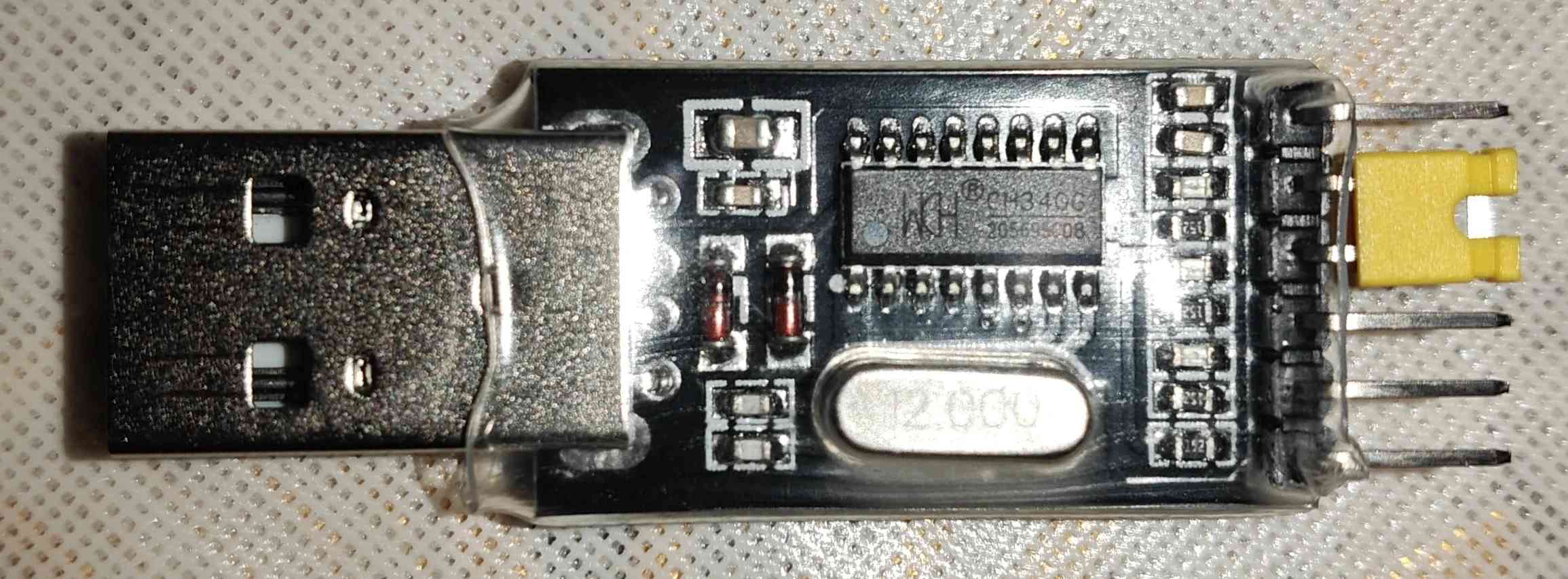
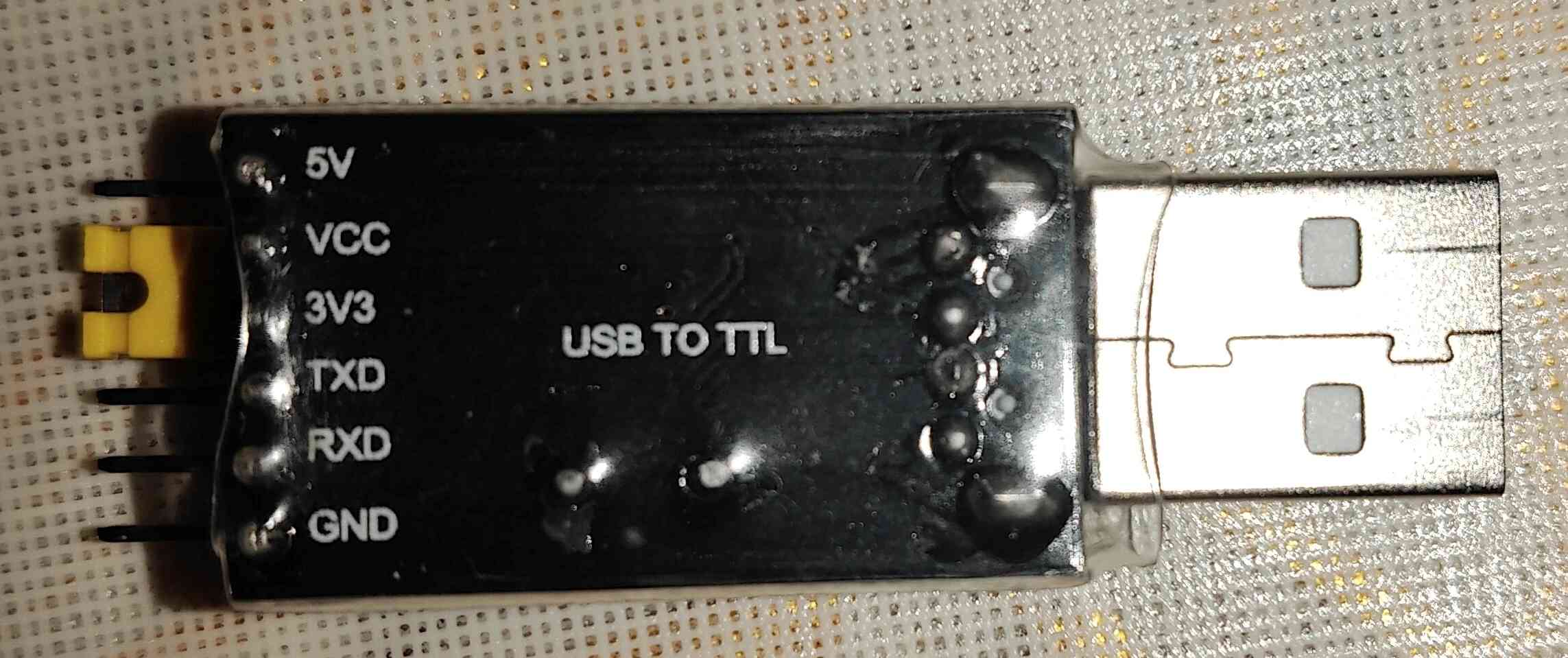
- Putty 進行串口通信
- tftpd64 用於搭建本地 TFTP 服務器,傳輸文件
- ImmortalWrt原廠分區固件 這裏使用immortalwrt-qualcommax-ipq807x-redmi_ax6-stock-squashfs-factory.ubi
- 原廠分區表文件mibib.bin
- 小米路由器修復工具
將分區表文件mibib.bin和固件immortalwrt-qualcommax-ipq807x-redmi_ax6-stock-squashfs-factory.ubi放入tftpd64目錄
immortalwrt-qualcommax-ipq807x-redmi_ax6-stock-squashfs-factory.ubi在本文中被改名成test.bin
章節1 拆機找TTL觸點 連線進行Putty串口通信
大概在這個位置:
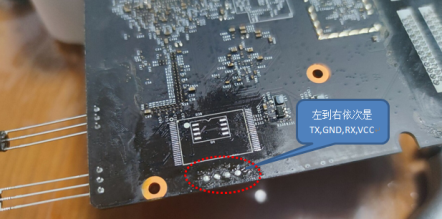
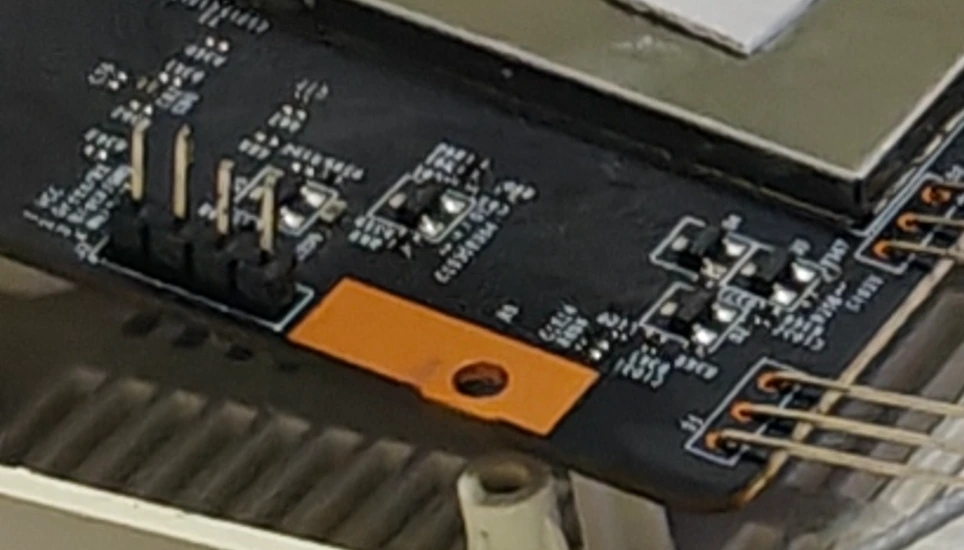
可以焊個4pin針方便連接
*CH340G跳線帽需短接在 3.3V 模式 *
PC插上CH340G 在設備管理器查看它的端口號
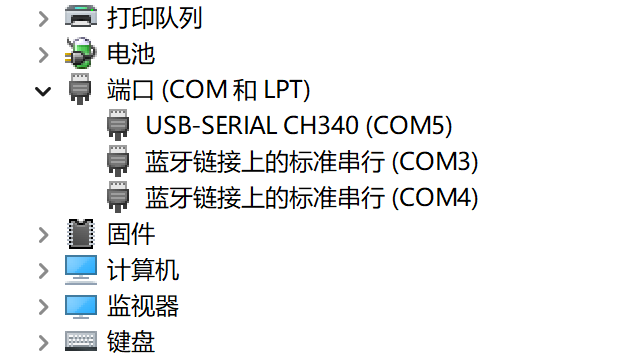
在putty設置:
Connection type: Serial
Serial line: COM5 <--用實際CH340G的端口號
Speed (Baud rate): 115200
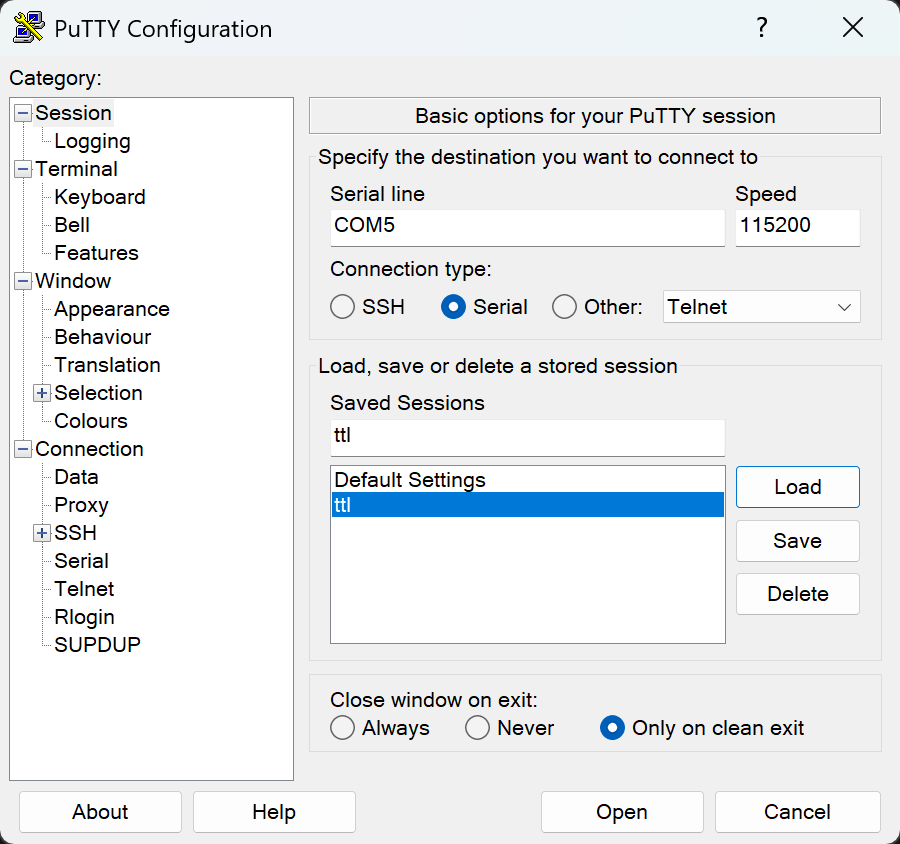
然後按照以下邏輯相聯
CH340G GND       <--> 路由器 GND
CH340G TX (發送) <--> 路由器 RX (接收)
CH340G RX (接收) <--> 路由器 TX (發送)
VCC不連
路由器通電之後再接TTL,不然路由器無法啓動
正常情況應該是路由器開始閃黃燈,putty開始輸出:
...
U-Boot 2016.01 (Jul 08 2021 - 07:16:48 +0000), Build: jenkins-common_router_openwrt_ota_publish-1455

DRAM:  smem ram ptable found: ver: 1 len: 4
512 MiB
NAND:  ONFI device found
ID = 158061c8
Vendor = c8
Device = 61
SF: Unsupported flash IDs: manuf ff, jedec ffff, ext_jedec ffff
ipq_spi: SPI Flash not found (bus/cs/speed/mode) = (0/0/48000000/0)
128 MiB
MMC:   sdhci: Node Not found, skipping initialization

PCI1 is not defined in the device tree
In:    serial@78B3000
Out:   serial@78B3000
Err:   serial@78B3000
machid: 8010010
MMC Device 0 not found
eth5 MAC Address from ART is not valid
write phy_id=1, reg(0x8074):0x0670
write phy_id=2, reg(0x8074):0x0670
write phy_id=3, reg(0x8074):0x0670
write phy_id=4, reg(0x8074):0x0670
bootwait is on, bootdelay=2
Hit any key to stop autoboot:  0
 trigger button release!
boot from rootfs 0
  miwifi: check crash in rmem !
ubi0: attaching mtd1
ubi0: scanning is finished
UBI init error 22
Erasing NAND...
Erasing at 0x6e0000 -- 100% complete.
Writing to NAND... OK
resetting ...
我們需要在
Hit any key to stop autoboot: 0
倒計時結束前按任意鍵如 Ctrl+C 或者 Enter
呼出UBOOT命令行 IPQ807x#
如果倒計時過短或者壓根沒有bootwait,可以試着按住reset再通電再接TTL再試圖中斷呼出UBOOT命令行
Hit any key to stop autoboot:  0
 detect button press, continue check 5 secs
 detect button pressed 5 secs !
 confirm to launch xq_upgrade ! <--檢測到reset,進入原廠救援模式
章節2 修復分區表
查詢當前分區表,發現已經變成以下這種情況了
IPQ807x#   mtdparts
device nand0 <nand0>, # parts = 1
 #: name                size            offset          mask_flags
 0: fs                  0x023c0000      0x02dc0000      0
active partition: nand0,0 - (fs) 0x023c0000 @ 0x02dc0000
defaults:
mtdids  : none
mtdparts: none
Gemini:
parts = 1:你的閃存裏現在只認出了1個分區。
Name: fs:這就是為什麼啓動會失敗,它找不到 rootfs,只找到了個叫 fs 的殘餘分區。
Offset: 0x02dc0000:好消息是,這個地址正好是 AX6 原廠固件 rootfs (系統分區) 的起始物理地址。
重刷分區表 mibib.bin 到物理地址 0x40000
電腦網卡設置
先設置連接路由器的網卡:
IP: 192.168.31.100
掩碼: 255.255.255.0
網關: 192.168.31.1
配置Tftpd
打開Tftpd64-設置-DHCP
IP pool start address: 192.168.31.2
Size of pool: 5
Router (Opt 3): 填入 192.168.31.1
Mask: 255.255.255.0
WINS/DNS: 填 0.0.0.0 或者留空即可。
Tftpd64主界面
Server interfaces 選擇相應網卡
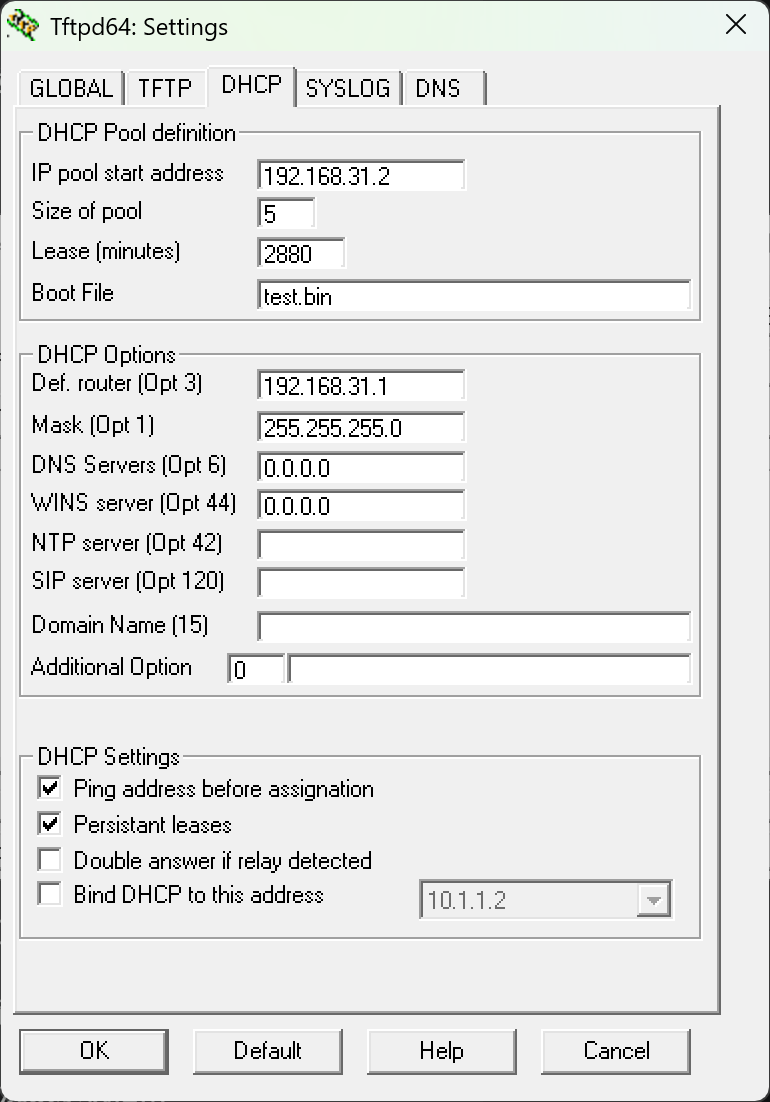
重刷分區表
將分區表文件mibib.bin 下載到內存
在UBOOT命令行輸入:
設置TFTP服務器
IPQ807x# setenv serverip 192.168.31.100
IPQ807x# setenv ipaddr 192.168.31.2
IPQ807x# tftpboot 0x44000000 mibib.bin
擦除 MIBIB 所在的區塊
IPQ807x# nand erase 0x40000 0x40000
寫入 MIBIB
IPQ807x# nand write 0x44000000 0x40000 0x40000
設置啓動標誌並重置環境變量
IPQ807x# env default -a
IPQ807x# saveenv
IPQ807x# reset
env default -a
gemini:
這步操作相當於給 U-Boot 進行了一次“格式化大腦”。它忘掉了所有錯誤的舊設置,重啓後重新從閃存裏讀取了你之前刷進去的那個正確的 mibib.bin。
章節3 刷入Openwrt底包
通過tftp下載固件到路由器內存
重新設置TFTP服務器
IPQ807x# setenv serverip 192.168.31.100
IPQ807x# setenv ipaddr 192.168.31.2
下載固件到內存
IPQ807x# tftpboot 0x44000000 test.bin
擦除rootfs分區
IPQ807x# nand erase 0x2dc0000 0x23c0000
將固件寫入分區
IPQ807x# nand write 0x44000000 0x2dc0000 0x1c50000
使用nand write 0x44000000 0x2dc0000 $filesize
會報錯
IPQ807x# nand write 0x44000000 0x2dc0000 $filesize
NAND write: device 0 offset 0x2dc0000, size 0x1c403bc
NAND write to offset 2dc0000 failed -22
Gemini:
NAND write ... failed -22 是完全預料之中的,也是個“好”錯誤。
原因:-22 代表 "Invalid Argument" (參數無效)。
詳解:NAND Flash 的寫入必須嚴格按照頁大小 (Page Size) 對齊(通常是 2048 字節或 4096 字節)。你的固件大小是 0x1c403bc,末尾的 3bc 説明它沒有對齊,所以 U-Boot 拒絕寫入。
保存環境變量
IPQ807x# saveenv
IPQ807x# reset
出現resetting...後重新接TTL線,不出意外的話加載一會後串口應該會顯示:
## Loading kernel from FIT Image at 44000000 ...
   Using 'config@ac04' configuration
   Trying 'kernel-1' kernel subimage
     Description:  ARM64 OpenWrt Linux-6.12.60
     Type:         Kernel Image
     Compression:  gzip compressed
     Data Start:   0x440000e8
     Data Size:    5599108 Bytes = 5.3 MiB
     Architecture: AArch64
     OS:           Linux
     Load Address: 0x41000000
     Entry Point:  0x41000000
     Hash algo:    crc32
     Hash value:   498fead8
     Hash algo:    sha1
     Hash value:   77fc2d898d54e6241736c2f5ad567dcf550ed6dd
   Verifying Hash Integrity ... crc32+ sha1+ OK
## Loading fdt from FIT Image at 44000000 ...
   Using 'config@ac04' configuration
   Trying 'fdt-1' fdt subimage
     Description:  ARM64 OpenWrt redmi_ax6-stock device tree blob
     Type:         Flat Device Tree
     Compression:  uncompressed
     Data Start:   0x445571ac
     Data Size:    49003 Bytes = 47.9 KiB
     Architecture: AArch64
     Hash algo:    crc32
     Hash value:   7aca8bd9
     Hash algo:    sha1
     Hash value:   f9759b7825963dbbd670ab22d1b7be2e8c778124
   Verifying Hash Integrity ... crc32+ sha1+ OK
   Booting using the fdt blob at 0x445571ac
   Uncompressing Kernel Image ... OK
   Loading Device Tree to 4a3f1000, end 4a3fff6a ... OK
Using machid 0x8010010 from environment

Starting kernel ...

Jumping to AARCH64 kernel via monitor
章節3 小米路由器修復工具刷回原廠官方固件
進入immortalwrt bash 查看當前分區信息,可以看見已經還原分區表了
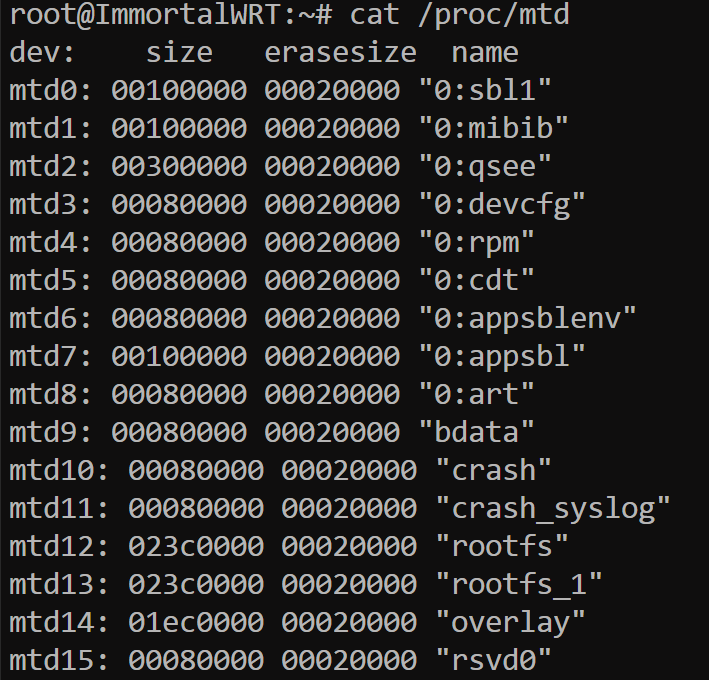
接下來就可以捅reset然後用小米路由器修復工具刷原廠官方固件了
這部分就省略了
結尾
感謝網上各路大神的教程和Gemini的幫助,但是貌似bdata丟了,沒SN碼和MAC地址了
累了,先不折騰了,下次一定
Uboot 日誌記錄:
U-Boot 2016.01 (Jul 08 2021 - 07:16:48 +0000), Build: jenkins-common_router_open

DRAM:  smem ram ptable found: ver: 1 len: 4
512 MiB
NAND:  ONFI device found
ID = 158061c8
Vendor = c8
Device = 61
SF: Unsupported flash IDs: manuf ff, jedec ffff, ext_jedec ffff
ipq_spi: SPI Flash not found (bus/cs/speed/mode) = (0/0/48000000/0)
128 MiB
MMC:   sdhci: Node Not found, skipping initialization

PCI1 is not defined in the device tree
In:    serial@78B3000
Out:   serial@78B3000
Err:   serial@78B3000
machid: 8010010
MMC Device 0 not found
eth5 MAC Address from ART is not valid
write phy_id=1, reg(0x8074):0x0670
write phy_id=2, reg(0x8074):0x0670
write phy_id=3, reg(0x8074):0x0670
write phy_id=4, reg(0x8074):0x0670
bootwait is on, bootdelay=2
Hit any key to stop autoboot:  0

Net:   MAC0 addr:9c:9d:7e:5c:d2:31
PHY ID1: 0x4d
PHY ID2: 0xd0b1
EDMA ver 1 hw init
Num rings - TxDesc:1 (0-0) TxCmpl:1 (7-7)
RxDesc:1 (15-15) RxFill:1 (7-7)
ipq807x_edma_alloc_rings: successfull
ipq807x_edma_setup_ring_resources: successfull
ipq807x_edma_configure_rings: successfull
ipq807x_edma_hw_init: successfull
board_eth_init: ipq807x_edma_init successed
eth0
IPQ807x#   mtdparts

device nand0 <nand0>, # parts = 1
 #: name                size            offset          mask_flags
 0: fs                  0x023c0000      0x02dc0000      0

active partition: nand0,0 - (fs) 0x023c0000 @ 0x02dc0000

defaults:
mtdids  : none
mtdparts: none
IPQ807x# <INTERRUPT>
IPQ807x# setenv serverip 192.168.31.100
IPQ807x# setenv ipaddr 192.168.31.2
IPQ807x# tftpboot 0x44000000 mibib.bin
ipq807x_eth_halt: done
eth0 PHY0 Down Speed :10 Half duplex
eth0 PHY1 up Speed :10 Full duplex
eth0 PHY2 Down Speed :10 Half duplex
eth0 PHY3 up Speed :1000 Full duplex
eth0 PHY4 Down Speed :10 Half duplex
eth0 PHY5 Down Speed :10 Half duplex
ipq807x_eth_init: done
Using eth0 device
TFTP from server 192.168.31.100; our IP address is 192.168.31.2
Filename 'mibib.bin'.
Load address: 0x44000000
Loading: *
Got TFTP_OACK: TFTP remote port: changes from 69 to 51212
#################################################################
         #######
         2.1 MiB/s
done
Bytes transferred = 1048576 (100000 hex)
ipq807x_eth_halt: done
IPQ807x# nand erase 0x40000 0x40000

NAND erase: device 0 offset 0x40000, size 0x40000
Erasing at 0x60000 -- 100% complete.
OK
IPQ807x# nand write 0x44000000 0x40000 0x40000

NAND write: device 0 offset 0x40000, size 0x40000
 262144 bytes written: OK
IPQ807x# tftpboot 0x44000000 test.bin
ipq807x_eth_halt: done
eth0 PHY0 Down Speed :10 Half duplex
eth0 PHY1 up Speed :10 Full duplex
eth0 PHY2 Down Speed :10 Half duplex
eth0 PHY3 up Speed :1000 Full duplex
eth0 PHY4 Down Speed :10 Half duplex
eth0 PHY5 Down Speed :10 Half duplex
ipq807x_eth_init: done
Using eth0 device
TFTP from server 192.168.31.100; our IP address is 192.168.31.2
Filename 'test.bin'.
Load address: 0x44000000
Loading: *
Got TFTP_OACK: TFTP remote port: changes from 69 to 51542
#################################################################
         #################################################################
         #################################################################
         #################################################################
         #################################################################
         #################################################################
         #################################################################
         #################################################################
         #################################################################
         #################################################################
         #################################################################
         #################################################################
         #################################################################
         #################################################################
         #################################################################
         #################################################################
         #################################################################
         #################################################################
         #################################################################
         #################################################################
         #################################################################
         #################################################################
         #################################################################
         #################################################################
         #################################################################
         #################################################################
         #################################################################
         #################################################################
         #################################################################
         #################################################################
         #################################################################
         ###
         2.1 MiB/s
done
Bytes transferred = 29623228 (1c403bc hex)
ipq807x_eth_halt: done
IPQ807x# nand erase 0x2dc0000 0x23c0000

NAND erase: device 0 offset 0x2dc0000, size 0x23c0000
Erasing at 0x5160000 -- 100% complete.
OK
IPQ807x# nand write 0x44000000 0x2dc0000 $filesize

NAND write: device 0 offset 0x2dc0000, size 0x1c403bc
NAND write to offset 2dc0000 failed -22
 0 bytes written: ERROR
IPQ807x# <INTERRUPT>
IPQ807x# reset
resetting ...
PCI1 is not defined in the device tree
In:    serial@78B3000
Out:   serial@78B3000
Err:   serial@78B3000
machid: 8010010
MMC Device 0 not found
eth5 MAC Address from ART is not valid
write phy_id=1, reg(0x8074):0x0670
write phy_id=2, reg(0x8074):0x0670
write phy_id=3, reg(0x8074):0x0670
write phy_id=4, reg(0x8074):0x0670
bootwait is on, bootdelay=2
Hit any key to stop autoboot:  0

Net:   MAC0 addr:9c:9d:7e:5c:d2:31
PHY ID1: 0x4d
PHY ID2: 0xd0b1
EDMA ver 1 hw init
Num rings - TxDesc:1 (0-0) TxCmpl:1 (7-7)
RxDesc:1 (15-15) RxFill:1 (7-7)
ipq807x_edma_alloc_rings: successfull
ipq807x_edma_setup_ring_resources: successfull
ipq807x_edma_configure_rings: successfull
ipq807x_edma_hw_init: successfull
board_eth_init: ipq807x_edma_init successed
eth0
IPQ807x# <INTERRUPT>
IPQ807x# mtdparts

device nand0 <nand0>, # parts = 1
 #: name                size            offset          mask_flags
 0: fs                  0x023c0000      0x02dc0000      0

active partition: nand0,0 - (fs) 0x023c0000 @ 0x02dc0000

defaults:
mtdids  : none
mtdparts: none
IPQ807x# <INTERRUPT>
IPQ807x# setenv serverip 192.168.31.100
IPQ807x# setenv ipaddr 192.168.31.2
IPQ807x# tftpboot 0x44000000 test.bin
ipq807x_eth_halt: done
eth0 PHY0 Down Speed :10 Half duplex
eth0 PHY1 up Speed :10 Full duplex
eth0 PHY2 Down Speed :10 Half duplex
eth0 PHY3 up Speed :1000 Full duplex
eth0 PHY4 Down Speed :10 Half duplex
eth0 PHY5 Down Speed :10 Half duplex
ipq807x_eth_init: done
Using eth0 device
TFTP from server 192.168.31.100; our IP address is 192.168.31.2
Filename 'test.bin'.
Load address: 0x44000000
Loading: *
Got TFTP_OACK: TFTP remote port: changes from 69 to 57976
#################################################################
         #################################################################
         #################################################################
         #################################################################
         #################################################################
         #################################################################
         #################################################################
         #################################################################
         #################################################################
         #################################################################
         #################################################################
         #################################################################
         #################################################################
         #################################################################
         #################################################################
         #################################################################
         #################################################################
         #################################################################
         #################################################################
         #################################################################
         #################################################################
         ############################
         2.1 MiB/s
done
Bytes transferred = 20447232 (1380000 hex)
ipq807x_eth_halt: done
IPQ807x# <INTERRUPT>
IPQ807x# nand write 0x44000000 0x2dc0000 0x1380000

NAND write: device 0 offset 0x2dc0000, size 0x1380000
 20447232 bytes written: OK
IPQ807x# setenv flag_boot_rootfs 0
IPQ807x# setenv flag_last_success 0
IPQ807x# setenv flag_try_sys1_failed 8
IPQ807x# setenv flag_try_sys2_failed 8
IPQ807x# saveenv
Saving Environment to NAND...
Erasing NAND...
Erasing at 0x6e0000 -- 100% complete.
Writing to NAND... OK
IPQ807x# reset
resetting ...


U-Boot 2016.01 (Jul 08 2021 - 07:16:48 +0000), Build: jenkins-common_router_openwrt_ota_publish-1455

DRAM:  smem ram ptable found: ver: 1 len: 4
512 MiB
NAND:  ONFI device found
ID = 158061c8
Vendor = c8
Device = 61
SF: Unsupported flash IDs: manuf ff, jedec ffff, ext_jedec ffff
ipq_spi: SPI Flash not found (bus/cs/speed/mode) = (0/0/48000000/0)
128 MiB
MMC:   sdhci: Node Not found, skipping initialization

PCI1 is not defined in the device tree
In:    serial@78B3000
Out:   serial@78B3000
Err:   serial@78B3000
machid: 8010010
MMC Device 0 not found
eth5 MAC Address from ART is not valid
write phy_id=1, reg(0x8074):0x0670
write phy_id=2, reg(0x8074):0x0670
write phy_id=3, reg(0x8074):0x0670
write phy_id=4, reg(0x8074):0x0670
bootwait is on, bootdelay=2
Hit any key to stop autoboot:  0
 trigger button release!
boot from rootfs 0
  miwifi: check crash in rmem !
ubi0: attaching mtd1
ubi0: scanning is finished
UBI init error 22
Erasing NAND...
Erasing at 0x6e0000 -- 100% complete.
Writing to NAND... OK
resetting ...


U-Boot 2016.01 (Jul 08 2021 - 07:16:48 +0000), Build: jenkins-common_router_openwrt_ota_publish-1455

DRAM:  smem ram ptable found: ver: 1 len: 4
512 MiB
NAND:  ONFI device found
ID = 158061c8
Vendor = c8
Device = 61
SF: Unsupported flash IDs: manuf ff, jedec ffff, ext_jedec ffff
ipq_spi: SPI Flash not found (bus/cs/speed/mode) = (0/0/48000000/0)
128 MiB
MMC:   sdhci: Node Not found, skipping initialization

PCI1 is not defined in the device tree
In:    serial@78B3000
Out:   serial@78B3000
Err:   serial@78B3000
machid: 8010010
MMC Device 0 not found
eth5 MAC Address from ART is not valid
write phy_id=1, reg(0x8074):0x0670
write phy_id=2, reg(0x8074):0x0670
write phy_id=3, reg(0x8074):0x0670
write phy_id=4, reg(0x8074):0x0670
bootwait is on, bootdelay=2
Hit any key to stop autoboot:  0

Net:   MAC0 addr:9c:9d:7e:5c:d2:31
PHY ID1: 0x4d
PHY ID2: 0xd0b1
EDMA ver 1 hw init
Num rings - TxDesc:1 (0-0) TxCmpl:1 (7-7)
RxDesc:1 (15-15) RxFill:1 (7-7)
ipq807x_edma_alloc_rings: successfull
ipq807x_edma_setup_ring_resources: successfull
ipq807x_edma_configure_rings: successfull
ipq807x_edma_hw_init: successfull
board_eth_init: ipq807x_edma_init successed
eth0
IPQ807x# env default -a
## Resetting to default environment
IPQ807x# saveenv
Saving Environment to NAND...
Erasing NAND...
Erasing at 0x6e0000 -- 100% complete.
Writing to NAND... OK
IPQ807x# reset
resetting ...


U-Boot 2016.01 (Jul 08 2021 - 07:16:48 +0000), Build: jenkins-common_router_openwrt_ota_publish-1455

DRAM:  smem ram ptable found: ver: 1 len: 4
512 MiB
NAND:  ONFI device found
ID = 158061c8
Vendor = c8
Device = 61
SF: Unsupported flash IDs: manuf ff, jedec ffff, ext_jedec ffff
ipq_spi: SPI Flash not found (bus/cs/speed/mode) = (0/0/48000000/0)
128 MiB
MMC:   sdhci: Node Not found, skipping initialization

PCI1 is not defined in the device tree
In:    serial@78B3000
Out:   serial@78B3000
Err:   serial@78B3000
machid: 8010010
MMC Device 0 not found
eth5 MAC Address from ART is not valid
write phy_id=1, reg(0x8074):0x0670
write phy_id=2, reg(0x8074):0x0670
write phy_id=3, reg(0x8074):0x0670
write phy_id=4, reg(0x8074):0x0670
Hit any key to stop autoboot:  0
 trigger button release!
boot from rootfs 1
  miwifi: check crash in rmem !
ubi0: attaching mtd1
ubi0: scanning is finished
ubi0: volume 2 ("rootfs_data") re-sized from 9 to 108 LEBs
ubi0: attached mtd1 (name "mtd=0", size 35 MiB)
ubi0: PEB size: 131072 bytes (128 KiB), LEB size: 126976 bytes
ubi0: min./max. I/O unit sizes: 2048/2048, sub-page size 2048
ubi0: VID header offset: 2048 (aligned 2048), data offset: 4096
ubi0: good PEBs: 286, bad PEBs: 0, corrupted PEBs: 0
ubi0: user volume: 3, internal volumes: 1, max. volumes count: 128
ubi0: max/mean erase counter: 1/0, WL threshold: 4096, image sequence number: 1764934210
ubi0: available PEBs: 0, total reserved PEBs: 286, PEBs reserved for bad PEB handling: 20
Read 0 bytes from volume kernel to 44000000
No size specified -> Using max size (5713920)
Could not find PCI in device tree
Erasing NAND...
Erasing at 0x6e0000 -- 100% complete.
Writing to NAND... OK
## Loading kernel from FIT Image at 44000000 ...
   Using 'config@ac04' configuration
   Trying 'kernel-1' kernel subimage
     Description:  ARM64 OpenWrt Linux-6.12.60
     Type:         Kernel Image
     Compression:  gzip compressed
     Data Start:   0x440000e8
     Data Size:    5599108 Bytes = 5.3 MiB
     Architecture: AArch64
     OS:           Linux
     Load Address: 0x41000000
     Entry Point:  0x41000000
     Hash algo:    crc32
     Hash value:   498fead8
     Hash algo:    sha1
     Hash value:   77fc2d898d54e6241736c2f5ad567dcf550ed6dd
   Verifying Hash Integrity ... crc32+ sha1+ OK
## Loading fdt from FIT Image at 44000000 ...
   Using 'config@ac04' configuration
   Trying 'fdt-1' fdt subimage
     Description:  ARM64 OpenWrt redmi_ax6-stock device tree blob
     Type:         Flat Device Tree
     Compression:  uncompressed
     Data Start:   0x445571ac
     Data Size:    49003 Bytes = 47.9 KiB
     Architecture: AArch64
     Hash algo:    crc32
     Hash value:   7aca8bd9
     Hash algo:    sha1
     Hash value:   f9759b7825963dbbd670ab22d1b7be2e8c778124
   Verifying Hash Integrity ... crc32+ sha1+ OK
   Booting using the fdt blob at 0x445571ac
   Uncompressing Kernel Image ... OK
   Loading Device Tree to 4a3f1000, end 4a3fff6a ... OK
Using machid 0x8010010 from environment

Starting kernel ...

Jumping to AARCH64 kernel via monitor
