

Connector的初始化
catalina解析server.xml是通過degister來實現的,degister解析到<Connector標籤後做的事情如下代碼所見
ConnectorCreateRule

@Override
    public void begin(String namespace, String name, Attributes attributes)
            throws Exception {
        Service svc = (Service)digester.peek();
        Executor ex = null;
        if ( attributes.getValue("executor")!=null ) {
            ex = svc.getExecutor(attributes.getValue("executor"));
        }
        Connector con = new Connector(attributes.getValue("protocol"));
        if (ex != null) {
            setExecutor(con, ex);
        }
        String sslImplementationName = attributes.getValue("sslImplementationName");
        if (sslImplementationName != null) {
            setSSLImplementationName(con, sslImplementationName);
        }
        digester.push(con);
    }
connector根據標籤屬性,拿到對應的protocol協議,拿到配在service標籤內部的線程池,protocol的名稱轉化成Connector中ProtocolHandler類型的成員變量, 後續將以Http11NioProtocol來做講解
public Connector(String protocol) {
        setProtocol(protocol);
        // Instantiate protocol handler
        ProtocolHandler p = null;
        try {
            Class<?> clazz = Class.forName(protocolHandlerClassName);
            // 反射調用ProtocolHandler的構造方法的時候會做後續的初始化
            p = (ProtocolHandler) clazz.getConstructor().newInstance();
        } catch (Exception e) {
            log.error(sm.getString("coyoteConnector.protocolHandlerInstantiationFailed"), e);
        } finally {
            this.protocolHandler = p;
        }
ProtocolHandler的構造
ProtocolHandler有其抽象方法,Http11NioProtocol構造方法中的tcp實現由NioEndpoint來做,因此Connector構造起來的時候,對應的ProtocolHanlder、endpoint的關聯關係已經關聯好
public AbstractProtocol(AbstractEndpoint<S, ?> endpoint) {
        this.endpoint = endpoint;
        ConnectionHandler<S> cHandler = new ConnectionHandler<>(this);
        setHandler(cHandler);
        getEndpoint().setHandler(cHandler);
        setSoLinger(Constants.DEFAULT_CONNECTION_LINGER);
        setTcpNoDelay(Constants.DEFAULT_TCP_NO_DELAY);
    }
構造後的init方法
在解析server.xml的基本層次結構,成員變量填充完整後,需要調用生命週期的init方法
org/apache/catalina/startup/Catalina.load       getServer().init();
-----> connector.init();    -------------->  protocolHandler.init();
----------> endpoint.init(); ------------->
看一下NioEndpoint的init方法
 protected void initServerSocket() throws Exception {
        if (getUseInheritedChannel()) {
            // Retrieve the channel provided by the OS
            Channel ic = System.inheritedChannel();
            if (ic instanceof ServerSocketChannel) {
                serverSock = (ServerSocketChannel) ic;
            }
            if (serverSock == null) {
                throw new IllegalArgumentException(sm.getString("endpoint.init.bind.inherited"));
            }
        } else {
//    綁定服務端的傳輸層端口
            serverSock = ServerSocketChannel.open();
            socketProperties.setProperties(serverSock.socket());
            InetSocketAddress addr = new InetSocketAddress(getAddress(), getPortWithOffset());
            serverSock.socket().bind(addr,getAcceptCount());
        }
        serverSock.configureBlocking(true); //mimic APR behavior
    }
建立Nio的Acceptor線程和Selector事件線程
org.apache.tomcat.util.net.NioEndpoint#startInternal

public void startInternal() throws Exception {

        if (!running) {
            running = true;
            paused = false;

            if (socketProperties.getProcessorCache() != 0) {
                processorCache = new SynchronizedStack<>(SynchronizedStack.DEFAULT_SIZE,
                        socketProperties.getProcessorCache());
            }
            if (socketProperties.getEventCache() != 0) {
                eventCache = new SynchronizedStack<>(SynchronizedStack.DEFAULT_SIZE,
                        socketProperties.getEventCache());
            }
            if (socketProperties.getBufferPool() != 0) {
                nioChannels = new SynchronizedStack<>(SynchronizedStack.DEFAULT_SIZE,
                        socketProperties.getBufferPool());
            }

            // Create worker collection
            if (getExecutor() == null) {
            //   創建Tomcat默認線程池,未手動配置  線程數10 - 200
                createExecutor();
            }

            // 這個是tomcat的連接數限制器
            initializeConnectionLatch();

            // Start poller thread
            poller = new Poller();
            Thread pollerThread = new Thread(poller, getName() + "-Poller");
            pollerThread.setPriority(threadPriority);
            pollerThread.setDaemon(true);
            pollerThread.start();

            startAcceptorThread();
        }
    }
我們來看一下Poller的實現和Acctptor的實現
Poller的實現
public class Poller implements Runnable {

        private Selector selector;
        // PollerEvent          private NioSocketWrapper socketWrapper;   private int interestOps;
        // 向多路複用器註冊socket和需要處理的socket時間
        private final SynchronizedQueue<PollerEvent> events =
                new SynchronizedQueue<>();
            .........

        public Poller() throws IOException {
            this.selector = Selector.open();
        }
@Override
        public void run() {
            // Loop until destroy() is called
            while (true) {

                boolean hasEvents = false;

                try {
                    if (!close) {
                        hasEvents = events();
                        if (wakeupCounter.getAndSet(-1) > 0) {
                            // If we are here, means we have other stuff to do
                            // Do a non blocking select
                            keyCount = selector.selectNow();
                        } else {
                        // 默認阻塞1秒鐘,監聽需要交給線程池的處理任務
                            keyCount = selector.select(selectorTimeout);
                        }
                        wakeupCounter.set(0);
                    }
                    ...
                } catch (Throwable x) {
                    ExceptionUtils.handleThrowable(x);
                    log.error(sm.getString("endpoint.nio.selectorLoopError"), x);
                    continue;
                }

                Iterator<SelectionKey> iterator =
                    keyCount > 0 ? selector.selectedKeys().iterator() : null;
                // Walk through the collection of ready keys and dispatch
                // any active event.
                while (iterator != null && iterator.hasNext()) {
                    SelectionKey sk = iterator.next();
                    iterator.remove();
                    NioSocketWrapper socketWrapper = (NioSocketWrapper) sk.attachment();
                    // Attachment may be null if another thread has called
                    // cancelledKey()
                    if (socketWrapper != null) {
                        // 主角, 任務處理都在裏面
                        processKey(sk, socketWrapper);
                    }
                }

                // Process timeouts
                timeout(keyCount,hasEvents);
            }
.............
        }
Acctptor的實現
public class Acceptor<U> implements Runnable {

 @Override
    public void run() {
        int errorDelay = 0;
        long pauseStart = 0;

        try {
            // Loop until we receive a shutdown command
            while (!stopCalled) {
            ............

                if (stopCalled) {
                    break;
                }
                state = AcceptorState.RUNNING;

                try {
                    //if we have reached max connections, wait
                    endpoint.countUpOrAwaitConnection();

                    // Endpoint might have been paused while waiting for latch
                    // If that is the case, don't accept new connections
                    if (endpoint.isPaused()) {
                        continue;
                    }

                    U socket = null;
                    try {
                        // 等待新連接
                        socket = endpoint.serverSocketAccept();
                    } catch (Exception ioe) {
                        // We didn't get a socket
                        endpoint.countDownConnection();
                        if (endpoint.isRunning()) {
                            // Introduce delay if necessary
                            errorDelay = handleExceptionWithDelay(errorDelay);
                            // re-throw
                            throw ioe;
                        } else {
                            break;
                        }
                    }
                    // Successful accept, reset the error delay
                    errorDelay = 0;

                    // Configure the socket
                    if (!stopCalled && !endpoint.isPaused()) {
                        // 由endpoint來處理新連接、把新連接存在map裏、向poller註冊PollerEndpoint
                        // 以後讀寫事件就由Poller交給線程池來管理
                        if (!endpoint.setSocketOptions(socket)) {
                            endpoint.closeSocket(socket);
                        }
                    } else {
                        endpoint.destroySocket(socket);
                    }
                }
                ........
        } finally {
            stopLatch.countDown();
        }
        state = AcceptorState.ENDED;
    }

}
當新連接接入時,會把新連接註冊到至底層為Selector的多路複用器上,Tomcat的Connector擁有了接受新連接和處理socket事件的能力
項目實戰
依舊使用mytomcat.war, 裏面有一個servlet FirstServlet,跟隨tomcat一起啓動,容器啓動,項目的部署暫且不討論
接下來我們看一下一個簡單的Servlet如何在tomcat中來流轉
tomcat啓動時, Acceptor將阻塞到 socket = endpoint.serverSocketAccept();這一行
在瀏覽器輸入http://localhost:8080/mytomcat/servlet1, Acceptor解除阻塞並且獲取到客户端socket
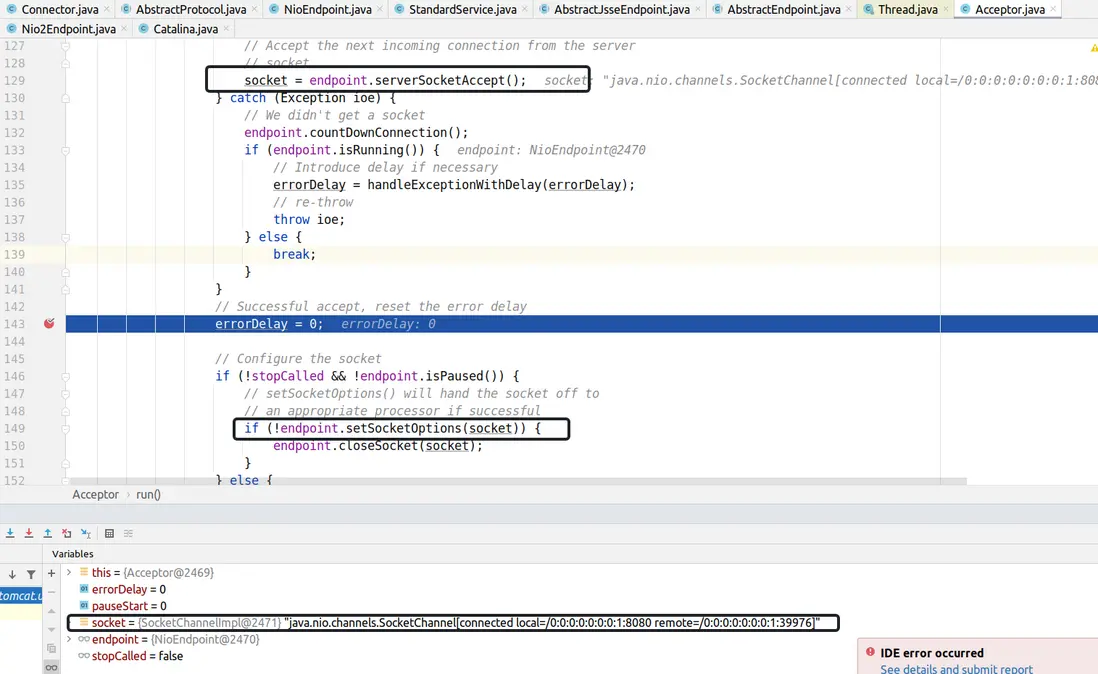
來看一下endpoint.setSocketOptions(socket)做了啥
@Override
    protected boolean setSocketOptions(SocketChannel socket) {
       .........
            NioSocketWrapper newWrapper = new NioSocketWrapper(channel, this);
            channel.reset(socket, newWrapper);
            connections.put(socket, newWrapper);
            socketWrapper = newWrapper;

            // Set socket properties
            // Disable blocking, polling will be used
            socket.configureBlocking(false);
          socketProperties.setProperties(socket.socket());
        // 註冊新連接
            poller.register(socketWrapper);
            return true;
        ...
再看一下Poller的代碼 監聽了新連接的OP_READ事件
public void register(final NioSocketWrapper socketWrapper) {
            socketWrapper.interestOps(SelectionKey.OP_READ);//this is what OP_REGISTER turns into.
            PollerEvent pollerEvent = createPollerEvent(socketWrapper, OP_REGISTER);
            addEvent(pollerEvent);
        }
這樣,http://localhost:8080/mytomcat/servlet1的請求就會交給Poller處理,詳細代碼見Poller的run函數
public void run() {
            // Loop until destroy() is called
            while (true) {

                boolean hasEvents = false;

                try {
                    if (!close) {
                        hasEvents = events();
                        if (wakeupCounter.getAndSet(-1) > 0) {
                            // If we are here, means we have other stuff to do
                            // Do a non blocking select
                            keyCount = selector.selectNow();
                        } else {
                        // 默認阻塞1秒鐘,監聽需要交給線程池的處理任務
                            keyCount = selector.select(selectorTimeout);
                        }
                        wakeupCounter.set(0);
                    }
                    ...
                } catch (Throwable x) {
                    ExceptionUtils.handleThrowable(x);
                    log.error(sm.getString("endpoint.nio.selectorLoopError"), x);
                    continue;
                }

                Iterator<SelectionKey> iterator =
                    keyCount > 0 ? selector.selectedKeys().iterator() : null;
                // Walk through the collection of ready keys and dispatch
                // any active event.
                while (iterator != null && iterator.hasNext()) {
                    SelectionKey sk = iterator.next();
                    iterator.remove();
                    NioSocketWrapper socketWrapper = (NioSocketWrapper) sk.attachment();
                    // Attachment may be null if another thread has called
                    // cancelledKey()
                    if (socketWrapper != null) {
                        // 主角, 任務處理都在裏面
                        processKey(sk, socketWrapper);
                    }
                }

                // Process timeouts
                timeout(keyCount,hasEvents);
            }
.............
        }
processKey的時候向線程池提交一個SocketProcessor任務
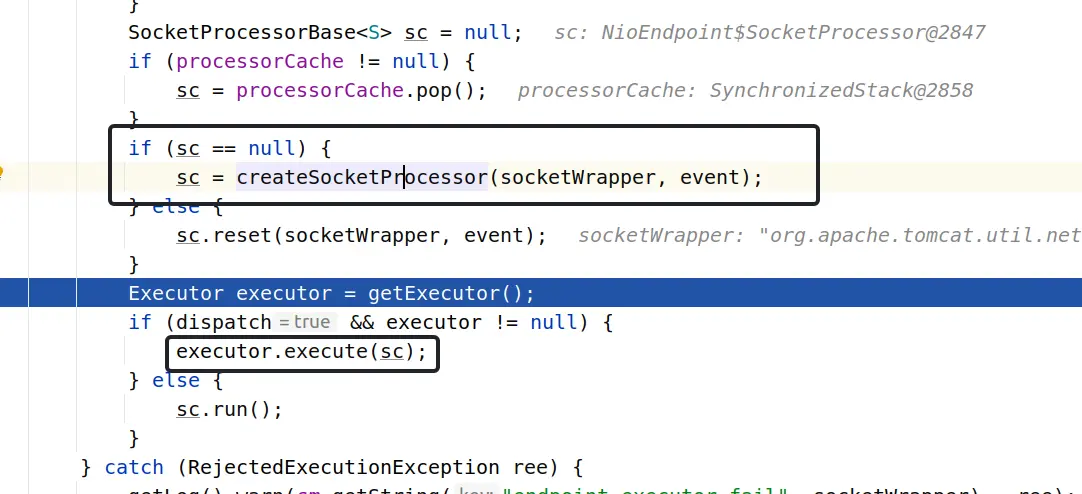
多線程任務的執行
經過一系列變換,connecotr對應的Handler為Http11Nio Protocol,
將協議部分的處理交由Http11Processor
CoyoteAdapter
tomcat並非直接把請求封裝為HttpServletRequest對象和HttpServletResponse對象,本身connector支持多種協議,不只使用http協議。所以tomcat存在比較底層的org.apache.coyote.Request, 也存在繼承HttpServletRequest的org.apache.catalina.connector.Request,CoyoteAdapter負責做二者的轉化並且把轉化後的HttpServletRequest對象和HttpServletResponse對象交給tomcat容器的Pipeline。
來看一下CoyoteAdapter的service方法
 public void service(org.apache.coyote.Request req, org.apache.coyote.Response res) throws Exception {

        Request request = (Request) req.getNote(ADAPTER_NOTES);
        Response response = (Response) res.getNote(ADAPTER_NOTES);

        if (request == null) {
            // Create objects
            request = connector.createRequest();
            request.setCoyoteRequest(req);
            response = connector.createResponse();
            response.setCoyoteResponse(res);

            // 做兩種類型request的轉換
            request.setResponse(response);
            response.setRequest(request);
        }


        try {
            // Parse and set Catalina and configuration specific
            // 下面有講解這個方法
            postParseSuccess = postParseRequest(req, request, res, response);
            if (postParseSuccess) {
                // check valves if we support async
                request.setAsyncSupported(connector.getService().getContainer().getPipeline().isAsyncSupported());
                // Calling the container
               //把HttpServletRequest 和HttpServletRequest對象交給tomcat的職責鏈Pipeline。
connector.getService().getContainer().getPipeline().getFirst().invoke(request, response);
            }
            ........
    }
我們來看一下postParseRequest(req, resp)方法
protected boolean postParseRequest(org.apache.coyote.Request req, Request request, org.apache.coyote.Response res,
            Response response) throws IOException, ServletException {

           // 解析出是否要Https
        if (req.scheme().isNull()) {
            // Use connector scheme and secure configuration, (defaults to
            // "http" and false respectively)
            req.scheme().setString(connector.getScheme());
            request.setSecure(connector.getSecure());
        } else {
            // Use processor specified scheme to determine secure state
            request.setSecure(req.scheme().equals("https"));
        }
// 代理相關

String proxyName = connector.getProxyName();
        int proxyPort = connector.getProxyPort();
        if (proxyPort != 0) {
            req.setServerPort(proxyPort);
        } else if (req.getServerPort() == -1) {
            // Not explicitly set. Use default ports based on the scheme
            if (req.scheme().equals("https")) {
                req.setServerPort(443);
            } else {
                req.setServerPort(80);
            }
        }
        if (proxyName != null) {
            req.serverName().setString(proxyName);
        }
// 預檢方法請求
// Check for ping OPTIONS * request
        if (undecodedURI.equals("*")) {
            if (req.method().equalsIgnoreCase("OPTIONS")) {
                StringBuilder allow = new StringBuilder();
                allow.append("GET, HEAD, POST, PUT, DELETE, OPTIONS");
                // Trace if allowed
                if (connector.getAllowTrace()) {
                    allow.append(", TRACE");
                }
                res.setHeader("Allow", allow.toString());
                // Access log entry as processing won't reach AccessLogValve
                connector.getService().getContainer().logAccess(request, response, 0, true);
                return false;
            } else {
                response.sendError(400, sm.getString("coyoteAdapter.invalidURI"));
            }
        }
        ........
 while (mapRequired) {
            // This will map the the latest version by default
          // tomcat可以部署多個應用,找到具體在某個Context、Host、填充到request對象中。
connector.getService().getMapper().map(serverName, decodedURI, version, request.getMappingData());

     }
.......
探索一下tomcat的職責鏈
正式進入Tomcat的職責鏈中,下面我們來看一下pipeline中有什麼
因為已有環境,本文直接給出默認的鏈裝結構
StandardEngineValve----> AccessLogValve----> ErrorReportValve---- > StandardHostValve ----> StandardContextValve -----> StandardWrapperValve---> ApplicationFilterChain ---後續執行指定的Servlet
排除容器本身的節點StandardEngineValve, StandardHostValve,StandardContextValve三個節點。 AccessLogValve,ErrorReportValve, StandardWrapperValve值得我們關注
AccessLogValve:使用來記錄訪問請求的基本信息,記錄到access.log中等
ErrorReportValve:來處理後面的錯誤,跳到失敗頁面等
StandardWrapperValve: 如下詳細解説
@Override
    public void invoke(Request request, Response response) throws IOException, ServletException {
        ...........
        // 獲取對應servlet對應的Wrapper, servlet可能還未加載
        StandardWrapper wrapper = (StandardWrapper) getContainer();
        Servlet servlet = null;
        Context context = (Context) wrapper.getParent();

        ........
        try {
            if (!unavailable) {
            // 獲取真正的servlet, 如果未加載初始化,在加載初始化後返回
                servlet = wrapper.allocate();
            }
        } catch (UnavailableException e) {
            container.getLogger().error(sm.getString("standardWrapper.allocateException", wrapper.getName()), e);
            checkWrapperAvailable(response, wrapper);
        }

        .................

// ApplicationFilterChain本身是servlet規範中的過濾器, 持有servelt對象,使用職責鏈調用完成後,再調用servlet, 至此,tomcat的請求流程到此,後續交給上層應用程序來處理請求
        ApplicationFilterChain filterChain = ApplicationFilterFactory.createFilterChain(request, wrapper, servlet);

        .........

         filterChain.doFilter(request.getRequest(), response.getResponse());
至此,tomcat講請求處理完後遞交給上層應用程序來處理,並返回結果,依次寫回
本文到此結束,tomcat的源碼還有很多,如容器之間的關係,多類的加載安全性,動態部署等,有興趣的朋友可以繼續研究