

養成良好的編碼習慣,一個合格的程序員需要掌握一些編寫單元測試的能力。單元測試也可以整體上提升我們的代碼質量,這裏介紹下 VUE 組件的單元測試。
如果想直接通過 Demo 學習,可以跳過下面的內容,點擊這裏下載示例
技術棧
- @vue/test-utils[1.0.0-beta.30]
- istanbul-instrumenter-loader[3.0.1]
- karma[4.4.1]
- karma-chrome-launcher[3.1.0]
- karma-mocha[1.3.0]
- karma-sourcemap-loader[0.3.7]
- karma-coverage-istanbul-reporter[2.1.1]
- karma-webpack[4.0.2]
- webpack[4.41.5]
定義配置文件
karma.conf.js 文件用於 karma 的配置,使用 node_modules/.bin/karma init 命令創建該文件,我們定義如下配置:
// Karma configuration

const webpackConfig = require('./config/webpack.test.config.js')

module.exports = function(config) {
  config.set({

    // base path that will be used to resolve all patterns (eg. files, exclude)
    basePath: '.',

    // frameworks to use
    // available frameworks: https://npmjs.org/browse/keyword/karma-adapter
    frameworks: [ 'mocha' ],

    // list of files / patterns to load in the browser
    files: [
      'test/**/*.spec.js'
    ],

    // preprocess matching files before serving them to the browser
    // available preprocessors: https://npmjs.org/browse/keyword/karma-preprocessor
    preprocessors: {
      'test/**/*.spec.js': [ 'webpack', 'sourcemap' ]
    },

    // webpack config
    webpack: webpackConfig,

    webpackMiddleware: {
      stats: 'errors-only'
    },

    // web server port
    port: 9876,

    // enable / disable colors in the output (reporters and logs)
    colors: true,

    // level of logging
    // possible values: config.LOG_DISABLE || config.LOG_ERROR || config.LOG_WARN || config.LOG_INFO || config.LOG_DEBUG
    logLevel: config.LOG_INFO,

    // enable / disable watching file and executing tests whenever any file changes
    autoWatch: true,

    // start these browsers
    // available browser launchers: https://npmjs.org/browse/keyword/karma-launcher
    browsers: [ 'Chrome' ],

    // Continuous Integration mode
    // if true, Karma captures browsers, runs the tests and exits
    singleRun: false,

    // Concurrency level
    // how many browser should be started simultaneous
    concurrency: Infinity
  })
}- 設置
frameworks為['mocha'],即使用mocha測試框架 - 設置
files為['test/**/*.spec.js'],即對test目錄下所有的後綴為.spec.js文件測試 - 設置
preprocessors為{'**/*.spec.js': ['webpack', 'sourcemap']},即使用webpack,sourcemap對所有的測試文件進行 webpack 打包 - 設置
browsers為Chrome,即使用 Chrome 瀏覽器作為測試瀏覽器
編寫測試用例
詳細的關於 @vue/test-utils 用法,查看 https://vue-test-utils.vuejs.org/zh/
import { expect } from 'chai'
import { shallowMount } from '@vue/test-utils'
import Header from '../src/components/Header'

describe('Header', () => {
  const wrapper = shallowMount(Header)
  const header = wrapper.find('header')
  const h1 = wrapper.find('h1')

  it('有 header 標籤', () => {
    expect(header.exists()).to.be.true
  })

  it('有 h1 標籤', () => {
    expect(h1.exists()).to.be.true
  })

  it('h1 的文案為“VUE 單頁模版”', () => {
    expect(h1.text()).to.equal('VUE 單頁模版')
  })

  it('h1 標籤在 header 標籤中', () => {
    expect(header.contains('h1')).to.be.true
  })
})
這裏我引用 vue-single-page 的 Header 組件測試用例
- 首先通過
shallowMount獲取wrapper - 使用
chai斷言庫編寫相關的測試用例
運行結果
i 「wdm」: Compiled successfully.
15 01 2020 18:28:13.799:INFO [karma-server]: Karma v4.4.1 server started at http://0.0.0.0:9876/
15 01 2020 18:28:13.813:INFO [launcher]: Launching browsers Chrome with concurrency unlimited
15 01 2020 18:28:13.820:INFO [launcher]: Starting browser Chrome
15 01 2020 18:28:17.075:INFO [Chrome 79.0.3945 (Windows 10.0.0)]: Connected on socket PUKPz4iBuFzeVNSsAAAA with id 91716917
TOTAL: 4 SUCCESS
可以看到我們的單元測試已經通過了
測試覆蓋率報告
測試完成後,我們需要查看測試覆蓋率報告。這需要在 webpack.test.config.js 和 karma.conf.js 中做一些配置修改
webpack.test.config.js
const merge = require('webpack-merge')
const path = require('path')
const webpackCommonConfig = require('./webpack.common.config')

const testConfig = {
  devtool: 'inline-source-map',
  mode: 'none',
  module: {
    rules: [
      {
        test: /\.spec.js$/i,
        enforce: 'pre',
        use: [
          {
            loader: 'istanbul-instrumenter-loader',
            options: {
              esModules: true
            }
          }
        ]
      }
    ]
  }
}

module.exports = merge(webpackCommonConfig, testConfig)- 添加一個優先執行的編譯
.spec.js文件的rules,loader使用istanbul-instrumenter-loader並開啓esModules模式
karma.conf.js
module.exports = function(config) {
  config.set({

    // ...

    coverageIstanbulReporter: {
      reports: [ 'html', 'text' ],
      fixWebpackSourcePaths: true
    },

    reporters: [ 'coverage-istanbul' ]

    //...

  })
}- 設置
reporters為[ 'coverage-istanbul' ],即使用coverage-istanbulreporters coverageIstanbulReporter配置項用於設置coverage-istanbul的參數,詳細的參數可以參考 這裏
運行結果
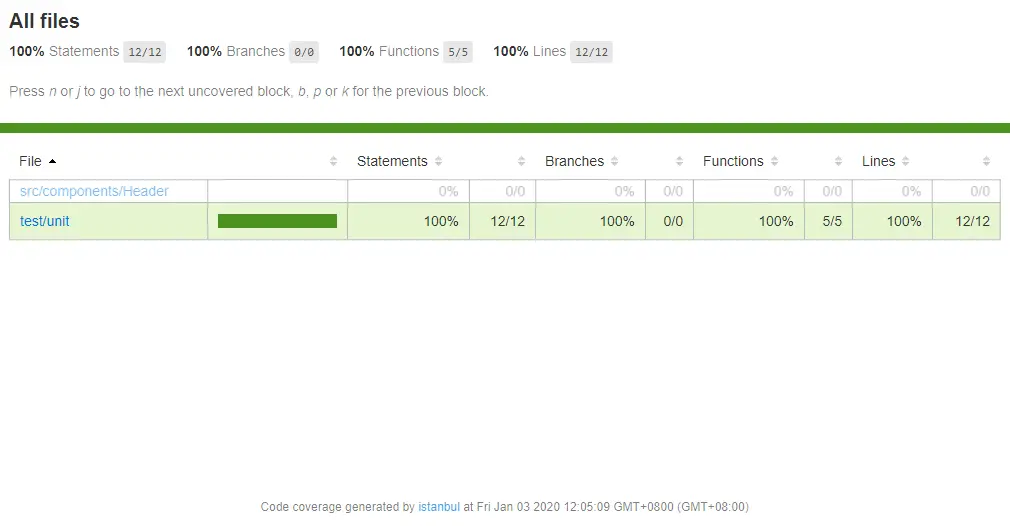
再次執行單元測試,我們會看到測試覆蓋率的相關信息
----------------|----------|----------|----------|----------|-------------------|
File            |  % Stmts | % Branch |  % Funcs |  % Lines | Uncovered Line #s |
----------------|----------|----------|----------|----------|-------------------|
All files       |      100 |      100 |      100 |      100 |                   |
 Header.spec.js |      100 |      100 |      100 |      100 |                   |
----------------|----------|----------|----------|----------|-------------------|
也可以通過生成到 coverage 目錄下的網頁文件,在瀏覽器中查看
參考資料
- https://vue-test-utils.vuejs.org/zh/
- https://github.com/mattlewis92/karma-coverage-istanbul-reporter
