

前言
微信的發送位置功能是一個十分方便的功能,他會定位用户當前所在地點,然後請求用户周邊的POI,並且還可以通過拖動地圖來獲取其他的位置發送給對方,本Demo是結合騰訊地圖SDK來實現類似的功能。
使用場景
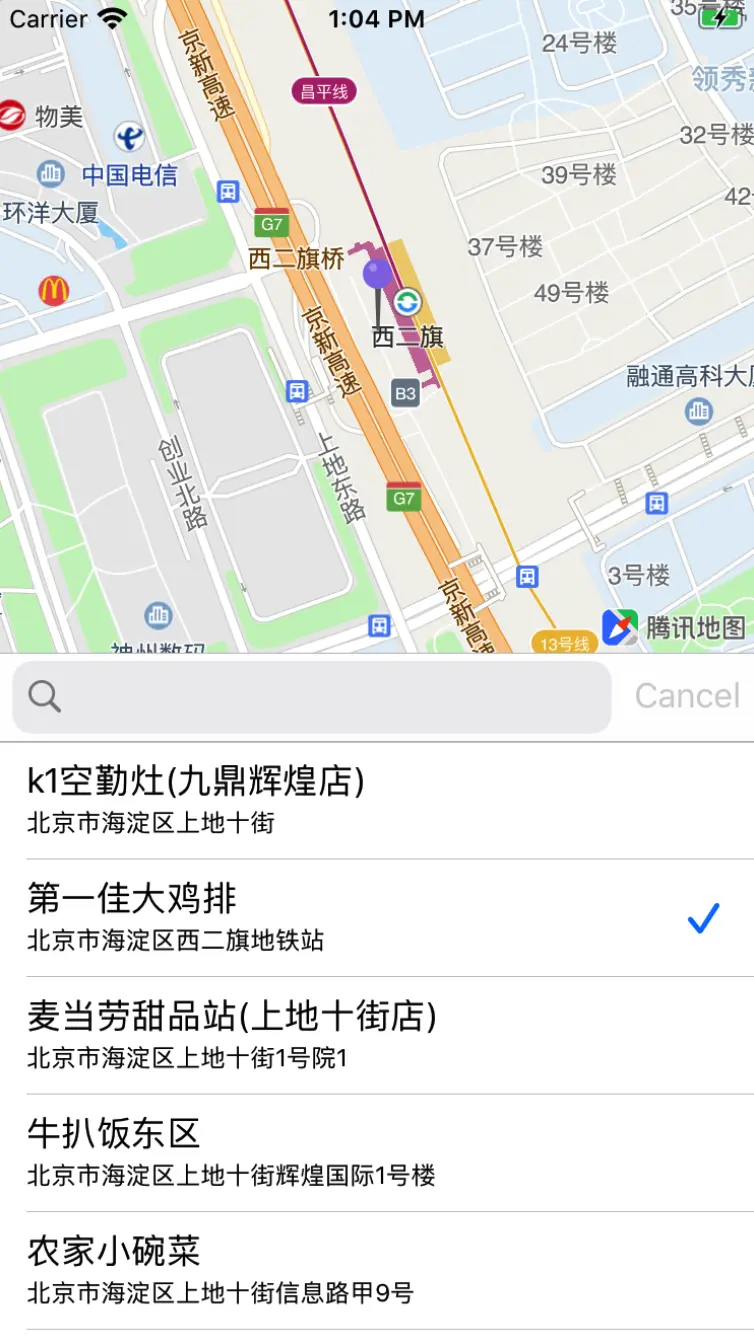
拖動地圖選擇地圖的中心點,然後請求該點周邊的門店信息,可以通過設置搜索分類來指定搜索門店的類型,如:美食、學校等。
準備
- 騰訊地圖3D SDK
- Marker
- 地點檢索
核心代碼:
1、設置大頭針,固定在地圖中央,並監聽地圖移動的時候大頭針跟隨移動:
- (void)mapViewRegionChange:(QMapView *)mapView {
    // 更新位置
    _annotation.coordinate = mapView.centerCoordinate;
}
2、配置周邊檢索功能,將檢索類型設置為"美食":
- (void)searchCurrentLocationWithKeyword:(NSString *)keyword {
CLLocationCoordinate2D centerCoord = self.mapView.centerCoordinate;

    QMSPoiSearchOption *option = [[QMSPoiSearchOption alloc] init];
    if (keyword.length > 0) {
        option.keyword = keyword;
    }
    option.boundary = [NSString stringWithFormat:@"nearby(%f,%f,2000,1)", centerCoord.latitude, centerCoord.longitude];
    [option setFilter:@"category=美食"];
    [self.mapSearcher searchWithPoiSearchOption:option];
}
3、解析檢索結果,移動地圖視野,並將結果顯示在tableView上:
- (void)searchWithPoiSearchOption:(QMSPoiSearchOption *)poiSearchOption didReceiveResult:(QMSPoiSearchResult *)poiSearchResult {
    NSLog(@"%@", poiSearchResult);

    if (poiSearchResult.count == 0) {
        return;
    }

    // 地圖移動到搜索結果的第一個位置
    if (_searchBar.text.length > 0) {
        _selectedIndex = 0;
        QMSPoiData *firstData = poiSearchResult.dataArray[0];
        _annotation.coordinate = firstData.location;
        [self.mapView setCenterCoordinate:firstData.location animated:YES];
    } else {
        _selectedIndex = -1;
    }

    _searchResultArray = poiSearchResult.dataArray;
    [_searchResultTableView reloadData];
}
以上就是核心代碼,在Demo中還添加了用於顯示地址的TableView以及搜索位置的SearchBar,有興趣的同學可以在文章最下方進入碼雲下載完整示例。
示例:搜索西二旗地鐵附近的美食
鏈接
感興趣的同學可以在碼雲中下載Demo嘗試一下。
以下內容轉載自麪糊的文章《模仿微信發送位置功能》作者:麪糊
鏈接:https://www.jianshu.com/p/47b...
來源:簡書
著作權歸作者所有。商業轉載請聯繫作者獲得授權,非商業轉載請註明出處。
