

前言
在地圖的使用中,尤其在導航場景下,進行GPS軌跡錄製是十分必要並且有用的,本文會對於安卓系統下的軌跡錄製部分做一個分享。
系統架構
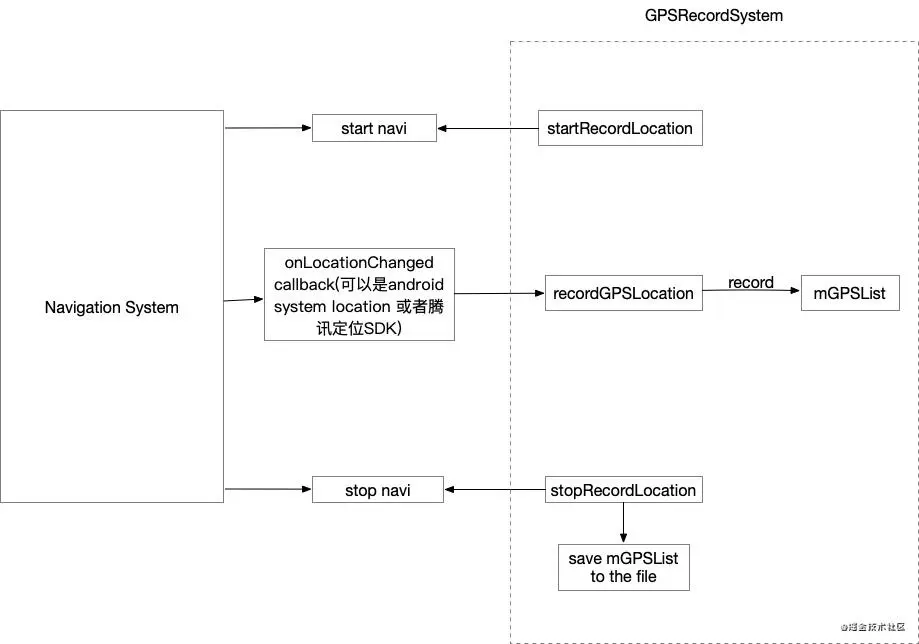
對於一個GPSRecordSystem(GPS軌跡錄製系統)主要分成3個部分:開始錄製,錄製GPS定位,結束錄製並存儲,如上圖右方所示。在實際應用中,以導航系統為例:(1)在開始導航時(start navi),進行錄製工作的相關配置;(2)收到安卓系統的onLocationChanged的callback進行GPSLocation的記錄;(3)結束導航(stop navi)時,停止記錄並存入文件。
相關代碼展示
用到的相關變量
    private LocationManager mLocationManager;   // 系統locationManager
    private LocationListener mLocationListener; // 系統locationListener

    private boolean mIsRecording = false;       // 是否正在錄製

    private List<String> mGpsList;              // 記錄gps的list
private String mRecordFileName; // gps文件名稱- 開始錄製
開始錄製一般是在整個系統工作之初,比如在導航場景下,當“開始導航”時,可以開始進行“startRecordLocation” 的配置
    public void startRecordLocation(Context context, String fileName) {
        // 已經在錄製中不進行錄製
        if (mIsRecording) {
            return;
        }
        Toast.makeText(context, "start record location...", Toast.LENGTH_SHORT).show();

        // 初始化locationManager和locationListener
        mLocationManager = (LocationManager) context.getSystemService(Context.LOCATION_SERVICE);
        mLocationListener = new MyLocationListener();
        try {
            // 添加listener
            mLocationManager.requestLocationUpdates(LocationManager.GPS_PROVIDER, 0, 0, mLocationListener);
        } catch (SecurityException e) {
            Toast.makeText(context, "start record location error!!!", Toast.LENGTH_SHORT).show();
            Log.e(TAG, "startRecordLocation Exception", e);
            e.printStackTrace();
        }

// 記錄文件名稱,筆者這裏使用“realLocationRecord + routeID”形式進行記錄
        mRecordFileName = fileName;
        if (!mRecordFileName.endsWith(".gps")) {
            mRecordFileName += ".gps";
        }

        mIsRecording = true;
}- 錄製中記錄軌跡
記錄location一般是在獲取安卓系統onLocationChanged回調時調用“recordGPSLocation”
    public void recordGPSLocation(Location location) {
        if (mIsRecording && location != null) {
        // 記錄location to list
            mGpsList.add(locationToString(location));
        }
    }
locationToString工具方法
驅動導航工作的GPS軌跡點一般要包含以下幾個要素,經度,緯度,精度,角度,速度,時間,海拔高度,所以在此記錄下,為後期軌跡回放做準備。
    private String locationToString(Location location) {
        StringBuilder sb = new StringBuilder();

        long time = System.currentTimeMillis();
        String timeStr = gpsDataFormatter.format(new Date(time));

        sb.append(location.getLatitude());
        sb.append(",");
        sb.append(location.getLongitude());
        sb.append(",");
        sb.append(location.getAccuracy());
        sb.append(",");
        sb.append(location.getBearing());
        sb.append(",");
        sb.append(location.getSpeed());
        sb.append(",");
        sb.append(timeStr);
        sb.append(",");
        sb.append(df.format((double) time / 1000.0));
        // sb.append(df.format(System.currentTimeMillis()/1000.0));
        // sb.append(df.format(location.getTime()/1000.0));
        sb.append(",");
        sb.append(location.getAltitude());
        sb.append("\n");
        return sb.toString();
    }
- 結束錄製並保存gps文件
結束錄製一般作用在整個系統的結尾,例如在導航場景下,“結束導航”時停止錄製調用“stopRecordLocation”
    public void stopRecordLocation(Context context) {
        Toast.makeText(context, "stop record location, save to file...", Toast.LENGTH_SHORT).show();

        // 移除listener
        mLocationManager.removeUpdates(mLocationListener);
        String storagePath = StorageUtil.getStoragePath(context); // 存儲的路徑
        String filePath = storagePath + mRecordFileName;

        saveGPS(filePath);
        mIsRecording = false;
    }
GPS軌跡存儲工具方法
    private void saveGPS(String path) {
        OutputStreamWriter writer = null;
        try {
            File outFile = new File(path);
            File parent = outFile.getParentFile();
            if (parent != null && !parent.exists()) {
                parent.mkdirs();
            }
            OutputStream out = new FileOutputStream(outFile);
            writer = new OutputStreamWriter(out);
            for (String line : mGpsList) {
                writer.write(line);
            }
        } catch (Exception e) {
            Log.e(TAG, "saveGPS Exception", e);
            e.printStackTrace();
        } finally {
            if (writer != null) {
                try {
                    writer.flush();
                } catch (IOException e) {
                    e.printStackTrace();
                    Log.e(TAG, "Failed to flush output stream", e);
                }
                try {
                    writer.close();
                } catch (IOException e) {
                    e.printStackTrace();
                    Log.e(TAG, "Failed to close output stream", e);
                }
            }
        }
    }
StorageUtil的getStoragePath工具方法
// 存儲在跟路徑下/TencentMapSDK/navigation
    private static final String NAVIGATION_PATH = "/tencentmapsdk/navigation";

// getStoragePath工具方法
    public static String getStoragePath(Context context) {
        if (context == null) {
            return null;
        }
        String strFolder;
        boolean hasSdcard;
        try {
            hasSdcard = Environment.getExternalStorageState().equals(Environment.MEDIA_MOUNTED);
        } catch (Exception e) {
            Log.e(TAG, "getStoragePath Exception", e);
            e.printStackTrace();
            hasSdcard = false;
        }
        if (!hasSdcard) {
            strFolder = context.getFilesDir().getPath() + NAVIGATION_PATH;
            File file = new File(strFolder);
            if (!file.exists()) {
                file.mkdirs();
            }
        } else {
            strFolder = Environment.getExternalStorageDirectory().getPath() + NAVIGATION_PATH;
            File file = new File(strFolder);
            if (!file.exists()) { // 目錄不存在,創建目錄
                if (!file.mkdirs()) {
                    strFolder = context.getFilesDir().getPath() + NAVIGATION_PATH;
                    file = new File(strFolder);
                    if (!file.exists()) {
                        file.mkdirs();
                    }
                }
            } else { // 目錄存在,創建文件測試是否有權限
                try {
                    String newFile = strFolder + "/.test";
                    File tmpFile = new File(newFile);
                    if (tmpFile.createNewFile()) {
                        tmpFile.delete();
                    }
                } catch (IOException e) {
                    e.printStackTrace();
                    Log.e(TAG, "getStoragePath Exception", e);
                    strFolder = context.getFilesDir().getPath() + NAVIGATION_PATH;
                    file = new File(strFolder);
                    if (!file.exists()) {
                        file.mkdirs();
                    }
                }
            }
        }
        return strFolder;
    }
結果展示
最終存儲在了手機目錄下的navigation目錄
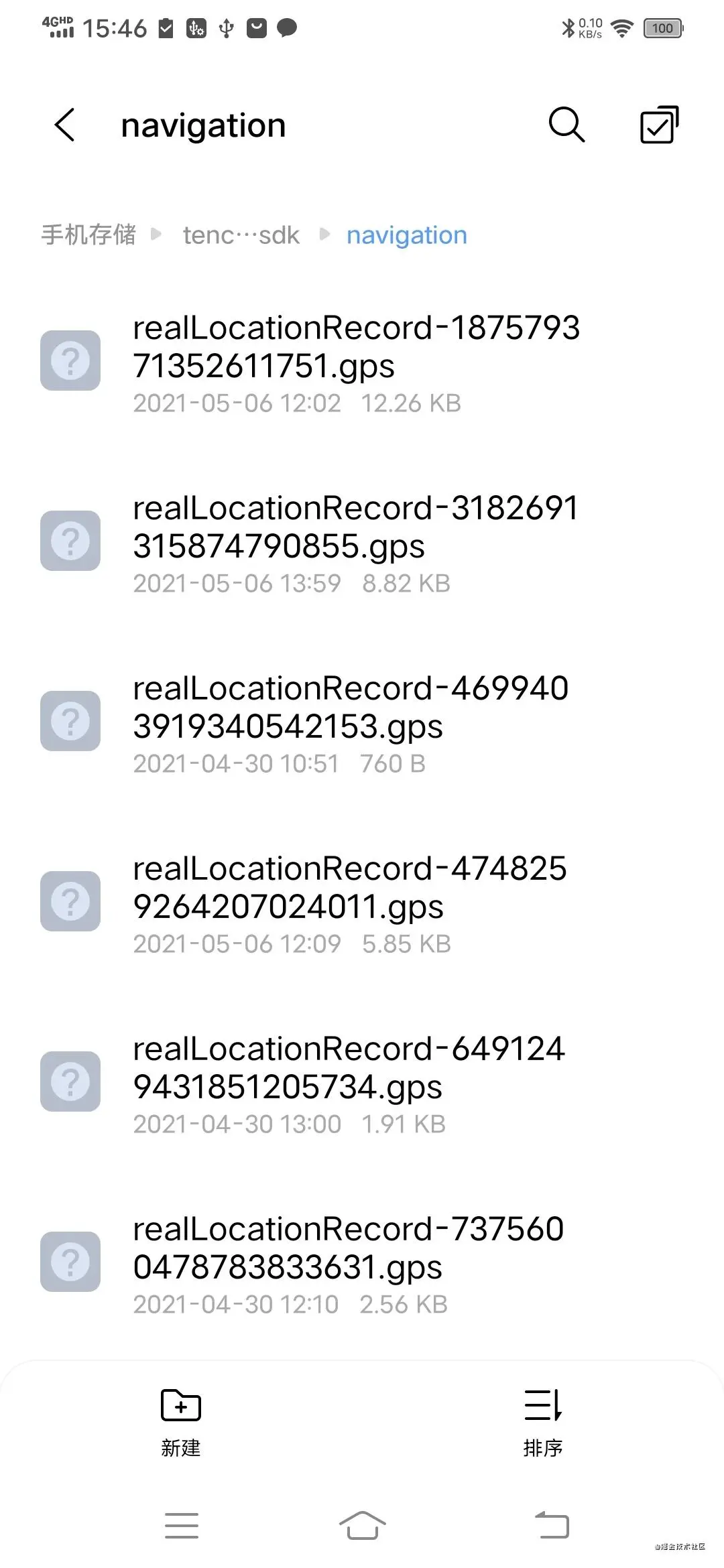
後續工作
後續可以對於錄製的gps文件講解在導航場景下進行軌跡回放的分享
