
【TI毫米波雷達】適配雷達的Flash芯片選型及QE位的默認值設置,串口迴環BUG的解決方案彙總
文章目錄
- 串口迴環問題現象
- Flash芯片未開啓QSPI功能導致
- 上電時序問題導致
- 上電以後的雷達串口迴環問題
- 延遲上電時序
- LP87524電源PMIC芯片的BUCK供電時序
- LP87524電源PMIC芯片的BUCK默認供電輸出
- 附錄:結構框架
- 雷達基本原理敍述
- 雷達天線排列位置
- 芯片框架
- Demo工程功能
- CCS工程導入
- 工程敍述
- Software Tasks
- Data Path
- Output information sent to host
- List of detected objects
- Range profile
- Azimuth static heatmap
- Azimuth/Elevation static heatmap
- Range/Doppler heatmap
- Stats information
- Side information of detected objects
- Temperature Stats
- Range Bias and Rx Channel Gain/Phase Measurement and Compensation
- Streaming data over LVDS
- Implementation Notes
- How to bypass CLI
- Hardware Resource Allocation
串口迴環問題現象
在正常燒錄代碼 並切換為功能模式後 無法運行用户代碼
且燒錄了ccsdebug.bin後 通過xds110下載代碼顯示下載失敗(非xds110報錯)
有兩種情況會導致該現象 一個是上電時序問題(包括不穩定上電)
另一個則是flash芯片選型問題
Flash芯片未開啓QSPI功能導致
TI毫米波雷達需要外接QSPI的QFlash芯片作為用户代碼存儲設備
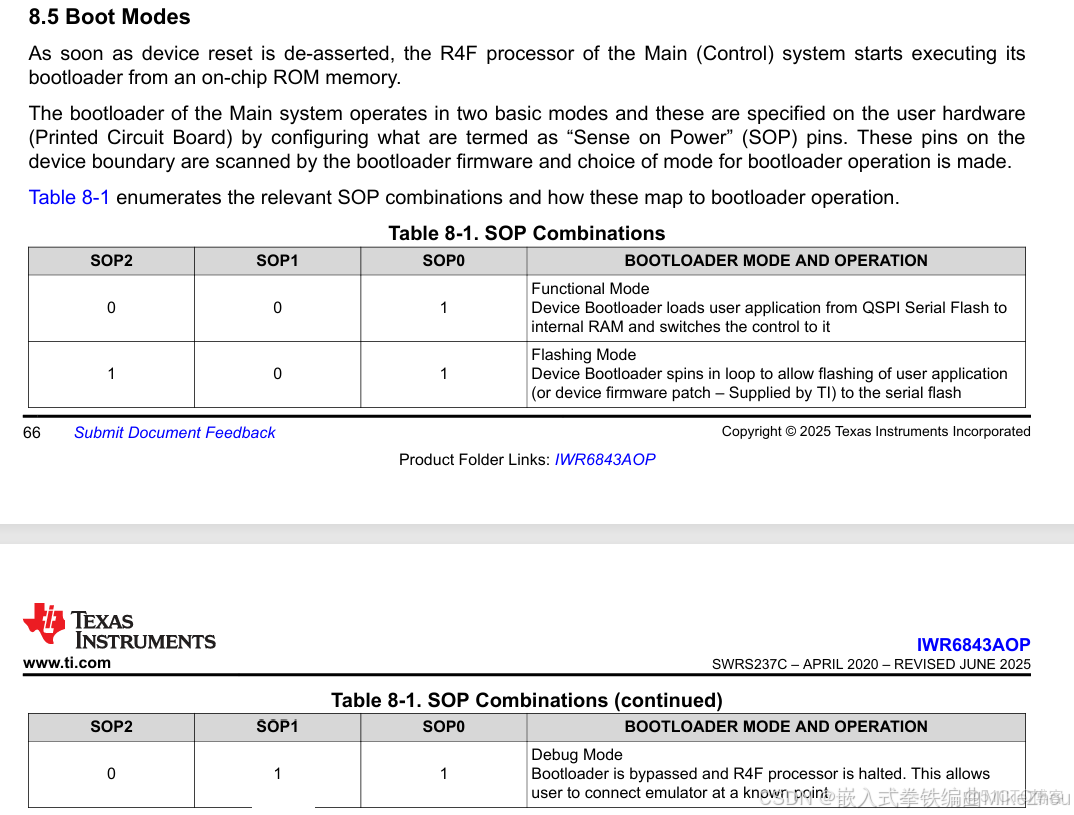
功能模式上電時 會從QSPI中下載代碼到RAM區域中
所以 QSPI的Flash芯片選擇尤其重要 要支持QSPI且開啓該功能的芯片
就算是差不多型號的flash芯片 也需要進行區分
比如MX25R1635FZUIL0無法使用 但MX25R1635FZUIH0可以使用(官方開發板所使用的flash)
具體flash芯片支持可以查看文檔:
https://www.ti.com/lit/an/sprach9c/sprach9c.pdf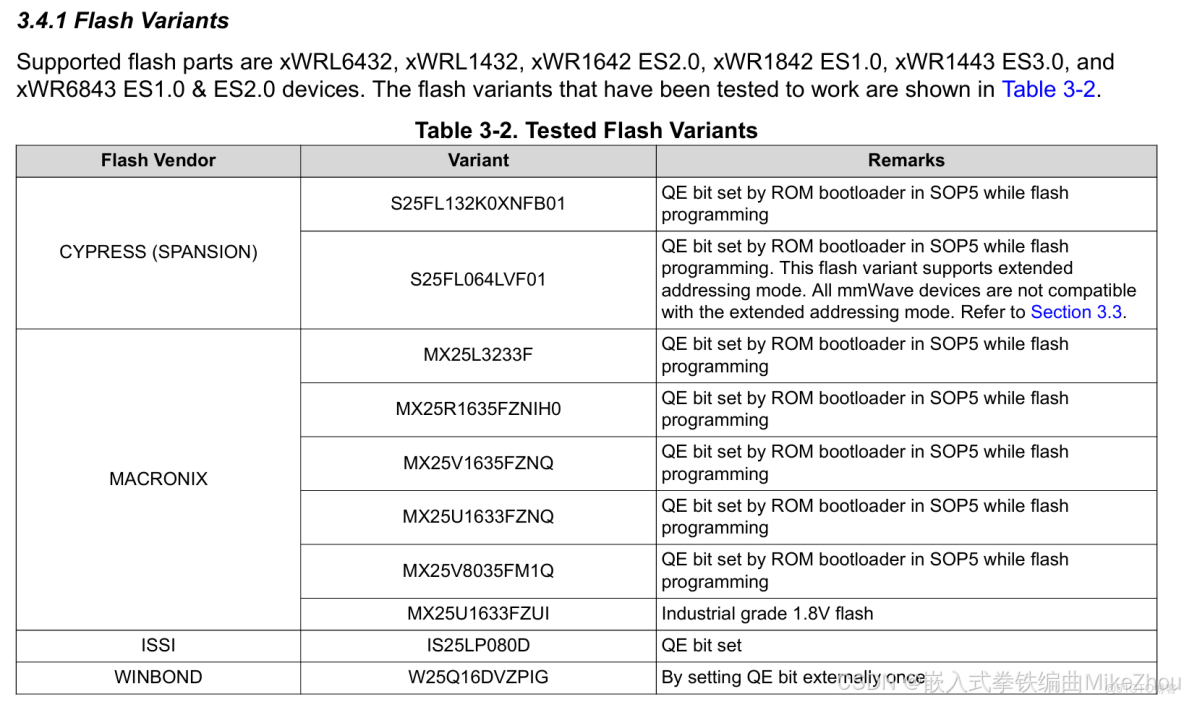
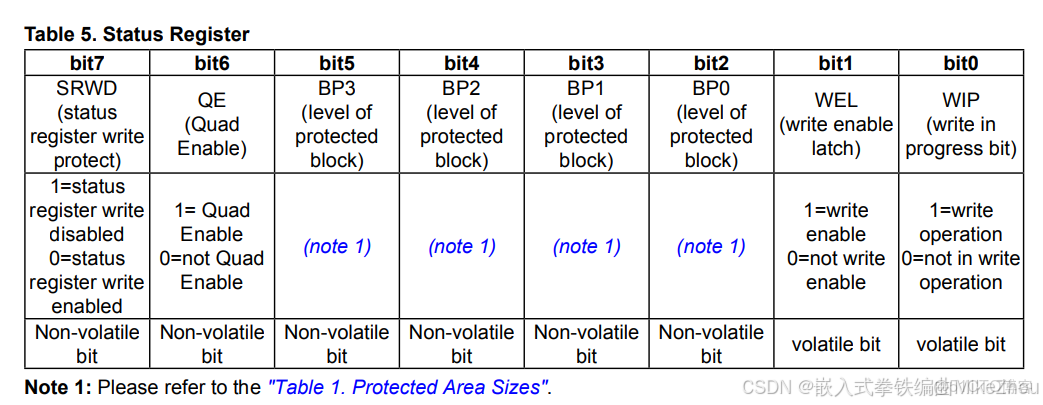
其中 主要是需要看QE位(開啓QSPI的那一位)是置0還是置1
雷達對支持的flash芯片 在bootloader時 會自動配置flash的QE位 但並不支持所有flash芯片 所以需要根據官方文檔來進行查找
有的flash芯片可以通過編程的方式設置QE位 有的則是固定QE位
我使用的是MX25L3233FM2I-08G 焊接上去直接用
相反的是 IS25LP016D-JBLA3則無法使用
MX25L3233FM2I-08G的QE位:

對於未開啓QE功能的 其需要先進行QE配置才行
比如IS25LP016D-JBLA3的設置方式:
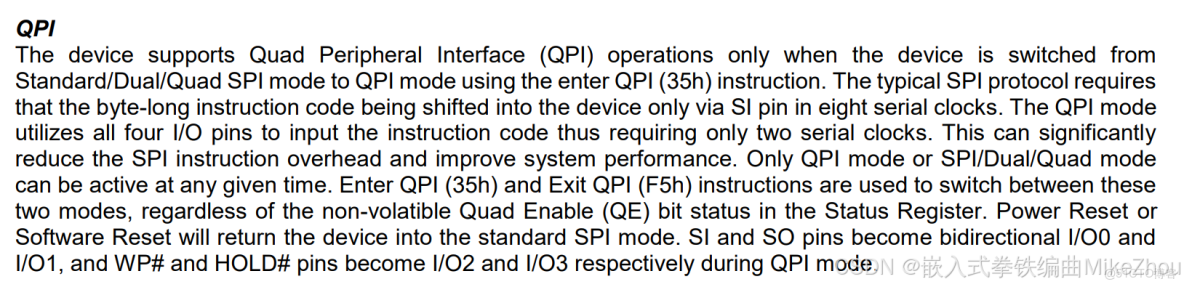
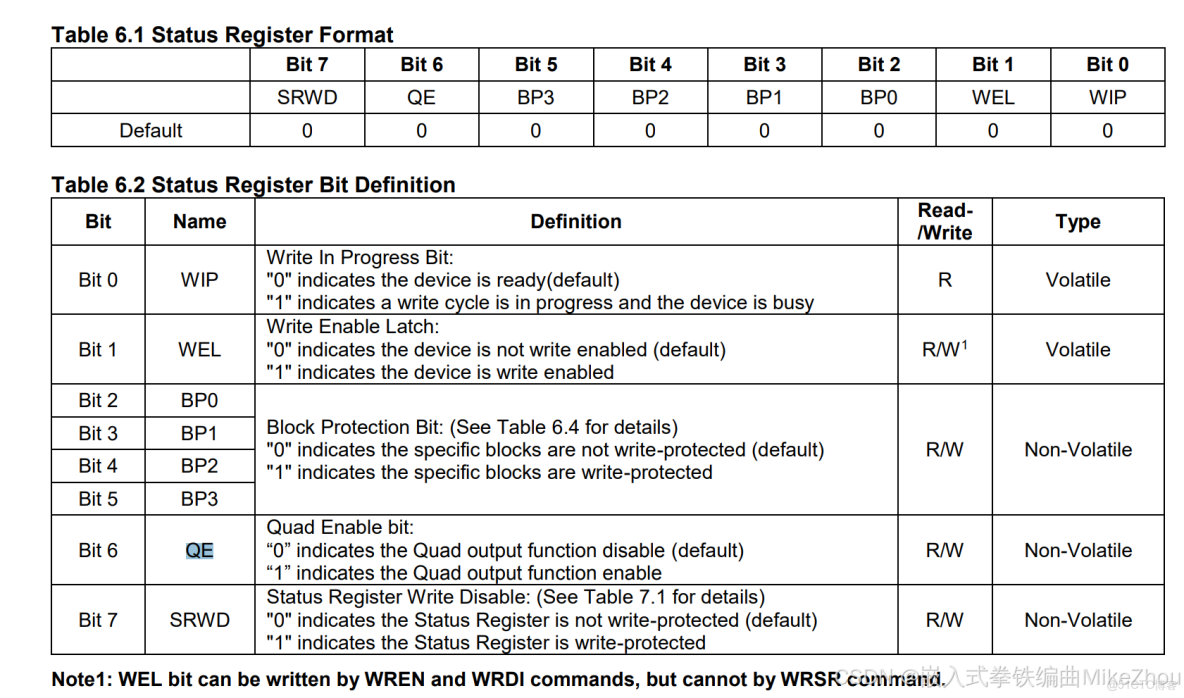
一般來説 雷達會自動對flash芯片的QSPI功能進行配置 只要配置方式一致 那麼就可以使用
但是 雷達和flash芯片的供電也會導致配置不成功
主要的區分方式就是看燒錄模式能不能被正常燒錄
flash優先要早於雷達供電 另外 雷達要按一定上電時序上電才行
上電時序問題導致
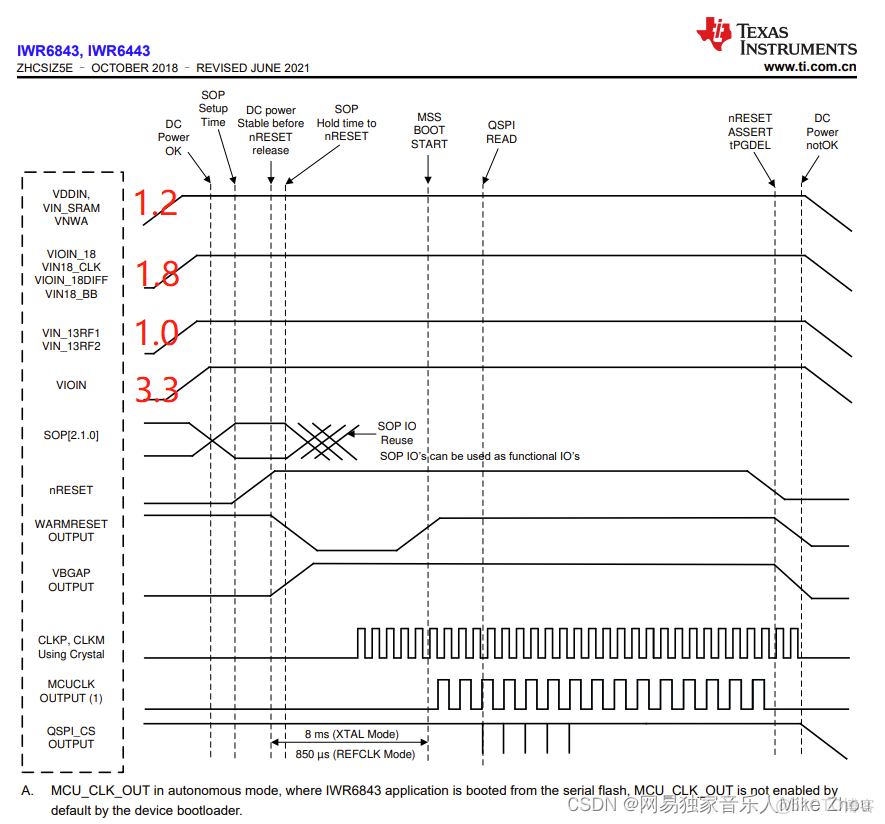
由IWR6843硬件手冊可以看到幾路供電的上電時序
以及AWR1843的手冊:
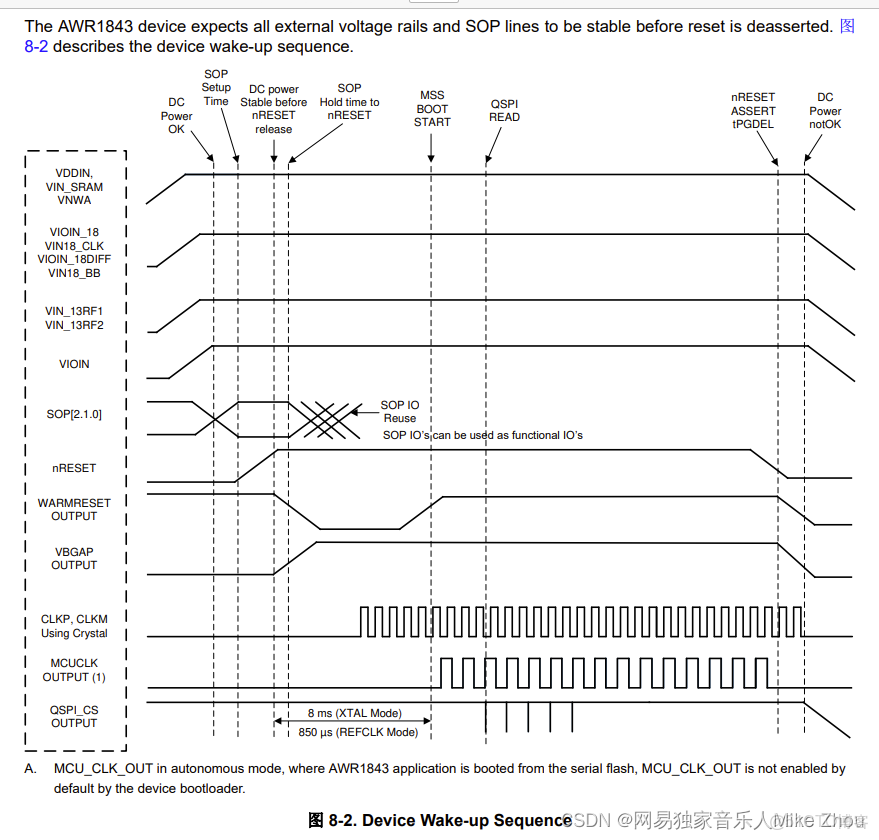
除了上電時序為1.2 1.8 1.0 3.3之外
還要求電壓穩定
上電以後的雷達串口迴環問題
如果電壓不穩定 則可能跑不進用户代碼
現象就是明明沒有配置串口迴環卻實現串口迴環
看這個時序 之前的串口迴環可能就是SOP的問題 因為上電不穩定 導致進入了錯誤的SOP模式
按這個上電時序上電以後 3.3V充滿電的時候 就是DC power OK 然後就是SOP setup time
然後這個DC power要穩定一段時間 在nRESET之前 NRESET充滿電以後 才是SOP Hold time to nRESET
在nRESET這個上升沿時間中 要保持電壓穩定 SOP穩定才行
不穩定或不按時序上電 就會導致SOP不穩定 從而進入到了不同的BOOT模式
而且燒錄代碼就是串口迴環
延遲上電時序
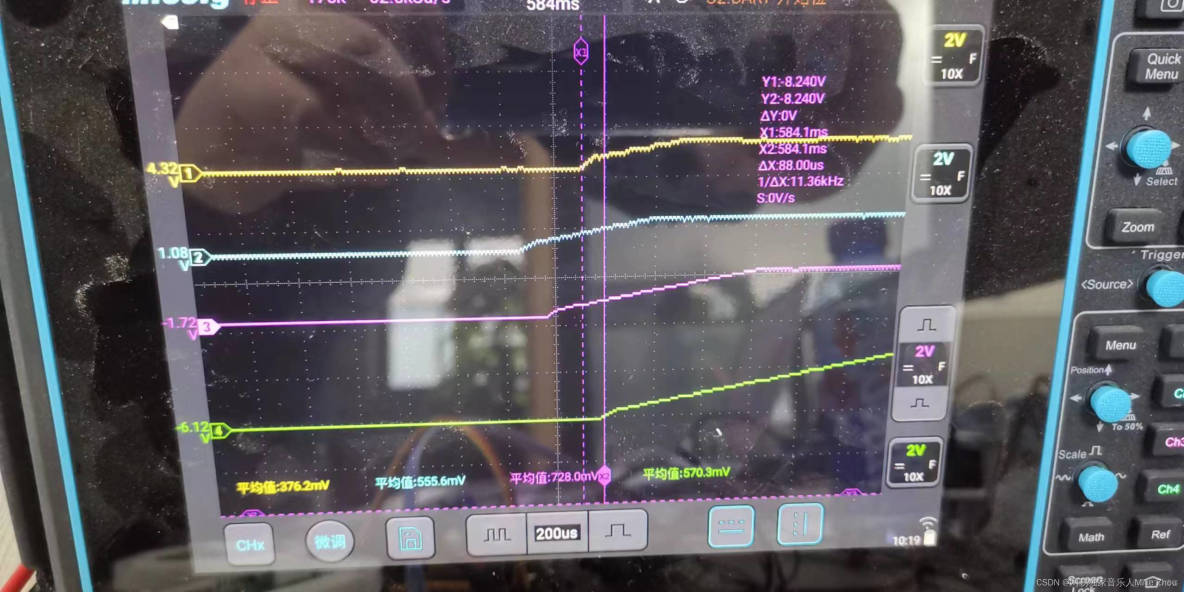
延遲上電不能過慢 也不能過快
100us左右的間隔我測試是可以正常工作的
波形圖:
LP87524電源PMIC芯片的BUCK供電時序
LP87524配置見:
【TI毫米波雷達】LP87702/LP87524電源PMIC芯片的BUCK供電配置
我們現在的原理圖是這樣 BUCK0-BUCK3分別輸出3.3 1.2 1.0 1.8的電壓
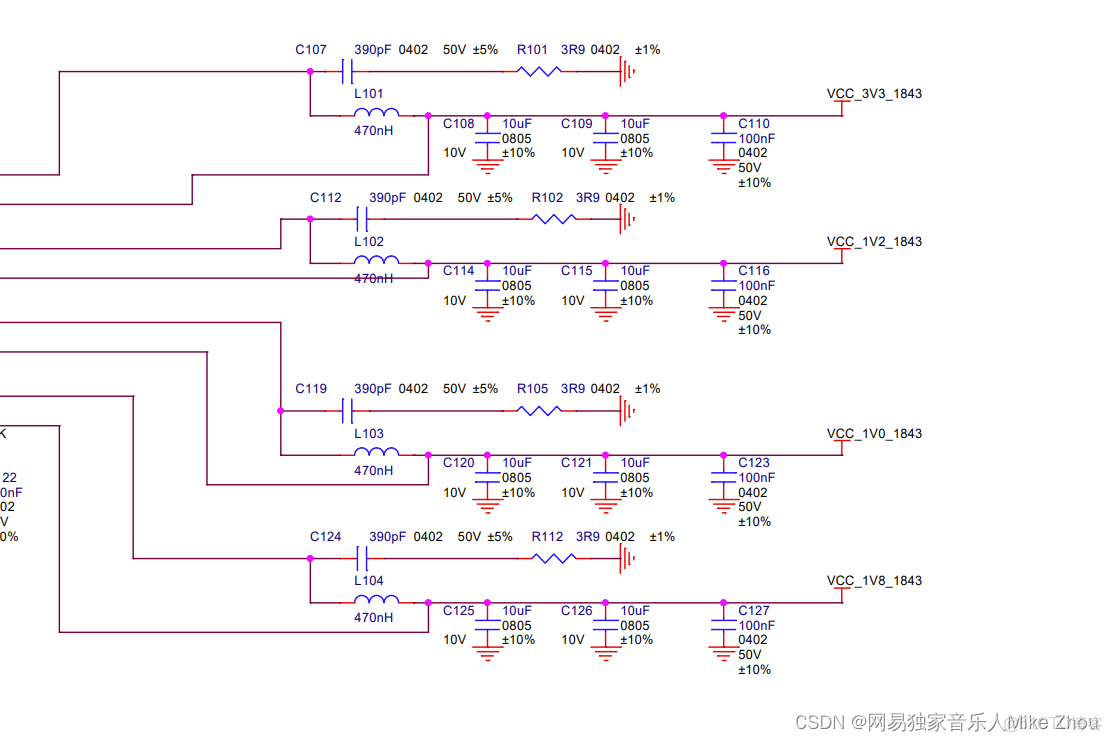
BUCK1 2 3由寄存器開關和EN1 2 3引腳共同決定 BUCK0由寄存器開關控制
按這個原理圖的話 時序控制為:
//按1.2 1.8 1.0 3.3的順序上電
//預準備
delay_ms(10);
dat=I2C_Read_y(&LP87524_I2C_Handle,LP87524_Slave_Add,LP87524_BUCK2_CTRL1,1,1,true);
dat|=(1<<7);
I2C_Write_x(&LP87524_I2C_Handle,LP87524_Slave_Add,LP87524_BUCK2_CTRL1,1,&dat,1,true);
delay_ms(10);
Enable_LP87524_BUCK(1,true);
delay_us(4400);
Enable_LP87524_BUCK(3,true);
delay_us(150);
//Enable_LP87524_BUCK(2,true);
Enable_LP87524_EN2;
delay_us(4450);
Enable_LP87524_BUCK(0,true);
波形:
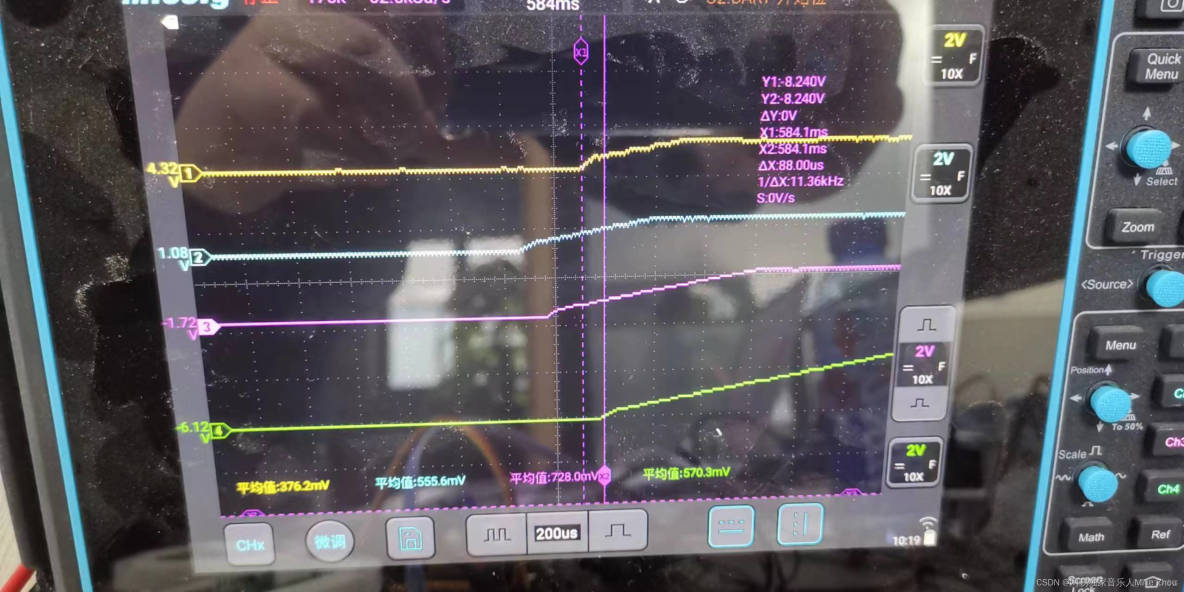
延遲上電間隔約100us
這個是可以使用的
如果加上雷達板負載 可能3.3V這一路會延後 所以還是帶上雷達板測試比較好
如果不進行預準備和延時間隔 則波形如圖:
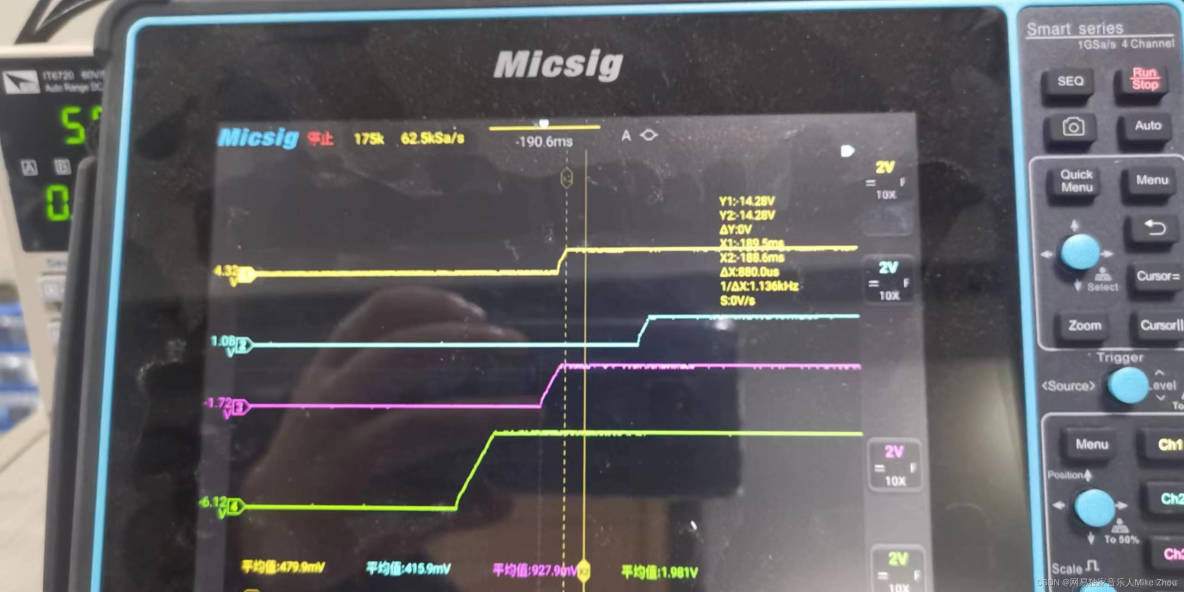
這是由於每個buck的硬件延時都不一樣導致的 所以必須一個一個來調整
另外 我的延時函數也有誤差 不一定完全是這個延時 要根據自己的板子來調整
上電穩定後的波形:
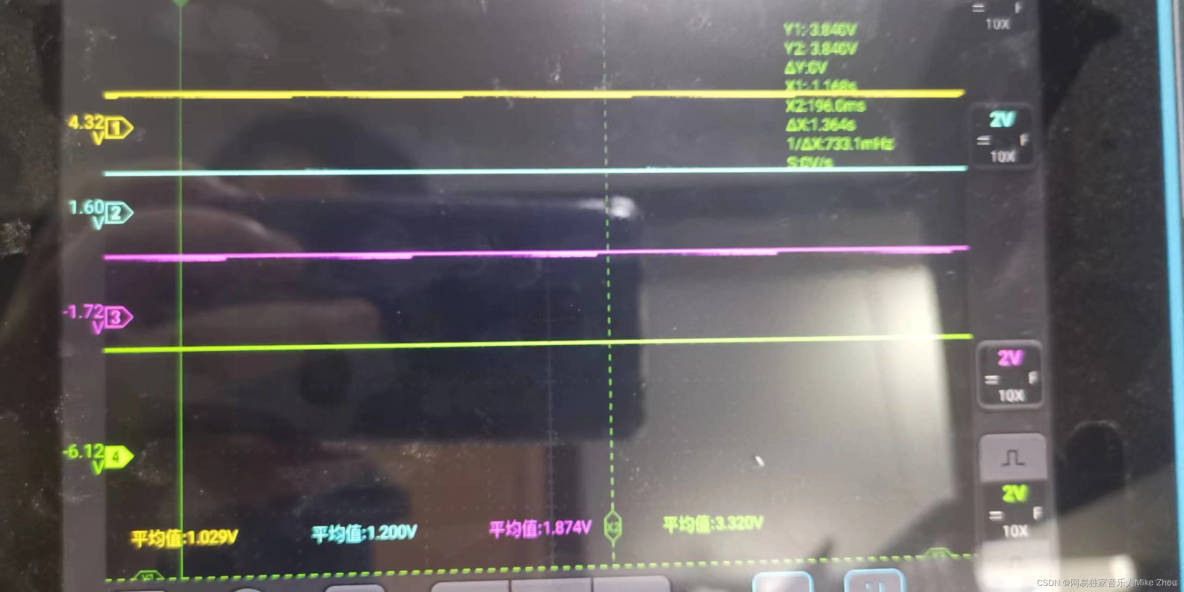
LP87524電源PMIC芯片的BUCK默認供電輸出
這一項是在芯片手冊中沒寫的
現象就是:
關閉VCC_5V以後 如果沒有負載 幾路buck會緩慢掉電 掉電到基本沒電的時候 重新打開VCC_5V 立馬就會進行默認輸出
也就是説 開啓5V開關以後 87524上電 但不進行配置 也不進行復位時 BUCK0-3的輸出分別是:0.88 3.36 1.55 1.87
這個就是87524的默認BUCK輸出值 如果運用在產品中 假設要進行功耗控制 只讓雷達工作一段時間 就需要頻繁開關VCC_5V電源 所以我建議是把BUCK0-3按照1.0 3.3 1.2 1.8的順序設計輸出 這樣的話 與默認BUCK輸出的電壓相近
(注:這裏的VCC_5V指的是除控制用的MCU外的其他器件總電源)
波形:
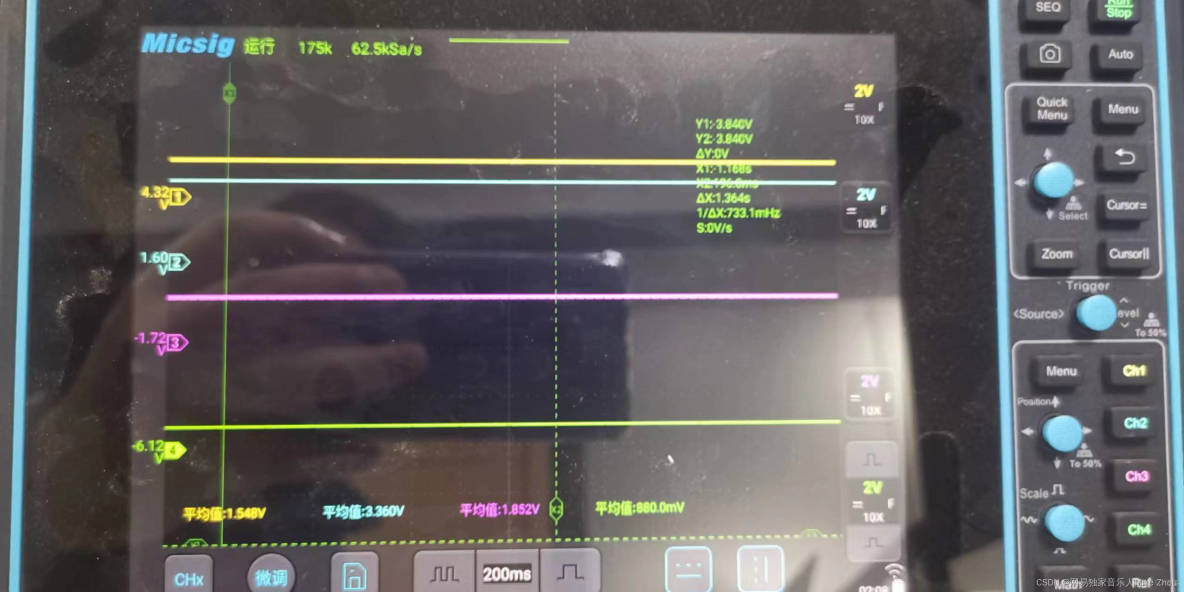
但其實是關閉電源的操作不對:
現在我加了一個 就是在關閉VCC_5V後 把EN1 EN2 EN3都關閉 然後重新打開VCC_5V 現在就不會有默認輸出了
嚴格按照這個順序來操作 就不會出現buck默認輸出的問題 也不會有電壓跳變
也就是説 在關閉LP87524的BUCK輸出前 要將EN1 EN2 EN3關閉 最好是先進行關閉函數再關閉總電源
附錄:結構框架
雷達基本原理敍述
雷達工作原理是上電-發送chirps-幀結束-處理-上電循環
一個Frame,首先是信號發送,比如96個chirp就順次發出去,然後接收回來,混頻濾波,ADC採樣,這些都是射頻模塊的東西。射頻完成之後,FFT,CFAR,DOA這些就是信號處理的東西。然後輸出給那個結構體,就是當前幀獲得的點雲了。
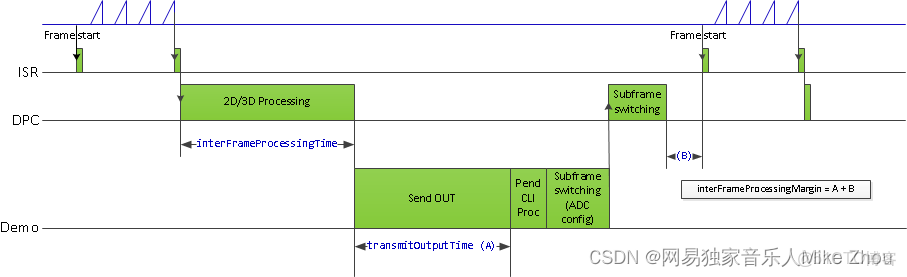
在射頻發送階段 一個frame發送若干個chirp 也就是上圖左上角
第一個綠色點為frame start 第二個綠色點為frame end
其中發送若干chirps(小三角形)
chirps的個數稱為numLoops(代碼中 rlFrameCfg_t結構體)
在mmwave studio上位機中 則稱為 no of chirp loopsframe end 到 週期結束的時間為計算時間 稱為inter frame period
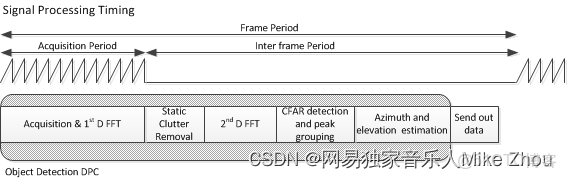
frame start到循環結束的時間稱為framePeriodicity(代碼中 rlFrameCfg_t結構體)
在mmwave studio上位機中 則稱為 Periodicity如下圖frame配置部分
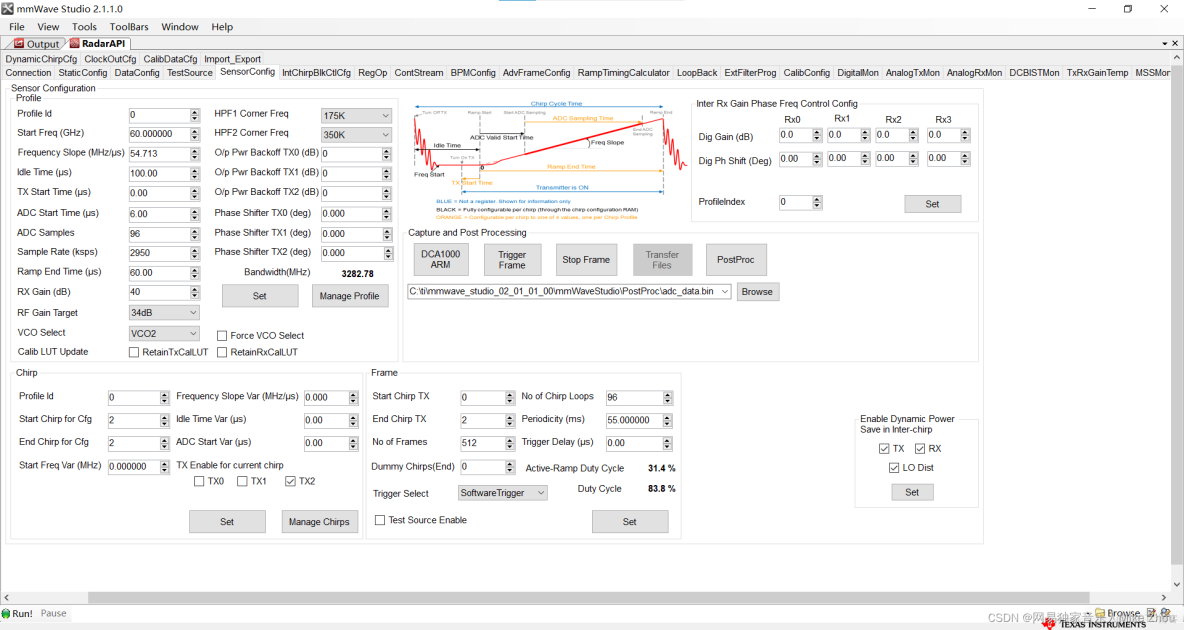
在inter frame Periodicity時間內(比如這裏整個週期是55ms)
就是用於計算和處理的時間 一定比55ms要小
如果chirps很多的話 那麼計算時間就會減小
如果是處理點雲數據 則只需要每一幀計算一次點雲即可
計算出當前幀的xyz座標和速度 以及保存時間戳
雷達天線排列位置
在工業雷達包:
C:\ti\mmwave_industrial_toolbox_4_12_0\antennas\ant_rad_patterns路徑下 有各個EVM開發板的天線排列説明
同樣的 EVM手冊中也有
如IWR6843AOPEVM:
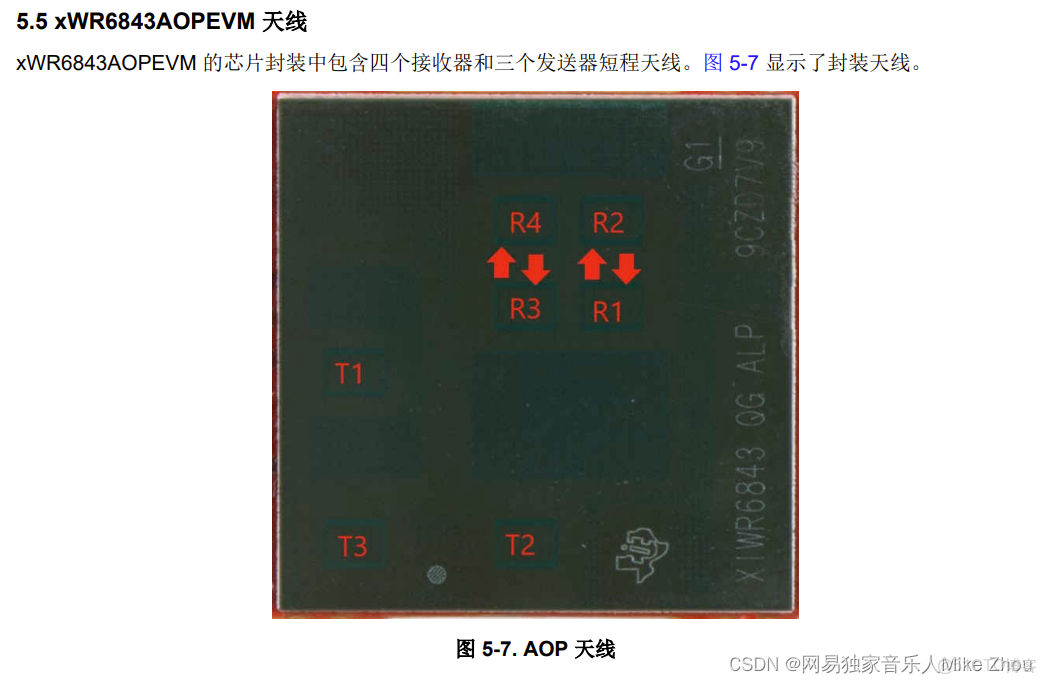
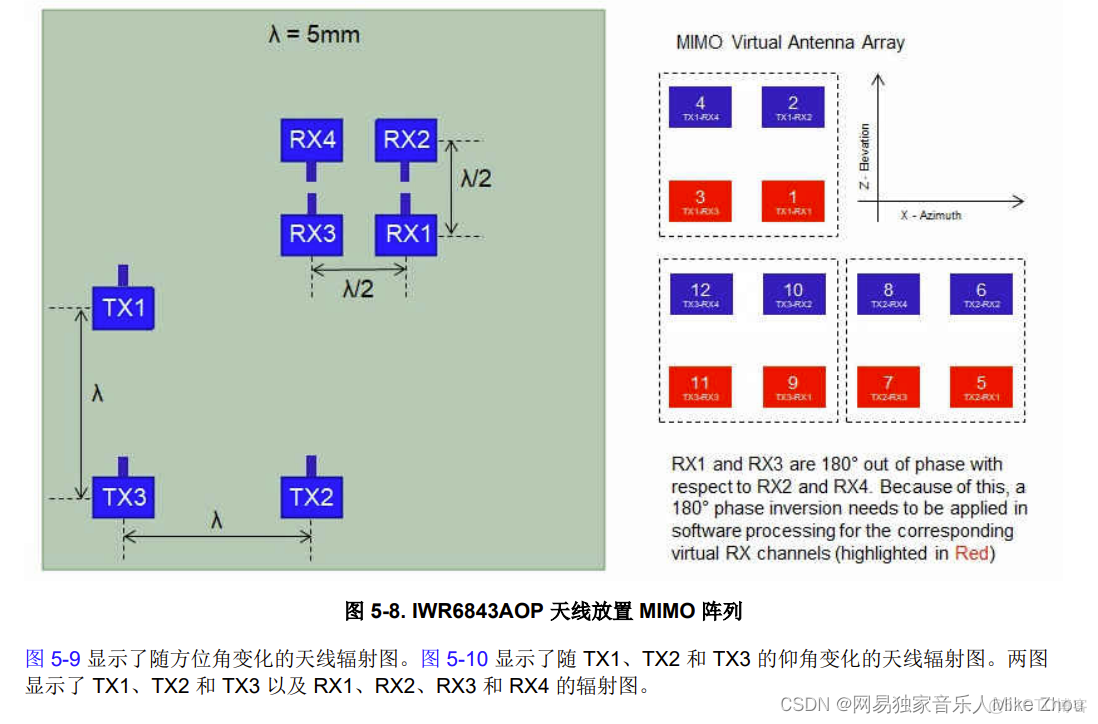
其天線的間距等等位於數據手冊:
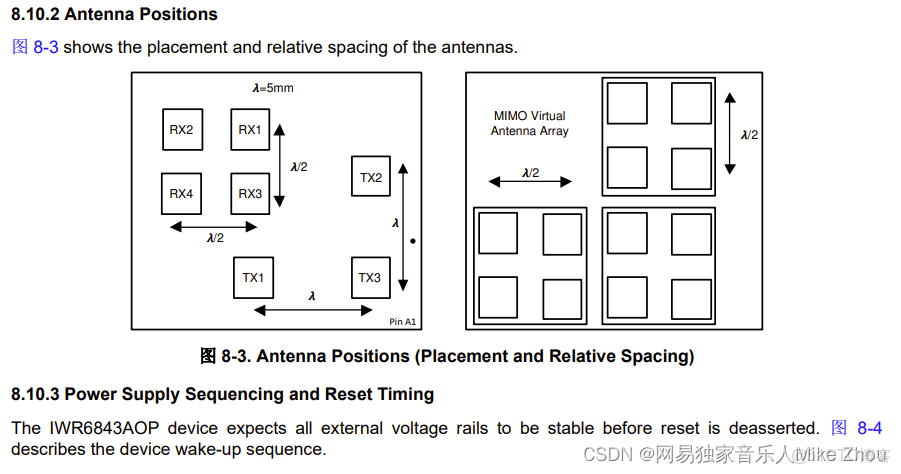
芯片框架
IWR6843AOP可以分成三個主要部分及多個外設
BSS:雷達前端部分
MSS:cortex-rf4內核 主要用於控制
DSS: DSP C674內核 主要用於信號處理
外設:UART GPIO DPM HWA等
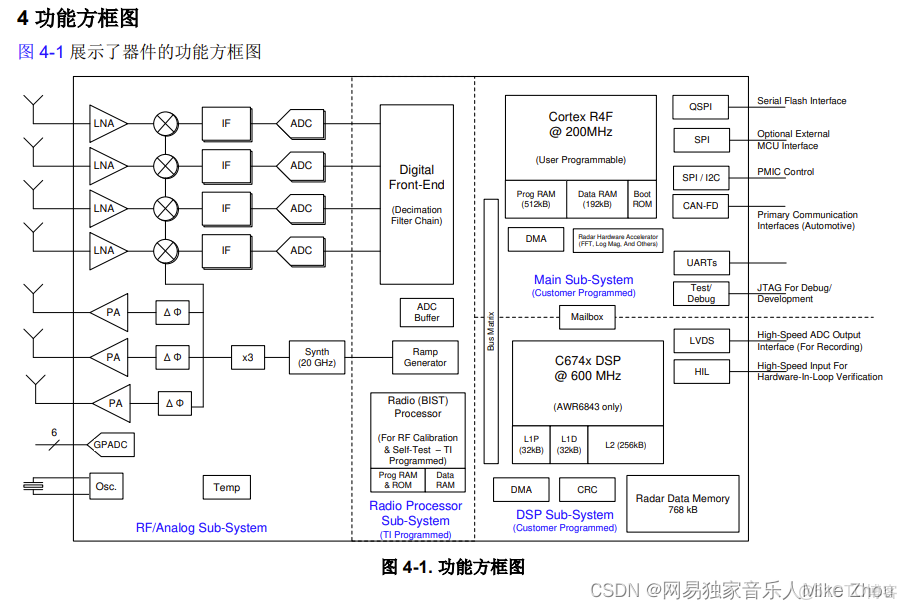
其中 大部分外設可以被MSS或DSS調用
另外 雷達前端BSS部分在SDK裏由MMWave API調用
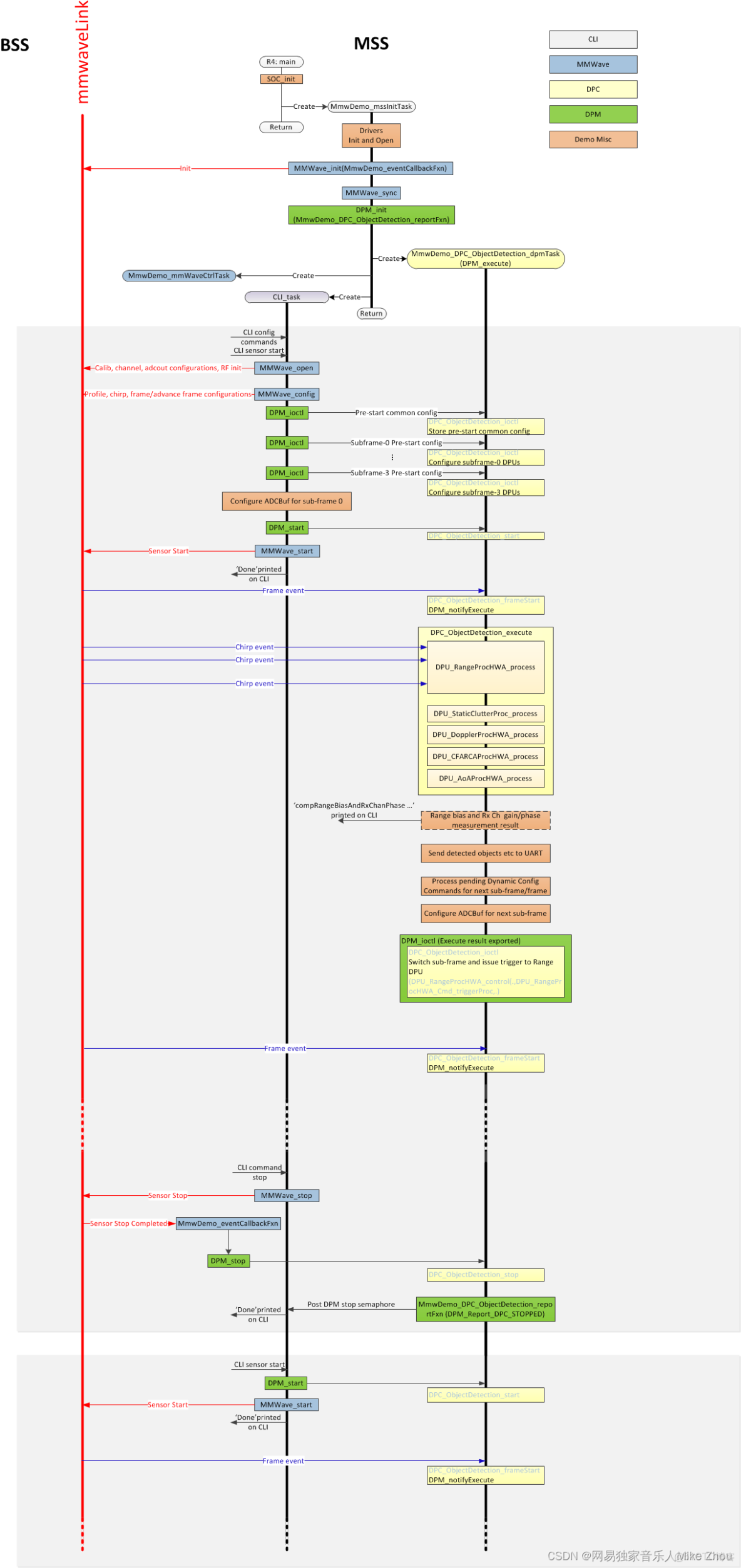
代碼框架上 可以分成兩個代碼 MSS和DSS 兩個代碼同時運行 通過某些外設進行同步 協同運作
但也可以只跑一個內核 在僅MSS模式下 依舊可以調用某些用於信號處理的外設 demo代碼就是如此
如下圖為demo代碼流程
Demo工程功能
IWR6843AOP的開箱工程是根據IWR6843AOPEVM開發板來的
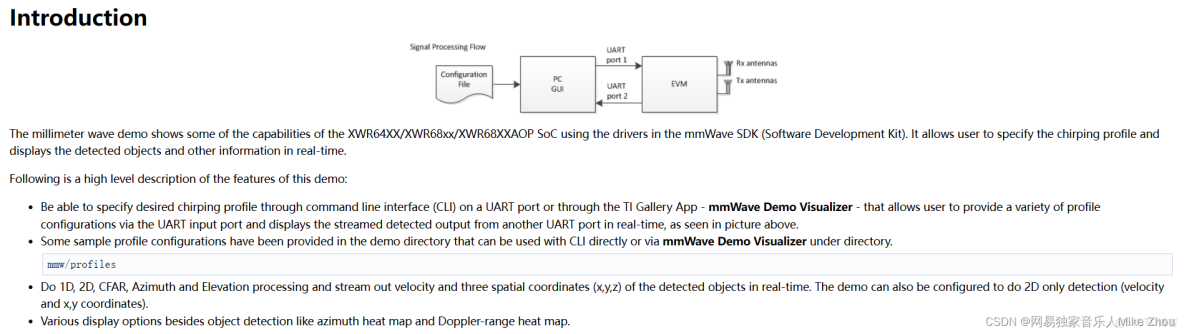
該工程可以將IWR6843AOP的兩個串口利用起來 實現的功能主要是兩個方面:
通過115200波特率的串口配置參數 建立握手協議
通過115200*8的串口輸出雷達數據
此工程需要匹配TI官方的上位機:mmWave_Demo_Visualizer_3.6.0來使用
該上位機可以在連接串口後自動化操作 並且對雷達數據可視化
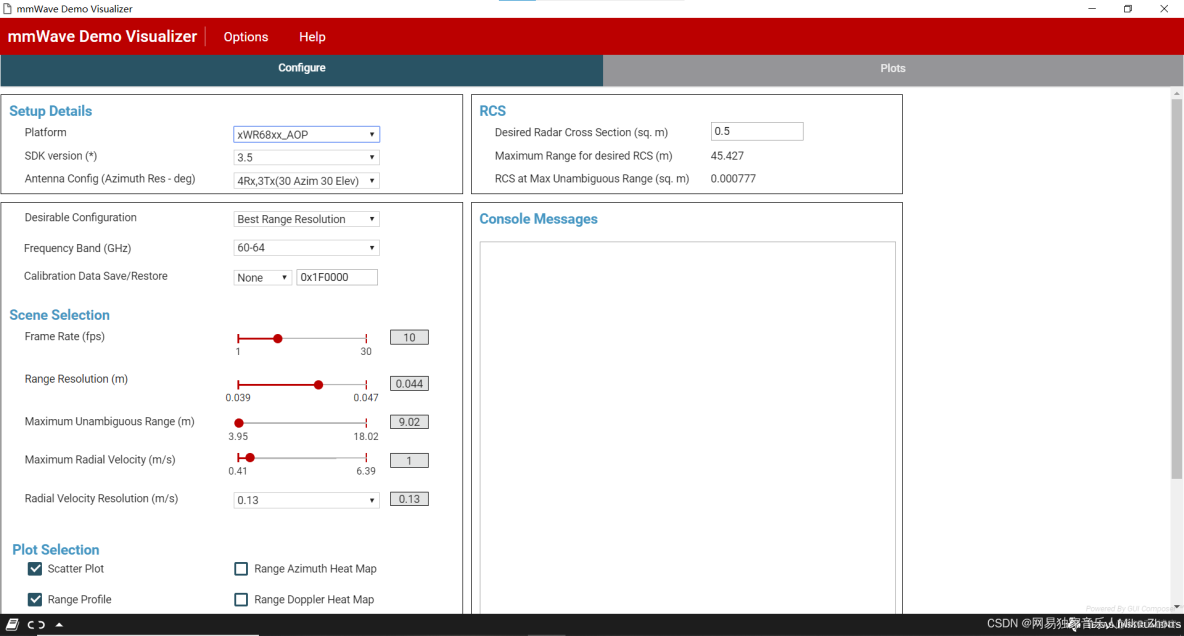
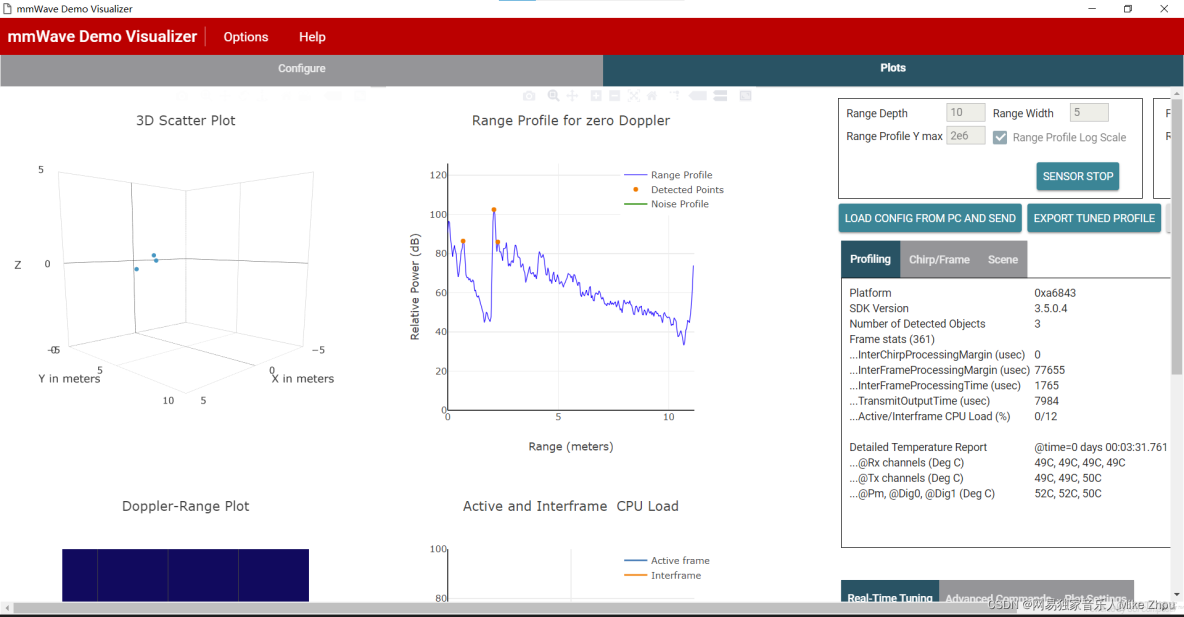
關於雷達參數配置 則在SDK的mmw\profiles目錄下
言簡意賅 可以直接更改該目錄下的文件參數來達到配置雷達參數的目的
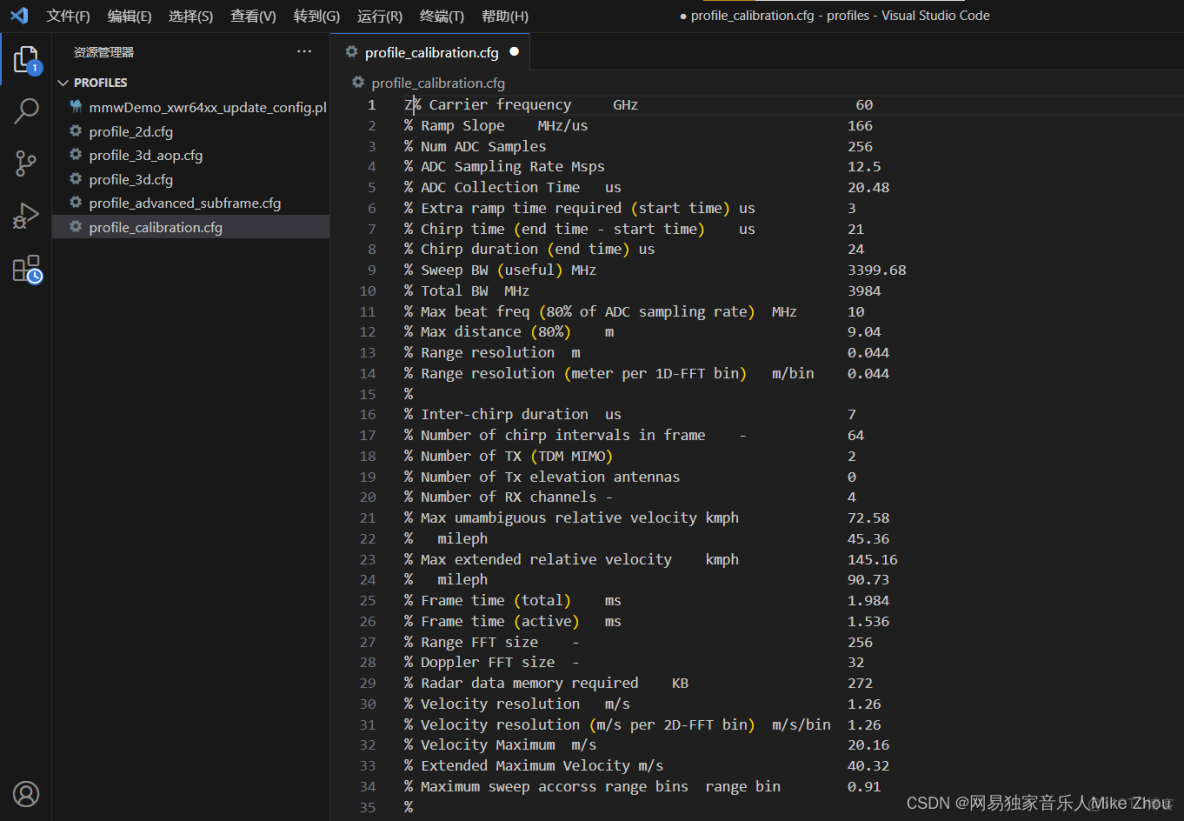
但這種方法不利於直接更改 每次用上位機運行後的參數是固定的(上位機運行需要SDK環境) 所以也可以在代碼中寫死 本文探討的就是這個方向
CCS工程導入
首先 在工業雷達包目錄下找到該工程設置
C:\ti\mmwave_industrial_toolbox_4_12_0\labs\Out_Of_Box_Demo\src\xwr6843AOP使用CCS的import project功能導入工程後 即可完成環境搭建
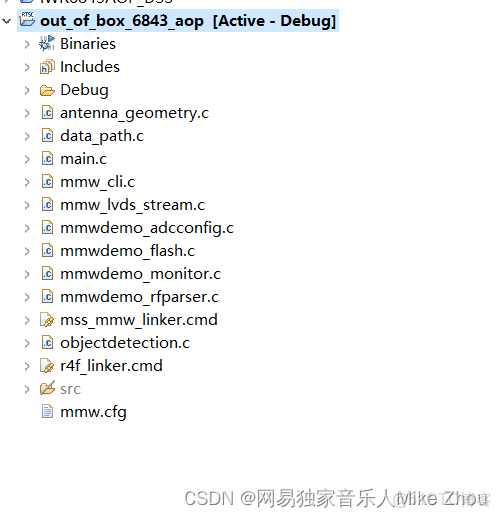
這裏用到的SDK最新版為3.6版本
工程敍述
以下來自官方文檔 可以直接跳過
Software Tasks
The demo consists of the following (SYSBIOS) tasks:
MmwDemo_initTask. This task is created/launched by main and is a one-time active task whose main functionality is to initialize drivers (<driver>_init), MMWave module (MMWave_init), DPM module (DPM_init), open UART and data path related drivers (EDMA, HWA), and create/launch the following tasks (the CLI_task is launched indirectly by calling CLI_open).
  CLI_task. This command line interface task provides a simplified 'shell' interface which allows the configuration of the BSS via the mmWave interface (MMWave_config). It parses input CLI configuration commands like chirp profile and GUI configuration. When sensor start CLI command is parsed, all actions related to starting sensor and starting the processing the data path are taken. When sensor stop CLI command is parsed, all actions related to stopping the sensor and stopping the processing of the data path are taken
  MmwDemo_mmWaveCtrlTask. This task is used to provide an execution context for the mmWave control, it calls in an endless loop the MMWave_execute API.
  MmwDemo_DPC_ObjectDetection_dpmTask. This task is used to provide an execution context for DPM (Data Path Manager) execution, it calls in an endless loop the DPM_execute API. In this context, all of the registered object detection DPC (Data Path Chain) APIs like configuration, control and execute will take place. In this task. When the DPC's execute API produces the detected objects and other results, they are transmitted out of the UART port for display using the visualizer.
Data Path
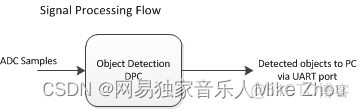
Top Level Data Path Processing Chain
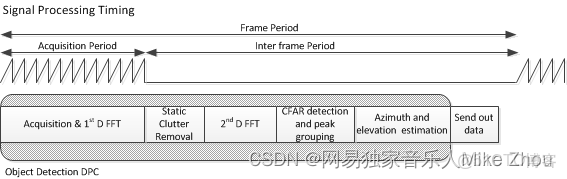
Top Level Data Path Timing
The data path processing consists of taking ADC samples as input and producing detected objects (point-cloud and other information) to be shipped out of UART port to the PC. The algorithm processing is realized using the DPM registered Object Detection DPC. The details of the processing in DPC can be seen from the following doxygen documentation:ti/datapath/dpc/objectdetection/objdethwa/docs/doxygen/html/index.htmlOutput information sent to host
Output packets with the detection information are sent out every frame through the UART. Each packet consists of the header MmwDemo_output_message_header_t and the number of TLV items containing various data information with types enumerated in MmwDemo_output_message_type_e. The numerical values of the types can be found in mmw_output.h. Each TLV item consists of type, length (MmwDemo_output_message_tl_t) and payload information. The structure of the output packet is illustrated in the following figure. Since the length of the packet depends on the number of detected objects it can vary from frame to frame. The end of the packet is padded so that the total packet length is always multiple of 32 Bytes.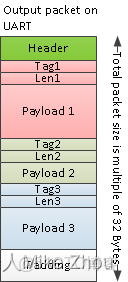
Output packet structure sent to UART
The following subsections describe the structure of each TLV.
List of detected objects
Type: (MMWDEMO_OUTPUT_MSG_DETECTED_POINTS)
Length: (Number of detected objects) x (size of DPIF_PointCloudCartesian_t)
Value: Array of detected objects. The information of each detected object is as per the structure DPIF_PointCloudCartesian_t. When the number of detected objects is zero, this TLV item is not sent. The maximum number of objects that can be detected in a sub-frame/frame is DPC_OBJDET_MAX_NUM_OBJECTS.
The orientation of x,y and z axes relative to the sensor is as per the following figure. (Note: The antenna arrangement in the figure is shown for standard EVM (see gAntDef_default) as an example but the figure is applicable for any antenna arrangement.)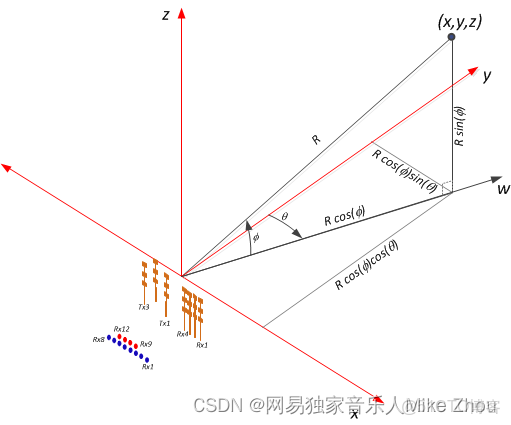
Coordinate Geometry
The whole detected objects TLV structure is illustrated in figure below.
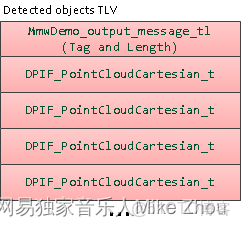
Detected objects TLV
Range profile
Type: (MMWDEMO_OUTPUT_MSG_RANGE_PROFILE)
Length: (Range FFT size) x (size of uint16_t)
Value: Array of profile points at 0th Doppler (stationary objects). The points represent the sum of log2 magnitudes of received antennas expressed in Q9 format.
Noise floor profile
Type: (MMWDEMO_OUTPUT_MSG_NOISE_PROFILE)
Length: (Range FFT size) x (size of uint16_t)
Value: This is the same format as range profile but the profile is at the maximum Doppler bin (maximum speed objects). In general for stationary scene, there would be no objects or clutter at maximum speed so the range profile at such speed represents the receiver noise floor.
Azimuth static heatmap
Type: (MMWDEMO_OUTPUT_MSG_AZIMUT_STATIC_HEAT_MAP)
Length: (Range FFT size) x (Number of "azimuth" virtual antennas) (size of cmplx16ImRe_t_)
Value: Array DPU_AoAProcHWA_HW_Resources::azimuthStaticHeatMap. The antenna data are complex symbols, with imaginary first and real second in the following order:
Imag(ant 0, range 0), Real(ant 0, range 0),...,Imag(ant N-1, range 0),Real(ant N-1, range 0)
...
Imag(ant 0, range R-1), Real(ant 0, range R-1),...,Imag(ant N-1, range R-1),Real(ant N-1, range R-1)Note that the number of virtual antennas is equal to the number of “azimuth” virtual antennas. The antenna symbols are arranged in the order as they occur at the input to azimuth FFT. Based on this data the static azimuth heat map could be constructed by the GUI running on the host.
Azimuth/Elevation static heatmap
Type: (MMWDEMO_OUTPUT_MSG_AZIMUT_ELEVATION_STATIC_HEAT_MAP)
Length: (Range FFT size) x (Number of all virtual antennas) (size of cmplx16ImRe_t_)
Value: Array DPU_AoAProcHWA_HW_Resources::azimuthStaticHeatMap. The antenna data are complex symbols, with imaginary first and real second in the following order:
Imag(ant 0, range 0), Real(ant 0, range 0),...,Imag(ant N-1, range 0),Real(ant N-1, range 0)
...
Imag(ant 0, range R-1), Real(ant 0, range R-1),...,Imag(ant N-1, range R-1),Real(ant N-1, range R-1)Note that the number of virtual antennas is equal to the total number of active virtual antennas. The antenna symbols are arranged in the order as they occur in the radar cube matrix. This TLV is sent by AOP version of MMW demo, that uses AOA2D DPU. Based on this data the static azimuth or elevation heat map could be constructed by the GUI running on the host.
Range/Doppler heatmap
Type: (MMWDEMO_OUTPUT_MSG_RANGE_DOPPLER_HEAT_MAP)
Length: (Range FFT size) x (Doppler FFT size) (size of uint16_t)
Value: Detection matrix DPIF_DetMatrix::data. The order is :
X(range bin 0, Doppler bin 0),...,X(range bin 0, Doppler bin D-1),
...
X(range bin R-1, Doppler bin 0),...,X(range bin R-1, Doppler bin D-1)Stats information
Type: (MMWDEMO_OUTPUT_MSG_STATS )
Length: (size of MmwDemo_output_message_stats_t)
Value: Timing information as per MmwDemo_output_message_stats_t. See timing diagram below related to the stats.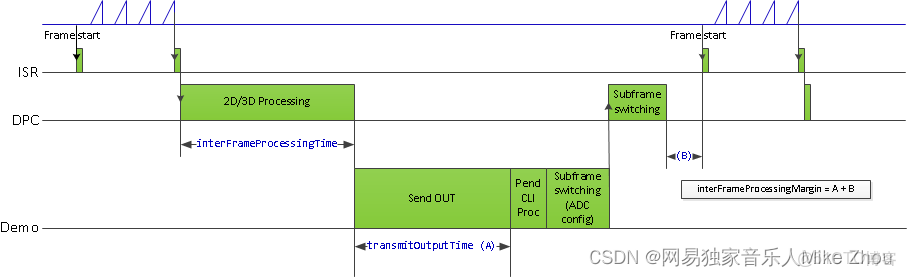
Processing timing
Note:
The MmwDemo_output_message_stats_t::interChirpProcessingMargin is not computed (it is always set to 0). This is because there is no CPU involvement in the 1D processing (only HWA and EDMA are involved), and it is not possible to know how much margin is there in chirp processing without CPU being notified at every chirp when processing begins (chirp event) and when the HWA-EDMA computation ends. The CPU is intentionally kept free during 1D processing because a real application may use this time for doing some post-processing algorithm execution.
While the MmwDemo_output_message_stats_t::interFrameProcessingTime reported will be of the current sub-frame/frame, the MmwDemo_output_message_stats_t::interFrameProcessingMargin and MmwDemo_output_message_stats_t::transmitOutputTime will be of the previous sub-frame (of the same MmwDemo_output_message_header_t::subFrameNumber as that of the current sub-frame) or of the previous frame.
The MmwDemo_output_message_stats_t::interFrameProcessingMargin excludes the UART transmission time (available as MmwDemo_output_message_stats_t::transmitOutputTime). This is done intentionally to inform the user of a genuine inter-frame processing margin without being influenced by a slow transport like UART, this transport time can be significantly longer for example when streaming out debug information like heat maps. Also, in a real product deployment, higher speed interfaces (e.g LVDS) are likely to be used instead of UART. User can calculate the margin that includes transport overhead (say to determine the max frame rate that a particular demo configuration will allow) using the stats because they also contain the UART transmission time.
The CLI command “guMonitor” specifies which TLV element will be sent out within the output packet. The arguments of the CLI command are stored in the structure MmwDemo_GuiMonSel_t.
Side information of detected objects
Type: (MMWDEMO_OUTPUT_MSG_DETECTED_POINTS_SIDE_INFO)
Length: (Number of detected objects) x (size of DPIF_PointCloudSideInfo_t)
Value: Array of detected objects side information. The side information of each detected object is as per the structure DPIF_PointCloudSideInfo_t). When the number of detected objects is zero, this TLV item is not sent.
Temperature Stats
Type: (MMWDEMO_OUTPUT_MSG_TEMPERATURE_STATS)
Length: (size of MmwDemo_temperatureStats_t)
Value: Structure of detailed temperature report as obtained from Radar front end. MmwDemo_temperatureStats_t::tempReportValid is set to return value of rlRfGetTemperatureReport. If MmwDemo_temperatureStats_t::tempReportValid is 0, values in MmwDemo_temperatureStats_t::temperatureReport are valid else they should be ignored. This TLV is sent along with Stats TLV described in Stats information
Range Bias and Rx Channel Gain/Phase Measurement and Compensation
Because of imperfections in antenna layouts on the board, RF delays in SOC, etc, there is need to calibrate the sensor to compensate for bias in the range estimation and receive channel gain and phase imperfections. The following figure illustrates the calibration procedure.
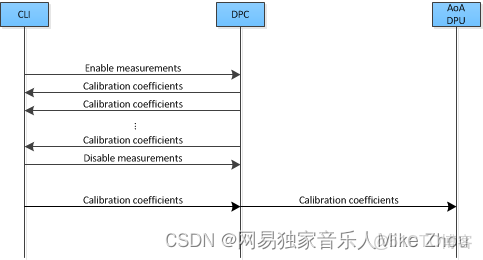
Calibration procedure ladder diagram
The calibration procedure includes the following steps:
Set a strong target like corner reflector at the distance of X meter (X less than 50 cm is not recommended) at boresight.
Set the following command in the configuration profile in .../profiles/profile_calibration.cfg, to reflect the position X as follows: where D (in meters) is the distance of window around X where the peak will be searched. The purpose of the search window is to allow the test environment from not being overly constrained say because it may not be possible to clear it of all reflectors that may be stronger than the one used for calibration. The window size is recommended to be at least the distance equivalent of a few range bins. One range bin for the calibration profile (profile_calibration.cfg) is about 5 cm. The first argument "1" is to enable the measurement. The stated configuration profile (.cfg) must be used otherwise the calibration may not work as expected (this profile ensures all transmit and receive antennas are engaged among other things needed for calibration).
measureRangeBiasAndRxChanPhase 1 X D
Start the sensor with the configuration file.
In the configuration file, the measurement is enabled because of which the DPC will be configured to perform the measurement and generate the measurement result (DPU_AoAProc_compRxChannelBiasCfg_t) in its result structure (DPC_ObjectDetection_ExecuteResult_t::compRxChanBiasMeasurement), the measurement results are written out on the CLI port (MmwDemo_measurementResultOutput) in the format below: For details of how DPC performs the measurement, see the DPC documentation.
compRangeBiasAndRxChanPhase <rangeBias> <Re(0,0)> <Im(0,0)> <Re(0,1)> <Im(0,1)> ... <Re(0,R-1)> <Im(0,R-1)> <Re(1,0)> <Im(1,0)> ... <Re(T-1,R-1)> <Im(T-1,R-1)>
  The command printed out on the CLI now can be copied and pasted in any configuration file for correction purposes. This configuration will be passed to the DPC for the purpose of applying compensation during angle computation, the details of this can be seen in the DPC documentation. If compensation is not desired, the following command should be given (depending on the EVM and antenna arrangement) Above sets the range bias to 0 and the phase coefficients to unity so that there is no correction. Note the two commands must always be given in any configuration file, typically the measure commmand will be disabled when the correction command is the desired one.
  For ISK EVM:
  compRangeBiasAndRxChanPhase 0.0   1 0 1 0 1 0 1 0 1 0 1 0 1 0 1 0 1 0 1 0 1 0 1 0
  For AOP EVM
  compRangeBiasAndRxChanPhase 0.0   1 0 -1 0 1 0 -1 0 1 0 -1 0 1 0 -1 0 1 0 -1 0 1 0 -1 0
Streaming data over LVDS
The LVDS streaming feature enables the streaming of HW data (a combination of ADC/CP/CQ data) and/or user specific SW data through LVDS interface. The streaming is done mostly by the CBUFF and EDMA peripherals with minimal CPU intervention. The streaming is configured through the MmwDemo_LvdsStreamCfg_t CLI command which allows control of HSI header, enable/disable of HW and SW data and data format choice for the HW data. The choices for data formats for HW data are:
MMW_DEMO_LVDS_STREAM_CFG_DATAFMT_DISABLED
MMW_DEMO_LVDS_STREAM_CFG_DATAFMT_ADC
MMW_DEMO_LVDS_STREAM_CFG_DATAFMT_CP_ADC_CQ
In order to see the high-level data format details corresponding to the above data format configurations, refer to the corresponding slides in ti\drivers\cbuff\docs\CBUFF_Transfers.pptx
When HW data LVDS streaming is enabled, the ADC/CP/CQ data is streamed per chirp on every chirp event. When SW data streaming is enabled, it is streamed during inter-frame period after the list of detected objects for that frame is computed. The SW data streamed every frame/sub-frame is composed of the following in time:
HSI header (HSIHeader_t): refer to HSI module for details.
User data header: MmwDemo_LVDSUserDataHeader
User data payloads:
Point-cloud information as a list : DPIF_PointCloudCartesian_t x number of detected objects
Point-cloud side information as a list : DPIF_PointCloudSideInfo_t x number of detected objects
The format of the SW data streamed is shown in the following figure:
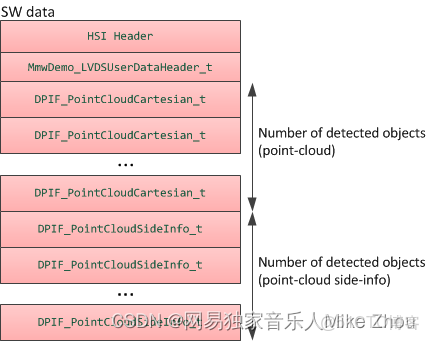
LVDS SW Data format
Note:
Only single-chirp formats are allowed, multi-chirp is not supported.
When number of objects detected in frame/sub-frame is 0, there is no transmission beyond the user data header.
For HW data, the inter-chirp duration should be sufficient to stream out the desired amount of data. For example, if the HW data-format is ADC and HSI header is enabled, then the total amount of data generated per chirp is:
(numAdcSamples * numRxChannels * 4 (size of complex sample) + 52 [sizeof(HSIDataCardHeader_t) + sizeof(HSISDKHeader_t)] ) rounded up to multiples of 256 [=sizeof(HSIHeader_t)] bytes.
The chirp time Tc in us = idle time + ramp end time in the profile configuration. For n-lane LVDS with each lane at a maximum of B Mbps,
maximum number of bytes that can be send per chirp = Tc * n * B / 8 which should be greater than the total amount of data generated per chirp i.e
Tc * n * B / 8 >= round-up(numAdcSamples * numRxChannels * 4 + 52, 256).
E.g if n = 2, B = 600 Mbps, idle time = 7 us, ramp end time = 44 us, numAdcSamples = 512, numRxChannels = 4, then 7650 >= 8448 is violated so this configuration will not work. If the idle-time is doubled in the above example, then we have 8700 > 8448, so this configuration will work.
For SW data, the number of bytes to transmit each sub-frame/frame is:
52 [sizeof(HSIDataCardHeader_t) + sizeof(HSISDKHeader_t)] + sizeof(MmwDemo_LVDSUserDataHeader_t) [=8] +
number of detected objects (Nd) * { sizeof(DPIF_PointCloudCartesian_t) [=16] + sizeof(DPIF_PointCloudSideInfo_t) [=4] } rounded up to multiples of 256 [=sizeof(HSIHeader_t)] bytes.
or X = round-up(60 + Nd * 20, 256). So the time to transmit this data will be
X * 8 / (n*B) us. The maximum number of objects (Ndmax) that can be detected is defined in the DPC (DPC_OBJDET_MAX_NUM_OBJECTS). So if Ndmax = 500, then time to transmit SW data is 68 us. Because we parallelize this transmission with the much slower UART transmission, and because UART transmission is also sending at least the same amount of information as the LVDS, the LVDS transmission time will not add any burdens on the processing budget beyond the overhead of reconfiguring and activating the CBUFF session (this overhead is likely bigger than the time to transmit).
The total amount of data to be transmitted in a HW or SW packet must be greater than the minimum required by CBUFF, which is 64 bytes or 32 CBUFF Units (this is the definition CBUFF_MIN_TRANSFER_SIZE_CBUFF_UNITS in the CBUFF driver implementation). If this threshold condition is violated, the CBUFF driver will return an error during configuration and the demo will generate a fatal exception as a result. When HSI header is enabled, the total transfer size is ensured to be at least 256 bytes, which satisfies the minimum. If HSI header is disabled, for the HW session, this means that numAdcSamples * numRxChannels * 4 >= 64. Although mmwavelink allows minimum number of ADC samples to be 2, the demo is supported for numAdcSamples >= 64. So HSI header is not required to be enabled for HW only case. But if SW session is enabled, without the HSI header, the bytes in each packet will be 8 + Nd * 20. So for frames/sub-frames where Nd < 3, the demo will generate exception. Therefore HSI header must be enabled if SW is enabled, this is checked in the CLI command validation.
Implementation Notes
The LVDS implementation is mostly present in mmw_lvds_stream.h and mmw_lvds_stream.c with calls in mss_main.c. Additionally HSI clock initialization is done at first time sensor start using MmwDemo_mssSetHsiClk.
EDMA channel resources for CBUFF/LVDS are in the global resource file (mmw_res.h, see Hardware Resource Allocation) along with other EDMA resource allocation. The user data header and two user payloads are configured as three user buffers in the CBUFF driver. Hence SW allocation for EDMA provides for three sets of EDMA resources as seen in the SW part (swSessionEDMAChannelTable[.]) of MmwDemo_LVDSStream_EDMAInit. The maximum number of HW EDMA resources are needed for the data-format MMW_DEMO_LVDS_STREAM_CFG_DATAFMT_CP_ADC_CQ, which as seen in the corresponding slide in ti\drivers\cbuff\docs\CBUFF_Transfers.pptx is 12 channels (+ shadows) including the 1st special CBUFF EDMA event channel which CBUFF IP generates to the EDMA, hence the HW part (hwwSessionEDMAChannelTable[.]) of MmwDemo_LVDSStream_EDMAInit has 11 table entries.
Although the CBUFF driver is configured for two sessions (hw and sw), at any time only one can be active. So depending on the LVDS CLI configuration and whether advanced frame or not, there is logic to activate/deactivate HW and SW sessions as necessary.
The CBUFF session (HW/SW) configure-create and delete depends on whether or not re-configuration is required after the first time configuration.
For HW session, re-configuration is done during sub-frame switching to re-configure for the next sub-frame but when there is no advanced frame (number of sub-frames = 1), the HW configuration does not need to change so HW session does not need to be re-created.
For SW session, even though the user buffer start addresses and sizes of headers remains same, the number of detected objects which determines the sizes of some user buffers changes from one sub-frame/frame to another sub-frame/frame. Therefore SW session needs to be recreated every sub-frame/frame.
User may modify the application software to transmit different information than point-cloud in the SW data e.g radar cube data (output of range DPU). However the CBUFF also has a maximum link list entry size limit of 0x3FFF CBUFF units or 32766 bytes. This means it is the limit for each user buffer entry [there are maximum of 3 entries -1st used for user data header, 2nd for point-cloud and 3rd for point-cloud side information]. During session creation, if this limit is exceeded, the CBUFF will return an error (and demo will in turn generate an exception). A single physical buffer of say size 50000 bytes may be split across two user buffers by providing one user buffer with (address, size) = (start address, 25000) and 2nd user buffer with (address, size) = (start address + 25000, 25000), beyond this two (or three if user data header is also replaced) limit, the user will need to create and activate (and wait for completion) the SW session multiple times to accomplish the transmission.
The following figure shows a timing diagram for the LVDS streaming (the figure is not to scale as actual durations will vary based on configuration).
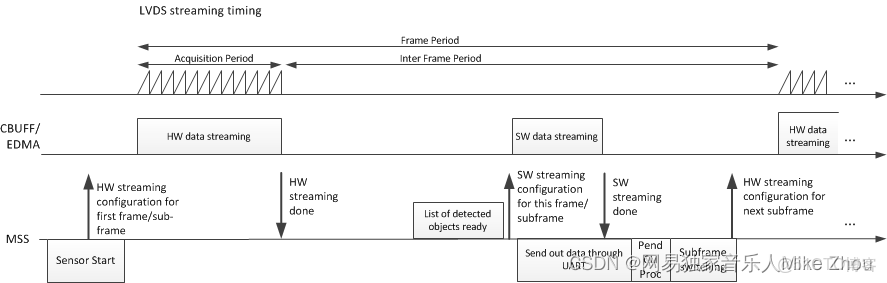
How to bypass CLI
Re-implement the file mmw_cli.c as follows:
MmwDemo_CLIInit should just create a task with input taskPriority. Lets say the task is called "MmwDemo_sensorConfig_task".
All other functions are not needed
Implement the MmwDemo_sensorConfig_task as follows:
Fill gMmwMCB.cfg.openCfg
Fill gMmwMCB.cfg.ctrlCfg
Add profiles and chirps using MMWave_addProfile and MMWave_addChirp functions
Call MmwDemo_CfgUpdate for every offset in Offsets for storing CLI configuration (MMWDEMO_xxx_OFFSET in mmw.h)
Fill gMmwMCB.dataPathObj.objDetCommonCfg.preStartCommonCfg
Call MmwDemo_openSensor
Call MmwDemo_startSensor (One can use helper function MmwDemo_isAllCfgInPendingState to know if all dynamic config was provided)
Hardware Resource Allocation
The Object Detection DPC needs to configure the DPUs hardware resources (HWA, EDMA). Even though the hardware resources currently are only required to be allocated for this one and only DPC in the system, the resource partitioning is shown to be in the ownership of the demo. This is to illustrate the general case of resource allocation across more than one DPCs and/or demo's own processing that is post-DPC processing. This partitioning can be seen in the mmw_res.h file. This file is passed as a compiler command line define"--define=APP_RESOURCE_FILE="<ti/demo/xwr64xx/mmw/mmw_res.h>"in mmw.mak when building the DPC sources as part of building the demo application and is referred in object detection DPC sources where needed as
#include APP_RESOURCE_FILE
