
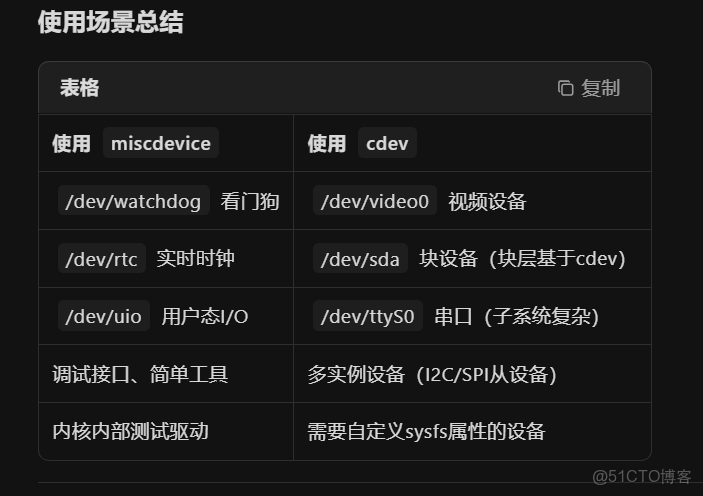
一、miscdevice
只有基礎設備節點,無 /sys/class/misc/myled/ 詳細屬性
// misc_register() 內部實現
int misc_register(struct miscdevice *misc)
{
    // ... 省略錯誤檢查
    dev = MKDEV(MISC_MAJOR, misc->minor);  // 強制主設備號10
    cdev_init(&misc->cdev, misc->fops);    // 內部使用cdev
    cdev_add(&misc->cdev, dev, 1);
    device_create(misc_class, NULL, dev, misc, "%s", misc->name);
}
miscdevice 本質上是預配置好設備號、類、節點名稱的  cdev 快捷方式  。
二、cdev + class
- 自動生成完整的
/sys/class/myled_class/myled/目錄,支持udev規則
static int __init my_init(void)
{
    // 1. 分配設備號
    alloc_chrdev_region(&dev_num, 0, 1, "myled");

    // 2. 初始化cdev
    cdev_init(&my_cdev, &led_fops);
    cdev_add(&my_cdev, dev_num, 1);

    // 3. 創建sysfs類
    my_class = class_create(THIS_MODULE, "myled_class");

    // 4. 創建設備節點
    device_create(my_class, NULL, dev_num, NULL, "myled");

    return 0;
}
1. 舊式簡化API(已不推薦使用)
// 一句話完成:註冊主設備號 + cdev_init/add
// 缺點:無法動態次設備號、不靈活、隱藏細節
register_chrdev(major, "name", &fops);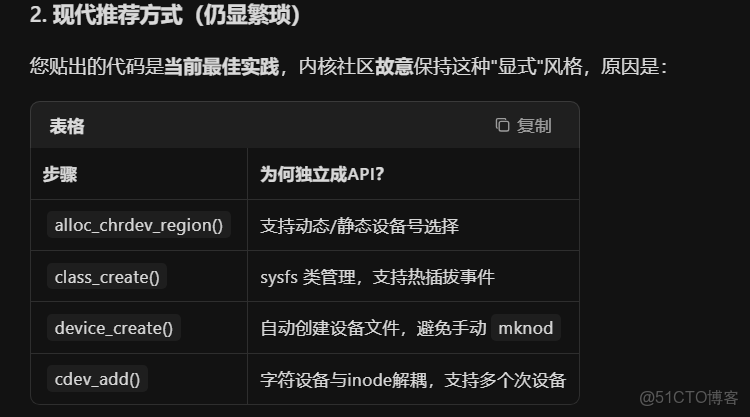
- Platform_Driver
- 私有數據管理方法1:
// 你的私有數據結構
struct my_private_data {
    struct gpio_desc *led;
    int value;
};

static int example_probe(struct platform_device *pdev)
{
    // 在probe中賦值
    pdev->dev.driver_data = devm_kzalloc(&pdev->dev, sizeof(*priv), GFP_KERNEL);
    // 問題1:無類型檢查,任何void*都能賦值
    // 問題2:在remove中使用時:
    struct my_private_data *priv = pdev->dev.driver_data;  // 隱式轉換,無警告
}- 方私有數據管理方法2(好):
// 在probe中:
static int example_probe(struct platform_device *pdev)
{

    struct my_private_data *priv = devm_kzalloc(...);
    platform_set_drvdata(pdev, priv);  // 宏內部有類型檢查
}
static int example_remove(struct platform_device *pdev)
{
    // 在remove中:
    struct my_private_data *priv = platform_get_drvdata(pdev);  // 返回正確類型
}


關鍵實現(include/linux/platform_device.h):

static inline void *platform_get_drvdata(const struct platform_device *pdev)
{
    return dev_get_drvdata(&pdev->dev);
}

static inline void platform_set_drvdata(struct platform_device *pdev, void *data)
{
    dev_set_drvdata(&pdev->dev, data);
}
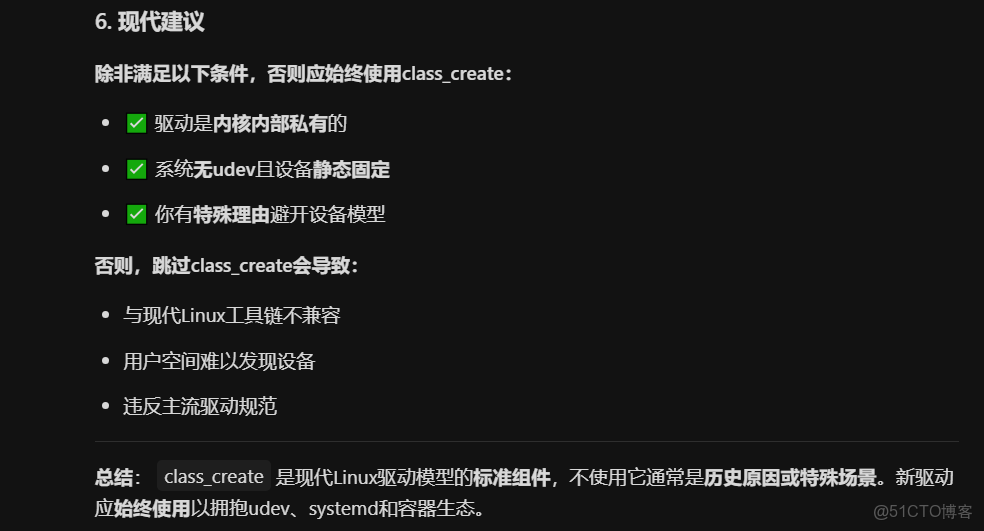
早期設備樹(Device Tree)
某些驅動讓設備樹或ACPI負責設備宣告:
// 只需註冊cdev,設備文件由dt-overlay描述
// 內核自動解析並創建,無需手動class_create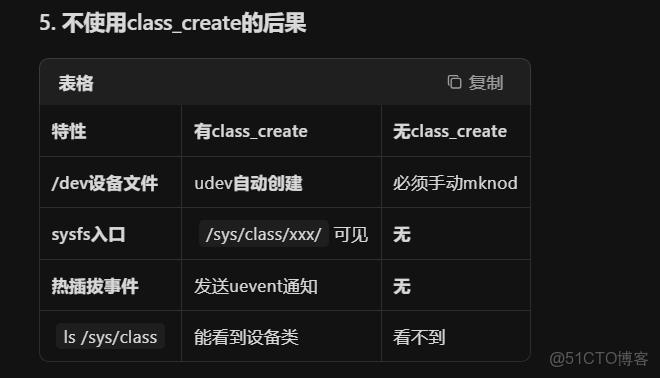
三、設備樹
生成plateform_device
設備樹生成 platform_device 是 Linux 內核啓動時的核心流程,由 drivers/of/platform.c 驅動完成。以下是完整機制解析:
在內核啓動早期,arch/arm/mach-xxx/ 或通用代碼調用:
// arch/arm/mach-imx/mach-imx8m.c
void __init imx8m_init_machine(void)
{
    of_platform_populate(NULL, NULL, NULL, NULL);  // ← 關鍵函數
}該函數啓動對整個設備樹的遞歸掃描,將符合條件的節點轉換為 platform_device。
在 Linux 內核中,platform_device 註冊後在 sysfs 中生成的是文件夾(目錄),而不是文件。
## Platform_device 設備與字符設備的關係
如果給 Platform_device添加ATTR
具體的方法:
在platreform_driver_xxx.c 中添加
// 顯示當前 DMA 狀態
static ssize_t dma_mode_show(struct device *dev,
                             struct device_attribute *attr, char *buf)
{
    struct platform_device *pdev = to_platform_device(dev);
    struct example_driver_data *drv_data = platform_get_drvdata(pdev);

    if (!drv_data) {
        return -ENODEV;
    }

    // 返回當前 DMA 模式的字符串表示
    switch (drv_data->dma_mode) {
    case 0:
        return sprintf(buf, "disabled\n");
    case 1:
        return sprintf(buf, "direct\n");
    case 2:
        return sprintf(buf, "scatter-gather\n");
    default:
        return sprintf(buf, "unknown (%d)\n", drv_data->dma_mode);
    }
}

// 動態設置 DMA 狀態
static ssize_t dma_mode_store(struct device *dev,
                              struct device_attribute *attr,
                              const char *buf, size_t count)
{
    struct platform_device *pdev = to_platform_device(dev);
    struct example_driver_data *drv_data = platform_get_drvdata(pdev);
    int mode;
    int ret;

    if (!drv_data) {
        return -ENODEV;
    }

    // 從用户空間讀取模式值
    ret = kstrtoint(buf, 10, &mode);
    if (ret < 0) {
        // 嘗試解析字符串形式的模式
        if (strncmp(buf, "disabled", 8) == 0) {
            mode = 0;
        } else if (strncmp(buf, "direct", 6) == 0) {
            mode = 1;
        } else if (strncmp(buf, "scatter-gather", 14) == 0) {
            mode = 2;
        } else {
            return -EINVAL; // 無效的模式值
        }
    }

    // 驗證模式值是否有效
    if (mode < 0 || mode > 2) {
        return -EINVAL;
    }

    // 設置新的 DMA 模式
    drv_data->dma_mode = mode;
    printk(KERN_INFO "Example platform driver: DMA mode set to %d\n", mode);

    return count;
}

// 定義設備屬性
static DEVICE_ATTR_RW(dma_mode);
// DEVICE_ATTR_RW 宏展開後自動創建:
// - dma_mode 屬性
// - .show = dma_mode_show (讀回調)
// - .store = dma_mode_store (寫回調)
在probe 中添加
static int example_probe(struct platform_device *pdev)
{


     ---------其它代碼省略----------


   /* 創建 sysfs 屬性文件 - 在 platform 設備目錄下 */
    ret = device_create_file(&pdev->dev, &dev_attr_dma_mode);
    if (ret < 0) {
        printk(KERN_ERR "Failed to create sysfs attribute: %d\n", ret);
        return ret;
    }
}
在這個probe代碼中創建了字符設備,接着註冊了sysfs 文件屬性,我們目前的實現在 platform 設備下創建了 dma_mode 屬性文件,但這確實引發了一個關於設備屬性歸屬的問題。讓我來解釋一下:
在 Linux 驅動模型中,這是兩個不同但相關的概念:
1. Platform 設備 :代表底層硬件抽象,是硬件與驅動程序之間的接口
2. 字符設備 :是提供給用户空間程序訪問的設備節點
## 應該如何處理?
這取決於您的設計意圖:
1. 如果 dma_mode 是硬件配置參數 :
- 當前實現在 platform 設備下創建是合理的,因為它代表硬件配置
- 這使得屬性文件出現在 /sys/devices/platform/example-pdrv/ 目錄下
2. 如果 dma_mode 是字符設備的運行時配置 :
- 應該在字符設備上創建設備屬性
- 這樣屬性文件會出現在 /sys/class/example-driver/example-driver/ 目錄下
# 設備級屬性(platform_device)
/sys/devices/platform/soc/4000f000.serial/dma_mode
# ↑修改隻影響USART3

# 類級屬性(class)
/sys/class/stm32-uart/global_log_level
# ↑修改影響所有STM32 UART設備
四、轉換流程(四步過濾)
Step 1:設備樹節點解析
// drivers/of/platform.c
static int of_platform_bus_create(...)
{
    struct device_node *child;
    // 遍歷所有子節點
    for_each_child_of_node(bus, child) {
        of_platform_device_create_pdata(child, ...);
    }
}
Step 2:四重過濾判斷
內核嚴格檢查節點屬性,任一條件不滿足則跳過:
static struct platform_device *of_platform_device_create_pdata(...)
{
    struct device_node *np = pdev->dev.of_node;

    // ① 必須有 compatible 屬性
    if (!of_get_property(np, "compatible", NULL))
        return NULL;  // ❌ 無compatible,不是設備

    // ② status 必須是 "ok" 或 "okay"
    if (!of_device_is_available(np))
        return NULL;  // ❌ status = "disabled"

    // ③ 不能有 "interrupt-parent" 且父節點是根節點(特殊情況)
    // ④ 必須匹配父級的 #address-cells 和 #size-cells(總線設備)

    // ✅ 通過所有檢查,創建 platform_device
    return of_device_alloc(np, bus_id, parent);
}
Step 3:創建 platform_device 實例
通過檢查的設備節點被轉換為內核結構體:
struct platform_device *of_device_alloc(...)
{
    struct platform_device *pdev;

    // 1. 分配 platform_device 結構體
    pdev = platform_device_alloc("", PLATFORM_DEVID_NONE);

    // 2. 關聯 device_node(保留設備樹信息)
    pdev->dev.of_node = of_node_get(np);

    // 3. 解析 reg 屬性,填充 resource(IO內存/中斷)
    of_address_to_resource(np, 0, &res);  // 解析reg為IO內存資源
    of_irq_to_resource(np, 0, &res);      // 解析interrupts為中斷資源

    // 4. 註冊到 platform 總線
    platform_device_add(pdev);

    return pdev;
}
Step 4:與 platform_driver 匹配
生成的 platform_device 等待匹配的驅動:
// drivers/base/platform.c
static int platform_match(struct device *dev, struct device_driver *drv)
{
    struct platform_device *pdev = to_platform_device(dev);
    struct platform_driver *pdrv = to_platform_driver(drv);

    // 1. 優先匹配 of_node 的 compatible
    of_driver_match_device(dev, drv);
    // 對比 pdev->dev.of_node->compatible 和 pdrv->driver->of_match_table

    // 2. 備選:匹配 platform_device_id
    // 3. 備選:匹配設備名
}
5:設備樹和plateform_device 對應關係
1. 設備樹節點(dts源碼)
usart3: serial@40004800 {
    compatible = "st,stm32-usart", "st,stm32-uart";  // ①
    reg = <0x40004800 0x400>;                        // ②
    interrupts = <GIC_SPI 39 IRQ_TYPE_LEVEL_HIGH>;  // ③
    clocks = <&rcc 0 STM32_AHB1_CLOCK(RCC_AHB1ENR_USART3EN)>; // ④
    status = "okay";                                 // ⑤
};
2. 內核生成的 platform_device 結構體
// 內核自動填充(drivers/of/platform.c 中創建)
struct platform_device {
    .name = "40004800.serial",          // 來自節點名 serial@40004800
    .id = PLATFORM_DEVID_NONE,          // 無ID
    .dev = {
        .of_node = {                    // 保留完整的設備樹節點
            .name = "serial",
            .full_name = "/soc/serial@40004800",
            .properties = {
                { .name = "compatible", .value = "st,stm32-usart\0st,stm32-uart\0" },
                { .name = "reg", .value = <0x40004800 0x400> },
                { .name = "interrupts", .value = <...> },
                { .name = "clocks", .value = <...> },
                { .name = "status", .value = "okay\0" },
            }
        },
        .platform_data = NULL,          // 通常不用,驅動直接從of_node解析
        .dma_mask = &some_mask,
        .coherent_dma_mask = 0xffffffff,
    },
    .resource = {                        // 自動解析 reg 和 interrupts 生成
        [0] = {                          // reg 解析為 IORESOURCE_MEM
            .start = 0x40004800,
            .end   = 0x40004800 + 0x400 - 1,
            .flags = IORESOURCE_MEM,
            .name  = NULL,               // 使用節點名
        },
        [1] = {                          // interrupts 解析為 IORESOURCE_IRQ
            .start = 39,                 // IRQ號
            .end   = 39,
            .flags = IORESOURCE_IRQ | IRQF_TRIGGER_HIGH,
            .name  = NULL,
        }
    },
    .num_resources = 2,                 // 2個資源項(MEM + IRQ)
};
3. 生成的 sysfs 文件系統路徑
# 設備註冊後,出現在 /sys/devices 和 /sys/bus/platform
$ ls -l /sys/devices/platform/soc/40004800.serial/
drwxr-xr-x  4 root root    0 Jan  1 00:00 power/
-rw-r--r--  1 root root 4096 Jan  1 00:00 driver_override
-r--r--r--  1 root root 4096 Jan  1 00:00 modalias
lrwxrwxrwx  1 root root    0 Jan  1 00:00 driver -> ../../../bus/platform/drivers/stm32-usart
lrwxrwxrwx  1 root root    0 Jan  1 00:00 of_node -> ../../../firmware/devicetree/base/soc/serial@40004800
-r--r--r--  1 root root 4096 Jan  1 00:00 resource0  # 對應 reg 的內存映射
-r--r--r--  1 root root 4096 Jan  1 00:00 resource1  # 對應 interrupts 的IRQ號

# 驅動匹配後,生成 /sys/class/tty/ 下的設備節點
$ ls -l /sys/class/tty/ttySTM3
lrwxrwxrwx  1 root root 0 Jan  1 00:00 /sys/class/tty/ttySTM3 -> ../../devices/platform/soc/40004800.serial/tty/ttySTM3
4. 驅動匹配(platform_driver)
// drivers/tty/serial/stm32-usart.c
static const struct of_device_id stm32_match[] = {
    { .compatible = "st,stm32-usart" },  // ① 匹配設備樹 compatible
    { .compatible = "st,stm32-uart" },
    {}
};
MODULE_DEVICE_TABLE(of, stm32_match);

static struct platform_driver stm32_usart_driver = {
    .probe = stm32_usart_probe,          // ② 匹配成功後調用
    .remove = stm32_usart_remove,
    .driver = {
        .name = "stm32-usart",
        .of_match_table = stm32_match,  // ③ 綁定匹配表
    },
};

// 匹配成功後,內核自動調用
static int stm32_usart_probe(struct platform_device *pdev)
{
    // ④ 從 platform_device 提取資源
    struct resource *res_mem = platform_get_resource(pdev, IORESOURCE_MEM, 0);
    struct resource *res_irq = platform_get_resource(pdev, IORESOURCE_IRQ, 0);

    // ⑤ 從 of_node 提取時鐘、DMA等複雜屬性
    struct device_node *np = pdev->dev.of_node;
    clk = of_clk_get(np, 0);

    // ⑥ 請求內存區域
    request_mem_region(res_mem->start, resource_size(res_mem), "stm32-usart");

    // ⑦ ioremap 映射到內核虛擬地址
    base = ioremap(res_mem->start, resource_size(res_mem));

    // ⑧ 註冊中斷
    request_irq(res_irq->start, stm32_irq, IRQF_TRIGGER_HIGH, "stm32-usart", port);

    // ⑨ 註冊 tty 設備
    uart_add_one_port(&stm32_uart_driver, &stm32_port->port);

    return 0;
}
5. 用户空間最終看到的設備
# 字符設備節點(由 tty 子系統創建)
$ ls -l /dev/ttySTM3
crw-rw---- 1 root dialout 250, 0 Jan  1 00:00 /dev/ttySTM3

# 設備樹原始信息
$ ls -l /sys/firmware/devicetree/base/soc/serial@40004800/
-r--r--r-- 1 root root  8 Jan  1 00:00 name
-r--r--r-- 1 root root 24 Jan  1 00:00 compatible
-r--r--r-- 1 root root  8 Jan  1 00:00 reg
-r--r--r-- 1 root root  4 Jan  1 00:00 interrupts
-r--r--r-- 1 root root  4 Jan  1 00:00 clocks
五、plateform_device 和plateform_driver
Makefile
#Makefile

obj-m += platform_device_example.o
obj-m += platform_driver_example.o

KDIR := /lib/modules/$(shell uname -r)/build
PWD := $(shell pwd)

default:
	$(MAKE) -C $(KDIR) M=$(PWD) modules

clean:
	$(MAKE) -C $(KDIR) M=$(PWD) clean
platform_device_example.c
#include <linux/init.h>
#include <linux/module.h>
#include <linux/platform_device.h>
#include <linux/ioport.h>
#include <linux/err.h>

/* 使用0避免與系統資源衝突 */
#define EXAMPLE_DEV_MEM_BASE    0x0  /* 使用0避免衝突 */
#define EXAMPLE_DEV_MEM_SIZE    0x1000
#define EXAMPLE_DEV_IRQ         0    /* 使用0表示無真實中斷 */

/* 定義設備資源 - 在Ubuntu測試環境中使用虛擬資源 */
static struct resource example_resources[] = {
    /* 註釋掉可能導致衝突的資源定義 */
    /*
    [0] = {
        .start  = EXAMPLE_DEV_MEM_BASE,
        .end    = EXAMPLE_DEV_MEM_BASE + EXAMPLE_DEV_MEM_SIZE - 1,
        .flags  = IORESOURCE_MEM,
    },
    [1] = {
        .start  = EXAMPLE_DEV_IRQ,
        .end    = EXAMPLE_DEV_IRQ,
        .flags  = IORESOURCE_IRQ,
    },
    */
};

/* 設備私有數據 */
static struct example_dev_data {
    int version;
    char name[32];
} example_data = {
    .version = 1,
    .name = "example-platform-device",
};

/* 定義platform_device結構體 */
/* 設備釋放函數 - 用於正確管理設備的生命週期 */
static void example_dev_release(struct device *dev)
{
    printk(KERN_INFO "Example platform device: release function called\n");
}

static struct platform_device example_platform_device = {
    .name   = "example-pdrv", /* 必須與platform_driver的name匹配 */
    .id     = -1,                         /* 單一設備 */
    .num_resources  = 0,                  /* 0個資源,避免衝突 */
    .resource       = example_resources,
    .dev = {
        .platform_data = &example_data,   /* 傳遞給驅動的私有數據 */
        .release = example_dev_release,   /* 設置release函數 */
    },
};

static int __init example_device_init(void)
{
    int ret;

    printk(KERN_INFO "Example platform device: registering\n");

    /* 註冊platform_device */
    ret = platform_device_register(&example_platform_device);
    if (ret) {
        printk(KERN_ERR "Failed to register platform device: %d\n", ret);
        return ret;
    }

    printk(KERN_INFO "Example platform device: registered successfully\n");
    return 0;
}

static void __exit example_device_exit(void)
{
    printk(KERN_INFO "Example platform device: unregistering\n");

    /* 註銷platform_device */
    platform_device_unregister(&example_platform_device);

    printk(KERN_INFO "Example platform device: unregistered successfully\n");
}

module_init(example_device_init);
module_exit(example_device_exit);

MODULE_LICENSE("GPL");
MODULE_AUTHOR("Example Author");
MODULE_DESCRIPTION("Platform Device Example");
MODULE_VERSION("1.0");
platform_driver_example.c
#include <linux/init.h>
#include <linux/module.h>
#include <linux/platform_device.h>
#include <linux/io.h>
#include <linux/err.h>
#include <linux/of.h>
#include <linux/fs.h>
#include <linux/cdev.h>
#include <linux/uaccess.h>
#include <linux/slab.h>
//#define  platform_device_attr 1


/* 設備私有數據結構體 - 與platform_device_example.c中的定義保持一致 */
struct example_dev_data {
    int version;
    char name[32];
};

/* 驅動私有數據結構 */
struct example_driver_data {
    void __iomem *base_addr;  /* 映射後的內存地址 */
    int irq;                  /* 中斷號 */
    struct resource *mem_res; /* 內存資源 */
    struct resource *irq_res; /* 中斷資源 */
    dev_t dev_num;            /* 設備號 */
    struct cdev cdev;         /* 字符設備結構體 */
    struct class *class;      /* 設備類 */
    struct device *device;    /* 設備 */
    char data[256];           /* 用於演示的數據緩衝區 */
    loff_t data_len;          /* 數據長度 - 與pos類型保持一致 */
    int dma_mode;             /* DMA 工作模式:0-關閉,1-直接模式,2-分散/聚集模式 */
};

/* 設備樹匹配表 - 用於支持設備樹 */
static const struct of_device_id example_of_match[] = {
    { .compatible = "example,example-pdrv", },
    {},
};
MODULE_DEVICE_TABLE(of, example_of_match);

/* ID表 - 用於傳統匹配方式 */
static const struct platform_device_id example_id_table[] = {
    { "example-pdrv", 0 },
    {},
};
MODULE_DEVICE_TABLE(platform, example_id_table);

/* 文件操作函數聲明 */
static int example_open(struct inode *inode, struct file *file);
static int example_release(struct inode *inode, struct file *file);
static ssize_t example_read(struct file *file, char __user *buf, size_t count, loff_t *pos);
static ssize_t example_write(struct file *file, const char __user *buf, size_t count, loff_t *pos);

/* 字符設備初始化函數 */
static int example_setup_char_device(struct example_driver_data *drv_data);
/* 字符設備資源清理函數 */
static void example_cleanup_char_device(struct example_driver_data *drv_data);

/* probe函數 - 當設備和驅動匹配成功時調用 */

/* 文件操作結構體定義 */
static struct file_operations example_fops = {
    .owner = THIS_MODULE,
    .open = example_open,
    .release = example_release,
    .read = example_read,
    .write = example_write,
};

static int example_open(struct inode *inode, struct file *file)
{
    struct example_driver_data *drv_data;

    drv_data = container_of(inode->i_cdev, struct example_driver_data, cdev);
    file->private_data = drv_data;

    printk(KERN_INFO "Example driver: device opened\n");
    return 0;
}

static int example_release(struct inode *inode, struct file *file)
{
    printk(KERN_INFO "Example driver: device released\n");
    return 0;
}

static ssize_t example_read(struct file *file, char __user *buf, size_t count, loff_t *pos)
{
    struct example_driver_data *drv_data = file->private_data;
    size_t read_size;
    loff_t available_bytes;

    if (*pos >= drv_data->data_len) {
        return 0; /* 已到達文件末尾 */
    }

    /* 計算可用字節數 */
    available_bytes = drv_data->data_len - *pos;

    /* 避免使用min()函數比較不同類型,完全使用條件判斷 */
    if (available_bytes > (loff_t)count) {
        read_size = count;
    } else {
        /* 直接轉換,確保類型安全 */
        read_size = (size_t)available_bytes;
    }

    /* 額外的安全檢查 */
    if (read_size > count) {
        read_size = count;
    }

    if (copy_to_user(buf, drv_data->data + *pos, read_size)) {
        return -EFAULT;
    }

    *pos += read_size;
    printk(KERN_INFO "Example driver: read %zu bytes\n", read_size);

    return read_size;
}

static ssize_t example_write(struct file *file, const char __user *buf, size_t count, loff_t *pos)
{
    struct example_driver_data *drv_data = file->private_data;
    size_t write_size;

    if (*pos >= sizeof(drv_data->data)) {
        return -ENOSPC; /* 緩衝區已滿 */
    }

    write_size = min(count, sizeof(drv_data->data) - *pos);

    if (copy_from_user(drv_data->data + *pos, buf, write_size)) {
        return -EFAULT;
    }

    *pos += write_size;
    /* 避免使用max()函數比較不同類型的值 */
    if (*pos > drv_data->data_len) {
        drv_data->data_len = *pos;
    }
    printk(KERN_INFO "Example driver: written %zu bytes\n", write_size);

    return write_size;
}

// 顯示當前 DMA 狀態
static ssize_t dma_mode_show(struct device *dev,
                             struct device_attribute *attr, char *buf)
{
    #ifdef platform_device_attr
    //將dma_mode屬性文件創建在platform設備上
    struct platform_device *pdev = to_platform_device(dev);
    struct example_driver_data *drv_data = platform_get_drvdata(pdev);

    #else
    //將dma_mode屬性文件創建在字符設備上
    struct example_driver_data *drv_data = dev_get_drvdata(dev);
    #endif
    if (!drv_data) {
        return -ENODEV;
    }

    // 返回當前 DMA 模式的字符串表示
    switch (drv_data->dma_mode) {
    case 0:
        return sprintf(buf, "disabled\n");
    case 1:
        return sprintf(buf, "direct\n");
    case 2:
        return sprintf(buf, "scatter-gather\n");
    default:
        return sprintf(buf, "unknown (%d)\n", drv_data->dma_mode);
    }
}

// 動態設置 DMA 狀態
static ssize_t dma_mode_store(struct device *dev,
                              struct device_attribute *attr,
                              const char *buf, size_t count)
{
    #ifdef platform_device_attr
    //將dma_mode屬性文件創建在platform設備上
    struct platform_device *pdev = to_platform_device(dev);
    struct example_driver_data *drv_data = platform_get_drvdata(pdev);
    #else
     //將dma_mode屬性文件創建在字符設備上
    struct example_driver_data *drv_data = dev_get_drvdata(dev);
    #endif
    int mode;
    int ret;

    if (!drv_data) {
        return -ENODEV;
    }

    // 從用户空間讀取模式值
    ret = kstrtoint(buf, 10, &mode);
    if (ret < 0) {
        // 嘗試解析字符串形式的模式
        if (strncmp(buf, "disabled", 8) == 0) {
            mode = 0;
        } else if (strncmp(buf, "direct", 6) == 0) {
            mode = 1;
        } else if (strncmp(buf, "scatter-gather", 14) == 0) {
            mode = 2;
        } else {
            return -EINVAL; // 無效的模式值
        }
    }

    // 驗證模式值是否有效
    if (mode < 0 || mode > 2) {
        return -EINVAL;
    }

    // 設置新的 DMA 模式
    drv_data->dma_mode = mode;
    printk(KERN_INFO "Example platform driver: DMA mode set to %d\n", mode);

    return count;
}

// 定義設備屬性
static DEVICE_ATTR_RW(dma_mode);
// DEVICE_ATTR_RW 宏展開後自動創建:
// - dma_mode 屬性
// - .show = dma_mode_show (讀回調)
// - .store = dma_mode_store (寫回調)


static int example_probe(struct platform_device *pdev)
{
    struct example_driver_data *drv_data;
    struct example_dev_data *dev_data;
    int ret = 0;

    printk(KERN_INFO "Example platform driver: probe function called\n");

    /* 分配驅動私有數據 */
    drv_data = devm_kzalloc(&pdev->dev, sizeof(*drv_data), GFP_KERNEL);
    if (!drv_data) {
        return -ENOMEM;
    }

    /* 獲取設備私有數據 */
    dev_data = pdev->dev.platform_data;
    if (dev_data) {
        printk(KERN_INFO "Example platform driver: device version %d, name %s\n",
               dev_data->version, dev_data->name);
    }

    /* 初始化數據緩衝區 */
    strcpy(drv_data->data, "Example Driver Initial Data\n");
    drv_data->data_len = (loff_t)strlen(drv_data->data);

    /* 初始化 DMA 模式為禁用狀態 */
    drv_data->dma_mode = 0;

    /* 設置字符設備 - 調用獨立的函數處理字符設備註冊 */
    ret = example_setup_char_device(drv_data);
    if (ret < 0) {
        printk(KERN_ERR "Failed to setup char device: %d\n", ret);
        return ret;
    }

    /* 保存驅動數據到設備中 */
    platform_set_drvdata(pdev, drv_data);

    #ifdef platform_device_attr
    /* 創建 sysfs 屬性文件 - 在 platform 設備目錄下 */
    ret = device_create_file(&pdev->dev, &dev_attr_dma_mode);
    if (ret < 0) {
        printk(KERN_ERR "Failed to create sysfs attribute: %d\n", ret);
        return ret;
    }
    #else

    /* 同時保存驅動數據到字符設備中,供sysfs屬性使用 */
    dev_set_drvdata(drv_data->device, drv_data);

    /* 創建 sysfs 屬性文件 - 在字符設備目錄下 */
    ret = device_create_file(drv_data->device, &dev_attr_dma_mode);
    if (ret < 0) {
        printk(KERN_ERR "Failed to create sysfs attribute: %d\n", ret);
        return ret;
    }
    #endif

    printk(KERN_INFO "Example platform driver: probe successful, device node created\n");
    return 0;
}

/* 字符設備初始化函數 */
static int example_setup_char_device(struct example_driver_data *drv_data)
{
    int ret = 0;

    /* 註冊字符設備 */
    ret = alloc_chrdev_region(&drv_data->dev_num, 0, 1, "example-driver");
    if (ret < 0) {
        printk(KERN_ERR "Failed to allocate char device region\n");
        return ret;
    }

    /* 初始化並添加cdev */
    cdev_init(&drv_data->cdev, &example_fops);
    drv_data->cdev.owner = THIS_MODULE;

    ret = cdev_add(&drv_data->cdev, drv_data->dev_num, 1);
    if (ret < 0) {
        printk(KERN_ERR "Failed to add char device\n");
        unregister_chrdev_region(drv_data->dev_num, 1);
        return ret;
    }

    /* 創建設備類 */
    drv_data->class = class_create(THIS_MODULE, "example-driver");
    if (IS_ERR(drv_data->class)) {
        printk(KERN_ERR "Failed to create class\n");
        cdev_del(&drv_data->cdev);
        unregister_chrdev_region(drv_data->dev_num, 1);
        return PTR_ERR(drv_data->class);
    }

    /* 創建設備節點 */
    drv_data->device = device_create(drv_data->class, NULL, drv_data->dev_num, NULL, "example-driver");
    if (IS_ERR(drv_data->device)) {
        printk(KERN_ERR "Failed to create device\n");
        class_destroy(drv_data->class);
        cdev_del(&drv_data->cdev);
        unregister_chrdev_region(drv_data->dev_num, 1);
        return PTR_ERR(drv_data->device);
    }

    return 0;
}


static int example_setup_char_device_parent(struct example_driver_data *drv_data, struct platform_device *pdev)
{
    int ret = 0;

    /* 註冊字符設備 */
    ret = alloc_chrdev_region(&drv_data->dev_num, 0, 1, "example-driver");
    if (ret < 0) {
        printk(KERN_ERR "Failed to allocate char device region\n");
        return ret;
    }

    /* 初始化並添加cdev */
    cdev_init(&drv_data->cdev, &example_fops);
    drv_data->cdev.owner = THIS_MODULE;

    ret = cdev_add(&drv_data->cdev, drv_data->dev_num, 1);
    if (ret < 0) {
        printk(KERN_ERR "Failed to add char device\n");
        unregister_chrdev_region(drv_data->dev_num, 1);
        return ret;
    }

    /* 創建設備類 */
    drv_data->class = class_create(THIS_MODULE, "example-driver");
    if (IS_ERR(drv_data->class)) {
        printk(KERN_ERR "Failed to create class\n");
        cdev_del(&drv_data->cdev);
        unregister_chrdev_region(drv_data->dev_num, 1);
        return PTR_ERR(drv_data->class);
    }

    /* 創建設備節點 - 使用platform設備作為父設備 */
    drv_data->device = device_create(drv_data->class, &pdev->dev, drv_data->dev_num, NULL, "example-driver");
    if (IS_ERR(drv_data->device)) {
        printk(KERN_ERR "Failed to create device\n");
        class_destroy(drv_data->class);
        cdev_del(&drv_data->cdev);
        unregister_chrdev_region(drv_data->dev_num, 1);
        return PTR_ERR(drv_data->device);
    }

    /* 在sysfs中創建從字符設備到platform設備的鏈接,方便識別關聯關係 */
    ret = sysfs_create_link(&drv_data->device->kobj, &pdev->dev.kobj, "device");
    if (ret) {
        printk(KERN_WARNING "Failed to create sysfs link to platform device\n");
        /* 鏈接創建失敗不影響主要功能,繼續執行 */
    }

    return 0;
}


/* remove函數 - 當設備被移除時調用 */
static int example_remove(struct platform_device *pdev)
{
    struct example_driver_data *drv_data = platform_get_drvdata(pdev);

    printk(KERN_INFO "Example platform driver: remove function called\n");

    #ifdef platform_device_attr
    /* 移除 sysfs 屬性文件 */
    device_remove_file(&pdev->dev, &dev_attr_dma_mode);
    #else
    /* 移除 sysfs 屬性文件 */
    device_remove_file(drv_data->device, &dev_attr_dma_mode);
    #endif

    /* 清理字符設備相關資源 - 調用獨立的清理函數 */
    if (drv_data) {
        example_cleanup_char_device(drv_data);
    }

    printk(KERN_INFO "Example platform driver: remove successful\n");
    return 0;
}

/* 字符設備資源清理函數 */
static void example_cleanup_char_device(struct example_driver_data *drv_data)
{
    if (drv_data->device && !IS_ERR(drv_data->device)) {
        /* 只銷毀設備,不清理設備屬性文件(設備屬性在example_remove中已處理) */
        device_destroy(drv_data->class, drv_data->dev_num);
    }

    if (drv_data->class && !IS_ERR(drv_data->class)) {
        class_destroy(drv_data->class);
    }

    cdev_del(&drv_data->cdev);
    unregister_chrdev_region(drv_data->dev_num, 1);
}

/* 定義platform_driver結構體 */
static struct platform_driver example_platform_driver = {
    .probe      = example_probe,
    .remove     = example_remove,
    .driver     = {
        .name   = "example-pdrv", /* 必須與platform_device的name匹配 */
        .owner  = THIS_MODULE,
        .of_match_table = example_of_match,  /* 設備樹匹配表 */
    },
    .id_table   = example_id_table,         /* ID匹配表 */
};

static int __init example_driver_init(void)
{
    int ret;

    printk(KERN_INFO "Example platform driver: registering\n");

    /* 註冊platform_driver */
    ret = platform_driver_register(&example_platform_driver);
    if (ret) {
        printk(KERN_ERR "Failed to register platform driver: %d\n", ret);
        return ret;
    }

    printk(KERN_INFO "Example platform driver: registered successfully\n");
    return 0;
}

static void __exit example_driver_exit(void)
{
    printk(KERN_INFO "Example platform driver: unregistering\n");

    /* 註銷platform_driver */
    platform_driver_unregister(&example_platform_driver);

    printk(KERN_INFO "Example platform driver: unregistered successfully\n");
}

module_init(example_driver_init);
module_exit(example_driver_exit);

MODULE_LICENSE("GPL");
MODULE_AUTHOR("Example Author");
MODULE_DESCRIPTION("Platform Driver Example");
MODULE_VERSION("1.0");
insmod.sh
#!/bin/bash

# 首先清除所有之前的內核日誌
sudo dmesg -c

echo "insmod..."
sudo insmod platform_device_example.ko
sudo insmod platform_driver_example.ko

echo "log:"
dmesg | grep "Example platform"

ls /sys/bus/platform/drivers/example-pdrv
ls /sys/devices/platform/example-pdrv
ls /sys/class/example-driver/example-driver/
remod.sh
#!/bin/bash
echo "rmmod..."
sudo rmmod platform_driver_example.ko
sudo rmmod platform_device_example.ko

echo "lsmod:"
lsmod | grep example

echo "log:"
dmesg | grep "Example platform"


echo "
clear log..."
sudo dmesg -c
echo "finish"