本文主要給大家介紹了關於Spring向頁面傳值和接受頁面傳過來的參數的相關內容,分享出來供大家參考學習,下面來一起看看詳細的介紹:
一、從頁面接收參數
spring MVC接收請求提交的參數值的幾種方法:
1、使用HttpServletRequest獲取。
?
@RequestMapping          (          "/login.do"          )


          public          String login(HttpServletRequest request){


                    String name = request.getParameter(          "name"          )


                    String pass = request.getParameter(          "pass"          )


          }
|
2、使用@RequestParam註解。
?
@RequestMapping          (          "/login.do"          )


          public          String login(HttpServletRequest request,


                    String name,


          @RequestParam          (          "pass"          )String password)           // 表單屬性是pass,用變量password接收


          {


          syso(name);


          syso(password)


          }
|
3、使用自動機制封裝成實體參數。
?
<form action=          "login.do"          >


          用户名:<input name=          "name"          />


          密碼:<input name=          "pass"          />


          <input type=          "submit"          value=          "登陸"          >


          </form>


          //封裝的User類


          public          class          User{


          private          String name;


          private          String pass;


          }
|
?
@RequestMapping          (          "/login.do"          )


          public          String login(User user)


          {


          syso(user.getName());


          syso(user.getPass());


          }
|
二、向頁面傳值
當Controller組件處理後,需要向響應JSP傳值時,可以使用的方法:
1),使用HttpServletRequest 和 Session 然後setAttribute() ,就和Servlet中一樣
Model數據會利用HttpServletRequest的Attribute傳值到success.jsp中
?
@RequestMapping          (          "/login.do"          )


          public          ModelAndView login(String name,String pass){


          User user = userService.login(name,pwd);


          Map<String,Object> data =           new          HashMap<String,Object>();


          data.put(          "user"          ,user);


          return          new          ModelAndView(          "success"          ,data);


          }
|
2),使用ModelAndView對象
3),使用ModelMap對象
使用ModelMap參數對象示例:
ModelMap數據會利用HttpServletRequest的Attribute傳值到success.jsp中
?
@RequestMapping          (          "/login.do"          )


          public           String login(String name,String pass ,ModelMap model){


          User user = userService.login(name,pwd);


          model.addAttribute(          "user"          ,user);


          model.put(          "name"          ,name);


          return          "success"          ;


          }
|
4),使用@ModelAttribute註解
使用@ModelAttribute示例
在Controller方法的參數部分或Bean屬性方法上使用@ModelAttribute數據會利用HttpServletRequest的Attribute傳值到success.jsp中
?
@RequestMapping          (          "/login.do"          )


          public          String login(          @ModelAttribute          (          "user"          ) User user){


          //TODO


          return          "success"          ;


          }


          @ModelAttribute          (          "name"          )


          public          String getName(){


          return          name;


          }
|
5)Session存儲:可以利用HttpServletReequest的getSession()方法
?
@RequestMapping          (          "/login.do"          )


          public          String login(String name,String pwd


          ModelMap model,HttpServletRequest request){


          User user = serService.login(name,pwd);


          HttpSession session = request.getSession();


          session.setAttribute(          "user"          ,user);


          model.addAttribute(          "user"          ,user);


          return          "success"          ;


          }
|
6)自定義Map
?
@ResponseBody


                    @RequestMapping          (value =           "/updatestatus"          , method = RequestMethod.POST)


                    public          Map<String, Object> updateStatus(HttpServletRequest request) {


                    Map<String, Object> result =           new          HashMap<String, Object>();


                    String id = request.getParameter(          "id"          );


                    SystemAdministrator sysadmin=systemAdminBiz.get(Integer.valueOf(id));


                    sysadmin.setStatus(          1          );


                    boolean          flag = systemAdminBiz.update(sysadmin);


                    result.put(          "status"          , flag);


                    return          result;


                    }
|
?
@RequestMapping          (value =           "/list"          , method = {RequestMethod.POST,RequestMethod.GET})


                    public          String queryAdministrator(HttpServletRequest request,ModelMap model) {


                    Integer roleId = request.getParameter(          "roleListById"          ) ==           null          ?           0          : Integer.parseInt(request.getParameter(          "roleListById"          ));


                    Map<String, Object> properties =           new          HashMap<String, Object>();


                    if          (roleId.intValue() >           0          ) {


                    properties.put(          "role:="          , roleId);


                    model.put(          "roleId"          , roleId);


                    }


                    List<SystemAdministrator> administrator = systemAdminBiz.find(properties);


                    List<SystemRole> systemRole = systemRoleBiz.getAll();


                    model.put(          "administratorList"          , administrator);


                    model.put(          "roleList"          , systemRole);


                    return          "sys_admin_list"          ;


                    }
|
7)Spring MVC 默認採用的是轉發來定位視圖,如果要使用重定向,可以如下操作
1,使用RedirectView
2,使用redirect:前綴
?
public          ModelAndView login(){


          RedirectView view =           new          RedirectView(          "regirst.do"          );


          return          new          ModelAndView(view);


          }
|
或者用如下方法,工作中常用的方法:
?
public          String login(){


                    //TODO


                    return          "redirect:regirst.do"          ;


          }
|
三、實例講解:
步驟一:創建新Web項目,導入Spring MVC包和業務層UserService
1. 創建Web項目導入相關的jar包:
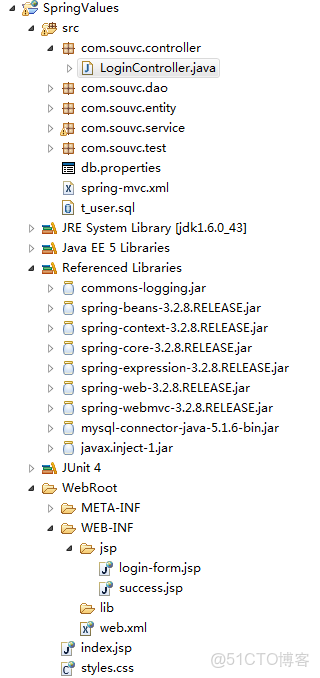
2. 導入前述業務層UserService類以及依賴的類,等。
User類代碼如下:
?
package          com.souvc.entity;


          import          java.io.Serializable;


          public          class          User           implements          Serializable {

                    private          static          final          long          serialVersionUID = -603439325380668432L;

                    private          int          id;

                    private          String name;

                    private          String pwd;

                    private          String phone;


                    public          User() {

                    }


                    public          User(          int          id, String name, String pwd, String phone) {

                    this          .id = id;

                    this          .name = name;

                    this          .pwd = pwd;

                    this          .phone = phone;

                    }


                    public          User(String name, String pwd, String phone) {

                    super          ();

                    this          .name = name;

                    this          .pwd = pwd;

                    this          .phone = phone;

                    }


                    public          int          getId() {

                    return          id;

                    }


                    public          void          setId(          int          id) {

                    this          .id = id;

                    }


                    public          String getName() {

                    return          name;

                    }


                    public          void          setName(String name) {

                    this          .name = name;

                    }


                    public          String getPwd() {

                    return          pwd;

                    }


                    public          void          setPwd(String pwd) {

                    this          .pwd = pwd;

                    }


                    public          String getPhone() {

                    return          phone;

                    }


                    public          void          setPhone(String phone) {

                    this          .phone = phone;

                    }


                    @Override

                    public          int          hashCode() {

                    return          id;

                    }


                    @Override

                    public          boolean          equals(Object obj) {

                    if          (          this          == obj)

                    return          true          ;

                    if          (obj ==           null          )

                    return          false          ;

                    if          (obj           instanceof          User) {

                    User o = (User) obj;

                    return          this          .id == o.id;

                    }

                    return          true          ;

                    }


                    @Override

                    public          String toString() {

                    return          id +           ","          + name +           ","          + pwd +           ","          + phone;

                    }

          }
|
UserDao接口代碼如下:
?
package          com.souvc.dao;


          import          com.souvc.entity.User;


          /**

                    * 用户數據訪問對象接口

                    */

          public          interface          UserDao {

                    /** 根據唯一用户名查詢系統用户, 如果沒有找到用户信息返回null */

                    public          User findByName(String name);

                    // public User add(String name, String pwd, String phone);

                    // public User find(int id);

                    // public User delete(int id);

                    // public void update(User user);

          }
|
UserService類代碼如下:
?
package          com.souvc.service;


          import          java.io.Serializable;


          import          javax.annotation.Resource;


          import          org.springframework.stereotype.Service;


          import          com.souvc.dao.UserDao;

          import          com.souvc.entity.User;


          /** 業務層 註解 */

          @Service

          // 默認的Bean ID是 userService

          public          class          UserService           implements          Serializable {

                    private          static          final          long          serialVersionUID = 7360372166489952236L;

                    private          UserDao userDao;


                    // @Resource //自動匹配userDao對象並注入

                    @Resource          (name =           "userDao"          )

                    public          void          setUserDao(UserDao userDao) {

                    this          .userDao = userDao;          //

                    }


                    public          UserDao getUserDao() {

                    return          userDao;

                    }


                    /** 登錄系統功能 */

                    public          User login(String name, String pwd)           throws          NameOrPwdException,

                    NullParamException {

                    if          (name ==           null          || name.equals(          ""          ) || pwd ==           null          || pwd.equals(          ""          )) {

                    throw          new          NullParamException(          "登錄參數不能為空!"          );

                    }

                    User user = userDao.findByName(name);

                    if          (user !=           null          && pwd.equals(user.getPwd())) {

                    return          user;

                    }

                    throw          new          NameOrPwdException(          "用户名或者密碼錯誤"          );

                    }

          }
|
NameOrPwdException類代碼如下:
?
package          com.souvc.service;


          /** 用户名或者密碼錯誤 */

          public          class          NameOrPwdException           extends          Exception {

                    public          NameOrPwdException() {

                    }


                    public          NameOrPwdException(String message) {

                    super          (message);

                    }


                    public          NameOrPwdException(Throwable cause) {

                    super          (cause);

                    }


                    public          NameOrPwdException(String message, Throwable cause) {

                    super          (message, cause);

                    }

          }
|
NullParamException類代碼如下:
?
package          com.souvc.service;


          /** 參數為空 */

          public          class          NullParamException           extends          Exception {

                    public          NullParamException() {

                    }


                    public          NullParamException(String message) {

                    super          (message);

                    }


                    public          NullParamException(Throwable cause) {

                    super          (cause);

                    }


                    public          NullParamException(String message, Throwable cause) {

                    super          (message, cause);

                    }

          }
|
JdbcDataSource類代碼如下:
?
package          com.souvc.dao;


          import          java.io.Serializable;

          import          java.sql.Connection;

          import          java.sql.DriverManager;

          import          java.sql.SQLException;

          import          org.springframework.beans.factory.annotation.Value;

          import          org.springframework.stereotype.Component;


          /** 組件註解 */

          @Component

          public          class          JdbcDataSource           implements          Serializable {


                    private          static          final          long          serialVersionUID = -8925981939329398101L;


                    private          String driver;


                    @Value          (          "#{jdbcProps.url}"          )

                    private          String url;


                    @Value          (          "#{jdbcProps.user}"          )

                    private          String user;


                    @Value          (          "#{jdbcProps.pwd}"          )

                    private          String pwd;


                    public          String getDriver() {

                    return          driver;

                    }


                    /** 必須使用Bean屬性輸入, 否則不能進行JDBC Driver註冊 */

                    @Value          (          "#{jdbcProps.driver}"          )

                    public          void          setDriver(String driver) {

                    try          {

                    // 註冊數據庫驅動

                    Class.forName(driver);

                    this          .driver = driver;

                    }           catch          (Exception e) {

                    throw          new          RuntimeException(e);

                    }

                    }


                    public          String getUrl() {

                    return          url;

                    }


                    public          void          setUrl(String url) {

                    this          .url = url;

                    }


                    public          String getUser() {

                    return          user;

                    }


                    public          void          setUser(String user) {

                    this          .user = user;

                    }


                    public          String getPwd() {

                    return          pwd;

                    }


                    public          void          setPwd(String pwd) {

                    this          .pwd = pwd;

                    }


                    public          Connection getConnection()           throws          SQLException {

                    Connection conn = DriverManager.getConnection(url, user, pwd);

                    return          conn;

                    }


                    public          void          close(Connection conn) {

                    if          (conn !=           null          ) {

                    try          {

                    conn.close();

                    }           catch          (SQLException e) {

                    e.printStackTrace();

                    }

                    }

                    }

          }
|
MysqlUserDao類代碼如下:
?
package          com.souvc.dao;


          import          java.io.Serializable;

          import          java.sql.Connection;

          import          java.sql.PreparedStatement;

          import          java.sql.ResultSet;

          import          java.sql.SQLException;


          import          org.springframework.beans.factory.annotation.Autowired;

          import          org.springframework.beans.factory.annotation.Qualifier;

          import          org.springframework.stereotype.Repository;


          import          com.souvc.entity.User;


          /** 持久層 註解 */

          @Repository          (          "userDao"          )

          // 指定特定的Bean ID 方便setUserDao注入

          public          class          MysqlUserDao           implements          UserDao, Serializable {

                    private          static          final          long          serialVersionUID = 7385842613248394287L;

                    private          JdbcDataSource dataSource;


                    public          MysqlUserDao() {

                    }


                    /** 創建 MysqlUserDAO 對象必須依賴於JDBCDataSource實例 */

                    public          MysqlUserDao(JdbcDataSource dataSource) {

                    this          .dataSource = dataSource;

                    }


                    @Autowired

                    // 按照類型自動裝配

                    public          void          setDataSource(          @Qualifier          (          "jdbcDataSource"          )

                    JdbcDataSource dataSource) {

                    this          .dataSource = dataSource;

                    }


                    public          JdbcDataSource getDataSource() {

                    return          dataSource;

                    }


                    /** 根據唯一用户名查詢系統用户, 如果沒有找到用户信息返回null */

                    public          User findByName(String name) {

                    System.out.println(          "利用JDBC技術查找User信息"          );

                    String sql =           "select id, name, pwd, phone from users where name=?"          ;

                    Connection conn =           null          ;

                    try          {

                    conn = dataSource.getConnection();

                    PreparedStatement ps = conn.prepareStatement(sql);

                    ps.setString(          1          , name);

                    ResultSet rs = ps.executeQuery();

                    User user =           null          ;

                    while          (rs.next()) {

                    user =           new          User();

                    user.setId(rs.getInt(          "id"          ));

                    user.setName(rs.getString(          "name"          ));

                    user.setPwd(rs.getString(          "pwd"          ));

                    user.setPhone(rs.getString(          "phone"          ));

                    }

                    rs.close();

                    ps.close();

                    return          user;

                    }           catch          (SQLException e) {

                    e.printStackTrace();

                    throw          new          RuntimeException(e);

                    }           finally          {

                    dataSource.close(conn);

                    }

                    }

          }
|
db.properties文件內容如下:
?
# config           for          Mysql

          driver=com.mysql.jdbc.Driver

          url=jdbc:mysql:          //localhost:3306/souvc

          user=root

          pwd=          123456
|
spring-mvc.xml文件代碼如下:
?
<?          xml          version          =          "1.0"          encoding          =          "UTF-8"          ?>

          <          beans          xmlns          =          "http://www.springframework.org/schema/beans"

                    xmlns:xsi          =          "http://www.w3.org/2001/XMLSchema-instance"

                    xmlns:context          =          "http://www.springframework.org/schema/context"

                    xmlns:jdbc          =          "http://www.springframework.org/schema/jdbc"

                    xmlns:jee          =          "http://www.springframework.org/schema/jee"

                    xmlns:tx          =          "http://www.springframework.org/schema/tx"

                    xmlns:jpa          =          "http://www.springframework.org/schema/data/jpa"

                    xmlns:util          =          "http://www.springframework.org/schema/util"

                    xmlns:mvc          =          "http://www.springframework.org/schema/mvc"

                    xsi:schemaLocation="

                    http://www.springframework.org/schema/beans http://www.springframework.org/schema/beans/spring-beans-3.2.xsd

                    http://www.springframework.org/schema/context http://www.springframework.org/schema/context/spring-context-3.2.xsd

                    http://www.springframework.org/schema/jdbc http://www.springframework.org/schema/jdbc/spring-jdbc-3.2.xsd

                    http://www.springframework.org/schema/jee http://www.springframework.org/schema/jee/spring-jee-3.2.xsd

                    http://www.springframework.org/schema/tx http://www.springframework.org/schema/tx/spring-tx-3.2.xsd

                    http://www.springframework.org/schema/data/jpa http://www.springframework.org/schema/data/jpa/spring-jpa-1.3.xsd

                    http://www.springframework.org/schema/util http://www.springframework.org/schema/util/spring-util-3.2.xsd

                    http://www.springframework.org/schema/mvc http://www.springframework.org/schema/mvc/spring-mvc-3.2.xsd">


                    <          util:properties          id          =          "jdbcProps"          location          =          "classpath:db.properties"          />


                    <          context:component-scan          base-package          =          "com.souvc"          />

                    <!-- 視圖處理 -->

                    <          bean          id          =          "viewResolver"          class          =          "org.springframework.web.servlet.view.InternalResourceViewResolver"          >

                    <          property          name          =          "prefix"          value          =          "/WEB-INF/jsp/"          ></          property          >

                    <          property          name          =          "suffix"          value          =          ".jsp"          ></          property          >

                    </          bean          >

          </          beans          >
|
MySQL數據庫初始化SQL代碼如下:
?
DROP          TABLE          users;

          CREATE          TABLE          USERS

          (

                    ID           DOUBLE          (7, 0) ,

                    NAME          VARCHAR          (50) ,

                    PWD           VARCHAR          (50),

                    PHONE           VARCHAR          (50) ,

                    PRIMARY          KEY          (id)

                    );


          INSERT          INTO          Users (id,           NAME          , pwd, phone)           VALUES          (1,           'Tom'          ,           '123'          ,           '110'          );

          INSERT          INTO          Users (id,           NAME          , pwd, phone)           VALUES          (2,           'Jerry'          ,           'abc'          ,           '119'          );

          INSERT          INTO          Users (id,           NAME          , pwd, phone)           VALUES          (3,           'Andy'          ,           '456'          ,           '112'          );
|
3. 為項目添加JUnit4 API,然後添加測試類TestCase和測試方法testUserService()用於測試上述配置是否正確。TestCase類代碼如下:
?
package          com.souvc.test;


          import          java.util.Properties;


          import          org.junit.Test;

          import          org.springframework.context.ApplicationContext;

          import          org.springframework.context.support.ClassPathXmlApplicationContext;


          import          com.souvc.dao.JdbcDataSource;

          import          com.souvc.entity.User;

          import          com.souvc.service.UserService;


          public          class          TestCase {


                    @Test

                    public          void          testUserService()           throws          Exception {

                    String cfg =           "spring-mvc.xml"          ;

                    ApplicationContext ac =           new          ClassPathXmlApplicationContext(cfg);

                    Properties obj = ac.getBean(          "jdbcProps"          , Properties.          class          );

                    JdbcDataSource ds = ac.getBean(          "jdbcDataSource"          , JdbcDataSource.          class          );

                    System.out.println(obj);

                    System.out.println(ds);

                    System.out.println(ds.getConnection());

                    UserService service = ac.getBean(          "userService"          , UserService.          class          );

                    User user = service.login(          "Tom"          ,           "123"          );

                    System.out.println(user);

                    }

          }
|
執行測試方法testUserService()
?
{user=root, url=jdbc:mysql://localhost:3306/souvc, driver=com.mysql.jdbc.Driver, pwd=123456}

          com.souvc.dao.JdbcDataSource@1cb1a4e2

          com.mysql.jdbc.JDBC4Connection@3d04fc23
|
利用JDBC技術查找User信息
?
這個結果説明業務層UserService工作正常。
4. 配置Spring MVC 核心控制器DispatcherServlet到web.xml。web.xml配置部分代碼參考如下:
?
<?          xml          version          =          "1.0"          encoding          =          "UTF-8"          ?>

          <          web-app          version          =          "2.5"          xmlns          =          "http://java.sun.com/xml/ns/javaee"

                    xmlns:xsi          =          "http://www.w3.org/2001/XMLSchema-instance"

                    xsi:schemaLocation="http://java.sun.com/xml/ns/javaee

                    http://java.sun.com/xml/ns/javaee/web-app_2_5.xsd">

                    <          welcome-file-list          >

                    <          welcome-file          >index.jsp</          welcome-file          >

                    </          welcome-file-list          >


                    <          servlet          >

                    <          servlet-name          >springmvc</          servlet-name          >

                    <          servlet-class          >

                    org.springframework.web.servlet.DispatcherServlet

                    </          servlet-class          >

                    <          init-param          >

                    <          param-name          >contextConfigLocation</          param-name          >

                    <          param-value          >classpath:spring-mvc.xml</          param-value          >

                    </          init-param          >

                    <          load-on-startup          >1</          load-on-startup          >

                    </          servlet          >

                    <          servlet-mapping          >

                    <          servlet-name          >springmvc</          servlet-name          >

                    <          url-pattern          >*.form</          url-pattern          >

                    </          servlet-mapping          >


          </          web-app          >
|
5. 部署項目到Tomcat並且啓動,測試Spring MVC配置是否正常。
在輸出結果中出現內容, 並且沒有異常就會説明Spring MVC部署正常。
步驟二:實現login-action1.form登錄流程,測試利用HttpServletRequrst傳值方法
1. 在WEB-INF/jsp文件夾下添加login-form.jsp文件,代碼如下所示:
?
<%@ page pageEncoding="utf-8" contentType="text/html; charset=utf-8"%>
<!DOCTYPE HTML>
<%@taglib prefix="c" uri="http://java.sun.com/jsp/jstl/core" %>
< c:url var = "base" value = "/" ></ c:url >
< html >
< head >
< title >Login Form</ title >
< link rel = "stylesheet" type = "text/css" href = "${base}styles.css" rel = "external nofollow" rel = "external nofollow" >
</ head >
< body >
< h6 >${message}</ h6 >
< form method = "post" action = "${base}login/login-action1.form" >
< div >
< h2 >登錄 login-action1.form</ h2 >
< p >< label >用户</ label >< input type = "text" name = "name" ></ p >
< p >< label >密碼</ label >< input type = "password" name = "pwd" ></ p >
< h3 >< input type = "submit" value = "登錄" ></ h3 >
</ div >
</ form >
< form method = "post" action = "${base}login/login-action2.form" >
< div >
< h2 >登錄 login-action2.form</ h2 >
< p >< label >用户</ label >< input type = "text" name = "name" ></ p >
< p >< label >密碼</ label >< input type = "password" name = "pwd" ></ p >
< h3 >< input type = "submit" value = "登錄" ></ h3 >
</ div >
</ form >
< form method = "post" action = "${base}login/login-action3.form" >
< div >
< h2 >登錄 login-action3.form</ h2 >
< p >< label >用户</ label >< input type = "text" name = "name" ></ p >
< p >< label >密碼</ label >< input type = "password" name = "pwd" ></ p >
< h3 >< input type = "submit" value = "登錄" ></ h3 >
</ div >
</ form >
< form method = "post" action = "${base}login/login-action4.form" >
< div >
< h2 >登錄 login-action4.form</ h2 >
< p >< label >用户</ label >< input type = "text" name = "name" ></ p >
< p >< label >密碼</ label >< input type = "password" name = "pwd" ></ p >
< h3 >< input type = "submit" value = "登錄" ></ h3 >
</ div >
</ form >
< form method = "post" action = "${base}login/login-action5.form" >
< div >
< h2 >登錄 login-action5.form</ h2 >
< p >< label >用户</ label >< input type = "text" name = "name" ></ p >
< p >< label >密碼</ label >< input type = "password" name = "pwd" ></ p >
< h3 >< input type = "submit" value = "登錄" ></ h3 >
</ div >
</ form >
< form method = "post" action = "${base}login/login-action6.form" >
< div >
< h2 >登錄 login-action6.form</ h2 >
< p >< label >用户</ label >< input type = "text" name = "name" ></ p >
< p >< label >密碼</ label >< input type = "password" name = "pwd" ></ p >
< h3 >< input type = "submit" value = "登錄" ></ h3 >
</ div >
</ form >
</ body >
</ html >
|
方法一解釋:
利用HttpServletRequest對象進行瀏覽器頁面到控制器傳值。
方法二解釋:
checkLogin2()方法。這樣就與login- form.jsp表單對應。
方法三解釋:
checkLogin3()
方法四解釋:
在處理方法完成後返回一個ModelAndView對象。
方法五解釋:
ModelMap屬性值與頁面login-form.jsp之間的數據對應。
方法六解釋:
@ModelAttribute聲明的屬性與login-form.jsp頁面的值關係。
用户名或者密碼錯誤時候出現的時候,能夠記住用户名。
在前述案例中,用户登錄成功以後, 可以利用HttpServletRequest對象的getSession()方法訪問Session對象, 這樣就可以保持用户登錄狀態了。
2. 為頁面添加樣式文件styles.css,樣式文件保存在WebRoot文件夾下,styles.css文件代碼如下所示:
?
* {

                    margin          :           0          ;

                    padding          :           0          ;

          }


          h          6          {

                    text-align          :           center          ;

                    color          :           red          ;

                    padding          :           10px          ;

                    font-size          :           14px          ;

          }


          form {

                    padding          :           10px          ;

                    float          :           left          ;

          }


          form div {

                    border          :           1px          gray          solid          ;

                    width          :           320px          ;

                    padding          :           8px          ;

          }


          form p input {

                    width          :           180px

          }


          form h          2          input {

                    text-align          :           center          ;

          }


          form h          2          {

                    background          :           black          ;

                    color          :           white          ;

                    padding          :           4px          ;

          }


          form p {

                    background          :           #ddd          ;

                    padding          :           4px          8px          0          8px          ;

          }


          form h          3          {

                    background          :           #ddd          ;

                    padding          :           8px          ;

          }
|
3. 在WEB-INF/jsp文件夾下添加success.jsp文件,這個文件是登錄成功以後顯示的界面,代碼如下所示:
?
<%@ page pageEncoding="utf-8" contentType="text/html; charset=utf-8"%>

          <!DOCTYPE HTML>

          <%@taglib prefix="c" uri="http://java.sun.com/jsp/jstl/core"%>

          <          c:url          var          =          "base"          value          =          "/"          ></          c:url          >

          <          html          >

                    <          head          >

                    <          title          >Success</          title          >

                    <          link          rel          =          "stylesheet"          type          =          "text/css"          href          =          "${base}styles.css"          rel          =          "external nofollow"          rel          =          "external nofollow"          >

                    </          head          >

                    <          body          >

                    <          h6          >

                    ${user.name}登錄成功!

                    </          h6          >

                    </          body          >

          </          html          >
|
上述頁面中,使用EL表達式和標準標籤庫配合顯示界面數據, 其中<c:url var="base" value="/"></c:url>和${base}用於解決絕對路徑問題。
4. 創建控制器類LoginController,在該類中使用註解@Controller的方式進行配置:
1)使用@Controller將LoginController聲明為控制器Bean組件。
2)使用@RequestMapping("/login")聲明對LoginController組件的請求在/login 路徑下。
3)流程控制方法loginForm(),用於顯示登錄表單頁面。使用@RequestMapping註解將映射請求/login-form.form到loginForm()方法。
4)增加userService屬性,並且使用@Resource註解聲明在運行期間注入userService對象。
5)增加控制流程方法checkLogin1() ,使用@RequestMapping註解將請求/login-action1.form映 射到checkLogin1()方法。checkLogin1()方法調用userService的login方法,實現登錄流程。 checkLogin1()方法主要是測試JSP頁面到控制器的數據傳輸方式。
LoginController類代碼如下所示:
?
package com.souvc.controller;
import java.util.HashMap;
import java.util.Map;
import java.util.Random;
import javax.annotation.Resource;
import javax.servlet.http.HttpServletRequest;
import org.springframework.stereotype.Controller;
import org.springframework.ui.ModelMap;
import org.springframework.web.bind.annotation.ModelAttribute;
import org.springframework.web.bind.annotation.RequestMapping;
import org.springframework.web.bind.annotation.RequestParam;
import org.springframework.web.servlet.ModelAndView;
import com.souvc.entity.User;
import com.souvc.service.NameOrPwdException;
import com.souvc.service.NullParamException;
import com.souvc.service.UserService;
@Controller
//@SessionAttributes("user")
@RequestMapping ( "/login" )
public class LoginController {
@Resource
// 請求Spring注入資源 userService
private UserService userService;
@RequestMapping ( "/login.form" )
public String loginForm() {
// 可以向表單界面傳遞一些參數
return "login-form" ;
}
@RequestMapping ( "/login-action1.form" )
// Spring MVC 自動參數注入HttpServletRequest
public String checkLogin1(HttpServletRequest req) {
System.out.println( "---方法一---" );
// 優點直接簡潔,缺點需要自己處理數據類型轉換, 不支持文件上傳功能
String name = req.getParameter( "name" );
String pwd = req.getParameter( "pwd" );
System.out.println(name);
System.out.println(pwd);
try {
User user = userService.login(name, pwd);
// 登錄成功將登錄用户信息保存到當前會話中
req.getSession().setAttribute( "user" , user);
return "success" ;
} catch (NameOrPwdException e) {
e.printStackTrace();
req.setAttribute( "message" , e.getMessage());
return "login-form" ;
} catch (NullParamException e) {
e.printStackTrace();
req.setAttribute( "message" , e.getMessage());
return "redirect:login.form" ;
} catch (RuntimeException e) {
e.printStackTrace();
req.setAttribute( "message" , e.getMessage());
return "error" ;
}
}
@RequestMapping ( "/login-action2.form" )
public String checkLogin2(String name, @RequestParam ( "pwd" )
String password, // 映射表單屬性不同的參數
HttpServletRequest req) {
System.out.println( "---方法二---" );
// 優點, 自動轉換數據類型, 缺點可能出現數據類型轉換異常
System.out.println(name);
System.out.println(password);
try {
User user = userService.login(name, password);
// 登錄成功將登錄用户信息保存到當前會話中
req.getSession().setAttribute( "user" , user);
return "success" ;
} catch (NameOrPwdException e) {
e.printStackTrace();
req.setAttribute( "message" , e.getMessage());
return "login-form" ;
} catch (NullParamException e) {
e.printStackTrace();
req.setAttribute( "message" , e.getMessage());
return "login-form" ;
} catch (RuntimeException e) {
e.printStackTrace();
req.setAttribute( "message" , e.getMessage());
return "error" ;
}
}
@RequestMapping ( "/login-action3.form" )
public String checkLogin3(User user, HttpServletRequest req) {
System.out.println( "---方法三---" );
// 自動填充到bean對象
System.out.println(user);
try {
user = userService.login(user.getName(), user.getPwd());
// 登錄成功將登錄用户信息保存到當前會話中
req.getSession().setAttribute( "user" , user);
return "success" ;
} catch (NameOrPwdException e) {
e.printStackTrace();
req.setAttribute( "message" , e.getMessage());
return "login-form" ;
} catch (NullParamException e) {
e.printStackTrace();
req.setAttribute( "message" , e.getMessage());
return "login-form" ;
} catch (RuntimeException e) {
e.printStackTrace();
req.setAttribute( "message" , e.getMessage());
return "error" ;
}
}
@RequestMapping ( "/login-action4.form" )
public ModelAndView checkLogin4(String name, String pwd,
HttpServletRequest req) {
System.out.println( "---方法四---" );
Map<String, Object> data = new HashMap<String, Object>();
try {
User user = userService.login(name, pwd);
// 登錄成功將登錄用户信息保存到當前會話中
req.getSession().setAttribute( "user" , user);
return new ModelAndView( "success" , data);
} catch (NameOrPwdException e) {
e.printStackTrace();
data.put( "message" , e.getMessage());
return new ModelAndView( "login-form" , data);
} catch (NullParamException e) {
e.printStackTrace();
data.put( "message" , e.getMessage());
return new ModelAndView( "login-form" , data);
} catch (RuntimeException e) {
e.printStackTrace();
data.put( "message" , e.getMessage());
return new ModelAndView( "error" , data);
}
}
@RequestMapping ( "/login-action5.form" )
public String checkLogin5(String name, String pwd, ModelMap model,
HttpServletRequest req) {
System.out.println( "---方法五---" );
try {
User user = userService.login(name, pwd);
// 登錄成功將登錄用户信息保存到當前會話中
req.getSession().setAttribute( "user" , user);
return "success" ;
} catch (NameOrPwdException e) {
e.printStackTrace();
model.addAttribute( "message" , e.getMessage());
return "login-form" ;
} catch (NullParamException e) {
e.printStackTrace();
model.addAttribute( "message" , e.getMessage());
return "login-form" ;
} catch (RuntimeException e) {
e.printStackTrace();
model.addAttribute( "message" , e.getMessage());
return "error" ;
}
}
@RequestMapping ( "/login-action6.form" )
public String checkLogin6(
@ModelAttribute ( "name" ) String name,
@ModelAttribute ( "password" ) String pwd,
ModelMap model, HttpServletRequest req){
System.out.println( "---方法六---" );
try {
User user = userService.login(name, pwd);
// 登錄成功將登錄用户信息保存到當前會話中
req.getSession().setAttribute( "user" , user);
return "success" ;
} catch (NameOrPwdException e) {
e.printStackTrace();
model.addAttribute( "message" , e.getMessage());
return "login-form" ;
} catch (NullParamException e) {
e.printStackTrace();
model.addAttribute( "message" , e.getMessage());
return "login-form" ;
} catch (RuntimeException e) {
e.printStackTrace();
model.addAttribute( "message" , e.getMessage());
return "error" ;
}
}
@RequestMapping ( "/login-action7.form" )
public String checkLogin7(ModelMap model, HttpServletRequest req) {
System.out.println( "---方法七---" );
String name1=req.getParameter( "name" );
String pwd1=req.getParameter( "pwd" );
try {
User user = userService.login(name1, pwd1);
// 登錄成功將登錄用户信息保存到當前會話中
req.getSession().setAttribute( "user" , user);
return "success" ;
} catch (NameOrPwdException e) {
e.printStackTrace();
model.addAttribute( "message" , e.getMessage());
return "redirect:login" ;
} catch (NullParamException e) {
e.printStackTrace();
model.addAttribute( "message" , e.getMessage());
return "redirect:login" ;
} catch (RuntimeException e) {
e.printStackTrace();
model.addAttribute( "message" , e.getMessage());
return "error" ;
}
}
private String[] msg = { "再來一次" , "下次就對了" , "沒關係還有機會" };
@ModelAttribute ( "next" )
public String getNext() {
Random r = new Random();
return msg[r.nextInt(msg.length)];
}
}
|
5.測試login-action1.form登錄流程
通過網址“http://localhost:8080/SpringValues/login/login.form”請求Tomcat服務器:
訪問請求的信息打印在控制枱:
?
---方法一---

          Tom

          123

          利用JDBC技術查找User信息

          ---方法二---

          Tom

          123

          利用JDBC技術查找User信息

          ---方法三---

          0,Tom,123,null

          利用JDBC技術查找User信息

          ---方法四---

          利用JDBC技術查找User信息

          ---方法五---

          利用JDBC技術查找User信息
|
總結
以上就是這篇文章的全部內容了,希望本文的內容對大家的學習或者工作能帶來一定的幫助,如果有疑問大家可以留言交流