

一、簡介
ArkUI的彈出框控制器在綁定彈出框後,可提供對彈出框的操作能力,當前支持關閉功能。可以將控制器傳入彈出框內容區域後進行操作。
從API version 18開始,可設置controller參數以綁定DialogController控制器,通過控制器能夠操作彈出框。
二、使用約束
目前openCustomDialogWithController和presentCustomDialog支持通過controller參數來綁定彈出框進行操作,目前getDialogController支持獲取自定義組件所在的彈出框的控制器。
説明 一個彈出框控制器只能綁定一個彈出框,且操作只對該彈出框生效。 使用getDialogController獲取彈出框控制器時,如果當前自定義組件不在彈出框中顯示則獲取為undefined。
三、創建自定義內容為ComponentContent的彈出框控制器
- 初始化一個自定義彈出框內容區的入參類,內部包含彈出框控制器。
class Params {
  public text: string = ''
  public dialogController: promptAction.CommonController = new promptAction.DialogController()
  constructor(text: string, dialogController: promptAction.CommonController) {
    this.text = text
    this.dialogController = dialogController
  }
}
- 初始化一個自定義的彈出框內容區,內部包含一個按鈕,該按鈕通過該自定義組件自帶的彈出框控制器實現關閉功能。
@Component
struct MyComponent {
  build() {
    Column({ space: 5 }) {
      Button('點我關閉彈窗:通過自定義組件自帶的DialogController')
        .onClick(() => {
          let dialogController: promptAction.DialogController = this.getDialogController()
          if (dialogController !== undefined) {
            dialogController.close()
          }
        })
    }
  }
}
- 初始化另一自定義彈出框內容區,其中包含一個Text組件和一個按鈕,該按鈕通過外部傳遞的彈出框控制器用於關閉彈出框,並且該內容區還包含前一個自定義彈出框內容區。
@Builder
function buildText(params: Params) {
  Column({ space: 5 }) {
    Text(params.text)
      .fontSize(30)
    if (params.dialogController !== undefined) {
      Button('點我關閉彈窗:通過外部傳遞的DialogController')
        .onClick(() => {
          params.dialogController.close()
        })
    }
    MyComponent()
  }
  .width(300)
  .height(200)
  .backgroundColor('#FFF0F0F0')
}
- 初始化一個彈出框控制器,並通過設置控制器參數來初始化一個彈出框內容實體對象。最後,通過調用UIContext中的getPromptAction方法獲取PromptAction對象,再通過該對象調用openCustomDialogWithController接口,並且設置初始化的內容實體對象和控制器參數以創建彈出框。
let dialogController: promptAction.CommonController = new promptAction.DialogController()
let contentNode: ComponentContent<Object> =
  new ComponentContent(this.getUIContext(), wrapBuilder(buildText), new Params(this.message, dialogController))
this.getUIContext().getPromptAction().openCustomDialogWithController(
  contentNode, dialogController, this.baseDialogOptions).catch((err: BusinessError) => {
  console.error('openCustomDialogWithController error: ' + err.code + ' ' + err.message)
})
四、創建自定義內容為CustomBuilder的彈出框控制器
- 初始化一個自定義彈出框內容區,內部包含一個Text組件和一個按鈕,該按鈕通過外部傳遞的彈出框控制器實現關閉功能。
@Builder customDialogComponent(dialogController: promptAction.DialogController) {
  Column({ space: 5 }) {
    Text(this.message)
      .fontSize(30)
    if (dialogController !== undefined) {
      Button('點擊關閉彈窗:通過外部傳遞的DialogController')
        .onClick(() => {
          dialogController.close()
        })
    }
  }
  .height(200)
  .padding(5)
  .justifyContent(FlexAlign.SpaceBetween)
  .backgroundColor('#FFF0F0F0')
}
- 初始化一個彈出框控制器,並通過調用UIContext中的getPromptAction方法獲取PromptAction對象,再通過該對象調用presentCustomDialog接口,設置初始化的內容實體對象和控制器參數以創建彈出框。
let dialogController: promptAction.CommonController = new promptAction.DialogController()
this.getUIContext().getPromptAction().presentCustomDialog(() => {
  this.customDialogComponent(dialogController)
}, dialogController, this.dialogOptions).catch((err: BusinessError) => {
  console.error('presentCustomDialog error: ' + err.code + ' ' + err.message)
})
五、在CustomDialogController內容區直接獲取彈出框控制器
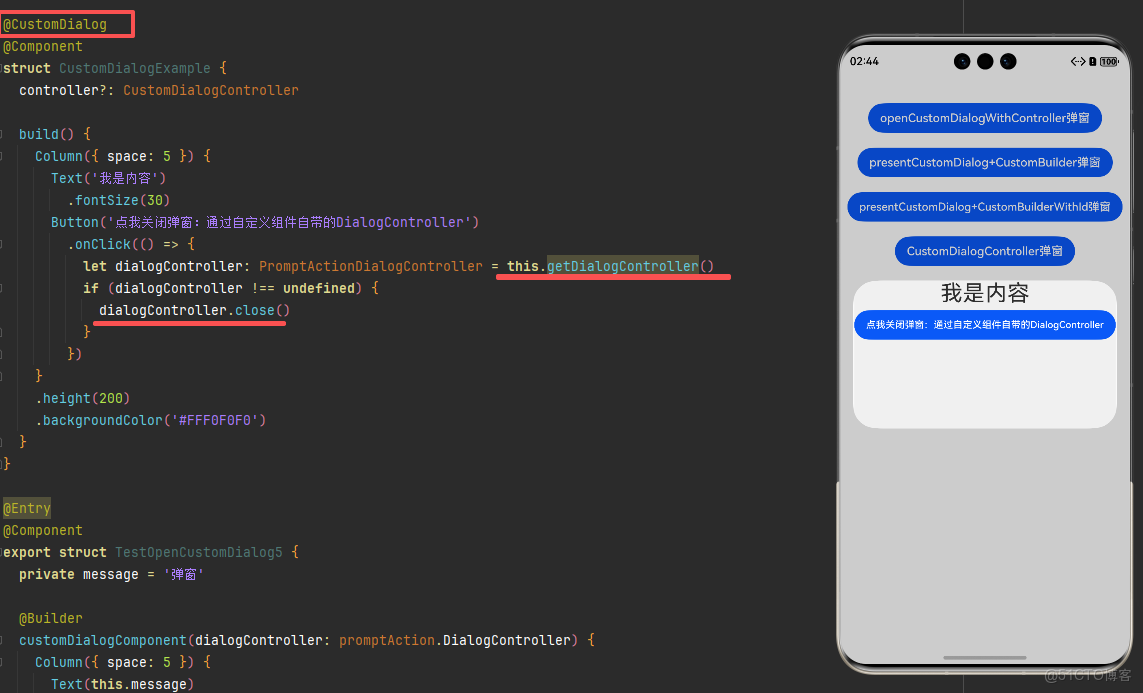
- 初始化一個自定義彈出框內容區,內部包含一個Text組件和一個按鈕,該按鈕通過彈出框控制器關閉彈出框。
@CustomDialog
@Component
struct CustomDialogExample {
  controller?: CustomDialogController

  build() {
    Column({ space: 5 }) {
      Text('我是內容')
        .fontSize(30)
      Button('點我關閉彈窗:通過自定義組件自帶的DialogController')
        .onClick(() => {
          let dialogController: PromptActionDialogController = this.getDialogController()
          if (dialogController !== undefined) {
            dialogController.close()
          }
        })
    }
    .height(200)
    .backgroundColor('#FFF0F0F0')
  }
}
- 初始化一個自定義彈出框構造器,關聯自定義彈出框內容區。
let customDialogController: CustomDialogController = new CustomDialogController({
  builder: CustomDialogExample(),
})
customDialogController.open()
六、使用控制器獲取彈出框的狀態
在自定義彈出框場景中,可以通過控制器調用getState接口獲取彈出框狀態。
初始化一個自定義彈出框內容區,內部包含一個Text組件和一個按鈕,該按鈕通過調用getState獲取當前彈出框狀態。
@Builder customDialogComponent(dialogController: promptAction.DialogController) {
  Column({ space: 5 }) {
    Text(this.message)
      .fontSize(30)
    if (dialogController !== undefined) {
      Button('點我查詢彈窗狀態')
        .onClick(() => {
          console.info('state:' + this.dialogController.getState())
        })
    }
  }
  .height(200)
  .padding(5)
  .justifyContent(FlexAlign.SpaceBetween)
  .backgroundColor('#FFF0F0F0')
}
七、完整示例
通過外部傳遞的彈出框控制器和自定義組件自帶的彈出框控制器,在自定義彈出框內容區域內實現關閉功能。
效果圖
import { ComponentContent, promptAction } from '@kit.ArkUI'
import { BusinessError } from '@kit.BasicServicesKit'

class Params {
  public text: string = ''
  public dialogController: promptAction.CommonController = new promptAction.DialogController()

  constructor(text: string, dialogController: promptAction.CommonController) {
    this.text = text
    this.dialogController = dialogController
  }
}

@Component
struct MyComponent {
  build() {
    Column({ space: 5 }) {
      Button('點我關閉彈窗:通過自定義組件自帶的DialogController')
        .onClick(() => {
          let dialogController: promptAction.DialogController = this.getDialogController() // API version 18
          if (dialogController !== undefined) {
            dialogController.close()
          }
        })
    }
  }
}

@Builder
function buildText(params: Params) {
  Column({ space: 5 }) {
    Text(params.text)
      .fontSize(30)
    if (params.dialogController !== undefined) {
      Button('點我關閉彈窗:通過外部傳遞的DialogController')
        .onClick(() => {
          params.dialogController.close()
        })
    }
    MyComponent()
  }
  .width(300)
  .height(200)
  .backgroundColor('#FFF0F0F0')
}

@CustomDialog
@Component
struct CustomDialogExample {
  controller?: CustomDialogController

  build() {
    Column({ space: 5 }) {
      Text('我是內容')
        .fontSize(30)
      Button('點我關閉彈窗:通過自定義組件自帶的DialogController')
        .onClick(() => {
          let dialogController: PromptActionDialogController = this.getDialogController()
          if (dialogController !== undefined) {
            dialogController.close()
          }
        })
    }
    .height(200)
    .backgroundColor('#FFF0F0F0')
  }
}

@Entry
@Component
export struct TestOpenCustomDialog5 {
  private message = '彈窗'

  @Builder
  customDialogComponent(dialogController: promptAction.DialogController) {
    Column({ space: 5 }) {
      Text(this.message)
        .fontSize(30)
      if (dialogController !== undefined) {
        Button('點擊關閉彈窗:通過外部傳遞的DialogController')
          .onClick(() => {
            dialogController.close()
          })
      }
    }
    .height(200)
    .padding(5)
    .justifyContent(FlexAlign.SpaceBetween)
    .backgroundColor('#FFF0F0F0')
  }

  @Builder
  customDialogComponentWithId(dialogId: number, dialogController: promptAction.DialogController) {
    Column({ space: 5 }) {
      Text(this.message)
        .fontSize(30)
      if (dialogId !== undefined) {
        Button('點擊關閉彈窗:通過DialogID')
          .onClick(() => {
            this.getUIContext().getPromptAction().closeCustomDialog(dialogId)
          })
      }
      if (dialogController !== undefined) {
        Button('點擊關閉彈窗:通過外部傳遞的DialogController')
          .onClick(() => {
            dialogController.close()
          })
      }
    }
  }

  private baseDialogOptions: promptAction.BaseDialogOptions = {
    isModal: false,
    autoCancel: false
  }
  private dialogOptions: promptAction.DialogOptions = {
    isModal: false,
    autoCancel: false
  }

  openCustomDialogWithController() {
    let dialogController: promptAction.CommonController = new promptAction.DialogController()
    let contentNode: ComponentContent<Object> =
      new ComponentContent(this.getUIContext(), wrapBuilder(buildText),
        new Params(this.message, dialogController))
    this.getUIContext().getPromptAction().openCustomDialogWithController(
      contentNode, dialogController, this.baseDialogOptions).catch((err: BusinessError) => {
      console.error('openCustomDialogWithController error: ' + err.code + ' ' + err.message)
    })
  }

  presentCustomDialogWithCustomBuilder() {
    let dialogController: promptAction.CommonController = new promptAction.DialogController()
    this.getUIContext().getPromptAction().presentCustomDialog(() => {
      this.customDialogComponent(dialogController)
    }, dialogController, this.dialogOptions).catch((err: BusinessError) => {
      console.error('presentCustomDialog error: ' + err.code + ' ' + err.message)
    })
  }

  presentCustomDialogWithCustomBuilderWithId() {
    let dialogController: promptAction.CommonController = new promptAction.DialogController()
    this.getUIContext().getPromptAction().presentCustomDialog((dialogId: number) => {
      this.customDialogComponentWithId(dialogId, dialogController)
    }, dialogController, this.dialogOptions).catch((err: BusinessError) => {
      console.error('presentCustomDialog error: ' + err.code + ' ' + err.message)
    })
  }

  customDialogController() {
    let customDialogController: CustomDialogController = new CustomDialogController({
      builder: CustomDialogExample(),
    })
    customDialogController.open()
  }

  build() {
    Column({ space: 20 }) {
      Button('openCustomDialogWithController彈窗').margin({top: 40})
        .onClick(() => {
          this.openCustomDialogWithController()
        })
      Button('presentCustomDialog+CustomBuilder彈窗')
        .onClick(() => {
          this.presentCustomDialogWithCustomBuilder()
        })
      Button('presentCustomDialog+CustomBuilderWithId彈窗')
        .onClick(() => {
          this.presentCustomDialogWithCustomBuilderWithId()
        })
      Button('CustomDialogController彈窗')
        .onClick(() => {
          this.customDialogController()
        })
    }.width('100%')
  }
}


