

一、簡介
ArkUI為組件提供了通用的屬性動畫和轉場動畫能力的同時,還為一些組件提供了默認的動畫效果。例如,List的滑動動效、Button的點擊動效,是組件自帶的默認動畫效果。在組件默認動畫效果的基礎上,開發者還可以通過屬性動畫和轉場動畫對容器組件內的子組件動效進行定製。
二、使用組件默認動畫
組件默認動效具備以下功能:
- 提示用户當前狀態,例如用户點擊Button組件時,Button組件默認變灰,用户即確定完成選中操作。
- 提升界面精緻程度和生動性。
- 減少開發者工作量,例如列表滑動組件自帶滑動動效,開發者直接調用即可。
示例代碼和效果如下。

@Entry
@Component
struct ComponentDemo {
  build() {
    Row() {
      Checkbox({ name: 'checkbox1', group: 'checkboxGroup' })
        .select(true)
        .shape(CheckBoxShape.CIRCLE)
        .size({ width: 50, height: 50 })
    }
    .width('100%')
    .height('100%')
    .justifyContent(FlexAlign.Center)
  }
}
三、打造組件定製化動效
部分組件支持通過屬性動畫和轉場動畫自定義組件子Item的動效,實現定製化動畫效果。例如,Scroll組件中可對各個子組件在滑動時的動畫效果進行定製。
- 在滑動或者點擊操作時通過改變各個Scroll子組件的仿射屬性來實現各種效果。
- 如果要在滑動過程中定製動效,可在滑動回調onScroll中監控滑動距離,並計算每個組件的仿射屬性。也可以自己定義手勢,通過手勢監控位置,手動調用ScrollTo改變滑動位置。
- 在滑動回調onScrollStop或手勢結束回調中對滑動的最終位置進行微調。
定製Scroll組件滑動動效示例代碼和效果如下。
示例代碼
import { curves, window, display, mediaquery, UIContext } from '@kit.ArkUI';
import { UIAbility } from '@kit.AbilityKit';

export default class GlobalContext extends AppStorage {
  static mainWin: window.Window | undefined = undefined;
  static mainWindowSize: window.Size | undefined = undefined;
}
/**
 * 窗口、屏幕相關信息管理類
 */
export class WindowManager {
  private static instance: WindowManager | null = null;
  private displayInfo: display.Display | null = null;
  private uiContext: UIContext;
  private orientationListener: mediaquery.MediaQueryListener;

  constructor(uiContext: UIContext) {
    this.uiContext = uiContext
    this.orientationListener = this.uiContext.getMediaQuery().matchMediaSync('(orientation: landscape)');
    this.orientationListener.on('change', (mediaQueryResult: mediaquery.MediaQueryResult) => {
      this.onPortrait(mediaQueryResult)
    })
    this.loadDisplayInfo()
  }

  /**
   * 設置主window窗口
   * @param win 當前app窗口
   */
  setMainWin(win: window.Window) {
    if (win == null) {
      return
    }
    GlobalContext.mainWin = win;
    win.on("windowSizeChange", (data: window.Size) => {
      if (GlobalContext.mainWindowSize == undefined || GlobalContext.mainWindowSize == null) {
        GlobalContext.mainWindowSize = data;
      } else {
        if (GlobalContext.mainWindowSize.width == data.width && GlobalContext.mainWindowSize.height == data.height) {
          return
        }
        GlobalContext.mainWindowSize = data;
      }

      let winWidth = this.getMainWindowWidth();
      AppStorage.setOrCreate<number>('mainWinWidth', winWidth)
      let winHeight = this.getMainWindowHeight();
      AppStorage.setOrCreate<number>('mainWinHeight', winHeight)
      let context: UIAbility = new UIAbility()
      context.context.eventHub.emit("windowSizeChange", winWidth, winHeight)
    })
  }

  static getInstance(uiContext: UIContext): WindowManager {
    if (WindowManager.instance == null) {
      WindowManager.instance = new WindowManager(uiContext);
    }
    return WindowManager.instance
  }

  private onPortrait(mediaQueryResult: mediaquery.MediaQueryResult) {
    if (mediaQueryResult.matches == AppStorage.get<boolean>('isLandscape')) {
      return
    }
    AppStorage.setOrCreate<boolean>('isLandscape', mediaQueryResult.matches)
    this.loadDisplayInfo()
  }

  /**
   * 切換屏幕方向
   * @param ori 常量枚舉值:window.Orientation
   */
  changeOrientation(ori: window.Orientation) {
    if (GlobalContext.mainWin != null) {
      GlobalContext.mainWin.setPreferredOrientation(ori)
    }
  }

  private loadDisplayInfo() {
    this.displayInfo = display.getDefaultDisplaySync()
    AppStorage.setOrCreate<number>('displayWidth', this.getDisplayWidth())
    AppStorage.setOrCreate<number>('displayHeight', this.getDisplayHeight())
  }

  /**
   * 獲取main窗口寬度,單位vp
   */
  getMainWindowWidth(): number {
    return GlobalContext.mainWindowSize != null ? this.uiContext.px2vp(GlobalContext.mainWindowSize.width) : 0
  }

  /**
   * 獲取main窗口高度,單位vp
   */
  getMainWindowHeight(): number {
    return GlobalContext.mainWindowSize != null ? this.uiContext.px2vp(GlobalContext.mainWindowSize.height) : 0
  }

  /**
   * 獲取屏幕寬度,單位vp
   */
  getDisplayWidth(): number {
    return this.displayInfo != null ? this.uiContext.px2vp(this.displayInfo.width) : 0
  }

  /**
   * 獲取屏幕高度,單位vp
   */
  getDisplayHeight(): number {
    return this.displayInfo != null ? this.uiContext.px2vp(this.displayInfo.height) : 0
  }

  /**
   * 釋放資源
   */
  release() {
    if (this.orientationListener) {
      this.orientationListener.off('change', (mediaQueryResult: mediaquery.MediaQueryResult) => {
        this.onPortrait(mediaQueryResult)
      })
    }
    if (GlobalContext.mainWin != null) {
      GlobalContext.mainWin.off('windowSizeChange')
    }
    WindowManager.instance = null;
  }
}

/**
 * 封裝任務卡片信息數據類
 */
export class TaskData {
  bgColor: Color | string | Resource = Color.White;
  index: number = 0;
  taskInfo: string = 'music';

  constructor(bgColor: Color | string | Resource, index: number, taskInfo: string) {
    this.bgColor = bgColor;
    this.index = index;
    this.taskInfo = taskInfo;
  }
}

export const taskDataArr: Array<TaskData> =
  [
    new TaskData('#317AF7', 0, 'music'),
    new TaskData('#D94838', 1, 'mall'),
    new TaskData('#DB6B42', 2, 'photos'),
    new TaskData('#5BA854', 3, 'setting'),
    new TaskData('#317AF7', 4, 'call'),
    new TaskData('#D94838', 5, 'music'),
    new TaskData('#DB6B42', 6, 'mall'),
    new TaskData('#5BA854', 7, 'photos'),
    new TaskData('#D94838', 8, 'setting'),
    new TaskData('#DB6B42', 9, 'call'),
    new TaskData('#5BA854', 10, 'music')

  ];

@Entry
@Component
export struct TaskSwitchMainPage {
  displayWidth: number = WindowManager.getInstance(this.getUIContext()).getDisplayWidth();
  scroller: Scroller = new Scroller();
  cardSpace: number = 0; // 卡片間距
  cardWidth: number = this.displayWidth / 2 - this.cardSpace / 2; // 卡片寬度
  cardHeight: number = 400; // 卡片高度
  cardPosition: Array<number> = []; // 卡片初始位置
  clickIndex: boolean = false;
  @State taskViewOffsetX: number = 0;
  @State cardOffset: number = this.displayWidth / 4;
  lastCardOffset: number = this.cardOffset;
  startTime: number | undefined = undefined

  // 每個卡片初始位置
  aboutToAppear() {
    for (let i = 0; i < taskDataArr.length; i++) {
      this.cardPosition[i] = i * (this.cardWidth + this.cardSpace);
    }
  }

  // 每個卡片位置
  getProgress(index: number): number {
    let progress = (this.cardOffset + this.cardPosition[index] - this.taskViewOffsetX + this.cardWidth / 2) / this.displayWidth;
    return progress
  }

  build() {
    Stack({ alignContent: Alignment.Bottom }) {
      // 背景
      Column()
        .width('100%')
        .height('100%')
        .backgroundColor(0xF0F0F0)

      // 滑動組件
      Scroll(this.scroller) {
        Row({ space: this.cardSpace }) {
          ForEach(taskDataArr, (item: TaskData, index) => {
            Column()
              .width(this.cardWidth)
              .height(this.cardHeight)
              .backgroundColor(item.bgColor)
              .borderStyle(BorderStyle.Solid)
              .borderWidth(1)
              .borderColor(0xAFEEEE)
              .borderRadius(15)
                // 計算子組件的仿射屬性
              .scale((this.getProgress(index) >= 0.4 && this.getProgress(index) <= 0.6) ?
                {
                  x: 1.1 - Math.abs(0.5 - this.getProgress(index)),
                  y: 1.1 - Math.abs(0.5 - this.getProgress(index))
                } :
                { x: 1, y: 1 })
              .animation({ curve: Curve.Smooth })
                // 滑動動畫
              .translate({ x: this.cardOffset })
              .animation({ curve: curves.springMotion() })
              .zIndex((this.getProgress(index) >= 0.4 && this.getProgress(index) <= 0.6) ? 2 : 1)
          }, (item: TaskData) => item.toString())
        }
        .width((this.cardWidth + this.cardSpace) * (taskDataArr.length + 1))
        .height('100%')
      }
      .gesture(
        GestureGroup(GestureMode.Parallel,
          PanGesture({ direction: PanDirection.Horizontal, distance: 5 })
            .onActionStart((event: GestureEvent | undefined) => {
              if (event) {
                this.startTime = event.timestamp;
              }
            })
            .onActionUpdate((event: GestureEvent | undefined) => {
              if (event) {
                this.cardOffset = this.lastCardOffset + event.offsetX;
              }
            })
            .onActionEnd((event: GestureEvent | undefined) => {
              if (event) {
                let time = 0
                if (this.startTime) {
                  time = event.timestamp - this.startTime;
                }
                let speed = event.offsetX / (time / 1000000000);
                let moveX = Math.pow(speed, 2) / 7000 * (speed > 0 ? 1 : -1);

                this.cardOffset += moveX;
                // 左滑大於最右側位置
                let cardOffsetMax = -(taskDataArr.length - 1) * (this.displayWidth / 2);
                if (this.cardOffset < cardOffsetMax) {
                  this.cardOffset = cardOffsetMax;
                }
                // 右滑大於最左側位置
                if (this.cardOffset > this.displayWidth / 4) {
                  this.cardOffset = this.displayWidth / 4;
                }

                // 左右滑動距離不滿足/滿足切換關係時,補位/退回
                let remainMargin = this.cardOffset % (this.displayWidth / 2);
                if (remainMargin < 0) {
                  remainMargin = this.cardOffset % (this.displayWidth / 2) + this.displayWidth / 2;
                }
                if (remainMargin <= this.displayWidth / 4) {
                  this.cardOffset += this.displayWidth / 4 - remainMargin;
                } else {
                  this.cardOffset -= this.displayWidth / 4 - (this.displayWidth / 2 - remainMargin);
                }

                // 記錄本次滑動偏移量
                this.lastCardOffset = this.cardOffset;
              }
            })
        ), GestureMask.IgnoreInternal)
      .scrollable(ScrollDirection.Horizontal)
      .scrollBar(BarState.Off)

      // 滑動到首尾位置
      Button('Move to first/last')
        .backgroundColor(0x888888)
        .margin({ bottom: 30 })
        .onClick(() => {
          this.clickIndex = !this.clickIndex;

          if (this.clickIndex) {
            this.cardOffset = this.displayWidth / 4;
          } else {
            this.cardOffset = this.displayWidth / 4 - (taskDataArr.length - 1) * this.displayWidth / 2;
          }
          this.lastCardOffset = this.cardOffset;
        })
    }
    .width('100%')
    .height('100%')
  }
}
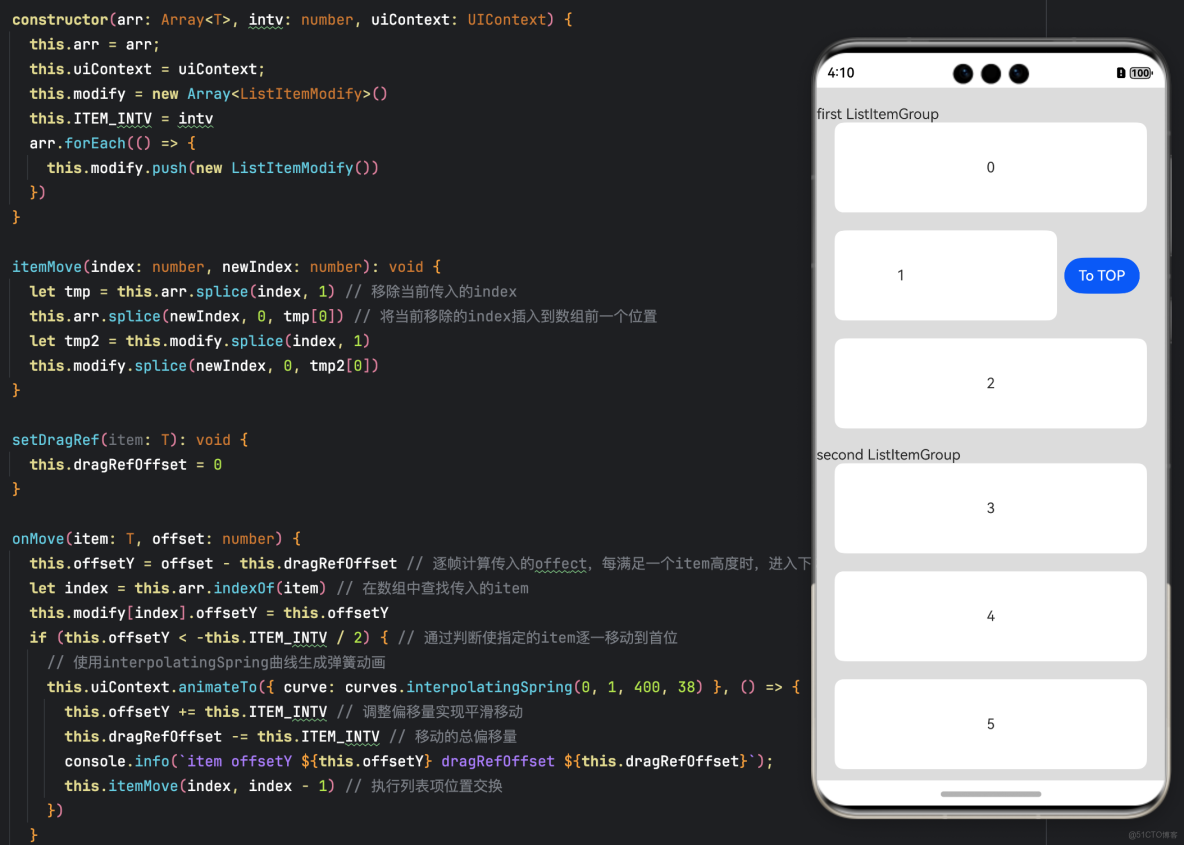
通過animateTo可以實現將List中指定的Item替換到首位,List中其餘Item依次向下排列。定製List組件動態替換動效的示例代碼和效果如下。
效果圖
示例代碼
import { curves, AnimatorResult } from '@kit.ArkUI';

// 該接口控制列表項視覺屬性
class ListItemModify implements AttributeModifier<ListItemAttribute> {
  public offsetY: number = 0;

  applyNormalAttribute(instance: ListItemAttribute): void {
    instance.translate({ y: this.offsetY }) // Y軸位移
  }
}

@Observed
class DragSortCtrl<T> {
  private arr: Array<T>
  private modify: Array<ListItemModify>
  private uiContext: UIContext; // 新增UIContext成員
  private dragRefOffset: number = 0
  offsetY: number = 0
  private ITEM_INTV: number = 0

  constructor(arr: Array<T>, intv: number, uiContext: UIContext) {
    this.arr = arr;
    this.uiContext = uiContext;
    this.modify = new Array<ListItemModify>()
    this.ITEM_INTV = intv
    arr.forEach(() => {
      this.modify.push(new ListItemModify())
    })
  }

  itemMove(index: number, newIndex: number): void {
    let tmp = this.arr.splice(index, 1) // 移除當前傳入的index
    this.arr.splice(newIndex, 0, tmp[0]) // 將當前移除的index插入到數組前一個位置
    let tmp2 = this.modify.splice(index, 1)
    this.modify.splice(newIndex, 0, tmp2[0])
  }

  setDragRef(item: T): void {
    this.dragRefOffset = 0
  }

  onMove(item: T, offset: number) {
    this.offsetY = offset - this.dragRefOffset // 逐幀計算傳入的offect,每滿足一個item高度時,進入下方if邏輯,更新dragRefOffset的值
    let index = this.arr.indexOf(item) // 在數組中查找傳入的item
    this.modify[index].offsetY = this.offsetY
    if (this.offsetY < -this.ITEM_INTV / 2) { // 通過判斷使指定的item逐一移動到首位
      // 使用interpolatingSpring曲線生成彈簧動畫
      this.uiContext.animateTo({ curve: curves.interpolatingSpring(0, 1, 400, 38) }, () => {
        this.offsetY += this.ITEM_INTV // 調整偏移量實現平滑移動
        this.dragRefOffset -= this.ITEM_INTV // 移動的總偏移量
        console.info(`item offsetY ${this.offsetY} dragRefOffset ${this.dragRefOffset}`);
        this.itemMove(index, index - 1) // 執行列表項位置交換
      })
    }
  }

  getModify(item: T): ListItemModify {
    let index = this.arr.indexOf(item)
    return this.modify[index]
  }
}

@Entry
@Component
struct ListAutoSortExample {
  @State private arr: Array<number> = [0, 1, 2, 3, 4, 5]
  @State dragSortCtrl: DragSortCtrl<number> = new DragSortCtrl<number>(this.arr, 120, this.getUIContext())
  @State firstListItemGroupCount: number = 3
  private listScroll: ListScroller = new ListScroller()
  private backAnimator: AnimatorResult | null = null

  @Builder
  itemEnd(item: number, index: number) {
    Row() {
      Button("To TOP").margin("4vp").onClick(() => {
        console.info(`item number item ${item} index ${index}`);
        this.listScroll.closeAllSwipeActions({
          onFinish: () => {
            this.dragSortCtrl.setDragRef(item)
            let length = 120 * (this.arr.indexOf(item))
            this.backAnimator = this.getUIContext()?.createAnimator({ // 創建彈簧動畫
              duration: 1000,
              easing: "interpolating-spring(0, 1, 150, 24)",
              delay: 0,
              fill: "none",
              direction: "normal",
              iterations: 1,
              begin: 0,
              end: -length
            })
            this.backAnimator.onFrame = (value) => { // 逐幀回調更新位置
              this.dragSortCtrl.onMove(item, value) // 處理list的移動替換動效
            }
            this.backAnimator.onFinish = () => {}
            this.backAnimator.play() // 啓動動畫
          }
        })
      })
    }.padding("4vp").justifyContent(FlexAlign.SpaceEvenly)
  }

  @Builder
  header(title: string) {
    Row() {
      Text(title)
    }
  }

  build() {
    Row() {
      Column() {
        List({ space: 20, scroller: this.listScroll }) {
          ListItemGroup({ header: this.header('first ListItemGroup'), space: 20 }) {
            ForEach(this.arr, (item: number, index) => {
              if (index < this.firstListItemGroupCount) {
                ListItem() {
                  Text('' + item)
                    .width('100%')
                    .height(100)
                    .fontSize(16)
                    .borderRadius(10)
                    .textAlign(TextAlign.Center)
                    .backgroundColor(0xFFFFFF)
                }
                .swipeAction({
                  end: this.itemEnd(item, index)
                })
                .clip(true)
                .attributeModifier(this.dragSortCtrl.getModify(item)) // 動態設置屬性修改
                .borderRadius(10)
                .margin({ left: 20, right: 20 })
              }
            })
          }
          ListItemGroup({ header: this.header('second ListItemGroup'), space: 20 }) {
            ForEach(this.arr, (item: number, index) => {
              if (index > this.firstListItemGroupCount - 1) {
                ListItem() {
                  Text('' + item)
                    .width('100%')
                    .height(100)
                    .fontSize(16)
                    .borderRadius(10)
                    .textAlign(TextAlign.Center)
                    .backgroundColor(0xFFFFFF)
                }
                .swipeAction({
                  end: this.itemEnd(item, index)
                })
                .clip(true)
                .attributeModifier(this.dragSortCtrl.getModify(item))
                .borderRadius(10)
                .margin({ left: 20, right: 20 })
              }
            })
          }
        }
        .padding({ top: 20 })
        .height("100%")
      }
    }.backgroundColor(0xDCDCDC)
  }
}