

一、場景介紹
從6.0.0(20) Beta1版本開始,導航組件新增支持設置標題欄stackBuilder以及bottomBuilder。
當應用開發者需要在標題欄區域增加自定義節點時,例如在標題欄上方區域增加分段按鈕,標題欄底部區域增加搜索框、頁籤時,可以使用標題欄自定義區域設置能力。
二、開發示例
效果圖
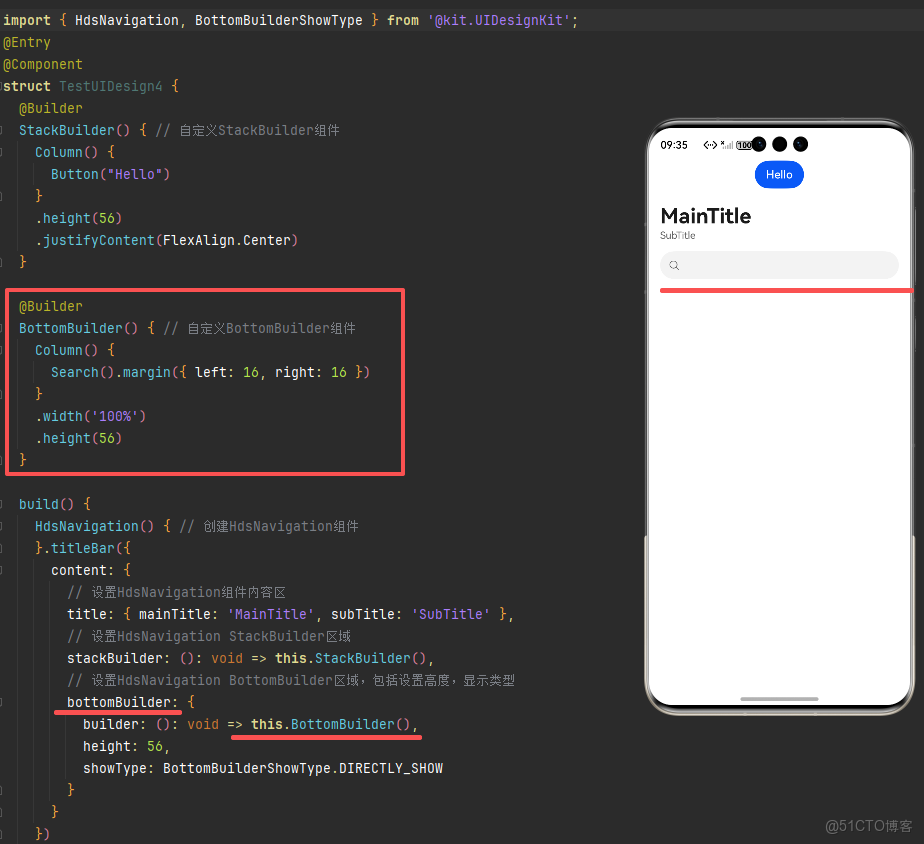
示例代碼TestUIDesign4.ets
import { HdsNavigation, BottomBuilderShowType } from '@kit.UIDesignKit';
@Entry
@Component
struct TestUIDesign4 {
  @Builder
  StackBuilder() { // 自定義StackBuilder組件
    Column() {
      Button("Hello")
    }
    .height(56)
    .justifyContent(FlexAlign.Center)
  }

  @Builder
  BottomBuilder() { // 自定義BottomBuilder組件
    Column() {
      Search().margin({ left: 16, right: 16 })
    }
    .width('100%')
    .height(56)
  }

  build() {
    HdsNavigation() { // 創建HdsNavigation組件
    }.titleBar({
      content: {
        // 設置HdsNavigation組件內容區
        title: { mainTitle: 'MainTitle', subTitle: 'SubTitle' },
        // 設置HdsNavigation StackBuilder區域
        stackBuilder: (): void => this.StackBuilder(),
        // 設置HdsNavigation BottomBuilder區域,包括設置高度,顯示類型
        bottomBuilder: {
          builder: (): void => this.BottomBuilder(),
          height: 56,
          showType: BottomBuilderShowType.DIRECTLY_SHOW
        }
      }
    })
    .backgroundColor(Color.White)
  }
}