

一、 概述
Cookie是服務端發送客户端的數據。客户端持有Cookie,便於服務端快速識別身份和狀態。
當Cookie的SameSite屬性未指定時,默認值為SameSite=Lax。這種設置下,Cookie僅在用户導航到其源站點時發送,不會在跨站請求中發送。
二、Cookie管理
Web組件提供WebCookieManager類來管理Cookie信息。Cookie信息存儲在應用沙箱路徑下/proc/{pid}/root/data/storage/el2/base/cache/web/Cookies的文件中。
下面以configCookieSync()接口為例,為“www.baidu.com”設置單個Cookie的值“value=test”。其他Cookie的相關功能及使用,請參考WebCookieManager()接口文檔。
示例代碼
import { webview } from '@kit.ArkWeb';
 import { BusinessError } from '@kit.BasicServicesKit';

 @Entry
 @Component
 struct TestCookie {
   controller: webview.WebviewController = new webview.WebviewController();

   build() {
     Column() {
       Button('configCookieSync')
         .onClick(() => {
           try {
             webview.WebCookieManager.configCookieSync('https://www.baidu.com', 'value=test123sa');
           } catch (error) {
             console.error(`ErrorCode: ${(error as BusinessError).code},  Message: ${(error as BusinessError).message}`);
           }
         })
       Web({ src: 'https://www.baidu.com', controller: this.controller })
     }
   }
 }
説明 Cookie每30s週期性保存到磁盤中,也可以使用接口saveCookieAsync進行強制落盤(PC/2in1和Tablet設備不會持久化session cookie,即使調用saveCookieAsync,也不會將session cookie寫入磁盤)。
三、緩存與存儲管理
在訪問網站時,網絡資源請求通常需要較長的時間。開發者可以通過Cache和Dom Storage等手段將資源保存到本地,以提高訪問同一網站的速度。
3.1 Cache
使用 cacheMode() 配置頁面資源的緩存模式,Web組件為開發者提供四種緩存模式,分別為:
- Default:優先使用未過期的緩存。如果緩存不存在,則從網絡獲取。
- None:加載資源使用緩存。如果緩存中無該資源,則從網絡中獲取。
- Online:加載資源不使用緩存。全部從網絡中獲取。
- Only:只從緩存中加載資源。
在下面的示例中,緩存設置為None模式。
import { webview } from '@kit.ArkWeb';
 import { BusinessError } from '@kit.BasicServicesKit';

 @Entry
 @Component
 struct TestCookie {
   controller: webview.WebviewController = new webview.WebviewController();
   @State mode: CacheMode = CacheMode.None;
   build() {
     Column() {
       Button('configCookieSync')
         .onClick(() => {
           try {
             webview.WebCookieManager.configCookieSync('https://www.baidu.com', 'value=test123sa');
           } catch (error) {
             console.error(`ErrorCode: ${(error as BusinessError).code},  Message: ${(error as BusinessError).message}`);
           }
         })
       Web({ src: 'https://www.baidu.com', controller: this.controller })
         .cacheMode(this.mode)
     }
   }
 }
為了獲取最新資源,開發者可以通過removeCache()接口清除已經緩存的資源,示例代碼如下:
import { webview } from '@kit.ArkWeb';
import { BusinessError } from '@kit.BasicServicesKit';

@Entry
@Component
struct TestCookie {
  controller: webview.WebviewController = new webview.WebviewController();
  @State mode: CacheMode = CacheMode.None;

  build() {
    Column({ space: 20 }) {
      Button('configCookieSync')
        .onClick(() => {
          try {
            webview.WebCookieManager.configCookieSync('https://www.baidu.com', 'value=test123sa');
          } catch (error) {
            console.error(`ErrorCode: ${(error as BusinessError).code},  Message: ${(error as BusinessError).message}`);
          }
        })
      Button('removeCache')
        .onClick(() => {
          try {
            // 設置為true時同時清除rom和ram中的緩存,設置為false時只清除ram中的緩存
            this.controller.removeCache(true);
          } catch (error) {
            console.error(`ErrorCode: ${(error as BusinessError).code},  Message: ${(error as BusinessError).message}`);
          }
        })

      Web({ src: 'https://www.baidu.com', controller: this.controller })
        .cacheMode(this.mode)
    }
  }
}
3.2 Dom Storage
Dom Storage包含了Session Storage和Local Storage兩類。Session Storage為臨時數據,其存儲與釋放跟隨會話生命週期;Local Storage為持久化數據,保存在應用目錄下。兩者的數據均通過Key-Value的形式存儲,在訪問需要客户端存儲的頁面時使用。開發者可以通過Web組件的屬性接口domStorageAccess()進行使能配置,示例如下:
import { webview } from '@kit.ArkWeb';
import { BusinessError } from '@kit.BasicServicesKit';

@Entry
@Component
struct TestCookie {
  controller: webview.WebviewController = new webview.WebviewController();
  @State mode: CacheMode = CacheMode.None;

  build() {
    Column({ space: 20 }) {
      Button('configCookieSync')
        .onClick(() => {
          try {
            webview.WebCookieManager.configCookieSync('https://www.baidu.com', 'value=test123sa');
          } catch (error) {
            console.error(`ErrorCode: ${(error as BusinessError).code},  Message: ${(error as BusinessError).message}`);
          }
        })
      Button('removeCache')
        .onClick(() => {
          try {
            // 設置為true時同時清除rom和ram中的緩存,設置為false時只清除ram中的緩存
            this.controller.removeCache(true);
          } catch (error) {
            console.error(`ErrorCode: ${(error as BusinessError).code},  Message: ${(error as BusinessError).message}`);
          }
        })

      Web({ src: 'https://www.baidu.com', controller: this.controller })
        .cacheMode(this.mode)
        .domStorageAccess(true)
    }
  }
}
四、獲取指定url對應cookie的值
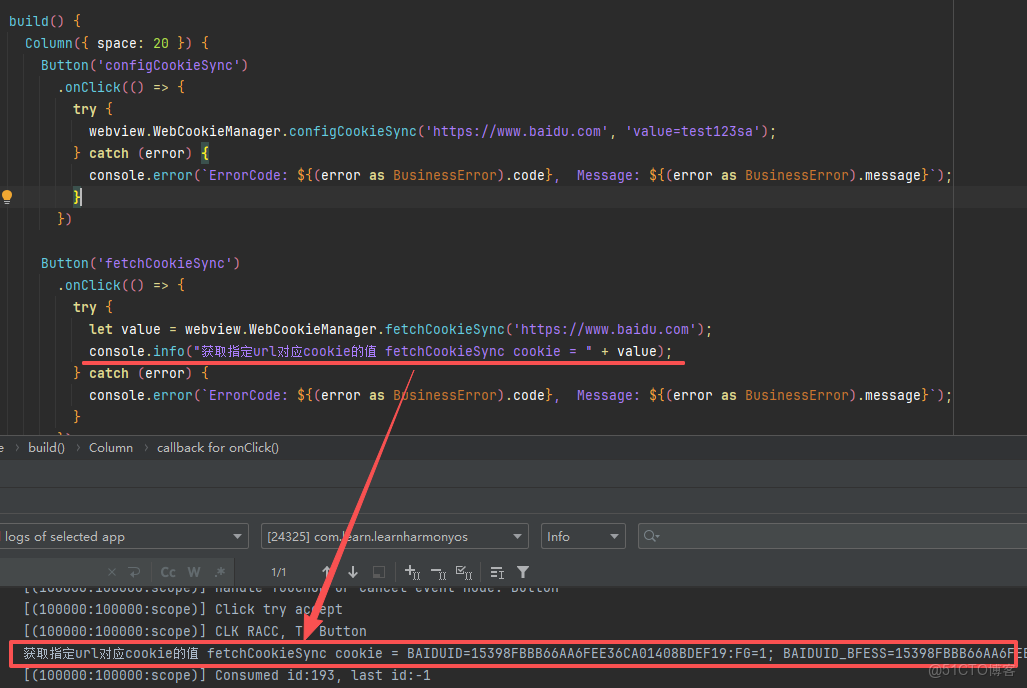
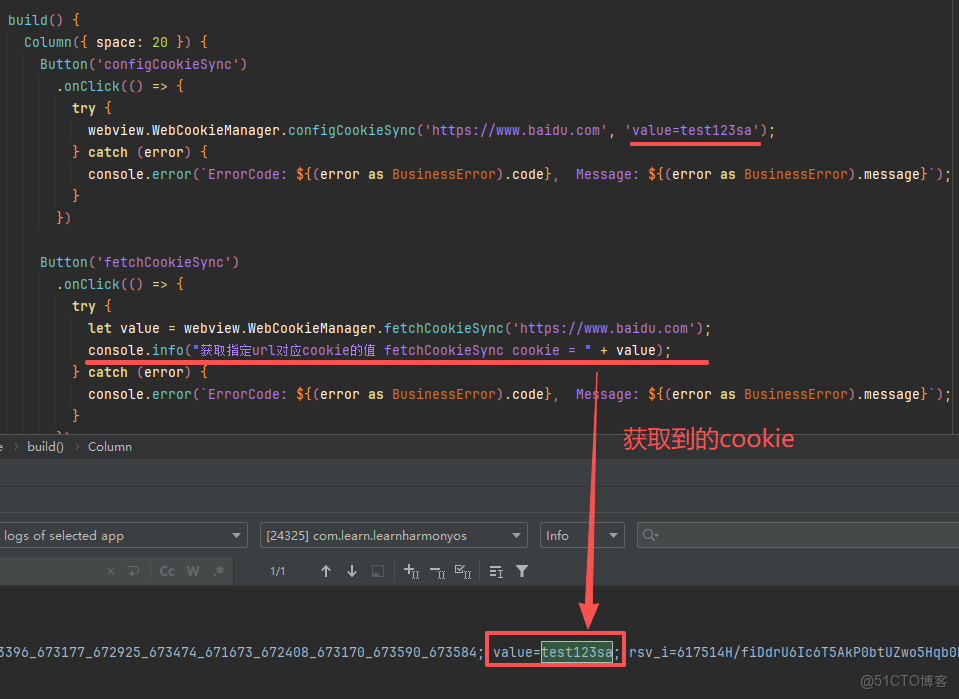
fetchCookieSync 獲取指定url對應cookie的值。
static fetchCookieSync(url: string, incognito?: boolean): string説明 系統會自動清理過期的cookie,對於同名key的數據,新數據將會覆蓋前一個數據。
為了獲取可正常使用的cookie值,fetchCookieSync需傳入完整鏈接。
fetchCookieSync用於獲取所有的cookie值,每條cookie值之間會通過"; "進行分隔,但無法單獨獲取某一條特定的cookie值。系統能力: SystemCapability.Web.Webview.Core
參數
|
參數名
|
類型
|
必填
|
説明
|
|
url
|
string
|
是
|
要獲取的cookie所屬的url,建議使用完整的url。
|
|
incognito
|
boolean
|
否
|
true表示獲取隱私模式下webview的內存cookies,false表示正常非隱私模式下的cookies。
默認值:false。
|
返回值:
|
類型
|
説明
|
|
string
|
指定url對應的cookie的值。
|
示例效果圖
示例代碼
import { webview } from '@kit.ArkWeb';
import { BusinessError } from '@kit.BasicServicesKit';

@Entry
@Component
struct TestCookie {
  controller: webview.WebviewController = new webview.WebviewController();
  @State mode: CacheMode = CacheMode.None;

  build() {
    Column({ space: 20 }) {
      Button('configCookieSync')
        .onClick(() => {
          try {
            webview.WebCookieManager.configCookieSync('https://www.baidu.com', 'value=test123sa');
          } catch (error) {
            console.error(`ErrorCode: ${(error as BusinessError).code},  Message: ${(error as BusinessError).message}`);
          }
        })

      Button('fetchCookieSync')
        .onClick(() => {
          try {
            let value = webview.WebCookieManager.fetchCookieSync('https://www.baidu.com');
            console.info("獲取指定url對應cookie的值 fetchCookieSync cookie = " + value);
          } catch (error) {
            console.error(`ErrorCode: ${(error as BusinessError).code},  Message: ${(error as BusinessError).message}`);
          }
        })

      Button('removeCache')
        .onClick(() => {
          try {
            // 設置為true時同時清除rom和ram中的緩存,設置為false時只清除ram中的緩存
            this.controller.removeCache(true);
          } catch (error) {
            console.error(`ErrorCode: ${(error as BusinessError).code},  Message: ${(error as BusinessError).message}`);
          }
        })

      Web({ src: 'https://www.baidu.com', controller: this.controller })
        .cacheMode(this.mode)
        .domStorageAccess(true)
    }
  }
}