

本文為轉載文
作者:小學生study
鏈接:https://juejin.cn/post/704919...
前言
Pinia.js 是新一代的狀態管理器,由 Vue.js團隊中成員所開發的,因此也被認為是下一代的 Vuex,即 Vuex5.x,在 Vue3.0 的項目中使用也是備受推崇。
Pinia.js 有如下特點:
- 完整的 typescript 的支持;
- 足夠輕量,壓縮後的體積只有1.6kb;
- 去除 mutations,只有 state,getters,actions(這是我最喜歡的一個特點);
- actions 支持同步和異步;
- 沒有模塊嵌套,只有 store 的概念,store 之間可以自由使用,更好的代碼分割;
- 無需手動添加 store,store 一旦創建便會自動添加;
安裝
npm install pinia --save
複製代碼
創建 Store
新建 src/store 目錄並在其下面創建 index.ts,導出 store
// src/store/index.ts

import { createPinia } from 'pinia'

const store = createPinia()

export default store
複製代碼
在 main.ts 中引入並使用。
// src/main.ts

import { createApp } from 'vue'
import App from './App.vue'
import store from './store'

const app = createApp(App)
app.use(store)
複製代碼
State
定義State
在 src/store 下面創建一個user.ts
//src/store/user.ts

import { defineStore } from 'pinia'

export const useUserStore = defineStore({
  id: 'user',
  state: () => {
    return {
      name: '張三'
    }
  }
})

複製代碼
獲取 state
<template>
  <div>{{ userStore.name }}</div>
</template>

<script lang="ts" setup>
import { useUserStore } from '@/store/user'

const userStore = useUserStore()
</script>
複製代碼
也可以結合 computed 獲取。
const name = computed(() => userStore.name)
複製代碼
state 也可以使用解構,但使用解構會使其失去響應式,這時候可以用 pinia 的 storeToRefs。
import { storeToRefs } from 'pinia'
const { name } = storeToRefs(userStore)
複製代碼
修改 state
可以像下面這樣直接修改 state
userStore.name = '李四'
複製代碼
但一般不建議這麼做,建議通過 actions 去修改 state,action 裏可以直接通過 this 訪問。
export const useUserStore = defineStore({
  id: 'user',
  state: () => {
    return {
      name: '張三'
    }
  },
  actions() {
    updateName(name) {
      this.name = name
    }
  }
})
複製代碼
<script lang="ts" setup>
import { useUserStore } from '@/store/user'
const userStore = useUserStore()
userStore.updateName('李四')
</script>
複製代碼Getters
export const useUserStore = defineStore({
 id: 'user',
 state: () => {
   return {
     name: '張三'
   }
 },
 getters: {
   fullName: (state) => {
     return state.name + '豐'
   }
 }
})
複製代碼
userStore.fullName // 張三丰
複製代碼Actions
異步 action
action 可以像寫一個簡單的函數一樣支持 async/await 的語法,讓你愉快的應付異步處理的場景。
export const useUserStore = defineStore({
  id: 'user',
  actions() {
    async login(account, pwd) {
      const { data } = await api.login(account, pwd)
      return data
    }
  }
})
複製代碼
action 間相互調用
action 間的相互調用直接用 this 訪問即可。
 export const useUserStore = defineStore({
  id: 'user',
  actions() {
    async login(account, pwd) {
      const { data } = await api.login(account, pwd)
      this.setData(data) // 調用另一個 action 的方法
      return data
    },
    setData(data) {
      console.log(data)
    }
  }
})
複製代碼
在 action 裏調用其他 store 裏的 action 也比較簡單,引入對應的 store 後即可方法其 action 的方法了。
// src/store/user.ts

import { useAppStore } from './app'
export const useUserStore = defineStore({
  id: 'user',
  actions() {
    async login(account, pwd) {
      const { data } = await api.login(account, pwd)
      const appStore = useAppStore()
      appStore.setData(data) // 調用 app store 裏的 action 方法
      return data
    }
  }
})
複製代碼
// src/store/app.ts
export const useAppStore = defineStore({
id: 'app',
actions() {
setData(data) {
console.log(data)
}
}
})
複製代碼數據持久化
插件 pinia-plugin-persist 可以輔助實現數據持久化功能。
安裝
npm i pinia-plugin-persist --save
複製代碼
使用
// src/store/index.ts

import { createPinia } from 'pinia'
import piniaPluginPersist from 'pinia-plugin-persist'

const store = createPinia()
store.use(piniaPluginPersist)

export default store
複製代碼
接着在對應的 store 裏開啓 persist 即可。
export const useUserStore = defineStore({
  id: 'user',

  state: () => {
    return {
      name: '張三'
    }
  },

  // 開啓數據緩存
  persist: {
    enabled: true
  }
})
複製代碼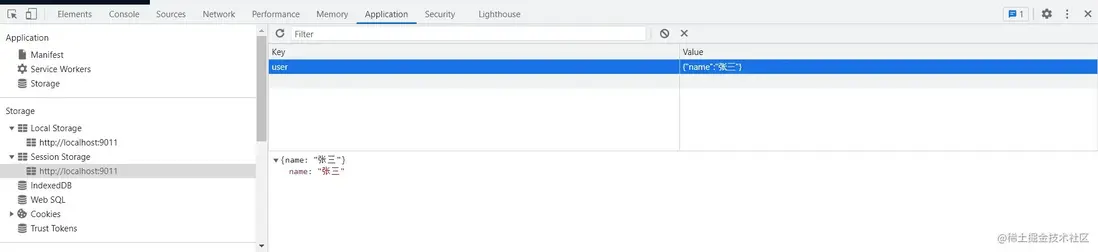
數據默認存在 sessionStorage 裏,並且會以 store 的 id 作為 key。
自定義 key
你也可以在 strategies 裏自定義 key 值,並將存放位置由 sessionStorage 改為 localStorage。
persist: {
  enabled: true,
  strategies: [
    {
      key: 'my_user',
      storage: localStorage,
    }
  ]
}
複製代碼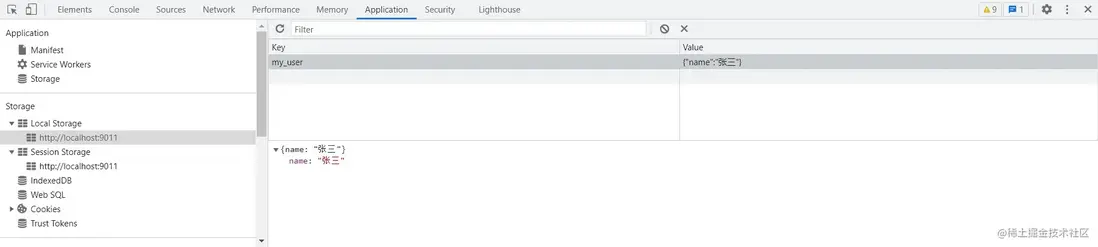
持久化部分 state
默認所有 state 都會進行緩存,你可以通過 paths 指定要持久化的字段,其他的則不會進行持久化。
state: () => {
  return {
    name: '張三',
    age: 18,
    gender: '男'
  }
},

persist: {
  enabled: true,
  strategies: [
    {
      storage: localStorage,
      paths: ['name', 'age']
    }
  ]
}
複製代碼
上面我們只持久化 name 和 age,並將其改為localStorage, 而 gender 不會被持久化,如果其狀態發送更改,頁面刷新時將會丟失,重新回到初始狀態,而 name 和 age 則不會。
感謝
本次分享到這裏就結束了,感謝您的閲讀,如果本文對您有什麼幫助,別忘了動動手指點個贊❤️。
本文如果有什麼錯誤或不足,歡迎評論區指正!
結語
我是林三心,一個熱心的前端菜鳥程序員。如果你上進,喜歡前端,想學習前端,那咱們可以交朋友,一起摸魚哈哈,摸魚羣,加我請備註【思否】