
1. 如何在vue3中使用html2canvas
npm install --save html2canvas
生成海報:
<template>
    <div class="poster-box" ref="posterBox">
        <div class="thumb"><img src="@assets/goods.jpg" alt=""></div>
        <div class="goods-info">
            <div class="title-box">
                <div class="title">情侶裝男女白色黑色T恤太空漫步宇航員默認發白色需要其他顏色請備註</div>
                <div class="price">¥99.9</div>
            </div>
            <div class="code">二維碼</div>
        </div>
    </div>
    <div class="btn" @click="initPoster">生成海報</div>
    <img v-if="showImg" :src="posterUrl" class="poster" alt="">
</template>
<script>
import html2canvas from 'html2canvas'
import { ref, unref } from 'vue'
export default {
    setup() {
        const showImg = ref(false)
        const posterBox = ref(null)
        const posterUrl = ref(null)
        const initPoster = () => {
            html2canvas(unref(posterBox), {
                width: unref(posterBox).getBoundingClientRect().width,
                height: unref(posterBox).getBoundingClientRect().height
            }).then(canvas => {
                posterUrl.value = canvas.toDataURL('image/jpeg')
                showImg.value = true;
            });
        }
        return {
            initPoster,
            showImg,
            posterBox,
            posterUrl
        }
    }
}
</script>
<style lang="scss" scoped>
.poster-box {
    width: 5.5rem;
    height: 7.4rem;
    background: #fff;
    padding: .15rem;
    .thumb {
        width: 100%;
        height: 5.2rem;
        img {
            width: 100%;
            height: 100%;
        }
    }
    .goods-info {
        margin-top: .2rem;
        display: flex;
        justify-content: space-between;
        .code {
            width: 1.4rem;
            height: 1.4rem;
            line-height: 1.4rem;
            text-align: center;
            color: #fff;
            background: #ddd;
            margin-left: .1rem;
        }
        .title-box {
            width: 0;
            flex: 1;
        }
        .title {
            text-align: justify;
            font-size: .3rem;
            font-weight: bold;
            overflow: hidden;
            text-overflow: ellipsis;
            display: -webkit-box;
            -webkit-line-clamp: 2;
            -webkit-box-orient: vertical;
        }
        .price {
            color: red;
            font-size: .32rem;
            font-weight: bold;
            margin-top: .2rem;
        }
    }
}
.poster {
    width: 5.5rem;
}
</style>
2. 生成的圖片白邊問題
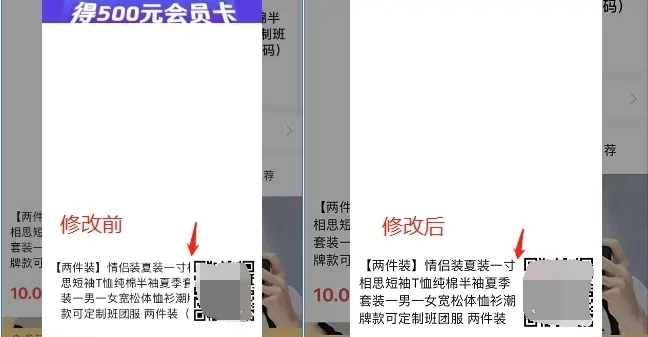
在某些機型上生成的圖片,右邊和下邊會有白邊,如下圖:
解決方法:
html2canvas(unref(posterBox), {
    // 加上寬高以後,白邊消失,如右圖
    width: unref(posterBox).getBoundingClientRect().width,
    height: unref(posterBox).getBoundingClientRect().height,
}).then(canvas => {
    const dataURL = canvas.toDataURL('image/png');
})
開始獲取寬高的時候用的,unref(posterBox).offsetWidth,但是在某些機型下還是有白邊,
因為用unref(posterBox).offsetWidth獲取到的寬度是整數,例如圖片寬度是273.59,獲取到的寬度是274,所以右邊會出現白邊。而unref(posterBox).getBoundingClientRect().width獲取到小數位的寬度,白邊就沒有了。
3. 生成的海報,文字被遮擋問題
這個問題,在安卓上沒問題,但是ios上就會被遮擋,
解決方法:把標題的文字每一個字都放到一個span中,再渲染就正常了
參考:https://github.com/niklasvh/h...
設置letter-spacing: 1px;的方法也試了,但是效果不行。
20220117
今天發現,如果只是單行的文字超出隱藏,是不需要放到span中就可以的,但是單行超出隱藏的css要這樣寫:
overflow: hidden;
text-overflow: ellipsis;
display: -webkit-box;
-webkit-line-clamp: 1;
-webkit-box-orient: vertical;